To avoid these ads, REGISTER NOW!

redragoon

Well-known member
Joined
Jun 12, 2018
Messages
296
Location
Greenville SC
Messed around with 3D printing a few years ago when I got an Ender pro. At times it was a frustrating experience with the PLA getting brittle and cracking, or getting stuck in the nozzle, not sticking to the base plate and coming undone after the part was almost done printing etc etc. However, when the parts printed to completion it was a joyous moment. I found out that PLA doesn't like heat when I printed a phone mount for my car...after parking at work for a day when I came back it had deformed into a melted snickers bar. I read ABS is what one should use for automotive type applications but it's hard to get the settings right. Given my hit/miss experience with just PLA I didn't bother trying ABS. I might blow the dust off the Ender soon and give it another whirl.
For sticking to the bed, I either had to clean with alcohol to remove oil from my hands or use Elmer's glue stick on the magnetic bed. PEI sheet on my new one only needs a wipe of alcohol and no glue. PEI adheres to PLA at 60C bed temp and releases at room temp.

Try ASA over ABS. It has similar heat properties, but easier to print. ABS cools very quickly by design for injection molded parts, but that causes layers to warp without glue or a heated chamber to keep it stuck down. PETG can also work if you don't have the highest temperatures, uses PLA settings with a higher nozzle temp.

Brittle filament is likely humidity or moisture related. As they absorb moisture, they get less flexible. I bought a cheap thermometer/hygrometer from the pet store. If it is over 50% humidity, I might have problems. Re-drying the filament and printing at 200C has also helped this.
 
To avoid these ads, REGISTER NOW!

stioc

Well-known member
Joined
May 2, 2005
Messages
1,317
Location
SoCal
For sticking to the bed, I either had to clean with alcohol to remove oil from my hands or use Elmer's glue stick on the magnetic bed. PEI sheet on my new one only needs a wipe of alcohol and no glue. PEI adheres to PLA at 60C bed temp and releases at room temp.

Try ASA over ABS. It has similar heat properties, but easier to print. ABS cools very quickly by design for injection molded parts, but that causes layers to warp without glue or a heated chamber to keep it stuck down. PETG can also work if you don't have the highest temperatures, uses PLA settings with a higher nozzle temp.

Brittle filament is likely humidity or moisture related. As they absorb moisture, they get less flexible. I bought a cheap thermometer/hygrometer from the pet store. If it is over 50% humidity, I might have problems. Re-drying the filament and printing at 200C has also helped this.
Thanks, those are awesome tips and good to learn about ASA too, I'll check it out. Yeah the PLA sits exposed to the env; I know they should be stored in vacuum sealed bags and I should prob get a filament dryer too. To get my interest back in 3D printing I ordered a Raspberry pi + a camera to run Octoprint. Meanwhile, after a little fiddling, I was able to successfully print a case for it using the 2yr old filament that was on the spool. Until last night I hadn't fired up the printer in prob over a yr so this thread def gave me the nudge I needed to start using it again.

raspb2.jpgraspb1.jpg
 

sh944

ALLIANCE MEMBER
Joined
Jan 1, 2014
Messages
291
Location
Linwood, KS
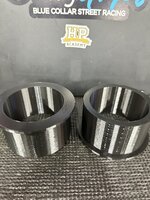
ASA is great stuff, I run almost all of my prints on it unless I have a specific need (Delrin for bushings on my race cars, as an example). If you can have a bed temp of 95-100C and head temp of 250-260C, it usually prints well.

i have a hard time understanding why PLA even has a market at this point, compared to ASA, aside from prototyping that you will throw away after test fitting, it seems substandard at best.
 

niget2002

Well-known member
Joined
Oct 2, 2012
Messages
11,115
Location
Josephine, TX
There's alternatives like ASA and PETG that are thermally resistant but not as finnicky as ABS to dial down. Although in some cases ABS is quite easy to use too. Also certain PLA blends are much stronger and thermally resistant, there's a ton of stuff on the market nowadays...
I had issues with ABS lifting from the bed a lot. ABS also shrinks more when cool more than the others. I did quite a bit with it when I first got into 3d printing as ABS and PLA were the only plastics I could get consistent results with my older printer with. I made a bunch of Aquarium parts with ABS as it holds up to moisture better than PLA.

I've had a lot of success with ASA lately. It's also UV resistant whereas none of the other plastics (that I know of) are. I think the only real negative I've had with ASA is I have to print it a little slower than the other materials. I'm not sure what the other cons to ASA are.

I also have some PETG+ I've used on a few prints. It has worked well too.
 

niget2002

Well-known member
Joined
Oct 2, 2012
Messages
11,115
Location
Josephine, TX
ASA is great stuff, I run almost all of my prints on it unless I have a specific need (Delrin for bushings on my race cars, as an example). If you can have a bed temp of 95-100C and head temp of 250-260C, it usually prints well.

i have a hard time understanding why PLA even has a market at this point, compared to ASA, aside from prototyping that you will throw away after test fitting, it seems substandard at best.
PLA is better if you're printing inside your house. ASA printing can produce fumes that are toxic. I print ASA in the shop with good ventilation.
 

stioc

Well-known member
Joined
May 2, 2005
Messages
1,317
Location
SoCal
I think PLA is easiest and faster to run especially on the average $200 types of printers. I would like to try ASA in the near future but for now I did order me some PETG to try, being food, water, chemical safe and more durable than PLA/PLA+ without having to run super high temps.
 

redragoon

Well-known member
Joined
Jun 12, 2018
Messages
296
Location
Greenville SC
PLA has several advantages over some of the other materials.
Low melting temp means you can achieve lower power usage or higher flow rates of the material.
It is made from organic sugar materials so raw materials are cheaper.
It has a large library of colors and types to fit model appearance and reduce the need for painting.

I've also found that PLA has very good strength in most applications.
ABS/ASA will bend more before failing, but PLA has a higher ultimate strength when printed correctly.
CNC Kitchen has comparisons of material strength on YouTube. Maker's Muse and others have left PLA outside with minimal effects.
 

sh944

ALLIANCE MEMBER
Joined
Jan 1, 2014
Messages
291
Location
Linwood, KS
I have been printing ASA inside the house for a couple of years at this point, I've never had any fume/smell issue with it. ABS, yes, but not ASA. A lot of my parts get UV exposure (outdoor light and occasionally 100 deg F+ temps, PLA just doesn't hold up for my uses.

I print almost exclusively ASA at this point, I have literally thousands of hours with the stuff.
 

Gerald O

Well-known member
Joined
Mar 5, 2013
Messages
1,884
Location
NC
Then there's 'Voron', for those to whom the printer is the hobby, or for the ******** DIYer. You build these from scratch or from one of the parts kits now available.


For me it was a matter of having the ultimate performing machine with an extra-large build volume, in this case 350mm x 350mm, and a completely open-source design not subject to the uncertain whims of a Chinese sole source manufacturer.
My all-in cost was less than $1200 and about 40hours assembly and programming/setup time.
 
Last edited:

Rabid Badger

Well-known member
Joined
Apr 2, 2018
Messages
1,338
Then there's 'Voron', for those to whom the printer is the hobby, or for the ******** DIYer. You build these from scratch or from one of the available parts kits now available.
There wasn't any way I was going to get a Voron assembled in my house with 2 kids and 5 animals running around, even if I had the time. I bought a Vivedino Troodon 2.0, which is essentially a Voron 2.4 clone.

After getting the kinks worked out this thing is ultra-reliable, and the print quality is mind-boggling.
 

Raymond_B

Well-known member
Joined
Jan 2, 2012
Messages
62
Location
TX
I thought I'd add this since some had mentioned different software for CAD. If you become a member of eaa.org you can get a DEEP discount on Solidworks, and it's not just the online version. Just like any enterprise program it has a very steep learning curve (IMO), but once you get the basics down you can start creating stuff.
 

cycle61

Well-known member
Joined
Apr 5, 2020
Messages
500
Location
Middle of Oregon
Well, after a couple years tinkering with a Prusa MK3 it's finally time to step up to a more professional printer. The Bambu X1C is on sale right now, and we ordered one for the shop, along with a roll of ABF-GF to test out a bunch of parts. Gets here Wednesday but I won't be home to get it unboxed and set up until next weekend.
 

sponserv

Member
Joined
Apr 15, 2021
Messages
15
Location
Daytona Beach
The dude on the boat is living his best life. LOVE it. I bought a Snapmaker 2 during the pandemic and had fun messing around with it. My problem is not so much the machine itself. Its figuring out how to design the part and create the g code.

I am just not that great with CAD. Thoughts on best way to learn the basics?
 

Citation

Well-known member
Joined
Jan 20, 2016
Messages
3,209
Location
Indy
The dude on the boat is living his best life. LOVE it. I bought a Snapmaker 2 during the pandemic and had fun messing around with it. My problem is not so much the machine itself. Its figuring out how to design the part and create the g code.

I am just not that great with CAD. Thoughts on best way to learn the basics?
I feel like learning CAD is like learning programming or playing an instrument. Practice is the key. There are a lot of interesting YT videos on making a shape or thing in CAD. They can be really helpful. Another thing that can help is trying to model something that already exists. Try to model something on your desk. It can be a challenge but it will improve your skills. Also, didn't be afraid of guess-print-check. I was making a replacement control knob the other day. I think I guessed the shape of the interface half a dozen times before I was happy with the fit.
 

F-22

Well-known member
Joined
Jan 23, 2022
Messages
1,830
It's really just practice.
What helps a lot is having the ability to visualize 3d space. CAD is just a tool that helps with that, but ultimately it still requires a good understanding of what's what.

I think I vaguely remember that about three quarters of the general population are not able to fully mentally manipulate 3D objects. Of course studies like these are very hard to take since a lot people wouldn't want to fully cooperate, and it is a skill that can be learned to a certain extent. But there is even a certain percentage of population with no capacity for mental visualization at all, a condition known as aphantasia, and supposedly up to 8% of people are unable to do so.

Besides CAD, these skills are also very important for artists... That's one point where engineers are somewhat connected to artists :))
 

jalexl

Active member
Joined
Mar 2, 2014
Messages
27
Location
Los Angeles, CA
This was a damned timely post! I absolutely LOVE my MK3, always working and never giving me issues. I use Octoprint, a small Raspi, and a camera to print to it from my PC, no cloud needed! However, lately I've been wanting more speed, after reading this I think I'll just got with the MK4 or upgrade my MK3.

Oh, and as far as uses, I've used it to make all sorts of prototype parts for my automotive projects. Most recently it helped me create a tensioner mount for my Novi 2000 blower bracket. I built everything in SolidWorks printed it until it I got the measurements right then had a buddy machine one for me. Before that a SBF timing cover seal installer, tungsten holder, and on and on. To me the biggest challenge is learning the CAD software!
would love to see all the projects you designed....im on the fence on buying a printer
 

Raymond_B

Well-known member
Joined
Jan 2, 2012
Messages
62
Location
TX
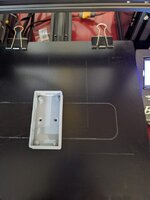
Here's a few

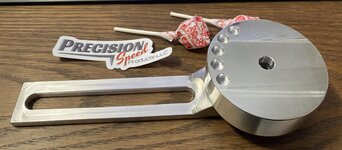
Supercharger belt auto tensioner mount, 3D printing helped me to get it all fabbed up before having it machined out of 6061

20220830_223547135_iOS.jpg
20220907_162012331_iOS.jpg
20220908_033521224_iOS.jpg

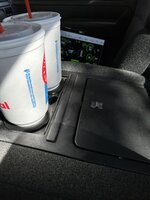
Sonic cup holders for my 95 Lightning :)

20220923_001441318_iOS.jpg

20221009_195149577_iOS.jpg

SBF timing cover seal installer

SBF Seal Installer.jpg

The list goes on, but you get the point :) Just buy one!

ON EDIT:
Forgot to mention, it really helped me in designing a motor plate for my project truck. Obviously I could not print the whole item, but I was able to print sections to get the measurements close then I had Send Cut Send make the whole part out of cheap acrylic and from there I was able to further get the dimensions in place, once it's right I'll have it made from 6061.

20240817_195319768_iOS.jpg
 
Last edited:

colmal

Well-known member
Joined
Sep 8, 2021
Messages
427
Location
Australia
It's really just practice.
What helps a lot is having the ability to visualize 3d space. CAD is just a tool that helps with that, but ultimately it still requires a good understanding of what's what.

I think I vaguely remember that about three quarters of the general population are not able to fully mentally manipulate 3D objects. Of course studies like these are very hard to take since a lot people wouldn't want to fully cooperate, and it is a skill that can be learned to a certain extent. But there is even a certain percentage of population with no capacity for mental visualization at all, a condition known as aphantasia, and supposedly up to 8% of people are unable to do so.

Besides CAD, these skills are also very important for artists... That's one point where engineers are somewhat connected to artists :))
OK. your close to the only poster that has answered my concerns - a lot of the posters here seem to be Uni educated- Engineers or Fitter and Turners, Mensa members ?

How practical are these products for entry level dumb schmucks ?
 
To avoid these ads, REGISTER NOW!

XJSuperman

Well-known member
Joined
Jan 26, 2018
Messages
3,086
Location
Central Iowa
If you choose the right printer: they're pretty practical for schmucks. My vote goes to the Bambu right now, as it can be printing right out of the box. You'll need to spend a moment with the Slicer program to wrap your mind around it, but they make it pretty intuitive now. There are others who have had good luck with other brands such as the Prusa or Creality offerings, but they may be a little less friendly to the brand-new-to-printing person IMO.
 

colmal

Well-known member
Joined
Sep 8, 2021
Messages
427
Location
Australia
If you choose the right printer: they're pretty practical for schmucks. My vote goes to the Bambu right now, as it can be printing right out of the box. You'll need to spend a moment with the Slicer program to wrap your mind around it, but they make it pretty intuitive now. There are others who have had good luck with other brands such as the Prusa or Creality offerings, but they may be a little less friendly to the brand-new-to-printing person IMO.
Thankyou, and thinking about it I'd mostly just be copying so it would be more of a scan and print.
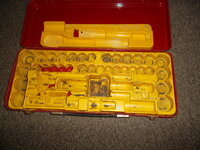
Maybe a interlocking mechanism for larger inserts, fairly basic.

These inserts are getting to be 50 years old now and decaying if not looked after, I have a lot that need replacing, any good ones I fill with expanding foam to preserve them, but repairing just comes up looking shoddy.SAM_3499.JPG
 

F-22

Well-known member
Joined
Jan 23, 2022
Messages
1,830
OK. your close to the only poster that has answered my concerns - a lot of the posters here seem to be Uni educated- Engineers or Fitter and Turners, Mensa members ?

How practical are these products for entry level dumb schmucks ?
It's very practical and a new thing to learn is never something to shy away from.

I tried knitting for the first time in my life the other day. It seems way more complex to me.

Try parametric CAD. I use a pirated solidworks version and it is more than fine for home use...

In CAD you basically only have two tools - "extrude" and "revolve". First one "pulls out" material from your "2D sketch" and the second one revolves material of your 2D sketch around an axis. Both can either "add" material to the space or "remove" existing material.

Bambulabs is really good, we have one at work and it is quite problem free. I have a MK3 Prusa at home for years now.

I'd still recommend the Prusa. It's a nice company to support. How hard is it nowadays to get an electronic product that is made in Europe? Prusa is. Bambu obviously isn't....
 

colmal

Well-known member
Joined
Sep 8, 2021
Messages
427
Location
Australia
It's very practical and a new thing to learn is never something to shy away from.

I tried knitting for the first time in my life the other day. It seems way more complex to me.

Try parametric CAD. I use a pirated solidworks version and it is more than fine for home use...

In CAD you basically only have two tools - "extrude" and "revolve". First one "pulls out" material from your "2D sketch" and the second one revolves material of your 2D sketch around an axis. Both can either "add" material to the space or "remove" existing material.

Bambulabs is really good, we have one at work and it is quite problem free. I have a MK3 Prusa at home for years now.

I'd still recommend the Prusa. It's a nice company to support. How hard is it nowadays to get an electronic product that is made in Europe? Prusa is. Bambu obviously isn't....
Yes I'm into trying new things/learning just have some constant head pain issues-seems to limit me sometimes.
And totally onboard with the China thinking, hate bullies/cheap ****/innovation thief's and the stuff they were doing to Australia to punish them for not toeing the line on various issues-ain't supporting them.
 

colmal

Well-known member
Joined
Sep 8, 2021
Messages
427
Location
Australia
@colmal , I have posted before, but I teach both SOLIDWORKS and OnShape (free, cloud-based) to HS students. Happy to point you in the right direction or send a few starter lessons for either of you want.
Thankyou, much appreciated, been looking at the prusa's around $2000 AUS, compared to 3-700 for others. Still researching trying to find a 40 by 40 cm, cable connection (like simple-wi-fi can be a pain), one of the Prusa sellers seem to have really good, ongoing support, which is a big plus and a straight scan and print (think i saw something a while ago) will keep me occupied/ease me in.
Just have issues with the simple sometimes, visualizing/problem solving is something I'm good at.
When I feel that I know enough to purchase, I'll go from there.
 

GirchyGirchy

Well-known member
Joined
Nov 14, 2011
Messages
9,818
Location
Central Indiana
Sonic cup holders for my 95 Lightning :)

20220923_001441318_iOS.jpg

20221009_195149577_iOS.jpg
Lol, that's one of the first things I thought of when driving my new-to-me '95 F-150. It has the captain's chairs and center console, and the cupholders are incredibly useless. I need to make something that fits in the factory holes but then comes up and expands to a normal mug or water bottle size.
 

colmal

Well-known member
Joined
Sep 8, 2021
Messages
427
Location
Australia
Uh, I'm starting with a new laptop first, is there a minimum computing power I need or the programs will run on pretty much anything ?

Will be Windows based, not getting an Apple or Mac. I may as well do the basics right, even if this shows my beginner level.
 

Citation

Well-known member
Joined
Jan 20, 2016
Messages
3,209
Location
Indy
Uh, I'm starting with a new laptop first, is there a minimum computing power I need or the programs will run on pretty much anything ?

Will be Windows based, not getting an Apple or Mac. I may as well do the basics right, even if this shows my beginner level.
Most computers are going to be sufficient to run the slicing software and the basic CAD programs. I do notice a difference in slicing speed between my 4th gen and 9th gen i7 laptops but in terms of basic slicing, we have been doing some work on an 8 year old, low power laptop (Intel, 6th gen M series cpu). Anything recent shouldn't have an issue.
 

colmal

Well-known member
Joined
Sep 8, 2021
Messages
427
Location
Australia
Most computers are going to be sufficient to run the slicing software and the basic CAD programs. I do notice a difference in slicing speed between my 4th gen and 9th gen i7 laptops but in terms of basic slicing, we have been doing some work on an 8 year old, low power laptop (Intel, 6th gen M series cpu). Anything recent shouldn't have an issue.
Thankyou
 

Cruzan80

Well-known member
Joined
Jul 22, 2015
Messages
4,167
Location
Denver, CO
@colmal What software are you planning on using for CAD? Some run various portions thru the cloud, enabling lower end computers to work just as well. others do everything on the "home" computer, and benefit from higher specs.

Not saying that it WONT work, but depending, may be helpful to get a higher end computer for some software.
 

colmal

Well-known member
Joined
Sep 8, 2021
Messages
427
Location
Australia
@colmal What software are you planning on using for CAD? Some run various portions thru the cloud, enabling lower end computers to work just as well. others do everything on the "home" computer, and benefit from higher specs.

Not saying that it WONT work, but depending, may be helpful to get a higher end computer for some software.
At this stage I'm looking at a Prusa, they seem to have excellent support thru some companies here, as far as programs go above my level at this stage.

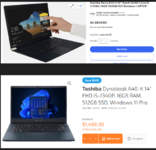
And tentatively looking at Toshiba laptops-1726271454523.png

Just starting looking in to things. when I do get a printer I will mainly be doing a scan and copy till I exhaust that avenue, want to copy at least 45 as new inserts before I branch out to anything else.1726271759444.png
 

Cruzan80

Well-known member
Joined
Jul 22, 2015
Messages
4,167
Location
Denver, CO
So the slicer (what converts the 3D shape into something the printer understands) will run on almost anything. These are things like PrusaSlicer, Cura, etc. The program you use to make the 3D design is what I was talking about (OnShape, Fusion360, SOLIDWORKS, TinkerCAD, etc).
 

Angie Grans

New member
Joined
Nov 7, 2024
Messages
4
Hello. My grandson wants this printer for Christmas, and I am happy to get it for him. I am concerned that the company has no phone number and no email address given at the site. Do you know anything about their customer support? Do you have any contact information? The "contact" link at the site led to nowhere. Thanks so much.
 

Citation

Well-known member
Joined
Jan 20, 2016
Messages
3,209
Location
Indy
Hello. My grandson wants this printer for Christmas, and I am happy to get it for him. I am concerned that the company has no phone number and no email address given at the site. Do you know anything about their customer support? Do you have any contact information? The "contact" link at the site led to nowhere. Thanks so much.
Generally no issues with Bambu Labs. The hardware is generally very good and the software generally works well. However one negative on the software front, they really push users into creating accounts that share who knows what data with servers in China. For this reason my company will not allow us to use their machines. Currently you can print offline or just via a local network. What you can't do is get things like software/firmware updates without creating an account.

Should you go BL? What is your budget. I've always been on the cheep side with these machines so things like the BL P1S with mutli-filament thing at $750 is just not in my budget. I bought a Flashforge 5M from FF's ebay store for $240+tax when they had a 20% off coupon running (might still be running).

So assuming you are looking in the low price range what would I suggest? Let's assume $350 is your cap but you would be happy to spend less.
Options in this area include the BL A1, A1 mini, A1 mini + AMS combo, Flashforge 5M, Creality V3 SE, V3 KE.

With all of the above BL is going to have the smoothest software expereince. However, I wouldn't say any are hard nor easy. Most are similar if you are creating your own models. BL is the best if you are just grabbing files off the web.

If I lost my printer I would likely replace it with another 5M. I had a Creatity V3SE. Those are about $160 at Microcenter. Not a bad printer but slower than the rest of this crowd. It also doesn't do network printing (I don't either but but I probably should). The V3KE has some nice upgrades over the V3SE but it cost almost the same as the 5M which I really like.

I like the 5M because it's a fast, Core XY machine that has print quality that matches Bambu. At the $240 sale price it undercuts the A1 ($300). The "nicer" workflow for on line parts doesn't mean much to me as I often design my own parts. Even when I find a file on line I often redo the design. The 5M is not enclosed but FF offers a kit + 3d files to print, that allow you to create an enclosure. This means the printer is going to be better for things like ABS plastic (please be aware of the outgassing with some of these materials) vs an open printer (all of the ones I mentioned are open). Compared to the Bambu Labs A1 mini, the 5M has a bigger build volume (the 220x220mm build surface is a bit of a defacto standard). The A1 mini is 180x180. That's good for a lot of stuff but may be a limit. However, in a big plus for the A1 mini is you can get the multi-color unit for an extra $150. So it would be the only one that can do multi-color for under $350.

The A1 is $300. It's similar to the A1 mini but not mini. It's build area is 256x256. That is a helpful increase over the 220x220 of the 5M and the Creality printers. But many on line files will probably not take advantage of the extra size. Note that the next typical step up in size are 300x300mm print beds ("helmet class printers").

I'm a fan of the FF 5M and so is this guy. However, he overall said the A1 was the better printer (but not in all cases). Also, I don't know what prices he was considering when doing this review.

A few othre things:
Safety: Many of the plastic types used with these printers outgas during printing. They also often release micro particulates of plastic. It is best to not print in areas where people will be. Opening a window and getting fresh air is a good idea.

Getting models: Many models can be downloaded off the web but learning to create your own models is a big deal. Think of your home conventional printer. You likely print a mix of things off the web and documents you created yourself. Same here. I would think about if your grandson can make his own files. Lots of resources and decent free options but it's something to think about since it really makes owning one of these things worth it.
 
To avoid these ads, REGISTER NOW!
Top Bottom