To avoid these ads, REGISTER NOW!

The Everything 3D Printer Thread

PelicanPines

ALLIANCE MEMBER
Joined
Apr 30, 2014
Messages
38,104
Location
New Jersey, USA, Earth, My own reality
Agree... BED temp is important... soooo important.

I just wasted 2 hours not realizing I had the wrong temp set in my Cura Sliced file I uploaded to Octoprint. Tried to print it 3 times with two different filaments (thinking it was the filaments fault)...

I was totally brain damaged not seeing the temperatures displayed on the CR10 control box, OCTOPrint app and the damn cura file that I generated.

On the positive... I releveled the bed 3 times... damn it's balls level to the print plane.

Testing printing TWO colors with an inserted script in the GCODE... to pause the print and allow me to change the color manually. I know it works If I was printing from the SD card... This test is from OCTOPRINT.
Additional INFORMATION:

When you try everything...
1. Bed is clean (scrubbed and dry)
2. Your flavor of sticky is applied
3. Everything is level
4. GCODE is accurate to your needs

It still doesn't stick or first layer goes wacky doodle

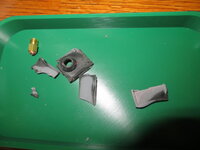
CHANGE YOUR NOZZLE.,, Lesson learned... Just a FEW HOUR print with abrasive "Glitter PLA" can wear out a brass nozzle.
IMG_0283.JPG
 
Last edited:
To avoid these ads, REGISTER NOW!

no704

Well-known member
Joined
Apr 27, 2016
Messages
5,203
I’ve been doing the sanding thing too Doing lost pla casting. Just looking for a less manual way before investing.
 

Bessy

Well-known member
Joined
Dec 18, 2012
Messages
992
Location
Ontario, Canada
Hey all!

Noticed a few weird things going on between the printer and my raspberry Pi running octoprint.
1) when the printer is powered off, but still connected to the Pi, the creality welcome screen or a loading bar flicks on and off intermittently, without any discernable pattern. I'm used to seeing the main menu with the three buttons while powered off and connected to the pie, but this is just the Creality screen, not anything navigable.

2) The Pi is showing "undervoltage detected" despite my not changing anything in my set up. I did move the power cord for the pi directly to an outlet vs the power bar, and only got this issue once again, that I saw, but I've only run one print since then.

3) I've had on the odd occasion the "Heating Failed" please cycle power... Message come up, with the printer both powered up or turned off and connected to the pi.

Any insights appreciated!

B.
 

penright

ALLIANCE MEMBER
Joined
Dec 27, 2016
Messages
618
Location
SW of Mustang, OK
2) The Pi is showing "undervoltage detected" despite my not changing anything in my set up. I did move the power cord for the pi directly to an outlet vs the power bar, and only got this issue once again, that I saw, but I've only run one print since then.
I had an issue where the USB cable was trying to power the printer's motherboard when the printer was off. I split open my USB cable and cut the power cord. Also, you might try a different power supply. Make sure the wattage is enough.
This may not have anything to do with your issues, just throwing out there my experience.
 

PelicanPines

ALLIANCE MEMBER
Joined
Apr 30, 2014
Messages
38,104
Location
New Jersey, USA, Earth, My own reality
Hey all!

Noticed a few weird things going on between the printer and my raspberry Pi running octoprint.
1) when the printer is powered off, but still connected to the Pi, the creality welcome screen or a loading bar flicks on and off intermittently, without any discernable pattern. I'm used to seeing the main menu with the three buttons while powered off and connected to the pie, but this is just the Creality screen, not anything navigable.

2) The Pi is showing "undervoltage detected" despite my not changing anything in my set up. I did move the power cord for the pi directly to an outlet vs the power bar, and only got this issue once again, that I saw, but I've only run one print since then.

3) I've had on the odd occasion the "Heating Failed" please cycle power... Message come up, with the printer both powered up or turned off and connected to the pi.

Any insights appreciated!

B.
This is absolutely the cable connecting the USB cable from the PI to the Printer. There are 4 wires in a USB cable.. you need to "defeat" ONE wire. It is causing both issue number 1 and 2... possibly 3.

There are youtube vids on how to deal with the cable issue.

USB cables either are POWER ONLY (won't work with PI to printer) or Data AND POWER... you really ONLY need the data part for the PI to control the printer.

I had the exact issue you have.

My solution was putting black electrical tape on the ONE tab on the bigger USB cable connector. Not kidding it's an easy fix with electrical tape... steady hand and a pair of tweezers.
 

Bessy

Well-known member
Joined
Dec 18, 2012
Messages
992
Location
Ontario, Canada
New rolls of filament keep following me home, so I figured it was time to do something a bit better to organize them.

Eventually I'll build a dedicated cabinet/shelf for them, that incorporates humidity control and whatnot, but we're looking at moving in the next few months, so I don't want to make something else I'll have to move and plan for.

As you can tell, I'm one or two rolls over box capacity right now. Fortunately with the amount of air that Amazon typically ships, we'll probably have enough boxes to box up our entire place when it comes time to move. 😂
 

Attachments

  • IMG_20210910_232211.jpg
    IMG_20210910_232211.jpg
    234.9 KB · Views: 103

zeliboba

Member
Joined
Mar 28, 2018
Messages
16
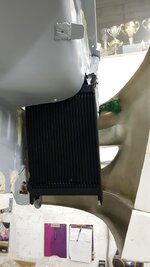
starting a little project, want to print ducting for my oil cooler
what type of plastic can/should be used that can withstand cooler operating temps without material degradation?
 

Attachments

  • d090dd2b-b752-4370-9d73-087d3333cab8.jpg
    d090dd2b-b752-4370-9d73-087d3333cab8.jpg
    75.3 KB · Views: 77

Bessy

Well-known member
Joined
Dec 18, 2012
Messages
992
Location
Ontario, Canada
Hey all!

Looking for recommendations on printer #2. Basically I'm looking for something relatively inexpensive (sub $250 CAD ideally) and small enough that I can keep on my desktop.

Ideally, it would find a place on my desk next to the desktop for doing quick test prints (i.e. scaling of certain features before going for a full print) and generally so I don't need to tie up the 5+ making smaller components.

While I'm thinking mostly about <4hr prints, since it will live next or close to the computer, quiet(er than my 5+) would also be a bonus but not absolutely necessary.

Any insights/recommendations are greatly appreciated!!!

Thanks,
 

k-os

Well-known member
Joined
Dec 29, 2012
Messages
995
Location
WI
Hey all!

Looking for recommendations on printer #2. Basically I'm looking for something relatively inexpensive (sub $250 CAD ideally) and small enough that I can keep on my desktop.

Ideally, it would find a place on my desk next to the desktop for doing quick test prints (i.e. scaling of certain features before going for a full print) and generally so I don't need to tie up the 5+ making smaller components.

While I'm thinking mostly about <4hr prints, since it will live next or close to the computer, quiet(er than my 5+) would also be a bonus but not absolutely necessary.

Any insights/recommendations are greatly appreciated!!!

Thanks,
I have a Voxelab Aquila that I've been really enjoying. Basically an Ender 3 V2 Pro clone with some slight updates. They're around $160 USD when on sale. I'm running custom firmware on mine that allows me to run a manual bed mesh, although I do have a BLTouch that I haven't installed yet. I also converted mine to direct drive and have a new hot end cooler on it.
 

Bessy

Well-known member
Joined
Dec 18, 2012
Messages
992
Location
Ontario, Canada
I have a Voxelab Aquila that I've been really enjoying. Basically an Ender 3 V2 Pro clone with some slight updates. They're around $160 USD when on sale. I'm running custom firmware on mine that allows me to run a manual bed mesh, although I do have a BLTouch that I haven't installed yet. I also converted mine to direct drive and have a new hot end cooler on it.
Thanks k-os,
Question for you: what slight updates made you choose the Aquila over say and Ender? Up here in the great white the cost difference is about $100, with both being available through Amazon. I do have a company semi locally that stocks Enders which come in about $10-20 cheaper than the Ender on Amazon. The further bonus is that they test everything ahead of shipping.

Looked into the voron.zero but they are cost prohibitive here. Other contenders right now include the Anycubic Mega Zero 2.0 and Anycubic Mega S ($212-$229 and 399 down to $299 on sale all on Amazon right now).
 

Bessy

Well-known member
Joined
Dec 18, 2012
Messages
992
Location
Ontario, Canada
The cost of the extrusion alone via Amazon.ca is more than 4x the price in Canada compared to the US. I saw that and immediately stopped trying to price it out because I was just going to be disheartened. Once SWMBO and I make the move to Illinois (likely early next year) I will revisit the idea.
 

shortykorte

Well-known member
Joined
Sep 1, 2014
Messages
8,034
Location
Tallahassee, Fl
Broken filament help. The last couple of months, the filament on my printer is broken between the machine and spool after a day. I can do a 10 hr. print without issue. Come back the next day and the filament is broken. When I try to break the filament, it doesn’t break.
 

PelicanPines

ALLIANCE MEMBER
Joined
Apr 30, 2014
Messages
38,104
Location
New Jersey, USA, Earth, My own reality
Broken filament help. The last couple of months, the filament on my printer is broken between the machine and spool after a day. I can do a 10 hr. print without issue. Come back the next day and the filament is broken. When I try to break the filament, it doesn’t break.
I have one spool that did that... I had to vacuum zip lock it whenever it wasn't "in use". I have dozens of spools that sit on the machine overnight without being used and nothing happens. Issue seems to be brand specific.
 

loganb

ALLIANCE MEMBER
Joined
Dec 29, 2011
Messages
5,494
Location
Omaha, NE
The cost of the extrusion alone via Amazon.ca is more than 4x the price in Canada compared to the US. I saw that and immediately stopped trying to price it out because I was just going to be disheartened. Once SWMBO and I make the move to Illinois (likely early next year) I will revisit the idea.

Not trying to get political here....but dare I ask why moving to Illinois? Assuming it's work or family....but as someone who moved out of IL in 2020 just curious.
 
To avoid these ads, REGISTER NOW!

loganb

ALLIANCE MEMBER
Joined
Dec 29, 2011
Messages
5,494
Location
Omaha, NE
All for avoiding the politics, so I'll leave it at "it is a work thing".

Makes sense, we moved to Chicagoland for work and left when the job ended. Enjoyed our time there but our reason for being there was over so we moved again. Happy to share our experiences or offer insight if you're moving to the Chicagoland area, just message me!
 

PelicanPines

ALLIANCE MEMBER
Joined
Apr 30, 2014
Messages
38,104
Location
New Jersey, USA, Earth, My own reality
They have good pizza...

Got a clog in my hot end that won't noodle out with a needle. Can't force it thru... can't seem to fix it in place. As Johnny 5 once said "No Disassemble"... but looks like I have to take apart my direct drive. I have a spare if needed.

It was my fault on the clog. There is a gear tensioning thing on the extruder... I had it too loose and it sat spinning on air while the hot end baked.

Filament break sensors are nice and useful (unless you use octoprint)... we need a filament movement sensor.
 

rlitman

Well-known member
Joined
Oct 18, 2010
Messages
24,576
Location
Long Island
Filament break sensors are nice and useful (unless you use octoprint)... we need a filament movement sensor.
That was my issue with the factory sensor (octoprint couldn't talk to it and would continue to print with a broken filament), and is why I went with a Bigtreetech smart sensor connected to the GPIO and use the Smart Filament Sensor plugin.

It's caught broken filament (that went brittle from being too wet), but has also caught clogged nozzles as well as a nozzle too close to the bed that's underextruding the first layer (effectively clogged).

The catch is that this smart sensor goes inline in my bowden cable (I'm not direct drive), and I was not happy with having four QD fittings and two bowdons downstream of the extruder as that created excessive backlash. So I removed the QD fittings from one side of this sensor and from my extruder, and put a 1/8NPT brass pipe ****** between the two (since these both had 1/8NPT threads), filling it's ID with a piece of bowden tube centered using electrical tape wraps for a now fixed section from my extruder.
 

PelicanPines

ALLIANCE MEMBER
Joined
Apr 30, 2014
Messages
38,104
Location
New Jersey, USA, Earth, My own reality
That was my issue with the factory sensor (octoprint couldn't talk to it and would continue to print with a broken filament), and is why I went with a Bigtreetech smart sensor connected to the GPIO and use the Smart Filament Sensor plugin.

It's caught broken filament (that went brittle from being too wet), but has also caught clogged nozzles as well as a nozzle too close to the bed that's underextruding the first layer (effectively clogged).

The catch is that this smart sensor goes inline in my bowden cable (I'm not direct drive), and I was not happy with having four QD fittings and two bowdons downstream of the extruder as that created excessive backlash. So I removed the QD fittings from one side of this sensor and from my extruder, and put a 1/8NPT brass pipe ****** between the two (since these both had 1/8NPT threads), filling it's ID with a piece of bowden tube centered using electrical tape wraps for a now fixed section from my extruder.
I actually have that sensor sitting in a box... when I rebuild after this fix... I will make it part of my "Put Together"... I forgot until you reminded me.
 

k-os

Well-known member
Joined
Dec 29, 2012
Messages
995
Location
WI
Thanks k-os,
Question for you: what slight updates made you choose the Aquila over say and Ender? Up here in the great white the cost difference is about $100, with both being available through Amazon. I do have a company semi locally that stocks Enders which come in about $10-20 cheaper than the Ender on Amazon. The further bonus is that they test everything ahead of shipping.

Looked into the voron.zero but they are cost prohibitive here. Other contenders right now include the Anycubic Mega Zero 2.0 and Anycubic Mega S ($212-$229 and 399 down to $299 on sale all on Amazon right now).
I miss-spoke a bit when referencing the V2, at least for the original Aquila. There is an Aquila X2 out now that includes a filament run-out sensor and carrying handle, but probably not worth the extra ~$40 compared to the original Aquila in my opinion.

I was originally looking at the Ender 3 but saw someone post a link to the Aquila on the Slickdeals post for the Ender 3. Aquila vs the Ender 3 has silent stepper drivers, included belt tensioners, and probably some other items I'm forgetting.
 

shortykorte

Well-known member
Joined
Sep 1, 2014
Messages
8,034
Location
Tallahassee, Fl
Looking at last couple of post, I’m confused and seem like a lot of upgrades would be beneficial.

A couple service cart trinkets. Some of the driver holes in a HF cart are on the large side. I’ve used washers that flop around so decided to make a plug.
567EC23B-CED1-44ED-A1DC-6A1059CC9F06.jpeg
AF627D67-EDC3-4441-8FB9-FAD2114E8CEB.jpeg
The other was a adjustable wrench stand. Started with a scrap of Kaizen foam but the plastic is much better.
86F74AAC-0058-43D4-93E5-5D88B0FFCB9F.jpeg
speaking of sensors, the filament tangled on the roll before the top layers of the rack was printed. 😳
 
Last edited:

Bessy

Well-known member
Joined
Dec 18, 2012
Messages
992
Location
Ontario, Canada
Any love for Anycubic here on the forum? Their Mega Zero 2.0 is down $65 to $154 with free shipping to Canada. Just curious if anyone has any thoughts or experience with these printers (are there any major benefits to one vs another?) before I give it a go? Specifically is there something comparable in the $150-200 price point that would be a better buy?

TIA!
 
Last edited:

mbaulfinger

Member
Joined
Aug 27, 2012
Messages
17
Any love for Anycubic here on the forum? Their Mega Zero 2.0 is down $65 to $154 with free shipping to Canada. Just curious if anyone has any thoughts or experience with these printers (are there any major benefits to one vs another?) before I give it a go? Specifically is there something comparable in the $150-200 price point that would be a better buy?

TIA!
I use a Chiron and like it alot. It gets mixed reviews. Once I learned how to level the bed etc its been very nice. I do have to say that its not a fast printer. I'd probably look at their Vyper if I were looking at a Anycubic. Its a bit above your price but looks like a great little printer.
 

Bessy

Well-known member
Joined
Dec 18, 2012
Messages
992
Location
Ontario, Canada
Printed some soft jaws with space for clamping 5/16" and 3/8" tubing for a bike rack project. Printed in PETG on a Prusa Mini, modeled in tinkerCAD.

20211024_120412.jpg
That's on my list, a set of jaws for the vice on my toolbox. Currently designing corner clamp jaws for my new Irwin clamps.
 

lovetap

Well-known member
Joined
Sep 23, 2021
Messages
248
Location
the last frontier
FYI using PETG the jaws deformed quickly, which was expected, still very usable for the intended purpose and good that the jaws bent before the work piece. Maybe nylon would be a little stronger?
 

rlitman

Well-known member
Joined
Oct 18, 2010
Messages
24,576
Location
Long Island
FYI using PETG the jaws deformed quickly, which was expected, still very usable for the intended purpose and good that the jaws bent before the work piece. Maybe nylon would be a little stronger?
When I need a good grip on a piece of metal rod (like a rifle barrel vise), I'll get a scrap block of 2x4, and drill it across the grain with a hole that's ever so slightly smaller than the metal I want to grip. I'll then saw through the wood, through the hole.
 

ER70S-2

Well-known member
Joined
Jan 2, 2015
Messages
796
What's a relatively cost effective way to get into printing NylonX or other high strength materials? The Matterhackers Pulse XE is around $1500 depending on options. What other options are there?
 

ArcReactorKC

Well-known member
Joined
Jun 1, 2019
Messages
2,237
Location
Out in the county NE of KCMO
What's a relatively cost effective way to get into printing NylonX or other high strength materials? The Matterhackers Pulse XE is around $1500 depending on options. What other options are there?
It really depends on what build volume you need. I have an ancient duplicator i3 that I converted to an e3d v6 bowden assembly and I built a heated chamber around the machine with cool air ducted only to the electronics underneath. I think I'm into the whole thing under $300 but it's limited to it's 200mm³ build volume.


Most hobby printers can be made to print these engineering materials with some modifications, a full metal hotend, an enclosure removing the electronics from the area, and possibly heat lamps to create a heated chamber are fairly easy to setup. Octoprint can even manage the temperature in the chamber for you.
 

loganb

ALLIANCE MEMBER
Joined
Dec 29, 2011
Messages
5,494
Location
Omaha, NE
What's a relatively cost effective way to get into printing NylonX or other high strength materials? The Matterhackers Pulse XE is around $1500 depending on options. What other options are there?

Trying to be cost effective while printing NylonX are things that generally don't belong together. applications that truly require those materials generally are commercial in nature and as a result often have more financial backing....so my question is why do you believe you need to print that vs one a heat treatable PLA or PETG that prints far easier and cheaper.
 
Last edited:

ER70S-2

Well-known member
Joined
Jan 2, 2015
Messages
796
Trying to be cost effective while printing NylonX are things that generally don't belong together. applications that truly require those materials generally are commercial in nature and as a result often have more financial backing....so my question is why do you believe you need to print that vs one a heat treatable PLA or PETG that prints far easier and cheaper.

I would like to get into 3D printing to make parts that are to complicated or time consuming to mill out of aluminum. Would PLA or PETG be strong enough? Maybe, but I would like to have the option of printing stronger parts since I usually make parts out of aluminum.

Cost-effective is a relative term. How much do you need to spend on a printer to print with Nylonx or the other carbon-containing filaments? That's the main question I was asking.
 

Bessy

Well-known member
Joined
Dec 18, 2012
Messages
992
Location
Ontario, Canada
I'm going to go out on a limb and say that to get the equivalent strength of aluminum you're going to be in the mid 5 figure range at least. What type of parts are you currently milling?
 

ER70S-2

Well-known member
Joined
Jan 2, 2015
Messages
796
I'm going to go out on a limb and say that to get the equivalent strength of aluminum you're going to be in the mid 5 figure range at least. What type of parts are you currently milling?
Thanks. I'm definitely not looking for the equivalent strength of aluminum, but good to know about how much it would cost. I guess I'm just wondering how much it would cost to make parts as strong as possible, but not quite aluminum strength. What filament is just under aluminum in terms of strength, and what type of printer would that cost to get up and running?
 
To avoid these ads, REGISTER NOW!
Top Bottom