To avoid these ads, REGISTER NOW!

The Everything 3D Printer Thread

HPRifleman

Member Emeritus
Joined
Nov 18, 2019
Messages
767
Location
Wayne, IL
Any updates on how it's holding up? And material used? I have the same issue with my dishwasher...
My primary concern was the heat of the water and drying element. I haven't tracked the number of cycles it has endured but it's probably about 5 at this point. The 3D printed part is still working fine and there is no damage to it.

The material is called Digital ABS and it is intended to compare favorably with a non-reinforced engineering plastic. The printer draws materials from two different cartridges, combines them, squirts them on to a platform, and cures with UV light.

I have even considered making a supplementary rack for utensils as my household gets these dirty faster than plates and glasses.
 
To avoid these ads, REGISTER NOW!

Jim_No_Garage

Well-known member
Joined
Jan 15, 2011
Messages
3,299
Location
Millington NJ
So I think I am running into the physical limitations of my Ender 3V2 - at the SMALL end of the spectrum.

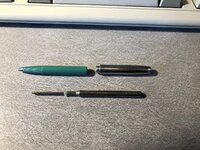
One of my "hobbies" is collecting interesting pen's and mechanical pencils. I picked up a Esterbrook pen from the 50's that requires a "no longer available" refill. I found a guy online who is selling 3d printed "sabot adapters" to use a modern pen insert in this vintage pen. He has a deal with a 3d print on demand company where the "adapter" sells for $9.00 and shipping/handling is $9.99. That seemed a little steep for S&H so I went after it on my own.

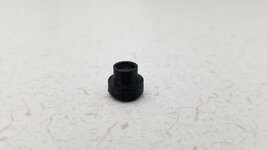
The good news is I have a non-functioning refill so I can get the critical measurements. I have been modeling the adapter in Fusion (I **** at Fusion BTW) and have been struggling with the print quality of my printer for this tiny object. This "collar" is 2.2mm tall, 5.4 mm from "tip to tip" with a 2.7 mm center bore. The trapezoidal "ears" ratchet inside the nose of the pen to extend/retract the insert - all in all it's a pretty cool mechanism.
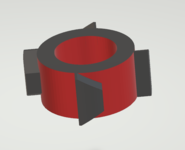
1648589196395.png

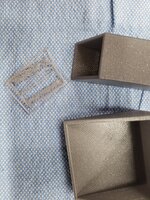
You can see the "original" and the disaster of a printed copy below. I'm trying to get the "collar" details right and I will add the rest of the model if I can get the collar to print. I'm getting almost no definition on the angles of the "wings" - just a blob.

1648589649226.png

I might print them square and try filing to fit . . .

I'm slicing with Cura with the out of the box "Super Quality" profile - 0.12 mm layers . I've never done any prints needing this level of precision so I'm thinking I'm working outside of the capabilities of the printer.

Any input would be appreciated.

Additional information:

Printing in PLA
Factory 0.4 mm nozzle - which @Bad Habit pointed out below could be a limiting factor

Cheers

Jim
 
Last edited:

H1Pete

Active member
Joined
Dec 19, 2014
Messages
26
I’ve noticed a huge difference for detailed prints with a smaller nozzle. Try slicing it with the settings for as small a nozzle as you can get and see what the preview looks like. Should be pretty noticeable if it’s going to work.
 

Cruzan80

Well-known member
Joined
Jul 22, 2015
Messages
4,150
Location
Denver, CO
Jim, what kind of Esterbrook? Most of the ones I know of use the lever-fill, except for the felt-tips. But I tend to drift older into the Dollar Pens with the square tops.
 

Jim_No_Garage

Well-known member
Joined
Jan 15, 2011
Messages
3,299
Location
Millington NJ
I’ve noticed a huge difference for detailed prints with a smaller nozzle. Try slicing it with the settings for as small a nozzle as you can get and see what the preview looks like. Should be pretty noticeable if it’s going to work.
Jim, what kind of Esterbrook? Most of the ones I know of use the lever-fill, except for the felt-tips. But I tend to drift older into the Dollar Pens with the square tops.
@Jim_No_Garage Nozzle size makes sense.
Also, how calibrated is your printer? https://teachingtechyt.github.io/calibration.html
One more thought, can you oversize the wings and sand them back? Just thinking out loud.
 

Jim_No_Garage

Well-known member
Joined
Jan 15, 2011
Messages
3,299
Location
Millington NJ
I’ve noticed a huge difference for detailed prints with a smaller nozzle. Try slicing it with the settings for as small a nozzle as you can get and see what the preview looks like. Should be pretty noticeable if it’s going to work.

@Jim_No_Garage Nozzle size makes sense.
Also, how calibrated is your printer? https://teachingtechyt.github.io/calibration.html
One more thought, can you oversize the wings and sand them back? Just thinking out loud.

I will research a smaller nozzle. Calibrated? - not very well probably. But I will take a look. The "close enough" and sand to fit approach might be what I try. I honestly didn't understand the mechanism when I embarked on this voyage - I didn't catch the trapezoid details on the collar until the second go round of the model/print/test cycle. The good news is the entire assembly prints in an hour and the collar prints in 10 minutes.

Jim, what kind of Esterbrook? Most of the ones I know of use the lever-fill, except for the felt-tips. But I tend to drift older into the Dollar Pens with the square tops.
It's what seems to be referred to as an FJ - It's a ballpoint with a pretty slick mechanism. There is a "ratcheting assembly" in the nose of the pen that the collar on the pen refill interacts with. Click the pen body into the nose and the pen sticks out to write. Click the pen body into the nose again and it retracts again. I've got $2.00 into this pen from a thrift store so I could afford the $20 to get it functioning, but this has become more about improving my 3d modeling and printing capabilities.

Thanks for the guidance and I will reply back once I have done some tweaking.

Jim


Esterbrook_FJ_Pen (1).jpegEsterbrook_FJ_Pen (2).jpeg
 

penright

ALLIANCE MEMBER
Joined
Dec 27, 2016
Messages
618
Location
SW of Mustang, OK
@Jim_No_Garage One other thought to throw out there, doubt this is your issue, but more for FYI.
Not sure if you knew that nozzles are consumable. The nozzle being replaced has about 4 - 5 spools of filiment.
If your .04 nozzle is old, it might be bigger than .04. :)

1648755159093.png
 

Jim_No_Garage

Well-known member
Joined
Jan 15, 2011
Messages
3,299
Location
Millington NJ
@Jim_No_Garage One other thought to throw out there, doubt this is your issue, but more for FYI.
Not sure if you knew that nozzles are consumable. The nozzle being replaced has about 4 - 5 spools of filiment.
If your .04 nozzle is old, it might be bigger than .04. :)

1648755159093.png
Thanks Penwrite - the nozzle on the machine was a brand new 0.4 as I had replaced it immediately before as part of other tweaks. I ordered an array of nozzles and I am playing with a 0.2 nozzle as I type this. The quality is better but not perfect - still playing with the model itself, the slicer settings . . .

Aren't hobbies supposed to be relaxing? LOL

Jim
 

AndyL

Well-known member
Joined
Feb 22, 2012
Messages
1,371
Location
Vancouver
Aren't hobbies supposed to be relaxing? LOL

Jim
No this one's all about tearing up hundred dollar bills while throwing plastic parts in the trash can :)

For something fine detail like that - I'd start with a .30 nozzle (.20/.25 is REALLY finicky on most machines) And something in the .08 layer height. Machine really does need to be dialed in right to get useable parts that small, might eyeball up some common settings the WoW figure folks like to use for fine details for your machine.
 

AndyL

Well-known member
Joined
Feb 22, 2012
Messages
1,371
Location
Vancouver
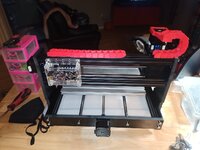
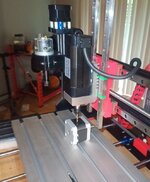
So prepping the 3018 for apartment life (and ratsnest control)
IMG_20220403_184853_488.jpg
Cable chain came out "meh" lots of cleanup on the edges.


IMG_20220404_061155_094.jpg

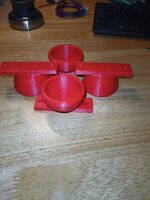
Then it goes and kicks out almost perfect squash ball feet - no changes, same filament - but it's been out in 90% humidity all day printing the cable chain parts.

I'm going to have to dig into settings again, something's still off clearly.
 

mv213

Well-known member
Joined
Sep 29, 2014
Messages
660
Location
Dallas, OR (the OTHER "Big D")
I’m excited to join the club. Just ordered an Anycubic Vyper after reading several reviews. Price and quality appear to fall somewhere between the Ender 3 and the Prusa MK3 if I’m reading between the lines correctly.

Anybody else using the Anycubic Vyper? Comments on your experience?
 

bugnut

ALLIANCE MEMBER
Joined
Jul 14, 2012
Messages
3,834
Location
Central Ohio
Well the Prusa started out strong but the last prints have fallen off the edge, first couple prints no issues, then all I see is this, even when using same material (pla). The images show the issue/s. I have different tried a different spool of material, same thing, then tried to repeat an earlier print and same issue. I have looked online for solutions, have made adjustments to the z axis to no avail. Parts that are good were out of same spool , a few weeks back. Thoughts?
 

Attachments

  • 20220404_135124.jpg
    20220404_135124.jpg
    638.9 KB · Views: 49
  • 20220404_135128.jpg
    20220404_135128.jpg
    556.9 KB · Views: 47
  • 20220404_135133.jpg
    20220404_135133.jpg
    488.9 KB · Views: 45

Poolshark314

Well-known member
Joined
Jul 5, 2021
Messages
658
Location
MD
Well the Prusa started out strong but the last prints have fallen off the edge, first couple prints no issues, then all I see is this, even when using same material (pla). The images show the issue/s. I have different tried a different spool of material, same thing, then tried to repeat an earlier print and same issue. I have looked online for solutions, have made adjustments to the z axis to no avail. Parts that are good were out of same spool , a few weeks back. Thoughts?
Looks like your nozzle is too far away from the bed. Could also possibly be a clog
 

ER70S-2

Well-known member
Joined
Jan 2, 2015
Messages
796
I just made this elevated shelf to free up some space in my top drawer. I planned on using nine legs, but seven seems like more than enough. I still amazed at the dimensional accuracy of the prints. The dowels are 0.250" and the holes they go in are 0.250", and the legs have a nub that's 0.375" and the shelf has 0.375" holes that they fit into. The dowels and legs friction fit into holes perfectly. I glued the dowels for strength, but I didn't have to glue the legs into the shelf at all.


Whiskeymike

Well-known member
Joined
Oct 31, 2013
Messages
775
Location
Austin, TX
I just made this elevated shelf to free up some space in my top drawer. I planned on using nine legs, but seven seems like more than enough. I still amazed at the dimensional accuracy of the prints. The dowels are 0.250" and the holes they go in are 0.250", and the legs have a nub that's 0.375" and the shelf has 0.375" holes that they fit into. The dowels and legs friction fit into holes perfectly. I glued the dowels for strength, but I didn't have to glue the legs into the shelf at all.
Slick idea! it would be great if they had a track to lay on, that you could slide them left/right to access what's below. I may play with that idea, as I can use all the help I can get for organizing this stuff.
 
To avoid these ads, REGISTER NOW!

ER70S-2

Well-known member
Joined
Jan 2, 2015
Messages
796
Slick idea! it would be great if they had a track to lay on, that you could slide them left/right to access what's below. I may play with that idea, as I can use all the help I can get for organizing this stuff.
That would be really cool. Now you've got me thinking!
 

Jim_No_Garage

Well-known member
Joined
Jan 15, 2011
Messages
3,299
Location
Millington NJ
Slick idea! it would be great if they had a track to lay on, that you could slide them left/right to access what's below. I may play with that idea, as I can use all the help I can get for organizing this stuff.

Hmmmm - I need to find the measured drawing I made of the side drawer in my drafting table - it has a built in rail to have a 2 level tray setup. I'm thinking it's beyond the print size capabilities of my printer.

Well the Prusa started out strong but the last prints have fallen off the edge, first couple prints no issues, then all I see is this, even when using same material (pla). The images show the issue/s. I have different tried a different spool of material, same thing, then tried to repeat an earlier print and same issue. I have looked online for solutions, have made adjustments to the z axis to no avail. Parts that are good were out of same spool , a few weeks back. Thoughts?
Those pictures look like under-extrusion to me. In all my playing around with nozzles for the pen insert - update to follow eventually - I switched back to the 0.4 nozzle and tried to print something that was sliced set up to a 0.2 nozzle. It took me 2 failed prints of that gcode to look closer at what was actually happening and I saw it - DOH!

Cheers

Jim
 

Bessy

Well-known member
Joined
Dec 18, 2012
Messages
992
Location
Ontario, Canada
I may have asked this before hand, but the big move is now imminent. I kept the boxes for both printers (E3v2 and E5+) and all of the packing materials, less the plastic wrapping. Would it be better to disassemble both printers and box them in the original materials, or build plywood crates and bolt them to the crates using T-nuts through the bottom? Leaning towards the former, but can't bring myself to start tearing them down yet.

Tia!
 

AndyL

Well-known member
Joined
Feb 22, 2012
Messages
1,371
Location
Vancouver
I may have asked this before hand, but the big move is now imminent. I kept the boxes for both printers (E3v2 and E5+) and all of the packing materials, less the plastic wrapping. Would it be better to disassemble both printers and box them in the original materials, or build plywood crates and bolt them to the crates using T-nuts through the bottom? Leaning towards the former, but can't bring myself to start tearing them down yet.

Tia!
My CR10 moved 700ish miles in a uhaul with just the electronics box disconnected. Even had a spool still on the holder.

Ok so it's got the redi-rod stabilizers and squash ball feet, but basically stock. Yes required some work to square/level after, but nothing more than semi-annual maintenance really.
 

ER70S-2

Well-known member
Joined
Jan 2, 2015
Messages
796
Ok wait - need to know - how'd you get that surface finish? Is that the cura fuzzy skin?

That's actually the bottom of the print. It was printed on the Prusa textured PEI powder coated steel sheet. If you squish the first layer in really good, the lines totally disappear, and all you see is that beautiful texture.
 

Bessy

Well-known member
Joined
Dec 18, 2012
Messages
992
Location
Ontario, Canada
My CR10 moved 700ish miles in a uhaul with just the electronics box disconnected. Even had a spool still on the holder.

Ok so it's got the redi-rod stabilizers and squash ball feet, but basically stock. Yes required some work to square/level after, but nothing more than semi-annual maintenance really.

The move is approximately 400-500 miles. Both printers are bone-stock except for Capricorn tubing and a few printed pieces to stabilize wires and the like so I'm reasonably sure they'd go back in the box with minimal effort. As we're moving for work and I only have the SportWagen, I'm expecting both printers to be shipped via moving company because space in the car will be at a premium with our personal effects/valuables in the car with us. I just don't want them damaged in the process. Still working out the moving arrangements with work, but things are going to start moving fast so I want to be prepared so that little things like this don't get overlooked/half-assed at the 11th hour.
 

bugnut

ALLIANCE MEMBER
Joined
Jul 14, 2012
Messages
3,834
Location
Central Ohio
All thanks for the input. New nozzle and z axis adjustment what seemed like a large amount to me but it's working again. Still scratching my head at what the root cause of all the z axis distance change was.....
 

ER70S-2

Well-known member
Joined
Jan 2, 2015
Messages
796
Man it is really awesome some of the stuff you guys come up with. I wish I was tech savvy enough to use a printer
I'm convinced that anyone can do it. I assembled my printer three months ago and have only been 3D printing for about 2.5 months. I never used Fusion 360 before this, and I'm able to design basic stuff no problem. Jump in and you'll get the hang of it. There are plenty of websites and YouTube videos to help. Whenever I don't know how to do something in Fusion 360, I just google it and within seconds I'm watching a video about it. Just go for it.
 

Darby9

Well-known member
Joined
Jan 18, 2020
Messages
110
Location
San Francisco
So I think I am running into the physical limitations of my Ender 3V2 - at the SMALL end of the spectrum.

One of my "hobbies" is collecting interesting pen's and mechanical pencils. I picked up a Esterbrook pen from the 50's that requires a "no longer available" refill. I found a guy online who is selling 3d printed "sabot adapters" to use a modern pen insert in this vintage pen. He has a deal with a 3d print on demand company where the "adapter" sells for $9.00 and shipping/handling is $9.99. That seemed a little steep for S&H so I went after it on my own.

The good news is I have a non-functioning refill so I can get the critical measurements. I have been modeling the adapter in Fusion (I **** at Fusion BTW) and have been struggling with the print quality of my printer for this tiny object. This "collar" is 2.2mm tall, 5.4 mm from "tip to tip" with a 2.7 mm center bore. The trapezoidal "ears" ratchet inside the nose of the pen to extend/retract the insert - all in all it's a pretty cool mechanism.

1648589196395.png

You can see the "original" and the disaster of a printed copy below. I'm trying to get the "collar" details right and I will add the rest of the model if I can get the collar to print. I'm getting almost no definition on the angles of the "wings" - just a blob.

1648589649226.png

I might print them square and try filing to fit . . .

I'm slicing with Cura with the out of the box "Super Quality" profile - 0.12 mm layers . I've never done any prints needing this level of precision so I'm thinking I'm working outside of the capabilities of the printer.

Any input would be appreciated.

Additional information:

Printing in PLA
Factory 0.4 mm nozzle - which @Bad Habit pointed out below could be a limiting factor

Cheers

Jim

I don't think anybody's mentioned this, but check your STL output settings too. For tiny features, you need to crank up resolution so the little parts aren't just one triangle. Just remember to go back to coarser settings before exporting a big model.

And if that doesn't work, I think you've provided ample justification for buying an LCD resin printer. Exhausted the limits of your technology.
 

Jim_No_Garage

Well-known member
Joined
Jan 15, 2011
Messages
3,299
Location
Millington NJ
I don't think anybody's mentioned this, but check your STL output settings too. For tiny features, you need to crank up resolution so the little parts aren't just one triangle. Just remember to go back to coarser settings before exporting a big model.

And if that doesn't work, I think you've provided ample justification for buying an LCD resin printer. Exhausted the limits of your technology.
Ok - I will have to look into that too. I just hit export and go - I didn't realize I could adjust the STL generation settings.

You guys are a great brain trust and I appreciate all your input!

Cheers

Jim
 

Darby9

Well-known member
Joined
Jan 18, 2020
Messages
110
Location
San Francisco
Ok - I will have to look into that too. I just hit export and go - I didn't realize I could adjust the STL generation settings.

You guys are a great brain trust and I appreciate all your input!

Cheers

Jim

Hope it helps. I don't export STL's from F360 much--mostly use that for CAM, but in Solidworks, you can set it from the Options when you Save As. Here's the difference on a small part--the bumps are about 0.080" wide in this. I can't get it to print w/ any quality on my Taz Workhorse w/ 0.4mm tip, even with the STL resolution improved, so I outsourced it on a multi-jet fusion machine.stl resolution example.JPG
 

jstroede

Well-known member
Joined
Oct 28, 2010
Messages
1,080
Location
Kansas City
IMG_20220408_064023876.jpgIMG_20220320_230623128.jpg

Been working on some tool organization stuff. It's turned out well. The socket tray is a copy of the harbor freight tray, but sized to fit my flex sockets. I just printed it last night and it works perfectly and matches well. Now I will be doing more trays for hex bits and other pieces, plus some add-ons for the 1/2 drive for the sizes of sockets I have but are not on the tray.
 

LeonardY

Well-known member
Joined
Apr 16, 2011
Messages
5,020
Location
Southern California
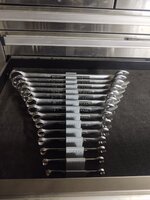
This took way too long to design, but I think I have an idea to make future wrench racks much more simple.
I simplified mine so they fit into my SK tool box.
1650308967252.png
If your interseted, I posted it previously in my garage thread.


AndyL

Well-known member
Joined
Feb 22, 2012
Messages
1,371
Location
Vancouver
IMG_20220418_150619_273-01.jpeg

Iterating my way to a mount for this new spindle on the 3018 (?3040 I guess since it's extended Y axis now)

The fun now is trying to tweak it into something I can build at home in aluminum plate.

I still love that I can iterate parts from sketchy measurements until they fit correctly and try ideas out for pennies without wasting a lot of time on aluminum to find out it was .5mm off.
 
To avoid these ads, REGISTER NOW!
Top Bottom