To avoid these ads, REGISTER NOW!

The Everything 3D Printer Thread

laser3kw

Well-known member
Joined
Nov 17, 2012
Messages
7,276
Location
northen IL
anyone have experience with a "Tina2". It is a smaller, cheapy unit that I saw on utube. looks interesting and funner as a starter machine but I am skeptical due to the "you get what you pay for" theory.
 
To avoid these ads, REGISTER NOW!

Jswain

Well-known member
Joined
Apr 26, 2013
Messages
2,449
Location
Calgary, AB
ER32 collet holder which I downloaded off thingiverse...but the lid I made myself with the size of the collet embedded underneath as the etch on quite a few of the collets is hard to see.
 

Attachments

  • 20230320_074526-01.jpeg
    20230320_074526-01.jpeg
    961 KB · Views: 93
  • 20230320_074553-01.jpeg
    20230320_074553-01.jpeg
    1.1 MB · Views: 52

jayz66ragtop

Well-known member
Joined
Sep 11, 2009
Messages
1,521
Location
SoCal
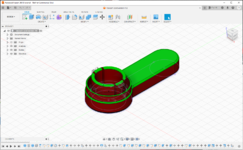
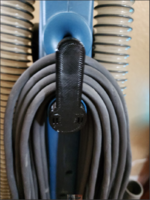
Vacuum cleaner's cord winds on the back between two "fingers" that clip onto two mounts. Originals lasted ~13 years but eventually the top one broke about a year ago. Went online and found a replacement for ~$7 but the kick in the nuts was $10 shipping, went ahead and ordered it anyway. Couple of months ago, the replacement broke on one side (has two clips that hold it to the vacuum). I thought hell, I have the 3D printer now, seems like a good project to learn how to model and print my own. Once I get the model right I can print as many as I want whenever I want.


Off to Fusion 360 -

HUGE learning curve, probably have over 200 hours into figuring out the software and just how to "make" something. I've since learned there are easier ways to do what I did but this was 100% from scratch so it took me a long time just to get something that looked even close to the original. I did have the original and took many measurements so I had something to base my model after. Note the file name "Vaccum cord winder v18" and no not that I misspelled Vacuum but v18, yes 18 versions to get it close to the original.

K4szdw.&owa=outlook.live.com&scriptVer=20230310007.png

ywlPqE.&owa=outlook.live.com&scriptVer=20230310007.png

Success!!! Well, it;s not perfect but I think this one will work for now. After I installed it I noticed a couple of things I could improve so I tweaked the model and just saved it until the one below has issues. So what was the biggest issue? No matter what I did it seemed like the left prong would break off while installing or doing a wiggle test. Figured out there were two issues contributing to the failures. One is for some reason the layer that binds the prong to the base had a defect where only the outer edge was bonded to the base. Imagine looking from the bottom of the prong is a square, only the outter edges were bonded to the base where I excpeted the middle to be bonded as well. Only figured that out when I went layer by layer in the slicer watching the tool path of the print head. So made a couple of tweaks and that went away, was stronger but still eventually failed 🙁. Was just about to give up when I remembered the original had relief cuts on the back, was thinking they were just to let moisture out or whatever but then realized they are relief cuts so the prongs have some give. Back to the drawing board, put in some relief cuts, slimed down the areas I beefed up trying to prevent failure aaaaaaaaaaand here it is:

1679330474535.png


A recap, to save $7 plus $10 shipping I invested ~200 hours and wasted $5 in filament printing failures. But now I feel good about playing more and being able to produce something in Fusion 360. I'm not a professional by any means but where I was once reliant on using things others created I can at least modify what they have done or if I feel inclined can try making it myself.
 

LeonardY

Well-known member
Joined
Apr 16, 2011
Messages
5,020
Location
Southern California
Note the file name "Vaccum cord winder v18" and no not that I misspelled Vacuum but v18, yes 18 versions to get it close to the original.
Welcome to the wonderful world of plastic design. I follow the same rules that I learned doing injection molded part design. Including fit tolerances. 3D printing introduces another set of criteria into the mix.

You did a great job at it.
 

cmandp

Well-known member
Joined
Dec 22, 2011
Messages
1,271
Location
New Jersey
My wife got me an Ender 3 Pro about 3 years ago. I printed a some things initially but really had trouble because the bed was not flat. I could get a good first layer on the four corners but then the center would be bad.

I meant to get it set up with BL touch for auto bed leveling but never got around to it. I shelved it for a bit.

Fast forward and I asked for a glass bed and my wife got it for me for Christmas.

Instantly easier as the bed was actually flat and could get a good first layer.

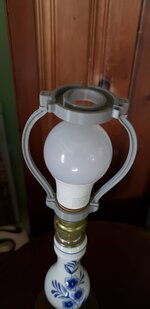
First project was to make a lamp harp for the wife's grandmothers lamp.

20230309_152738.jpg

20230309_152754.jpg
 

ER70S-2

Well-known member
Joined
Jan 2, 2015
Messages
796
@cycle61 You'll get there. I have the same printer and use a lot of Overture PETG and it prints perfectly. Try soap and water before 99% iso. Make sure you're using 7x7 mesh bed leveling and use live adjust Z. For some reason I have to really squish PETG into the textured sheet and go very slow (10mm/s) on the first layer. Maybe there are other ways, but this works for me.
 

no704

Well-known member
Joined
Apr 27, 2016
Messages
5,206
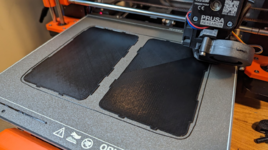
Okay, gave it a soap and water wash, and then 99% iso again. 1st layer is currently running at the default 20mm/sec, I'll try it again slower if this one peels.

Edit: looking good so far!

1679524382061.png
That’s a big part to have not peal from the bed. Might want to try a raft.
 

laser3kw

Well-known member
Joined
Nov 17, 2012
Messages
7,276
Location
northen IL
OK
I have been sifting through the 3d printer market and frankly, it would be easier to throw a dart.
I try to do research but the manufactures make it hard to determine what the difference between models are. Then, go on Ebay and there several sellers that off "open box", used and returned (supposed works like new - with minimal warranty).
So, what are desirable features to look for, for a guy who is mechanical /electrical / computer/ CAD savvy? What accessories are a must have? What consumable materials are most widely used? Good brands? Emerging brands?
I know, all are loaded questions.
Bottom line, I would prefer a moderate size envelope, good precision and price under $350?
 

LeonardY

Well-known member
Joined
Apr 16, 2011
Messages
5,020
Location
Southern California
OK
I have been sifting through the 3d printer market and frankly, it would be easier to throw a dart.
I try to do research but the manufactures make it hard to determine what the difference between models are. Then, go on Ebay and there several sellers that off "open box", used and returned (supposed works like new - with minimal warranty).
So, what are desirable features to look for, for a guy who is mechanical /electrical / computer/ CAD savvy? What accessories are a must have? What consumable materials are most widely used? Good brands? Emerging brands?
I know, all are loaded questions.
Bottom line, I would prefer a moderate size envelope, good precision and price under $350?
I'll start with a few questions.
What do you want to make with a 3d printer?
What are your expectations from the printer?
Is the printer the hobby or a tool for your hobbies?

I was where you are 3 years ago. I made the decision that the printer was to enhance and further my hobbies and interests. I bought and use both resin and FDM printers. The resin printers are for my prop and model making. While the FDM (Filament) printer is for that as well. I also use the FDM printer to print workholding for my CNC mill. I use it to prototype parts that I will eventually machine. It is also useful for creating things I use around the shop and house. ie. Closet rod holder, drawer divider brackets, and even parts to modify my resin printers.

I'm guessing at this point, that you want an FDM printer. I have a QIDI X-Max. It wasn't cheap. It was around $1K. I wanted a printer that I could print with right out of the box. Give me great prints without me needing to fiddle to much with it. I wanted to the ability to print different materials. PLA, ABS, PETG, TPU and carbon fiber. I have done all of those with little or no trouble. I wanted a printer I didn't have to upgrade. I didn't want to build an enclosure. I did add a filament sensor upgrade.

Unless your going for the printer is my hobby. Buying used or rebuilt is a **** shoot. You might be spending more time getting the printer to print a benchy than something you want.

Depending on your answers, I and others will be able to direct you to a good printer.
 
Last edited:

laser3kw

Well-known member
Joined
Nov 17, 2012
Messages
7,276
Location
northen IL
What do you want to make with a 3d printer?
parts to support other "hobbies"
What are your expectations from the printer?
My expectations will be a machine that requires "finesse", preparation and fore-thought to make parts with some degree of precision. I'm not expecting tenths or even thousandths but good replication of a generated model.
Is the printer the hobby or a tool for your hobbies?
a tool that, in itself, a hobby. Most of my hobbies interweave at some point. Kind of the thought " we create tools to create better tools".
 

LeonardY

Well-known member
Joined
Apr 16, 2011
Messages
5,020
Location
Southern California
parts to support other "hobbies"

My expectations will be a machine that requires "finesse", preparation and fore-thought to make parts with some degree of precision. I'm not expecting tenths or even thousandths but good replication of a generated model.

a tool that, in itself, a hobby. Most of my hobbies interweave at some point. Kind of the thought " we create tools to create better tools".
Great. I just added to my previous pot.
 

LeonardY

Well-known member
Joined
Apr 16, 2011
Messages
5,020
Location
Southern California
parts to support other "hobbies"

My expectations will be a machine that requires "finesse", preparation and fore-thought to make parts with some degree of precision. I'm not expecting tenths or even thousandths but good replication of a generated model.

a tool that, in itself, a hobby. Most of my hobbies interweave at some point. Kind of the thought " we create tools to create better tools".
Check out Elegoo.

A friend just bought one and he's thrilled. It's in your price range.
It's the printer I was going to get 3 years ago but they were always sold out.
 

Jswain

Well-known member
Joined
Apr 26, 2013
Messages
2,449
Location
Calgary, AB
You may be slightly over thinking it. I would choose an ender model as the support/parts is huge and any problems/upgrades you want to do will already be documented and easy to find/fix/modify.

That narrows it down to just the size, how large do you want to print? Ender 3 pro is a stellar choice for a first machine and you will have no problem printing parts you measure with a caliper to accurately fit.

Start with a PLA filament as it will be the easiest to learn, print a few test prints off the card that comes with the printer, then find some premade parts on thingiverse.com and print them using stock slicer settings. Then start playing with the slicer settings to figure out what changes do what. As the parts are printing figure out a program for designing your own parts.

After that then what filament you choose will depend on what parts you are making.
 

laser3kw

Well-known member
Joined
Nov 17, 2012
Messages
7,276
Location
northen IL
I see names like Elegoo, Creality / Ender, Prusa, Anycubic frequently. I watch utube videos on machines but they seem to lack critique on bad points and don't seem to review the mechanical of motors, frame, guides, extruder or other hardware. Most mention software but not much else.
As far as volume or features, this is where I start to deviate from price shopping. I recently was looking at specifications on a machine, one model had a print envelop of 210x210x250 for a reasonable price and the next model in that series had an envelop of 300x300x350 - for $50 more. I would buy the bigger model.
Are there particular features that are a necessity? Self leveling seems a must. Direct drive vs Bowden? As you can see, I try to research heavily - maybe too heavily (to a fault)
Thanks for the replys - all perspectives welcomed.
 
Last edited:
To avoid these ads, REGISTER NOW!

AffableCurmudgeon

Well-known member
Joined
Jan 26, 2009
Messages
1,906
Location
Triad Area NC
Are there particular features that are a necessity? Self leveling seems a must. Direct drive vs Bowden?
As others have said, a lot depends on what you will print on it.

I have a Creality Ender 3 Pro. It does not have self-leveling. I use a glass bed and level it once in a while, maybe after 20 or so prints, using a sheet of paper. Takes less than 3 minutes. I really don't think self-leveling is a must.

As for Bowden vs, Direct, my printer has a Bowden tube. Since I print mostly car parts using PETG and some indoor stuff using PLA, that is not an issue. If you want to print TPU (flexible material) then direct drive is a must. I may add that to mine if I find a need to print TPU.

I like my Ender 3 Pro. I use Fusion 360 and Cura and have become very proficient in both. They let me design and print just about anything for my Beetle.

When I started 3 years ago, I did not know anything about 3D printing. My personal experience is that a simpler printer, with the ability to tweak the parameters, is a good way to start. Spending a year in learning about types of filaments, temperatures, effect of speed, cooling, thickness, supports, ability to manipulates things that CAD programs generate (like threads and clarences) to match your printer's tolerances, is a good way to start.

It is a fun hobby. You will love it.
 

slodat

ALLIANCE MEMBER
Joined
Feb 6, 2010
Messages
3,679
Location
Central-ish, WA
I started with a Prusa i3MK3S. I value my time and results more than fiddling with ****. The Prusa was a great printer out of the box and has made hundreds. If not over a thousand near perfect or perfect enough for me prints. I bought a Bambu X1C a few months ago. It’s an order of magnitude better and more effortless than the Prusa.

When I read about the cheaper stuff, it’s usually guys trying to get them to work. I value my time and the results.
 

LeonardY

Well-known member
Joined
Apr 16, 2011
Messages
5,020
Location
Southern California
one model had a print envelop of 210x210x250 for a reasonable price and the next model in that series had an envelop of 300x300x350 - for $50 more. I would buy the bigger model.
Ah...Welcome to the rabbit hole. This is what happened to me. Started simple and kept adding features. My budget started at $160 and jumped to $1k. Do I regret it? No. My printer is reliable and I don't have to mess with it. (Much.)
Are there particular features that are a necessity? Self leveling seems a must. Direct drive vs Bowden?
I would get opt for direct drive over Bowden. Self leveling is nice but I don't see it as a necessity. My machine doesn't have it, I don't level my machine very often. I do a quick level when I remove the print head or change the nozzle.

One thing I should mention is enclosures. I have my printer in the garage. An enclosure was a must. It also helps with controlling the temperature for printing certain materials. You can build an enclosure yourself but I didn't want to add another thing on my already overloaded list.
 

ER70S-2

Well-known member
Joined
Jan 2, 2015
Messages
796
@laser3kw I wanted a printer that was reliable and could print any material, so I got a Prusa. All you have to do is install a $30 hardened steel nozzle and you can print with any filament since it comes with an all metal hotend. Mine has been printing flawlessly for 15 months. Prusas just work. It seems like the cheaper printers need constant fiddling with to keep them running. I would much rather put the time into learning 3D design and getting experience with different materials than **** with troubleshooting. You will have enough to learn as it is. Having a bulletproof printer makes everything else much easier.
 

Jswain

Well-known member
Joined
Apr 26, 2013
Messages
2,449
Location
Calgary, AB
It's like going to the grocery store. You can go in a Pontiac, Honda, or a Cadillac.

I've had an ender 3 pro and I don't know what all this constant fiddling talk is, but I must have hit the jackpot because after the initial setup it's been rock solid.
I did upgrade to an all metal hotend(cheap e3dv6 clone), high temp thermistor, dual z steppers etc but once it was setup initially I haven't adjusted basically anything. They are timing belts on stepper motors it's not like it just goes out of wack on you. I level my bed maybe every couple of months or if a first layer looks off so don't think you need some fancy auto levelling system. But even on the cheapest enders you can update the firmware(free) to include mesh levelling.

Don't believe you need to pick up groceries in a Cadillac....now if you are going to use the 3dprinter to make money perhaps you should spend a little more initially. Random projects/prototypes for yourself...it's like going to get groceries
 

Black300zx

Well-known member
Joined
Apr 8, 2019
Messages
781
Location
Elkton, Md
A recap, to save $7 plus $10 shipping I invested ~200 hours and wasted $5 in filament printing failures. But now I feel good about playing more and being able to produce something in Fusion 360. I'm not a professional by any means but where I was once reliant on using things others created I can at least modify what they have done or if I feel inclined can try making it myself.
Those 200hrs weren't wasted, you've now learned the basics of how to model parts, so the next widget you need to make might only take you a few hours. Nice work :beer:

I've had an ender 3 pro and I don't know what all this constant fiddling talk is, but I must have hit the jackpot because after the initial setup it's been rock solid.
Ditto (more or less) with my Ender 3 Max Neo. Maybe the fiddling comes in with tougher to print resins, but PLA has been pretty easy and successful. I've only had 2 real issues that I've ran into that weren't a result of a stupid modelling or slicing error on my part:
1 - The frame isn't as rigid as it could be, so if I give it a good bump accidentally (or move it), it needs the bed re-leveled. I've had a few first layer issues as a result. Re-set the Z offset and run auto-levelling and it's good to go again. Might start working on some gussets to keep things square and rigid.

2 - The first few parts I ran with white Overture PLA had 1st layer issues, and I had to do some tweaking of the nozzle temp and z-offset
 

Jswain

Well-known member
Joined
Apr 26, 2013
Messages
2,449
Location
Calgary, AB
Unless you already know your way around fusion 360 or similar programs & Cura or other slicers I think you will spend way more time fiddling there, then you ever will with the printer. The printer will become the very simple part of the puzzle quickly.
 

jayz66ragtop

Well-known member
Joined
Sep 11, 2009
Messages
1,521
Location
SoCal
Unless you already know your way around fusion 360 or similar programs & Cura or other slicers I think you will spend way more time fiddling there, then you ever will with the printer. The printer will become the very simple part of the puzzle quickly.
QFT

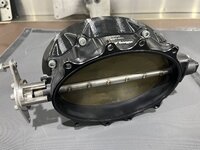
This all day long but there are so many STL files out there to use until you are ready to dive into that. I was content for a little while just printing things others had made STL files for but have been aware of CAD for a long time. Just never could justify the time to invest in learning until the vacuum part broke that I made. Now, it's just another tool in the toolbox that I can bring to the table. Seeing that throttle body adapter above make me want to print a carb spacer for my car.
 

Black300zx

Well-known member
Joined
Apr 8, 2019
Messages
781
Location
Elkton, Md
QFT

This all day long but there are so many STL files out there to use until you are ready to dive into that. I was content for a little while just printing things others had made STL files for but have been aware of CAD for a long time. Just never could justify the time to invest in learning until the vacuum part broke that I made. Now, it's just another tool in the toolbox that I can bring to the table. Seeing that throttle body adapter above make me want to print a carb spacer for my car.
Once you become proficient with CAD, you'll have a whole new world available with 3D printing. Need a little piece of trim that's NLA? No problem. Need a custom dust collection adapter? No Problem. Need a custom tool? No problem
 

LeonardY

Well-known member
Joined
Apr 16, 2011
Messages
5,020
Location
Southern California
Just never could justify the time to invest in learning until the vacuum part broke that I made.
It always takes a project to start.
I used CAD for years at work but I never had a need to do 3D modeling. Then a job came along and they needed something to basically pay me up front (End of fiscal year. They would lose the money if they didn't spend it.) They asked if I could do a 3D model. I said sure. In two weeks I completed the 3D model.
Honestly, I can't design in 2D CAD anymore. Although, I still put pencil to paper to solve design problems.
 

laser3kw

Well-known member
Joined
Nov 17, 2012
Messages
7,276
Location
northen IL
my former career (retired) was an electronic / mechanical engineer. I designed and modeled complete machines with may have a thousand parts (not including fasteners). I used Autodesk products over a 25 year period, the last being AutoCad Inventor. Fusion 360 is awkward and a more primitive modeling platform compared to Inventor. I have explored other Cad packages trying to get back to the freindliness of Inventor.
 

LeonardY

Well-known member
Joined
Apr 16, 2011
Messages
5,020
Location
Southern California
I have explored other Cad packages trying to get back to the freindliness of Inventor.
It's tough when you know a program to move to another. I use FormZ, Rhino, Zbrush, and VisualCAD/CAM. I used AutoCAD, Inventor, Revit and Solidworks before I retired. Rhino has a trial version but it still costs about $900. FormZ has a free version. Since I no longer have to follow any standards. I'm most comfortable in FormZ and Zbrush.
 

sh944

ALLIANCE MEMBER
Joined
Jan 1, 2014
Messages
291
Location
Linwood, KS
Don't feel bad, I have twenty years invested in TurboCAD, it’s a good program but behind the times. I use 3D-builder (microsoft store product for basic builds) and it does fine. It’s not the program, it’s what you do with it that counts.

The same goes with printers. I currently have a Qidi X-plus and a Bambu X1C, but for what I run, an Ender 3 probably would have been just fine. It’s just a matter of how involved you become with your platform, nothing more.
 
Last edited:

AffableCurmudgeon

Well-known member
Joined
Jan 26, 2009
Messages
1,906
Location
Triad Area NC
I've had an ender 3 pro and I don't know what all this constant fiddling talk is, but I must have hit the jackpot because after the initial setup it's been rock solid.
Agreed, my experience is the same as well. I think people sometimes have a preconceived notion in their mind, or are loyal to a brand and don't consider other opinions. Same folks keep Snap-On in business as well. :)

I calibrated extrusion on my Ender 3 once when I bought it. Rock solid since then. No Fiddling, ever.
 

kppolich

Well-known member
Joined
Apr 7, 2020
Messages
344
Location
Eastern Iowa
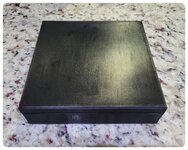
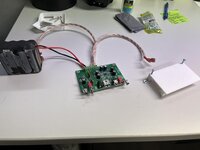
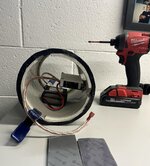
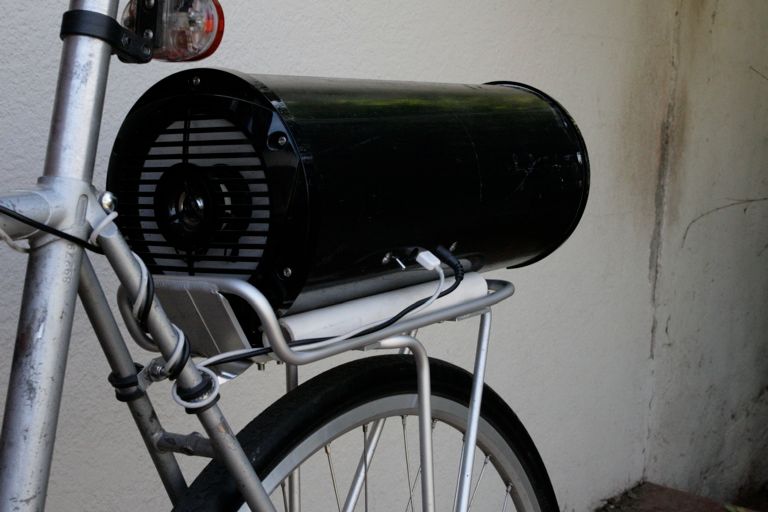
After a few quick iterations to allow for more space above the board components and around the mounting screws I have printed this circuit board protector for my bike boombox that I carry on RAGBRAI.

This thing is LOUD with a nice battery that will last all day at full volume and the 6.5" Kenwood marine speakers.

The first board and speakers lasted me 8 years. I spent $60 and ordered a new board after the battery came loose inside the enclosure and dinged up the board components. Not with this one, High Strength Outdoor Velco for the battery and this 3D printed protector just in case for the board.

Plans here:
 

Attachments

  • keWyymO.jpg
    keWyymO.jpg
    140.8 KB · Views: 27
  • Bae54F1.jpg
    Bae54F1.jpg
    273.5 KB · Views: 25
  • xOMSPnr.jpg
    xOMSPnr.jpg
    215.8 KB · Views: 29
  • pWgG4xy.jpg
    pWgG4xy.jpg
    425 KB · Views: 48

kppolich

Well-known member
Joined
Apr 7, 2020
Messages
344
Location
Eastern Iowa
I've been looking for a light solution for a while now to keep an eye on things better in Octoprint without leaving the lights on in our Bike Room that also houses the 3D printer.

I settled on this rechargeable LED bar with magnetic swivel mount for $17 on amazon rather than a USB/Smart light option. For the times I need it I can turn it on or let it run out. The mount itself has 3m on the back attached to the bottom of my lower TV. The light and female side of the mount have interlocking magnets which is a nice touch.


It came with a second mounting base so I can technically take it and mount it elsewhere if/when that happens.
 

Attachments

  • NGCl58D.jpg
    NGCl58D.jpg
    361.1 KB · Views: 40
  • LqPHE0l.jpg
    LqPHE0l.jpg
    456 KB · Views: 45

Mark_17

Well-known member
Joined
Jun 27, 2018
Messages
742
Location
NJ
Having a problem that I'm hoping someone can help me on.

I have an Ender 3 pro. I've used it for a couple years with no issues.

Now I am having feeder issues. The issues seem to be intermittent, but lately they have happened on all of my long prints. Prints that are 1-1.5 hours seem to be fine with maybe 1 layer not right.

I replaced the plastic pieces on top of the extruder motor with aluminum, then replaced the extruder motor, then the hot end and the tube between them.

I'm stumped. I've been using the same brand of filament, the same slicer settings, nothing has changed.

Any one have any ideas to try?
 
To avoid these ads, REGISTER NOW!
Top Bottom