To avoid these ads, REGISTER NOW!

The Everything 3D Printer Thread

slodat

ALLIANCE MEMBER
Joined
Feb 6, 2010
Messages
3,679
Location
Central-ish, WA
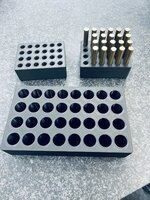
Ran a few each of these work in progress blocks on the X1C’s. They turn out really nice and will help with the production of these parts.
IMG_2806.jpeg

IMG_2807.jpeg

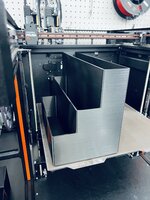
I wanted to print another bag organizer on the XL for the larger bags. The first attempt failed:

IMG_2780.jpeg

The control panel stated the fan had failed. A reboot appeared to fix it. The second attempt failed as well. It stopped extruding. I believe that hotend is clogged bad. I switched to the other tool head and got a successful print.

IMG_2804.jpeg

IMG_2803.jpeg

IMG_2802.jpeg

IMG_2805.jpeg

As I use the XL more I feel it’s going to get better over time. This is historically how Prusa does things. A few things aren’t there that are quite surprising. I had to reslice the project to switch to the other tool head. I’ve had issues where the wifi doesn’t work at all requiring multiple reboots. It doesn’t switch toolheads when it runs out of filament and other toolheads have that filament loaded.

I love the print quality. The big bag organizer is 12” wide, 6.5” deep, 8” tall. That’s a great looking print at that size.
 
To avoid these ads, REGISTER NOW!

loganb

ALLIANCE MEMBER
Joined
Dec 29, 2011
Messages
5,496
Location
Omaha, NE
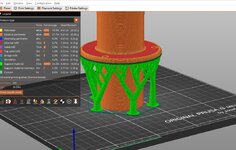
Cross post from my thread, but a quick example of the practical impacts changing support types can have on the parts. The example part is a 2" OD dust collection adapter...but has a wide flange in the middle to cover up a hole and provide attachment for where it passes thru a tabletop

With the "standard" support which are shown in the green material:

grid support.jpg


Almost half the print time is taken up printing that support material...which is then thrown away

A slightly modified version of this that the slicer program I use calls "Snug" improves on time and material:

snug support.jpg

Cutting 24 minutes out of the print...so not a big savings as it's still 2 hours to print supports that will then be tossed

But the cool tree supports....

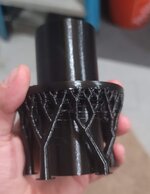
tree support.jpg

Those cut the time from original 2.5 hours to 53 minutes but even better reduce the material used by 80%...in this case the value of that material was now 35 cents...much better!

Finished part after the 3.5 hour print:

tree.jpg

And where it goes:

20230825_184030.jpg
 

jayz66ragtop

Well-known member
Joined
Sep 11, 2009
Messages
1,521
Location
SoCal
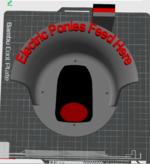
Bought the wife a Mach E a little while back, waiting for the permit to be approved to install a 240V outlet in the garage. Ford put an Easter Egg on the rear motor casing that says "Electric Ponies Live Here". Once the outlet is installed I am going to mount a level 2 charger next to it and wanted some sort of cool charging connector/cable hanger. Found a STL I liked and then modified it to fit the Mach E. Going to print it when I have enough time with the wife not around so it doesn't spoil the surprise and then hang it along with the new charger. Probably going to print two, one as a test just to make sure it comes out clean and doesn't need further adjustments and then the second with PETG-CF. I just got four spools of CF filament for $0.99 from Bambu but three are black and the fourth is red. May have to see if they have the PETG-CF in Grey.


Outlook-dsvnfvhe.png

Yes, I know it has the wrong plate for printing PETG-CF, I just used what was in the AMS at the time to get an idea of print time and such.
 

Poolshark314

Well-known member
Joined
Jul 5, 2021
Messages
658
Location
MD
Last edited:

jayz66ragtop

Well-known member
Joined
Sep 11, 2009
Messages
1,521
Location
SoCal
@jayz66ragtop , Do it in red. Make that pony feeder pop.
I initially had it in red with black lettering but her car is grey. It is the GT PE so I could do grey with red lettering to match the calipers.

Maybe I'll do grey with the charger connector part black and red lettering. I'll play with it in the slicer and see how it looks.


Vehicle in question:

20230723_163619.jpg

Feel like this matches the car more
1693603998198.png

But the red really pops on this one
1693603663910.png
 
Last edited:

Mark_17

Well-known member
Joined
Jun 27, 2018
Messages
742
Location
NJ
I could never get my Ender 3 pro working right again. The Ender 3 S1 went on sale for $300 so I jumped on it.

Got it set up last night and printing. So far I'm very happy with it. It prints much faster and much quieter.
 

nicholam77

Well-known member
Joined
Dec 18, 2016
Messages
2,655
Location
Minneapolis, MN
I could never get my Ender 3 pro working right again. The Ender 3 S1 went on sale for $300 so I jumped on it.

Got it set up last night and printing. So far I'm very happy with it. It prints much faster and much quieter.

I did the same but ditched my Ender 3v2 after constant extruder issues. I haven't had any troubles with the Sprite *so far*. Overall seems to be a nice upgrade.
 

no704

Well-known member
Joined
Apr 27, 2016
Messages
5,206
Cross post from my thread, but a quick example of the practical impacts changing support types can have on the parts. The example part is a 2" OD dust collection adapter...but has a wide flange in the middle to cover up a hole and provide attachment for where it passes thru a tabletop

With the "standard" support which are shown in the green material:

grid support.jpg


Almost half the print time is taken up printing that support material...which is then thrown away

A slightly modified version of this that the slicer program I use calls "Snug" improves on time and material:

snug support.jpg

Cutting 24 minutes out of the print...so not a big savings as it's still 2 hours to print supports that will then be tossed

But the cool tree supports....

tree support.jpg

Those cut the time from original 2.5 hours to 53 minutes but even better reduce the material used by 80%...in this case the value of that material was now 35 cents...much better!

Finished part after the 3.5 hour print:

tree.jpg

And where it goes:

20230825_184030.jpg
What were your support settings for that?
 

loganb

ALLIANCE MEMBER
Joined
Dec 29, 2011
Messages
5,496
Location
Omaha, NE
What were your support settings for that?
The tree supports were whatever default for PrusaSlicer is as I haven't done any tuning of it. Can get more info later if you'd like, just away from the computer and printer for a couple days
 

cycle61

Well-known member
Joined
Apr 5, 2020
Messages
500
Location
Middle of Oregon
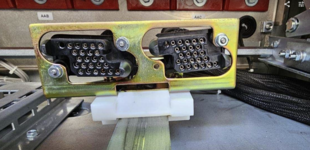
A client's site had some ham-fisted operations of a medium voltage (15,000 volts) breaker, and it resulted in damage to the control connections inside the machine.

1694064751786.png

The parts to replace this from the manufacturer are well over $1k, and only available with a long lead time. We found what we believe is the identical part from a supplier, and have ordered some, but before making any promises to our client, we're going to see if our theory is correct. The 3rd party vendor offers very good documentation of their products, including a 3d model library.

1694065020203.png

So this is getting started on the printer tonight, and in the morning we'll see if it fits the machine. I'm making some to have in-hand first thing tomorrow, and @slodat is printing a set that will probably be good enough to put into service if the vendor can't deliver their version in time.

1694064722704.png
 

NBraun

Well-known member
Joined
Sep 14, 2020
Messages
158
Using my ender 3 v2 has finally pushed me over the edge. I was all prepared to pull the trigger on an X1C, just to see they're unveiling something on the 20th. Now I HAVE to wait,
 
To avoid these ads, REGISTER NOW!

jmdirk

Well-known member
Joined
May 4, 2015
Messages
695
P1S just got released.

P1P had a price drop.

at this point i'd just get more P1Ps as FSS needs.

I dithered over it for awhile, but ended up pulling the trigger on a P1S. Only about $130CAD difference between the P1P and the P1S. Seems like a no brainer.
 

NBraun

Well-known member
Joined
Sep 14, 2020
Messages
158
Well decided to just go ahead and pull the trigger on the X1C. Holy buckets this thing prints easy compared to my Ender 3. I know people can get great prints off of those, but I spent a month testing different settings trying to get good PETG prints and this thing does it perfect on the first try! Already did some test prints and started printing some useful items for the shop.

hgZf8xfl.jpg
This is a gauge holder for my V8 swapped Ranger in PETG

Printed off some bench dogs in PLA-CF for my CNC router.
Avommmhl.jpg


I did have a question for those that have experience with the X1C and AMS. I was using the test rolls that came with the printer. It seems that when it would try and retract it couldn't pull it out of the tool head. The roll will get pulled up and wedged in the AMS. Is this something you've seen? I'm thinking it may be because the roll is too light to have enough force to pull.
 

slodat

ALLIANCE MEMBER
Joined
Feb 6, 2010
Messages
3,679
Location
Central-ish, WA
I did have a question for those that have experience with the X1C and AMS. I was using the test rolls that came with the printer. It seems that when it would try and retract it couldn't pull it out of the tool head. The roll will get pulled up and wedged in the AMS. Is this something you've seen? I'm thinking it may be because the roll is too light to have enough force to pull.
Happens from time to time. Pull the tube from the connector on the back where it enters the printer. Then click retry. Works everytime for me. No rhyme or reason I can figure out. It just does it sometimes. Takes a few seconds.
 

jeepxj

Well-known member
Joined
Mar 2, 2008
Messages
17,831
well looks like this years christmas pollyanna gift is going to be fun.


jayz66ragtop

Well-known member
Joined
Sep 11, 2009
Messages
1,521
Location
SoCal
Well, attempted a trial print of the EV charger cord holder with a scaled down version to save on filament and either the extruder or the feeder is jammed switching from the black to the red. Didn't have time to take the XC1 apart over the weekend so will have to take a look sometime this week. Bummed because the electrician is coming tomorrow to install the 240V plug and was hoping to put the holder up on Wednesday since the wife works that evening. Guess it'll have to wait until this weekend.

Wondering if my hot end just needs to be replaced, doesn't have a ton of filament through it but didn't seem to purge right when switching from the grey to black filament on this test piece.
 

jeepxj

Well-known member
Joined
Mar 2, 2008
Messages
17,831
Well, attempted a trial print of the EV charger cord holder with a scaled down version to save on filament and either the extruder or the feeder is jammed switching from the black to the red. Didn't have time to take the XC1 apart over the weekend so will have to take a look sometime this week. Bummed because the electrician is coming tomorrow to install the 240V plug and was hoping to put the holder up on Wednesday since the wife works that evening. Guess it'll have to wait until this weekend.

Wondering if my hot end just needs to be replaced, doesn't have a ton of filament through it but didn't seem to purge right when switching from the grey to black filament on this test piece.

you got a spare hot end? takes like 3 minutes to swap out and see.
 

jayz66ragtop

Well-known member
Joined
Sep 11, 2009
Messages
1,521
Location
SoCal
you got a spare hot end? takes like 3 minutes to swap out and see.
I do, took it off the last time I got a jam as well. unfortunately I was too rough on the little tool they sent with the printer to unclog the hot end so we'll see. I think it may be filament stuck in the extruder and not the hot end but that's another couple of minutes to pull out once the hot end is removed. Had family things on Sunday, may get a minute to take a look tonight.
 

MadeByMiller

Well-known member
Joined
Dec 29, 2018
Messages
1,230
Location
Rapid City, SD
The elusive Prusa XL was delivered to the studio on Friday. I wasted no time unboxing and assembling the machine. Assembly was straightforward and took six hours. Excitedly, I plugged it into power and booted up the machine - to which I was greeted with an error code. Straight out of the box, the sandwich board was having communication issues to both toolheads. The online diagnostic said this error code is likely tied to improper connections or loose wires on the cables that run to the toolheads from the sandwich board. I checked these connections and ensured that the wires were seated properly into their connectors, and everything looked fine. In fact, I knew that the connections had to be operational, as the lights and fans were functioning on the toolheads, indicating that they were receiving power and signal.

One annoying online tech support chat and 2.5 hours later, and I was still left with an inoperable machine and no help. I was told my case would be forwarded to an "XL specialist" to further try to diagnose the problem. Before I even contacted tech support, I was pretty sure that there was an issue with the sandwich board causing the problem, and the tech I chatted with told me that he believes that to be the culprit, but he wasn't well versed enough in the XL to be confident. He informed me that I should be receiving communication from said XL specialist on Tuesday.

This is disappointing, but there's nothing I can do but wait at this point.

1695065502519.png
 

Jehannum

Well-known member
Joined
May 3, 2012
Messages
1,348
Location
Albuquerque, NM
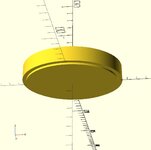
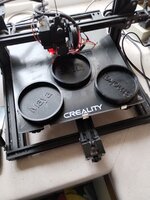
My idiot dogs ate the food scoop because my son left it out last week, so I designed a parametric food cup.

It takes as parameters volume (cups), diameter (inches), and name (text), so that I could just fill the cup to the rim with food, and have the right amount of food for the dog.

If you specify more than one of the same diameter, they stack.

Food Cup_top.jpg


Food Cup_bottom.jpg

The last one's on the plate now, almost finished (1/2 cup, the other two are 1/3rd cup):
messages_0(1).jpeg

Stacked:
messages_0(2).jpeg
 

cycle61

Well-known member
Joined
Apr 5, 2020
Messages
500
Location
Middle of Oregon
I have an Oneida Mini Gorilla dust collector in my garage/shop, and although it moves an incredible amount of air, the unfinished 5" diameter hose connects to exactly nothing without adapters. After over a year of just sort of sticking it in front of stuff, I've found a good model to start printing up a bunch of connectors.

This is a parametric model found here: https://www.printables.com/model/282014

Incredible range of customization available within this model, I think I'll be able to use it for all my tools and connectors.

1695067929832.png

A pack of 10x3mm magnets have been ordered from Amazon, and the print is running now.

1695068073166.png
 

jeepxj

Well-known member
Joined
Mar 2, 2008
Messages
17,831
I do, took it off the last time I got a jam as well. unfortunately I was too rough on the little tool they sent with the printer to unclog the hot end so we'll see. I think it may be filament stuck in the extruder and not the hot end but that's another couple of minutes to pull out once the hot end is removed. Had family things on Sunday, may get a minute to take a look tonight.

run that thing uber hot and then manually force filament into it.
 

cycle61

Well-known member
Joined
Apr 5, 2020
Messages
500
Location
Middle of Oregon
The dust collector hose adapter came out perfectly.

1695138485057.png

And now, what I suspect is a leaky hot end smurfed up the first layer of the next print. I need to disassemble this thing. It's the slight frustrations of having the Prusa be a good, but not great, printer. The bottom of the extruder is covered in melted filament, and I have to scrub it frequently with a brass wire brush to avoid this kind of failure.

1695138551542.png
 

slodat

ALLIANCE MEMBER
Joined
Feb 6, 2010
Messages
3,679
Location
Central-ish, WA
The dust collector hose adapter came out perfectly.

1695138485057.png

And now, what I suspect is a leaky hot end smurfed up the first layer of the next print. I need to disassemble this thing. It's the slight frustrations of having the Prusa be a good, but not great, printer. The bottom of the extruder is covered in melted filament, and I have to scrub it frequently with a brass wire brush to avoid this kind of failure.

1695138551542.png
This is the hot end. I fought it for years. I'm sending you a new hotend now..
 

jayz66ragtop

Well-known member
Joined
Sep 11, 2009
Messages
1,521
Location
SoCal
run that thing uber hot and then manually force filament into it.
Yeah, I tried that... Set the hot end to 300 degrees and tried to force it through while hitting the manual feed. It goes in about a mm and then hits something hard in the extruder. Tried it with and without the PTFE tube in place.
 

jeepxj

Well-known member
Joined
Mar 2, 2008
Messages
17,831
Yeah, I tried that... Set the hot end to 300 degrees and tried to force it through while hitting the manual feed. It goes in about a mm and then hits something hard in the extruder. Tried it with and without the PTFE tube in place.

did you let it heat soak a while?

you got the needle kit? that saved one of my P1P hot ends
 

jayz66ragtop

Well-known member
Joined
Sep 11, 2009
Messages
1,521
Location
SoCal
did you let it heat soak a while?

you got the needle kit? that saved one of my P1P hot ends
Let it sit for about five minutes, pulled the front cover away as well just to keep the fan away.

I broke the needle kit when I tried to unclog it the last time. Tried to find a new one on their site but couldn't find one, should contact their customer support and see if they can send me a couple replacements.
 

BobLon

ALLIANCE MEMBER
Joined
Apr 19, 2017
Messages
141
Location
Florida
I have an Oneida Mini Gorilla dust collector in my garage/shop, and although it moves an incredible amount of air, the unfinished 5" diameter hose connects to exactly nothing without adapters. After over a year of just sort of sticking it in front of stuff, I've found a good model to start printing up a bunch of connectors.

This is a parametric model found here: https://www.printables.com/model/282014

Incredible range of customization available within this model, I think I'll be able to use it for all my tools and connectors.

1695067929832.png

A pack of 10x3mm magnets have been ordered from Amazon, and the print is running now.

1695068073166.png

Thanks for this. I have 5" piping in my dust collector. Haven't yet branched out to the various tools so this looks promising.

Hope you post some post process/use pics.

BobL.

Edit: I should have scrolled down, duh. Was just so exited :thumbup:
 
To avoid these ads, REGISTER NOW!
Top Bottom