To avoid these ads, REGISTER NOW!

The Everything 3D Printer Thread

jeepxj

Well-known member
Joined
Mar 2, 2008
Messages
17,831
Let it sit for about five minutes, pulled the front cover away as well just to keep the fan away.

I broke the needle kit when I tried to unclog it the last time. Tried to find a new one on their site but couldn't find one, should contact their customer support and see if they can send me a couple replacements.

if they dont come through for you I have a ton of them. I can pop a couple in the mail
 
To avoid these ads, REGISTER NOW!

loganb

ALLIANCE MEMBER
Joined
Dec 29, 2011
Messages
5,495
Location
Omaha, NE
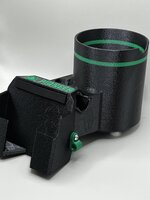
Finally printing something on the big printer after a month or so of it being idle due to life. Reprinting a dust chute for the chopsaw as I may have cut a piece that was too short and shot the tail into it and broke it at a layer line....

20230919_160312.jpg

Printed in ABS
 

fletcher94

Active member
Joined
Sep 4, 2023
Messages
29
Ime sorta jelous of everyone posting their successful prints. You all do some great work. I couldn’t get it to do much so ended up selling my prusa a few months ago. Super cool concept but just didn’t care enough to learn it like I initially planned. I guess ime better suited for manual machine work and welding.
 

cycle61

Well-known member
Joined
Apr 5, 2020
Messages
500
Location
Middle of Oregon
I just rebuilt my leaky hotend, mostly to see if it's actually the problem. Looks like when I assembled the machine in '21 I didn't get the heat brake fully seated into the hot end. That leaves a tiny gap between the nozzle and the end of the heat brake, allowing filament to gradually leak through the threads where the pieces install from top and bottom.

IMG_0084.jpg

The burnt goop was originally orange, which tells me it's been doing this for quite a while. Haven't printed anything orange in well over a year.
 

jayz66ragtop

Well-known member
Joined
Sep 11, 2009
Messages
1,521
Location
SoCal
if they dont come through for you I have a ton of them. I can pop a couple in the mai

Sent them a message so we'll see. May take you up on the offer depending on what they say.

I looked all over their site and could not find a place to purchase them, only found them in the "What's in the box" for the P1S I think it was.


Officially called a "Unclogging Pin Tool" from here looks like they show it on the "Accessory Box" for the X1C on the "What's in the box"
 

jeepxj

Well-known member
Joined
Mar 2, 2008
Messages
17,831
Sent them a message so we'll see. May take you up on the offer depending on what they say.

I looked all over their site and could not find a place to purchase them, only found them in the "What's in the box" for the P1S I think it was.


Officially called a "Unclogging Pin Tool" from here looks like they show it on the "Accessory Box" for the X1C on the "What's in the box"

just cracked open a P1S so I have a full set for you if you want it.
 

sh944

ALLIANCE MEMBER
Joined
Jan 1, 2014
Messages
291
Location
Linwood, KS
I posted this in the Garage forum as well (KC Wrenching Society garage condo thread) but thought its appropriate to post here as well, so some of this is duplicated elsewhere.

First, this isn't necessarily the product I would have bought as its Chinese manufactured LED lighting, but my wife bought it as a birthday gift for me and I am appreciative that she made a thoughtful purchase AND I appreciate that she supports my "garage habit". Also, its certainly much better than what it was.

But... its Chinese and so you get to deal with the typical issues that comes with that. First, the mounting brackets that they sent were made out of a special kind of "tin foil" that doesn't hold for ****. Secondly, to mount them on overhead joists requires more effort that I want to put into it as drilling overhead through thick gauge metal isn't my idea of fun. Here's what came with the lights...

IMG_E2732.JPG


Its flimsy as hell and even worse, after I test fit the first one and then called it a night, I parked my Spyder under it and the next morning came back to find that it hadn't properly secured the light and the light fell and put a small dent in the fender of my car so now I get to make a visit to my PDR guy. $@&$#%%#! At least the light still works.

I already knew I wasn't happy with the brackets so I drew up a quick design and ran a prototype print that would better secure *and* center the lights on the joists. After I test fit the prototype, I made a few minor tweaks... here's a pic of the prototype and the final product side-by-side....

IMG_2727.JPG


I built a collar on revised part just in case I needed to run a bolt through it for additional clamping strength, but I built some spring tension into (hard to see but it is there lol) and it seems like it has enough clamping strength and surface area contact on its own to hold with no worries.

Here's a picture of the clamp holding the light to the joist.

IMG_2722.JPG


And just to satisfy the inner-nerd in me, I worked on the tolerances of the fitment to the luminaire itself and was pleased with how it came out on the first try. I might actually be getting to the point of being able to accurately measure things... finally. lol

IMG_2725.JPG


So far, I only have two of the printed clamps pending the trial fit, I used mechanical beam clamps and ty-wraps to secure the rest of the lights for now but it is definitely much better lit than it used to be under the mezzanine. I *may* add one more row of lights at some point, and I will run EMT conduit and permanently wire the lighting before I call it good.

IMG_2730.JPG
 
Last edited:

kaymccampbell

Well-known member
Joined
Feb 27, 2015
Messages
29,410
Location
Upstate New York
I posted this in the Garage forum as well (KC Wrenching Society garage condo thread) but thought its appropriate to post here as well, so some of this is duplicated elsewhere.

First, this isn't necessarily the product I would have bought as its Chinese manufactured LED lighting, but my wife bought it as a birthday gift for me and I am appreciative that she made a thoughtful purchase AND I appreciate that she supports my "garage habit". Also, its certainly much better than what it was.

But... its Chinese and so you get to deal with the typical issues that comes with that. First, the mounting brackets that they sent were made out of a special kind of "tin foil" that doesn't hold for ****. Secondly, to mount them on overhead joists requires more effort that I want to put into it as drilling overhead through thick gauge metal isn't my idea of fun. Here's what came with the lights...

IMG_E2732.JPG


Its flimsy as hell and even worse, after I test fit the first one and then called it a night, I parked my Spyder under it and the next morning came back to find that it hadn't properly secured the light and the light fell and put a small dent in the fender of my car so now I get to make a visit to my PDR guy. $@&$#%%#! At least the light still works.

I already knew I wasn't happy with the brackets so I drew up a quick design and ran a prototype print that would better secure *and* center the lights on the joists. After I test fit the prototype, I made a few minor tweaks... here's a pic of the prototype and the final product side-by-side....

IMG_2727.JPG


I built a collar on revised part just in case I needed to run a bolt through it for additional clamping strength, but I built some spring tension into (hard to see but it is there lol) and it seems like it has enough clamping strength and surface area contact on its own to hold with no worries.

Here's a picture of the clamp holding the light to the joist.

IMG_2722.JPG


And just to satisfy the inner-nerd in me, I worked on the tolerances of the fitment to the luminaire itself and was pleased with how it came out on the first try. I might actually be getting to the point of being able to accurately measure things... finally. lol

IMG_2725.JPG


So far, I only have two of the printed clamps pending the trial fit, I used mechanical beam clamps and ty-wraps to secure the rest of the lights for now but it is definitely much better lit than it used to be under the mezzanine. I *may* add one more row of lights at some point, and I will run EMT conduit and permanently wire the lighting before I call it good.
IMG_2730.JPG
IME Chinese LEDs want receptacles on the ceiling, not hard wiring. It makes it so much easier to swap one out when it STB.
 

MadeByMiller

Well-known member
Joined
Dec 29, 2018
Messages
1,230
Location
Rapid City, SD
Jealous you got your XL! Thinking that bambu might come out with a bigger system before ill see an XL
Not sure if this message was aimed at me and my XL. After getting the run around multiple times from Prusa, I've actually decided to return the machine. Waiting on Prusa to send me packaging instructions and a shipping label.
 

sh944

ALLIANCE MEMBER
Joined
Jan 1, 2014
Messages
291
Location
Linwood, KS
IME Chinese LEDs want receptacles on the ceiling, not hard wiring. It makes it so much easier to swap one out when it STB.

You mean the 37 GA stranded wire whip that they provided won't work? lol

Seriously, a 9 volt battery could probably melt that thing so I get where you are going with that suggestion. I can fab my own 3 pin connectors using something far more robust and depending on my motivation at the time, I might go ahead and do so as the 110v plug in cord that they provided with a built in on/off switch looks like it is just as suspect to fail as any other component in the system.

I'll say this much, at this point it is putting out a good bit of light and as long as it keeps working, I'll be happy.
 

jayz66ragtop

Well-known member
Joined
Sep 11, 2009
Messages
1,521
Location
SoCal
just cracked open a P1S so I have a full set for you if you want it.
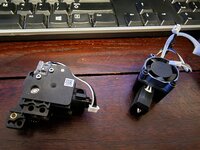
Really appreciate the offer, I may take you up on it. Bambu's initial response wasn't very encouraging BUT I went ahead and pulled the hot end and extruder out this afternoon/evening and it was clogged up pretty good. It was switching from grey to red filament when things went sideways and it seems a bit literally. Some of the red filament was almost horizontal from where it should be vertical going in. Thought I had it cleaned all up, put it back together but turning the yellow gear by hand I could feel something still not right. Pulled it back apart and there was a couple of pieces inside the black housing. Blew it all out again, double checked everything and put it back together. Yellow gear now turns smooth as butter.

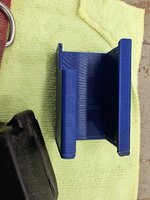
First print since getting it back together is starting now. First print now that its back in business is the block to put under the extruder when knocking out the yellow gear assembly, that thins is a pain to get out without something under the case supporting it.

PSA - For anyone with a Bambu printer, I highly recommend you print the gear removal tool. It's tough to print it when you need it so best to have it on hand prior to needing it. I've learned that lesson and now printing at least one to have on had when I need to remove the yellow gear assembly again. This is the one I'm printing: https://www.printables.com/model/406762-bambu-lab-gear-removal-tool-extruder-clog-fix and looks just like the one recommended on the Bambu Wiki page here: https://wiki.bambulab.com/en/x1/troubleshooting/extruder-clog
 

jeepxj

Well-known member
Joined
Mar 2, 2008
Messages
17,831
Really appreciate the offer, I may take you up on it. Bambu's initial response wasn't very encouraging BUT I went ahead and pulled the hot end and extruder out this afternoon/evening and it was clogged up pretty good. It was switching from grey to red filament when things went sideways and it seems a bit literally. Some of the red filament was almost horizontal from where it should be vertical going in. Thought I had it cleaned all up, put it back together but turning the yellow gear by hand I could feel something still not right. Pulled it back apart and there was a couple of pieces inside the black housing. Blew it all out again, double checked everything and put it back together. Yellow gear now turns smooth as butter.

First print since getting it back together is starting now. First print now that its back in business is the block to put under the extruder when knocking out the yellow gear assembly, that thins is a pain to get out without something under the case supporting it.

PSA - For anyone with a Bambu printer, I highly recommend you print the gear removal tool. It's tough to print it when you need it so best to have it on hand prior to needing it. I've learned that lesson and now printing at least one to have on had when I need to remove the yellow gear assembly again. This is the one I'm printing: https://www.printables.com/model/406762-bambu-lab-gear-removal-tool-extruder-clog-fix and looks just like the one recommended on the Bambu Wiki page here: https://wiki.bambulab.com/en/x1/troubleshooting/extruder-clog

I feel like on my own in saying my bambu support experience was rock solid.

only one mess up on the AMS for this test article.
2023-09-21 11.58.37.jpg
 

jayz66ragtop

Well-known member
Joined
Sep 11, 2009
Messages
1,521
Location
SoCal
I feel like on my own in saying my bambu support experience was rock solid.

only one mess up on the AMS for this test article.
2023-09-21 11.58.37.jpg
Sorry if I sounded like I was putting their customer service down. For the most part they have been quick to answer with satisfying responses. When inquiring about the clog removal tool their response was a bit cryptic but that may have been my faul partially because I asked about a clog removal needle and not the "official" name. It's all good and still think they are a great company with a great product.
 

jayz66ragtop

Well-known member
Joined
Sep 11, 2009
Messages
1,521
Location
SoCal
Welp... Decided to go for it and print the EV charging cord holder last night, sat around for about 15 minutes and all was good UNTIL the AMS switched from grey to black. Could hear it struggle a bit and then got the message about not being able to pull back the filament. Hit retry while standing there and could see when the filament was being pulled back it was almost like the end of the filament was catching on every joint. I retried a couple of times hoping it would fix itself but alas, just made it worse. The filament was so taught in the tube that I couldn't get it disconnected to see what was going on.

Eventually I pulled on the filament inside the AMS, stretching it a little which gave me enough slack to disconnect the AMS from the back of the printer. Cut the filament and was able to pull it out of the AMS, now on to the printer side. I was able to disconnect the tube from the back of the printer that goes into the chamber and pulled from the out first, was able to pull it a little so I clipped that part and pulled the filament from there out.

So I had about an inch from the back of the print into the chamber to get out. When I pulled on it and watched the inside tube I could see the filament came out a little and then got hung up. So I disconnected the tube from the print head and tried pushing it out, of course I could get it about an inch and half from the end and was out of tube to push with. Disconnected the tube from the inside now and had enough to push the filament all the way to where I could see the end but not enough to get a hold of it. Grabbed a short cutoff piece of filament and pushed what was in the tube out just enough to get a hold of it.

As I was pulling the remaining filament out of the tube I could feel there was a bulb at the end, that is what was getting snagged on all the joints. I thought maybe the end got messed up after inserting the filament or whatever so I put everything back together and give it another go.

Second print went about as well. Grey filament was being loaded and I heard the same noise I heard when the black filament had trouble being pulled back. Since I had a pretty good idea what was gong to happen next, I stopped the print and immediately pulled the tube from the print head since I could see the filament there. Sure enough, the end of grey filament had the same weird bulb at the end like the black.

At this point I stopped for the night with printing, I think the hot end is messed up and causing the end of the filament to get jammed up when the extruder tries to push it thorough. Not sure if it's not getting up to temperature or it's just worn out and time for a replacement. In either case I went on the Bambu website and ordered a replacement extruder, new tubes, and something else I cannot remember. I have a complete hot end, a couple of hot ends (.02, .04, and .06 I think) from the Kickstarter thank you package so I'm going to replace the extruder, tubes, and hot end once my new parts arrive. If anyone wants pictures of any of this, I have to take it apart again when the new parts arrive. Most of it can be found on the Bambu website though.

Not sure why my test print of the gear removal tool went so smooth but glad I did that so I have it just in case I need it.

Really bummed, wife works tonight and tomorrow so was hoping to have the hanger up by Saturday afternoon.

I'm sure I am to blame for some of the follies above and in no way blame the printer. All of the parts I'm replacing are considered wear items so I think it's just maintenance along with a NEWB to the 3D printing world. After taking things apart I am even happier with the equipment, things are well designed and made.

Hopefully someone finds this of value, sharing out my experience so others can learn form my mistakes, laugh a little at my expense, and see reasons to either get or not get a 3D printer for personal use. The "political" side of creating plastic things aside, I think these devices free the common man to create and innovate without the huge costs of a manufacturing plant.
 

penright

ALLIANCE MEMBER
Joined
Dec 27, 2016
Messages
618
Location
SW of Mustang, OK
I 3D printed a bunch of holders with pegs that would snap into pegboards. This summer the inside temperature got to 110 degrees Fahrenheit. All the parts were printed with PLA. They did not melt but soften enough that the weight would pull it out.
Also, some parts that were being held were too heavy even without heat. My pegboard holes are on 1" centers, so depending on the shape of the holder, there are only so many pegs.
The fix I am going to try is to put a hole in a screw. That way the peg works more like wall anchors than peg friction via expanding points.
Haven't tested in production yet.


Here is a picture comparing no screw and with the screw.

1695404844250.png

1695404885993.png
 

jayz66ragtop

Well-known member
Joined
Sep 11, 2009
Messages
1,521
Location
SoCal
The fix I am going to try is to put a hole in a screw. That way the peg works more like wall anchors than peg friction via expanding points.
Haven't tested in production yet.


Could try putting a push pin in them instead of a screw like how fasteners for vehicles work that way it's all 3D printed and can reprint new pins when you lose them. Might be able to simply put a hole in the front side of the model then create a pin that goes in the hole to prevent the peg from bending in.
 

jeepxj

Well-known member
Joined
Mar 2, 2008
Messages
17,831
Welp... Decided to go for it and print the EV charging cord holder last night, sat around for about 15 minutes and all was good UNTIL the AMS switched from grey to black. Could hear it struggle a bit and then got the message about not being able to pull back the filament. Hit retry while standing there and could see when the filament was being pulled back it was almost like the end of the filament was catching on every joint. I retried a couple of times hoping it would fix itself but alas, just made it worse. The filament was so taught in the tube that I couldn't get it disconnected to see what was going on.

Eventually I pulled on the filament inside the AMS, stretching it a little which gave me enough slack to disconnect the AMS from the back of the printer. Cut the filament and was able to pull it out of the AMS, now on to the printer side. I was able to disconnect the tube from the back of the printer that goes into the chamber and pulled from the out first, was able to pull it a little so I clipped that part and pulled the filament from there out.

So I had about an inch from the back of the print into the chamber to get out. When I pulled on it and watched the inside tube I could see the filament came out a little and then got hung up. So I disconnected the tube from the print head and tried pushing it out, of course I could get it about an inch and half from the end and was out of tube to push with. Disconnected the tube from the inside now and had enough to push the filament all the way to where I could see the end but not enough to get a hold of it. Grabbed a short cutoff piece of filament and pushed what was in the tube out just enough to get a hold of it.

As I was pulling the remaining filament out of the tube I could feel there was a bulb at the end, that is what was getting snagged on all the joints. I thought maybe the end got messed up after inserting the filament or whatever so I put everything back together and give it another go.

Second print went about as well. Grey filament was being loaded and I heard the same noise I heard when the black filament had trouble being pulled back. Since I had a pretty good idea what was gong to happen next, I stopped the print and immediately pulled the tube from the print head since I could see the filament there. Sure enough, the end of grey filament had the same weird bulb at the end like the black.

At this point I stopped for the night with printing, I think the hot end is messed up and causing the end of the filament to get jammed up when the extruder tries to push it thorough. Not sure if it's not getting up to temperature or it's just worn out and time for a replacement. In either case I went on the Bambu website and ordered a replacement extruder, new tubes, and something else I cannot remember. I have a complete hot end, a couple of hot ends (.02, .04, and .06 I think) from the Kickstarter thank you package so I'm going to replace the extruder, tubes, and hot end once my new parts arrive. If anyone wants pictures of any of this, I have to take it apart again when the new parts arrive. Most of it can be found on the Bambu website though.

Not sure why my test print of the gear removal tool went so smooth but glad I did that so I have it just in case I need it.

Really bummed, wife works tonight and tomorrow so was hoping to have the hanger up by Saturday afternoon.

I'm sure I am to blame for some of the follies above and in no way blame the printer. All of the parts I'm replacing are considered wear items so I think it's just maintenance along with a NEWB to the 3D printing world. After taking things apart I am even happier with the equipment, things are well designed and made.

Hopefully someone finds this of value, sharing out my experience so others can learn form my mistakes, laugh a little at my expense, and see reasons to either get or not get a 3D printer for personal use. The "political" side of creating plastic things aside, I think these devices free the common man to create and innovate without the huge costs of a manufacturing plant.

I have 2 p1ps and a p1S running pretty much constantly. im terrible on maintenance. i grease the lead screws about once every 2 weeks.

one clogged hot end is all the gods have given me so far.
 

jayz66ragtop

Well-known member
Joined
Sep 11, 2009
Messages
1,521
Location
SoCal
I have 2 p1ps and a p1S running pretty much constantly. im terrible on maintenance. i grease the lead screws about once every 2 weeks.

one clogged hot end is all the gods have given me so far.
Well, to be fair I was not gentle on mine a couple of times when filament got stuck so that may contribute to some of this...

Was bugging me because I couldn't remember what else came in that package as a thank you to all the Kickstater supports so I dug the part and guess what else was in there. I knew there was a ready to go complete .4 hotend and two or three hotends but felt like there was something else.


20230922_154348.jpg20230922_154425.jpg

Whooohooo! Hopefully be back in business in a little bit and don't have to wait for USPS to figure out how to get my parts from LA to here.
 

jayz66ragtop

Well-known member
Joined
Sep 11, 2009
Messages
1,521
Location
SoCal
and to reply to myself here a bit...

Got it back together and wanted to really test out switching filaments this time before claiming victory and moving on. Wanted something small to not waste too much filament if it went sideways but something that would allow color switching multiple times since that seemed to be when issue arose.


Printed a two plug wire separater in multiple colors, no issues whatsoever. Interesting the surface of them looks so rough but that is zoomed in pretty good, they are about an inch wide. I think it's back working again, the filament is from that last bout of cutting out the troubled filament. You can see how the end is all mangled, initially I thought it was the extruder but I think it is the hotend. Well, I think the mangling is from the extruder but due to the filament not going into the hotend correctly or getting clogged up in there.


20230922_173359.jpg
 
To avoid these ads, REGISTER NOW!

jayz66ragtop

Well-known member
Joined
Sep 11, 2009
Messages
1,521
Location
SoCal
Back for an update on the EV charger cord holder saga and the plot thickens.


Thought everything was set last night so I set the printer up and hung out in the office for a bit just to make sure everything was good and about five minutes into the print the same F'ing thing!!! Was fed up and just needed to step away for a bit, knew we would be out and busy most of the afternoon today so didn't get to looking at things until about 6:00.

I found the needles on Amazon and ordered a kit on Friday night because I was annoyed. Not that I didn't appreciate jeepxj's offer, it's just a me thing. They were delivered while we were out so I grabbed them and went to go see what was up. Tried multiple times with the hotend at 260 and 300 to push the stuck filament free from the bottom of the hotend with no luck. The Bambu instructions say to get the 1.5mm wrench really hot, stick it in the filament from the top and then let everything cool. I was going to give that a go, got the wrench super hot with a lighter, stuck it in the filament and it started to melt so I pushed a little harder just about to stop and let things cool when POP, the wrench almost bottomed out in the hotend and all the filament came out.

Let everything cool down and started inspecting everything. Keep in mind ALL of the filament I used for this project was brand new, literally opened the boxes, cut the factory sealed bags, and put the filament directly into my AMS. The grey filament is different than the other two colors. It's much smoother and noticeably smaller diameter, I have TLP, PETG, ABS, PLA, and PP filament and none of the others feel like this. How I didn't notice this before I don't know, probably over site due to excitement. I don't have any dark grey ABS but have a very small amount of light grey so I said screw it, the first one is going to be black with light grey accent and red letters. Been printing for almost an hour and so far no issues (except a couple of strings from the print tower being drug over into the black).

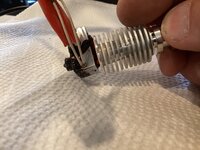
So, I think the issue all along was mainly the diameter is smaller so once it hits resistance of the hotend it goes sideways and gets all buggered up in there and will not feed. This is the first using this brand's ABS but have their PETG and it was fantastic, I think this was just a fluke bum spool of filament. But I've gotten really good at taking the hotend off bare handed while it's 200+ degrees :FIREdevil The trick is to hold the cooling fins, even the sock gets pretty hot, ask me how I know .

Also, suprise for the wife ruined. She came in while I was checking on the printer and could see what it was on the screen before I could cover it up. Oh well, she's just happy to have a hanger instead of the cord being wound up on the floor and the plug sitting on a box. and although she thought the "electric Ponies Feed Here" was cute, she figured I'd put "Feed Bag" or something like that. :dunno:


UPDATE at 12:30, 50% through the print and still no issues other than a couple of strings of grey drug into the black but at this point I'm happy the mystery seems to have been solved.
 
Last edited:

loganb

ALLIANCE MEMBER
Joined
Dec 29, 2011
Messages
5,495
Location
Omaha, NE
Another contender entering the 3D printing ring trying to take the title of baddest desktop printer:


All I know is what's on that video and their website....but if it works....big leap forward in technology and hardware getting rid of belts at that price point. I'm also not excited enough about it to drop $1400 out the gate on a company with a limited track record on 1st gen tech and hope that it ships/works as advertised or that I get my money back if I cancel...but am excited to see if they can back up even most of what they promise in that video!
 

draco_1967

Well-known member
Joined
Jan 3, 2021
Messages
205
Location
Utah
Interesting. I like the magnetic rails and 4-corner bed screws. Seems like a lot to potentially go wrong with those too... I'll wait to see how it performs in the hands of others.
 

jayz66ragtop

Well-known member
Joined
Sep 11, 2009
Messages
1,521
Location
SoCal
Interesting. I like the magnetic rails and 4-corner bed screws. Seems like a lot to potentially go wrong with those too... I'll wait to see how it performs in the hands of others.
I agree and this coming from someone who dropped $1400 on the Kickstater for a Bambu labs XC1. I felt more comfortable with the XC1 because by the time the Kickstater was out, may "influencers" had already been given pre-production models to test and their web site had pictures of their test lab with multiple printers sitting there running.

Will be intersting to see how well the tech does after 1000's of prints.
 

Black300zx

Well-known member
Joined
Apr 8, 2019
Messages
781
Location
Elkton, Md
It's been a while since my last post in this thread, but I'm still happy with how my Ender 3 Max neo is treating me. Haven't done much lately since I've been busy enjoying summer.

Looking ahead a few months towards winter projects, I want to get involved in making some parts for my car. OEM-based, but with some changes/improvements. 3D printed for proof of fitment/concept, but hopefully transferring into a molded/formed composite.

Some parts will be easy to model in CAD from scratch. Others would really benefit from me buying a 3D scanner. Soo....are 3D scanners a close enough relative to 3D printing to discuss in this thread? I started doing a little research and the CR-scan ferret seems to be pretty flaky from what I've seen in reviews, but the CR-scan lizard seems to be surprisingly effective for hobbyist scanning. Anyone have any experience with it, or anything else in the $500ish range?
 

slodat

ALLIANCE MEMBER
Joined
Feb 6, 2010
Messages
3,679
Location
Central-ish, WA
I am on my second scanner. First was the Einscan HX. It is perfect for the kind of thing you are looking to do. It's right at 20x the price you mentioned. I sold it and upgraded to the Shining 3d Freescan Combo. I use the scanner exclusively for reverse engineering for my client projects. There was nothing wrong with the HX. I wanted the features of the recently released Freescan Combo. I can't comment on the budget friendly scanners.

I do have quite a bit of experience reverse engineering with 3d scanners. It's definitely not inexpensive. They pay for themselves, in my opinion and use case, when there's money in the project. I use a third party software called Quick Surface for reverse engineering. It helps create parametric solid geometry from the scan mesh. My scanning setup has paid for itself in a couple months.

Edited to add: I'm happy to share what I've learned and answer questions. There's not a lot out there that I've found on the subject.
 
Last edited:

loganb

ALLIANCE MEMBER
Joined
Dec 29, 2011
Messages
5,495
Location
Omaha, NE
I was at the oral surgeon today and got a 3d scan for a new crown and commented I'd love to take their scanner home. Surgeon laughed and said he had priced a new model and it was $35k...decided the team could deal with the cord from the handheld scanner as the new models main benefit was cordless
 

Grimpala

Well-known member
Joined
Jul 16, 2012
Messages
1,404
I posted this in the Garage forum as well (KC Wrenching Society garage condo thread) but thought its appropriate to post here as well, so some of this is duplicated elsewhere.

First, this isn't necessarily the product I would have bought as its Chinese manufactured LED lighting, but my wife bought it as a birthday gift for me and I am appreciative that she made a thoughtful purchase AND I appreciate that she supports my "garage habit". Also, its certainly much better than what it was.

But... its Chinese and so you get to deal with the typical issues that comes with that. First, the mounting brackets that they sent were made out of a special kind of "tin foil" that doesn't hold for ****. Secondly, to mount them on overhead joists requires more effort that I want to put into it as drilling overhead through thick gauge metal isn't my idea of fun. Here's what came with the lights...

IMG_E2732.JPG


Its flimsy as hell and even worse, after I test fit the first one and then called it a night, I parked my Spyder under it and the next morning came back to find that it hadn't properly secured the light and the light fell and put a small dent in the fender of my car so now I get to make a visit to my PDR guy. $@&$#%%#! At least the light still works.

I already knew I wasn't happy with the brackets so I drew up a quick design and ran a prototype print that would better secure *and* center the lights on the joists. After I test fit the prototype, I made a few minor tweaks... here's a pic of the prototype and the final product side-by-side....

IMG_2727.JPG


I built a collar on revised part just in case I needed to run a bolt through it for additional clamping strength, but I built some spring tension into (hard to see but it is there lol) and it seems like it has enough clamping strength and surface area contact on its own to hold with no worries.

Here's a picture of the clamp holding the light to the joist.

IMG_2722.JPG


And just to satisfy the inner-nerd in me, I worked on the tolerances of the fitment to the luminaire itself and was pleased with how it came out on the first try. I might actually be getting to the point of being able to accurately measure things... finally. lol

IMG_2725.JPG


So far, I only have two of the printed clamps pending the trial fit, I used mechanical beam clamps and ty-wraps to secure the rest of the lights for now but it is definitely much better lit than it used to be under the mezzanine. I *may* add one more row of lights at some point, and I will run EMT conduit and permanently wire the lighting before I call it good.

IMG_2730.JPG
Any chance you want to share the STL for the light clips? I have these same lights and I'm looking to add some more and these would work great for my application.
 

sh944

ALLIANCE MEMBER
Joined
Jan 1, 2014
Messages
291
Location
Linwood, KS
Happy to... will try to send it via pm as I don't believe I can just post that file type here. If that doesn't work, I'll throw it up on a website and share the link or you can just shoot me your email address and I will send it directly to you.

If it gets hot where you are located, I'd suggest a filament more temperature stable than PLA. My preference is ASA for this application.

EDIT: Can't attach file, will work on Plan B...
 
Last edited:

bugnut

ALLIANCE MEMBER
Joined
Jul 14, 2012
Messages
3,837
Location
Central Ohio
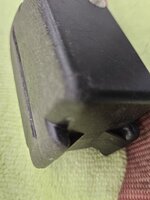
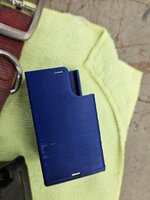
Noticed the dogs collar for the underground fence was being abraded and was in need of protection from further damage. Quick sketchup and print. Wondering why there is a missing layer, maybe, around the slot. This should minimize further damage.
 

Attachments

  • 20230922_101550.jpg
    20230922_101550.jpg
    482.7 KB · Views: 29
  • 20230922_101553.jpg
    20230922_101553.jpg
    486.4 KB · Views: 30
  • 20230922_101559.jpg
    20230922_101559.jpg
    531.5 KB · Views: 31
  • 20230922_101608.jpg
    20230922_101608.jpg
    664.7 KB · Views: 30
  • 20230922_101612.jpg
    20230922_101612.jpg
    535.9 KB · Views: 31
  • 20230922_101638.jpg
    20230922_101638.jpg
    584.3 KB · Views: 32
  • 20230922_101642.jpg
    20230922_101642.jpg
    762 KB · Views: 32
  • 20230922_101852.jpg
    20230922_101852.jpg
    477.5 KB · Views: 32

kaymccampbell

Well-known member
Joined
Feb 27, 2015
Messages
29,410
Location
Upstate New York
That looks like ringing. It could be due to the way the hole was placed in the CAD software, or the way the part was terminated or footed. Or the part could have slipped a tiny bit. Or you could have had a bit of crud in the belts or on the tracks, that was finally ejected. Or you could have had a blob on the part that caused things to jump. Or cranky printer gnomes. Or probably a dozen other things that haven't happened to me.
 
To avoid these ads, REGISTER NOW!
Top Bottom