To avoid these ads, REGISTER NOW!

The Everything 3D Printer Thread

jeepxj

Well-known member
Joined
Mar 2, 2008
Messages
17,831
Do you increase your wall thickness in that area.

Is there such a thing as variable wall thickness with bambu?

you can. depends on the strength need. you can use a modifier to change wall counts.

i personally dont and its just holding up a knife or a headset. I use 1" long 8-32s so they have a lot of contact area. I also use just 1 - .82mm wide wall
 
To avoid these ads, REGISTER NOW!

gte718p

Well-known member
Joined
Mar 12, 2009
Messages
3,950
The $100 Ender at Microcenter is the Ender 3 V2. We got one for my father for Christmas. It's a small upgrade over the 3 Pro. I do understand what you mean about the noise. The V2 is very quite in comparison but otherwise the print quality/speed are basically the same as the 3 Pro. Microcenter has a similar deal on the Ender 3 S1 for $150 (again with a coupon you have to find). The S1 is a big step up as it has auto bed leveling, faster print speeds, and a direct drive extruder that is better for both flexible materials and for print jobs that have a lot of start/stops of the extruder. For most people I would say the extra $50 is worth it. However, in your case maybe not. If you are already happy with the old printer in every way other than sound and you don't see trying to expand your usage/capabilities etc, then the V2 is probably better. It's fans are no louder than those on the 3 Pro and are quieter than those on the S1. Both have the very quite motors. So basically the V2 is quieter at the expense of lesser overall capabilities.

If you do think you can get $50-60 for your old printer I would get one of the new ones. I personally would get the S1 but I'm not sure if I would recommend the S1 over the V2 for your needs.
I’m not familiar with the Ender boards. If it has removable driver chips, replacing the drivers to make it quiet is only $5 if you buy from china and wait. If the chips are soldered in, they can still be replaced, the actual chips are even cheaper, but it takes a fair amount of skill and knowledge to replace SMD chips.


jeepxj

Well-known member
Joined
Mar 2, 2008
Messages
17,831
my oldest machine is having issue with the extruder finally. 3,7XX hours. i need to troubleshoot. not entirely sure what is up. its skipping on the feed. could be my longer feed tube.


in other news: when trying to get to a single wall make sure its wall, not infill.

1711388548207.png
 

bigredcornhead

Well-known member
Joined
Aug 9, 2011
Messages
430
I read through you guy's 3D printer thread not cause i know one or have the slightest inkling but i think its cool. Plus this is cool and i might one. Also need to come up with a wall grease gun holder. Also what have you printed that might be XJ specific?


jeepxj

Well-known member
Joined
Mar 2, 2008
Messages
17,831
I read through you guy's 3D printer thread not cause i know one or have the slightest inkling but i think its cool. Plus this is cool and i might one. Also need to come up with a wall grease gun holder. Also what have you printed that might be XJ specific?

thangs.com to really get your ideas flowing.

honestly not much. my XJ interior is raw metal at this point.
 

sh944

ALLIANCE MEMBER
Joined
Jan 1, 2014
Messages
291
Location
Linwood, KS
@jeepxj You have both X1C’s and P1S machines, correct? Do you find any significant difference between them? I have X1C’s at the office but am thinking I might get a P1S for the garage at home and am looking to see if there is really $500 more to the X1C.
 

loganb

ALLIANCE MEMBER
Joined
Dec 29, 2011
Messages
5,499
Location
Omaha, NE
@jeepxj You have both X1C’s and P1S machines, correct? Do you find any significant difference between them? I have X1C’s at the office but am thinking I might get a P1S for the garage at home and am looking to see if there is really $500 more to the X1C.

You get the Lidar for 1st layer, an extra 10 or 20 degrees on bed heating and hardened extruder gear with the X1c over the P1S...might be a couple other smaller things but those are the ones that stuck out when I was evaluating. The hardened gear is like a $15 swap down the road....haven't missed the other items yet as i went P1s.

Oh yeah..think x1 camera is a bit better...
 

jeepxj

Well-known member
Joined
Mar 2, 2008
Messages
17,831
@jeepxj You have both X1C’s and P1S machines, correct? Do you find any significant difference between them? I have X1C’s at the office but am thinking I might get a P1S for the garage at home and am looking to see if there is really $500 more to the X1C.

negative. P1P 2x and 5x P1S

personally i dont see the need for X1C cost
 

Black300zx

Well-known member
Joined
Apr 8, 2019
Messages
782
Location
Elkton, Md
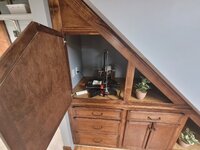
Finished stain & poly on the under-stair "home" for my printer. Still needs baseboards reinstalled and 1/4 round, but I moved in permanently and kicked off a print. One benefit I was hoping for was a better thermal environment, and it looks like I got it. room ambient was 63F and the air behind the door is sitting around 73F, even with the gaping cutout to the right of the door. I might fab up a removable divider to see if I can get it up into the 80s.

I also forgot about the spool holder hanging off the left side, so I ended up rotating it 90degrees w/ the spool in the back. Not ideal. I guess I have to upgrade to the sprite extruder so I can mount the spool above ;)
 

Attachments

  • 20240327_073850.jpg
    20240327_073850.jpg
    705.7 KB · Views: 63
  • 20240327_073857.jpg
    20240327_073857.jpg
    642.1 KB · Views: 58
  • 20240327_074219.jpg
    20240327_074219.jpg
    1 MB · Views: 65
Last edited:

kaymccampbell

Well-known member
Joined
Feb 27, 2015
Messages
29,427
Location
Upstate New York
Finished stain & poly on the under-cabinet "home" for my printer. Still needs baseboards reinstalled and 1/4 round, but I moved in permanently and kicked off a print. One benefit I was hoping for was a better thermal environment, and it looks like I got it. room ambient was 63F and the air behind the door is sitting around 73F, even with the gaping cutout to the right of the door. I might fab up a removable divider to see if I can get it up into the 80s.

I also forgot about the spool holder hanging off the left side, so I ended up rotating it 90degrees w/ the spool in the back. Not ideal. I guess I have to upgrade to the sprite extruder so I can mount the spool above ;)
Gonna name it Harry Potter?
 

Jehannum

Well-known member
Joined
May 3, 2012
Messages
1,348
Location
Albuquerque, NM
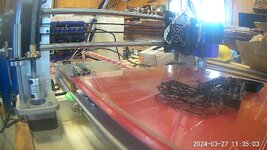
Made some Petg pasta with the recently upgraded printer. I don't have much experience with Petg, so I need to read up on bed adhesion.

1000002402.jpg
Less squish than PLA, and it sticks hard to everything. I usually lay some PVA so that I can slide a scraper underneath and detach without ending up with pieces of my glass bed in the base.
 

niget2002

Well-known member
Joined
Oct 2, 2012
Messages
11,115
Location
Josephine, TX
I think PETG on an open printer take some work to make stick but is possible.
ASA has been my spaghetti maker lately, even with PEI build sheets and 45c chamber temps. Makes me appreciate just how easy PLA is to print.
ASA is my next hurdle. I need to get the PETG to work long enough to print a new parts fan shroud out of PETG. Then I plan on moving to ASA. I have some parts for my kayak build I want to print out of ASA.

I have an enclosed printer to print the ASA with, but I need to reprint some of the parts out of PETG. The PLA parts are warping when I try to print ASA and is causing the printer to fail.

I also have some parts for the inside of the travel trailer I'd like to print out of PETG.
 

niget2002

Well-known member
Joined
Oct 2, 2012
Messages
11,115
Location
Josephine, TX
Less squish than PLA, and it sticks hard to everything. I usually lay some PVA so that I can slide a scraper underneath and detach without ending up with pieces of my glass bed in the base.
Do you think this looks like too much squish? I was thinking the long skinny part of the print could have been the issue. I was thinking of trying a raft.

petg_first_layer.png
 
To avoid these ads, REGISTER NOW!

sh944

ALLIANCE MEMBER
Joined
Jan 1, 2014
Messages
291
Location
Linwood, KS
So far, ASA has been pretty flawless for me. I run an enclosed printer (Qidi X-Max at home, Bambu X1C's at the office), generally speaking, I have a 100 deg C bed and print at 260 deg C. I have not had to need adhesive on the bed, and I've printed some decently large stuff and not gotten warpage on any of the prints. I can use whatever plate I want on the printers. I use Inland ASA that I typically buy at the local MicroCenter.

The only issue I have had with ASA was with the filament breaking on the Qidi and since the filament sensor isn't working on that machine, it kept going... but I am notoriously bad about not keeping my filament in a dryer after I have opened it up, so I think that one was on me.

Before I went to ASA, I ran a few spools of PETG and had a lot more problems. You might try a spool of ASA and see if life gets better. It certainly worked out that way for me,
 

Sweetcorn

Well-known member
Joined
Feb 14, 2018
Messages
667
Location
North Central Ohio
I think PETG on an open printer take some work to make stick but is possible.
ASA has been my spaghetti maker lately, even with PEI build sheets and 45c chamber temps. Makes me appreciate just how easy PLA is to print.
I have an Ender 3 v2 Neo that I use for 100% PETG, and it gets a lot of use.

I run the extruder at 240, bed temp at 74, .4mm nozzle, and use a PEI board for PETG.

No glue or spray on the board, just a wipe down with IPA before each use. Also, when I go to remove a print, I reheat the bed up if I'm not around when it finished and everything has cooled off. Seems to release from the PEI board easier that way.

Those are the the main things I did to get great prints out of it. If anyone's interested I can detail further settings, but once I got those things set, it was really just fine tuning from there.

It prints so well with those settings for PETG I've abandoned using PLA for anything.
 

niget2002

Well-known member
Joined
Oct 2, 2012
Messages
11,115
Location
Josephine, TX
I have an Ender 3 v2 Neo that I use for 100% PETG, and it gets a lot of use.

I run the extruder at 240, bed temp at 74, .4mm nozzle, and use a PEI board for PETG.

No glue or spray on the board, just a wipe down with IPA before each use. Also, when I go to remove a print, I reheat the bed up if I'm not around when it finished and everything has cooled off. Seems to release from the PEI board easier that way.

Those are the the main things I did to get great prints out of it. If anyone's interested I can detail further settings, but once I got those things set, it was really just fine tuning from there.

It prints so well with those settings for PETG I've abandoned using PLA for anything.
This printer has a glass bed. I should order a pei bed for it. I have one of those on the other printer and it works well.
 

XJSuperman

Well-known member
Joined
Jan 26, 2018
Messages
3,086
Location
Central Iowa
I'm doing my shopping a bit more seriously now for the Bambu P1S setup. What all does a fella need if he is buying the P1S combo with the AMS and a few rolls of filament. Anything else to add to the cart while ordering? Nozzle(s)? More filament? Its a little over a thousand dollars at the moment. Does it come with a good bed mat, or do I need to grab one?
What else am I unaware of or should be looking at for this setup? I originally thought the printer was down to $700 but that's without the AMS, so since I missed that large detail I am wondering what else I glanced over and missed.
At the moment I am going direct through Bambu as others suggested.
 
Last edited:

Citation

Well-known member
Joined
Jan 20, 2016
Messages
3,210
Location
Indy
This printer has a glass bed. I should order a pei bed for it. I have one of those on the other printer and it works well.
If you don't care about surface finish on the bed contacting surface try masking tape on the bed. My first printer, a monoprice cadet, has no bed heating, just a making tape surface. Bed adhesion was never an issue.
I have had issues with my Ender 3 V3 SE while using a pei bed. I'm not sure if the fault is the bed, the settings, the filament etc. I've just started using this Elegoo PLA Pro material. I'm thinking about getting a second bed and leaving it with a tape coating.
 

niget2002

Well-known member
Joined
Oct 2, 2012
Messages
11,115
Location
Josephine, TX
If you don't care about surface finish on the bed contacting surface try masking tape on the bed. My first printer, a monoprice cadet, has no bed heating, just a making tape surface. Bed adhesion was never an issue.
I have had issues with my Ender 3 V3 SE while using a pei bed. I'm not sure if the fault is the bed, the settings, the filament etc. I've just started using this Elegoo PLA Pro material. I'm thinking about getting a second bed and leaving it with a tape coating.
PEI needs to be cleaned very well to work the best. I've had good luck with Acetone or IPA.

I've used blue painter's tape in the past as well on this machine. If the PEI doesn't work out, I still have the glass I can put painter's tape on.
 

Citation

Well-known member
Joined
Jan 20, 2016
Messages
3,210
Location
Indy
PEI needs to be cleaned very well to work the best. I've had good luck with Acetone or IPA.

I've used blue painter's tape in the past as well on this machine. If the PEI doesn't work out, I still have the glass I can put painter's tape on.
I did use IPA to make sure it was clean. I had limited time over the last few days but I think I need to do some characterization tests to make sure I like the settings.
 

sh944

ALLIANCE MEMBER
Joined
Jan 1, 2014
Messages
291
Location
Linwood, KS
I'm doing my shopping a bit more seriously now for the Bambu P1S setup. What all does a fella need if he is buying the P1S combo with the AMS and a few rolls of filament. Anything else to add to the cart while ordering? Nozzle(s)? More filament? Its a little over a thousand dollars at the moment. Does it come with a good bed mat, or do I need to grab one?
What else am I unaware of or should be looking at for this setup? I originally thought the printer was down to $700 but that's without the AMS, so since I missed that large detail I am wondering what else I glanced over and missed.
At the moment I am going direct through Bambu as others suggested.
I think you should be good to go straight out of the box. I know the X1Cs I have bought needed nothing else besides filament.
 

jeepxj

Well-known member
Joined
Mar 2, 2008
Messages
17,831
I'm doing my shopping a bit more seriously now for the Bambu P1S setup. What all does a fella need if he is buying the P1S combo with the AMS and a few rolls of filament. Anything else to add to the cart while ordering? Nozzle(s)? More filament? Its a little over a thousand dollars at the moment. Does it come with a good bed mat, or do I need to grab one?
What else am I unaware of or should be looking at for this setup? I originally thought the printer was down to $700 but that's without the AMS, so since I missed that large detail I am wondering what else I glanced over and missed.
At the moment I am going direct through Bambu as others suggested.

P1S
AMS
if you want to do fine detail work get a .2mm nozzle. if you wanna do big stuff .6mm nozzle. it comes with a .4 and a spare.
built plate it comes with is good.
i'd buy at least 4 spools and refills to get the good discount for my initial batch. then just use amazon for stuff. with AMS its ideal to just use plastic spools. not cardboard.

get a UPS for it IMO. https://www.amazon.com/dp/B07BXZPF99?tag=atomicindus08-20
 

stinkity stoink

Well-known member
Joined
Apr 8, 2007
Messages
729
Location
New Jersey
I'm doing my shopping a bit more seriously now for the Bambu P1S setup. What all does a fella need if he is buying the P1S combo with the AMS and a few rolls of filament. Anything else to add to the cart while ordering? Nozzle(s)? More filament? Its a little over a thousand dollars at the moment. Does it come with a good bed mat, or do I need to grab one?
What else am I unaware of or should be looking at for this setup? I originally thought the printer was down to $700 but that's without the AMS, so since I missed that large detail I am wondering what else I glanced over and missed.
At the moment I am going direct through Bambu as others suggested.
I am no expert on this at all. I bought the p1s combo and went crazy with printing. Buy extra filament. I only bought 3 rolls I think and it was gone in a few days. Other than that the printer has been perfect. Hopefully I didn’t just jinx myself.
 

moab11

Well-known member
Joined
Nov 22, 2015
Messages
553
Location
Thunder Bay, Ontario
I'll second on stocking up on some filament to get you started, though it's nice that the discount program is now unlimited and open to everyone for when you want to reorder.

When you are buying the printer, a lot of the accessories are offered at a pretty good discount from the printer page, expand the list for more stuff. But a couple of nozzles and filament is all you should need from there to get you started. Then you can get a feel for the hobby and see what other things you want(filament dryer, desiccant, different filaments, etc)
 

Jehannum

Well-known member
Joined
May 3, 2012
Messages
1,348
Location
Albuquerque, NM
PEI needs to be cleaned very well to work the best. I've had good luck with Acetone or IPA.

I've used blue painter's tape in the past as well on this machine. If the PEI doesn't work out, I still have the glass I can put painter's tape on.
I've dissolved PEI with acetone. Be careful what kind of solvent you use on it.
 
To avoid these ads, REGISTER NOW!
Top Bottom