
You are using an out of date browser. It may not display this or other websites correctly.
You should upgrade or use an alternative browser.
You should upgrade or use an alternative browser.
The Everything 3D Printer Thread
- Thread starter BoilermakerFan
- Start date
Poolshark314
Well-known member
Luckily there are quite a few Gridfinity generators to help you out, so the hardest part is getting the cutout rightIIID Max PLA+. Print color looks a little more satin in finish than what I expected but I like it. Almost no print failures so far too.
It’s nuts. Once you get into Gridfinity, you kinda can’t stop. That said, most of the organizers I’ve printed don’t fit tools/stuff the way I’d like so I think utopia is being able to make your own….which is my next adventure.
Yes!
ptt49er
Well-known member
What types of filaments are $10/kg?slant3d is making 10 a kg filament now via tangledfilament.com
Poolshark314
Well-known member
I have gotten $10/kg PLA and PETG on a fairly regular basis from Amazon. There are plenty sales to stock up on. This was $8.50 2 days ago:What types of filaments are $10/kg?
Last edited:
thomfr
Well-known member
Hi,
Wow what a huge amount of info!
But, as a starter in 3d it scares me off.
Would it be an Idea to have a little pinned post at the beginning of the tread with the best info for starters in 3d?
Thom
Wow what a huge amount of info!
But, as a starter in 3d it scares me off.
Would it be an Idea to have a little pinned post at the beginning of the tread with the best info for starters in 3d?
Thom
What types of filaments are $10/kg?
PLA and PETG IIRC.
I've considered becoming an importer to better help my own costs. i have a goal of under 4 a kg.
harley jim
Well-known member
Hello.
I'm sure this question has been asked so many times,
Years ago I was trained on draftsight which was 2D
I downloaded Autocad but with the other programs on my laptop it froze.
So I need to buy a new laptop and find the best program to learn 3D.
Any suggestions from you would be really helpful. Thank you.
I'm sure this question has been asked so many times,
Years ago I was trained on draftsight which was 2D
I downloaded Autocad but with the other programs on my laptop it froze.
So I need to buy a new laptop and find the best program to learn 3D.
Any suggestions from you would be really helpful. Thank you.
Hello.
I'm sure this question has been asked so many times,
Years ago I was trained on draftsight which was 2D
I downloaded Autocad but with the other programs on my laptop it froze.
So I need to buy a new laptop and find the best program to learn 3D.
Any suggestions from you would be really helpful. Thank you.
tinkercad works in the browser.

Tinkercad
Tinkercad is a free, easy-to-use app for 3D design, electronics, and coding.
i personally use fusion360.
harley jim
Well-known member
Fusion 360 is what I downloaded, sorry, I said Autocad. The research I have done keeps taking me back there, that may be the one I need, I just like to ask people that are already using something.
I played with Tinkercad and don't think I care for it.
Thank you jeepxj.
I played with Tinkercad and don't think I care for it.
Thank you jeepxj.
purplezr2
Well-known member
An one using Onshape? I have seen it advertised on youtube.
I have access to PTC Creo so I use that.
I have access to PTC Creo so I use that.
draco_1967
Well-known member
That's not too bad if you are printing lots of same-color items.slant3d is making 10 a kg filament now via tangledfilament.com
FYI for others in the thread, the $10 per kg is with a $7/month membership, and it is on 3kg spools. For my current use I'm not sure I could justify the membership when there are other sources of filament at similar costs. Plus, the Bambu AMS can't handle 3kg spools.
kaymccampbell
Well-known member
OK, here ya go.Hi,
Wow what a huge amount of info!
But, as a starter in 3d it scares me off.
Would it be an Idea to have a little pinned post at the beginning of the tread with the best info for starters in 3d?
Thom
Required items.
-3D printer, still in box.
-chicken.
-knife.
-strings of beads.
Place box in middle of garage floor.
Don beads.
Grasp chicken by throat.
Grasp knife in other hand.
Dance in circle around box.
Chant. OOG-HA-CHAK-HA...OOG-HA-CHAK-HA... until breathless.
Throw chicken out the door.
Stab box repeatedly.
Throw box out the door.
Retire to La-Z-Boy with beverage of choice.
Call neighbor's kid to dispose of chicken and printer.
kaymccampbell
Well-known member
I've been playing with StinkerCAD. It runs on your browser. It's very much like machining. You place a block on the workplane, then create tools to shave off or drill out the bits you don't like. Also, the user community have created tools that extend its capabilities. It's not the Messiah, but it doesn't ****. And elementary school kids can use it.Hello.
I'm sure this question has been asked so many times,
Years ago I was trained on draftsight which was 2D
I downloaded Autocad but with the other programs on my laptop it froze.
So I need to buy a new laptop and find the best program to learn 3D.
Any suggestions from you would be really helpful. Thank you.
ArcReactorKC
Well-known member
I use onshape on occasion, when I am not at my desk and I need to offload some processing I will use it instead of fusion, or sketchup (I'm old)An one using Onshape? I have seen it advertised on youtube.
I have access to PTC Creo so I use that.
Yankeefarmer
Well-known member
I started using OnShape about 3 weeks ago. Love it. Many tutorials on YouTube on how to do various things. I can work on my designs from my iPad using the iOS app, although my MacBook Pro through Chrome browser is a bit easier for some functions and using keyboard shortcuts. Currently designing a little gearbox using the gear generating FeatureScript.
When doing Gridfinity modules, I like to test my models by generating a 2d drawing at 1:1 scale to do a fit test before sending the solid model to the 3d printer.
When doing Gridfinity modules, I like to test my models by generating a 2d drawing at 1:1 scale to do a fit test before sending the solid model to the 3d printer.
Cruzan80
Well-known member
For OnShape, Yes as mentioned before multiple times in this thread. One of the nicest parts I recently discovered is that it can handle parametric solids and triangular meshs in the same environment (so take a STL and use CAD on it).
Very similar to SOLIDWORKS in lots of ways.
Very similar to SOLIDWORKS in lots of ways.
Excellent choice. Prusas are beasts. I have 81 print days on my MK3S+ and have sent 3.75 miles of filament through it and it still operates as if it's brand new. The only thing I did to it was reprint the extruder out of polycarbonate carbon fiber so I can use advanced filaments.I just picked up a Prusa M4KS. Spent the weekend putting it together, still working on stuff. Looking forward to whatever comes next.
bugnut
ALLIANCE MEMBER
I cut my teeth on ACAD lite 2d, been using Sketchup. It works for my needs. no matter it seems like there are many tube users posting help as needed.
Rccrawlerguy
Well-known member
- Joined
- Dec 11, 2011
- Messages
- 269
The fist print came out OKish. It was a calibration file that came with the machine. It already had gcode generated, so I used it. The next item was battery wall mounts for Kobalt 24V system. I used some Cura recommended settings. They are a bit tight to slide on, for some reason the slicer didn't add supports to the internal legs( that grab the battery) so the legs drooped down. I can sand them a little, and should be fine. I am going to make more and scale them up a bit. The surfaces came out ok, not the greatest. I am working on a few mounts for my Dewalt 20V batteries now, I am playing with settings. They look purty darn good. Layer lines are had to see, you can still feel them with fingernail. I'm pretty impressed with quality.
However, the Tronxy X5SA machine has 2 Z axis motors and screws, with quad start thread. You can't even look at the bed without one side getting out of sync. A popular mod is to buy 2 timing pulleys , idler, and belt and link them together.
After the Dewalt mounts are done I am going to make myself some of these.
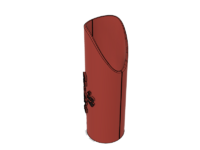

It is my design. I've seen several that just slip over the pipe, they might work in some situations, but not all the time. I based these off of the steel ones that have different miters cut out in them

I am going to do the 45* first and get to modeling the other ones I want.
Before I got the printer up and running, I was just going to cut them out of some thinner plastic on my 10W laser. I figured if i had to draw them, might as go whole hog.
However, the Tronxy X5SA machine has 2 Z axis motors and screws, with quad start thread. You can't even look at the bed without one side getting out of sync. A popular mod is to buy 2 timing pulleys , idler, and belt and link them together.
After the Dewalt mounts are done I am going to make myself some of these.
It is my design. I've seen several that just slip over the pipe, they might work in some situations, but not all the time. I based these off of the steel ones that have different miters cut out in them
I am going to do the 45* first and get to modeling the other ones I want.
Before I got the printer up and running, I was just going to cut them out of some thinner plastic on my 10W laser. I figured if i had to draw them, might as go whole hog.

Winter boredom
And I have a new tool box I have been moving into and organizing.
Customizable file, made holders for 4mm bits, 1/4 and one for my 5/16 impacts.
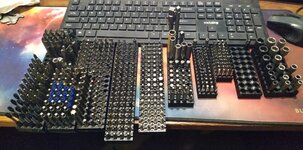
Have a few more bit sets in grab and go holders, but most of these were in an organizer. Needing to dig for a T25 in the mixed torx spot.
And I have a new tool box I have been moving into and organizing.
Customizable file, made holders for 4mm bits, 1/4 and one for my 5/16 impacts.
Have a few more bit sets in grab and go holders, but most of these were in an organizer. Needing to dig for a T25 in the mixed torx spot.
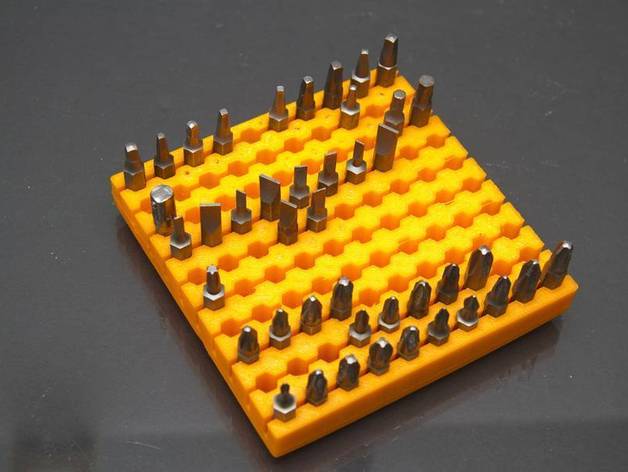
Link for the above bit holder
 www.thingiverse.com

I used PETG but dropped one holder in the Cold garage and it broke. That one did have the Through Hole, then printed with no through hole and were stronger. Play with a smaller 2X2 to get sizing for your printer. Slots make it flex some for easier bit removal if you size them to hold snug.
In the Thingy customizer you are limited to 15 holes. If you view source, copy and paste in OpenScad you can have more holes... well, till it doesn't fit your printer.
Customizable Hex Bit Holder by xchg_dot_ca
https://youtu.be/bbjOygFkFz0With my customizer you can create hex bit holder of any size for any size of bits. You can tweak many parameters, all dimension are in mm: Rows - number of rows, currently maximum is 10Number - number of columns, currently maximum is 10Base height - overall heigh of...
www.thingiverse.com
I used PETG but dropped one holder in the Cold garage and it broke. That one did have the Through Hole, then printed with no through hole and were stronger. Play with a smaller 2X2 to get sizing for your printer. Slots make it flex some for easier bit removal if you size them to hold snug.
In the Thingy customizer you are limited to 15 holes. If you view source, copy and paste in OpenScad you can have more holes... well, till it doesn't fit your printer.
Jeff
Well-known member
gotta keep the wife happy, she wanted ball holders, how was I to say no??
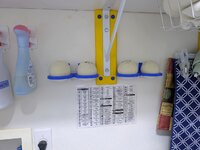
At least she doesn’t keep them in her purse!gotta keep the wife happy, she wanted ball holders, how was I to say no??
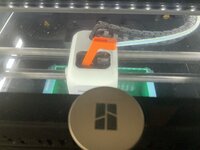
I printed this doodad at 103%. It stops the PTFE tube from rubbing on the, apparently very dirty, P1-C1 glass top. That drove me crazy!
ArcReactorKC
Well-known member
I need to do this. I have replaced a handful of these ptfe tubes from wear-through. I always say I'll get to it later and never do.I printed this doodad at 103%. It stops the PTFE tube from rubbing on the, apparently very dirty, P1-C1 glass top. That drove me crazy!
moab11
Well-known member
I made one before but it didn't work well, need to try again as my ptfe tube is getting a bit thin.
XJSuperman
Well-known member
Adding to my to-do list....."check ptfe tube"
After checking prices at McMaster, I ordered 10M from over there too!
I have also had FANTASTIC results with these cheap hot ends that use screw in nozzles. You just heat it up to 260C and change it out while hot. I did use the OEM electrical components and silicone boot from the extra parts I wasted my money on!
It takes 60 seconds to change sizes and you don't have to fat finger those tiny plugs!
Storage box
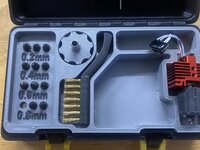
It takes 60 seconds to change sizes and you don't have to fat finger those tiny plugs!
Storage box
Poolshark314
Well-known member
I had some issues with failure to feed on those types of models. You could actually hear the friction increasing from the AMS motor slowing down trying to pass through that section. I just put zipties around the section that rubs on the glass so the PTFE tubing doesn't wear awayI printed this doodad at 103%. It stops the PTFE tube from rubbing on the, apparently very dirty, P1-C1 glass top. That drove me crazy!
All it does is gently bend the tube down. I haven’t noticed any difference in feeding but, time will tell.I had some issues with failure to feed on those types of models. You could actually hear the friction increasing from the AMS motor slowing down trying to pass through that section. I just put zipties around the section that rubs on the glass so the PTFE tubing doesn't wear away
wantedabiggergarage
Member Emeritus
Did you make them blue ball holders because of the wife?gotta keep the wife happy, she wanted ball holders, how was I to say no??

stinkity stoink
Well-known member
Im still pretty new to all this. I just bought some IIID max pla+ for my Bambu p1s and it jammed. It’s the first jam I have had yet and was pretty nervous taking it apart.
it didn’t seem to even make it to the hot end and it was tough to pull out.
Did I get a bad batch or am I supposed to change settings for it ?I have read several posts that say run it the same as pla.
it didn’t seem to even make it to the hot end and it was tough to pull out.
Did I get a bad batch or am I supposed to change settings for it ?I have read several posts that say run it the same as pla.
draco_1967
Well-known member
You can use nearly 2kg of filament and build an AMS riser, which raises the glass top enough to clear the PTFE tubingI had some issues with failure to feed on those types of models. You could actually hear the friction increasing from the AMS motor slowing down trying to pass through that section. I just put zipties around the section that rubs on the glass so the PTFE tubing doesn't wear away

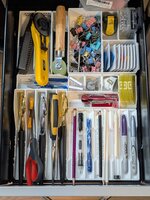
I got started on my Gridfinity organization project. I began with my sewing space, since I've been doing a lot of sewing recently. One drawer down, two to go. Then I get to start on the garage...
Poolshark314
Well-known member
All my AMS units are wall mounted to keep them out of the wayYou can use nearly 2kg of filament and build an AMS riser, which raises the glass top enough to clear the PTFE tubing
I got started on my Gridfinity organization project. I began with my sewing space, since I've been doing a lot of sewing recently. One drawer down, two to go. Then I get to start on the garage...
Jeff
Well-known member
Shhhhhhhhhhhhhhhh!Did you make them blue ball holders because of the wife?
This was a post I made in the consumer printer suggestion thread https://www.garagejournal.com/forum/threads/the-best-consumer-3d-printer.532433/
I was asked to repost it here (after fixing a bunch of phone related typos - damn predictive text keyboards) along with some additional comments.
The question was what hobby printer for around $500
I think that's a hard question as it might depend on some factors. At that price point it's kind of a question about what compromises you are ok with. Happily, at that price point it's not like the compromised option is ****. In fact in any one area a $1500 printer (Bambu X1C, Creality K2 Plus, etc) won't do any better vs many of the sub $500 options.
A few things to consider.
How big is the build volume? For what ever reason 220x220 has been the default build size. It's the one used by printers like the Ender 3 family and many prints on line will be scaled to fit on that size print bed. Bambu uses a slightly larger 256x256. The extra size may help in some cases and certainly isn't going to hurt as the machines are about the same size as the 220 machines (which typically have a 235x235mm plate. The next step up are the 300x300mm printers. More print area but physically larger. However, if size isn't a problem they seem to have few/no compromises vs the smaller sizes. Larger than that and you need to decide if they are appropriate for small prints or if the small prints are compromised by the larger build area.
Bed slinger vs Core XY. Slingers are generally cheaper but can still be fast and produce good prints. However, as the print gets larger you can have issues with parts deforming/failing because you are moving the part a lot as you print it. Bed slingers are almost always open vs enclosed. Core XY come in both open and closed. They move the print head in x and y while the part is moved vertically and rather slowly. Many Core XY printers are enclosed because it's relatively easy to add the enclosure. Some base models aren't but are otherwise similar to an enclosed model and in some cases enclosure kits are available. However, if you need an enclosed, get a factory one from the start (see below)
Enclosures are good for two reasons. First they help keep heat in when printing filaments that are heat sensitive (most stuff that isn't PLA). Second they can help control the fumes that may be released by filaments that aren't PLA. A factory enclosed printer is more likely to have air filtration and may have some type of active chamber temp control. Otherwise chamber heart comes from trapping the heat from the print bed.
Workflow and user interface is another thing to consider. Bambu is the king here (X1C, A1, A1 mini) in that they smoothly integrate the computer/phone software with the printer and its interface. The P1P, P1S are somewhat compromised by a limited on printer screen. Anymore most printers will offer network printing from the slicer on your computer. I still like the old school sneakernet and use a USB drive to carry the files to my printer. Note that some printers accept USB drives (best in my view) while others only accept SD/micro SD cards. I find those more annoying to deal with. Since I use my printer offline and the printer is near the computer I'm OK with this offline life. However, others have the printer in a remote location. In that case you should look at things like do they have a remote camera or can one be added for cheap. Note that even though Bambu is the king here others may be good enough. Finally there has been some stink about Bambu forcing people to use their servers. I don't know the facts and it's possible the other print vendors are leaving big security gaps in their systems while Bambu is getting criticized for closing theirs. I don't know. I will say that even though my current printer's UI is much better than my first printer that had the blue screen Ender 3 type interface, in general the difference hasn't really impacted my workflow. I typically plug in the thumb drive, select the file and hit print. A nicer interface is nice but in my case doesn't result in better prints.
Finally there is the multi material question. Bambu was first, others have it now as well. Even if you don't want to print in multicolor it can be good for things like auto switching rolls when you run out of filament and using a second material as a support.
So at $500 you can have 300x300 or enclosed or multi material or CoreXY or cash in your pocket. You might get more than one but you won't get all of them. If you are willing to brave used you might get more of them.
A note on speed. The modern crop of printers are all very fast compared to the old Ender 3 Pros. While there are certainly speed differences between them, the differences are relatively small (say +-25% on print time vs 2-3x like old vs new printers). The more expensive units aren't necessarily faster and sometimes faster is achieved at the expense of quality (ie slowing down a bit may help quality). So like the overall idea here, at $500 or less you may not be sacrificing speed vs the more expensive printers.
Personally, I've been very happy with my Adventure 5M. For about $60 you can print/buy an enclosure kit which makes it decent for more advanced filaments. It's as fast as any of the prints under $500. However, at 220^3 it's one of the smallest build areas (if only because most printers do a bit more than 220 tall). With the enclosure this printer can do more engineering filaments. The 5M Pro is factory enclosed with air filtration and chamber temp control. The 5X is multicolor but I haven't seen reviews yet. All support printing from USB or via the network through Orca Slicer.
The Bambu A1 + multi material unit is fast, prints nicely and has a solid color charger. The down side would be concerns regarding locked down software and being an open bed slinger. Still, might be the best option for PLA so long as you didn't mind the size (MMU sits next to the printer) and locked software.
I'm not sure if you can get a Creality K1 Max for your budget. They had a rocky start but seem sorted now. As for table space the K1p takes up basically no more space vs the BL A1 but it's a 300x300 enclosed Core XY printer. It's a great unit is single color is ok.
Not sure about Elegoo or Anycubic. They might be good but I would check some reviews. My brother has an ELEGOO Neptune 4 Plus and is happy with it as an upgrade to an older Longer LK5 Pro (think old Ender 3 but larger build volume). It's fast (comparable to X1C https://www.tomshardware.com/news/3d-printer-speed-hierarchy) but has drawbacks associated with a large, open bed slinger.
Sorry, it's a long read but hopefully it helps!
I was asked to repost it here (after fixing a bunch of phone related typos - damn predictive text keyboards) along with some additional comments.
The question was what hobby printer for around $500
I think that's a hard question as it might depend on some factors. At that price point it's kind of a question about what compromises you are ok with. Happily, at that price point it's not like the compromised option is ****. In fact in any one area a $1500 printer (Bambu X1C, Creality K2 Plus, etc) won't do any better vs many of the sub $500 options.
A few things to consider.
How big is the build volume? For what ever reason 220x220 has been the default build size. It's the one used by printers like the Ender 3 family and many prints on line will be scaled to fit on that size print bed. Bambu uses a slightly larger 256x256. The extra size may help in some cases and certainly isn't going to hurt as the machines are about the same size as the 220 machines (which typically have a 235x235mm plate. The next step up are the 300x300mm printers. More print area but physically larger. However, if size isn't a problem they seem to have few/no compromises vs the smaller sizes. Larger than that and you need to decide if they are appropriate for small prints or if the small prints are compromised by the larger build area.
Bed slinger vs Core XY. Slingers are generally cheaper but can still be fast and produce good prints. However, as the print gets larger you can have issues with parts deforming/failing because you are moving the part a lot as you print it. Bed slingers are almost always open vs enclosed. Core XY come in both open and closed. They move the print head in x and y while the part is moved vertically and rather slowly. Many Core XY printers are enclosed because it's relatively easy to add the enclosure. Some base models aren't but are otherwise similar to an enclosed model and in some cases enclosure kits are available. However, if you need an enclosed, get a factory one from the start (see below)
Enclosures are good for two reasons. First they help keep heat in when printing filaments that are heat sensitive (most stuff that isn't PLA). Second they can help control the fumes that may be released by filaments that aren't PLA. A factory enclosed printer is more likely to have air filtration and may have some type of active chamber temp control. Otherwise chamber heart comes from trapping the heat from the print bed.
Workflow and user interface is another thing to consider. Bambu is the king here (X1C, A1, A1 mini) in that they smoothly integrate the computer/phone software with the printer and its interface. The P1P, P1S are somewhat compromised by a limited on printer screen. Anymore most printers will offer network printing from the slicer on your computer. I still like the old school sneakernet and use a USB drive to carry the files to my printer. Note that some printers accept USB drives (best in my view) while others only accept SD/micro SD cards. I find those more annoying to deal with. Since I use my printer offline and the printer is near the computer I'm OK with this offline life. However, others have the printer in a remote location. In that case you should look at things like do they have a remote camera or can one be added for cheap. Note that even though Bambu is the king here others may be good enough. Finally there has been some stink about Bambu forcing people to use their servers. I don't know the facts and it's possible the other print vendors are leaving big security gaps in their systems while Bambu is getting criticized for closing theirs. I don't know. I will say that even though my current printer's UI is much better than my first printer that had the blue screen Ender 3 type interface, in general the difference hasn't really impacted my workflow. I typically plug in the thumb drive, select the file and hit print. A nicer interface is nice but in my case doesn't result in better prints.
Finally there is the multi material question. Bambu was first, others have it now as well. Even if you don't want to print in multicolor it can be good for things like auto switching rolls when you run out of filament and using a second material as a support.
So at $500 you can have 300x300 or enclosed or multi material or CoreXY or cash in your pocket. You might get more than one but you won't get all of them. If you are willing to brave used you might get more of them.
A note on speed. The modern crop of printers are all very fast compared to the old Ender 3 Pros. While there are certainly speed differences between them, the differences are relatively small (say +-25% on print time vs 2-3x like old vs new printers). The more expensive units aren't necessarily faster and sometimes faster is achieved at the expense of quality (ie slowing down a bit may help quality). So like the overall idea here, at $500 or less you may not be sacrificing speed vs the more expensive printers.
Personally, I've been very happy with my Adventure 5M. For about $60 you can print/buy an enclosure kit which makes it decent for more advanced filaments. It's as fast as any of the prints under $500. However, at 220^3 it's one of the smallest build areas (if only because most printers do a bit more than 220 tall). With the enclosure this printer can do more engineering filaments. The 5M Pro is factory enclosed with air filtration and chamber temp control. The 5X is multicolor but I haven't seen reviews yet. All support printing from USB or via the network through Orca Slicer.
The Bambu A1 + multi material unit is fast, prints nicely and has a solid color charger. The down side would be concerns regarding locked down software and being an open bed slinger. Still, might be the best option for PLA so long as you didn't mind the size (MMU sits next to the printer) and locked software.
I'm not sure if you can get a Creality K1 Max for your budget. They had a rocky start but seem sorted now. As for table space the K1p takes up basically no more space vs the BL A1 but it's a 300x300 enclosed Core XY printer. It's a great unit is single color is ok.
Not sure about Elegoo or Anycubic. They might be good but I would check some reviews. My brother has an ELEGOO Neptune 4 Plus and is happy with it as an upgrade to an older Longer LK5 Pro (think old Ender 3 but larger build volume). It's fast (comparable to X1C https://www.tomshardware.com/news/3d-printer-speed-hierarchy) but has drawbacks associated with a large, open bed slinger.
Sorry, it's a long read but hopefully it helps!
Other than build volume, what benefits does a $500 printer offer over a $200 printer like the Bambu Lab A1 mini?The question was what hobby printer for around $500