To avoid these ads, REGISTER NOW!

The Everything 3D Printer Thread

manwithtools

ALLIANCE MEMBER
Joined
Aug 24, 2015
Messages
13,647
Location
Lebanon, TN
Do you have an AMS with the x1? You can add on a chamber heater to it, but you won't get the full integration of the AMS 2. The HT is a single roll unit
I have an AMS with the X1C currently and looking to get the AMS2 and also the HT for the more temperamental filaments. I'm pretty familiar with the product offerings. Just looking for folks with firsthand experience (good or bad).
 
To avoid these ads, REGISTER NOW!

ER70S-2

Well-known member
Joined
Jan 2, 2015
Messages
797
Anyone here have the Bambu Lab H2D with AMS? I'm looking to upgrade from my X1C and thinking of the H2D with AMS HT Bundle. Thoughts or comments?


I just bought an H2D with an AMS 2 Pro a few months ago and it's a beast. I actually regret not getting the H2C even though I don't ever print more than 2 color functional prints. Having multiple nozzle sizes and nozzles dedicated to specific filaments in the machine and ready to go is the main reason I wish I got the H2C.

Also- The AMS 2 Pro is a terrible dryer. It doesn't ever get to the set temp no matter how long you let it run. It's horrible. I'm not sure if the HT is any better in that regard (as in doing what it's advertised to do). You may want to invest in a different dryer. I got a Sovol SH03 and it's also a beast. Very happy with it. I got the SH03 over the HT since it can dry 4 spools at a time.
 

manwithtools

ALLIANCE MEMBER
Joined
Aug 24, 2015
Messages
13,647
Location
Lebanon, TN
I just bought an H2D with an AMS 2 Pro a few months ago and it's a beast. I actually regret not getting the H2C even though I don't ever print more than 2 color functional prints. Having multiple nozzle sizes and nozzles dedicated to specific filaments in the machine and ready to go is the main reason I wish I got the H2C.

Also- The AMS 2 Pro is a terrible dryer. It doesn't ever get to the set temp no matter how long you let it run. It's horrible. I'm not sure if the HT is any better in that regard (as in doing what it's advertised to do). You may want to invest in a different dryer. I got a Sovol SH03 and it's also a beast. Very happy with it. I got the SH03 over the HT since it can dry 4 spools at a time.
Thank you for this feedback, exactly what I wanted.
 

jayz66ragtop

Well-known member
Joined
Sep 11, 2009
Messages
1,521
Location
SoCal
Anyone here have the Bambu Lab H2D with AMS? I'm looking to upgrade from my X1C and thinking of the H2D with AMS HT Bundle. Thoughts or comments?

I know you specifically the H2D, I have an H2C. got the bundle with two AMS 2 Pros and an AMS HT. I had an X1C prior and had great luck with it as well.

I have about 250 hours on the H2C and zero regrets going with it. Most of my prints are single or two color but I have a couple of things that are four or more colors that I printed with the X1C and the time difference is huge. My opinion on the H2 series:

H2S - if you print mostly single color and an occasional two or three color OR you want/need a larger print volume than an X1 this is your best choice
H2D - if you print more than ~30% two color prints, this is probably your best bet. The benefit of simply switching nozzles for a color change is a huge time and filament savings.
H2C - if you like to have the most expensive device in the line OR you print items that have more than two colors more than ~30% of the time this is your machine.

I chose the H2C because at the time it was I think $300-$400 more for the H2C over the H2D and I KNEW I would regret not getting the H2C. All things being the same I'd do it again.
 

Cruzan80

Well-known member
Joined
Jul 22, 2015
Messages
4,167
Location
Denver, CO
H2D - if you print more than ~30% two color prints, this is probably your best bet. The benefit of simply switching nozzles for a color change is a huge time and filament savings.
The other thing to consider is if you are printing lots of things needing a different support material. This (and the H2C) allow you to use a different material for easier support removal without swapping.
 

ER70S-2

Well-known member
Joined
Jan 2, 2015
Messages
797
The other thing to consider is if you are printing lots of things needing a different support material. This (and the H2C) allow you to use a different material for easier support removal without swapping.
That's one of the main reasons I got mine. You can also make parts with TPU features integrated into other materials which is amazing (solid parts with flexible features, vibration isolation grommets, etc.).
 

jayz66ragtop

Well-known member
Joined
Sep 11, 2009
Messages
1,521
Location
SoCal
My post above is followed by an "incident".

Had my first "issue" with the H2C and I believe it was self inflicted just like everything with my X1C...

I had a multi-color three hour print going for about an hour and got a pop-up "Extruder change failed 07FF-8020 180821".

  • Looked, looked some more and didn't see a thing wrong.
  • Hit resume multiple times and same thing.
  • Turned off and back on the printer a few times, same thing.
  • I noticed the little dribble guard thing was bent a tiny little bit so I turned off the printer, tweaked it back the best I could and power cycled the printer. Same thing.
  • I had noticed earlier that one of the AMS 2 Pros and the AMS HT had red lights flashing along with the progress bar on the printer, didn't put much thought into the fact that the other AMS 2 Pro was not flashing mainly because it's "last" in the chain of AMS'
  • For this two color print I did put a different spool in the AMS HT and an open slot in the AMS 2 Pro that had the red lights but when putting the filament in everything seemed to be acknowledged and happy. Printer recognized both new filaments and fed them in and out a little in doing so.

Apparently when I slid the AMS 2 Pro back in the cable must have pulled ever so slightly out on one of the pins or something. I slid it back out, pulled out the six pin connector, plugged it back in, and all lights are white now. For a test I sent a small print using the filament in the AMS HT on the left nozzle just to be sure and it just finished printing as I started to type this out. Going to declare victory unless the original two color print now fails which I just sent to the printer so we'll see.

So, why it complained about the Extruder not being able to change when it was clearly a communication issue with the AMS I don't know but glad I was able to figure it out without tearing apart my printer. The other search results were indicating it could be the dual feed extruder and some other pretty invasive things to check.


Assuming this is fixed, my record still stands as all issues with Bambu printers have been self inflicted.


On edit: Original print completed the second time with zero issues after fixing the cable issue. Still not really sure how/why pulling the cable only slightly caused this issue. Visibly I couldn't even tell the cable was pulled out and the little tab was engaged, I had to press it down to get the cable to disengage from the AMS. Just something new to be aware of with the AMS 2 Pros I guess. I do remember thinking that the cable/plug on the original AMS that came with my X1C seemed to engage a little more precisely than with the AMS 2 Pros when I first setup the H2C.
 
Last edited:

jayz66ragtop

Well-known member
Joined
Sep 11, 2009
Messages
1,521
Location
SoCal
That's one of the main reasons I got mine. You can also make parts with TPU features integrated into other materials which is amazing (solid parts with flexible features, vibration isolation grommets, etc.).
I agree with this and the comment prior about support material.

For me, not so sure how this will play out in reality at least with TPU and other materials. I told myself I would do this and it'll be the best thing evah! but the reality is probably not much will I print this way but at least I have the ability to.
 

manwithtools

ALLIANCE MEMBER
Joined
Aug 24, 2015
Messages
13,647
Location
Lebanon, TN
I know you specifically the H2D, I have an H2C. got the bundle with two AMS 2 Pros and an AMS HT. I had an X1C prior and had great luck with it as well.

I have about 250 hours on the H2C and zero regrets going with it. Most of my prints are single or two color but I have a couple of things that are four or more colors that I printed with the X1C and the time difference is huge. My opinion on the H2 series:

H2S - if you print mostly single color and an occasional two or three color OR you want/need a larger print volume than an X1 this is your best choice
H2D - if you print more than ~30% two color prints, this is probably your best bet. The benefit of simply switching nozzles for a color change is a huge time and filament savings.
H2C - if you like to have the most expensive device in the line OR you print items that have more than two colors more than ~30% of the time this is your machine.

I chose the H2C because at the time it was I think $300-$400 more for the H2C over the H2D and I KNEW I would regret not getting the H2C. All things being the same I'd do it again.
Thank you for this nice summary.
 

ER70S-2

Well-known member
Joined
Jan 2, 2015
Messages
797
I agree with this and the comment prior about support material.

For me, not so sure how this will play out in reality at least with TPU and other materials. I told myself I would do this and it'll be the best thing evah! but the reality is probably not much will I print this way but at least I have the ability to.
I hear ya. I probably won't print much like this, but I did do a few test prints and the parts came out mint. I think the biggest obstacle against printing parts like this is actually remembering that it's possible when designing parts in my head. It definitely opens new doors.
 

RichieP_MechE

Well-known member
Joined
Jun 23, 2021
Messages
178
Location
Near Pittsburgh
This is a project that got way out of hand. Came across https://weatherstar.netbymatt.com/ a few months ago, thought it would be cool to have that streaming to an old tube TV. A few weeks ago, I then fell down a raspberry pi rabbit hole and ended spending too much money and time making this:

20260221_112316.jpg

Printed in PLA on my P1S

20260221_111812.jpg
Mini wireless keyboard fits in the slot on top. Yes, I could ssh into this, but I'm a hardware guy, not a software guy.
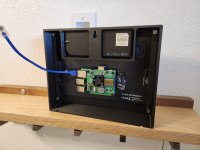
20260221_111801.jpg
Used a POE hat to power the setup

20260221_111111.jpg
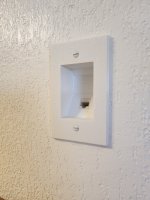
Printed a definitely code compliant recessed faceplate from Schoolhouse Spools PETG

20260221_110750.jpg
Network cable runs down to the basement to a POE injector

And finally, fancy pic for social media
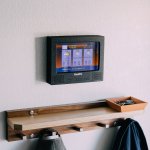
CW1A8649-2.jpg
 

mike93lx

ALLIANCE MEMBER
Joined
Dec 9, 2013
Messages
37,374
Location
Richmond, VA
This is a project that got way out of hand. Came across https://weatherstar.netbymatt.com/ a few months ago, thought it would be cool to have that streaming to an old tube TV. A few weeks ago, I then fell down a raspberry pi rabbit hole and ended spending too much money and time making this:

20260221_112316.jpg

Printed in PLA on my P1S

20260221_111812.jpg
Mini wireless keyboard fits in the slot on top. Yes, I could ssh into this, but I'm a hardware guy, not a software guy.

20260221_111801.jpg
Used a POE hat to power the setup

20260221_111111.jpg
Printed a definitely code compliant recessed faceplate from Schoolhouse Spools PETG

20260221_110750.jpg
Network cable runs down to the basement to a POE injector

And finally, fancy pic for social media
CW1A8649-2.jpg
That's sweet
 

jayz66ragtop

Well-known member
Joined
Sep 11, 2009
Messages
1,521
Location
SoCal
This is a project that got way out of hand. Came across https://weatherstar.netbymatt.com/ a few months ago, thought it would be cool to have that streaming to an old tube TV. A few weeks ago, I then fell down a raspberry pi rabbit hole and ended spending too much money and time making this:

20260221_112316.jpg

Printed in PLA on my P1S

20260221_111812.jpg
Mini wireless keyboard fits in the slot on top. Yes, I could ssh into this, but I'm a hardware guy, not a software guy.

20260221_111801.jpg
Used a POE hat to power the setup

20260221_111111.jpg
Printed a definitely code compliant recessed faceplate from Schoolhouse Spools PETG

20260221_110750.jpg
Network cable runs down to the basement to a POE injector

And finally, fancy pic for social media
CW1A8649-2.jpg
Dammit! Now you are going to make me revisit my stalled MagicMirror project!

Main reason it stalled five or six years ago is I didn't want to run an electrical outlet to where I wanted to hang it, didn't even think of PoE and now I have a switch with PoE ports. ****, now that I think about it I could do two or three of them...

Thanks for spending my money for me RichieP!
 

RichieP_MechE

Well-known member
Joined
Jun 23, 2021
Messages
178
Location
Near Pittsburgh
Dammit! Now you are going to make me revisit my stalled MagicMirror project!

Main reason it stalled five or six years ago is I didn't want to run an electrical outlet to where I wanted to hang it, didn't even think of PoE and now I have a switch with PoE ports. ****, now that I think about it I could do two or three of them...

Thanks for spending my money for me RichieP!
lol glad to be of service. I was also wanting to avoid installing an electrical outlet 5 feet up in the middle of a wall. Originally I was trying to think of a code compliant way to run 5V from a usb adapter up to the mounting point, looking at low voltage thermostat wire and usb ports with terminal blocks. Then it hit me - just use a network cable and POE. Power and comms in one!
 
To avoid these ads, REGISTER NOW!

duneslider

Well-known member
Joined
Jan 20, 2013
Messages
2,245
Location
Riverton, Utah

interesting
Have you tried it? I draw pictures everyday in cad and I am not sure how I feel about typing paragraphs about what I want to draw as opposed to just drawing what I want to draw. I can see it being nice for someone that doesn't have cad experience but if you are proficient is this going to be annoying, or nice?
 

jeepxj

Well-known member
Joined
Mar 2, 2008
Messages
17,831
Have you tried it? I draw pictures everyday in cad and I am not sure how I feel about typing paragraphs about what I want to draw as opposed to just drawing what I want to draw. I can see it being nice for someone that doesn't have cad experience but if you are proficient is this going to be annoying, or nice?

no i havent yet.

im not sure. i can see a possibility with it.
 

moto_ridah

Well-known member
Joined
Jun 13, 2009
Messages
88
Location
PNW
First TPU prints seemed to go well enough, knock on wood. Made up some feet for my Engel cooler. Textured build plate for extra stiction along with the reliefs.
 

Attachments

  • PXL_20260228_231514128.MP.jpg
    PXL_20260228_231514128.MP.jpg
    276.4 KB · Views: 29
  • PXL_20260228_084528794.MP.jpg
    PXL_20260228_084528794.MP.jpg
    199.1 KB · Views: 29

gte718p

Well-known member
Joined
Mar 12, 2009
Messages
3,950
for reasons i dont understand there is a lot of POE lighting now.

1771867790797.png

Because it is awesome.

Instead of requiring an electrician and a network technician taking and taking several days to install, wire, and program "smart" lighting, a single guy can do it in an afternoon.

I haven't tried it yet, but a friend just did his new office/warehouse and absolutely loved it. Lights, speakers, cameras, and access control all wired and configured in one day with a three-man crew.
 

ed_

Well-known member
Joined
Nov 5, 2019
Messages
183
Location
Maine
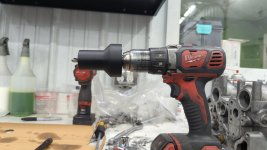
I had to helicoil several ruined exhaust header stud holes on my engine's head so I made a depth limiter for my drill hand held drillpress to ensure each of the holes were uniform in depth.
1.jpg

All done.
2.jpg

Not a fancy design by any means but it's always nice having the option to 3d print temporary contraptions.
 

mike93lx

ALLIANCE MEMBER
Joined
Dec 9, 2013
Messages
37,374
Location
Richmond, VA
I had to helicoil several ruined exhaust header stud holes on my engine's head so I made a depth limiter for my drill hand held drillpress to ensure each of the holes were uniform in depth.
1.jpg

All done.
2.jpg

Not a fancy design by any means but it's always nice having the option to 3d print temporary contraptions.
What material are you using for stuff like this? What program for modeling?
 

mike93lx

ALLIANCE MEMBER
Joined
Dec 9, 2013
Messages
37,374
Location
Richmond, VA
That's what had me looking at them, being able to have different temps going on in different chambers seems nice. I usually have petg in a couple and leave a couple whatever random pla silk the kids are liking in the others. I don't care much about the kids randomness going on but like to keep the petg in good condition for the stuff I am doing.
It arrived today and is extremely well packaged. Lots of padding, good carton, plastic corners on the carton and inside a double wall outer box. I'm impressed so far.

I need to wait til the printer is idle as I have to flip over the AMS to install it. I'll share pics and feedback when that happens
 

mike93lx

ALLIANCE MEMBER
Joined
Dec 9, 2013
Messages
37,374
Location
Richmond, VA
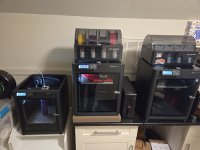
From 1 to 3...
That escalated quickly...

What's up with the paver under the printer?
An attempt at noise control. People use them for vibration reduction, which isn't my issue here and it doesn't help on that cabinet.

My bedroom is right below and it's louder than I would like. I think some of it is coming from the cabinets and that they are screwed into the framing.

The stand on the left is bad too. Seems like that cabinet is amplifying sound.

I'm going to try a freestanding metal shelving unit and I suspect that's where a paver may help.
 

ER70S-2

Well-known member
Joined
Jan 2, 2015
Messages
797
An attempt at noise control. People use them for vibration reduction, which isn't my issue here and it doesn't help on that cabinet.

My bedroom is right below and it's louder than I would like. I think some of it is coming from the cabinets and that they are screwed into the framing.

The stand on the left is bad too. Seems like that cabinet is amplifying sound.

I'm going to try a freestanding metal shelving unit and I suspect that's where a paver may help.

I used a paver under my Prusa for years. I machined solid aluminum feet to replace the rubber feet that came with the printer. The aluminum feet coupled the printer to the paver, essentially increasing the mass of the printer and directing vibrations into it. The paver sat on a piece of 3/4" thick foam slightly smaller than the paver. The noise reduction with that setup was huge.
 

mike93lx

ALLIANCE MEMBER
Joined
Dec 9, 2013
Messages
37,374
Location
Richmond, VA
I used a paver under my Prusa for years. I machined solid aluminum feet to replace the rubber feet that came with the printer. The aluminum feet coupled the printer to the paver, essentially increasing the mass of the printer and directing vibrations into it. The paver sat on a piece of 3/4" thick foam slightly smaller than the paver. The noise reduction with that setup was huge.
I may need to get some foam for under the paver. I tried some really large felt pads and I think they don't have enough give to work well

Ultimately the printers may just need to go in the garage. We don't have guests a lot, but this setup eats a lot of space in the guest room and if the printers are running, the room can't be used for watching TV.

If I finish the interior of my pool shed and condition it, I would have space for a bunch more printers...
 

ER70S-2

Well-known member
Joined
Jan 2, 2015
Messages
797
I may need to get some foam for under the paver. I tried some really large felt pads and I think they don't have enough give to work well

Ultimately the printers may just need to go in the garage. We don't have guests a lot, but this setup eats a lot of space in the guest room and if the printers are running, the room can't be used for watching TV.

If I finish the interior of my pool shed and condition it, I would have space for a bunch more printers...
I tried felt, sorbothane ($$$), bubble wrap, and foam from JoAnn fabrics. The foam blew all the others away.
 

duneslider

Well-known member
Joined
Jan 20, 2013
Messages
2,245
Location
Riverton, Utah
I used a paver under my Prusa for years. I machined solid aluminum feet to replace the rubber feet that came with the printer. The aluminum feet coupled the printer to the paver, essentially increasing the mass of the printer and directing vibrations into it. The paver sat on a piece of 3/4" thick foam slightly smaller than the paver. The noise reduction with that setup was huge.
I was going to suggest foam or one of those antifatigue mats under the paver.

I have mine in the garage and its been pretty nice to have out there. It isn't conditioned and even this winter when the garage got down to 45-48 I didn't have any issues printing pla and petg. No noise and no mess in the house. Eventually, when I get my office/hobby room done I will probably move the printer into that space.
 
To avoid these ads, REGISTER NOW!
Top Bottom