
You are using an out of date browser. It may not display this or other websites correctly.
You should upgrade or use an alternative browser.
You should upgrade or use an alternative browser.
The Everything 3D Printer Thread
- Thread starter BoilermakerFan
- Start date


kaymccampbell
Well-known member
That's something I need to do. A larger tray to hold them all, so they don't move on their drawer.Made a new case for my 3-4" micrometer.
I bought the mic used and it only came with half of a case. (It's the thing on the right)
Firebrick43
Well-known member
If you turn on fuzzy skins in your slicer for the outside walls. It will closely match the build plate surface texture and make for an almost manufactured look! Nice jobMade a new case for my 3-4" micrometer.
I bought the mic used and it only came with half of a case. (It's the thing on the right)
Punkinhead
Well-known member
- Joined
- Nov 19, 2011
- Messages
- 71
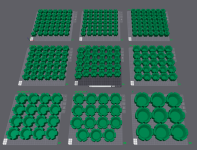
My new pole barn shop is almost done and the interior walls will be steel so I started printing magnetic hangers for some of my tools.

kaymccampbell
Well-known member
You could glue them nested and get JIC roses.
I came across this one a while ago. He designed it to fit in a relatively shallow drawer, while keeping them all (reasonably) accessible.That's something I need to do. A larger tray to hold them all, so they don't move on their drawer.
Firebrick43
Well-known member
I ran across a strike against the Elegoo Centauri Carbon 2 (with out canvas color) tonight. It does not support manual color changes via script/ M600 filament change commands. The elegoo flavor of orca will output GCode to do so but the machine without canvas will ignore them all.
Its documented on the official github so maybe it will be fixed?

 github.com
Its documented on the official github so maybe it will be fixed?
Feature request: G-code triggered pause support (M600 or equivalent) · Issue #4 · elegooofficial/CentauriCarbon2
The Centauri Carbon 2 firmware currently does not support a G-code-triggered pause command such as M600, which makes certain advanced workflows difficult or unreliable. Current behavior M600 comman...
github.com
Been slowly learning how to reverse engineer complex shapes in FreeCAD. This window switch was kicking my **** for awhile because the top part is complex and bends in two directions but I'm getting there.
Scanned with an einstar 2.
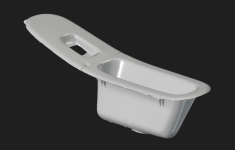
My model so far. I've deviated from the design in a few spots to make it stronger since these are notorious for breaking at the base.

Comparison

Scanned with an einstar 2.
My model so far. I've deviated from the design in a few spots to make it stronger since these are notorious for breaking at the base.
Comparison
Old tool guy
Well-known member
- Joined
- Apr 13, 2023
- Messages
- 3,639
Why is there a crease in front of the cup?
It's just on the exterior and won't be visible when installed. The inside of it is nice and smooth.Why is there a crease in front of the cup?
I'll prob revise the model more later so that may change. I'm still early in design right now.
TracerRound
Well-known member
kaymccampbell
Well-known member
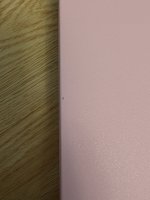
Carve it out and use a 3D pen to place a dot of plastic back in. I've got a Mynt 3D pen and it works great for infill.Does any one have a suggestion on how to save this print? Ended up with a random burnt filament or black spec. Happens randomly to me and I know sanding will make it worse. Anyone figured a way to cover it up?
TracerRound
Well-known member
I was wondering if that was going to be the suggested solution. I also noticed some websites recommended 400-800 grit sandpaper and a heat gun to clean up the final result. I had been using 220 grit and nothing else and it left a chalky result.
Is this the one? https://www.amazon.com/dp/B01BLQ24IW?tag=atomicindus08-20
Is this the one? https://www.amazon.com/dp/B01BLQ24IW?tag=atomicindus08-20
Old tool guy
Well-known member
- Joined
- Apr 13, 2023
- Messages
- 3,639
Need help please. I’m taking a 3d class at the local community center, the instructor is weak. We are using a Bambu A1 mini.
I bought a Bambu A1 printer and now i want to make things. First thing on my list is a luggage tag or key chain fob, the trick is i want to have text on both sides. Having trouble getting that to work out. Question 1: what app should i be using to create it? I am trying Tinkercad and Makerlab. Question 2: getting the bsckside image to print. It’s actually a logo, i have converted the jpg to stl? and can get it into the design and mirrored, no problem there. But i can’t figure out the thickness settings.
I bought a Bambu A1 printer and now i want to make things. First thing on my list is a luggage tag or key chain fob, the trick is i want to have text on both sides. Having trouble getting that to work out. Question 1: what app should i be using to create it? I am trying Tinkercad and Makerlab. Question 2: getting the bsckside image to print. It’s actually a logo, i have converted the jpg to stl? and can get it into the design and mirrored, no problem there. But i can’t figure out the thickness settings.
kaymccampbell
Well-known member
Yup. That's the one I have. Buy yourself a pair of the little side cutters, too.I was wondering if that was going to be the suggested solution. I also noticed some websites recommended 400-800 grit sandpaper and a heat gun to clean up the final result. I had been using 220 grit and nothing else and it left a chalky result.
Is this the one? https://www.amazon.com/dp/B01BLQ24IW?tag=atomicindus08-20
kaymccampbell
Well-known member
Bambu slicer has the ability to apply raised or lowered text to an object before printing. I find it easier the effing with CAD text.Need help please. I’m taking a 3d class at the local community center, the instructor is weak. We are using a Bambu A1 mini.
I bought a Bambu A1 printer and now i want to make things. First thing on my list is a luggage tag or key chain fob, the trick is i want to have text on both sides. Having trouble getting that to work out. Question 1: what app should i be using to create it? I am trying Tinkercad and Makerlab. Question 2: getting the bsckside image to print. It’s actually a logo, i have converted the jpg to stl? and can get it into the design and mirrored, no problem there. But i can’t figure out the thickness settings.
Firebrick43
Well-known member
You can do text in the slicerNeed help please. I’m taking a 3d class at the local community center, the instructor is weak. We are using a Bambu A1 mini.
I bought a Bambu A1 printer and now i want to make things. First thing on my list is a luggage tag or key chain fob, the trick is i want to have text on both sides. Having trouble getting that to work out. Question 1: what app should i be using to create it? I am trying Tinkercad and Makerlab. Question 2: getting the bsckside image to print. It’s actually a logo, i have converted the jpg to stl? and can get it into the design and mirrored, no problem there. But i can’t figure out the thickness settings.
Kay beat me to it
kaymccampbell
Well-known member
You come to GJ and expect not to spend money. You silly puppy.Thank you Kay. That looks like a great solution that is going to cost me money.
Need help please. I’m taking a 3d class at the local community center, the instructor is weak. We are using a Bambu A1 mini.
I bought a Bambu A1 printer and now i want to make things. First thing on my list is a luggage tag or key chain fob, the trick is i want to have text on both sides. Having trouble getting that to work out. Question 1: what app should i be using to create it? I am trying Tinkercad and Makerlab. Question 2: getting the bsckside image to print. It’s actually a logo, i have converted the jpg to stl? and can get it into the design and mirrored, no problem there. But i can’t figure out the thickness settings.
Checkout the Makerlab part of Makerworld, the web platform/library Bambu made. There are some web based customization tools on labs that allows you to do custom keychains and other customized items then download or send the .stl file direct to the printer....skipping the CAD step.
Old tool guy
Well-known member
- Joined
- Apr 13, 2023
- Messages
- 3,639
So i should open the tag in slicer and then add text?You can do text in the slicer
Kay beat me to it
Firebrick43
Well-known member
Yes, or you can make a simple one with shapes in the slicerSo i should open the tag in slicer and then add text?
kaymccampbell
Well-known member
Yes. I did this for my Flashforge Adventurer in Orca, which is a fork of Bambu for other printers.So i should open the tag in slicer and then add text?

TracerRound
Well-known member
Bambu anniversary sale starts Monday https://us.store.bambulab.com/pages/anniversary-sale
PelicanPines
ALLIANCE MEMBER
That's the one I got... love it.I was wondering if that was going to be the suggested solution. I also noticed some websites recommended 400-800 grit sandpaper and a heat gun to clean up the final result. I had been using 220 grit and nothing else and it left a chalky result.
Is this the one? https://www.amazon.com/dp/B01BLQ24IW?tag=atomicindus08-20
What a pita to design this but I finally got a v1. I spent so much time going in circles trying to get a pixel perfect match until I realized I didn't need that and should focus more on making something that prints easy


Still needs more revisions but it's nice to see progress. I'm printing it in an upright orientation because I want to add some fuzzy skin to replicate the OEM texture.
Still needs more revisions but it's nice to see progress. I'm printing it in an upright orientation because I want to add some fuzzy skin to replicate the OEM texture.
mike93lx
ALLIANCE MEMBER
Nice. What material are you planning to do the final part in?What a pita to design this but I finally got a v1. I spent so much time going in circles trying to get a pixel perfect match until I realized I didn't need that and should focus more on making something that prints easy
Still needs more revisions but it's nice to see progress. I'm printing it in an upright orientation because I want to add some fuzzy skin to replicate the OEM texture.
PLANice. What material are you planning to do the final part in?
Just teasing lol. Final will be ASA but I may explore other options as well if I can't get a good texture. My goal is to be able to make parts that don't look 3d printed.
I'm open to recommendations if anyone has suggestions.
mike93lx
ALLIANCE MEMBER
Best way to make it look not 3d printed is post processing. Sanding, filler, paint. Fuzzy skin can look good but you need to play with the settings.PLA
Just teasing lol. Final will be ASA but I may explore other options as well if I can't get a good texture. My goal is to be able to make parts that don't look 3d printed.
I'm open to recommendations if anyone has suggestions.
I haven't used any Asa... Are you setup with good ventilation?
I'm gonna do my best to avoid post processing but we'll see how it goes. Orienting the print upwards has done a good job of minimizing the spots where you can the see separate layers but I am concerned about how shiny black ASA might be.Best way to make it look not 3d printed is post processing. Sanding, filler, paint. Fuzzy skin can look good but you need to play with the settings.
I haven't used any Asa... Are you setup with good ventilation?
And yup I've got my printers set up for ASA. I run Prusa's filtration system on them and have already done ASA in the past without issue.
mike93lx
ALLIANCE MEMBER
I'm no expert on this and don't print abs or Asa, but I was under the impression that filtration was really not sufficientI'm gonna do my best to avoid post processing but we'll see how it goes. Orienting the print upwards has done a good job of minimizing the spots where you can the see separate layers but I am concerned about how shiny black ASA might be.
And yup I've got my printers set up for ASA. I run Prusa's filtration system on them and have already done ASA in the past without issue.
Firebrick43
Well-known member
Designed a few different prints recently
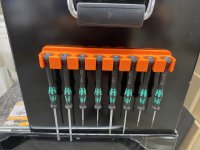
Magnetic Wera micro screwdriver rack
Epoxy and epoxy paraphernalia holder

Magnetic Wera micro screwdriver rack
Epoxy and epoxy paraphernalia holder
bggrnchvy
Well-known member
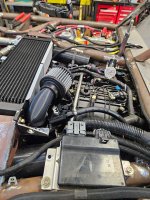
Due to a series of limitations, I needed to make this air filter fit the oil catch can in a weird spot. A little time modeling a profile in SW gave me a good PLA test peice I reprinted in ASA with a couple of extra features to let me clamp it on.


Last edited:
fourjeepin
Well-known member
So I spent a few weeks reading the last 100 pages of this thread and am thinking about getting a Bambu P1S and a Sunlu S2 dryer. I am on the fence about AMS and curious what others think about it. I am thinking of getting the AMS 1 bundle from Microcenter which adds $131 but want opinions on if it is worth it to upgrade to the AMS2?
Primary usage will be to print custom sized Schaller bins for hardware, probably using gridfinity. I think these need to be PTEG for durability and heat resistance in my shop. My 12 yo said he wants to be able to print fidgets and I am sure I will also want to print other organizers for my toolbox.
Primary usage will be to print custom sized Schaller bins for hardware, probably using gridfinity. I think these need to be PTEG for durability and heat resistance in my shop. My 12 yo said he wants to be able to print fidgets and I am sure I will also want to print other organizers for my toolbox.
Old tool guy
Well-known member
- Joined
- Apr 13, 2023
- Messages
- 3,639
So if you don't get the ams … how long will junior be content to print his fidgets in only one color?
kaymccampbell
Well-known member
Is junior paying for the AMS?So if you don't get the ams … how long will junior be content to print his fidgets in only one color?
So I spent a few weeks reading the last 100 pages of this thread and am thinking about getting a Bambu P1S and a Sunlu S2 dryer. I am on the fence about AMS and curious what others think about it. I am thinking of getting the AMS 1 bundle from Microcenter which adds $131 but want opinions on if it is worth it to upgrade to the AMS2?
Primary usage will be to print custom sized Schaller bins for hardware, probably using gridfinity. I think these need to be PTEG for durability and heat resistance in my shop. My 12 yo said he wants to be able to print fidgets and I am sure I will also want to print other organizers for my toolbox.
So looking at Bambu's site, the P2S with AMS2 combo is 699, the P1S with the same AMS is 539. For me, and I had a P1S, if budget allows I would get the P2 if for no other reason then the screen on the P1 is infuriatingly painful to do anything on where the P2 has a larger touchscreen that actually enables you to quickly accomplish things at the machine vs having to go back to the computer. The tool-less nozzle change is nice as well but most people don't change nozzles that often. For gridfinity bins load a .6 in and go to town.
If the budget doesn't allow the P2, I would still try and get the AMS2 as the active drying will help if you want to do ASA or TPU etc
fourjeepin
Well-known member
Yeah, and how long will I be content to print my tool organizers in only 1 color. I think getting AMS is a best. The bundle with AMS Classic doesn‘t add too much cost, but the AMS2 sounds like a much better design.So if you don't get the ams … how long will junior be content to print his fidgets in only one color?
Junior will probably not even pay for filament!Is junior paying for the AMS?
I was hoping to stay under $400 but you have a good point as the P2S is quite a step up from what I have read. I’ll reconsider this unit.So looking at Bambu's site, the P2S with AMS2 combo is 699, the P1S with the same AMS is 539. For me, and I had a P1S, if budget allows I would get the P2 if for no other reason then the screen on the P1 is infuriatingly painful to do anything on where the P2 has a larger touchscreen that actually enables you to quickly accomplish things at the machine vs having to go back to the computer. The tool-less nozzle change is nice as well but most people don't change nozzles that often. For gridfinity bins load a .6 in and go to town.
If the budget doesn't allow the P2, I would still try and get the AMS2 as the active drying will help if you want to do ASA or TPU etc
Mrs. Fourjeepin won’t be thrilled if I double the budget. What kitchen/cooking gadget can I make for her to convince her it will be worth the expense?
Custom gridfinity setup for each drawer... especially the junk drawerYeah, and how long will I be content to print my tool organizers in only 1 color. I think getting AMS is a best. The bundle with AMS Classic doesn‘t add too much cost, but the AMS2 sounds like a much better design.
Junior will probably not even pay for filament!
I was hoping to stay under $400 but you have a good point as the P2S is quite a step up from what I have read. I’ll reconsider this unit.
Mrs. Fourjeepin won’t be thrilled if I double the budget. What kitchen/cooking gadget can I make for her to convince her it will be worth the expense?
Mail sorter?
Keychain holder?
I've got a 3d printed holder for Oxo corn on the cob holders...those sharp stabby things
Spice organizers