To avoid these ads, REGISTER NOW!

The Everything 3D Printer Thread

Old tool guy

Well-known member
Joined
Apr 13, 2023
Messages
3,372
I replaced the second Pic with a less potatoey one

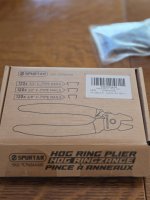
One ring would likely be enough, but I don't want it to fail. They're 3/8 rings from a cheap kit that I picked up after one of @Ryan 's posts on making DIY bungees.
8967.jpg
Ok, i went back and read the article, but i didn’t see a reference to the hog ring kit. And what size heat shrink did you buy?
 
To avoid these ads, REGISTER NOW!

mike93lx

ALLIANCE MEMBER
Joined
Dec 9, 2013
Messages
38,076
Location
Richmond, VA
Ok, i went back and read the article, but i didn’t see a reference to the hog ring kit. And what size heat shrink did you buy?
This was done with an old kit, probably bought from harbor freight 10 years ago. I'd have to go measure, but maybe 3/8? No adhesive and it's probably 2:1. Anything will do for this use case as it's just there to cover the rings

This is the hog ring kit Spurtar Angled Hog Ring Pliers Kit with 360pcs 3/4" 1/2" 3/8" Hog Rings | Spring-Loaded A3 Steel for Upholstery Fencing Animal Pet Cage Craft Bagging Netting Trap https://www.amazon.com/dp/B0DCG3HWHL?tag=atomicindus08-20
 

Pinne

Well-known member
Joined
Oct 8, 2024
Messages
345
The four heads on a u1 is cool and would be perfect for Multicolor models. Do they have a material management system or is it one spool per head at a time?

Personally, I would jump past the p2s and get an x2d. Dual heads covers the benefit of different support material and it can do some Multicolor. An AMS unit for the main head and a Sunlu S2 for the secondary would be a sweet setup
Looks like it's around $900 with the Bambu AMS. I don't know how much multi-material printing I'll do but it seems like that could be nice to have. The heated chamber on the X2D actually looks like the standout feature for my uses over the P2S.
 

mike93lx

ALLIANCE MEMBER
Joined
Dec 9, 2013
Messages
38,076
Location
Richmond, VA
Looks like it's around $900 with the Bambu AMS. I don't know how much multi-material printing I'll do but it seems like that could be nice to have. The heated chamber on the X2D actually looks like the standout feature for my uses over the P2S.
Even a P1S can do engineering filaments. I've done prints with 100 degree bed temps and 270 degree nozzle temps in mine.

If it was me, I would go with either a p1s or x2d. The p2s just doesn't feel like it fits well between the two

I'd love to be able to do a second material for supports
 

moto_ridah

Well-known member
Joined
Jun 13, 2009
Messages
91
Location
PNW
At current prices I would go with X2D, the extras you get for $100/150 over a P2S are worth it. This coming from someone with two P2S. I bought the 2nd during the last sale when the extra $50 off ($700 for the P2S) between the 2 models was worth it, plus availability for the X2D was limited to Bambu direct at the time. Not sure if they are dialing in the P2S retail price a bit more now since they kept it at $750. Buying from local big box store or ship to store can be a bonus for easy returns pending how your area shipping companies are, as some of the units from Bambu tend to get kicked around.
 

Citation

Well-known member
Joined
Jan 20, 2016
Messages
3,230
Location
Indy
Looks like it's around $900 with the Bambu AMS. I don't know how much multi-material printing I'll do but it seems like that could be nice to have. The heated chamber on the X2D actually looks like the standout feature for my uses over the P2S.
You might check out the Creality K1 plus as well. They have things like the heated chamber you need for engineering materials. It also has a good build size (350x350mm). With filament changer it's $900 on sale (check the various deal sites). A drawback vs the X2D is it uses a conventional filament change. However, I think the print speeds are faster than the X2D. Not night and day different but faster. However the speed advantage might be with pla where printers can go all out. With other materials your speed may be limited by the material itself.

If you just want to try things out, go for a deal on the Flashforge 5M or 5M pro. They are great printers and the open frame 5M can be had for $150 if you are ok dealing with AliExpress. The enclosed model is about $80-100 more. Great printer but the build are is small for many automotive parts. However, it's a cheap starter printer and even if you get a bigger printer later, the 5M is still likely to be faster when printing PLA. It would make for a good second printer.
 

Old tool guy

Well-known member
Joined
Apr 13, 2023
Messages
3,372
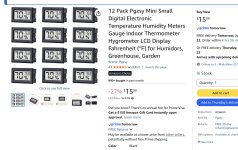
Are these any good? Reason i ask, when i pull my spools out of the sunlu drier the control panel shows humidity aroud 15%. I put the spool into a ziplock back with a sensor,band when i check bsck 2 hrs later the thingie shows close to 30%. I wait about 2 hours to give the device time to stabilize.
.
IMG_9874.jpeg
 

burger

Well-known member
Joined
Jun 6, 2005
Messages
1,005
Location
Erf
Are these any good? Reason i ask, when i pull my spools out of the sunlu drier the control panel shows humidity aroud 15%. I put the spool into a ziplock back with a sensor,band when i check bsck 2 hrs later the thingie shows close to 30%. I wait about 2 hours to give the device time to stabilize.
.
IMG_9874.jpeg
Can’t speak to those specifically, but I own many similar. They are not terribly accurate and only read as low as 20%.
 

Old tool guy

Well-known member
Joined
Apr 13, 2023
Messages
3,372
They are not terribly accurate and only read as low as 20%.
Did not know that. So when i see videos of people printing accessories for ceral containers and they include a slot for a humidity gauge … that's not useful?
 
Last edited:

Dh3256

Well-known member
Joined
Mar 19, 2018
Messages
1,159
Are these any good? Reason i ask, when i pull my spools out of the sunlu drier the control panel shows humidity aroud 15%. I put the spool into a ziplock back with a sensor,band when i check bsck 2 hrs later the thingie shows close to 30%. I wait about 2 hours to give the device time to stabilize.
.
IMG_9874.jpeg
We use that style of sensor a lot, maybe a few hundred of them, they are very accurate and reasonably reliable. We have run tests against lab grade instruments and they met their accuracy, repeatability, and linearity specs. The batteries they come with don't last long, so order replacement batteries as well. They are a lot less expensive on Temu, and the sensors seem to all be about the same among brands. The sensor is electronic, that's how they get the accuracy, repeatability, and low cost.
 

burger

Well-known member
Joined
Jun 6, 2005
Messages
1,005
Location
Erf
Did not know that. So when i see videos of people printing accessories for ceral containers and they include a slot for a humidity gauge … that's not useful?

I printed 24 of those cereal boxes. My takeaways: They do a good job of keeping filament dry and are easier to get spools in and out of than a ziplock bag. Plus they look cool. The humidity gauges are near worthless. Your desiccant changes color when it needs to be dried, which is indication enough. I've switched away from the desiccant trays that sit in the bottom of the cereal container to the cylinder shaped ones that mount in the center of the spool. Reason there is that I have a Sunlu dryer that replaced the lid of my AMS. It runs while I print, so if the desiccant is in the spool, it also gets dried while I print.
 

Dh3256

Well-known member
Joined
Mar 19, 2018
Messages
1,159
I haven't bothered with sensors. My rolls go from a drier to a ziplock bag and back to a drier.

At that price they can't be accurate and reliable
Price is rarely completely indicative of quality anymore. Those sensors are very accurate, it's an electronic device that sells in quantity for pennies. You can pay higher prices but you aren't likely to get better accuracy or reliability unless you are paying hundreds for a lab grade instrument.
 

burger

Well-known member
Joined
Jun 6, 2005
Messages
1,005
Location
Erf
We use that style of sensor a lot, maybe a few hundred of them, they are very accurate and reasonably reliable. The batteries they come with don't last long, so order replacement batteries as well. They are a lot less expensive on Temu, and the sensors seem to all be about the same among brands. The sensor is electronic, that's how they get the accuracy, repeatability, and low cost.

What do you use them for? I find if I have multiple in the same location, they will have different readings. There have been multiple in my AMS the last few weeks and there's a 10% range.
 

Dh3256

Well-known member
Joined
Mar 19, 2018
Messages
1,159
What do you use them for? I find if I have multiple in the same location, they will have different readings. There have been multiple in my AMS the last few weeks and there's a 10% range.
Monitoring humidity and temperature in manufacturing environments as well as shipping environmental monitoring. We also use them in environmental chambers for testing, when the testing will ultimately exceed the ratings and destroy the sensor.

Humidity will vary, even over fairly short distances, and any air flow, heat, etc. will affect the readings. Any sensors will give different readings if not subject to the identical environment. 10% is a big difference, are the batteries weak? Or maybe the ones you got are different. What are the specs on the ones you got?
 

ER70S-2

Well-known member
Joined
Jan 2, 2015
Messages
809
Are these any good? Reason i ask, when i pull my spools out of the sunlu drier the control panel shows humidity aroud 15%. I put the spool into a ziplock back with a sensor,band when i check bsck 2 hrs later the thingie shows close to 30%. I wait about 2 hours to give the device time to stabilize.
.
IMG_9874.jpeg

I have had those exact ones for 3.5 years and they are good enough for 3D printing purposes. Mine are all within a few percent/degrees iirc. Yes, they take some time to equilibrate (2 hours seems a little long, though), but remember, ziplock bags are not going to keep moisture out.

Get some plastic cereal containers, but you have to keep desiccant in them. This works. I've been doing it for years.

Edit- someone mentioned that they don't go below 20% humidity. Mine go into single digits, but the air needs to be dry :p
 

burger

Well-known member
Joined
Jun 6, 2005
Messages
1,005
Location
Erf
Monitoring humidity and temperature in manufacturing environments as well as shipping environmental monitoring. We also use them in environmental chambers for testing, when the testing will ultimately exceed the ratings and destroy the sensor.

Humidity will vary, even over fairly short distances, and any air flow, heat, etc. will affect the readings. Any sensors will give different readings if not subject to the identical environment. 10% is a big difference, are the batteries weak? Or maybe the ones you got are different. What are the specs on the ones you got?

Three separate orders from Amazon:


All purchased fairly recently, but I guess that doesn't necessarily mean the batteries are fresh. It's been my experience that I could leave two sitting next to each other and they won't read the same.
 

Dh3256

Well-known member
Joined
Mar 19, 2018
Messages
1,159
It's been my experience that I could leave two sitting next to each other and they won't read the same.
That is true for lab grade instruments as well, humidity will vary in the few inches of space between them. Not 10% but potentially a percent or two.

Also they typically do ship with weak batteries, unless you happen to get a just-manufactured batch. They cut costs on the batteries, we always replace the batteries before using them.
 

Old tool guy

Well-known member
Joined
Apr 13, 2023
Messages
3,372
time to equilibrate (2 hours seems a little long, though), but remember, ziplock bags are not going to keep moisture out.
2 hrs cuz i had other things to do. My point was, i knew it wasn't like an instant thermometer.
I wasn’t aware ziplocks were permeable.
 
To avoid these ads, REGISTER NOW!

theoldwizard1

Well-known member
Joined
Feb 22, 2011
Messages
43,366
Location
SE MI
Remember, I HAVE NO SKIN IN THIS GAME ! I don't own a 3d printer and am not likely to buy one !!!

Okay. Forget those 2 other guys.

For those you you who don't understand any of this, but would like to know more, watch this video. You Bought It, They Own It !

Executive summary (my word, I do not claim they are 100% accurate) :

Bambu Lab built software for their product using public domain code. The public domain code comes with a license that says they must PUBLISH their code and allow other to copy and modify it. Some one did and Bambu Lab is threatened to sue them unless they stopped publishing this new work.

There is more to the story, but it gets messy after this.
 
Last edited:

NUTTSGT

Super Moderator
Staff member
Joined
Sep 14, 2009
Messages
51,220
Location
Northern Central Ohio
Remember, I HAVE NO SKIN IN THIS GAME ! I don't own a 3d printer and am not likely to buy one !!!


There is more to the story, but it gets messy after this.
If you have no skin in the game, why come into a thread and create drama ?

The drama is over and will not get messy.

Thread cleaned up.
 

burger

Well-known member
Joined
Jun 6, 2005
Messages
1,005
Location
Erf
It's not vapor tight, however they seal pretty well. For extremely moisture sensitive filament (like pet-cf) I keep the bag they came in. For the rest, ziplocs are sufficient, IMO

I find the cereal boxes to work great, but my first attempts didn't go so well. I didn't have a dryer, just the cereal boxes with trays of desiccant in the bottom. The desiccant would sometimes turn black. I don't think it was moisture leaking in, but that the filament was either wet when new or sucked in moisture through my careless handling.

I made two changes: adding a Sunlu dryer on top of the AMS and moving the desiccant to the center of the spool. I haven't had a problem since. I don't run the dryer before printing; just while printing. Temperature settings took some dialing in. And I'll add that humidity in my basement has been awful.

Ziplocks could be fine with my current setup, but I can't speak to that since I'm all cereal at this point. Inherently they seem like they have a worse and more user error prone seal. Plus the cereal boxes are cheap. You can find them on the river for less than $5 each. When you're dollars deep in (another one of your) expensive hobbies, that's not much.
 

burger

Well-known member
Joined
Jun 6, 2005
Messages
1,005
Location
Erf
How convenient … sold in sets of 6.

This thread got nasty the last day or two so I want to make sure you understand this is not at all supposed to come across punchy. I hope we're all friends here, talking about tools and building things.

Coming in a six pack means value (plus that's how beer comes). Do you have less than six spools of filament? My 24 containers filled up quick between different colors and materials. I've only been doing this since last December and I keep finding things to print. I'm considering purchasing a second printer because only having one printer is a bottleneck.
 
Last edited:

mike93lx

ALLIANCE MEMBER
Joined
Dec 9, 2013
Messages
38,076
Location
Richmond, VA
I find the cereal boxes to work great, but my first attempts didn't go so well. I didn't have a dryer, just the cereal boxes with trays of desiccant in the bottom. The desiccant would sometimes turn black. I don't think it was moisture leaking in, but that the filament was either wet when new or sucked in moisture through my careless handling.

I made two changes: adding a Sunlu dryer on top of the AMS and moving the desiccant to the center of the spool. I haven't had a problem since. I don't run the dryer before printing; just while printing. Temperature settings took some dialing in. And I'll add that humidity in my basement has been awful.

Ziplocks could be fine with my current setup, but I can't speak to that since I'm all cereal at this point. Inherently they seem like they have a worse and more user error prone seal. Plus the cereal boxes are cheap. You can find them on the river for less than $5 each. When you're dollars deep in (another one of your) expensive hobbies, that's not much.
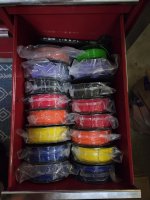
I considered cereal boxes early on (even posted here about it) and decided that the bulk and handling wasn't worth it for me. I have driers on both of my ams's as well as a standalone, plus I don't tend to keep a ton of filament around. My tool chest, which is my printer stand, has a couple drawers that perfectly fit filament spools, so I've just been doing the ziplocs for now. The Pic below is one drawer, but it was right before starting a wheelchair so it's packed. 8214.jpg
 

Old tool guy

Well-known member
Joined
Apr 13, 2023
Messages
3,372
This thread got nasty the last day or two so I want to make sure you understand this is not at all supposed to come across punchy. I hope we're all friends here, talking about tools and building things.

Coming in a six pack means value (plus that's how beer comes). Do you have less than six spools of filament? My 24 containers filled up quick between different colors and materials. I've only been doing this since last December and I keep finding things to print. I'm considering purchasing a second printer because only having one printer is a bottleneck.
It got punchy (nice word) but i didn‘t think it was aimed at me. If it was … i missed it. I just bought my A1 about 4-5 weeks ago, almost everything i know i learned here and i appreciate all the input and cheap advice.
.
My original filament purchase was a set of 8 spools of 250g all different colors. As I use them up i buy a full spool of a color i think i need, and the partial spools are useful for adding highlights to prints. I only have 4 big spools at the moment, so an order of 6 containers is good.
 

Old tool guy

Well-known member
Joined
Apr 13, 2023
Messages
3,372
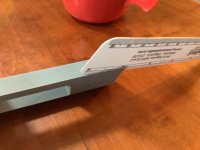
What happened here? This was the first layer, petg. The layer wasn’t curled or warped but i could see what looked like a crack, and it pulled back easily.
.
IMG_9883.jpegIMG_9882.jpeg
 

BMW Rider

Well-known member
Joined
Apr 8, 2010
Messages
351
Location
Calgary, Alberta, Canada
I got close to this pool to stick my toe in the shallow end, but feel like I just fell into the deep end instead.

I'm just a week into my endeavor with a new Bambu P2S and adding all the bits and such to get started and support it. I did read about the drama regarding Bambu, but decided it was not an issue for my needs as a beginner in this field as I just wanted a printer that would be ready to work out of the box. So far that has been my experience, but I want to move past just printing other peoples designs and do a few of my own or modify existing ones. That's the deep water I'm trying to keep my head above.

I have read this thread from the beginning to end and have gleaned some good info. Thanks to all who have contributed and keep it coming and remember, some of us are a bit clueless still. 🤪
 

Cruzan80

Well-known member
Joined
Jul 22, 2015
Messages
4,349
Location
Denver, CO
What program are you making your designs in? As I have done before, happy to help offer advice and/or "practice lessons" (have taught OnShape/Solidworks to MS/HS students for years). I also have a list of other tutorials/classes at various levels from others. If interested, please feel free to PM, so we dont drag this thread off track.

The offer is open for anyone, not just @BMW Rider.
 

Old tool guy

Well-known member
Joined
Apr 13, 2023
Messages
3,372
I started with tinkercad, seemed to be ok but had limitations. Maybe it was me. Now i’m using fusion 360, seems much more powerful, but i still struggle to think in 3 dimensions.
 

BMW Rider

Well-known member
Joined
Apr 8, 2010
Messages
351
Location
Calgary, Alberta, Canada
I've been working on learning Fusion using the limited free version using some tutorial videos I found. I've improved my skills somewhat in that I can successfully complete the lesson models following along, but trying to apply that to my own work is still a stretch. As such, I've yet to create anything of my own to print. I'm open to suggestions for easier programs with modest or no cost. For what I want to do, the cost of many of the programs is rather steep. I have no previous 3D modelling experience and only limited experience with 2D CAD. I'll PM you for your suggestions.
 

mike93lx

ALLIANCE MEMBER
Joined
Dec 9, 2013
Messages
38,076
Location
Richmond, VA
I'm self taught in Fusion and definitely fumble my way around but have been able to design a few reasonably complex things.

I try to make YouTube videos work, but definitely wish I had someone to lean on at times.
 

gpiggaz

Well-known member
Joined
Mar 14, 2010
Messages
2,579
Location
Tucson, AZ & Edmonds, WA
I'm self taught in Fusion and definitely fumble my way around but have been able to design a few reasonably complex things.

I try to make YouTube videos work, but definitely wish I had someone to lean on at times.
My wife bought me this book on Fusion, it helped tremendously with my learning it to be good enough to do stuff for myself. I even subscribed to the full version for a year . There was a 50% off discount on 1 year so "only" something like $30/month for that year, but when the year was up I went back to the free version for home use since I wasn't going to make any money using it. I did give up a few features that I used frequently though - Auto dimensioning is one I miss for sure. I use Fusion to design more than just 3D printer parts.

Here's a link to the book, it's probably dated by now since it was a couple of years ago that I got the book and used it: https://www.amazon.com/dp/B0C6W4LJCX?tag=atomicindus08-20


1784824590454.png
 

Cruzan80

Well-known member
Joined
Jul 22, 2015
Messages
4,349
Location
Denver, CO
I was trying to find a thread that I swear we started last time this came up, so we could keep this thread focused on the 3D printer side, and address CAD separately. However, I can't find it specifically (some related ones, but not a definite). Maybe it ended up getting snipped due to egos? Happy to post here as well, but worried about it getting buried within the 170 pages.

Overall, I find Fusion less intuitive than OnShape/Solidworks, but that may be because of what I learned first (Dassault vs Autodesk is like Windows/Mac). Happy to help with any program though.
 
To avoid these ads, REGISTER NOW!
Top Bottom