To avoid these ads, REGISTER NOW!

The Everything 3D Printer Thread

OP
B

BoilermakerFan

Well-known member
Joined
Apr 17, 2006
Messages
2,188
Location
Indianapolis, Indiana
What material were you printing with? PLA, right?

So here's the thing, the PEI surface on the prusa beds is great, but my experience is that the PEI loses adhesion to PLA over time for some reason. The only reliable way I can get it to regain adhesion with PLA is by lightly sanding the bed with 2000 grit sandpaper. Then clean off with acetone and/or alcohol.

I also tend to print a lot of PETG filament, and one of the upsides (or downsides depending on your perspective), is that it sticks extremely well to the PEI surface. In fact, many people recommend purposely decreasing the adhesion of the PEI. The way I do it, is that I just rub my hands all over the surface.

PLA doesn't like that at all. It adheres best to a clean surface.

Also, if you're still struggling to get that first layer to stick, you may be printing the first layer too fast. Perhaps I go overboard, but in the slicer, I set the first layer to be at 20 mm/s. You could also turn the speed down by the dial on the front as well


Well, the MK3 is quieter for a different reason, the MK3 uses different stepper drivers.

The MK3 in normal (high power mode) is still quieter than the MK2 in silent mode.

The thing about silent mode in the MK2, is that it drastically reduces torque to the stepper motors. So if for any reason there's a small obstruction, it will cause the motor to skip a step, and cause a layer shift. And at that point, it's game over and you have to start the print over again.

And by obstructions, I mean like filament that has curled up on overhangs (pretty much any filament can do this). Also if you print with PETG, and print without a silicone sock around the hotend, it likes to drop PETG "boogers" once in a while.

PETG likes to ooze alot, especially at the higher print range (240C +), and it likes to stick to the nozzle. So over time, it'll collect on the nozzle and burn. And, once it's burnt, it'll drop onto your print, causing an obstruction. The printer in normal mode usually will have the power to go right through it, but in silent mode, it won't.

So my recommendation for silent mode:
For long prints, don't. Not worth losing a whole print on the off chance one obstruction will mess it up.

Prints with a lot of overhangs. Maybe. Try to watch the print and check to see if the overhangs start curling up.

PETG prints: you can, just don't be surprised you'll lose a few prints.

If noise is a concern, download and print the dampeners for the printer. They may introduce some slight artifacting (the printer will rock back and forth with these) in your prints, but it'll make it much quieter.

https://www.thingiverse.com/thing:1707045

PLC,

I have my first layer bonding issue sorted. But yes, ATM, I'm using PLA. My issue was the PINDA sensor was set up to high. I reset it's height using the zip tie method from the manual, tested it, tweaked it, and recalibrated. Then dialed in the Z-axis. Another benefit I saw from this is that the sensor now finds the exact center of calibration points 1 and 9. Before it was inside the circle, but not centered. :thumbup: I'm going to run another 3Dbenchy test to see much it improves over my first one. I know it will be better, but I'm curious to see just how much better.

I ran a large flat print last night and I had some lifting about 70% into the print (even with glue on the bed). I canceled the print, cleaned the bed, reapplied the glue stick layer, and restarted. The print lifted because the bed temp was too high and I left it at that setting the whole time. On the second print I started at 70degC for the first layer to make sure it flowed out and squished, but dropped it to 65degC during the in-fill stage. On the second and third layers it was 60degC. Fourth layer was dropped to 55degC. Sixth layer dropped to 50degC. After the tenth layer I dropped it to 40degC, then left it there the remainder of the print since PLA can be printed without a heated bed. This was more of an experiment to see what would happen and I was prepared to lose another print. It was a successful print. No poor bonding issues and no lift. Nice sharp edges all the way around. Next flat print I will start at 65degC then drop down the temps through the print again. I'll share a pic of the print later this evening when I can get it edited on DropBox.

WRT the Silent mode on the MK2 vs. MK3. I knew the MK3 has the awesome TMC2130 stepper drivers. I was just surprised the MK2 had Silent, Auto, and High power modes. I thought it only had one setting. I ran my print last night in Auto. It definitely changed current throughout the printing and not just between rapid moves and extruding, though that had the most audible change whenever it switched between the two. The noise level changed throughout the print even when extruding. However, I do appreciate the warnings about Silent mode on the MK2. I will definitely pass that info on to the tech teacher at the school when I donate the GeeeTech with the genuine Prusa MK2 controller installed after I upgrade my Prusa to full MK3 satus. I'm really glad to hear that the MK3 in normal mode is quieter than the MK2 in Silent mode. I will also be sure to keep the MK2 in High Power mode when I'm printing the upgrade parts for the Prusa in PETG or ePC.

Speaking of the TMC2130 stepper drivers, man I wish TMC would introduce a version of the 2660s (the 4A drivers on the DuetWiFi board) with the Silent mode, even if it dropped the max current to 2A or 2.5A. That would be a killer stepper driver for a moderate sized (300mm cube print dimensions) 3D printer!
 
To avoid these ads, REGISTER NOW!
OP
B

BoilermakerFan

Well-known member
Joined
Apr 17, 2006
Messages
2,188
Location
Indianapolis, Indiana
I also discovered that my PEI tape has a small piece of grit underneath it at the rear of the bed about 50mm off center and 15mm down from the rear edge of the bed. It has about a 6-7mm diameter bubble. So when I pull off the MK42 bed to install the MK52 bed on the upgrade, I will remove the old PEI tape and install new.

Here's the large, flat print that lifted after 3 hours on the over heated bed... This is the second print that turned out pretty close to perfect:

20180313_075413.jpg


No prints for me tonight... I'm too tired and my wife said the printer woke her up a few times during the night last night. So a cabinet to enclose it for sound deadening is on the list for it once it's upgraded to a MK3, though the new drivers will definitely help.

I have a couple more sets of lift legs so I'm thinking about building an overkill cabinet for two printers stacked on top of each other, then I'll just use the legs to raise or lower the whole cabinet to access each printer. Of course, I can't move the cabinet if a printer is printing, but for accessing them and setting them up it would be fine. Heck I might just buy a couple NEMA 23 sized motors with integrated lead screws that are 24" to 36" long and just make fronts that can drop down remotely. For no other reason than why not mod out the cabinet while I'm at it?
 
Last edited:
OP
B

BoilermakerFan

Well-known member
Joined
Apr 17, 2006
Messages
2,188
Location
Indianapolis, Indiana
Here's a custom designed and printed Busman RTMR auxiliary relay fusebox mount for my Jeep JK Wrangler that puts it right next to the factory box.

3d printed on ASA and took about 13hrs due to the 4layer thick wall depth and 30% infill to give it strength. Came out pretty good I think.

Sent from my SM-G955F using Tapatalk

That looks great Steve!
 
OP
B

BoilermakerFan

Well-known member
Joined
Apr 17, 2006
Messages
2,188
Location
Indianapolis, Indiana
My wife found an older article about a 3D printer on the ISS used to make tools and repair parts:

Space Station 3-D Printer Builds Ratchet Wrench To Complete First Phase Of Operations

"The International Space Station's 3-D printer completed the first phase of a NASA technology demonstration by printing a tool with a design file transmitted from the ground to the printer. The tool was a ratchet wrench.

"For the printer's final test in this phase of operations, NASA wanted to validate the process for printing on demand, which will be critical on longer journeys to Mars," explained Niki Werkheiser, the space station 3-D printer program manager at NASA's Marshall Space Flight Center in Huntsville, Alabama. "In less than a week, the ratchet was designed, approved by safety and other NASA reviewers, and the file was sent to space where the printer made the wrench in four hours.”"

And a more recent article:

3D Printing In Zero-G Technology Demonstration (3D Printing In Zero-G) - 12.06.17

"The 3D Printing In Zero-G Technology Demonstration serves as a proof-of-concept test of the properties of melt deposition modeling additive manufacturing in the microgravity environment of the International Space Station (ISS). The lessons learned from this technology demonstration can be applied in the next generation of melt deposition modeling in the permanent NanoRacks Additive Manufacturing Facility (AMF), as well as for any future additive manufacturing technology. This includes any future additive manufacturing technologies NASA may plan to use, such as metals or electronics in-space manufacturing, on both the ISS and Deep Space Missions. This demonstration is the first step towards realizing a machine shop in space, a critical enabling component of any Deep Space Mission."

I haven't followed the goings-on on the ISS in quite a while, so this was new to me, but very cool.
 

plc268

Well-known member
Joined
Jul 10, 2016
Messages
87
No prints for me tonight... I'm too tired and my wife said the printer woke her up a few times during the night last night. So a cabinet to enclose it for sound deadening is on the list for it once it's upgraded to a MK3, though the new drivers will definitely help.

In the dead of night even my MK3 seems loud sometimes. It's not really, but just loud enough to be annoying to light sleepers. Thankfully I don't really have that problem in my household.

Other steps you can take to help quieten your printer is by putting on something massive, like a concrete paver stone. If your printer is sitting on a wood table, the sound your printer makes gets amplified. Try lifting your printer in the air while printing, just to see how much quieter it gets when lifted off the surface.

I thought about doing an enclosure, and I still might do one eventually. If I do one, I'll likely overbuild it and probably add some sound deadening that I have left over from my car audio install. It won't sound proof it per-say, but it would go a long way.
 
OP
B

BoilermakerFan

Well-known member
Joined
Apr 17, 2006
Messages
2,188
Location
Indianapolis, Indiana
In the dead of night even my MK3 seems loud sometimes. It's not really, but just loud enough to be annoying to light sleepers. Thankfully I don't really have that problem in my household.

Other steps you can take to help quieten your printer is by putting on something massive, like a concrete paver stone. If your printer is sitting on a wood table, the sound your printer makes gets amplified. Try lifting your printer in the air while printing, just to see how much quieter it gets when lifted off the surface.

I thought about doing an enclosure, and I still might do one eventually. If I do one, I'll likely overbuild it and probably add some sound deadening that I have left over from my car audio install. It won't sound proof it per-say, but it would go a long way.

Yeah, that's the route I'm going to take too. I thought about converting my soon to be upgraded Prusa MK3 into a HyperCube Evo style printer, but that would defeat the point of upgrading to the MK3 and I can just build a sound deadened cabinet a lot easier and cheaper. I'll probably use T-Slots rail and linear slides to make shelves that can be pulled out, but when pushed in they can be locked down tight so they don't move or rattle. I'll make the shelves in a torsion box style so they can be mass loaded. The cabinet will be tall enough for the Prusa and the big HyperCube Evo or Spider V2 with isolated chambers so I can heat/vent each one independently allowing me to print ABS on one and another material in the other at the same time.

Odor control is another big reason I'm going fully enclosed. The smell of ABS printing will trigger a migraine for my wife but My garage isn't finished out yet so the printers have to be in the basement.

I'm really starting to love the Prusa MK2 so I can't wait to upgrade to the MK3.
 
OP
B

BoilermakerFan

Well-known member
Joined
Apr 17, 2006
Messages
2,188
Location
Indianapolis, Indiana
Ordered a few filaments and a replacement extruder stepper for the GeeeTech upgrade this morning:

eSUN 1.75mm ePC Black PolyCarbonate

eSUN 1.75mm PLA PRO (PLA+) Olive Green

eSUN 1.75mm Solid Purple PETG

DROK 40mm High Torque Bipolar Stepper Motor Nema 17, 46Ncm, Low Noise, 1.8°


The ePC and purple PETG are primarily for printing the parts for my upcoming DIY build, but the ePC will be used to print some of the MK3 upgrade parts and I will probably end up printing new enclosure parts in purple for the Prusa as well just because it's purple.


I also found an aluminum composite bed support for the Prusa i3 that accepts 4 of the linear bearing in the aluminum blocks so I won't have to purchase the Mk2 --> MK2S upgrade kit and I'll get a stronger, lighter bed support with better bearing mounts in the process for my MK3 upgrade.

:rocker:
 
Last edited:

plc268

Well-known member
Joined
Jul 10, 2016
Messages
87
4 Bearings is fine if the rods on the bed are perfectly parallel. 3 is generally regarded as better as most aren't capable of the precision required to make 4 bearings run optimally.

Also, aluminum bearing blocks may not fit the prusa frame. At least it doesn't on an mk3. The frame cutouts are just big enough for the U-bolt that holds the bearing to the bed.

Also, if you want to go down another rabbit hole, there's several projects that rebuild the Prusa i3 mk2 frame with 3030 aluminum extrusion. If you want to look it up, it's called "Haribo 3030." (The haribo name is a reference to the candy prusa sends with their printer kits)

I built one of these myself, and the frame rigidity is massively increased over the stock mk2 frame.

https://github.com/PrusaMK2Users/3030_Haribo_Edition

And here's a knockoff called "Zaribo..." they increased the Z height by 100mm, and commercialized the project.

http://zaribo.org/
 
OP
B

BoilermakerFan

Well-known member
Joined
Apr 17, 2006
Messages
2,188
Location
Indianapolis, Indiana
4 Bearings is fine if the rods on the bed are perfectly parallel. 3 is generally regarded as better as most aren't capable of the precision required to make 4 bearings run optimally.

Also, aluminum bearing blocks may not fit the prusa frame. At least it doesn't on an mk3. The frame cutouts are just big enough for the U-bolt that holds the bearing to the bed.

Also, if you want to go down another rabbit hole, there's several projects that rebuild the Prusa i3 mk2 frame with 3030 aluminum extrusion. If you want to look it up, it's called "Haribo 3030." (The haribo name is a reference to the candy prusa sends with their printer kits)

I built one of these myself, and the frame rigidity is massively increased over the stock mk2 frame.

https://github.com/PrusaMK2Users/3030_Haribo_Edition

And here's a knockoff called "Zaribo..." they increased the Z height by 100mm, and commercialized the project.

http://zaribo.org/

Thanks for the tips. It took me a second to visualize the frame pieces your were talking about... The other drawback to the aluminum blocks is that it probably eats 5-10mm in print height so it would offset the gain from the MK3 upgrade or even take some away. I can order the aluminum composite bed carrier with 3 or 4 bearings and with the U-bolt stock option. The U-bolt option is cheaper, but I thought the aluminum block would be stronger.

I need to order one of the bed supports since I will be moving the MK42 bed to the POS GeeeTech i3 Pro B when I upgrade it with all the original MK2 parts.

I'll check out the Haribo and Zaribo. I think only the main frame is left to move to aluminum after the MK3 upgrade, right? The upgrade comes with the 3030 Y-axis supports and new front/rear frame plates.

I don't know that I need the 280mm Z height on the Prusa Mk3. I wonder if keeping it stock height would keep it more rigid for smaller, detail prints? I'm going to build a bigger printer after I get the MK3 upgrade fully installed and dialed in.

As much as I really like the HercuLien and Eustathios Spider V2 printers, I think they're a little more than I want to tackle for my first scratch build so I'm leaning towards the HyperCube Evolution, probably in a 400x400x500 volume so I can run (4) 200x200 silicone bed heaters. The one piece 300sq or 400sq heaters don't seem to heat evenly and take forever to heat up too. Maybe guys have just been running them on underpowered PSUs without insulation on the bottoms, I still have to look into it.


I did a search and I couldn't find an answer to one of my questions...

Can a Viki2 be substituted for the LCD2004 on a Prusa Mk2/Mk3? It's just a nicer, cleaner display, but it's still uses the U8GLIB library.


I tried to print a couple more models and they failed. I tried slicing them with the Prusa software and got the same results. So I went through the layers and realized one was really designed to be printed on a display base (New Order Storm Trooper helmet) and the sea otter needs supports under the front feet. Noobie hasn't figured out how to setup supports for such a small model, but I'll get it sorted out. I'm actually relieved that it wasn't just Simplify3D screwing it up or I would have been :mad: that I spent money on it.


Printing a Millennium Falcon coffee cup coaster for my wife now. I ran the temp calibration and PID calibration last night and the first layer is looking better than ever.
 
OP
B

BoilermakerFan

Well-known member
Joined
Apr 17, 2006
Messages
2,188
Location
Indianapolis, Indiana
And here's a knockoff called "Zaribo..." they increased the Z height by 100mm, and commercialized the project.

http://zaribo.org/

:evil:

I kind of wish I didn't click on that link... I don't need the 320mm Z-axis, but it would allow me to swap the nice 220mm Z-axis steppers over to the GT along with a set of rods to get rid of the z-wobble on the craptastic GT. And if I upgrade to the 3030 frame, then I might as well put the Prusa frame on the GT while I'm at it. Damn you man!
:beer:
 

DocMike

Member
Joined
Jul 8, 2011
Messages
18
My little rig. 3Dprinter/laser/CNC craver.


05df0bf8603679df786bd81b3c4612b6.jpg7345b21f786e20afb70f9c1d692ad0cc.jpgcb3a9ead097950ecf548c81b5a8180fe.jpg4bc5ee996bc0924a71869a501c6869af.jpg


Sent from my iPhone using Tapatalk
 

Attachments

  • 05df0bf8603679df786bd81b3c4612b6.jpg
    05df0bf8603679df786bd81b3c4612b6.jpg
    131.7 KB · Views: 23
  • 7345b21f786e20afb70f9c1d692ad0cc.jpg
    7345b21f786e20afb70f9c1d692ad0cc.jpg
    827.5 KB · Views: 7
  • cb3a9ead097950ecf548c81b5a8180fe.jpg
    cb3a9ead097950ecf548c81b5a8180fe.jpg
    81.9 KB · Views: 6
  • 4bc5ee996bc0924a71869a501c6869af.jpg
    4bc5ee996bc0924a71869a501c6869af.jpg
    141 KB · Views: 5
OP
B

BoilermakerFan

Well-known member
Joined
Apr 17, 2006
Messages
2,188
Location
Indianapolis, Indiana
Nice little rig Doc. When did you buy in? I didn't know about it or I probably would have jumped on the KS campaign. Their on pre-order now for $799.

How do you like it?
 

TurtleValley

Well-known member
Joined
Dec 4, 2017
Messages
253
Location
BC. Canada
This is a great thread. Thank you for moving it along. I don't post on it as I am learning from everything you do on it so that I can choose wisely when I pull the trigger on a Filament 3D Printer. I have a 3D dental printer that I use for our Model Railroad Business. it is fantastic for very small HO Scale details. I am now interested in getting into a filament printer to do some larger parts for jigs and fixtures etc.

Keep this thread motoring. We are all watching!
 

lilscorpion

Well-known member
Joined
Mar 15, 2010
Messages
3,599
Location
Colorado
My son and I made some progress today. FT5 instructions are ok but you gotta kinda figure a few things out. Few cases the hardware they tell you to use isn’t long enough but we’ve adapted.

I’ve assembled a few CNC plasma tables and some CNC routers. This was a lot more difficult only because of the little bitty hardware. Many times I found myself fumbling with get the T-Nuts started. Got a little better as we progressed though.

175be02a63d60f03b6987b9d80b88147.jpg

2e3be2a1accdf4d2226a4ca22d5531d5.jpg


Sent from my iPhone using Tapatalk Pro
 

Attachments

  • 175be02a63d60f03b6987b9d80b88147.jpg
    175be02a63d60f03b6987b9d80b88147.jpg
    416.6 KB · Views: 3
  • 2e3be2a1accdf4d2226a4ca22d5531d5.jpg
    2e3be2a1accdf4d2226a4ca22d5531d5.jpg
    75.3 KB · Views: 8
OP
B

BoilermakerFan

Well-known member
Joined
Apr 17, 2006
Messages
2,188
Location
Indianapolis, Indiana
Nice progress Lilscorpion!


Today I spent the day in the car driving my daughter back up to Purdue since her spring break is now over.


Yesterday I changed out the black PLA for the red that I acquired with the GeeeTech POS and the eSun translucent blue that I purchased when I thought maybe the red PLA was bad.

My daughter wanted an octopus printed out in the red so that was a perfect test... recalibrated the Z for the new material. Only had to change it by 0.005mm. And I printed this at the 0.15mm OPTIMAL layer setting in the Prusa software:

20180317_184108.jpg


A 99.8% perfect print! It had one tiny flaw on the tip of one of the tentacles. My daughter didn't even notice, but I went over it with a magnifying glass because I wanted to see how dialed in the printer is. I'm happy with the result.

Next I loaded up the blue filament and found an Anubis vase. I had to scale it down to fit the Prusa and printed it at the fastest 0.3mm layer height setting to see what it would look like. The print still took 5 hours and 43 minutes to finish. I was actually really impressed with how well it turned out at the fastest, lowest quality setting. You can see some stringing of the filament in the gaps, but my daughter didn't mind and it does add some strength to the vase:

20180317_212736.jpg


20180317_223406.jpg


20180318_230806.jpg


My daughter also requested a couple of these Squishy Turtles she found on Thingiverse:

bb1dae9d8cf52fee61b245c1042a1386_preview_featured.jpg


I'm printing the lower bodies and heads in the black. She wanted the Spiral, Hex, and Large Spike (not in the pic) bodies in the red and blue. I have the files loaded on my SD card, but I didn't have time to change the filament back to black and start the print before we left this morning.


I have a pretty big cue of files of things to still to print yet for my son, so I'll continue to post the finished prints as they're done.


I'm just waiting on my new filaments to show up so I can start printing the new pieces for the Prusa MK3/Zaribo upgrade. And I am leaning towards the 320mm Z-axis upgrade when I do the upgrade... what's an extra $85 to gain 100mm in height on the MK3? Plus I can move the genuine Prusa 220mm Z parts to the GeeeTech, or what's left of it after all the MK2 parts are moved over. Truth be told, I realized I'm basically building a new all-aluminum MK3 at this point. The only things left on the GeeeTech would be the LCD and the X&Y stepper motors. So I think it just makes more sense to print a new Prusa LCD case for the MK3, pull the X/Y stepper motors from the MK2, and just put the GeeeTech LCD in the MK2 case and leave the rest of the MK2 alone since it's working, square, and printing great. I'll just order the other polished rods from Zaribo for the 320mm MK3, along with the 3-bearing aluminum composite bed holder (lighter weight than the solid aluminum ones). Might as well grab the upgraded poly GT2 belts for the MK3 while I'm at it. If I end up needing any other parts I'll pilfer them from the MK2, but I don't think there is anything else I need. My tax donation of the the Prusa MK2 to the school still covers the cost of everything I need to build the MK3 320mm Zaribo. And since the electronics will be genuine Prusa, I can add the multi-material upgrade later if I decide to do that.
I realized there is another benefit to the 3030 aluminum frame for the MK3. I'm using the IKEA JANSJO flexible LED light to illuminate the print bed. They mount with two small stand-offs into their weighted base. Instead of using the base, I'll just drill the two holes I need for each light into the frame's top rail where they are out of the way of the Z-axis and X-carriage. I'll probably put 5K LED strip lights in the slots in the frame uprights too. Then I'll have plenty of light on the printer bed and I'll add the OctoPrint board to the MK3 for a web cam so I can monitor my long prints during the day when I'm working and out making my sales calls. That will also let me remotely kill any prints that start to fail instead of having them go for 4-8 hours before I can swing by the house to stop it.

Early this summer I can start gathering the parts to build a bigger 400x400x500 or 400x400x600 HyperCube Evolution. I'm going OTT with this one. I want the Duet WiFi controller, expansion board, and the Duet 7" TFT touchscreen. I'm also researching Delta style printers. It may be a better option to build a Delta for the 500mm or 600mm height that I want. It will probably take me 4 months to gather all of the parts since I have to spread out the costs because of other priority projects in the house and the motorcycles.

My buddy also emailed me tonight that he received his Monoprice Mini Delta printer and got it to successfully print the test file after he added the automatic bed leveling to his G-code in Cura. He said the PLA sample he received printed the test file great. While I was driving I gave him a call to talk about it. He's very happy with the printer, especially for less than a $200 investment. He got caught by the Cura revision issue because there is a config file for the Mini Delta for an old version of Cura, but not the latest version. So he's going to have to install the older version of Cura, load the config file, and copy all of the settings down so he can set up the printer in the newest version of Cura. I'm going to go check it out later this week or early next week.


I'll keep the thread updated with my progress on the MK3/Zaribo upgrade, the big printer build, and my buddy's MP Mini Delta too.
 

lilscorpion

Well-known member
Joined
Mar 15, 2010
Messages
3,599
Location
Colorado
BoilermakerFan said:
Nice progress Lilscorpion!

Today I spent the day in the car driving my daughter back up to Purdue since her spring break is now over.

Yesterday I changed out the black PLA for the red that I acquired with the GeeeTech POS and the eSun translucent blue that I purchased when I thought maybe the red PLA was bad.

My daughter wanted an octopus printed out in the red so that was a perfect test... recalibrated the Z for the new material. Only had to change it by 0.005mm. And I printed this at the 0.15mm OPTIMAL layer setting in the Prusa software:

20180317_184108.jpg


A 99.8% perfect print! It had one tiny flaw on the tip of one of the tentacles. My daughter didn't even notice, but I went over it with a magnifying glass because I wanted to see how dialed in the printer is. I'm happy with the result.


Octopus looks great! Can’t wait to get printing.


Sent from my iPhone using Tapatalk Pro
 
OP
B

BoilermakerFan

Well-known member
Joined
Apr 17, 2006
Messages
2,188
Location
Indianapolis, Indiana
I think I've stated this before too, but I'll state it again:

Now that I have a working 3D printer, I really question why I waited so long to get one!

I'm having a lot of fun just printing out trinkets or figurines right now. I can't wait until I start designing my own stuff to print and making more useful parts for the shop and basement hobby bench.

The first thing I'm going to try is to design my own Scurvy Tick logo Maker token. I have the CAD files for my logo, so I have to import them and figure out how to make it a round, scalloped edge token with a height dimension and the relief for the text and tick. The Prusa software has an option that allows you to print different layers in different colors. It stops the print and prompts you to change the filament as well as adjust the Z-axis if necessary. I can design the logo token to have the outer edge built up for two or three on the very outside, then fill in the center with white, then switch back to the black to finish the print. It would make for a very clean part versus just trying to paint it after it's done.
 
OP
B

BoilermakerFan

Well-known member
Joined
Apr 17, 2006
Messages
2,188
Location
Indianapolis, Indiana
Octopus looks great! Can’t wait to get printing.


Sent from my iPhone using Tapatalk Pro

Thanks! It's about 100mm in diameter and maybe 60mm tall. It took just under 2 hours to print at the 0.15mm layer height. The Prusa can go down to as fine as 0.5mm layer heights, but that would have been a 6 hour print.

I'm tempted to print the vase again at a 0.1mm layer height and run it a little slower, but that would push it out to over 18 hours so I can't do that until after I upgrade to the MK3 for the quiet stepper drivers and move it to my hobby area on a solid base to further reduce the noise. Where the printer is now, it wakes my wife up during the night so I'm not allowed to run the printer past 11pm. :sad:
 

carnegie03

Active member
Joined
Feb 23, 2010
Messages
27
Thought I would share some 3d printing experience- Architect with a garage and car problem here. International harvester problem too, but that's a whole different thread.

I bought a makerbot replicator + over a year ago for the office and while it took some time to dial in, we're able to produce scale models of our project for client meetings, etc.

A fishing cabin design- see image.

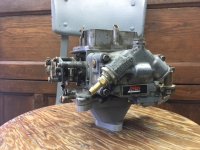
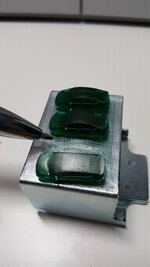
However, since this is garage journal, I though I would also share a carb adapter for a 61 scout. Holley 2-barrel 2300 to Holley 1904 1-barrel. Not that the 152 cu in engine is going to like it, but interesting nonetheless. The 3d print will be used for mockup of hood clearance, maybe a quick test run and then reprinted in parts for a sand casting, time permitting.

Drawn in sketchup, exported to .stl and printed on the makerbot. Print took about 4 hours.

Edit: pla filament; we typically use gray in the office, have found that other colors seem to laydown differently.

Happy printing!
 

Attachments

  • Fishing Cabin 10-10-2016 (1).jpg
    Fishing Cabin 10-10-2016 (1).jpg
    137.6 KB · Views: 245
  • IMG_3115.JPG
    IMG_3115.JPG
    113.6 KB · Views: 228
  • IMG_3118.JPG
    IMG_3118.JPG
    124 KB · Views: 229
Last edited:
OP
B

BoilermakerFan

Well-known member
Joined
Apr 17, 2006
Messages
2,188
Location
Indianapolis, Indiana
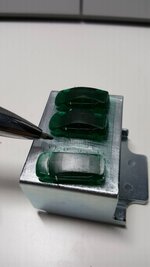
Very cool carnegie03.

What size nozzle do you have on the printer? It looks like your extruder rate needs to be increased a little since the window panes are broken...

What scale is the cabin? 1:48?

Printing a scale model of the house we want to build and the garage to go with it is one of the things I want to do too. I have the detailed plans from the architect so I could probably do the work myself, but I'm going to see if he'll send me a scaled STL file to print for a reasonable fee. I plan to print each wall face down so I can have little supports added so I can assemble it as a full model with removable roof and second story. I might even print the basement since I plan to finish it out.

The%2BMadrona_01.jpg


20170422_113840.jpg


We want to tie the house to the garage via a 2-story connection, a mud room on the lower level and a WIC on the upper level, so I will have to do some CAD work, but having the models to manipulate and change orientations will be awesome. We're also going to extend the dormers all the way to each end of the house to maximize ceiling height and finished square footage to get th ehouse to about 1,600-1,650sq-ft. IIRC, it's about 1,430sq-ft as designed. I will also edit the garage to match the style of the house as far as exterior walls and trim goes.


And I just experienced what you alluded to with colors. My black prints GREAT. The Blue does a very good to great job. The red was easy to dial in... this morning I loaded white and it was such a PITA. Calibrations looked great, then the first layer would string, short extrude, or booger. Took about 8 starts to finally get it dialed in.
 
Last edited:
To avoid these ads, REGISTER NOW!

carnegie03

Active member
Joined
Feb 23, 2010
Messages
27
BoilermakerFan, your house and barn combo look good, should be a nice setup. The cabin is probably at 1/8"=1'-0" or 3/32", I don't recall. Those are the scales we tend to use most often that strikes a nice balance between speed, details, etc. Some models have to be printed in multiple pieces which can take about a week between prep time and having someone available to remove a print to get another going overnight, etc. 1:48 would be pretty big, but cool- not sure how long that would take. Had an HO railroader ask about some buildings, that would be an easy scale to deal with.

We have never printed walls or roofs separately, but no reason couldn't be done. Benefit to me for 3d printing is that instead of having an intern or myself build a model over 3-4 days out of cardboard, we let the robot do the work while we sleep. I can get on board with that any day.

We have just used the standard extruder size at .4mm; I have an experimental extruder we haven't tried yet with different nozzles. Got that one specifically to try cork and wood based (or mixed in) filaments. Putty gray is a bit flat, but prints way better than the white did.

I've never come across a client that could print our models at home...that would probably be a tough client! Plus then I couldn't charge for the print.
 
OP
B

BoilermakerFan

Well-known member
Joined
Apr 17, 2006
Messages
2,188
Location
Indianapolis, Indiana
Thanks for the scale info. My Prusa only has a 205mm X & Y so I'd have to print it in sections. I can't remember the overall length of the house, but I'll probably start at 1/4"=1' and I might even go up to 1/2":1' later to make a really nice scale model of everything after we actually get to build the house and garage.

My mom (and my dad to an extent) build miniatures as a hobby and my mom has won several contests so she was probably more excited than my son to learn that I picked a 3D printer.
 

TurtleValley

Well-known member
Joined
Dec 4, 2017
Messages
253
Location
BC. Canada
Just thought I would share what we print with our dental resin printer. Mainly little detail parts for our mrr business.

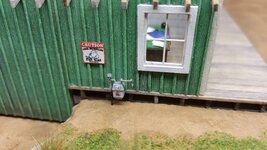
1:87 gas meter
1:87 door knob and lock plates
1:87 truck tires
Cash register
1:160 toyota prius

The printer uses a lcd dlp and then UV cured resin. I am getting about 25 micron accuracy with a bit of tweaking.3f08bec852a2c87d90f13d2da10b1cf5.jpg679ac9d0e3c4d0fb200af038aaa5a865.jpgb96c4a4475ca3aa49b5d4e27c749e73f.jpg85d14260cc1ef8c16e03487234fd4f57.jpg2df5bed8b3a28bab30452d3cad24a93f.jpg18a8e14ca64eb9ea301539340d95126e.jpg07a63caeea40fc39998a612c06c47aad.jpg

Sent from my SM-N920W8 using Tapatalk
 

Attachments

  • 85d14260cc1ef8c16e03487234fd4f57.jpg
    85d14260cc1ef8c16e03487234fd4f57.jpg
    103.1 KB · Views: 14
  • 2df5bed8b3a28bab30452d3cad24a93f.jpg
    2df5bed8b3a28bab30452d3cad24a93f.jpg
    45.3 KB · Views: 6
  • 679ac9d0e3c4d0fb200af038aaa5a865.jpg
    679ac9d0e3c4d0fb200af038aaa5a865.jpg
    24.3 KB · Views: 5
  • 3f08bec852a2c87d90f13d2da10b1cf5.jpg
    3f08bec852a2c87d90f13d2da10b1cf5.jpg
    126.5 KB · Views: 5
  • 18a8e14ca64eb9ea301539340d95126e.jpg
    18a8e14ca64eb9ea301539340d95126e.jpg
    29.8 KB · Views: 5
  • 07a63caeea40fc39998a612c06c47aad.jpg
    07a63caeea40fc39998a612c06c47aad.jpg
    60.4 KB · Views: 5
  • b96c4a4475ca3aa49b5d4e27c749e73f.jpg
    b96c4a4475ca3aa49b5d4e27c749e73f.jpg
    58.5 KB · Views: 6
OP
B

BoilermakerFan

Well-known member
Joined
Apr 17, 2006
Messages
2,188
Location
Indianapolis, Indiana
Holy cow those are tiny! Crazy what some people do for details on the 1/87 scale HO model railroads! I have a lot of old structures, engines, and track in my folks basement from my granddad that was given to my dad and I when he switched to N-scale. My cousin has the N-scale stuff and has been slowly building a 6'x12' layout. I don't have the room for a HO sized layout and TBH, I can't afford it nowadays. The HO and O stuff is so darn expensive now it's crazy. You can practically build a garden railway outside for what it costs to build a detailed HO layout of any fun size now.

And since I jumped over to your build thread to check in, you can print off some sweet drone parts with a FFF 3D printer.
 

plc268

Well-known member
Joined
Jul 10, 2016
Messages
87
For guys who have a printer and are looking to build an enclosure, here is a really sweet one I found on Thingiverse:

https://www.thingiverse.com/thing:2792618

It's currently designed for the Prusa i3 and clones.

I saw a post on facebook a few days ago where some used a 15u 24" deep enclosed server cabinet as an enclosure. Looked really slick. I'll see if I can dig that picture up again.

Edit: here it is. More info in the comments

https://www.facebook.com/groups/PrusaOfficial/permalink/1613163668739492/

Seems like a 12u cabinet is sufficient for just the printer, and a 15 comfortably fits filment as well.
 
Last edited:
OP
B

BoilermakerFan

Well-known member
Joined
Apr 17, 2006
Messages
2,188
Location
Indianapolis, Indiana
I saw a post on facebook a few days ago where some used a 15u 24" deep enclosed server cabinet as an enclosure. Looked really slick. I'll see if I can dig that picture up again.

Edit: here it is. More info in the comments

https://www.facebook.com/groups/PrusaOfficial/permalink/1613163668739492/

Seems like a 12u cabinet is sufficient for just the printer, and a 15 comfortably fits filment as well.

That's pretty sweet. I forgot I had a large NEMA 3R pole mounted switch box a buddy gave to me... I had to drill out the locks, but I'm pretty sure it's big enough for the Prusa. I just need to mod it a bit, but heavy duty steel FTW!
 
OP
B

BoilermakerFan

Well-known member
Joined
Apr 17, 2006
Messages
2,188
Location
Indianapolis, Indiana
With help from Joan on the Prusa Research forum I was finally able to correct the goat model and get it printed!

20180324_195115.jpg


I didn't use supports so the belly had some flaws, but I just wanted to see if it would print.

I'm going to scale it up a lot and reprint with supports this week while my wife and son are done in Florida for their spring break.

I'm going to work on the enclosure for the MK2 this week while they're gone too.
 
OP
B

BoilermakerFan

Well-known member
Joined
Apr 17, 2006
Messages
2,188
Location
Indianapolis, Indiana
Goat looks great especially without supports

Sent from my SM-G955F using Tapatalk

Thanks Steve. I was surprised how well it turned out, especially since the white PLA has been the hardest for me to get dialed in and printing well.


Here's the pics of the big electrical enclosure I'm going to repurpose for my printer cabinet:

20180325_153212.jpg


20180325_153238.jpg


The only negative to this cabinet is the fact that the top compartment has to be opened to access the lower cabinet. There isn't an easy way to change that either, so I'll probably just add an inner flip up clear door to keep the upper section sealed for filament storage. I picked up new locks to replace the ones on it since I don't have the key. I didn't need keyed locks, but they were almost 1/3 the cost of thumb turn closures. I'll just leave the keys in the locks even though they are all keyed the same.

I still need to haul it out from behind the garage and give it a really good cleaning, then remove some extra hardware off the back that I don't need. I also need some adjustable vibration damping feet and peel&stick noise damping for it. After that I'll 3D print the HEPA/carbon filter fan from the one I posted earlier. Eventually I'll move the electronics to the upper section and heat the lower part.
 

NakeDiesel

Well-known member
Joined
Sep 6, 2007
Messages
2,727
Location
oklahoma
Been stalking this thread for a while. How strong are the pieces made with PLA? I've been doing carbon fiber work and making molds for it out of various things from making negative cast of fenders and such with gelcoat and fiberglass to using those plastic coated sheets of particle board for my big flat pieces. There are some small things I'd like to make molds of like differential covers for various different rear ends and would love to be able to just print the mold using something like the crealty 500mm unit or I could print the diff cover and then pull a mold off of it.

Am I anywhere in the ballpark of what can be done with the 3d printers and pla?
 

plc268

Well-known member
Joined
Jul 10, 2016
Messages
87
Been stalking this thread for a while. How strong are the pieces made with PLA? I've been doing carbon fiber work and making molds for it out of various things from making negative cast of fenders and such with gelcoat and fiberglass to using those plastic coated sheets of particle board for my big flat pieces. There are some small things I'd like to make molds of like differential covers for various different rear ends and would love to be able to just print the mold using something like the crealty 500mm unit or I could print the diff cover and then pull a mold off of it.

Am I anywhere in the ballpark of what can be done with the 3d printers and pla?

If you're making molds out of parts printed out of PLA, then PLA is perfectly adequate. Plain PLA can be fairly strong, but generally it's kind of stiff and brittle. It also has very low heat tolerance and can soften and deform in summer heat and inside vehicles. It's also not a material that can take repeated stress, as it will crack over time. There's some special blends of PLA that are more impact resistant, and some PLA blends are high temp PLAs that you can bake/anneal, and they'll have even better heat resistance than just about any filament on the market.

But if you need a material that is pretty good at what PLA can't do, look at PETG. It prints will low to no odor and gives off even less particulates than PLA does. It can be slightly tricky for someone new to print, but if you have the right settings down, it'll print nearly as well as PLA. It also prints a fair bit hotter than PLA though, but not as hot as ABS. It's not flexible, but it's not stiff either. If you drop a PLA part it's likely to shatter, whereas a PETG part will stay intact.

Not many people print with ABS these days, but it can be desirable to print because of its heat resistance (high glass transition temp) and post processing abilities with acetone vapor. You can make smooth and shiny parts with acetone vapor if you don't mind losing some surface detail.

Nylons are generally the strongest of the non exotic filaments, but they pose their own challenges. It's harder to control warping on large parts, and the filament soaks up humidity like a sponge. I generally use this for small parts that I need to be strong.
 

NakeDiesel

Well-known member
Joined
Sep 6, 2007
Messages
2,727
Location
oklahoma
Thanks for the quick reply. I'm still a ways out from even getting into it. I need to get my race truck up and going and some other projects that have piled up done before I try to take on a new toy and projects.

Here is a picture of the bed of my truck done in Carbon fiber. I made the fenders last winter and this winter I moved the engine and cab back almost 19" and made a new bed for it out of CF. Original bedsides weighted 125lbs together, the new bedsides weigh 4lbs 12 oz each before clear coat and paint.

39612694145_b0476e5d2d_h.jpg
 

plc268

Well-known member
Joined
Jul 10, 2016
Messages
87
Thanks for the quick reply. I'm still a ways out from even getting into it. I need to get my race truck up and going and some other projects that have piled up done before I try to take on a new toy and projects.

Here is a picture of the bed of my truck done in Carbon fiber. I made the fenders last winter and this winter I moved the engine and cab back almost 19" and made a new bed for it out of CF. Original bedsides weighted 125lbs together, the new bedsides weigh 4lbs 12 oz each before clear coat and paint.

39612694145_b0476e5d2d_h.jpg

If you don't already have the CAD skills, I highly, highly recommend start learning. At the end of the day, for 3d printing, if you want custom parts, you need to know how to model them.

3D printing can be a powerful tool for mold making and casting though.
 
OP
B

BoilermakerFan

Well-known member
Joined
Apr 17, 2006
Messages
2,188
Location
Indianapolis, Indiana
Here is a picture of the bed of my truck done in Carbon fiber. I made the fenders last winter and this winter I moved the engine and cab back almost 19" and made a new bed for it out of CF. Original bedsides weighted 125lbs together, the new bedsides weigh 4lbs 12 oz each before clear coat and paint.

NakeDiesel,

One of the things I'm going to trial is 3D printing a part a little undersized with a very open honeycomb fill pattern and thin walls in either PET or ePC (eSun easy polycarbonate) and then skin the part in either fiberglass or CF. The goal is to allow me to design and print the main piece, but then skin it with a composite/epoxy to add strength since the 3D printed part is just layers laid on top of each other. I haven't done any trials yet to determine the best way to prep the part and which epoxy will bond the best. I'm going to start with custom headphone cups before stepping up to motorcycle body parts. Will it work? :dunno:


After work today I hauled the big enclosure to my patio so I could scrub the filthy thing down and wash it really well before bringing it in the house. Fortunately, my wife and son left for FL today for spring break, so I only had to put a few old towels down in the kitchen. I needed to remove some of the old electrical connections, the old locks, and drill out a few rivets to remove the shelf in the lower section and a weird 90deg piece from the top section. Then I installed new locks. I really don't need it to be locked, but the enclosure won't stay closed without them and keyed locks were 1/3 the cost of thumb turn closures.

20180326_165514.jpg


20180326_181120.jpg


20180326_181102.jpg


20180327_003356.jpg


20180327_003510.jpg


Before I removed the piece of 90deg aluminum in the upper section, I test fit my filament spools to see if they would fit and how many would fit. Turns out, they do and a lot will fit, 16 spools to be exact! And that's with plenty of room for a gun safe style dehumidifier and room in the center to feed the spools down into the lower section. So I'll be fabricating two 8-wide filament spool holders to fit in the upper section.

20180326_170016.jpg


20180326_170042.jpg


Then I brought up the GeeeTech i3 Pro B to test fit it in the lower section since my Prusa MK2 is busy...

The GT just fits, which means the Prusa will not fit this way:

20180326_181433.jpg


The Prusa will fit if I orient it this way:

20180326_181422.jpg


So now I have to decide if I want to cut into the side and add a big clear door to easily access the Prusa MK2, or remove the Prusa MK2 LCD and surface mount it to the outside of either the front door or the side panel.

And it may not fit at all once the sound deadener is added to the inside surfaces. I realized the moving bed on the Y-axis is what eats up a lot of the space, so I can probably build a cube stye printer (or buy the FT-5 kit) with a 300x300 bed and a 400mm Z-height to fit in the space very easily since the HyperCube Evo and similar printers all have the X/Y axis contained within the frame rails and only the Z-axis moves up and down within the frame. Since the plan is to eventually heat the lower section the electronics would be moved to the exterior of the cabinet in their own printed enclosures.


And here's what my Prusa was doing:

20180326_192336.jpg


20180326_194830.jpg


20180326_205155.jpg


It's busy printing my largest print to date. I scaled the goat model up to 1600%, corrected the first layer and enabled supports. The final model is around 190mm long, 70mm wide, and just over 200mm tall. So it just about maxes out my X and Z axis on the MK2. My son asked for a bigger version of the goat and since the white was loaded and calibrated, I went ahead and maxed it out.

And with the supports, I dodged a potential disaster. My filament had somehow become tangled on the spool. The filament was basically woven through too many other wraps so it was starting to tighten the windings. I caught it before it caused a major print failure so I paused the print while it was printing the support layer and kept the preheat on. Then I unloaded the filament, trimmed the end, untangled the windings, double checked that there were no more tangles further into the spool, reloaded the filament, and resumed the print. Pausing while it was printing the supports prevent any layer shift or boogers from forming on the legs of the actual print. This averted problem did make me realize that the OctoPrint and a web cam will be a good investment in my time to get setup for long prints. This print is estimated to take 34 hours to finish. I started it around 7pm tonight so it should be done around 5am on Wednesday. :Twitch:
 

NakeDiesel

Well-known member
Joined
Sep 6, 2007
Messages
2,727
Location
oklahoma
If you don't already have the CAD skills, I highly, highly recommend start learning. At the end of the day, for 3d printing, if you want custom parts, you need to know how to model them.

3D printing can be a powerful tool for mold making and casting though.

I used to be really good at CAD back in the day, but haven't messed with newer versions or 3d other than sketchup. I've designed a few things in sketchup over the years including my workbench I posted on here.
 

plc268

Well-known member
Joined
Jul 10, 2016
Messages
87
I used to be really good at CAD back in the day, but haven't messed with newer versions or 3d other than sketchup. I've designed a few things in sketchup over the years including my workbench I posted on here.

Sketchup will work for 3d printing, but it's not the ideal tool. The models it produces usually will have issues for printing.

Another software to try is Autodesk Fusion 360. It's free for hobbyists (meaning you only have to pay if you generate $100k in sales or something like that), and has many tutorials on youtube.
 

plc268

Well-known member
Joined
Jul 10, 2016
Messages
87
It's busy printing my largest print to date. I scaled the goat model up to 1600%, corrected the first layer and enabled supports. The final model is around 190mm long, 70mm wide, and just over 200mm tall. So it just about maxes out my X and Z axis on the MK2. My son asked for a bigger version of the goat and since the white was loaded and calibrated, I went ahead and maxed it out.

And with the supports, I dodged a potential disaster. My filament had somehow become tangled on the spool. The filament was basically woven through too many other wraps so it was starting to tighten the windings. I caught it before it caused a major print failure so I paused the print while it was printing the support layer and kept the preheat on. Then I unloaded the filament, trimmed the end, untangled the windings, double checked that there were no more tangles further into the spool, reloaded the filament, and resumed the print. Pausing while it was printing the supports prevent any layer shift or boogers from forming on the legs of the actual print. This averted problem did make me realize that the OctoPrint and a web cam will be a good investment in my time to get setup for long prints. This print is estimated to take 34 hours to finish. I started it around 7pm tonight so it should be done around 5am on Wednesday. :Twitch:

How deep is the enclosure? The prusa will probably fit if you detach the LCD and relocate it. The Cables are pretty long, and is trivial to get even longer ones. You might even want to mount the LCD on the outside of the enclosure.

That enclosure looks mighty nice though, and cleaned up very well. You may want to print a different heatbed cable cover to route the heatbed cables out the side, rather the back.

And I just remembered, on the i3 mk2, I HIGHLY recommend upgrading the heatbed wires to something more substantial and adding an external mosfet to take the current off of the main board. Why? Because they're prone to burning up, and Prusa will not take responsibility for it. Get some 14awg silicone wire, solder it to the bed, and wire it into the mosfet. If you decide to do this, I can help you out, it's pretty simple actually.


Oh, and about the filament tangling: 99.9% of the time, this is user error. Why do I say this? Because most people who have a filament tangle usually blame the filament manufacturer at some point or another and they'll send you a new roll to keep you happy. But, it's physically impossible to tangle a roll and knot it while being manufactured.

The way tangles occur is when the loose end of the filament ends up going under another coil while you're handling the roll. Moral of the story: keep control of the end of your spool, and always secure it. If you lose control of the end, unravel several meters of filament and rewind it.

If you have a tangle on the printer and you don't want to stop the print, and provided you can make a little slack in the filament, you can unroll a few coils, and then put the entire spool through the knot, undoing the knot. Hard to explain in text though
 

geo_08

Well-known member
Joined
Mar 7, 2018
Messages
110
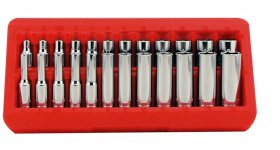
If somebody with a 3d printer wants a challenge... make one of these.

Actually I have been kicking around getting a printer for awhile, and making socket trays may be the final straw.
 

Attachments

  • 18622nopkg.jpg
    18622nopkg.jpg
    104.9 KB · Views: 195
OP
B

BoilermakerFan

Well-known member
Joined
Apr 17, 2006
Messages
2,188
Location
Indianapolis, Indiana
How deep is the enclosure? The prusa will probably fit if you detach the LCD and relocate it. The Cables are pretty long, and is trivial to get even longer ones. You might even want to mount the LCD on the outside of the enclosure.

That enclosure looks mighty nice though, and cleaned up very well. You may want to print a different heatbed cable cover to route the heatbed cables out the side, rather the back.

And I just remembered, on the i3 mk2, I HIGHLY recommend upgrading the heatbed wires to something more substantial and adding an external mosfet to take the current off of the main board. Why? Because they're prone to burning up, and Prusa will not take responsibility for it. Get some 14awg silicone wire, solder it to the bed, and wire it into the mosfet. If you decide to do this, I can help you out, it's pretty simple actually.


Oh, and about the filament tangling: 99.9% of the time, this is user error. Why do I say this? Because most people who have a filament tangle usually blame the filament manufacturer at some point or another and they'll send you a new roll to keep you happy. But, it's physically impossible to tangle a roll and knot it while being manufactured.

The way tangles occur is when the loose end of the filament ends up going under another coil while you're handling the roll. Moral of the story: keep control of the end of your spool, and always secure it. If you lose control of the end, unravel several meters of filament and rewind it.

If you have a tangle on the printer and you don't want to stop the print, and provided you can make a little slack in the filament, you can unroll a few coils, and then put the entire spool through the knot, undoing the knot. Hard to explain in text though

The lower portion of the enclosure is 18" deep, 21-1/2" wide, and 24" tall. I am planning to mount all of the electronics outside eventually so that they are separated from the heated interior when I get that far with the mods.

I was planning to print the side cable for the heat bed too. I need to check my wiring, it may have already been upgraded. If not, I have the Teflon jacketed power wire from my audio amp stash.


The filament tangle was totally my fault. I didn't double check it before I loaded it and I had just tossed it to the side the previous filament change. And I tried to untangle it by passing the spool through the tangle, but it was wrapped about 4 times and the filament fought me the whole way so that's why I had to pause, unload, untangle, reload, and resume.

I'm 21-1/2 hours into the print now and it's at 61% on the Gcode. The honeycomb infill looks sweet too. I have pics that I need to upload and edit later so I can post them.

Talked to one of my buddies about my idea for the 3D printed cores on 'glassed or composite skinned parts. He thinks we can find a epoxy that will work with PET or PC, but worst case, I'll have to print them with ABS. I'll have to set up a vacuum bagging system for it to ensure dimensional stability and maintain the correct ratios for maximum strength. No biggie since I've been planning a vacuum bagging system for composite layups for a while now. Once I can trail it and prove it out, my buddy wants a custom dash for his show Jeep so that will be easier to test than even my motorcycle parts since there are less compound curves and the thickness will be less critical too.
 
To avoid these ads, REGISTER NOW!
Top Bottom