To avoid these ads, REGISTER NOW!

The Everything 3D Printer Thread

To avoid these ads, REGISTER NOW!

heffneil

Well-known member
Joined
Apr 12, 2009
Messages
722
Location
Naples FL
I bought an Anet A8 3d printer. I read a little here and got inspired to put it together :) So I spent the past few days putting it together. Not completely done but it was a pretty tedious process. I am probably 90%. Need to clean up the wires and then fire that baby up! Im getting excited.
 

Stea1thNinja

Member
Joined
Aug 19, 2018
Messages
22
Location
Michigan
I have been super happy with my CR-10 and would definitely recommend it for a first machine. If you are looking to build the Voron and Hypercube are good options to consider.
 
OP
B

BoilermakerFan

Well-known member
Joined
Apr 17, 2006
Messages
2,188
Location
Indianapolis, Indiana
I have been super happy with my CR-10 and would definitely recommend it for a first machine. If you are looking to build the Voron and Hypercube are good options to consider.

Sweet! Your first post on GJ and it's in the 3D printer thread. :beer:

Welcome Stea1thNija!

I'm seriously considering picking up a CR-10 just to see if i can get it to print PET-G well enough to print the parts for my RC II. I can always donate it to my son's school if it doesn't.
 

Stea1thNinja

Member
Joined
Aug 19, 2018
Messages
22
Location
Michigan
PETG took a bit to get figured out but the CR-10 does it well. I had problems with the corners of PETG prints lifting when I first started. The cheap 12” x 12” mirrors from Lowe’s covered with hairspray work amazing. When hot the PETG sticks so well you will break the glass pulling parts off but adter it cools they fall right off.
 

NakeDiesel

Well-known member
Joined
Sep 6, 2007
Messages
2,727
Location
oklahoma
I'm finally getting serious about a 3d printer now that one of the kids moved out of the house and I now have a big office instead of the little area I had. I didn't want something like this out in my dirty shop where I weld, paint, wood work, etc...

Trying to decide on a Prusa i3 MK3 kit and getting on the list to get the MMU 2.0 upgrade for multi materials. Or going the Crealty CR 10s S5 route with the 400 cubed or 500 cubed bed.

I like what I've read about both, this will be my first printer and only printer probably for quite a while so I want to get as much printer as I can. Leaning heavily towards the Prusa right now.

Has anyone experience with both? What are the bad's of either? Is there another printer I should look at besides these two?

Thanks in advance.
 

dowmace

Well-known member
Joined
Apr 30, 2012
Messages
596
Location
KCMO
I have both a Prusa and a CR10. Along with an Anet A8 and an Ender 3.

While Prusa makes a fine printer they are somewhat pricey per 3^mm. A creality printer will serve you well and get you fantastic bang for the buck.

Personally I have two printers with ABL and am starting to dislike it. My regular printers with flat glass beds rarely need adjustment.

Sent from my SM-G965U using Tapatalk
 

noid

Well-known member
Joined
Jul 15, 2010
Messages
1,341
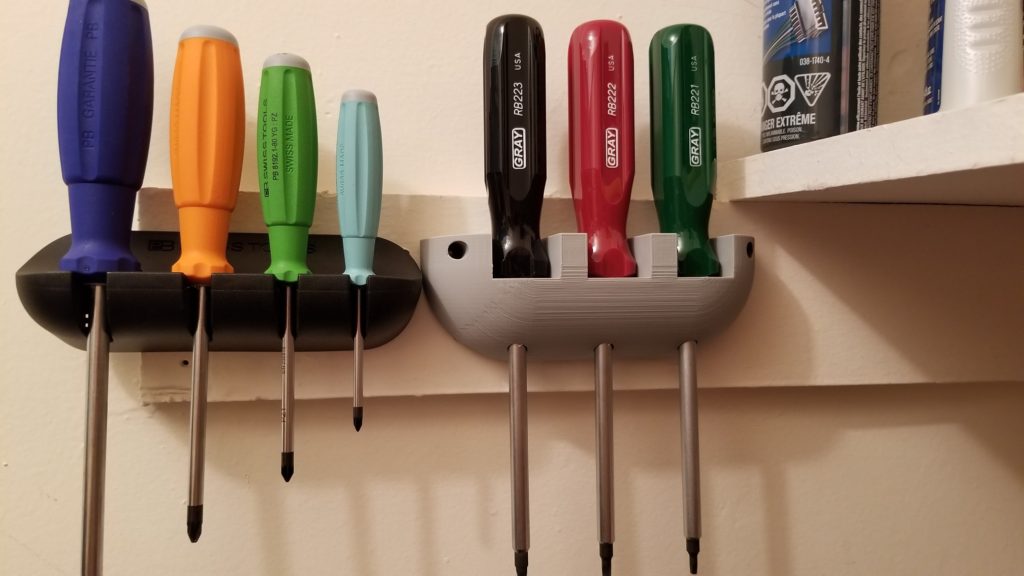
PB Swiss didn't have robertson drives (popular in Canada), so got a set from Gray. Made a tray for them similar to the PB Swiss trays.

20181119_162646_resized-1024x576.jpg


STL file can be downloaded here for anyone who wants it.

Share your STL's guys!
 

NakeDiesel

Well-known member
Joined
Sep 6, 2007
Messages
2,727
Location
oklahoma
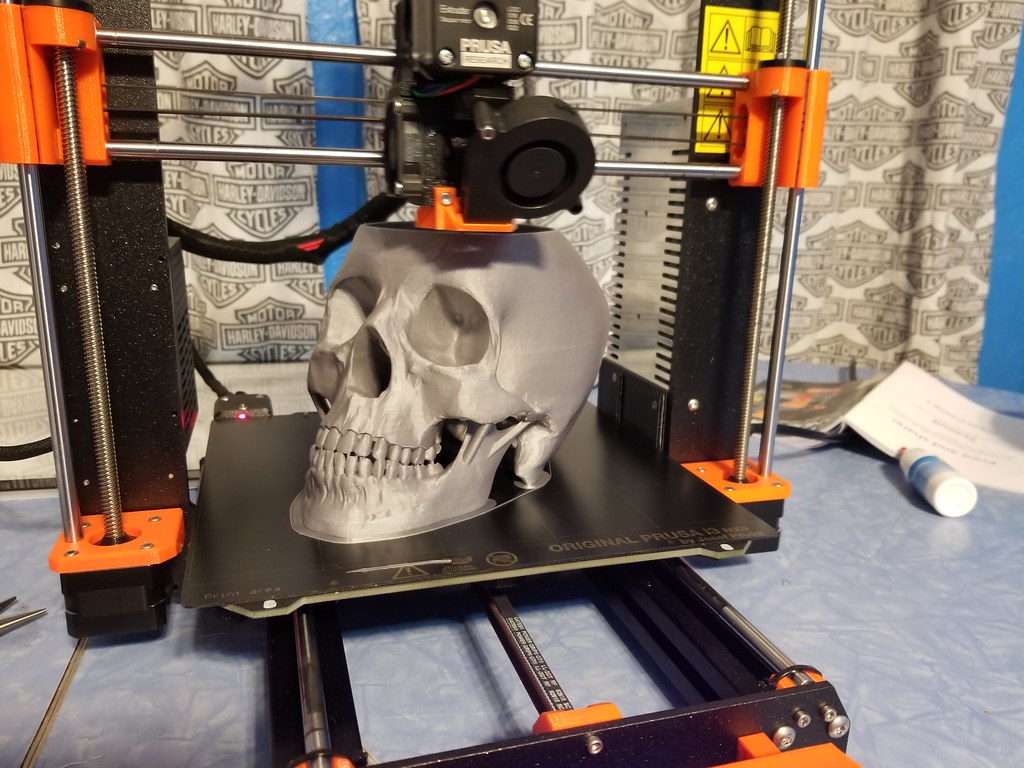
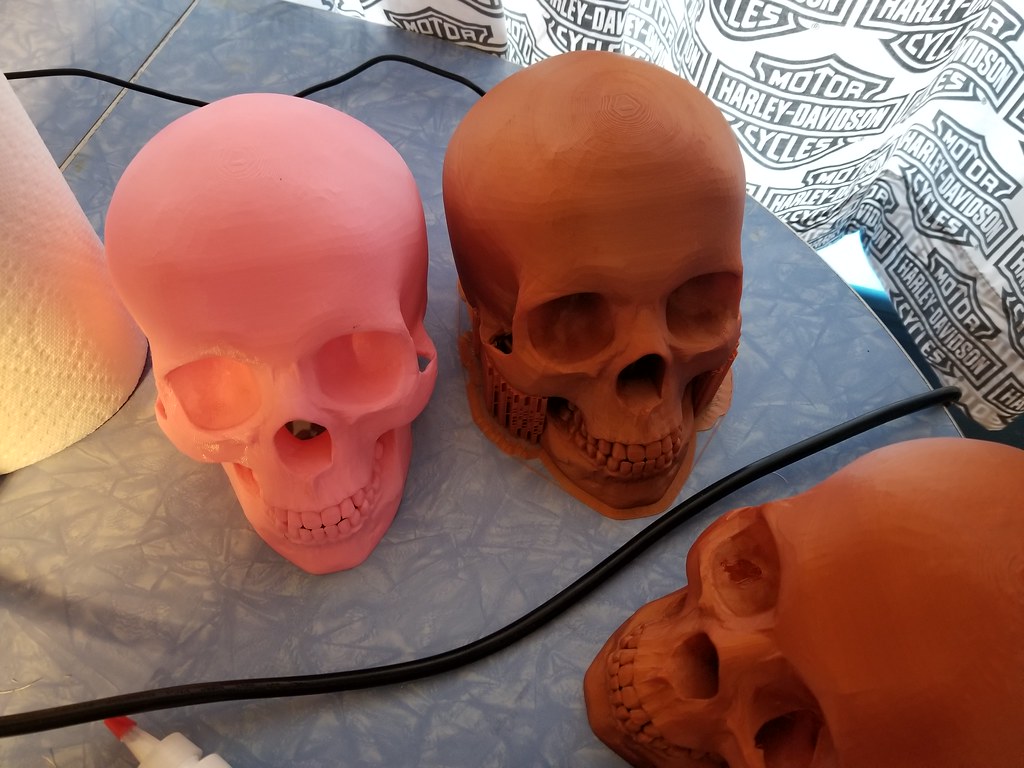
I bought a Prusia i3 MK3 back in October and ordered the MMU 2.0 upgrade for it as well. Built the printer last month and ran into issues after calibrating it with getting test prints to stick on the bed. After playing with it finally this week I was able to re calibrate it and bumped up the bed temp to 70 degrees and haven't had issues with layers not adhering to it. Cleaning the bed in between prints with iopropal alcohol. Was on vacation this week for Turkey day and gotten to play with it quite a bit. Did some large prints as well. The first skull I did evidently had an issue in the gcode or slicer portion as a ways up, it got off for a bit and then corrected itself later on. I finished the print out (36 hours) and cleaned it up and it looks decent without that section that was off in it. Printed my wife a skull planter and now printing a batch of 6 half tracks for the fun of it. Really just figuring out the printer and settings and how the tool works for converting stl files to printable gcode. My 2 year old granddaughter loved the whistle I printed for her, not sure anyone else did... :)

46046202191_f56a6d7867_b.jpg


46046199361_482d387402_b.jpg


31107123087_0d47ebaf96_b.jpg


31107120797_9da124de77_b.jpg


45996250202_6dd639b2ec_b.jpg


45321745954_22c7b2e4e7_b.jpg


45134222905_db4efa6c35_b.jpg
 

R32Jordie

Well-known member
Joined
Jan 17, 2018
Messages
57
Was also looking at getting a 3d printer for home now that I have the space. Its just hard to take the leap back from the Fortus 400C I used to play with at my old work. It looks like the Prusia i3 MK3 might be fun to tinker with.

I love the idea of mounting them in Ikea cabinets.

This is my Wanhao i3 setup7a23d2ed114b0af8d824a64426987b28.jpg301ff4c79598d9e40468e1ce233de29f.jpge8c20b3ea8683d13a0adac9e476e9ddd.jpg

Sent from my SM-G955F using Tapatalk
 

Attachments

  • 7a23d2ed114b0af8d824a64426987b28.jpg
    7a23d2ed114b0af8d824a64426987b28.jpg
    52 KB · Views: 6
  • 301ff4c79598d9e40468e1ce233de29f.jpg
    301ff4c79598d9e40468e1ce233de29f.jpg
    45.6 KB · Views: 2
  • e8c20b3ea8683d13a0adac9e476e9ddd.jpg
    e8c20b3ea8683d13a0adac9e476e9ddd.jpg
    45.7 KB · Views: 7

zhaddock

Well-known member
Joined
Jul 22, 2014
Messages
247
Location
Kansas City
I have an A8 and an Ender 3. I know there's a lot of A8 fans out there but the Ender 3 is so much better in quality of construction than the A8. In fact I plan on parting out my A8 to build a mini cnc router. The $200 Ender 3 printed better strait out of the box than the >$3500 3D printer we have at work.
 

Jehannum

Well-known member
Joined
May 3, 2012
Messages
1,347
Location
Albuquerque, NM
I have an A8 and an Ender 3. I know there's a lot of A8 fans out there but the Ender 3 is so much better in quality of construction than the A8. In fact I plan on parting out my A8 to build a mini cnc router. The $200 Ender 3 printed better strait out of the box than the >$3500 3D printer we have at work.

I also have an Ender 3, but it's a bit of a Ship of Theseus at this point - I think the only things original on it are the bed mounts and Melzi board inside.

FWIW, I've been super happy with the projects I've done on it - glass bed, rail conversion, motor dampers, E3D extruder, Marlin firmware upgrade, and all the usual small things like printed ducting, storage, and whatnot.
 

Jehannum

Well-known member
Joined
May 3, 2012
Messages
1,347
Location
Albuquerque, NM
Last weekend I added the BLTouch bed level sensor to my Ender 3, because that was one of the biggest issues that kept my kids from using it effectively.

20181216_191226-jpg.5737


Now I'm at almost the limit of what the little Sanguino can do, but I might still do some stability upgrades like a dual Z axis (belt driven, not dual motor, the board doesn't have the capacity to run dual Z motors).
 
Last edited:

Injected65

Active member
Joined
Jan 6, 2008
Messages
43
Location
Salina, KS
I have been looking at the Ender 3 lately. I can't convince the boss to buy a printer at work, so he agreed that I can buy one and use it here. I have a feeling that once he sees the usefulness of it on prototyping that I will be able to convince him to buy something with a bigger build volume (like a CR-10s would be about right) and I will take the Ender 3 home.
 

Jehannum

Well-known member
Joined
May 3, 2012
Messages
1,347
Location
Albuquerque, NM
I have been looking at the Ender 3 lately. I can't convince the boss to buy a printer at work, so he agreed that I can buy one and use it here. I have a feeling that once he sees the usefulness of it on prototyping that I will be able to convince him to buy something with a bigger build volume (like a CR-10s would be about right) and I will take the Ender 3 home.

It's a fine printer and I like mine, but it ends up being the sort of thing you buy that gets you just far enough that you realize what you're missing.

That said, here's a fun project I did with it for Fathers' day last summer, running a full -6 fuel system for my 1967 Pontiac GTO.

VvUYdyP.jpg


My son welded and powdercoated the brackets that we installed under the car to retain the lines.

full album
 
Last edited:

NakeDiesel

Well-known member
Joined
Sep 6, 2007
Messages
2,727
Location
oklahoma
Been having a lot of fun printing things on my MK3 and learning to use Fusion 360 from autocad to create a few things.

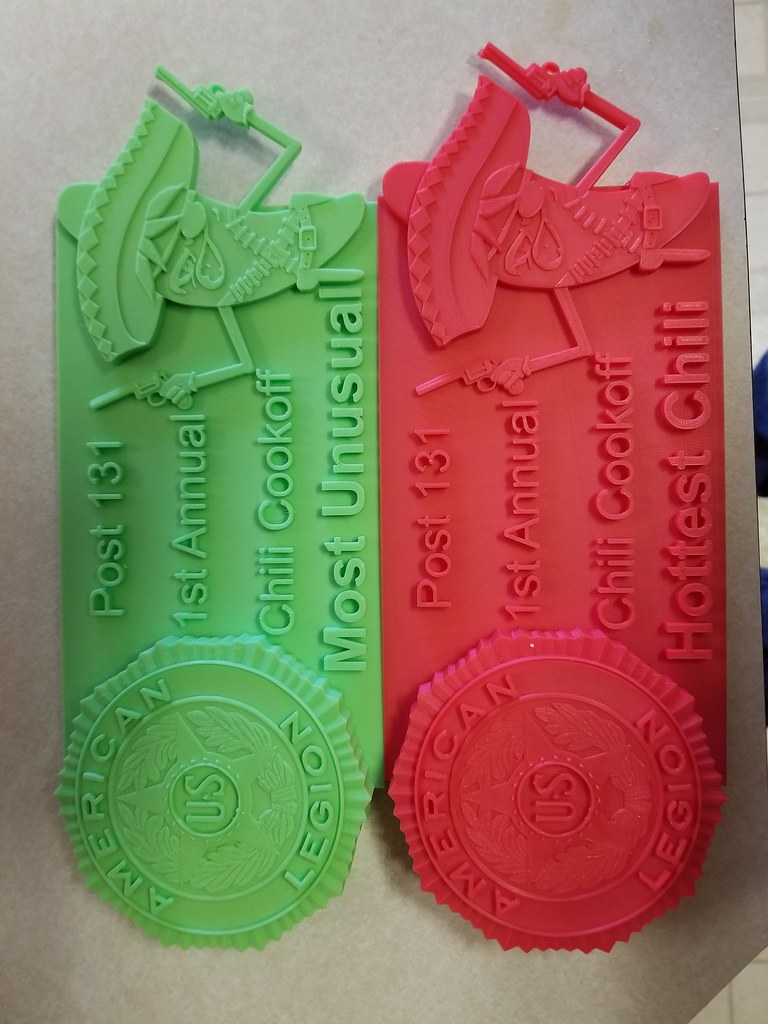
First project on Fusion 360 was to create the American Legion logo. Printed a big one and then a bunch of coin sized ones playing with the slicer tool and doing filament changes at levels to add effects.

I've printed a few skulls for people and that helped pay for a couple of spools of filament and printed a pink flamingo for a cousin. First one I've printed that I cut it and printed it in pieces and then glued it together. She loved it. Did a 3d Deer skull with separately printed antlers in copper, was a hit during dirty Santa at the family get together.

Had a chili cook-off at the legion this past weekend and I created and printed the trophies for it as well.

45657978884_189729535f_b.jpg


45657972194_81335a409e_b.jpg


45468637265_2cc2f9017d_b.jpg


45468637285_4eb25d6f88_b.jpg


45657978874_35acd464d1_b.jpg


Messed up the levels for color change on this one, was supposed to be black background, orange border and upper and lower letters in orange and center letters in white.
45657974074_d59bbe3b6d_b.jpg


part of the 3d model I created for the trophies for the chili cook-off
46381028901_f72556b115_b.jpg


45657969244_85390ab46f_b.jpg


32508893738_527fdee3b6_b.jpg


31441725077_3b8a2ba58d_b.jpg


32508892078_859dfae27f_b.jpg


31441723347_df194da35a_b.jpg
 

NakeDiesel

Well-known member
Joined
Sep 6, 2007
Messages
2,727
Location
oklahoma
I'm using Slic3r Prusa Edition 1.41.1+win64. I'm using 1.75mm pla, both the stuff I bought from Prusa when I ordered the printer as well as eSun that I've bought off of Amazon for some different colors I needed. Printed Brim, outside supports and used a fill density of 15% on the skulls. I ran into issues when I didn't use a fill density on the inside of the skulls with the bottom of the eye sockets not printing right.
 

garandman

Well-known member
Joined
Oct 5, 2011
Messages
667
Location
Boston MA / Mt Sunapee NH
Started in the 3D Printer business in 1989. Ran one of the largest Stratasys dealers from 2005-2016 when we sold the company. We’d delivered roughly $10 million worth of machines and made thousands of parts. Most were ABS but we also printed aerospace parts in ULTEM, polycarbonate, and they now have a carbon-fiber reinforced nylon machine.

Have three MakerBots we almost never use - one is still in the box. In the garage we have a Stratasys uPrint + which will print ABS up to 8”x8”x6” high. Because it has a heated build chamber you can actually make parts that size.

Also have SOLIDWORKS and a 3D scanner.
 
To avoid these ads, REGISTER NOW!

freudianfloyd

Well-known member
Joined
Feb 12, 2015
Messages
3,426
Location
Nowhere
I mentioned in another post that I finally got a 3d printer. My wife got me the Ender 3. After some trial and error I got it running great. I have been printing socket organizers for the past few days, and recently printed this Shockwave stabilizing brace for an AR pistol build I'm working on. It turned out almost perfect.
View media item 89502
Also printed some wrench rails.
View media item 89454
 
OP
B

BoilermakerFan

Well-known member
Joined
Apr 17, 2006
Messages
2,188
Location
Indianapolis, Indiana
<snip>

Have three MakerBots we almost never use - one is still in the box. In the garage we have a Stratasys uPrint + which will print ABS up to 8”x8”x6” high. Because it has a heated build chamber you can actually make parts that size.

<snip>

So... any plans to start using the MakerBots? If not,send me a PM.

I bought a Prusia i3 MK3 back in October and ordered the MMU 2.0 upgrade for it as well. Built the printer last month and ran into issues after calibrating it with getting test prints to stick on the bed. After playing with it finally this week I was able to re calibrate it and bumped up the bed temp to 70 degrees and haven't had issues with layers not adhering to it. Cleaning the bed in between prints with iopropal alcohol. Was on vacation this week for Turkey day and gotten to play with it quite a bit. Did some large prints as well. The first skull I did evidently had an issue in the gcode or slicer portion as a ways up, it got off for a bit and then corrected itself later on. I finished the print out (36 hours) and cleaned it up and it looks decent without that section that was off in it. Printed my wife a skull planter and now printing a batch of 6 half tracks for the fun of it. Really just figuring out the printer and settings and how the tool works for converting stl files to printable gcode. My 2 year old granddaughter loved the whistle I printed for her, not sure anyone else did... :)

You have the smooth PEI bed, correct? Are you using glue stick now? I have a Prusa Mk2 and have rarely had a FLA issue with PLA with glue stick. My PETG didn't bond at all so my last attempt to get it to print on my MK2 will be AquaNet hairspray.

I'm going to buy the full MK3 upgrade kit so I can use all the parts off my Mk2 to upgrade a GeeeTech i3 clone that is a POS with a lot of issues, the main one being that the extruder is supposedly for 1.75mm filament, but it has 3mm drive gears, but they are not in the correct place for actual 3mm filament and the opening in the top with the PTFE tube is only 2mm. Anyway, once I have my Mk3 upgrade, the GT i3 gets upgraded to mostly genuine Prusa parts and the GT will be donated to my son's STEM middle school.

The middle school just got a high end MakerBot. They had an old small 100mm*3 3D printer that quit working and the parts for it are NLA, even from the manufacturer... I'm going to see if they still have it so I can build a new machine from the parts for them and give it back.

The big RailCoreII 300ZLT (300x300x600) BOM, side panel dwg, and Fusion360 model has finally been released! So after the Mk3 Upgrade I can finally start printing parts for the RCII 300ZLT!

After that is done I'm undecided what my plan is for the Prusa Mk3. A friend borrowed his school's MK2 to print organizers for his Twilight Imperium 4thEd. game and got hooked on 3D printing. He's interested in buying my MK3 after I have the 300ZLT up and running. I'll probably sell it to him if he matches what I'd get from the tax write off of donating it to the middle school. The other thing I might consider is going to a smaller nozzle in the MK3 and printing miniatures, but TBH, I can do the same thing with a MonoPrice printer for less than $200, so it makes more sense to sell it.


My son is doing his science fair project around 3D printing. Specifically, he is testing the infill pattern strengths to crushing or compression loads. We're printing five 40mm cube samples with 5 different infills at 2 layers for base, walls, and tops with only 5% fill. After we see the results, I'm going to go one step farther and test the top two at 10% and 15% and see if the results scale. I will also test the cubes for side loads by flipping them 90deg to their sides and test both side axis. I want this information for my future motorcycle fenders, seat pans, and electronics trays. I'll probably go up to 3 or 5 layers for the walls, but then the PLA will be vacuum bagged in FG or CF. I just want the strongest, lightest core I can get.


freudianfloyd do me a favor and send me a DM with the link to the Shockwave file. I'd love to print one in OD green for a pistol I have. Thanks.
 

NakeDiesel

Well-known member
Joined
Sep 6, 2007
Messages
2,727
Location
oklahoma
@BoilerMakerFan, yeah it is the smooth plate. I tried glue stick at 60 degree bed temp and that didn't work any better than just the default 60 degrees. I've gotten where I clean it good with rubbing alcohol and set the bed temp to 70 degrees and don't have adhesion issues with the printer.
 
OP
B

BoilermakerFan

Well-known member
Joined
Apr 17, 2006
Messages
2,188
Location
Indianapolis, Indiana
@BoilerMakerFan, yeah it is the smooth plate. I tried glue stick at 60 degree bed temp and that didn't work any better than just the default 60 degrees. I've gotten where I clean it good with rubbing alcohol and set the bed temp to 70 degrees and don't have adhesion issues with the printer.

Interesting! I start my bed at 60deg then drop it to 55deg for PLA. I had lift with the bed too hot on bigger prints. I tried a couple different bed temps with PETG, but didn't have any luck. I really need to get the PETG sorted out.

Also, which whistle did you print? The V29? I love that whistle. It's so LOUD! And it sounds so cool when you first blow it.
 
OP
B

BoilermakerFan

Well-known member
Joined
Apr 17, 2006
Messages
2,188
Location
Indianapolis, Indiana
Today my son and I built the compression strength tester for the infill patterns. We use the 4" PVC coupling to keep most of the destruction contained.

The cylinder is a 4" bore so it can produce 1,570 pounds of force at 125psi. So far, the maximum psi we've recorded is 56psi. That's still 703lbs of force on a 40mm cube at 5% infill with one layer (0.2mm) walls! We have two more patterns to test initially, then we have to go back and test all 5 samples of each pattern. We tested all 5 samples of the rectilinear infill. It's been the absolute weakest by a factor of 2! The highest pressure it withstood was 23.5psi or 295 pounds.

I'll share the final results when we're done. Then I plan to take the top 2 or 3 and print more samples with 10% and 15% infill and test how it scales, then we'll test side loading.
 

Attachments

  • 20190106_224548.jpg
    20190106_224548.jpg
    127.9 KB · Views: 114
  • 20190106_224457.jpg
    20190106_224457.jpg
    119.1 KB · Views: 108
  • 20190106_224509.jpg
    20190106_224509.jpg
    127.9 KB · Views: 113
OP
B

BoilermakerFan

Well-known member
Joined
Apr 17, 2006
Messages
2,188
Location
Indianapolis, Indiana
Drumroll please...

All samples of the 40mm test cubes were printed at the same exact settings on the same spot on the bed. The top and bottom were 2 layers and the sides were just one layer. The layer height was 0.2mm. The infill percentage was 5% for all samples. The only change between samples was the infill pattern. The samples were tested for compression or crush strength using a 4" bore air cylinder and we recorded PSI on a gauge at the cylinder. If you want to know the pounds of force, multiply the PSI times 12.56 in*2.

My son's hypothesis was that the 3D Honeycomb would be the strongest.

The results of our infill testing were as follows:

Rectilinear: Failed at 20-23psi. Average is 22.1psi

Hilbert Curve: Failed at 48-58psi. Average is 53psi

Gyroid: Failed at 43-46psi. Average is 44.6psi

Cubic: Failed at 37-50psi. Average is 44psi

3D honeycomb: Failed at 50-56psi. Average is 52.8psi


My observations and comments:

The rectilinear is kind of the default infill in 3D printing. It's pathetic performance had me question the PLA we used. So I printed new cubes today with the same PLA we used for the Hilbert Curve. The results were identical. Wow.

The Hilbert Curve was a HUGE shock! It looked the weakest. More testing will be done!

The 3D Honeycomb was so close, and even though the average was 0.2psi lower, it was definitely the more consistent. At 5% infill, the printer moves a little too much between the layer pattern so there are a lot of individual strings. I think that if every layer of the 3D HC was bonded to the ones above and below, it would have performed significantly better... However, for the experiment, we used 5%.

Gyroid was the most consistent, bar none. It's a very stable infill.

Cubic performed worse than I thought it would. I think the 37psi lowest result was more of an individual test variance than the material or pattern. I think my son had the steel plates off center just enough since it didn't crush one side and the top plate blew out.


My testing rig performed better than I thought it would. I was afraid the wood would start to split and fall apart. It didn't. At 125psi, the cylinder can generate 1,570 pounds of force. It may not survive too many tests at that pressure...


I am going to bump the infill percentages to 10% and print 9 samples of Hilbert, 3D HC, and Gyroid. I'm going to test 3 samples in the Y plane, 3 in the X plane and 3 in the Z plane so see how orientation of the pattern affects compression strength. I also want to see if these 3 patterns scale linearly to increased fill density or if any become exponentially stronger. I'm hoping one does go up exponentially... After these test prints I will test the best performer in PLA+ to see how it improves the results.

It will be a few weeks before I can print those samples because I have a few things to print before I get back to that. For my prints before the additional testing I'm going to run the Gyroid or 3D HC. The 3D HC would be a little stronger, but the Gyroid leaves a cool pattern on the sides and prints faster.


Oh, I also printed a few more Cubic samples today just to test the different PLA to see if it changed as well. It also tested identical which I was glad to see. All 3 brands of PLA performed the same, which in theory they should have.
 
OP
B

BoilermakerFan

Well-known member
Joined
Apr 17, 2006
Messages
2,188
Location
Indianapolis, Indiana
The Prusa Mk3 is a great printer, but I'm seriously reconsidering my path...

I'm now looking at buying the new Creality3D Ender 5, then upgrading the control board to a Duet 2 WiFi and add a glass bed so I have both options.

I can take the Ender 5 control board and put it on the GT i3 and change the extruder on it to get it working so it can be donated... then I'll sell my Prusa Mk2. Selling my Mk2 would essentially cover the cost of the Ender 5.

Ender 5 Review
 

E.rodz

Well-known member
Joined
Nov 11, 2009
Messages
2,434
Location
st.paul MN.
we just bought my son a creality Enderly 3 printer and we just got it put together and hoping to get some printing in soon! been reading the whole thread trying to learn from everyone else's trials and tribulations we will see how this goes soon!
 

Geteos

Well-known member
Joined
Jun 10, 2018
Messages
55
Location
Toronto
I used the monoproce my mini select for about 2 years with a glass bed, very good little entry level machine, the only downside is the size of the bed.

I ended up upgrading to an Ender 3 a few months ago and really like the extra space it offers. I sometimes have issues with bed adhesion so I’m looking at getting a glass bed and a PEI sheet. The only other mods I’ve made were a filament guide and the intake fan cover.

Originally I had wanted to build a printer from scratch because I have access to high quality linear guides and ball screws, but the cost for steppers and controllers pushed me towards the Ender. At some point I might mod the Ender and switch from the ball bearing wheels to miniature linear guides.
 
Last edited:
OP
B

BoilermakerFan

Well-known member
Joined
Apr 17, 2006
Messages
2,188
Location
Indianapolis, Indiana
I've been really impressed with everything I've seen on the Ender 3. I'm going with the Ender 5 simply because I was planning on the E3 Pro, but the Ender 5 will have a more rigid frame and a 300mm build height.
I'll be grabbing the glass and PE beds with mine. If my buddy commits to buying my Prusa Mk2, I'll pull the trigger on the Ender 5 and the Duet 2 WiFi. I found a guy on YT that has his config files for the Duet on an Ender 3. The settings will be close enough to get me going. You have to be a Patreon supporter to get access, but that's a small price to pay to save a fair amount of time.
 

Geteos

Well-known member
Joined
Jun 10, 2018
Messages
55
Location
Toronto
The box frame on the Ender 5 looks really good, but it's too bad they put the steppers outside the frame. If they were placed inboard it would be super easy to slap some plexiglass on it and make it enclosed.

I bought a bunch of 80/20 and printed corners to make an enclosure for my MP mini select then didn't get around to buying the plexiglass. Now I have to see if I can re-purpose the stock into something else.
 
OP
B

BoilermakerFan

Well-known member
Joined
Apr 17, 2006
Messages
2,188
Location
Indianapolis, Indiana
Look closer... there is enough room to put the Lexan or HDPE in the slots... that would enclose the sides and back. Then make a full coverage door for the front. Only the top is a bit of a PITA, and mostly because it's a Bowden tube setup.

You could just use 1/4" plywood for the sides, back, and top of the box for the MP Select. Then you would only need a single piece of PC for the front.
 

Geteos

Well-known member
Joined
Jun 10, 2018
Messages
55
Location
Toronto
That's a good idea for the box, I have a lot of extra 1/4" plywood kicking around right now too, but I ended up selling the MP last weekend to put towards a project bike that I'm having delivered tomorrow, a '72 Honda CB500 four. :bounce:
 

56Safari

Well-known member
Joined
Jun 3, 2016
Messages
130
I've been really impressed with everything I've seen on the Ender 3. I'm going with the Ender 5 simply because I was planning on the E3 Pro, but the Ender 5 will have a more rigid frame and a 300mm build height.

This thread inspired me to give 3d printers a shot.. I purchased an ender 3 pro last week... Probably should have spent the extra $100 on the ender 5, but I wasn't sure so I figured I'd start cheap and work my way up if/when I actually NEED something better.

I'd spend the extra few $$ and get one off amazon that you know is actually in the USA. I didn't do my research and bought one from the https://www.creality3d.shop. It said it was 'IN STOCK' in the USA, but its not.... Naturally I stumbled on the creality ender 3 reddit thread after I already purchased it stating not to buy from them... I'm going to give them the 5-15 days to actually send it, after that I will file a paypal complaint... if it gets to that point I might go for the Ender 5
 
To avoid these ads, REGISTER NOW!
Top Bottom