To avoid these ads, REGISTER NOW!

The Everything 3D Printer Thread

Bad Mojo

Well-known member
Joined
Sep 2, 2012
Messages
113
I use Rhino for all my 3D modeling and can't wait to get into the SubD tools that just came out.

I also installed a SKR Mini E3 V2.0 on my Ender3 and it is having me thinking about getting a second Ender 3 because it has reignited my desire to have a 3D printer running all the time. It is so much quieter with the new board! I also spent the morning researching new fans for the printer to quiet the machine a bit more. It is so nice not to hear the printer in the rest of the house.
 
To avoid these ads, REGISTER NOW!

youinreverse

Well-known member
Joined
Nov 9, 2015
Messages
128
Location
SLC
I use Rhino for all my 3D modeling and can't wait to get into the SubD tools that just came out.

I also installed a SKR Mini E3 V2.0 on my Ender3 and it is having me thinking about getting a second Ender 3 because it has reignited my desire to have a 3D printer running all the time. It is so much quieter with the new board! I also spent the morning researching new fans for the printer to quiet the machine a bit more. It is so nice not to hear the printer in the rest of the house.
I also installed an SKR Mini E3 into my printer, and I love how quiet it is. I'm also having desires for a second printer, if only because I could take all the parts I've removed to upgrade and use them to build a second machine. :lol_hitti
 

Jehannum

Well-known member
Joined
May 3, 2012
Messages
1,347
Location
Albuquerque, NM
I put the TH3D EZBoard into my ender 3 (https://www.th3dstudio.com/product/ezboard-lite/).

It's a lot more expensive than the SKR boards, but IMO, it was worth it for me to support the American company selling it, and the American company that designed it (Paquette engineering). It also has the correct amount of copper in the board, so that the steppers don't need any heat sinks. The TH3D unified firmware and its web-based build tool is kinda cool, but I still prefer to just build plain ol' Marlin for it.
 

RonRock

Well-known member
Joined
Oct 6, 2007
Messages
1,171
Location
Iowa, USA
Looking for a little (lot) help.

I got a hand me down XYZ DaVinci printer a couple years ago. At that time it needed a new hot end. I followed the previous owners suggestion and bought and installed a E3D-v6 and flashed the firmware with Repetier.

So I eventually started my printing. It did do something, not as well as I would have liked but something. So I messed around for hours changing settings. This thing is a time ****. You can loose a day very quickly. Each try to print takes about 45 minute.

Anyway, I made several attempts before giving up and letting it set. Now we are having a very cold winter so a good time to revisit. So I start it up and start over.

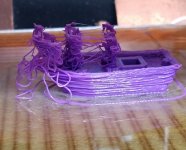
Did a print same results as previous. Make adjustments, another print a bit better still not good. Strange thing is that all of my prints are failing at nearly the same place. About 20 minutes into the 45-60 minute print. I have checked and the nozzle is still at temp.

I am at a loss. I obviously do not know enough to know what to change to help. Any suggestions? I have a fleet of these that all look pretty similar. Bottom is tolerable top is ****. Some even worse or not at all on top.

Here,
 

Attachments

  • _Resized_20210213_113401_6908_.jpg
    _Resized_20210213_113401_6908_.jpg
    98.6 KB · Views: 142

loganb

ALLIANCE MEMBER
Joined
Dec 29, 2011
Messages
5,494
Location
Omaha, NE
No experience with that printer but looks like your z offset is too high, putting the extruder head too high off the bed and not putting an appropriate amount of "smush" on the filament. Not sure how that machine bed level is set, but may be also worth looking at

Sent from The Garage Journal mobile app
 

white91formula

Well-known member
Joined
Dec 11, 2012
Messages
424
Location
Boston, MA
Level the bed abs set the nozzle off the bed correctly.

What slicer are you using? Try cura and use the predefined settings for your printer and material. Constantly changing settings is a losing situation. You'll be chasing bad prints forever. 1 thing at a time.
 

Mas78

Well-known member
Joined
Sep 22, 2019
Messages
70
Location
Mid-West
That Benchy isn't turning out very well for you.
Is you're nozzle temp within the range the filament Mfr recommends?
next thing I would check is the amount being extruded. What I mean is when you manually jog the feeder say 20mm is it moving that amount? It really looks like it's over extruding to me in the picture.
I've read some people mark the filament and measure off 100mm or some other length.
I find it easier to take the tubing off the top of mine and clip the filament fush, Jog 20mm and measure if that is what came out.
The more you feed out the more accurate you can adjust your extruder settings to fine tune it.
 

Strouty

Well-known member
Joined
Mar 21, 2010
Messages
38,206
Location
Southern Maine
Ok, I am now officially involved, just bought a printer, well ordered it, probably won’t arrive until March though. My buddy convinced me to buy it. Matterhackers pulse that does nylon. I am excited. :)
 

loganb

ALLIANCE MEMBER
Joined
Dec 29, 2011
Messages
5,494
Location
Omaha, NE
Ok, I am now officially involved, just bought a printer, well ordered it, probably won’t arrive until March though. My buddy convinced me to buy it. Matterhackers pulse that does nylon. I am excited. :)
Nice! Soon you will have more printers then 'Burbs [emoji3]

Sent from The Garage Journal mobile app
 

Strouty

Well-known member
Joined
Mar 21, 2010
Messages
38,206
Location
Southern Maine
I don't think I will be expanding my printer lineup quite as fast. I will be definitely making lots of cool tool storage bits and pieces.
 

loganb

ALLIANCE MEMBER
Joined
Dec 29, 2011
Messages
5,494
Location
Omaha, NE
It was either a 3D printer or an old HAAS 3 axis mill, but I didn't want to take up that much room, yet........

Can't fault that decision one bit....

Did the Haas have the manual mode where you can manually crank the table around or was it CNC only?
 

Bessy

Well-known member
Joined
Dec 18, 2012
Messages
992
Location
Ontario, Canada
Hey all!

I apologize if this isn't the place for this question, mods let me know if I should create a separate thread. I'm seriously considering dabbling in 3D printing, pending the right set up. With all of the info out there (I'm suffering from overload) my question is, as of 2021, what's the best bang for the buck for a beginner?

I'd like something that isn't super finicky to get up and running, but that also has decent print volume (12×12x12" or thereabouts would be nice), and lastly not breaking the bank (say <$1000 CAD.)

I've been considering the following units:

1) Snapmaker 2.0 (outside my price but the specs and reviews look decent) - I also like the ability to utilize the laser and CNC in one machine. Is it really a game changer over the original?

2) Creality 10s Pro v2 (good print volume, more affordable unit)

3) Flashforge Finder or Adventurer 3 - low price point , but also limited print volume at 140mm^3 and 150mm^3 respectively.

With those parameters in mind, are there any other units I should be considering? I'd expect that among my first prints once I'm up and running and dialed in would be largely tool related (wrench or screw driver racks) and a few little bits and bobs for the workshop (hold downs, etc.) If I can get something really dialed in for accuracy I'd possibly attempt to replicate the center cap for my suburban tractor, but that might be a bit down the road.

Any thoughts or advice is appreciated!

B.

Sent from my Pixel 3a using Tapatalk
 

bdbecker

ALLIANCE MEMBER
Joined
Nov 18, 2015
Messages
5,542
Location
Iowa
...I apologize if this isn't the place for this question, mods let me know if I should create a separate thread. I'm seriously considering dabbling in 3D printing, pending the right set up...

I don't think you could go wrong with the Creality. I have a CR-10 S4 and have been very pleased with it. I do agree that the Flashforge build areas are a little small and that you'd probably outgrow them pretty quickly.
 

Mas78

Well-known member
Joined
Sep 22, 2019
Messages
70
Location
Mid-West
I'd vote for the Creality as well out of your list.
CHEP on YouTube here
really likes the Ender 3. He has several good videos on using the Cura slicer software as well. They may not make a whole lot of sense before you actually have a printer though.

You can always download the Cura software and then download some files from Thingiverse to just see how the slicer software works before you buy a printer as well.
 

Bessy

Well-known member
Joined
Dec 18, 2012
Messages
992
Location
Ontario, Canada
I'd vote for the Creality as well out of your list.
CHEP on YouTube here
really likes the Ender 3. He has several good videos on using the Cura slicer software as well. They may not make a whole lot of sense before you actually have a printer though.

You can always download the Cura software and then download some files from Thingiverse to just see how the slicer software works before you buy a printer as well.
Thanks, I will definitely check out Cura in the mean time! Has anyone here had any experience with the first gen Snapmaker? The three-in-one is compelling for the gen 2.

Sent from my Pixel 3a using Tapatalk
 

loganb

ALLIANCE MEMBER
Joined
Dec 29, 2011
Messages
5,494
Location
Omaha, NE
I'd also support anything from Creality over the rest of the ones in your list. Them and Prusa are the 2 most popular, most supported and purpose built brands of printers and with that gives them the most opportunity for R&D, future life as a company and support from fellow users. Not much experience with the others on your list, I've seen a Snapmaker but never was that excited about it, I'd rather have 3 separate machines then a jack of all approach
 
To avoid these ads, REGISTER NOW!

banjopete

Well-known member
Joined
Oct 5, 2014
Messages
300
Location
Edmonton, Alberta, Canada
I've been happily using a creality ender 3 for a few years now and have been very happy with it for the price. The newer ender 3 pro seems to have solved some parts as you'd expect. Great bang for buck and good bed size. I find having one endlessly useful for garage stuff, car stuff, and pretty much any other hobby stuff. Jump in.

I will warn too that all 3d printers will require some patience and fiddling at some point. Be prepared for it and patient when it's your turn but enjoy.
 

brawls43

Well-known member
Joined
Aug 29, 2012
Messages
133
Location
Minneapolis
Of your list Bessy, I also vote for the Creality CR-10. For easier setup, at added cost, consider getting it through someone like Tiny Machines. Not sure if there is a Canadian company that does similar, but Tiny Machines installs upgrades, their firmware, and test the machine prior to shipping. I'm looking at getting a printer for work through them. I've been mostly happy with my Creality Ender 3, but its a smaller bed size then you were looking for.
 

txvwnut

Well-known member
Joined
Jan 1, 2015
Messages
7,587
Location
Bedford, Texas
Man Id love to have the ability to use a 3D printer but to ignorant to figure out the programming

No programming involved you just need to know how to use a cad based drawing program to draw what you want then transfer that to the slicer program and it makes the g code for you.
 

blatterjr

Well-known member
Joined
Nov 21, 2011
Messages
157
I runs a small print farm and have owned a lot of brands and most of the Creality line. Of your list, the Creality is likely the most viable for what you want to do and a good value for the price. Like has been mentioned though, you WILL have to tinker and figure out what works for you. I think every printer has a personality that you need to find and adapt.

Because I sell product and have to make lots of parts, I've moved on the the Prusa ecosystem. They take minimal tinkering and give superior overall consistency of prints across ABS, PETG, Nylon, HTPLA, and exotic composites (I don't print flexible, so YMMV there). You will note that the flagship Prusa MK3S is at the top of your price range.

Like anything, you'll get a million opinions, so read your review, watch some videos and pick something you think makes sense for you.
 

Bessy

Well-known member
Joined
Dec 18, 2012
Messages
992
Location
Ontario, Canada
An update:

After some research, I have my sights set on the CR10 S4 from Creality. Small problem is that I'm in Canada so they want $999 for shipping on-top of the $512 price tag. My second choice the Ender 5 Plus Looks like it will ship from Canada at a price of about $903 taxes in. I'm going to do some price shopping to see if I can't get it a little bit cheaper but due to COVID-19, I'm probably put of luck to get one shipped from the US for a half decent price.

Will update as a decision is made.

Sent from my Pixel 3a using Tapatalk
 
OP
B

BoilermakerFan

Well-known member
Joined
Apr 17, 2006
Messages
2,188
Location
Indianapolis, Indiana
That seems absurd for shipping to Canada.

I ordered parts and filament from Rat Rig in Portugal and they shipped via DHL for about $45. You might want to look for a Creality dealer in the EU who could ship to you.
 

Bessy

Well-known member
Joined
Dec 18, 2012
Messages
992
Location
Ontario, Canada
Quick question for the forum here; I've heard that Sketchup can create STL files with a little bit of tweaking to save as binary. Has anyone here successfully printed Sketchup files with their Creality or other printers? Converted to an STL file I should be able to work with it in CURA without issue, or am I mistaken there?

Currently awaiting a response from sales rep at Top3DShop re: their availability of the S4. I'd like to be able to print components for tool organization foremost (as well as several other components around the house (I jumped into the rabbit hole of Thingiverse last night, what a ride), so printing within a 12-15" cube as opposed to 8" is hugely appealing rather than outgrowing my footprint too quickly. The 350x350x400 print area of the Ender 5 will suffice, but if I can go bigger for a little bit less money, why not?

Thanks,
B.
 

Firebrick43

Well-known member
Joined
May 12, 2015
Messages
13,971
Location
West central Indiana
Quick question for the forum here; I've heard that Sketchup can create STL files with a little bit of tweaking to save as binary. Has anyone here successfully printed Sketchup files with their Creality or other printers? Converted to an STL file I should be able to work with it in CURA without issue, or am I mistaken there?

Currently awaiting a response from sales rep at Top3DShop re: their availability of the S4. I'd like to be able to print components for tool organization foremost (as well as several other components around the house (I jumped into the rabbit hole of Thingiverse last night, what a ride), so printing within a 12-15" cube as opposed to 8" is hugely appealing rather than outgrowing my footprint too quickly. The 350x350x400 print area of the Ender 5 will suffice, but if I can go bigger for a little bit less money, why not?

Thanks,
B.

I did get sketchup to save as a stl and print on my ender 3. It was a couple of years ago and as I remember it I was very limited in what I want to do. It hastened me learning fusion 360
 

Cruzan80

Well-known member
Joined
Jul 22, 2015
Messages
4,154
Location
Denver, CO
Agreed, while you "can" have Sketchup save a part as a .stl using an extension, much easier to use parametric CAD. If your device has issues with Fusion, look into OnShape. All the processing is done remote, so frees up your computer.

Sent from my IN2015 using The Garage Journal mobile app
 

gte718p

Well-known member
Joined
Mar 12, 2009
Messages
3,950
I did my first few projects with TinkerCAD, but quickly outgrew it and have now moved onto OpenSCAD.

Paul


Sent from my iPad using The Garage Journal mobile app

That is ********. I didn't think anyone actually used OpenSCAD except a bunch of ********* crazy computer engineers. It is basically programming to get that part.

FreeCAD is basically a GUI that a normal CAD user would use as a wrapper for OpenSCAD. You still have the access to the program language, but you also have the point and click of a parametric cad program. I would recommend it before jumping to the *********.

Fusion 360 has been the maker default for a few years. Normally that is what I would recommend to anyone wanting to learn CAD. However after hooking the majority of the maker market, they have made some changes recently to force people into expensive subscriptions. For example they where going to disable .STL export until the community revolted. I don't expect them to continue to place nicely with the maker space, so I would recommend FreeCad over F360 these days.
 

ddawg16

Well-known member
Joined
Jul 11, 2008
Messages
21,005
Location
S. California
Another vote for 360....if you look at users, the % of paid subscriptions vs 'Student' or 'Hobby' is huge from my understanding. Hence, I can understand why they want to disable .stl....which would really ****
 

SigElite

Well-known member
Joined
Jan 18, 2013
Messages
78
I spent a few years with various Monoprice printers and then about 6 months ago upgraded to the Prusa Mk3S. Its well worth the upgrade in my opinion. Its a tool in the tool shop that I wouldn't want to give up. Lots of organizers, knick nacks, sellable stuff, you name it. Some downloaded but mostly my own designs.

I would strongly recommend F360, its been a great tool for increasing my own CAD knowledge and skills which have come in handy more than a few times. Soon as I figure out how to post images, I will share some. Thanks
 

speed bump

Well-known member
Joined
May 28, 2008
Messages
6,317
Location
Butte Montana
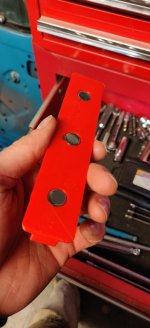
One of my goals for this year is to utilize my 3d printer more so I decided to replace my old foam extension holders with something a little better. Put some magnets in the base to hold it down in the tool box and with the stock HF liner they are about perfect.
 

Attachments

  • IMG_20210221_131725.jpg
    IMG_20210221_131725.jpg
    50.4 KB · Views: 116
  • IMG_20210221_131911.jpg
    IMG_20210221_131911.jpg
    74.8 KB · Views: 113

pwhittle

Well-known member
Joined
May 9, 2011
Messages
252
Location
Woodstock, GA
That is ********. I didn't think anyone actually used OpenSCAD except a bunch of ********* crazy computer engineers. It is basically programming to get that part.


Well, I have been an embedded software engineer for a long, long time, so it seemed to make sense to me. I manage my designs in source code control too!

Paul


Sent from my iPad using The Garage Journal mobile app
 

Strouty

Well-known member
Joined
Mar 21, 2010
Messages
38,206
Location
Southern Maine
I would strongly recommend F360, its been a great tool for increasing my own CAD knowledge and skills which have come in handy more than a few times. Soon as I figure out how to post images, I will share some. Thanks


Can use CAD program to make 3D parts, but can't figure out how to post pictures on the forum, the irony is strong..........
 

vavet

Well-known member
Joined
Mar 6, 2012
Messages
5,318
Location
Ashland, VA
Here's a fairly basic 3D printing question.
I'm using an Ender3 v2. I use the free Cura slicer. The default settings for PLA including 0.2mm layer height. The top and bottom layers are 4 layers/0.8mm thick.
These solid layers take a lot longer to print than an infill layer.
If I reduce that to 0.6mm/3 layers thick, it doesn't look quite as nice, and I'm probably giving up a minuscule amount of strength, but other than that, is there any reason for 4 layers? Most of the pieces I print are merely functional and lately, they're for toolbox organizing so appearance is not nearly as important. I'd rather finish them faster with a slight decrease in appearance.
Am I sacrificing anything else?
 

Bessy

Well-known member
Joined
Dec 18, 2012
Messages
992
Location
Ontario, Canada
I spent a few years with various Monoprice printers and then about 6 months ago upgraded to the Prusa Mk3S. Its well worth the upgrade in my opinion. Its a tool in the tool shop that I wouldn't want to give up. Lots of organizers, knick nacks, sellable stuff, you name it. Some downloaded but mostly my own designs.


I would strongly recommend F360, its been a great tool for increasing my own CAD knowledge and skills which have come in handy more than a few times. Soon as I figure out how to post images, I will share some. Thanks

Are any of these modeling programs capable of allowing users to enter dimensions via keyboard or am I just an idiot?

As I mentioned before I've been working with Sketch up since it's inception pretty well, and I'm more than fluent, but these other programs continue to vex me.

Sent from my Pixel 3a using Tapatalk
 

ddawg16

Well-known member
Joined
Jul 11, 2008
Messages
21,005
Location
S. California
Are any of these modeling programs capable of allowing users to enter dimensions via keyboard or am I just an idiot?

As I mentioned before I've been working with Sketch up since it's inception pretty well, and I'm more than fluent, but these other programs continue to vex me.

Sent from my Pixel 3a using Tapatalk

Fusion 360 lets you do it
 
To avoid these ads, REGISTER NOW!
Top Bottom