To avoid these ads, REGISTER NOW!

The Everything 3D Printer Thread

bdbecker

ALLIANCE MEMBER
Joined
Nov 18, 2015
Messages
5,542
Location
Iowa
...If I reduce that to 0.6mm/3 layers thick, it doesn't look quite as nice, and I'm probably giving up a minuscule amount of strength, but other than that, is there any reason for 4 layers?...

One issue I could see from doing fewer layers, at least when it comes to the base, is that your part maybe more susceptible to warp depending on the shape of your part. While a 0.2mm layer might not seem like a lot, you are removing 1/4 of the solid layers of material, which is probably more than a minuscule difference in strength. That's not to say you shouldn't try it - the best way to know for sure if it'll work or not is to give it a shot.
 
To avoid these ads, REGISTER NOW!

vpd66

Well-known member
Joined
Mar 1, 2010
Messages
709
Location
Central Wisconsin
What brand PETG filament has everyone had good experiences with??? I've owned an Ender 3 for a little over a year and have printed at least 3 different brands of PLA with no problems. I decided it was time to try some PETG. I ordered a roll of Polymaker PolyLite PETG. I was well aware of all the different slicer setting for PETG and researched it pretty heavily. My first print was a stringy disaster! It took me about 2 days to get this filament dailed in. The main slicer setting that seemed to get rid of the stringing was "retraction distance". Now I'm getting decent prints but still see some very fine (I call them angel hair) strings. Is this normal with PETG? I've seen YouTube videos of people printing PETG on the same printer but a different brand filament without this problem. Also the filament doesn't seem like its wound right on the spool. When I took it out of the package it had tension on it and it kind of backlashed. Now I have to keep watching the spool for filament tangling.
 

Bessy

Well-known member
Joined
Dec 18, 2012
Messages
992
Location
Ontario, Canada
Quick question for the forum here; I've heard that Sketchup can create STL files with a little bit of tweaking to save as binary. Has anyone here successfully printed Sketchup files with their Creality or other printers? Converted to an STL file I should be able to work with it in CURA without issue, or am I mistaken there?

Currently awaiting a response from sales rep at Top3DShop re: their availability of the S4. I'd like to be able to print components for tool organization foremost (as well as several other components around the house (I jumped into the rabbit hole of Thingiverse last night, what a ride), so printing within a 12-15" cube as opposed to 8" is hugely appealing rather than outgrowing my footprint too quickly. The 350x350x400 print area of the Ender 5 will suffice, but if I can go bigger for a little bit less money, why not?

Thanks,
B.
Quick update:
I went with the Creality Ender 5 Plus after all. It ships relatively local (Hamilton to Port Franks is roughly 2.5rs). Packing slip was created around 4:30 so I anticipate receiving it early next week.
This weekend I'll be prepping an area in the shop to set it up. I have a 24×32" bench on wheels that I plan to modify and screw into the studs to keep it as level and true as possible. I'll have to build out the one edge by about an inch to meet the specs of the machine, but I think it will do the job nicely.

Thinking of starting up a build thread when I receive the box. Stay tuned for questions and updates!

Sent from my Pixel 3a using Tapatalk
 

white91formula

Well-known member
Joined
Dec 11, 2012
Messages
424
Location
Boston, MA
What brand PETG filament has everyone had good experiences with??? I've owned an Ender 3 for a little over a year and have printed at least 3 different brands of PLA with no problems. I decided it was time to try some PETG. I ordered a roll of Polymaker PolyLite PETG. I was well aware of all the different slicer setting for PETG and researched it pretty heavily. My first print was a stringy disaster! It took me about 2 days to get this filament dailed in. The main slicer setting that seemed to get rid of the stringing was "retraction distance". Now I'm getting decent prints but still see some very fine (I call them angel hair) strings. Is this normal with PETG? I've seen YouTube videos of people printing PETG on the same printer but a different brand filament without this problem. Also the filament doesn't seem like its wound right on the spool. When I took it out of the package it had tension on it and it kind of backlashed. Now I have to keep watching the spool for filament tangling.


I print mostly petg on my ender 5's. I like overature Petg filament. I've also used hatchbox

More complex prints still get the fine angel hair strings you mentioned but I really dont get any strings anymore. I also have direct drives which made a big difference.

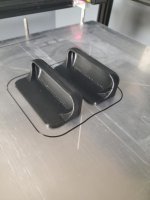
Just made these handles for my smoker out of overature Petg with no stringing
 

Attachments

  • 20210215_210605.jpg
    20210215_210605.jpg
    55.6 KB · Views: 127

white91formula

Well-known member
Joined
Dec 11, 2012
Messages
424
Location
Boston, MA
Quick update:
I went with the Creality Ender 5 Plus after all. It ships relatively local (Hamilton to Port Franks is roughly 2.5rs). Packing slip was created around 4:30 so I anticipate receiving it early next week.
This weekend I'll be prepping an area in the shop to set it up. I have a 24×32" bench on wheels that I plan to modify and screw into the studs to keep it as level and true as possible. I'll have to build out the one edge by about an inch to meet the specs of the machine, but I think it will do the job nicely.

Thinking of starting up a build thread when I receive the box. Stay tuned for questions and updates!

Sent from my Pixel 3a using Tapatalk

Familiarize yourself with the firmware and get a good interface to it to be able to flash it and calibrate steppers and extruder.

I have a ever 5 pro that worked great out of the box. The Ender 5 plus took some work from firmware updates ablnd alot of tweaking to get to run right. Also the stock bowden tube is junk, get a better one or you will be chasing print quality issues.

Once you get it straightened out it will be a great printer
 

Bessy

Well-known member
Joined
Dec 18, 2012
Messages
992
Location
Ontario, Canada
Familiarize yourself with the firmware and get a good interface to it to be able to flash it and calibrate steppers and extruder.


I have a ever 5 pro that worked great out of the box. The Ender 5 plus took some work from firmware updates ablnd alot of tweaking to get to run right. Also the stock bowden tube is junk, get a better one or you will be chasing print quality issues.


Once you get it straightened out it will be a great printer
Any suggestions on the Bowden tube and/or firmware that I should be considering? I've also read that the extruder should be replaced with a metal one basically right away. Is there any harm in running it as is out of the box and performing these upgrades down the road?

Thanks!

B.

Sent from my Pixel 3a using Tapatalk
 

vpd66

Well-known member
Joined
Mar 1, 2010
Messages
709
Location
Central Wisconsin
Any suggestions on the Bowden tube and/or firmware that I should be considering? I've also read that the extruder should be replaced with a metal one basically right away. Is there any harm in running it as is out of the box and performing these upgrades down the road?

Thanks!

B.

Sent from my Pixel 3a using Tapatalk

Capricorn tubing is what you want it is an upgrade that is worth doing on all Ender machines. Creality even sells it has an upgrade. Run the extruder that comes with the machine until you have a problem. Then you can decide if you want to upgrade or go with an OEM replacement. Don't get caught up in over upgrading your machine. They work very well right out of the box. Just my 2 cents.
 

vpd66

Well-known member
Joined
Mar 1, 2010
Messages
709
Location
Central Wisconsin
I print mostly petg on my ender 5's. I like overature Petg filament. I've also used hatchbox

More complex prints still get the fine angel hair strings you mentioned but I really dont get any strings anymore. I also have direct drives which made a big difference.

Just made these handles for my smoker out of overature Petg with no stringing


i'm really thinking that I might have got a bad roll from Polymaker. I'm going to order a roll of Hatchbox and see how it prints.
 

noid

Well-known member
Joined
Jul 15, 2010
Messages
1,341
i'm really thinking that I might have got a bad roll from Polymaker. I'm going to order a roll of Hatchbox and see how it prints.

Most of my printing is also PETG; angel hair stringing is pretty well always present to some degree with PETG, but it really should be a minimal non-structural amount that can be easily brushed away.

I've found some colors of PETG within the same brand line to need vastly different heat input.

For example, overture black PETG needs 255c to print well, while their white prints well in the 230-235c range.

Esun black prints well at 235c, so its all over the board.

I've generally been happiest with the overture filaments, as I find them to have the best consistency and cleanest coiling.

I run an micro swiss all metal hotend so I don't mind running 255c frequently (black is my most used color).
 

white91formula

Well-known member
Joined
Dec 11, 2012
Messages
424
Location
Boston, MA
Any suggestions on the Bowden tube and/or firmware that I should be considering? I've also read that the extruder should be replaced with a metal one basically right away. Is there any harm in running it as is out of the box and performing these upgrades down the road?

Thanks!

B.

Sent from my Pixel 3a using Tapatalk

I have the microswiss direct drive units on both of mine so no bowden tube for me. It is kind of expensive but came wuh the all metal hot end and metal extruder.
 

noid

Well-known member
Joined
Jul 15, 2010
Messages
1,341
I have the microswiss direct drive units on both of mine so no bowden tube for me. It is kind of expensive but came wuh the all metal hot end and metal extruder.

In the grand scheme of 3D printing, all metal hotends are cheap.

Its a worthwhile upgrade for anyone printing any reasonable amount.

PETG + All metal hotend + PEI sheets + Windex = Dream solution.
 
OP
B

BoilermakerFan

Well-known member
Joined
Apr 17, 2006
Messages
2,188
Location
Indianapolis, Indiana
What brand PETG filament has everyone had good experiences with??? I've owned an Ender 3 for a little over a year and have printed at least 3 different brands of PLA with no problems. I decided it was time to try some PETG. I ordered a roll of Polymaker PolyLite PETG. I was well aware of all the different slicer setting for PETG and researched it pretty heavily. My first print was a stringy disaster! It took me about 2 days to get this filament dailed in. The main slicer setting that seemed to get rid of the stringing was "retraction distance". Now I'm getting decent prints but still see some very fine (I call them angel hair) strings. Is this normal with PETG? I've seen YouTube videos of people printing PETG on the same printer but a different brand filament without this problem. Also the filament doesn't seem like its wound right on the spool. When I took it out of the package it had tension on it and it kind of backlashed. Now I have to keep watching the spool for filament tangling.

I use eSun, Prusa, and Devil Design PETG. The DD filament is the best of the 3 with Prusa a very close second. I love eSun PLA, but their PETG has been less impressive. Definitely more fiddly as others have mentioned. The DD runs great on my Prusa Mk2.5s at the Prusa setting in the slicer.
 

Bessy

Well-known member
Joined
Dec 18, 2012
Messages
992
Location
Ontario, Canada
Anyone with the Ender 5 Plus out there? Seems to be missing the power supply switch on the side. I've read that some of these units have autoswitching capabilities but I don't want to plug it in if I'm wrong?

Anyone with a recent purchase that can confirm the absence of a switch?

Solved: newer units come with a dual switch power supply. Powered up just fine! Going to call it a night and resume in the morning!

Sent from my Pixel 3a using Tapatalk
 
Last edited:

Bessy

Well-known member
Joined
Dec 18, 2012
Messages
992
Location
Ontario, Canada
Fired up and tried to calibrate tonight. Having issues trying to dial in the z-axis is proving nerve wracking and difficult to say the least.

I went through the set up video that 3DPrinters Canada put out,which was pretty good all considered, manually levelled the bed, but when I tried to print, after homing the print nozzle, the bed came up and mashed into the nozzle with some force. As mentioned the stock interface and controls leave much to be desired and certainly aren't as intuitive as I'd have hoped but that's just a matter of learning the navigation.

Anyone with the 5 Plus had issues with too much z-travel?

Sent from my Pixel 3a using Tapatalk
 

techieman33

Well-known member
Joined
Jun 18, 2018
Messages
1,096
Location
Kansas
I've had my Ender 3 Pro for a couple of weeks now and I think it's finally getting where I want it to be. It printed pretty well right out of the box thankfully. But it was way to loud for me. I started with putting it on a concrete paver with some leftover kaizen foam and that was a noticeable improvement. Today I swapped the hot end fan to a noctua fan and replaced the mainboard with Creality's "silent" board. Those changes have made a huge difference. The fan is whisper quiet and I don't notice the stepper motors running at all. Just have to print the x-axis cable chain and then I think I'll be done with printing stuff for the printer and able to really start working on the list of stuff I actually want.
 

vavet

Well-known member
Joined
Mar 6, 2012
Messages
5,318
Location
Ashland, VA
I have a B&D workmate with a broken spring clip. It's been broken for a while, but I've just lived with it.
I finally decided to do something about it. Thingiverse to the rescue once again.

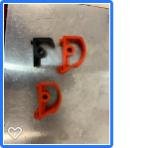
I've never seen this type of model before. The contributor included two files, one with built in supports and one without. I printed one of each just to see. Both printed fine.
 

Attachments

  • download.jpg
    download.jpg
    4.6 KB · Views: 64
  • download (1).jpg
    download (1).jpg
    4.5 KB · Views: 52
To avoid these ads, REGISTER NOW!

Bessy

Well-known member
Joined
Dec 18, 2012
Messages
992
Location
Ontario, Canada
First successful print!

Just a quick calibration cube. Came out pretty good at 20×20×20 on all but one corner. The front right corner of the print started to lift off the table (not sure if it was uneven heat of the bed or exactly why?) - any thoughts? Nozzle was at 180 and the bed was 40 degrees.

Print quality seems relatively fantastic with a very smooth finish. Settings and model were downloaded from Thingiverse. https://www.thingiverse.com/thing:1278865005ab7287ae4d66169bcf047756221af.jpg

Sent from my Pixel 3a using Tapatalk
 

Attachments

  • 005ab7287ae4d66169bcf047756221af.jpg
    005ab7287ae4d66169bcf047756221af.jpg
    433.2 KB · Views: 23

plc268

Well-known member
Joined
Jul 10, 2016
Messages
87
40C is pretty low for heating a bed. Even though PLA doesn't technically need a heated bed on some surfaces, pretty much everyone does use one now. You should be at ~60C bed temp for PLA.
 

Bessy

Well-known member
Joined
Dec 18, 2012
Messages
992
Location
Ontario, Canada
Bumped bed temp up to 60 degrees for my next print (tool holder for printer tools, clips into the 40/20 extrusion). appears to be printing good (41% complete). Small amount of lift (maybe .5mm) on the left side. I printed with a brim which appears to have a very minor gap from the left side of the print itself, around less than 20% of the circumference.

So far so good.
 

techieman33

Well-known member
Joined
Jun 18, 2018
Messages
1,096
Location
Kansas
Bumped bed temp up to 60 degrees for my next print (tool holder for printer tools, clips into the 40/20 extrusion). appears to be printing good (41% complete). Small amount of lift (maybe .5mm) on the left side. I printed with a brim which appears to have a very minor gap from the left side of the print itself, around less than 20% of the circumference.

So far so good.

Not sure what your bed surface is but from my reading some adhere better than others. And it can vary by material, and even the brand and a specific batch from that brand. After some playing around myself on my first roll of PLA I've had better luck getting it to stick when I set it to 75*C for the initial layers. Then it cools back down to 60*C after that. Something else I've read that you can try is to use a little hairspray or elmers glue stick on the bed. With the downside there being that you'll have to do some more work to clean it off the bed after your print is done. Seems like constantly tinkering with settings one at a time to find the sweet spot is just one of those things you have to deal with when it comes to 3d printing.
 

txvwnut

Well-known member
Joined
Jan 1, 2015
Messages
7,588
Location
Bedford, Texas
The Ender 3Pro is a good machine to start with, I suggest getting the V2 version as it gives more processing memory and the quieter drivers for the stepper motors.
 

techieman33

Well-known member
Joined
Jun 18, 2018
Messages
1,096
Location
Kansas
If the printer is going to be in your living space than the V2 with the silent stepper motor drivers is worth the extra expense. I made it about 2 days with my Ender 3 pro before I ended up buying the upgrade board along with a couple of fans to quiet it down. Before the mods I could hear it from 30 feet away. It sits about 4 feet behind my computer chair, so that was a problem. Now I can sit in that chair and not hear it at all.
 

Bessy

Well-known member
Joined
Dec 18, 2012
Messages
992
Location
Ontario, Canada
Not sure what your bed surface is but from my reading some adhere better than others. And it can vary by material, and even the brand and a specific batch from that brand. After some playing around myself on my first roll of PLA I've had better luck getting it to stick when I set it to 75*C for the initial layers. Then it cools back down to 60*C after that. Something else I've read that you can try is to use a little hairspray or elmers glue stick on the bed. With the downside there being that you'll have to do some more work to clean it off the bed after your print is done. Seems like constantly tinkering with settings one at a time to find the sweet spot is just one of those things you have to deal with when it comes to 3d printing.
I bumped up to 80 degrees (stock glass bed that came with the printer). Didn't think about the hairspray at the time. I have a glue stick, but was hesitant to try it as this is only my third print and the first two printed pretty much within my tolerances.

Picking up a raspberry Pi, camera and improved Boden tube which should be here next week.

Depending on how the weekend goes, I'll give it another shot to print the bed cable relief and maybe another few things throughout the weekend.

The heater in the shop is not working properly right now but it's supposed to be a bit warmer this weekend, not sure if that may make a difference or not.

Sent from my Pixel 3a using Tapatalk
 

techieman33

Well-known member
Joined
Jun 18, 2018
Messages
1,096
Location
Kansas
I bumped up to 80 degrees (stock glass bed that came with the printer). Didn't think about the hairspray at the time. I have a glue stick, but was hesitant to try it as this is only my third print and the first two printed pretty much within my tolerances.

Picking up a raspberry Pi, camera and improved Boden tube which should be here next week.

Depending on how the weekend goes, I'll give it another shot to print the bed cable relief and maybe another few things throughout the weekend.

The heater in the shop is not working properly right now but it's supposed to be a bit warmer this weekend, not sure if that may make a difference or not.

Sent from my Pixel 3a using Tapatalk

The shop being cold is a good clue. When it's cool in the room the filament can cool to quickly and shrink causing it to warp. You could try sticking a box over it to see if that helps. It should retain at least a little more heat and cut down on any drafts.
 

brawls43

Well-known member
Joined
Aug 29, 2012
Messages
133
Location
Minneapolis
80 degrees seems high for a bed temp. A cold shop or a draft can effect the print. As does fan settings. I turn off the fan for the first 5-6 layers, then have it on like 40%. I also print in my garage and I got one of the cheap creality zip up enclosures. With a glass bed you shouldn't really need hair spray or glue stick. When I switched to a glass bed, I also noticed the glass takes a little longer to warm up. The thermistor is on the bottom of the aluminum bed, and isn't measuring the glass temperature. I give my bed an extra 5-10 minutes to warm up. That really helped with the corners lifting or curling for me. It was always one corner too. Now I love my glass bed, if the print finishes and I'm not around or hovering over, the bed cools off, and the print lifts off like nothing. No prying or scraping the print off the bed.
 

Firebrick43

Well-known member
Joined
May 12, 2015
Messages
13,971
Location
West central Indiana
I need to reproduce one metal piece and one rubber piece for a vintage chainsaw. Interested in doing a few dozen of both. Wondering if 3D printing is a viable option. Details and lots of pictures in this thread - https://www.garagejournal.com/forum/showthread.php?t=476790

Thanks!

Whats the metal part(function). They try (for money reasons) at my work to use 3d printing to replace metal and rubber parts. Mostly stationary parts with fairly low stress. Unfortunately it just doesn't work out. They parts get soft with oil and creep over time. I just fooled with a prox mount that was 3d printed last night.

There are printers(markedforged) that can add selective carbon tow to the print that can make high strength parts but on a whim I priced one, it was over 32k if I remember and the filament was 200 a roll and the carbon tow was over twice that.

The rubber (TPU filament) does work better/last longer, but still not a good replacement.

Rubber parts are relatively easy to build a mold and cast even at home. 3d printing would be useful to make the master, or even the mold itself depending on shape.
 

californiamilleghia

Well-known member
Joined
Apr 11, 2020
Messages
537
Location
SoCal
is there any 3D printer material that is flexible like a tail light seal ?

there are some seals that would be nice to print if they have some flex in them :)
 

californiamilleghia

Well-known member
Joined
Apr 11, 2020
Messages
537
Location
SoCal
I need to reproduce one metal piece and one rubber piece for a vintage chainsaw. Interested in doing a few dozen of both. Wondering if 3D printing is a viable option. Details and lots of pictures in this thread - https://www.garagejournal.com/forum/showthread.php?t=476790

Thanks!

you could print the metal part a little larger to size for shrinkage and have it lost wax cast.

or 3D print a mold for the metal part and make your own waxes ,

we had our local caster make a mold off our original that we enlaged with paint and bondo , and then he made 100 waxes to lost wax cast
 

Strouty

Well-known member
Joined
Mar 21, 2010
Messages
38,206
Location
Southern Maine
I guess I should have ordered a bunch of filament at the same time as the printer, it comes with some, but the nylonx is too expensive to learn on and it only comes with black PLA and then the fancy support materials. I guess I will have a bit of a delay, just ordered a bunch of "training" materials.....
 
To avoid these ads, REGISTER NOW!
Top Bottom