To avoid these ads, REGISTER NOW!

The Everything 3D Printer Thread

loganb

ALLIANCE MEMBER
Joined
Dec 29, 2011
Messages
5,493
Location
Omaha, NE
I stayed busy printing this week and successfully printed a number of self created and borrowed items from Thingiverse. But I hit my first snag today and could use some guidance. One of several items I downloaded from Thingiverse was saved in the wrong orientation (laying vertical and needs to be horizontal to print) in the STL file. I have tried countless times in Fusion and the Prusa slicer app to square it up. I thought it was squared up after my efforts with the slicer, but it was obvious once I started the print that is still a little off square.

Open to suggestions. Also included a link https://www.thingiverse.com/thing:3821350

On mobile so can't screenshot but there is a button on the toolbar in Prusa to change the face that's on the print bed. In the middle or so, shows a cube with a rotational arrow I think??? Click it and some white ovals will show up on the faces of the partner the bed, click the face on the side you want on the bed and it'll move
 
To avoid these ads, REGISTER NOW!

vertguy

Well-known member
Joined
Apr 6, 2010
Messages
1,259
Location
SE WI
What do you know as I figured there was a simple command to get this accomplished. It took me a couple minutes, but it appears to have worked, Just redid the slicer file and the print is underway!

Thanks LoganB!!
 

Poolshark314

Well-known member
Joined
Jul 5, 2021
Messages
658
Location
MD
I stayed busy printing this week and successfully printed a number of self created and borrowed items from Thingiverse. But I hit my first snag today and could use some guidance. One of several items I downloaded from Thingiverse was saved in the wrong orientation (laying vertical and needs to be horizontal to print) in the STL file. I have tried countless times in Fusion and the Prusa slicer app to square it up. I thought it was squared up after my efforts with the slicer, but it was obvious once I started the print that is still a little off square.

Open to suggestions. Also included a link https://www.thingiverse.com/thing:3821350

There should be a tab to allow you to rotate in your slicer. This is the tab in Cura
1640968823707.png
 

vertguy

Well-known member
Joined
Apr 6, 2010
Messages
1,259
Location
SE WI
I tried the rotation function initially and could never get to sit exactly flat on the print bed. But the plane change worked perfectly.
 

ER70S-2

Well-known member
Joined
Jan 2, 2015
Messages
796
Hey Prusa experts. I just assembled my Y axis, and the bearings honestly feel like ****. They make a clicking noise, and the clicks are associated with notchiness or drag as I slide the Y axis back and forth. I soaked the bearings with 99.99% isopropyl alcohol, let them dry, then packed them with Superlube which Prusa recommends as a lube for the Misumi bearings.

Has anyone else felt this? Does it effect print quality? These videos were taken without the Y axis motor connected.


rlitman

Well-known member
Joined
Oct 18, 2010
Messages
24,576
Location
Long Island
I found that notchiness on some bearings in my Ender 6. I ended up replacing the worst of them with premium bearings, and now everything is smooth as glass.
 

MadeByMiller

Well-known member
Joined
Dec 29, 2018
Messages
1,230
Location
Rapid City, SD
Hey Prusa experts. I just assembled my Y axis, and the bearings honestly feel like ****. They make a clicking noise, and the clicks are associated with notchiness or drag as I slide the Y axis back and forth. I soaked the bearings with 99.99% isopropyl alcohol, let them dry, then packed them with Superlube which Prusa recommends as a lube for the Misumi bearings.

Has anyone else felt this? Does it effect print quality? These videos were taken without the Y axis motor connected.


I had the exact same experience with my Prusa. I talked to my buddy who is a Prusa expert, and he recommended packing more grease in, which I did. There was a big improvement, but they still are a bit noisy and gritty sounding.
 

ER70S-2

Well-known member
Joined
Jan 2, 2015
Messages
796
I found that notchiness on some bearings in my Ender 6. I ended up replacing the worst of them with premium bearings, and now everything is smooth as glass.
Thanks. What exactly did you replace them with? The Misumi bearings that come with the Prusas are supposed to be premium bearings. They're around $10 each. What do you have to spend to get better?
 

ER70S-2

Well-known member
Joined
Jan 2, 2015
Messages
796
I had the exact same experience with my Prusa. I talked to my buddy who is a Prusa expert, and he recommended packing more grease in, which I did. There was a big improvement, but they still are a bit noisy and gritty sounding.

Thank you, too. I packed them by putting Superlube in the bearings and pushing a rod into each end of the bearing at the same time to force the lube into the tracks. I did that about 7 times for each bearing. I can't imagine that its possible to get more lube into the bearings, but maybe I'll try one of the 3D printed bearing lube nozzles after I'm able to print one.

I chatted with Prusa support and sent them links to my videos. They said that no linear bearings will ever be completely quiet or smooth. As long as the prints look good, I'm fine with it. We shall see.
 

MadeByMiller

Well-known member
Joined
Dec 29, 2018
Messages
1,230
Location
Rapid City, SD
Thank you, too. I packed them by putting Superlube in the bearings and pushing a rod into each end of the bearing at the same time to force the lube into the tracks. I did that about 7 times for each bearing. I can't imagine that its possible to get more lube into the bearings, but maybe I'll try one of the 3D printed bearing lube nozzles after I'm able to print one.

I chatted with Prusa support and sent them links to my videos. They said that no linear bearings will ever be completely quiet or smooth. As long as the prints look good, I'm fine with it. We shall see.
I used the same method you describe. I think you will find the prints will still look good. They do in my case, for what it's worth.
 
OP
B

BoilermakerFan

Well-known member
Joined
Apr 17, 2006
Messages
2,188
Location
Indianapolis, Indiana
Try cleaning the bearings out really well, then repacking them. I had to do that on my Mk2 after several weeks worth of printing. I printed the nozzle that fits the tube and has slots along the bearing lines. That helped a lot too. Then I would wipe off the excess as it purged out off the rails for the first week or so. My bed glides like a pat of butter on a hot skillet now.

My Prusa didn't like the move to our new house 3 hours away... I finally got it set back up in November and I'm having an issue on my Z axis. It doesn't really move. Very noising and notchy. I suspect it's interference in the wiring in the control board enclosure. That was an issue I had before on the X axis. Hoping to finally have a little time to spend on it on Monday. If it still doesn't work, I do have the BTT Prusa board that I can swap in and see how that works.

I need to get it running. I have a few things I need to print for family and friends that are way over due now and I need to print an adapter ring for my Maslow M2 CNC router to run a Makita router in the 71mm mount as well as chain guides.
 

KYBOSH

Member
Joined
Aug 8, 2021
Messages
8
Location
Ellenwood, GA, USA, Earth, The Solar System, .....
Wow! Never knew this forum had a thread like this.
Very timely as I just started 3D printing this week.
I picked up a Dremel 3D20 for a song and started studying it and the Cura software.

Been ah printing fool and its been running damn near 24 hours a day.
Right now Im printing additional bins and inserts for my Dewalt organizer.

And I already have my eye on a bigger machine!
My ambitions are bigger than this 6x9 print bed I currently have.
Very addictive.

Havent tried my hand at the CAD side of things yet but I plan on using Sketchup to do that and have had plenty of practice using that software over the last year.

Gonna have to do a lot of reading and catching up on this thread.
 

rlitman

Well-known member
Joined
Oct 18, 2010
Messages
24,576
Location
Long Island
Thanks. What exactly did you replace them with? The Misumi bearings that come with the Prusas are supposed to be premium bearings. They're around $10 each. What do you have to spend to get better?
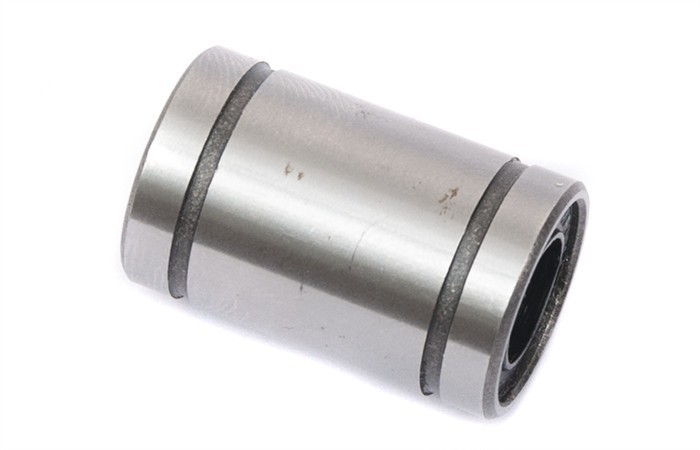
I'm having trouble finding my record of what I bought, but it isn't all that relevant anyway, since my printer uses rollers with all of its bearings and the Prusas I know of have linear bearings on rods. Then again, this doesn't say $10:
 

ER70S-2

Well-known member
Joined
Jan 2, 2015
Messages
796
I'm having trouble finding my record of what I bought, but it isn't all that relevant anyway, since my printer uses rollers with all of its bearings and the Prusas I know of have linear bearings on rods. Then again, this doesn't say $10:
Gotcha. Rollers are a totally different type of bearing and not really comparable to linears. I understand how a high quality roller bearing would help, though.

That's a generic linear bearing in that link. The Misumis that Prusas ship with now are about 5 times that cost.
 

slodat

ALLIANCE MEMBER
Joined
Feb 6, 2010
Messages
3,679
Location
Central-ish, WA
Found a recommendation for Overture PETG temps while clicking around online. Upped to 260/85C and no more little hairs. Parts are coming off the printer really nice.

F9DABBA2-0693-4D0E-A68E-35C7D453F7CB.jpeg
 

Bad Habit

Well-known member
Joined
Mar 19, 2014
Messages
1,971
Location
Chumstick WA
Got mine together and worked through some calibration issues. Working in a cold room didn't help so I moved up into my office to see if that would help. I changed to the Orange they sent with it and kept struggling with Benchy. Kept getting a little further along before it would catch and pull it off. Had to leave it for a few days, so came back to it to start fresh. Checked tightness on pulleys, nozzle wasn't as tight as I thought it should be. Changed filament to the black and success. Then looking at the roll of Orange, noticed they sent me PETG instead. No wonder I was struggling try to use it to print with PLA settings. I guess if you're going to learn something, might as well do it the hardway
 

Attachments

  • 20220103_182209.jpg
    20220103_182209.jpg
    231 KB · Views: 97

bugnut

ALLIANCE MEMBER
Joined
Jul 14, 2012
Messages
3,834
Location
Central Ohio
I have been lurking and looking for several years and am thinking of pulling the trigger on a Prusa. I keep reading temperature is of critical importance, which I comprehend as it is a material deposition process. Will be using various materials and printing different volumes.

Outbuilding minimum heat is 45f and max is ambient.
Outbuilding office is minimum 40f and max 80f.

So I have a question: is this good enough for daily usage or should the process be in a more controlled environment?

TIA
 

slodat

ALLIANCE MEMBER
Joined
Feb 6, 2010
Messages
3,679
Location
Central-ish, WA
My shop gets cool in the winter and into the mid 70’s in the summer. I print PETG successfully between 45F and 75F temperatures my shop sees. You can’t go wrong with a Prusa.

This is a screenshot of mine printing right now, through the night.

1F453F9E-5566-48BB-A1E5-EC818DAC1C87.jpg
 
To avoid these ads, REGISTER NOW!

Poolshark314

Well-known member
Joined
Jul 5, 2021
Messages
658
Location
MD

Thought this would be a cool video to share. I like how he said "lightly modified Ender 3" as the water goes shooting everywhere lol
 

loganb

ALLIANCE MEMBER
Joined
Dec 29, 2011
Messages
5,493
Location
Omaha, NE
I have been lurking and looking for several years and am thinking of pulling the trigger on a Prusa. I keep reading temperature is of critical importance, which I comprehend as it is a material deposition process. Will be using various materials and printing different volumes.

Outbuilding minimum heat is 45f and max is ambient.
Outbuilding office is minimum 40f and max 80f.

So I have a question: is this good enough for daily usage or should the process be in a more controlled environment?

TIA

If you print PLA or PETG which some(probably most) people print exclusively you won't have any problems with those temps as long as there aren't strong breezes across the print area

If you try ABS or some of the other more temp sensitive, higher extruder temp materials you will likely need an enclosure with temp control to keep it consistent
 

pwhittle

Well-known member
Joined
May 9, 2011
Messages
252
Location
Woodstock, GA
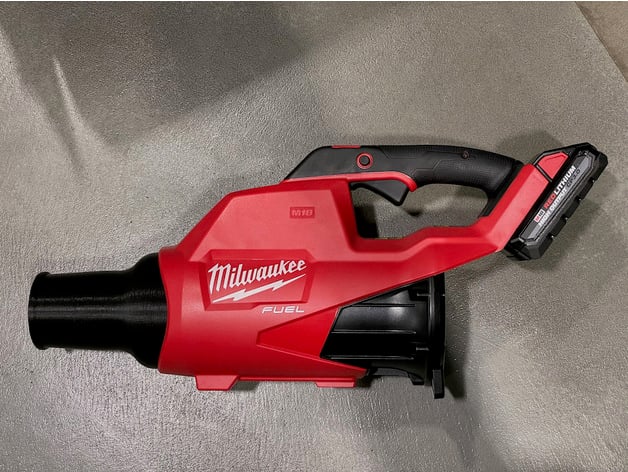
I found a stubby nozzle for the Milwaukee M18 blower on Thingiverse. Will be even better for blowing off a just washed car.


Printed in Polymaker ABS on an Ender 3. It took 33 hours to print with 25% infill, 0.4mm nozzle and 0.2mm layer height at 260/110 C.

Major upgrades include
- metal extruder
- FulaBed and FulaPrint 2.0 print surface
- Enclosure

Paul
 

Attachments

  • 5925107B-676B-4A12-9EE4-06BD80E4DDC1.jpeg
    5925107B-676B-4A12-9EE4-06BD80E4DDC1.jpeg
    342.3 KB · Views: 84
  • C4C7543C-4FC1-40BD-B709-2758D3BF1456.jpeg
    C4C7543C-4FC1-40BD-B709-2758D3BF1456.jpeg
    299.1 KB · Views: 76
  • 70DEC7DD-0BDD-4665-9ADE-4E8E61A0E6BE.jpeg
    70DEC7DD-0BDD-4665-9ADE-4E8E61A0E6BE.jpeg
    342.1 KB · Views: 75

Poolshark314

Well-known member
Joined
Jul 5, 2021
Messages
658
Location
MD
I found a stubby nozzle for the Milwaukee M18 blower on Thingiverse. Will be even better for blowing off a just washed car.


Printed in Polymaker ABS on an Ender 3. It took 33 hours to print with 25% infill, 0.4mm nozzle and 0.2mm layer height at 260/110 C.

Major upgrades include
- metal extruder
- FulaBed and FulaPrint 2.0 print surface
- Enclosure

Paul
Looks good! Wow 33 hours! I think I'll do it in PLA+. Then I can crank it out in 9!
 

loganb

ALLIANCE MEMBER
Joined
Dec 29, 2011
Messages
5,493
Location
Omaha, NE
I found a stubby nozzle for the Milwaukee M18 blower on Thingiverse. Will be even better for blowing off a just washed car.


Printed in Polymaker ABS on an Ender 3. It took 33 hours to print with 25% infill, 0.4mm nozzle and 0.2mm layer height at 260/110 C.

Major upgrades include
- metal extruder
- FulaBed and FulaPrint 2.0 print surface
- Enclosure

Paul

That came out great! Already setup well for ABS I assume? I've got the teal version of that and think PETG would work well...but well done!
 

pwhittle

Well-known member
Joined
May 9, 2011
Messages
252
Location
Woodstock, GA
I print ABS almost exclusively. It took quite some work to get to the point of printing ABS reliably on an Ender 3, but now that is my default.

Round models like this need no special adhesion tricks. Anything with a square corner gets mouse ears added in Cura to hold them down.

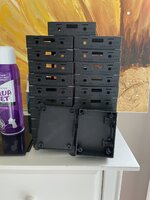
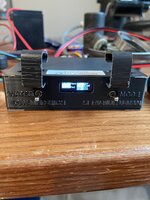
i originally bought the 3D printer to print enclosures for a PCB I designed for an electronic toilet controller in our motorhome. I have printed about 150 of these now, the first 50 in PLA, and the rest in ABS.

9C336880-BA4E-402E-B622-D150C2FF1DDE.jpegAC685920-18A7-4CC5-A0FE-977C9F8D032D.jpeg1519AED7-725F-455B-8377-887C52256DAD.jpeg

The FulaFlex print surface was a game changer for adhesion when hot and release When cold. The FulaBed is a great flat surface that the stock bed did not provide.

I have a roll of PETG to try, but haven’t tried it yet as the ABS printing is working so well.
 

HPRifleman

Member Emeritus
Joined
Nov 18, 2019
Messages
767
Location
Wayne, IL
Here's something a little different.

I design stuff for a living, stuff that is pretty important to the control of a moving vehicle. So we use our 3D printer to prove out ideas and help validate concepts. But I have noticed that, sometimes, a dimension that was modeled in CAD would turn out slightly different when actually printed.

So I came up with this gauge to illustrate the difference between modeled and printed dimensions.

Each number on the gauge is a dimension in millimeters. Next to each number are three features, a wall, a round hole, and a cylindrical boss. For example, the wall on the left of the gauge tapers from 2.00mm thick at the bottom to a theoretical sharp point at the top edge. It should be 1.25mm thick where the "1.25" numerals are and .50mm at the "0.50" numerals.

The hole diameter and boss diameter are the same dimensions as the numbers that are next to them.

gj_090.JPG

gj_091.JPG
 

ER70S-2

Well-known member
Joined
Jan 2, 2015
Messages
796
Here's something a little different.

I design stuff for a living, stuff that is pretty important to the control of a moving vehicle. So we use our 3D printer to prove out ideas and help validate concepts. But I have noticed that, sometimes, a dimension that was modeled in CAD would turn out slightly different when actually printed.

So I came up with this gauge to illustrate the difference between modeled and printed dimensions.

Each number on the gauge is a dimension in millimeters. Next to each number are three features, a wall, a round hole, and a cylindrical boss. For example, the wall on the left of the gauge tapers from 2.00mm thick at the bottom to a theoretical sharp point at the top edge. It should be 1.25mm thick where the "1.25" numerals are and .50mm at the "0.50" numerals.

The hole diameter and boss diameter are the same dimensions as the numbers that are next to them.

This is really cool and something I have been wondering and plan to test (I'm still assembling my printer). How far off are the dimensions?
 

Cruzan80

Well-known member
Joined
Jul 22, 2015
Messages
4,150
Location
Denver, CO
So the top point thickness is ckmpletely dependant on the nozzle you have (or set in the slicer). A .4mm opening for the filament to extrude to is incapable of making a cylinder .25 in diameter (assuming both are mm). Therefore the program throws an error and makes it invisible.

There are several calibration prints on sites like Thingiverse to dial in your ratios compared to the desgin.
 

klindstedt

Well-known member
Joined
Jan 10, 2016
Messages
56
Hi all, I've been considering the purchase of a 3D Printer for the last year. Got a new influx of cash following birthday and Christmas....

I'm down to either the Prusa Mini+, the Creality Ender 3 V2, or the Voxelab Aquila X2....
Well, I ended up pulling the trigger on a Creality CR-10 mini. Not so mini on print size, 11.8" x 8.6"x 11.8". Arriving tomorrow, so I'll have the weekend to play. I'm sure I'll be back with comments and questions. Will scour thingiverse for now, but want to learn to model for myself. I've used AutoCAD for the last 35 years (since release 2.52!), but only in a 2D capacity. Hope some of that experience transfers over.
 

HPRifleman

Member Emeritus
Joined
Nov 18, 2019
Messages
767
Location
Wayne, IL
This is really cool and something I have been wondering and plan to test (I'm still assembling my printer). How far off are the dimensions?
In general, the wall printed 0.1-0.4mm thicker and the hole diameter was undersized by 0.6-0.7mm. The 0.25mm diameter hole actually did not print all the way through so 1/2mm is probably the smallest hole I would try to print. Hole variation needs to be known as I use them for thread-forming screws in many cases.

The cylindrical boss was more complicated as the dimension would vary between X and Y axis. For example, the boss that was modeled as 2.00mm diameter measured 1.98 in one axis and 2.04 in the other axis.

This was on an Objet 260 printer.
 

ER70S-2

Well-known member
Joined
Jan 2, 2015
Messages
796
In general, the wall printed 0.1-0.4mm thicker and the hole diameter was undersized by 0.6-0.7mm. The 0.25mm diameter hole actually did not print all the way through so 1/2mm is probably the smallest hole I would try to print. Hole variation needs to be known as I use them for thread-forming screws in many cases.

The cylindrical boss was more complicated as the dimension would vary between X and Y axis. For example, the boss that was modeled as 2.00mm diameter measured 1.98 in one axis and 2.04 in the other axis.

This was on an Objet 260 printer.

Man, my OCD is going to be out of control once I get my printer running, lol. I'm used to machining parts to the thousandth or so. I think I should just resist the urge to measure any parts unless absolutely necessary.

Thanks for the info!
 

Poolshark314

Well-known member
Joined
Jul 5, 2021
Messages
658
Location
MD
Man, my OCD is going to be out of control once I get my printer running, lol. I'm used to machining parts to the thousandth or so. I think I should just resist the urge to measure any parts unless absolutely necessary.

Thanks for the info!
There are definitely factors that can exaggerate dimensional accuracy like improper belt tension and print head not being fully calibrated, but I think for the most part being +-.2mm is the normal tolerance
 

niget2002

Well-known member
Joined
Oct 2, 2012
Messages
11,112
Location
Josephine, TX
It's been a while since I've been in this thread. Looks like it's still going strong.

Regarding Room temperature when printing... I put my printer into an enclosure. I have the output fan from the power supply blowing into the enclosure. In the winter when it's cooler in the shop I'll turn on the printer and set the heat bed to printing temperature. I'll leave that sit at that temp for ~15 minutes or so before starting my print job. What I've found is that between the PS heat and the print bed heat, the inside of the enclosure is usually a pretty good temperature for printing.

I also have an exhaust fan at the top of the enclosure. I hooked up a small arduino beetle and a temp probe to monitor the enclosure temps. If it gets too warm, it turns on the fan and ***** the heat out. During the winter this fan barely runs, but during the summer it runs pretty much all the time that the printer is on.

I'm sure I could get octopi to monitor the temp and turn the fan on/off on it's own, but I had the arduino lying around.

My latest project is an aquarium controller for a planted tank. The controller has two outlets it needs to control. One for co2 and one for the heater. I printed a box to house the outlet and the relay. There's a 10A fuse wired to the AC circuit coming into the box. The relay has a 4 pin aircraft connector for pwr/gnd/relay1/relay2 in the bottom of the box. The relay is mounted inside the box above the AC outlet where you see the dead space in this picture.
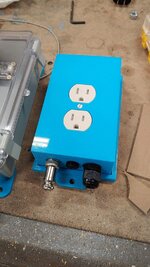
0101220900.jpg

I've also been playing with DIN mounts lately. I've designed a few brackets to hold some electronics to it for an upcoming CNC controller I'm working on.

Also threw together a Vesa 75 mount for a LattePanda Alpha so I could mount the SBC to the back of a small touch screen.

0107220843.jpg

I haven't decided yet if I want to leave the SBC on the back of the monitor, or put the SBC in the controller box. I'm leaning toward putting it in the controller box so I can free up the Vesa mount to mount the screen to a movable arm. It would mean running power, hdmi, and USB up to the screen. If I leave the SBC mounted to the monitor, then I just have to run ethernet and power up to it. Decisions, decisions.
 

vertguy

Well-known member
Joined
Apr 6, 2010
Messages
1,259
Location
SE WI
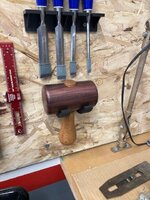
Finally started using some my prints for organizing my wood working tools. The plane mounts and mallet hook (which I had to modify) were from Thingiverse and the others I drew up in Fusion. The chisel rack really helped me learn a few things like patterning and adding ribs. I still have plenty to learn with the Fusion s/w, but really enjoying the new "tool" and finding plenty of uses. We have a couple family milestone birthdays over the next couple weeks, so I will be making some items for the cake decor.


IMG_0367.jpgIMG_0370.jpgIMG_0374.jpg
IMG_0375.jpg
IMG_0366.jpg
 

Balor

Well-known member
Joined
Feb 2, 2014
Messages
452
Location
Florida
Finally started using some my prints for organizing my wood working tools. The plane mounts and mallet hook (which I had to modify) were from Thingiverse and the others I drew up in Fusion. The chisel rack really helped me learn a few things like patterning and adding ribs. I still have plenty to learn with the Fusion s/w, but really enjoying the new "tool" and finding plenty of uses. We have a couple family milestone birthdays over the next couple weeks, so I will be making some items for the cake decor.


IMG_0367.jpgIMG_0370.jpgIMG_0374.jpg
IMG_0375.jpg
IMG_0366.jpg

Tell me about the hammer
 

vertguy

Well-known member
Joined
Apr 6, 2010
Messages
1,259
Location
SE WI
The wood mallet was made by my older brother from hickory for the handle and Katalox for the head. He cranks out some cool stuff on the lathe as he also hooked my up with a cool wood handled marking knife. Now I need to reciprocate with some printed tool mounts.
 
To avoid these ads, REGISTER NOW!
Top Bottom