To avoid these ads, REGISTER NOW!

The Everything 3D Printer Thread

kppolich

Well-known member
Joined
Apr 7, 2020
Messages
344
Location
Eastern Iowa
Ariens Skids, 12h each, PETG @ 70%. Nice to have them, but hope I don't have to use them again this year.
Overall, for (2) it used about 1/2 a roll of PETG. ~$10


File: https://www.thingiverse.com/thing:5184866
 

Attachments

  • IMG_7218 Large.jpeg
    IMG_7218 Large.jpeg
    155.9 KB · Views: 141
  • 69785211538__7FA0D5CF-73EA-42D7-B6EE-D65BD849920C Large.jpeg
    69785211538__7FA0D5CF-73EA-42D7-B6EE-D65BD849920C Large.jpeg
    197.8 KB · Views: 88
  • IMG_9858 Large.jpeg
    IMG_9858 Large.jpeg
    132.2 KB · Views: 84
Last edited:
To avoid these ads, REGISTER NOW!

73project

Well-known member
Joined
Jan 16, 2014
Messages
82
Couple catches for the drawers on my Craftsman toolbox. Did two slightly different styles found on thingiverse. Printed with ABS.

20230129_223627.jpg
I needed a couple of those back when I had my Craftsman box! The box has since been sold, but I put up with poor drawer closing detents on a couple of drawers for 15+ years.
 

ArcReactorKC

Well-known member
Joined
Jun 1, 2019
Messages
2,237
Location
Out in the county NE of KCMO
I just want to say if you don't have a Bambu X1 carbon yet... Order one, it has been awesome. I have a bunch of printers from $100 enders on up to my big $$$$ Raise 3d.

The bambu has run circles around all of them. Speed and quality are on point, it handles engineering filaments just as well as my big boy printers and does it faster. The AMS is just a bonus.

I will say though if you order one, order the textured PEI with it, the "cool plate" needs glue as a release agent and is terribly annoying, I am used to printing on glass or textured pei, no glue needed and everything peels off when cool easily. Seriously don't mess with the cool plate.

bambu.jpg
 

purplezr2

Well-known member
Joined
Jun 1, 2010
Messages
5,290
Location
Central MN
I just want to say if you don't have a Bambu X1 carbon yet... Order one, it has been awesome. I have a bunch of printers from $100 enders on up to my big $$$$ Raise 3d.

The bambu has run circles around all of them. Speed and quality are on point, it handles engineering filaments just as well as my big boy printers and does it faster. The AMS is just a bonus.

I will say though if you order one, order the textured PEI with it, the "cool plate" needs glue as a release agent and is terribly annoying, I am used to printing on glass or textured pei, no glue needed and everything peels off when cool easily. Seriously don't mess with the cool plate.

bambu.jpg
Where did you order from, only seeing the cool plate option....
 

ArcReactorKC

Well-known member
Joined
Jun 1, 2019
Messages
2,237
Location
Out in the county NE of KCMO
Where did you order from, only seeing the cool plate option....
I ordered directly from Bambu, I created a separate order for the textured plate.


I also have this plate from Amazon because it was here faster than the Bambu direct


jayz66ragtop

Well-known member
Joined
Sep 11, 2009
Messages
1,521
Location
SoCal
I ordered directly from Bambu, I created a separate order for the textured plate.


I also have this plate from Amazon because it was here faster than the Bambu direct

Ordering one of those, did not have that option when I bought mine and yes it's annoying to peel stuff off of the cool plate. That's about the only gripe about mine.
 

jayz66ragtop

Well-known member
Joined
Sep 11, 2009
Messages
1,521
Location
SoCal
@ArcReactorKC How is the print quality of the Bambu compared your others?
So far from my experience is it blows just about everything at and below it's price point out of the water. Even on the fastest speed the print quality is good to fantastic depending on the filament type.

Sorry, I know you didn't ask me but I'm the reason he bought one.
 

jayz66ragtop

Well-known member
Joined
Sep 11, 2009
Messages
1,521
Location
SoCal
Well, had my first "incident" with the X1 tonight. The AMS actually... Apparently when I pulled the filament out when changing the spool to another one the filament broke off inside the AMS. I didn't realize nor notice the red light on that slot and went to put the filament from the new spool in and it would only go in a couple of inches and met resistance. I thought it was just the motor that pulls it the rest of the way in but nope kept getting red or flashing red light. Tried several times then noticed the panel on the printer had a message with a QR code. Scanned the QR and it was a link to a Youtube video show how to take apart the AMS and remove the filament. All in all it was a 15 minute job but sure was nerve racking taking that thing apart. Found a 4-5 inch piece of filament inside the tube that connects that slot to the "Y" block underneath.

Anyway, printing a cord wrapper for our vacuum cleaner and it seems to be back functional again so I must have put it back correctly (hoping I didn't jinx it by typing that as it's only 34% done but has swapped filament several times).
 

slodat

ALLIANCE MEMBER
Joined
Feb 6, 2010
Messages
3,679
Location
Central-ish, WA
I hated the cool plate when it first arrived. The textured sheet was out of stock when I ordered. I bought an aftermarket textured sheet around the time I bought the X1C, and ordered the Bambu textured sheet when I noticed it back in stock. I’ve yet to use either because I’m not having any issues with the cool sheet. I occasionally put a bit of the glue stick on it and it’s been great.

The Bambu lives up to all the hype. I’m very glad to have it in the shop.
 

ArcReactorKC

Well-known member
Joined
Jun 1, 2019
Messages
2,237
Location
Out in the county NE of KCMO
@ArcReactorKC How is the print quality of the Bambu compared your others?
Quality is on par with my high end printers, there isn't a machine other than possibly a prusa mk3 that can compete under $1k out of the box. I can get better quality with some of the higher end machines but not at the speed of the bambu. I highly expect some of the big players to change their approach to the market now with the bambu x1 widely available.

Raise3d, Ultimaker, Makerbot, etc. The big names that are prosumer/industrial manufacturers have not truly innovated in some years. The biggest draw to their machines was multi-material and high end engineering filament printing. Now that there is a machine out there under $2000USD they need to get moving on some innovation to compete.

To their credit my Raise 3d machines are bigger, and built much more sturdy, they feel more like a "machine" and less like an "appliance" my Pro2 isn't going to be put out to pasture, and neither is my custom CoreXY machine as they will printer larger items and are still handling my pekk and ultem prints as they are out of range for the Bambu's hot end. Although the Pro2 did require a hot end change to achieve pekk temperatures, as far as I am aware there isn't a high temp hot end available for the bambu as of yet.

I was about to buy a Raise 3d pro3 for another production printer and decided to gamble on an X1CC instead. It has run all of my pla/petg/abs prints without any issues thus far which is perfect.
 

ER70S-2

Well-known member
Joined
Jan 2, 2015
Messages
796
@ArcReactorKC That's great. Thank you for the information. Sounds like I should be pretty content with my Prusa, although I would love to improve the print quality. It makes beautiful prints, but it's kind of weird that there's nothing that can be done to make the Prusas print better. At least not that I have found.
 

ArcReactorKC

Well-known member
Joined
Jun 1, 2019
Messages
2,237
Location
Out in the county NE of KCMO
@ArcReactorKC That's great. Thank you for the information. Sounds like I should be pretty content with my Prusa, although I would love to improve the print quality. It makes beautiful prints, but it's kind of weird that there's nothing that can be done to make the Prusas print better. At least not that I have found.
You can get almost any decent printer to the quality out of a bambu printer. At the end of the day an 0.4mm nozzle melting PLA is an 0.4mm nozzle melting PLA.

The reason Bambu seems so head and shoulders above the rest is it's walled garden. They are in control of almost everything and thus the calibration aspect is taken care of for you.

Have you done all the e/x/y/z step calibration on your current printer? Are the belts tensioned correctly? Are you running linear advance and taking advantage of coasting? The i3 bed slinging design is not conducive to high quality high speed prints. Slow it down and fine tune your temperatures for your filament and you will probably see dramatic improvement.

I started my 3d printing journey many moons ago when we still had to build these things out of all thread and used string trimmer line for filament. We spent countless hours just getting the damn things to make a coherent part. We are finally getting to the most exciting time in 3d printing hobbyist history. We get to complain about quality!

Post some pictures of your prints and from there we can see what adjustments you can make to get better quality.
 

jayz66ragtop

Well-known member
Joined
Sep 11, 2009
Messages
1,521
Location
SoCal
Not to be rude, but you are not. I've been 3d printing for quite some time. This was an addition to my range of printers and I waited until the kickstarter and all the nonsense that goes with a kickstarter was over before buying one.
My mistake, I thought you were someone else but there are at least two others that bought X1's after my original post and some questions they asked.

I participated in the kickstarter and honestly it was the smoothest forthright one I've participated in. Did what they said and say what they did. Only part that wasn't clear was it would take 3-4 weeks for delivery once manufactured due to shipping issues from China.
 

BoostAddiction

Well-known member
Joined
Jan 23, 2006
Messages
885
Location
Western North Carolina
Here's another vote for the Bambu Labs Carbon X1. It's my 4th printer, and the other ones aren't going to see any use now since the X1 is so versatile, and fast.

My only complaint is that I wish the print bed was bigger, but I'm guessing there will be a bigger version out eventually.
 

sh944

ALLIANCE MEMBER
Joined
Jan 1, 2014
Messages
291
Location
Linwood, KS
I’ll also comment, the X1 is a great printer. The print quality is a good bit better than my Qidi X-Plus, mostly because I don’t take the time to constantly make the manual calibrations that the X1 does by itself automatically.

Is anyone using anything other than the Bambu slicer? That’s all I’ve used so far and it works great, but fielding additional info from the crowd re other options.

Thanks to Jay, he’s the reason I bought mine.
 
Last edited:

jayz66ragtop

Well-known member
Joined
Sep 11, 2009
Messages
1,521
Location
SoCal
I’ll also comment, the X1 is a great printer. The print quality is a good bit better than my Qidi X-Plus, mostly because I don’t take the time to constantly make the manual calibrations that the X1 does by itself automatically.

Is anyone using anything other than the Bambu slicer? That’s all I’ve used so far and it works great, but fielding additional info from the crowd re other options.

Thanks to Jay, he’s the reason I bought mine.
I considered trying others but you lose AMS using any other slicer so I'm sticking to the Bambu one. It's built off of Prusa slicer, I know because when opening both apps I get the same warning about one of the dlls they use if that matters any.
 
To avoid these ads, REGISTER NOW!

Bessy

Well-known member
Joined
Dec 18, 2012
Messages
992
Location
Ontario, Canada
Design question for the Brain Trust:

Have any of you successfully modeled a shape in Fusion360 based on a profile taken from a picture, and if so, how did you manage it?

I have traced a profile that I want to make a series of 3d printed clips for, but due to the imprecise extruded shape of the part I'm trying to clip, I can't easily take super precise measurements. I am hoping someone might be able to show me a "For Dummies" solution that they have successfully used that allows me to scale the entire drawing based on a single (or at least very few) measurement(s) and then use that profile in Fusion360 or similar modeling software to create a part?

TIA!
 

Attachments

  • Light Fixture Profile.jpg
    Light Fixture Profile.jpg
    158.4 KB · Views: 40

MadeByMiller

Well-known member
Joined
Dec 29, 2018
Messages
1,230
Location
Rapid City, SD
Design question for the Brain Trust:

Have any of you successfully modeled a shape in Fusion360 based on a profile taken from a picture, and if so, how did you manage it?

I have traced a profile that I want to make a series of 3d printed clips for, but due to the imprecise extruded shape of the part I'm trying to clip, I can't easily take super precise measurements. I am hoping someone might be able to show me a "For Dummies" solution that they have successfully used that allows me to scale the entire drawing based on a single (or at least very few) measurement(s) and then use that profile in Fusion360 or similar modeling software to create a part?

TIA!
It's best to scan the tracing (better yet, the actual object if possible) using a printer/scanner than take a picture of it. Pictures have perspective and camera lens distortion, so it will never be as good as a scan. I do what you're describing in Fusion quite often, just last week as a matter of fact. It's an excellent way of reverse engineering an odd shape.

You will want to bring your image into Fusion as a Canvas, not a decal. You can then do just as you describe and scale the canvas image using the Calibrate option when you right click on your Canvas image in the Browser. This is not a 100% foolproof method, and if you're needing the model to be absolutely critically close dimensionally, then I suggest printing some 1:1 profile images and comparing them to your part.

HERE is an older Lars Christensen tutorial that shows the process in detail using a photo from the internet.

Lastly, here is an example where I scanned the actual 3D object using my printer/scanner in order to "trace" the profile in CAD. It can be tricky to get a good scan of a 3D object (especially since my scanner isn't exactly high resolution) but if you get creative you can get some more than useable results.
Scan to Sketch.png
 

vwpieces

Well-known member
Joined
Apr 28, 2020
Messages
5,925
Location
Hills, PA
Printed a few more drawer catches for the side and top Craftsman toolbox cabinets in ABS. Will see if these fit and function before I print more.

Also the bearing housing for the lower steering column on MK1 Volkswagen. Plastic retaining housings turn to dust and bearing falls out. Bearing inside that outer housing i printed was NOS. Plastic deteriorated in the package.

20230220_005506.jpg
 

bugnut

ALLIANCE MEMBER
Joined
Jul 14, 2012
Messages
3,834
Location
Central Ohio
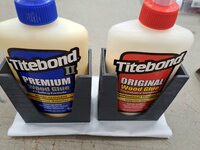
My titebond glue would not fit standing up in the drawer. Printed a couple holders and velcro affixed to the glue drawer. Not sure how it will work out long term but they're upright and handy now.
 

Attachments

  • 20230220_100714.jpg
    20230220_100714.jpg
    553.7 KB · Views: 32
  • 20230220_100741.jpg
    20230220_100741.jpg
    483.4 KB · Views: 33
  • 20230220_101915.jpg
    20230220_101915.jpg
    541.2 KB · Views: 50

WoodsTruck

Well-known member
Joined
Jan 12, 2013
Messages
1,019
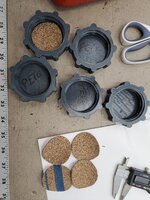
Printed with petg, 5 gas can caps took a while to get a thingiverse model correct but it worked like a charm!
I pulled a thingiverse file for a fuel can vent cap as mine were cracking out. Worked good. I was able to put an o-ring in the cap to seal around the shoulder of the vent nub.

How are you sealing the larger caps?
 

Bessy

Well-known member
Joined
Dec 18, 2012
Messages
992
Location
Ontario, Canada
First prints on the 3v2 over the weekend, at least since getting it back up and running (first time since moving into this place in July).
Of the 11 tape measure clips I printed, I think seven? were useable (barely) due to a lack of adhesion in between layers. I tried a knob today as well, and still had the same issue, where it will print several layers just fine then periodically it will have gaps where the layer doesn't like to adhere, creating a weak point. Going to play with the temperatures and install the all metal extruder this week, in order to see if I can get some better adhesion.
 

Attachments

  • 16770142083929047519634612001546.jpg
    16770142083929047519634612001546.jpg
    508.5 KB · Views: 38

ER70S-2

Well-known member
Joined
Jan 2, 2015
Messages
796
Does anyone here have an acrylic enclosure for their printer? I just bought one that's supposed to be made from 1/4" thick acrylic, and I was kind of surprised that it only measured 0.208". I know there's some pretty loose tolerances when it comes to acrylic sheet, but 0.042" too thin seems excessive. Is this normal or should I complain? To be clear, the company advertises it as 1/4" thick panels.
 

Grimpala

Well-known member
Joined
Jul 16, 2012
Messages
1,404
1677032387495.png

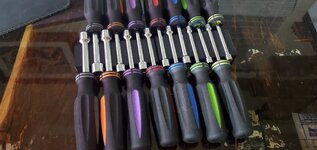
Created a new holder for the HF nut drivers if anyone is interested in the STL. I had to print the unit in two pieces and then I'll epoxy them together. My big printer is on the fritz and my small one is only 6x6x6. The STL is one solid piece.
 

Attachments

  • 20230221_201405.jpg
    20230221_201405.jpg
    402.9 KB · Views: 42

Slupie

Well-known member
Joined
Dec 19, 2010
Messages
162
Location
Bartlett, IL
Does anyone here have an acrylic enclosure for their printer? I just bought one that's supposed to be made from 1/4" thick acrylic, and I was kind of surprised that it only measured 0.208". I know there's some pretty loose tolerances when it comes to acrylic sheet, but 0.042" too thin seems excessive. Is this normal or should I complain? To be clear, the company advertises it as 1/4" thick panels.
Looking at McMaster Carr the tolerance for the 1/4" thk Acrylic sheets they sell is +/-0.040" https://www.mcmaster.com/8536K164/ so I say it is normal.
 

ER70S-2

Well-known member
Joined
Jan 2, 2015
Messages
796
Looking at McMaster Carr the tolerance for the 1/4" thk Acrylic sheets they sell is +/-0.040" https://www.mcmaster.com/8536K164/ so I say it is normal.

Haha, great minds think alike. I did the exact same thing and saw that tolerance, but I also saw some tighter tolerances, too. I'm inclined to let it be, but I may recommend that the vendor state the tolerances of the acrylic he uses.
 

4 FN 27

ALLIANCE MEMBER
Joined
Oct 19, 2015
Messages
4,635
Location
Minnesnowta
Does anyone here have an acrylic enclosure for their printer? I just bought one that's supposed to be made from 1/4" thick acrylic, and I was kind of surprised that it only measured 0.208". I know there's some pretty loose tolerances when it comes to acrylic sheet, but 0.042" too thin seems excessive. Is this normal or should I complain? To be clear, the company advertises it as 1/4" thick panels.

Probably Cast Acrylic, typically .236 (6mm) and mill tolerance is +/-10%. At least that is what I designed around for 30 years. Still a little light by .004.

True 1/4 inch Acrylic is Extruded if I remember??? the plus tolerance is about 50% of the minus tolerance. Been a while since I dabbled in Acrylic.
 

kaymccampbell

Well-known member
Joined
Feb 27, 2015
Messages
29,405
Location
Upstate New York
Does anyone here have an acrylic enclosure for their printer? I just bought one that's supposed to be made from 1/4" thick acrylic, and I was kind of surprised that it only measured 0.208". I know there's some pretty loose tolerances when it comes to acrylic sheet, but 0.042" too thin seems excessive. Is this normal or should I complain? To be clear, the company advertises it as 1/4" thick panels.
Just this one. The skin is nominally 1/4", but there's quite a lot of variance in panel thickness, depending on manufacturer and date of manufacture.
IMG_20220130_174253.jpg
 

bugnut

ALLIANCE MEMBER
Joined
Jul 14, 2012
Messages
3,834
Location
Central Ohio
For the gas can caps, to insure a seal I hand cut cork gaskets. I measured twice and cut once, I had screwed the caps on tight and then measured the gap from the can, then installed the gasket and rechecked to insure I had good contact.

I pulled a thingiverse file for a fuel can vent cap as mine were cracking out. Worked good. I was able to put an o-ring in the cap to seal around the shoulder of the vent nub.

How are you sealing the larger caps?
 

Black300zx

Well-known member
Joined
Apr 8, 2019
Messages
781
Location
Elkton, Md
Does anyone here have an acrylic enclosure for their printer? I just bought one that's supposed to be made from 1/4" thick acrylic, and I was kind of surprised that it only measured 0.208". I know there's some pretty loose tolerances when it comes to acrylic sheet, but 0.042" too thin seems excessive. Is this normal or should I complain? To be clear, the company advertises it as 1/4" thick panels.
That's pretty typical for acrylic sheet. If you go on McMaster-Carr and look at their Acrylic sheet selection, you'll see +/-0.059" tolerances on a several of their offerings. Several of the offerings also have asymmetrical tolerances, with more tolerance allocated on the thin side which would be desirable if you need to make sure the panel will slide into a groove.


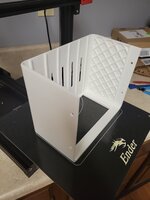
I printed my largest part so far on my Ender-3 Max. Last summer I mounted my old double-din stereo to the cabin ceiling in our boat. 100% functional, but I never fab'd an enclosure for it to make it look finished and to prevent hitting your head on a sharp sheet-metal corner. An hour of modelling and about 24hrs of printing later I now have an enclosure, complete with vent-holes and countersunk screw holes for mounting :cool: I'm happy with how it printed, although I made a couple goofs:
  1. I added large 0.5" radius edge blends to the outside to make it less painful to bump into, and I didn't realize that while doing so, I moved one edge of the rectangular opening about 1mm back from the face of the enclosure, which created a really long unsupported bridged section when I oriented it for printing. I should have realize I goofed when I saw the brim passes curve under the part as you see in the first image. Doh! Some sagging in that area and a few loose layers, but it's usable.
  2. I was running black filament before this job and apparently didn't purged it enough because I ended up with one grey streak on the first layer (the primary cosmetic face) about 5" long. The brim passes looked clean, so I guess there was some residue in the nozzle that took a while to move out. A little sanding and some Krylon Fusion and it should be perfectly fine for my needs. Any tips for how long to purge between color changes? Or is it best practice just to change the nozzle to be sure?
Overall still very happy with the quality given that I have done any ustep calibrations whatsoever. Before buying I read about some minor binding in the z-axis leadscrews causing banding, which I noticed early on but faded as I got more hours of runtime. The upper half of this print (where I've never ran the machine before) shows some banding again, so I thing my first area of tuning is going to be to put my dial indicator on the z-axis and see if I can't find where the binding is occurring and try to smooth it out a bit.
 

Attachments

  • 20230221_221850.jpg
    20230221_221850.jpg
    557.4 KB · Views: 35
  • 20230221_221857.jpg
    20230221_221857.jpg
    480.3 KB · Views: 44

ER70S-2

Well-known member
Joined
Jan 2, 2015
Messages
796
That's pretty typical for acrylic sheet. If you go on McMaster-Carr and look at their Acrylic sheet selection, you'll see +/-0.059" tolerances on a several of their offerings. Several of the offerings also have asymmetrical tolerances, with more tolerance allocated on the thin side which would be desirable if you need to make sure the panel will slide into a groove.

Any tips for how long to purge between color changes? Or is it best practice just to change the nozzle to be sure?

Thanks, everyone, for the reassurance on the acrylic thickness question I had.

I have a different printer (Prusa), but I purge 3-4 times when switching filaments just to make sure all of the previous filament comes out. I also purge at the higher of the two temps. For instance, if I load PLA after I had been using PETG, I purge the PLA at PETG temps. I have no idea if other people do this, but I figure it can't hurt.
 

Jehannum

Well-known member
Joined
May 3, 2012
Messages
1,347
Location
Albuquerque, NM
That's pretty typical for acrylic sheet. If you go on McMaster-Carr and look at their Acrylic sheet selection, you'll see +/-0.059" tolerances on a several of their offerings. Several of the offerings also have asymmetrical tolerances, with more tolerance allocated on the thin side which would be desirable if you need to make sure the panel will slide into a groove.


I printed my largest part so far on my Ender-3 Max. Last summer I mounted my old double-din stereo to the cabin ceiling in our boat. 100% functional, but I never fab'd an enclosure for it to make it look finished and to prevent hitting your head on a sharp sheet-metal corner. An hour of modelling and about 24hrs of printing later I now have an enclosure, complete with vent-holes and countersunk screw holes for mounting :cool: I'm happy with how it printed, although I made a couple goofs:
  1. I added large 0.5" radius edge blends to the outside to make it less painful to bump into, and I didn't realize that while doing so, I moved one edge of the rectangular opening about 1mm back from the face of the enclosure, which created a really long unsupported bridged section when I oriented it for printing. I should have realize I goofed when I saw the brim passes curve under the part as you see in the first image. Doh! Some sagging in that area and a few loose layers, but it's usable.
  2. I was running black filament before this job and apparently didn't purged it enough because I ended up with one grey streak on the first layer (the primary cosmetic face) about 5" long. The brim passes looked clean, so I guess there was some residue in the nozzle that took a while to move out. A little sanding and some Krylon Fusion and it should be perfectly fine for my needs. Any tips for how long to purge between color changes? Or is it best practice just to change the nozzle to be sure?
Overall still very happy with the quality given that I have done any ustep calibrations whatsoever. Before buying I read about some minor binding in the z-axis leadscrews causing banding, which I noticed early on but faded as I got more hours of runtime. The upper half of this print (where I've never ran the machine before) shows some banding again, so I thing my first area of tuning is going to be to put my dial indicator on the z-axis and see if I can't find where the binding is occurring and try to smooth it out a bit.
The current firmware on the E3 has a "change filament" setting in the menu. Just push the "purge more" option in that menu after changing out the filament until you get the color you installed.
 
Last edited:
To avoid these ads, REGISTER NOW!
Top Bottom