

You are using an out of date browser. It may not display this or other websites correctly.
You should upgrade or use an alternative browser.
You should upgrade or use an alternative browser.
The Garage Computer
- Thread starter Ryan
- Start date


mdbeck1
Well-known member
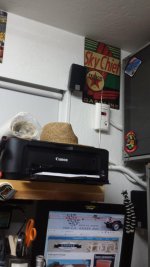
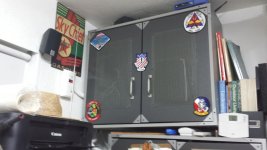
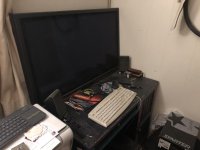
My Humble setup...
Decent setup. If you do much grinding or "dirty" work you might think about some filters around the CPU and printer.
I noticed that this is post 1. Welcome to the forum (also known as "the disease"). Lots of interesting ideas here that will make you want to spend more money.
If you want to organize your garage you should probably take a look at this thread: http://www.garagejournal.com/forum/showthread.php?t=140559
maxpower_hd
Well-known member
I just use my Samsung 10" tablet. It has a big enough screen especially with the zoom feature. I have it in a rubber case and a protective film on the screen that can be replaced if I scratch it. It is portable so I can use it in my shop or at the work shop. I get it greasy all the time and it cleans right up. It hooks to my vintage shop stereo too so I can stream music as well and I can connect to the blue tooth speaker at work. Best of all worlds for me.
NewShockerGuy
Well-known member
I'm using a Viewsonic vot132. Super tiny, on the side of my workbench and a Dell 24" monitor.
I'll post pictures when I get home but use a wireless BT mouse/keyboard.
Works nicely for the garage.
-Nigel
I'll post pictures when I get home but use a wireless BT mouse/keyboard.
Works nicely for the garage.
-Nigel
Know Wosad
Banned
- Joined
- May 15, 2016
- Messages
- 811
I've yet to take the plunge but the whole tablet thing seems the best route to go in a shop.
I have an old tower, LCD and a wireless keyboard and mouse in the shop.Its OK.Better than most around here. I want a "military grade" tablet. NO. Tablet. Not alaptop.... with wifi........dunno if there is such a thing ?
I haven't attempted the stoopid fone yet. I'm not smart enough.I want simplicity and clarity.....NO TWITTER BUTTON.
USB is good
Bluetooth is good.
Imagine a downpour,working on a 555 Ford backhoe,pull out the tablet,access a schematic with part numbers.Open bookmarks.Opens site of parts house. Skype whssizface. He has the part ! Open PayPal. Send money.
Dude sends part and tracking number.
Wait for drone to drop it.
Technology *****. OR. Maybe not. ???
I remember bees nests and junkyards in the rain with a green box of 3/8, a hammer and a pry bar.
Were those better times ?
I still don't have the right answer. Nobody tweeted the event tho !
Technology is a female term. Ya can't live with it, nor without it.
Go ahead.I just brain farted that....;-)
I have an old tower, LCD and a wireless keyboard and mouse in the shop.Its OK.Better than most around here. I want a "military grade" tablet. NO. Tablet. Not alaptop.... with wifi........dunno if there is such a thing ?
I haven't attempted the stoopid fone yet. I'm not smart enough.I want simplicity and clarity.....NO TWITTER BUTTON.
USB is good
Bluetooth is good.
Imagine a downpour,working on a 555 Ford backhoe,pull out the tablet,access a schematic with part numbers.Open bookmarks.Opens site of parts house. Skype whssizface. He has the part ! Open PayPal. Send money.
Dude sends part and tracking number.
Wait for drone to drop it.
Technology *****. OR. Maybe not. ???
I remember bees nests and junkyards in the rain with a green box of 3/8, a hammer and a pry bar.
Were those better times ?
I still don't have the right answer. Nobody tweeted the event tho !
Technology is a female term. Ya can't live with it, nor without it.
Go ahead.I just brain farted that....;-)
Last edited:
theoldwizard1
Well-known member
I want a "military grade" tablet.
Panasonic is pretty much the industry standard of ruggedized laptop, They have a line a
Actually a Fire HD 10 is a good start, Needs a good ruggedized case.
This is next on the list of required shop tools
https://www.amazon.com/gp/aw/d/B00X...s=micro+pc&dpPl=1&dpID=41UPoyHdtiL&ref=plSrch
https://www.amazon.com/gp/aw/d/B00X...s=micro+pc&dpPl=1&dpID=41UPoyHdtiL&ref=plSrch
Weird Tolkienish Figure
Well-known member
Not a bad idea, but I'd rather have a giant monitor and a keyboard set at a good height...
Weird Tolkienish Figure
Well-known member
You guys can go tablet if you want, although I'd question the decision. The screens get gunked up pretty fast, and you will eventually want a computer that allows you to download files and such. Maybe a Microsoft Surface might suffice?
iamhomeless
Well-known member
My current shop computer is getting a bit long in the tooth. It's an old Dell Precision 5400 laptop. The video card is no longer up to snuff for Cad work (why I bought it) but I got about 8 years of use out of it so I can complain.
I will say that keeping it in a separate enclosure really helped, I currently use an industrial computer enclosure I scored from work. And it's more than big enough for me to stash a full sized tower, wide screen monitor and accessories, which is what I m leaning towards for the replacement unit.
After working with computers on shop floors and industrial settings, I can say the biggest killers are heat and contamination. A powered fan and filter really prolonge the lifespan of your system, especially if you tend to paint, grind, or Weld in the shop.
I will say that keeping it in a separate enclosure really helped, I currently use an industrial computer enclosure I scored from work. And it's more than big enough for me to stash a full sized tower, wide screen monitor and accessories, which is what I m leaning towards for the replacement unit.
After working with computers on shop floors and industrial settings, I can say the biggest killers are heat and contamination. A powered fan and filter really prolonge the lifespan of your system, especially if you tend to paint, grind, or Weld in the shop.
Crazyjake8493
Well-known member
I've got an ancient Dell laptop stored under the workbench, and an old Dell desktop that I got for free, mounted over my bar/counter. The laptop is for parts manuals and stuff I need while working on stuff at the bench. The desktop is mostly for surfing the web and for friends to check facebook or whatever they want when having a beer. I should make a cover for the desktop to keep dust out.
If I won't be making a mess, I usually bring my Macbook out to the garage, since it's faster than the Dells, and I'm not much of a PC guy anyway, but they were free.
If I won't be making a mess, I usually bring my Macbook out to the garage, since it's faster than the Dells, and I'm not much of a PC guy anyway, but they were free.
Just an old repurposed Windows 7 dell machine from work, standard keyboard and mouse, which I hook up to a 42" Sony 1080p flat screen. That way I can watch the fights or a race if I want, or stream youtube or listen to music all in one. I like the idea of a tablet for space saving, but I know I would just get it really, really dirty.
Dragfluid
ALLIANCE MEMBER
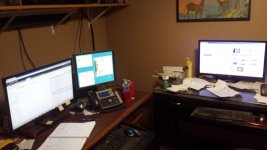
Mike in Ohio
Well-known member
Just an old repurposed Windows 7 dell machine from work, standard keyboard and mouse, which I hook up to a 42" Sony 1080p flat screen. That way I can watch the fights or a race if I want, or stream youtube or listen to music all in one. I like the idea of a tablet for space saving, but I know I would just get it really, really dirty.
Probably a very stupid question, but I am barely computer savvy enough to get my computer to this site. What kind of cable do you use to connect them. The monitor cable on my old desktop is hardwired to the monitor, and has a big plug with screws to connect to the tower. I don't think my flat screen has a usb port.
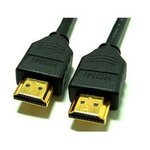
Not a stupid question, depending on the age of the monitor. If it's a blue conector it's called a vga (I'm guessing that is what you have) the next option is called dvi which is normally white and the last is hdmi (the current standard) I have attached photos for reference.Probably a very stupid question, but I am barely computer savvy enough to get my computer to this site. What kind of cable do you use to connect them. The monitor cable on my old desktop is hardwired to the monitor, and has a big plug with screws to connect to the tower. I don't think my flat screen has a usb port.


Sent from my SM-G930V using Tapatalk
Attachments


Mike in Ohio
Well-known member
The blue is what is on my old desktop, what is on the other end to connect it to the flat screen? Thanks.
James-W
Well-known member
I have a laptop I take out to the garage when I need it but I don't leave it out there permanently. I had considered running a cat-6 cable and a coax cable along with a phone line out to the garage when I built it, but then I decided I most likely wouldn't use it very often anyway.
If I need to use the phone we have a wireless phone that works with the house land line and I have a wireless router that works quite well out to the garage. As far as TV is concerned, I do mostly woodworking and when I am running the equipment I wear hearing protection so television is not something I would use very often. Still, it would be nice to have a big screen in the garage when there is a ball game I want to watch.
If I need to use the phone we have a wireless phone that works with the house land line and I have a wireless router that works quite well out to the garage. As far as TV is concerned, I do mostly woodworking and when I am running the equipment I wear hearing protection so television is not something I would use very often. Still, it would be nice to have a big screen in the garage when there is a ball game I want to watch.
A**holes Garage
Banned
Using an old ACER netbook now. Going to start the inventory of my garage, tools, etc.
Last edited:
The blue is what is on my old desktop, what is on the other end to connect it to the flat screen? Thanks.
There are a variety of cables and adapters, one way or another you should be able to manage it.
If you have an older PC/video card, it may only have VGA. If it's newer, it will have HDMI and/or DVI.
Your TV needs to be new ENOUGH, but if it's an LCD flat screen at all, it should have at least one HDMI port. It may also have a VGA port too, my older Sony does, specifically for PC video.
So, it'd be one of these combinations:
HDMI --> HDMI
DVI --> HDMI adapter --> HDMI
VGA --> VGA
VGA --> HDMI adapter --> HDMI
The other concern is audio, which again depends on the computer and TV. If both are modern enough, HDMI to HDMI will carry audio as well, and problem solved. If you have to do a combination of adapters, you'll have to either have separate audio with PC speakers, or you may have a port on the back of your TV for the common speaker output.
Hope that makes sense.

I've gone to an iPad and a Microsoft surface, then a apple tv on my 42" flatpanel Samsung for my Youtube videos. If need be I can screen cast or share from the tablets to the flatpanel. And the tablets I can bring inside if I want to do any changes or update.
Mike in Ohio
Well-known member
There are a variety of cables and adapters, one way or another you should be able to manage it.
If you have an older PC/video card, it may only have VGA. If it's newer, it will have HDMI and/or DVI.
Your TV needs to be new ENOUGH, but if it's an LCD flat screen at all, it should have at least one HDMI port. It may also have a VGA port too, my older Sony does, specifically for PC video.
So, it'd be one of these combinations:
HDMI --> HDMI
DVI --> HDMI adapter --> HDMI
VGA --> VGA
VGA --> HDMI adapter --> HDMI
The other concern is audio, which again depends on the computer and TV. If both are modern enough, HDMI to HDMI will carry audio as well, and problem solved. If you have to do a combination of adapters, you'll have to either have separate audio with PC speakers, or you may have a port on the back of your TV for the common speaker output.
Hope that makes sense.
VGA to HDMI is the ticket for my setup if I get it set up, gonna have to wait for spring though. Thanks for the help.
Totally agree that iPad and appletv is the best setup. iPad is so versatile in the shop.I've gone to an iPad and a Microsoft surface, then a apple tv on my 42" flatpanel Samsung for my Youtube videos. If need be I can screen cast or share from the tablets to the flatpanel. And the tablets I can bring inside if I want to do any changes or update.
Totally agree that iPad and appletv is the best setup. iPad is so versatile in the shop.
Yeah I got tired of the big work station type setups. Wireless, bluetooth and portable that's the way to roll.
I need room for tools and projects lol!!
Lucid Moments
Well-known member
My shop is in the process of being built, but my plan once it is built is to go for a fanless, sealed industrial PC. Here is one example. Add a decent monitor mounted to a wall and a cheap cordless keyboard/mouse combo and I am set. It doesn't have to do much but access the web and some manuals that I have saved.
PeteyDaMan
Active member
I used an 24" Acer Chromebase. Since it's a touch screen, the only wire needed is power. I have it on a swivel bracket. It has a camera built in so I can do video calls easily. I added a wireless keyboard for convenience. I have it connected via Bluetooth to my stereo so I can listen to streaming music.
The only down side is the Google Playstore isn't available for it so I can't download any apps yet.
The only down side is the Google Playstore isn't available for it so I can't download any apps yet.
RGKSR
Well-known member
I have a mini tower in my garage, with a Brother Q700 label printer and a Epson printer hooked up. It’s nice to have when I working of the cars and want to look something up or place an order. I also have another on on my reloading bench in the basement.
I guess things have changed since I lasted posted in this thread. I got an older Dell laptop from my neighbor. He had a stack of them he refurbed and sold on Ebay for guys like me.
This thing is basic and simple, perfect for the shop.
This thing is basic and simple, perfect for the shop.
Magnum440d100
Well-known member
This is something I’ve been struggling with. Having a computer in the shop....
On the one hand, it is convenient if it is already powered up and ready to go. And if it gets greasy, no big deal. I paid over $1k for my iPhone X and I do not want it to get too beat up, too soon.
On the other hand, my phone is always fired up and ready to go at a moments notice...
Plus I do not have an average size “monitor”....
On the one hand, it is convenient if it is already powered up and ready to go. And if it gets greasy, no big deal. I paid over $1k for my iPhone X and I do not want it to get too beat up, too soon.
On the other hand, my phone is always fired up and ready to go at a moments notice...
Plus I do not have an average size “monitor”....
Attachments
Mikla
Member
I just stick my iPhone in a Ziploc so I can use it with greasy/dirty hands. But I am still a paper person... I like to have the appropriate manual pages printed out and nearby when needed, included being blue taped to the hood or body somewhere when working on a car.
I've been watching this thread as I'm trying to decide what to do, too.
I often use my phone, but screen size surely isn't a plus. I'd also like to keep some .pdf manuals at the ready, and again, screen size is an issue.
Currently, I carry my iPad down to the garage when needed, but it's memory is almost full and I use it often in the house. (I have an even older iPad, but it won't do web anymore and cannot be updated)
So...the other night I was at Best Buy and they have a Asus Vivo 11.6 laptop on sale for $119. Perfect, I though and considered buying it. I didn't, and figured I'd check the web for reviews. Very limited memory, half of which is used up the OS and apparently it runs on Windows 10S that only allows the use of programs from the Microsoft store. From what I read, you can do a free update to regular Windows 10. May be perfect for what I need...although I hate to buy something knowing upfront how limited it is.
I often use my phone, but screen size surely isn't a plus. I'd also like to keep some .pdf manuals at the ready, and again, screen size is an issue.
Currently, I carry my iPad down to the garage when needed, but it's memory is almost full and I use it often in the house. (I have an even older iPad, but it won't do web anymore and cannot be updated)
So...the other night I was at Best Buy and they have a Asus Vivo 11.6 laptop on sale for $119. Perfect, I though and considered buying it. I didn't, and figured I'd check the web for reviews. Very limited memory, half of which is used up the OS and apparently it runs on Windows 10S that only allows the use of programs from the Microsoft store. From what I read, you can do a free update to regular Windows 10. May be perfect for what I need...although I hate to buy something knowing upfront how limited it is.
RDeMeyer
Active member
https://www.garagejournal.com/forum/attachment.php?attachmentid=808561&d=1536702068
Hope my cross link works. I have since upgraded my computer to a super small form factor. Wireless keyboard and mouse, WiFi connected with a 17" monitor. Give up a little bench space but I NEED the computer more!
Hope my cross link works. I have since upgraded my computer to a super small form factor. Wireless keyboard and mouse, WiFi connected with a 17" monitor. Give up a little bench space but I NEED the computer more!
Magnum440d100
Well-known member
https://www.garagejournal.com/forum/attachment.php?attachmentid=808561&d=1536702068
Hope my cross link works. I have since upgraded my computer to a super small form factor. Wireless keyboard and mouse, WiFi connected with a 17" monitor. Give up a little bench space but I NEED the computer more!
That is a CLEAN setup!!!! Not just the computer, but everything!

engineer2
Well-known member
Finally got a garage computer! Got the wife a new one, so I got the old one. Ancient and sort of slow, but OK for internet stuff. Got my Depstech WiFi camera working on it and uploaded all my automotive tech info. Plus nobody bothers me in the garage.
niget2002
Well-known member
I have a Raspberry Pi 3 stuck to the back of the garage tv using double sided mounting tape. A bluetooth keyboard/mouse combo works great with it. Just enough power for browsing internet and youtube videos.
I'm currently using an iPad mini 4 paired to a bluetooth speaker for sound for my tiny workshop.
I'm contemplating putting in a computer workstation in the garage I'm building right now so I can model up parts and print them on my 3D printer which currently lives in my basement. That way I can print ABS and not have to worry about the fumes indoors. It would require me to get something that can run Fusion 360 though... Right now I'm running it on a 2015 Retina iMac which I don't really want to leave in the garage.
I'm contemplating putting in a computer workstation in the garage I'm building right now so I can model up parts and print them on my 3D printer which currently lives in my basement. That way I can print ABS and not have to worry about the fumes indoors. It would require me to get something that can run Fusion 360 though... Right now I'm running it on a 2015 Retina iMac which I don't really want to leave in the garage.
PassnThru
Well-known member
Finally got a garage computer! Got the wife a new one, so I got the old one. Ancient and sort of slow, but OK for internet stuff. Got my Depstech WiFi camera working on it and uploaded all my automotive tech info. Plus nobody bothers me in the garage.
What are the specs on the computer? I have had great success reviving old computers by putting a SSD in as the boot drive. I use the Samsung EVO 850 at 500GB in several computers here. It runs about $120 right now but the radical drop in boot time makes it worth it. You can keep a larger, cheaper mechanical drive in the computer to put data if you need more than 500GB.
coljar
Well-known member
I guess things have changed since I lasted posted in this thread. I got an older Dell laptop from my neighbor. He had a stack of them he refurbed and sold on Ebay for guys like me.
This thing is basic and simple, perfect for the shop.
One of my son's buddies works for a bank as an IT guy and they were changing out their Dells for newer models, so he hooked me up with a freebie for the garage.
HOTFR8
Banned
One of my son's buddies works for a bank as an IT guy and they were changing out their Dells for newer models, so he hooked me up with a freebie for the garage.
Lucky score for you.

coljar
Well-known member
Lucky score for you.
Yes, he's a good kid(31), but we've always thought of him as a kind of adopted son. He can use my shop if he wants to.