To avoid these ads, REGISTER NOW!

WB200 Wheel Balancer Calibration

vgb14

Member
Joined
Jul 5, 2010
Messages
12
Location
NJ
I have a Snap-On WB200 Wheel Balancer and I am having a problem calibrating it. The manual says to first fine balance a wheel, and then attach a 4 oz. weight to the outer rim and spin the wheel. It says the inner reading should then be 0 or 0.25 oz and the outer should be 3.75 or 4.00. I am getting 0.75 on the inner and 4.25 on the outer. The manual says to adjust the Null Pot and respin until the inner is 0 or 0.25. However, the pot is already at its max adjustment, and I cannot get the inner reading lower than 0.75.

I'm wondering if any of you have had this issue and can recommend a solution.
 
To avoid these ads, REGISTER NOW!

rlitman

Well-known member
Joined
Oct 18, 2010
Messages
24,613
Location
Long Island
Are you sure you have the wheel diameter settings correct ? Also make sure the wheel isnt bent.

+1

Start over, and first get the wheel fine balanced to the point that it shows all 0's on two consecutive spins.

Then make sure you have both the diameter, width and offset dialed in correctly before continuing with the calibration, as that is what the calibration is adjusting. Measure the diameter and width with your calibers, and use the diameter of the circle that the weights spin in, with the width being the distance between the two circles. Don't just go by the numbers on the tire! Also, don't try to calibrate using a rim that requires sticky weights.

The important thing to understand here is that balancer calibration does NOT adjust the zero point of the machine. A balanced wheel will appear balanced, regardless of the calibration. Calibration adjusts the weight numbers called out on the display for an unbalanced wheel. With improper calibration, it may take several spins and added weights to get to zero. With proper calibration, the machine should prescribe the exact correct amount of weight on the first shot.
 
Last edited:
OP
V

vgb14

Member
Joined
Jul 5, 2010
Messages
12
Location
NJ
Thanks for your input, guys.

Wheel diameter settings are spot on, though I am going by the OEM wheel specs as I do not have the caliper. Perhaps I should get one. I also tried with a couple of different rims, so I doubt that it is an issue with the rim.

I'm glad to hear that a balanced wheel will appear balanced. That makes sense, because the wheels feel fine after balancing them with the machine. As far as accuracy in prescribing weights, it sometimes gets it right the first time, and sometimes it is off by 0.25 ounces at most.
 

rlitman

Well-known member
Joined
Oct 18, 2010
Messages
24,613
Location
Long Island
If you're within 0.25 oz on the first try, you're about as calibrated as you are going to get, as that's the minimum adjustment. A mis-calibrated machine may have you add 0.75 oz on the second spin, or more.

OEM wheel specs are often way off from the sizes of the weight circles. You can use a tape measure if you don't have the plastic caliper. It's just not as easy to eyeball it. Keep in mind that the weights sit in a different spot than the bead, and the location of the weights is what matters to the computer.
 
Joined
Jul 28, 2024
Messages
9
Location
Wisconsin
I also have a wb200 but cannot for the life of me get it into the "fine" mode in order to calibrate. According to the manual one is to rotate the diameter potentiameter all the way counter clockwise and then back to switch between fine/state/dynamic moes and the fine and static lights are supposed to iliminate on the left top side of the machine but my wb200 never shows the fine or static lights illuminated so thus I cannot get it into fine mode for calibartion. All the balancer shows when a wheel is spun up is it comes back with 2.50 every time. Any ideas would be greatly appreciated!!!!
 

rlitman

Well-known member
Joined
Oct 18, 2010
Messages
24,613
Location
Long Island
I also have a wb200 but cannot for the life of me get it into the "fine" mode in order to calibrate. According to the manual one is to rotate the diameter potentiameter all the way counter clockwise and then back to switch between fine/state/dynamic moes and the fine and static lights are supposed to iliminate on the left top side of the machine but my wb200 never shows the fine or static lights illuminated so thus I cannot get it into fine mode for calibartion. All the balancer shows when a wheel is spun up is it comes back with 2.50 every time. Any ideas would be greatly appreciated!!!!
Maybe you're not turning it fast enough. I'm not familiar with the WB200, but my WB240 front panel looks like this:
That U-turn symbol at 7 o'clock on the top knob (diameter) is the reminder of which knob switches modes. Looking up the WB200, I see the symbol in the same spot on the left knob (also diameter), so I guess it works the same.

For me, I turn the knob to 12 o'clock, quickly turn it left to full stop and back to 12 in under half a second to flip between modes. If you go too slow, it thinks your just playing with the diameter.

But always getting 2.50 whenever you spin a wheel sounds like your problem is more than calibration.
 
Joined
Jul 28, 2024
Messages
9
Location
Wisconsin
Maybe you're not turning it fast enough. I'm not familiar with the WB200, but my WB240 front panel looks like this:
That U-turn symbol at 7 o'clock on the top knob (diameter) is the reminder of which knob switches modes. Looking up the WB200, I see the symbol in the same spot on the left knob (also diameter), so I guess it works the same.

For me, I turn the knob to 12 o'clock, quickly turn it left to full stop and back to 12 in under half a second to flip between modes. If you go too slow, it thinks your just playing with the diameter.

But always getting 2.50 whenever you spin a wheel sounds like your problem is more than calibration.
Great suggestions! I will have to go out to the shop now and test to see if maybe I just wasnt turning the knob fast enough from 12 o'clock to 7 o'clock and back to 12 o'clock to make the machine hopefully understand I want to change modes rather than just change wheel diameter. I will report back on my findings shortly but thank you so much for your initial very quick response! I have a feeling I may need to take this machine appart to see if any components on the circuit board are also faulty as yes currently no matter what I am getting readings of exactly 2.50 every time I rotate the tire. I believe I am doing it fast enough as I have watched multiple videos on how this machine functions. Basically start spinning the tire till it beaps and then i let go and let the wheel spin.. then it beeps again and shows the reading of 2.50 every time no mater how much weight or not is added/removed or no mater what tire I try to balance. I agree that I may have bigger issues but was hoping getting the machine into calibration mode would hopefully at least get me further and hopefully a functional machine rather than a boat anchor. haha Maybe there are some caps/transistors/diods/chips on the board that look suspect and if I cant get this machine to do anything other than read 2.50 than I will be taking it apart soon to dig into what could be the issue further.
Again very much appreciate your insights and looking forward to future discussions to hopefully get this machine up and running. :)
 

rlitman

Well-known member
Joined
Oct 18, 2010
Messages
24,613
Location
Long Island
...Basically start spinning the tire till it beaps and then i let go and let the wheel spin.. then it beeps again and shows the reading...
That's how mine works. First beep lets you know it's up to speed. Mine engages the brake after that next beep (not sure if your model has a brake). I would start by testing in static mode. That bypasses the force sensors, eliminating more than half the logic.
 
Joined
Jul 28, 2024
Messages
9
Location
Wisconsin
That's how mine works. First beep lets you know it's up to speed. Mine engages the brake after that next beep (not sure if your model has a brake). I would start by testing in static mode. That bypasses the force sensors, eliminating more than half the logic.
Unfortunatly I cant even get mine into static mode as "Fine" and "static" modes are entered when rotatating the diameter nob to 7 o'clock and back apparently but it seems that function does not work so its always stuck in "dynamic"mode according to the manual I have read.

I just went out to the shop to try your suggestion of moving the diameter nob from 12 o'clock to 7 o'clock quickly and back and was hopefuly that would get the machine into the static and fine modes lighting the lights on the top left of the machine but still nothing after after multiple tries unfortunatly. Seems I may be stuck taking this machine appart to have a look at the circuit board unless you have any other suggestions that would be very greatly appreciated!!!

Going to try and upload a few photos and hopefully a youtube video link below of what my balancer looks like and functions like for full transparency and troubleshooting and hopefully that will spur some ideas/suggestions to finally getting this machine working again!!

Thanks again for your suggestions and hopefully soon this machine will be functional again!
 
Joined
Jul 28, 2024
Messages
9
Location
Wisconsin
That's how mine works. First beep lets you know it's up to speed. Mine engages the brake after that next beep (not sure if your model has a brake). I would start by testing in static mode. That bypasses the force sensors, eliminating more than half the logic.
Unfortunatly I cant even get mine into static mode as "Fine" and "static" modes are entered when rotatating the diameter nob to 7 o'clock and back apparently but it seems that function does not work so its always stuck in "dynamic"mode according to the manual I have read.

I just went out to the shop to try your suggestion of moving the diameter nob from 12 o'clock to 7 o'clock quickly and back and was hopefuly that would get the machine into the static and fine modes lighting the lights on the top left of the machine but still nothing after after multiple tries unfortunatly. Seems I may be stuck taking this machine appart to have a look at the circuit board unless you have any other suggestions that would be very greatly appreciated!!!

Going to try and upload a few photos and hopefully a youtube video link below of what my balancer looks like and functions like for full transparency and troubleshooting and hopefully that will spur some ideas/suggestions to finally getting this machine working again!!

Thanks again for your suggestions and hopefully soon this machine will be functional again!
 
Last edited:
Joined
Jul 28, 2024
Messages
9
Location
Wisconsin
That's how mine works. First beep lets you know it's up to speed. Mine engages the brake after that next beep (not sure if your model has a brake). I would start by testing in static mode. That bypasses the force sensors, eliminating more than half the logic.
Below is a quick YouTube video link of what the balancer does every time it is spun and comes back with 2.5 every time.
Hopefully it provides some insight to the issue and correction?

 
To avoid these ads, REGISTER NOW!
Joined
Jul 28, 2024
Messages
9
Location
Wisconsin
That's how mine works. First beep lets you know it's up to speed. Mine engages the brake after that next beep (not sure if your model has a brake). I would start by testing in static mode. That bypasses the force sensors, eliminating more than half the logic.
Additionally the following YouTube video shows how I am unable to select either the "fine" or "static" modes when turning the left most diameter potentiometer from the 12 o'clock positions to 7 o'clock positions and and back quickly nothing happens.


rlitman

Well-known member
Joined
Oct 18, 2010
Messages
24,613
Location
Long Island
Below is a quick YouTube video link of what the balancer does every time it is spun and comes back with 2.5 every time.
Hopefully it provides some insight to the issue and correction?...
On mine, you can't do that test without spinning the weight of a wheel. It needs the rotating mass. Like that, it will error every time.
Additionally the following YouTube video shows how I am unable to select either the "fine" or "static" modes when turning the left most diameter potentiometer from the 12 o'clock positions to 7 o'clock positions and and back quickly nothing happens...
As far as I'm aware, you're doing it right, so that's not a good sign. But I would still first try spinning it with a wheel to get it out of an error state before trying this again.
 
Joined
Jul 28, 2024
Messages
9
Location
Wisconsin
On mine, you can't do that test without spinning the weight of a wheel. It needs the rotating mass. Like that, it will error every time.

As far as I'm aware, you're doing it right, so that's not a good sign. But I would still first try spinning it with a wheel to get it out of an error state before trying this again.
Appreciate the reply!
I actually have spun it many times with an actual rim/wheel on the machine trying to get it to function and it behaves the exact same way. No mater if it's spun with a wheel or not it gives the two beeps once when you spin it up and the device detects it's spinning fast enough and signifying you to let go and then once again after a few seconds signifying it's completed its analysis and the wheel can be stopped from rotating at which time it shows 2.50 every time no matter it a rim/wheel is attached it not. When I took the video I just didn't have a spare rim to install without taking it off the car and I knew from pervious experience it behaves the exact same way no matter if a rim is on the machine or not so just wanted to get a quick video taken for you to see what it does so please disregard that there is wheel mounted to the device and know it behaves the exact same way even with a rim on the machine.
Based on this would you hate any other suggestions or is it time to tear appart the machine and have a look at the circuit board?
Thanks so much again for all the suggestions as I continue troubleshooting hopefully to eventually a working machine. 😊👍👍
 
Joined
Jul 28, 2024
Messages
9
Location
Wisconsin
Ok, well that seals the deal for me. You're not doing anything wrong, but the machine sure is.
Thanks for the confirmation. Looks like the only next thing to do is pull machine appart and have a look at the circuit board. Hoping to find sole obvious blow caps or other burnt components that I can replace and hopefully get this thing back up and working.
I know there was a another person having a similar issue with their snap on balancer as well and only getting 000 reading after a spin. Mine does 2.50 instead. Wonder if it's a similar fault or something completely different.
Any additional thoughts or suggestions are greatly appreciated.
I will post more in a few days when I get thr machine appart and have some video of thr circuit board itself.
 

tommyboy08

New member
Joined
Jan 12, 2025
Messages
2
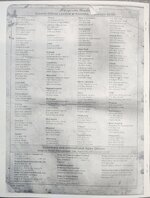
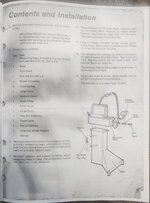
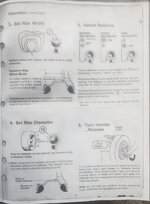
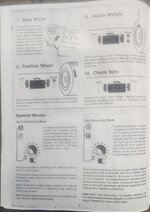
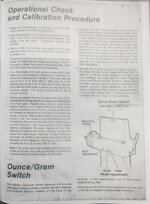
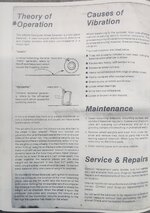
Here's the Manuel.
20250112_202618.jpg
 

Attachments

  • 20250112_202334.jpg
    20250112_202334.jpg
    524.2 KB · Views: 30
  • 20250112_202354.jpg
    20250112_202354.jpg
    490.4 KB · Views: 32
  • 20250112_202413.jpg
    20250112_202413.jpg
    427.6 KB · Views: 26
  • 20250112_202453.jpg
    20250112_202453.jpg
    478.9 KB · Views: 28
  • 20250112_202511.jpg
    20250112_202511.jpg
    443.2 KB · Views: 28
  • 20250112_202523.jpg
    20250112_202523.jpg
    586.6 KB · Views: 29
  • 20250112_202545.jpg
    20250112_202545.jpg
    670.7 KB · Views: 28
  • 20250112_202600.jpg
    20250112_202600.jpg
    658.3 KB · Views: 30

G-Body

Member
Joined
Oct 5, 2010
Messages
22
Location
Chicago burbs
Thank you for posting the manual I have been looking for that. I swear I used to have a PDF of it and haven`t been able to find it.
 

tommyboy08

New member
Joined
Jan 12, 2025
Messages
2
No problem. I just got the balancer a couple weeks ago and had to order a hard copy because I couldn't find a PDF online. Thought I would save someone else some money and time.
 

Raj90Bing44

New member
Joined
Feb 11, 2025
Messages
1
Hi,

I found this thread very useful. Just thought I'd throw my 2 cent worth in.

I bought a Balco 90 wheel balancer 2 days ago. Long story short, couldn't find the user manual anywhere. The Snap on wb200 looks IDENTICAL in every aspect. I'll try use this information from the snap on manual to calibrate it :)

Thanks!
 

martianman1999

New member
Joined
Jul 13, 2025
Messages
1
I swear I had a copy in pdf form as well. I know I got it off another fourm a few years ago and now I cant find it. I uploaded the copy I have to github I will also upload it here because this fourm comes up at the top of search results for the WB200.
Snapon-WB200-Manual
 

Attachments

  • Snapon WB200 Manual.pdf
    10.7 MB · Views: 12

balance boy

New member
Joined
Jul 24, 2025
Messages
1
I swear I had a copy in pdf form as well. I know I got it off another fourm a few years ago and now I cant find it. I uploaded the copy I have to github I will also upload it here because this fourm comes up at the top of search results for the WB200.
Snapon-WB200-Manual
Thank you for the manual I just purchased a WB 200 and the wheel balance continues to come up at 9.25. I hope I can make the necessary adjustments. Thanks again for the Manuel.
 
To avoid these ads, REGISTER NOW!
Top Bottom