To avoid these ads, REGISTER NOW!

Wireless Internet option for barn

Denwood

Well-known member
Joined
Sep 22, 2014
Messages
4,184
Location
Thunder Bay, Ontario, Canada
I’m with Wyliediesel...for sure use the Nano 5 ACs. I don’t use Ubiquiti WI-FI access points at home as the controller software is a PITA if you’re only using one or two access points. On the commercial side I do use them as you can manage a multi site network, firmware updates etc all in one spot.

So use two Nanobeam 5 AC (gen2) for your wireless bridge, but consider findIng an AC class 1200 or better access point for your barn. Any WIFi extender with wired access point mode will work. I like the netgear EX7000 for this as it also has 5 gigabit LAN ports. These come in handy if connecting security cams etc at the remote site.

Regardless, make sure your Wi-Fi access point has gigabit ports to connect to the remote Nanobeam5 AC...otherwise everything at the remote side will be limited to 100Mbit.
I have one of these inexpensive APs in my shop: https://www.tp-link.com/ca/home-networking/range-extender/re450/
It only has one Ethernet port, but it is a gigabit port. If using with a Nanobeam 5AC , you would plug that into the remote antenna’s Ethernet port and set the TP link to access point mode. That setup gets you ~400Mbps on a newer iPhone assuming your ISP can provide it.

Btw, glass will impede signal on these. I did some testing with a redundant system using four Nanobeam 5ACs and in the initial stage I had a linked pair inside at both ends. I did get a connection, but it was slow. They need to be line of site outside. That system works well btw as a redundant failover (2 parallel bridges). Users don’t even notice a failed link / swap.
 
Last edited:
To avoid these ads, REGISTER NOW!

b-boy

Well-known member
Joined
Oct 2, 2013
Messages
2,155
Location
Buffalo NY
If anyone's looking for an alternative to hard-wired, I picked up a MyFi unit from Verizon Wireless.

It's a 4G standalone access point. It was $90 for the device. I have it on my plan as an extra line for $20 per month with unlimited usage. I only had 3 lines on my cell plan. Because of that, I couldn't get some of the special package deals Verizon was offering for 4 line packages.

It works great. I've been using it to work from home for the past 3 weeks. It's fast enough to keep up with my work PC and VPN. Plus it's portable. I can take it anywhere.

I still have 200ft of fiber to pull to my barn, but this was a nice, short-term workaround until it gets warm out.
 
Last edited:

wyliesdiesels

Well-known member
Joined
Aug 14, 2012
Messages
19,998
Location
Modesto, CA
Well nanostations and nanobeams are 2 different types of radios. Either one will work for this. The nanobeams will have a more focused directional signal and can help with longer distances and objects in pathway such as trees.
 

JOE.G

Well-known member
Joined
Feb 4, 2013
Messages
765
Location
Eastern ( Catskills ) NY
wyliesdiesels Do you have a Link to the 5 G version so I know we are talking about the same ones?

If I do a factory reset what would I have to do to set them back up? The guy who did it for me years ago is no longer around.

They are both set up in windows so hopefully one day I can move them out side, They do read full strengh on the bars that are on the units. 25 MB is fast enough for me to stream movies out in the Man Cave.
 

JOE.G

Well-known member
Joined
Feb 4, 2013
Messages
765
Location
Eastern ( Catskills ) NY
I thought I would want a Nanostation M5 ( I have the M2 now I think it's is called ) The price on Amazon is for 1 unit so i would need to purchase 2 correct?

If I could get close to 100 MB from my current M2 I would be very happy even high 70's 80's would be great.

I found reset instruction at one point but it really confused me so i did not proceed.
 

wyliesdiesels

Well-known member
Joined
Aug 14, 2012
Messages
19,998
Location
Modesto, CA
I thought I would want a Nanostation M5 ( I have the M2 now I think it's is called ) The price on Amazon is for 1 unit so i would need to purchase 2 correct?

If I could get close to 100 MB from my current M2 I would be very happy even high 70's 80's would be great.

I found reset instruction at one point but it really confused me so i did not proceed.

Lets backup here. What is the speed you get from your ISP?

If youre only getting 25Mbps from your ISP, then changing the radios will not increasing your internet speed.

In order to know what your radios are doing, you really need to be able to log into them. Resetting them is easy. Make sure theyre powered on, then push the reset button gently with a paperclip (dont push too hard as the button is not strong and can be broken off) for 10-15 secs.

Not sure what is confusing about the reset instructions as theyre pretty clear to me.

once its reset, you will need to figure out what IP address your router gives the radio. You can do this with the ubiquiti discovery tool.

If youre unable to figure this out, I could do it remotely through teamviewer.
 

Dirtmerchant

Well-known member
Joined
Oct 20, 2019
Messages
63
Location
SWFL - WNC
Wondering if I can hop on this thread for help with the same subject; if not, I'd be happy to create a new thread.

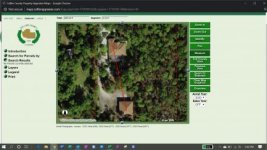
Anywho, the far side of my detached garage is about 300' from the Xfinity Wifi router, which is over my attached garage where all the phones and CATV home runs are located. There are some scattered pine and palm trees between the two structures and they are both concrete block buildings.

USE: I'd like to be able to stream video and or audio and surf internet reliably. For all intents and purposes Cell service ***** and is of no use unless you are in one spot holding your phone up and standing on one leg...

BUDGET: Meh, maybe a couple hundred bucks all in, I'm cheap and don't need bleeding edge. I do have a couple old Wifi Routers laying around if they can be incorporated to save money but do not want to make it overly complicated.

I have attached pics of the aerial showing locations with vegetation and speed test running on my PC about 50' away from the Wifi router if this helps.

Opinions and links to products greatly appreciated!!
 

Attachments

  • 2020-04-07.jpg
    2020-04-07.jpg
    19.1 KB · Views: 13
  • 2020-04-07 (1).jpg
    2020-04-07 (1).jpg
    21.2 KB · Views: 14

wyliesdiesels

Well-known member
Joined
Aug 14, 2012
Messages
19,998
Location
Modesto, CA
Wondering if I can hop on this thread for help with the same subject; if not, I'd be happy to create a new thread.

Anywho, the far side of my detached garage is about 300' from the Xfinity Wifi router, which is over my attached garage where all the phones and CATV home runs are located. There are some scattered pine and palm trees between the two structures and they are both concrete block buildings.

USE: I'd like to be able to stream video and or audio and surf internet reliably. For all intents and purposes Cell service ***** and is of no use unless you are in one spot holding your phone up and standing on one leg...

BUDGET: Meh, maybe a couple hundred bucks all in, I'm cheap and don't need bleeding edge. I do have a couple old Wifi Routers laying around if they can be incorporated to save money but do not want to make it overly complicated.

I have attached pics of the aerial showing locations with vegetation and speed test running on my PC about 50' away from the Wifi router if this helps.

Opinions and links to products greatly appreciated!!

Do you have a mounting point above the trees?

You could use a pair of nanobeam M5 AC radios

The wireless routers arent gonna do anything for you in terms of a bridge. you could use one as an AP at the other end of the wireless bridge
 

Dirtmerchant

Well-known member
Joined
Oct 20, 2019
Messages
63
Location
SWFL - WNC
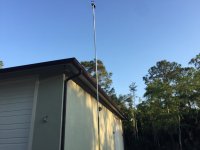
We have a Davis Weather Station mounted next to the detached on a pole at about 30' but there is no power there. I do have a Wall Pack light mounted on the exterior of the building at about 12' above the ground and sorta in the line of site of the Xfiniti Wifi router.

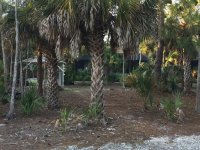
The palm trees are probably 20' the Pines and Cypress are 20'-80' tall.

EDIT: to add pics.

Pic of building with WX station on pole and pack light on building. Neither are line of sight to side of house where Wifi is located. I do have a line of site area on pool deck but will need to shoot through trees as shown is second pic
 

Attachments

  • IMG_1246.jpg
    IMG_1246.jpg
    120.4 KB · Views: 15
  • IMG_1245.jpg
    IMG_1245.jpg
    162.9 KB · Views: 13
Last edited:

JOE.G

Well-known member
Joined
Feb 4, 2013
Messages
765
Location
Eastern ( Catskills ) NY
wyliesdiesels I just checked I have a M2 Loco, I have a direct line of sight so these should be strong enough.

I have 400 to 500 MB from my ISP over wireless, In my shop I get about 25 MB with the M2's about 100 FT Apart. Do I bring both M2's to my main Router area to do the reset? Or do I reset them each in there current location one at a time? Or do I just reset one of them?

This stuff is foreign to me and I worry that if I mess with them I will not have any internet out there. I do think that I can probably tweak them a bit to get better then I have now If I could get into them. thanks
 
Last edited:

Denwood

Well-known member
Joined
Sep 22, 2014
Messages
4,184
Location
Thunder Bay, Ontario, Canada
wyliesdiesels I just checked I have a M2 Loco, I have a direct line of sight so these should be strong enough.

I have 400 to 500 MB from my ISP over wireless, In my shop I get about 25 MB with the M2's about 100 FT Apart. Do I bring both M2's to my main Router area to do the reset? Or do I reset them each in there current location one at a time? Or do I just reset one of them?

This stuff is foreign to me and I worry that if I mess with them I will not have any internet out there. I do think that I can probably tweak them a bit to get better then I have now If I could get into them. thanks

I'd reset them both in your main router area...then you can access them a bit easier. This video will help:


The video assumes that your home network is using 192.168.1.x for a subnet. If you open a command prompt on your computer and type ipconfig /all then the "enter" key, then post that output here, we can give you the settings for the bridge. There a a few gotchas regarding ip addressing during setup that can make the process a bit daunting.

You'll also want to check your router's DHCP settings (googe it for your router) and see what IP address range it is using. Ideally you'll assign a unique IP address outside of that range for each bridge (and set them for static IP addresses) to make accessing later easy.
 
Last edited:

ard

Well-known member
Joined
Feb 16, 2015
Messages
4,391
Location
Sierra Foothills... California
Wondering if I can hop on this thread for help with the same subject; if not, I'd be happy to create a new thread.

Anywho, the far side of my detached garage is about 300' from the Xfinity Wifi router, which is over my attached garage where all the phones and CATV home runs are located. There are some scattered pine and palm trees between the two structures and they are both concrete block buildings.

USE: I'd like to be able to stream video and or audio and surf internet reliably. For all intents and purposes Cell service ***** and is of no use unless you are in one spot holding your phone up and standing on one leg...

BUDGET: Meh, maybe a couple hundred bucks all in, I'm cheap and don't need bleeding edge. I do have a couple old Wifi Routers laying around if they can be incorporated to save money but do not want to make it overly complicated.

I have attached pics of the aerial showing locations with vegetation and speed test running on my PC about 50' away from the Wifi router if this helps.

Opinions and links to products greatly appreciated!!

How is the shop wired now? Just a single conduit with a service from the house? SOmething else? ( "yeah, there was a 3way switch we installed but never use it" would be a home run...) (Im angling for an open conduit you could use...)

Your internet service now, for the house, is all wifi? aka Wireless? Xfinity comes in, wifi router- all computers connect to that? Are there any ethernet ports on the xfinity router?

Shooting through those trees, in the rain, might not be fun. Dunno. Most of my deploys are above trees, or well to the side. A few that I cannot avoid are always a PITA.
 

Dirtmerchant

Well-known member
Joined
Oct 20, 2019
Messages
63
Location
SWFL - WNC
@ard,

Yes, single conduit from sub-panel that goes to pool equipment then on to the building; no open conduit.

Yes, all wireless.

There are 4 Ethernet ports on the Xfinity router, pic attached.

Thanks!
 
Last edited:

wyliesdiesels

Well-known member
Joined
Aug 14, 2012
Messages
19,998
Location
Modesto, CA
wyliesdiesels I just checked I have a M2 Loco, I have a direct line of sight so these should be strong enough.

I have 400 to 500 MB from my ISP over wireless, In my shop I get about 25 MB with the M2's about 100 FT Apart. Do I bring both M2's to my main Router area to do the reset? Or do I reset them each in there current location one at a time? Or do I just reset one of them?

This stuff is foreign to me and I worry that if I mess with them I will not have any internet out there. I do think that I can probably tweak them a bit to get better then I have now If I could get into them. thanks

Locos do not have as much output power so that is one of your issues. The other is the glass.

Even without those issues, you still wont get your full 400Mbps provisioned speed as the M2 or M5 (non AC) cannot do more than 100Mbps on the NIC.

Would be better to get a pair of Nanostation M5 AC radios as well as some mounting arms.

You need to bring both radios to the router and plug them in there. You will also need a computer to be able to program them.
 

JOE.G

Well-known member
Joined
Feb 4, 2013
Messages
765
Location
Eastern ( Catskills ) NY
Yeah Do you think the Locos would get me above 50 with proper tuning? You did state you would remote into it and help me is that something you would still be willing to do?
 

wyliesdiesels

Well-known member
Joined
Aug 14, 2012
Messages
19,998
Location
Modesto, CA
Yeah Do you think the Locos would get me above 50 with proper tuning? You did state you would remote into it and help me is that something you would still be willing to do?

its theoretically possible. however, objects like trees, buildings, metal, etc as well as other radios (your or your neighbors access points) operating nearby on the same or overlapping channels will cause interference and attenuate the useable signal.

The 5Ghz radios have wider spectrum and more channels available to help with this.

yes i could remote in to help as long as you have a computer setup with teamviewer.
 

JOE.G

Well-known member
Joined
Feb 4, 2013
Messages
765
Location
Eastern ( Catskills ) NY
Whliesdiesels. Ill PM you when I am ready. I have a few different projects going on that I need to focus on first, Then ill either buy the M5 Or ill just try to set these ones up. I don't need blazing fast speed out there. Thank you
 

Denwood

Well-known member
Joined
Sep 22, 2014
Messages
4,184
Location
Thunder Bay, Ontario, Canada
@ard,

Yes, single conduit from sub-panel that goes to pool equipment then on to the building; no open conduit.

Yes, all wireless.

There are 4 Ethernet ports on the Xfinity router, pic attached.

Thanks!

For your needs, I might suggest Powerline to try first....as you're not looking for high bandwidth. These are cheap, and if you're not seeing decent speeds, you can always return them. The local unit should be connected via CAT5 to your Xfinity router. If it meets your bandwidth needs, ultimately this solution is the simplest to install.

https://www.tp-link.com/ca/home-networking/powerline/tl-pa9020p-kit/?utm_medium=select-local

You'll probably see 40-50 Mbps with those over 300 ft assuming you don't have a lot of "noise" on your AC power.
 
Last edited:
To avoid these ads, REGISTER NOW!

JOE.G

Well-known member
Joined
Feb 4, 2013
Messages
765
Location
Eastern ( Catskills ) NY
Dirtmerchant can you post back and let us know how it works for you. I was thinking about them but I was told they have to be plugged into a line/circuit that connects to the Sub panel in the shop and I am unsure which outlet that would be and would not want to move everything around just for this. Thanks
 

Denwood

Well-known member
Joined
Sep 22, 2014
Messages
4,184
Location
Thunder Bay, Ontario, Canada
@Denwood,

Thanks for your time and advice, I just placed an order from Amazon for the tp-link item you linked.

Rod


Rod, you're quite welcome. For sure report back and let us know how they perform. I have tested older versions of these on my home system with two services (meter bases) and some very old wiring. They will work across both sides of the panel, including my garage sub panel. I went through the trouble of installing another outlet in my house on one of the legs going to the shop (on the 220V bus). Ultimately it was a bit slow for my needs.

Make sure you don't plug either end into a AFCI, GFCI circuit, or surge arrest. You can always add a receptacle outside of these circuits at the house end (on the main house panel)..which is pretty much what I did. Panel to shop distance in my case is about 100ft. What you will likely see is varying connection speeds depending on AC noise in your system...like the pool equipment mid-stream in your run.

At the remote end, test bandwidth by trying the receiver on outlets that originate from either leg of your shop panel (usually alternating 110AC breakers)..hope that makes sense.

To be clear, I'm only suggesting trying the Powerline first because your bandwidth expectations at the remote site are conservative. You'll get higher speeds with a set of Nanobeam 5ACS...but you will want to get them above those trees which may be more trouble than it's worth.
 
Last edited:

Dirtmerchant

Well-known member
Joined
Oct 20, 2019
Messages
63
Location
SWFL - WNC
@Joe.G BestBuy and WalMart were both sold out of these, Amazon showed them available through Prime but they still are not showing a delivery date. Once I get them installed I report back with a speed test.

@Denwood, I think I know what you are saying. I have a dedicated outlet in my garage for my central vac, it is not a GFCI outlet and I believe it is a stand alone circuit. I'll plug the sending unit into that outlet as I can feed an Ethernet cable out of the attic to it without looking too goofy. I have an outlet that I wanted to use for the receiving unit in my shop but that may be slaved to a GFCI. If it is, I have an outlet for my alarm system that I can plug into and then use a good wifi router.

I'll report back with speed tests.

Thanks again!

Rod
 

JOE.G

Well-known member
Joined
Feb 4, 2013
Messages
765
Location
Eastern ( Catskills ) NY
I believe all circuits in my shop are fed from a GFCI outlet, Will they not work on it or is there a possibility but no certain that there would be a problem? Thanks Dirtmerchant as I have always wanted to try these and have almost purchased them a few times.
 

wyliesdiesels

Well-known member
Joined
Aug 14, 2012
Messages
19,998
Location
Modesto, CA
The units on both ends need to be on the same phase leg otherwise it wont work.

Also, if your 2 buildings are fed through separate services and or transformers, it wont work either.
 

Denwood

Well-known member
Joined
Sep 22, 2014
Messages
4,184
Location
Thunder Bay, Ontario, Canada
The units on both ends need to be on the same phase leg otherwise it wont work.

Also, if your 2 buildings are fed through separate services and or transformers, it wont work either.

Wylie,
Dirtmerch has indicated his outbuilding is powered via a subpanel and 300' conduit with some pool bits in between.

Joe, if all receptacles are fed via GFCI, you'll want to throw a receptacle off your panel (assuming there is one in the shop), or relocate the GFCI one hop further down the chain leaving the first in the chain unprotected and plug into that. That's what I did (dedicated receptacle directly off house panel) in my house.

If your house is feeding the garage via a subpanel both phases from your house are running to your shop ( assuming 220V), and therefore both phases are covered...you'll just want to test on alternating breakers (circuits) out in your shop. The faster link is the phase you want :) AV2 powerline is not phase dependent..it will work on either. Older tech, not.

"MIMO enables HomePlug AV2 devices to transmit on any two-wire pairs within three-wire configurations comprising Line (L), Neutral (N) and Protective Earth (PE) (the coupling is done in the MIMO Analog Front End (AFE) blocks in Figure..."

Ground and Neutral are essentially connected at the panel(s) so this is why AV2 will not run into some of the issues found in the earlier versions of PowerLine. If the receiver is not on the same phase as the transmitter, you'll lose some of the MIMO capabilities..so best to test the receiver (remote end) on both phases (alternating breakers/circuits in your shop). Services run from the same transformer may also potentially share Powerline signal, something to consider.
 
Last edited:

JOE.G

Well-known member
Joined
Feb 4, 2013
Messages
765
Location
Eastern ( Catskills ) NY
My house is a 200 amp Subpanel since I have a disconnect at my meter from what I am told which then feeds a 100 amp subpanel in my shop from my homes 200 amp panel. If this makes sense and I think I am explaining it correctly.
 

Dirtmerchant

Well-known member
Joined
Oct 20, 2019
Messages
63
Location
SWFL - WNC
@Denwood and @wyliesdiesels

I got the Netgear Powerline today. It worked f'n fantastic in the house but can not detect the other device when plugged in the outlet in my shop.

To refresh your memory, I have 1 service at the house that runs to my main breaker box, from there it goes to a sub-panel box and on to my pool equipment pad. It then goes to my shop breaker box.

I am plugging the sending unit into a non GFCI 3 prong outlet in my house where it connects to the Xfinity cable modem using Ethernet. In my shop, I'm using the only non GFCI outlet that is a dedicated 3 prong outlet for my alarm system.

Any words of wisdom?
 

wyliesdiesels

Well-known member
Joined
Aug 14, 2012
Messages
19,998
Location
Modesto, CA
@Denwood and @wyliesdiesels

I got the Netgear Powerline today. It worked f'n fantastic in the house but can not detect the other device when plugged in the outlet in my shop.

To refresh your memory, I have 1 service at the house that runs to my main breaker box, from there it goes to a sub-panel box and on to my pool equipment pad. It then goes to my shop breaker box.

I am plugging the sending unit into a non GFCI 3 prong outlet in my house where it connects to the Xfinity cable modem using Ethernet. In my shop, I'm using the only non GFCI outlet that is a dedicated 3 prong outlet for my alarm system.

Any words of wisdom?

Both units need to be on the same phase. you need to figure out which phase the shop unit is currently on by looking at the breakers in the panel and then plugging it into an outlet thats on the other phase.
 

Dirtmerchant

Well-known member
Joined
Oct 20, 2019
Messages
63
Location
SWFL - WNC
@wyliediesels

Thanks for reply. It's probably obvious that I'm not an electrician but I'm really good at following directions. Can you tell me how I'd go about determining which phase the shop is currently on?

All other outlets in my shop are GCFI, which as per @Denwood is no bueno for Powerline access.

I'd be happy to post pics of house breaker box and shop breaker box if you can tell by looking at them.

Rod
 

Dirtmerchant

Well-known member
Joined
Oct 20, 2019
Messages
63
Location
SWFL - WNC
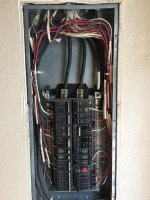
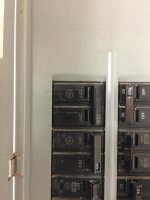
The first and second pics are in the house, the circuit where the screwdriver is pointing is the outlet the sending Powerline adapter is on, the main was turned off.... :shocking:

The third pic is the shop. The circuit labeled 3 is for the outlet where the receiving Powerline adapter is on. I moved the connected breaker from the left side (A) (taped black) over to the right side (B) (taped red) and still had no signal from the sending adapter.
 

Attachments

  • IMG_1296.jpg
    IMG_1296.jpg
    102.8 KB · Views: 22
  • IMG_1294.jpg
    IMG_1294.jpg
    120.7 KB · Views: 19
  • IMG_1293.jpg
    IMG_1293.jpg
    110.8 KB · Views: 18
Last edited:

wyliesdiesels

Well-known member
Joined
Aug 14, 2012
Messages
19,998
Location
Modesto, CA
If you moved the circuit from 3 to 4 then it would still be the same phase. You would need to move the circuit up or down one breaker.

Breakers horizontally next to each other will be on the same phase.
 

Denwood

Well-known member
Joined
Sep 22, 2014
Messages
4,184
Location
Thunder Bay, Ontario, Canada
From your house panel, can you point out which breaker services the shop sub panel? You may need to have a look if there is a sub panel in your house that services the shop/pool.

You may want to also try a connection between your house and the pool equipment area and see if that works to start.

You have just one meter to your house, correct?
 

Dirtmerchant

Well-known member
Joined
Oct 20, 2019
Messages
63
Location
SWFL - WNC
@Denwood,

In the house the service for the shop is #1&3 100amp top left.

Outside house is a 100amp sub panel that runs to pool equipment. There is a splice in a waterproof box there running on to shop. Pics attached.

I do not have an existing connection between house and pool equipment.

Yes, one meter only and that is at the house.
 

Attachments

  • IMG_1297.jpg
    IMG_1297.jpg
    76 KB · Views: 11
  • IMG_1298.jpg
    IMG_1298.jpg
    50.3 KB · Views: 10
  • IMG_1299.jpg
    IMG_1299.jpg
    55.3 KB · Views: 10

Denwood

Well-known member
Joined
Sep 22, 2014
Messages
4,184
Location
Thunder Bay, Ontario, Canada
So technically, it should be fine as long as you're trying both phases in the shop. For kicks, I'd try it with your pool gear off. If still nothing, I'd guess the distance is an issue :-(
 

Showkey

"MEMBER EMERITUS"
Joined
Aug 9, 2014
Messages
8,638
Location
Wausau WI
Anyone have any experience with this Netgear Orbi range extender?

https://www.netgear.com/orbi/rbs50y.aspx


The ORBI mesh system might be better choice vs extenders products.

https://www.netgear.com/orbi/rbk50.aspx

Several other prior threads on MESH sytems.
I run ORBI mesh with a base and two satellites. Covers three buildings on two acres with 200 Mbps ( same as wired). Prior to the MESH tried extenders and multiple routers with varied success. Absolutely no band width issues with mesh. Home is two levels 5000 sqft, shop is 100’ away and 1000’ sqft. HD video in the shop is no problem. There are over 30 Wifi devices on the system.

Costco has been a great place to find ORBI mesh at a great price.
https://www.costco.com/netgear-orbi...eat-protection,-3-pack.product.100483036.html
 
Last edited:

Dirtmerchant

Well-known member
Joined
Oct 20, 2019
Messages
63
Location
SWFL - WNC
@Denwood,

Tried both breaker positions in shop with all breakers at pool panel off; no love.

I then tried the receiving device on an outlet at the pool equipment and got a red signal light meaning that it is a link rate of <50 Mbps, they use a Red (good), Amber (better) and Green (best) visual system.

I re-tried it in the house and I'm getting Green with measured speed @ >110 Mbps.

I'm going to try to contact support at NetGear but think the run is just too far.

Any experience with this extender?
https://www.netgear.com/orbi/rbs50y.aspx

Rod
 
To avoid these ads, REGISTER NOW!
Top Bottom