To avoid these ads, REGISTER NOW!

Wireless Router

BCreekDave

Well-known member
Joined
Dec 17, 2015
Messages
206
Location
Dayton, OH
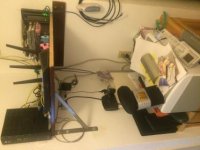
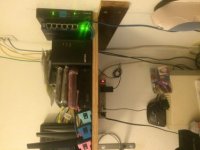
You aren't supposed to see those[emoji1]. I need to add a power strip to plug those into. They are insteon modules for my home automation system. One is a power line module that allows one one of the boxes on the shelf to communicate over the power lines. The rest of them are various signal filters etc for insteon. The power strip will allow them to be plugging in individually instead of ganged on top of each other. Always more to do.


Sent from using Tapatalk
 
To avoid these ads, REGISTER NOW!

BCreekDave

Well-known member
Joined
Dec 17, 2015
Messages
206
Location
Dayton, OH
Thanks jeffmoss26. This is about the third iteration. Most things are re-purposed and ebay purchases. The wall mount rack was $75.00.

Git: the advantage to a managed or Smart Switch is traffic segmentation and priority. You can create vlans to separate the data packets and add QOS (quality of service) priority to certain network traffic. An example is the brew-pub I setup. The owner wanted to provide a free wifi for customers and still have a private admin wifi. I did this with one wifi access point and created a two vlans. One for free wifi and one for the admin traffic. The traffic is kept separate all the way through the network to the switch and then the firewall (pfsense). Then the data is routed out to printers or POS devices or the Internet. I can throttle the free traffic and have a "captive portal" (the pop-up web page you see at Starbucks for legal stuff that you have to acknowledge before you can use the Internet) setup for the free wifi. For security, you can setup VPN into your home network and keep this segmented from the video or security traffic. Many options here.

The power draw on my switch is about 20 watts I think. The 24 port one I have had no fans. The 48 port version has fans. It is "green" which means it can power down unused ports. I buy most things as a balance between performance and power draw.


Sent from using Tapatalk
 
Last edited:

ddawg16

Well-known member
Joined
Jul 11, 2008
Messages
21,005
Location
S. California
Help me out here (because I don't know that much about managed switches) - but why would remote access be easier and why would you have more protection?

What about power draw and noisy fans?

Thanks jeffmoss26. This is about the third iteration. Most things are re-purposed and ebay purchases. The wall mount rack was $75.00.

Git: the advantage to a managed or Smart Switch is traffic segmentation and priority. You can create vlans to separate the data packets and add QOS (quality of service) priority to certain network traffic. An example is the brew-pub I setup. The owner wanted to provide a free wifi for customers and still have a private admin wifi. I did this with one wifi access point and created a two vlans. One for free wifi and one for the admin traffic. The traffic is kept separate all the way through the network to the switch and then the firewall (pfsense). Then the data is routed out to printers or POS devices or the Internet. I can throttle the free traffic and have a "captive portal" (the pop-up web page you see at Starbucks for legal stuff that you have to acknowledge before you can use the Internet) setup for the free wifi. For security, you can setup VPN into your home network and keep this segmented from the video or security traffic. Many options here.

The power draw on my switch is about 20 watts I think. The 24 port one I have had no fans. The 48 port version has fans. It is "green" which means it can power down unused ports. I buy most things as a balance between performance and power draw.


Sent from using Tapatalk

Good explanation ^^ for you Git.....

A comparison you might be familiar with....the 'Guest' access on your wireless router. With a managed switch, you have much greater control. Think of it as dedicated pipes in your network.

Also, a 24 port switch will actually fill up quite quickly.

You want to have the managed switch as the front end and feed your wireless router from it.

I don't have a managed switch at home....but I do feed my cable modem to an 8-port gigswitch....then it feeds my Trendnet router. All fixed devices are hard wired. Only the kids Kindles and our phones use the wireless. MAC filter is turned on...but remember, any MAC address can be cloned....but who would want to clone any of my stuff?

One thing I don't do....I don't use the default DNS lookup.
 

BCreekDave

Well-known member
Joined
Dec 17, 2015
Messages
206
Location
Dayton, OH
Thanks ddawg for moving this back closer to the original question.

The last thing I will say as I have beat this topic to death is a few folks have mentioned fiber and gigabit speeds to the premises. If you have these kind of speeds (lucky you) be careful about the equipment you buy on the inside. Many of the cheap gigabit wifi routers do not have the internal speeds to support this kind of traffic. You plug the cables in and they report gigabit but multiple users quickly saturate the internal router/switch "fabric" .

I have worked with a few friends who have paid for gigabit (and even a bit less) speed from the cableco only to buy a cheap router and when they do a speed test find they are getting much less. A few calls or a cableco tech support visit reveals that the bottle neck is the cheap router. Just something to be aware of if you are getting less than you paid for.

I unfortunately do not have this problem....
 
To avoid these ads, REGISTER NOW!
OP
F

FEVERinc

Well-known member
Joined
Dec 23, 2015
Messages
255
Location
Central Florida
6bb4339269b515c56cd45a1fc316d098.jpg


I only have 25 down and two up right now coming into the facility. I have bright house and it cost me $150 a month :(

Eventually I'd like to upgrade but that might have to wait a while so I went with the nighthawk


Sent from my iPhone using Tapatalk
 

wyliesdiesels

Well-known member
Joined
Aug 14, 2012
Messages
20,061
Location
Modesto, CA
Thanks jeffmoss26. This is about the third iteration. Most things are re-purposed and ebay purchases. The wall mount rack was $75.00.

Git: the advantage to a managed or Smart Switch is traffic segmentation and priority. You can create vlans to separate the data packets and add QOS (quality of service) priority to certain network traffic. An example is the brew-pub I setup. The owner wanted to provide a free wifi for customers and still have a private admin wifi. I did this with one wifi access point and created a two vlans. One for free wifi and one for the admin traffic. The traffic is kept separate all the way through the network to the switch and then the firewall (pfsense). Then the data is routed out to printers or POS devices or the Internet. I can throttle the free traffic and have a "captive portal" (the pop-up web page you see at Starbucks for legal stuff that you have to acknowledge before you can use the Internet) setup for the free wifi. For security, you can setup VPN into your home network and keep this segmented from the video or security traffic. Many options here.

The power draw on my switch is about 20 watts I think. The 24 port one I have had no fans. The 48 port version has fans. It is "green" which means it can power down unused ports. I buy most things as a balance between performance and power draw.


Sent from using Tapatalk

My nighthawk can do all that with the exception of the captive portal.

The R7000 has guest wifi networks, VLANs, VPN(including for mobile devices- just came out eith the latest firmware), as well as USB print server, USB NAS server, remote access, customizable QOS, etc etc.

As Ive said, most home users dont need much of that- captive portal, guest network, VLANs are more needed in a commercial environment like the brewery u described.

Heres my network when i first started building it:
 

Attachments

  • image.jpg
    image.jpg
    10.3 KB · Views: 23
Last edited:
To avoid these ads, REGISTER NOW!
Top Bottom