To avoid these ads, REGISTER NOW!

Between 265 & 485 SQ/FT Woody's Works Garage

Workspaces sized between 265 and 485 squarefeet.

drivesitfar

Well-known member
Joined
Oct 23, 2013
Messages
36,190
Location
Pacific Northwest
Woody: best of luck on the sheetrocking and i don't envy you having to do those big sheets in a tight space.

are you doing the mudding and taping too? have you done much mudding and taping or could you use a few tips?

i'm not a fan of mudding and taping, but i learned that doing lite coats to eliminate a lot of extra sanding is best. also if you can get the sheetrock depressions on their edges to line up instead of minimizing use of sheetrock it makes it easier to mud and get the tape in those gaps.

it's one job i try to hire out if there is a pro available cause they are worth their weight in gold in my mind. It could make the difference between an average job and an AMAZING job, but i know if you are doing it yourself it most likely will be close to AMAZING.

cheers and best of luck

finally finished my mailbox and i posted a few pictures over on the GET HEALTHY thread in Free Parking if you have time to take a peak and maybe make a post cause 1/2 Cup said he just gained 3 pounds which is a very good thing.
 
To avoid these ads, REGISTER NOW!
OP
D

Denwood

Well-known member
Joined
Sep 22, 2014
Messages
4,305
Location
Thunder Bay, Ontario, Canada
Drives, i’m hoping my drywall guy will be free to mud. He does it in three coats with little to no sanding. He’s also miles faster boarding. Boarding the ceiling was not too bad given the lift rental. Best tool ever.

I’ve been sound testing in three spots upstairs directly above the theater as we add sound attenuation measures. So far we’re down 7-9db over the three test locations. A 94db pink noise signal from my computer speakers in basement is being reduced to 44db in the middle of the room above now with two layers of drywall and green glue. This layer is not air sealed, walls are still bare, and furnace room completely open. I figure we’re approaching an STC50 rating which may approach STC 60 by the time we’re done :)

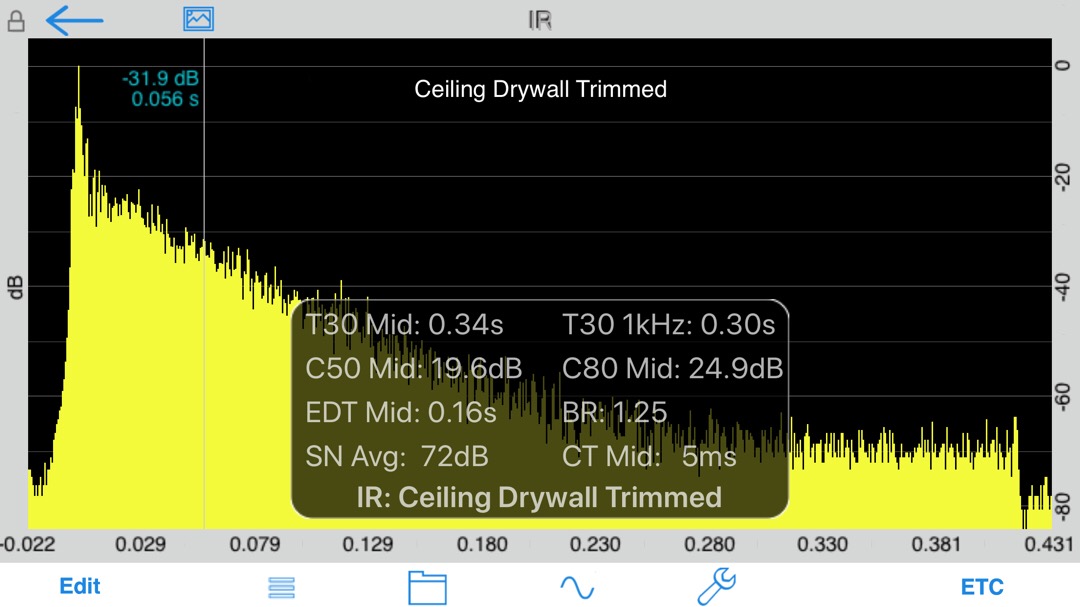
Here is my first attempt at a room impulse test. I’m very much still learning but the end goal is a space that has the right amount of diffusion and absorption surfaces so that audio is both clear and defined yet spacious. This graph shows what happens if you clap (impulse) in the middle of the room. What you see is reverberations, (reflections from walls) over about .4s before the clap “decays”. This is with drywall ceiling and open spray foam walls. Our target will be to have this clap decay in closer to .2-.3 seconds when the room is done. Going lower than that will result in a dead sounding room.

basesoundtest1.jpg
 
Last edited:
OP
D

Denwood

Well-known member
Joined
Sep 22, 2014
Messages
4,305
Location
Thunder Bay, Ontario, Canada
Boiler, 50db is pretty good, yes, but we can do better yet :) The open furnace room is a flanking noise offender right now. Once that room is closed up, all the duct mufflers and return air duct treatments added to HVAC should work to their design specs.

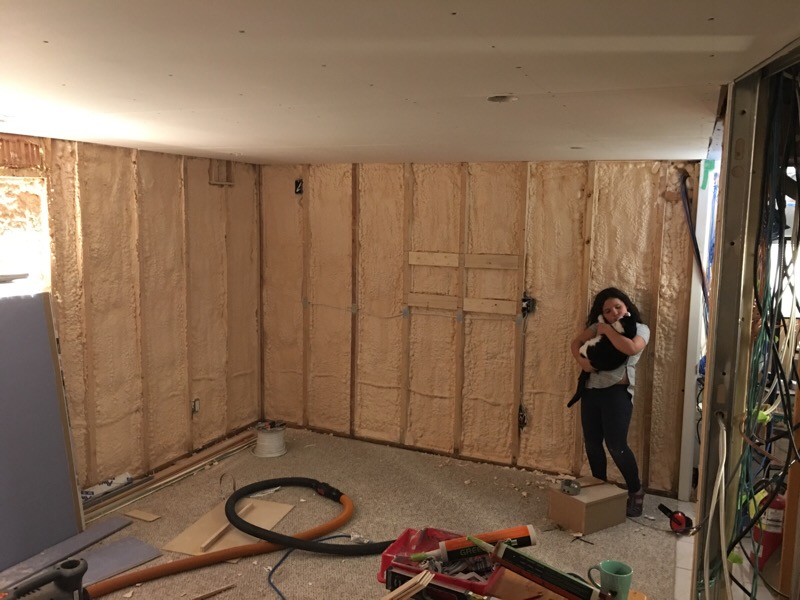
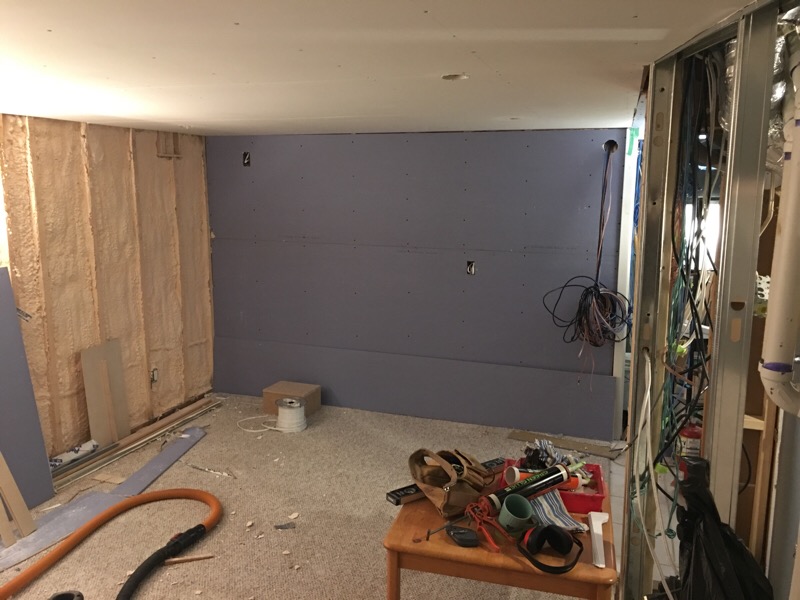
My youngest spent a solid three hours helping clean up and then adding the 1st layer of mold/moisture resistant drywall to the screen wall. She was joined by the ever present “rescue” cat Magnus who is apparently not terrified of shop vacs and chop saws?? An extra set of hands, particularly enthusiastic ones, are always welcome :)

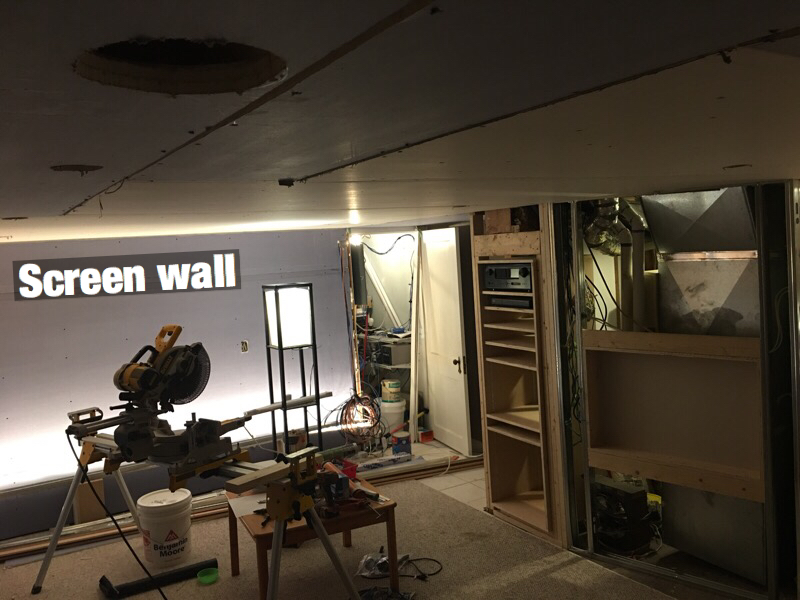
Before drywall, the screen wall needed reinforcing for the TV mount and extra receptacles added for the Tv, motorized screen and LED lighting. It will get a second layer of drywall with Green Glue, then we can build a false wall (with inset acoustic fabric screens) to hide wires, led lighting, speakers, and some storage.

screenwall1.jpg


screenwall2.jpg
 
Last edited:

drivesitfar

Well-known member
Joined
Oct 23, 2013
Messages
36,190
Location
Pacific Northwest
Woody: looks like great progress and maybe done by Christmas?

did you have the insulation blown in or do it yourself or are my eyes with my new glasses deceiving me cause looks like a pretty slick way to insulate walls in your basement?

your girls seem to always be hanging with their DAD and no wonder you like posting pictures of them. you might have to reserve a day or a couple hours a week to use your new room with those 2, but i bet they don't sit still very often.

keep up the great work and hope your drywall guy has time to do your mudding and taping.

cheers
 
OP
D

Denwood

Well-known member
Joined
Sep 22, 2014
Messages
4,305
Location
Thunder Bay, Ontario, Canada
Drives, the basement walls got R28 worth of closed cell foam. I use the same insulation contractor here for all spray foam as they do it right with temperature controlled A/B chemicals. Spray foam is pretty much the best for our climate as it completely air seals the concrete with zero air gap for condensation and mold to form.

I think a few months is a good target. Things are moving much quicker now..all the prelim structural, wiring and sound treatments are behind us.
 

bj383ss

Well-known member
Joined
Sep 29, 2011
Messages
3,166
Location
TX
Making progress Dennis. This is going to be great when you are all done.

Bret
 

drivesitfar

Well-known member
Joined
Oct 23, 2013
Messages
36,190
Location
Pacific Northwest
WOODY: when you say you are dragging your feet i have to smile. you sir are an inspiration to all of us on how you manage to run a business, upgrade your 100 year old home and manage to have some fun and keep your kids smiling.

WELL DONE!!

it's a pretty major project you took on so if it might take a bit longer than expected just understand that you are a long ways towards getting it finished if you look back a few months and see where you started.

keep up the good work and maybe just take a day to smell the roses so to speak and maybe a date night or family function to keep you smiling.

cheers
 
OP
D

Denwood

Well-known member
Joined
Sep 22, 2014
Messages
4,305
Location
Thunder Bay, Ontario, Canada
Drives, yes, it’s putting family needs first that tend to slow things down..but that’s ok :)

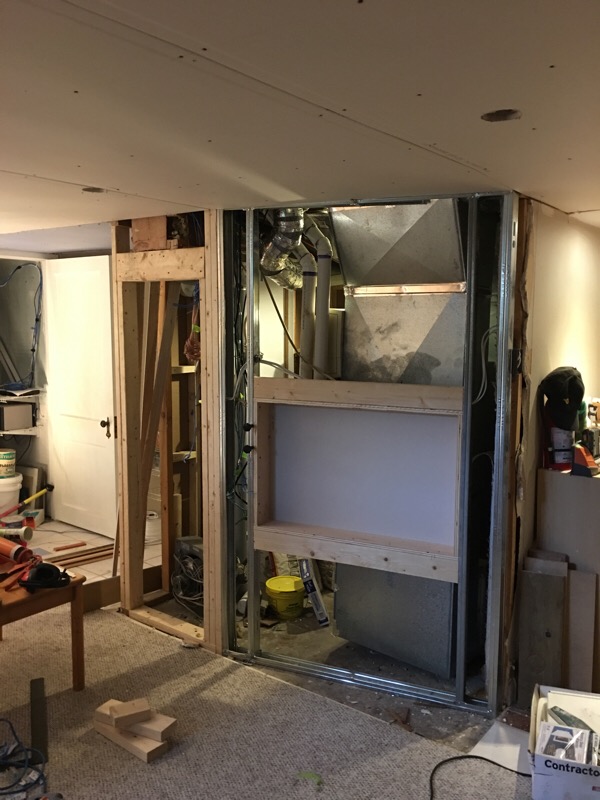
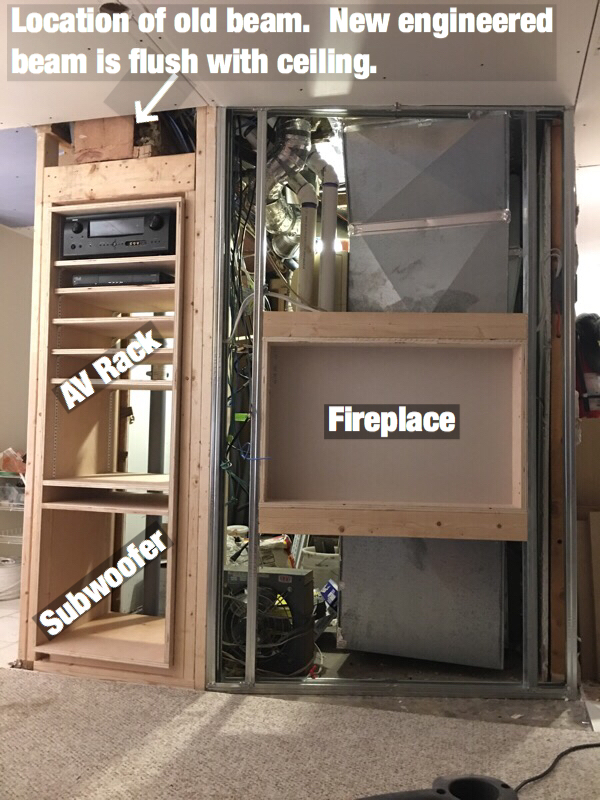
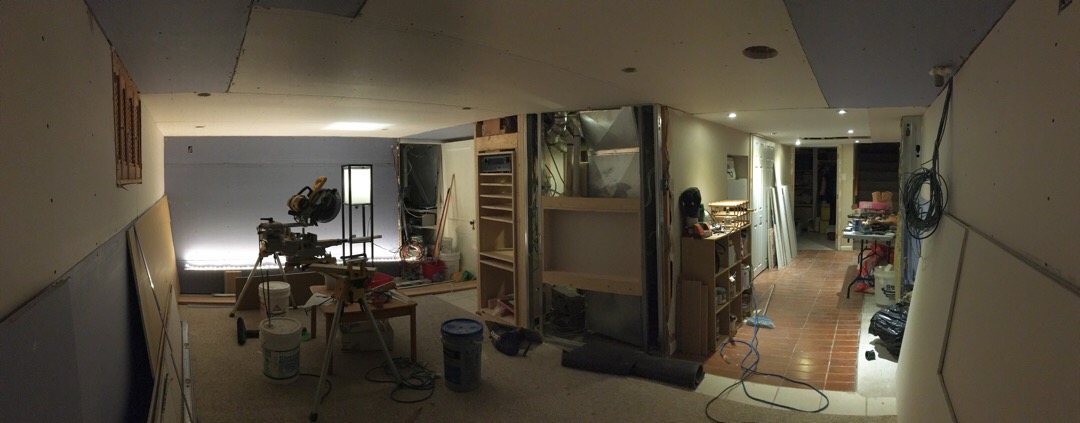
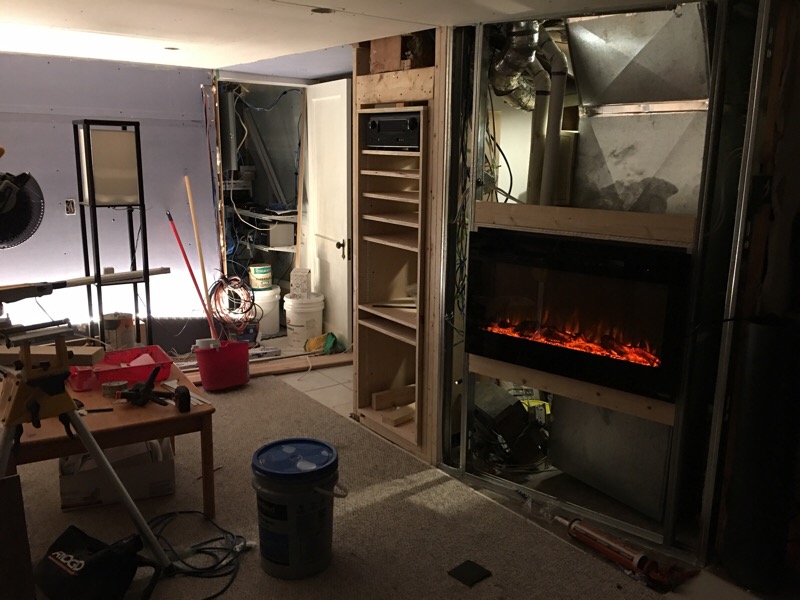
My drywall bud is hopefully showing up Monday to finish boarding and do the mud :). I made the decision to add a fireplace for some ambiance, and added heat if required. This wall is just to the right of the screen wall so will house the fireplace and equipment rack. Should the space be in use just to listen to music (and it will) the fireplace will be nice to have. We already have a high efficiency wood burning fireplace on the main floor, so the basement version will just be an electric built in with a 1500 watt heater integrated. The rough in is to spec, but with the fireplace on order, fingers crossed that I got it right. Sound absorption panels will be recessed above and below for a nice clean look.

This wall was angled back about 12 inches after moving some HVAC bits around to create a much more spacious feeling entry to the room. The angle will work well with the sectional seating in the space.

I’m using metal studs where it makes sense to save space, but also help with sound attenuation as it performs much better than wood in that department.

screenwall3.jpg
 
Last edited:
OP
D

Denwood

Well-known member
Joined
Sep 22, 2014
Messages
4,305
Location
Thunder Bay, Ontario, Canada
Home theatre equipment rack and fireplace

It's rewarding to finally see things coming together after all the demolition, structural work, acoustical work, HVAC, wiring and drywall...

The media rack will have an acoustically damped, but removable rear panel to make access to wires later easier. There'll be no need to slide out any components :) It's just 3/4" birch ply, with the adjustable shelf racks routed in.

The base of the rack (under the 12" subwoofer) will get 50 lbs or so of sand to dampen it before final installation. Green glue + 5/8" firecode drywall on the back side of the rack will keep things to code in terms of the furnace room fire rating that we need to maintain.

screenwall4.jpg


This gives you an idea of the rather weird space we're dealing with. The house electrical/network room is to the right of the screen wall, and a short hallway right beside the AV rack leads to the basement bath and office area.

screenwall5.jpg
 
Last edited:

bj383ss

Well-known member
Joined
Sep 29, 2011
Messages
3,166
Location
TX
Amazing work and engineering from you as always Dennis.

Looking forward to seeing this finished.

Bret
 

JohnnieMo

Well-known member
Joined
Nov 25, 2014
Messages
1,175
Location
Calgary, Alberta
Re: Woody's Works Garage - rebirth!

Having access to the back of that AV rack is like Disneyland and your birthday all rolled in to one. Only in my dreams.
 

drivesitfar

Well-known member
Joined
Oct 23, 2013
Messages
36,190
Location
Pacific Northwest
Woody: looks like your well thought out design is coming to fruition finally. WELL DONE and keep up the great work.

just a note do you have good air flow into the furnace cause we have louvered doors on our old gas furnace that is in a small room off our hallway? not sure what the requirements are for yours but thought i'd mention it before you buttoned that wall up.

best of luck and as you know FAMILY does come ahead of a lot of things and it's probably the main reason you are doing this project.

cheers
 
OP
D

Denwood

Well-known member
Joined
Sep 22, 2014
Messages
4,305
Location
Thunder Bay, Ontario, Canada
Bret, my wife is looking forward to a finished product more than any of us :) I've stopped giving timelines, which strangely seems to work better.

Dwight, I'm learning a lot as always too.

Boiler, thanks. The design process for me tends to be a bit fluidic as ideas get injected sometimes quite late in the process.

Johnnie, I wasn't sure how well the AV rack rear access concept would work, but fortunately the two support posts behind it are just far back enough to allow panel removal. The Atmos amp (a Denon AVR-X3300W) will have a lot of connections, so rear access should makes things simpler. The rack is much larger than it needs to be, however my theatre guru consultant suggested it in case I decide to go with separate amps etc. in the future. For now, there will be lots of media storage space.

Drives, one of the goals in the energy retrofit process was to get all combustion air from outside. The furnace, on demand water heater, and even our wood burning fireplace use outside air which keeps air balance a lot easier. Our new clothes dryer is a heat pump (ventless) unit which requires zero inside air, along with up to 75% more efficient operation than a conventional unit. When it's -30C outside (or +30C for that matter), this overall approach insures that far fewer BTUs are vented to the outside, and our ERV air exchanger can do it's air exchanges more efficiently. This also means I can put air seals on the furnace fire door and take further sealing measures to keep theatre noise out of the HVAC system.

When one starts adding all the typical inefficiencies in our homes, it's interesting to see how cascading "savings" result from a more systemic approach to the whole thing.
 
Last edited:

JohnnieMo

Well-known member
Joined
Nov 25, 2014
Messages
1,175
Location
Calgary, Alberta
Bret, my wife is looking forward to a finished product more than any of us :) I've stopped giving timelines, which strangely seems to work better.

I use this same technique when I'm telling my wife when I'll be home.... or when I will phone home. LOL

Question: Do you have a recommendation for a Smart Things compatible lighting solution? Specifically bulbs and switches?

I wanted to put a bulb into my garage alley night light and use CoRE to turn it on and off. However the Philips Hue bulbs I was looking at appear to work on the Hue bridge. My assumption is that it won't function as a mesh repeater as a result and thus eliminate half the reason I wanted it.

(*I'll vote again for having you start a dedicated Smart Things thread so I can quit derailing your build thread)
 
OP
D

Denwood

Well-known member
Joined
Sep 22, 2014
Messages
4,305
Location
Thunder Bay, Ontario, Canada
Johnnie, no worries at all with automation questions here :)

Use Hue. I have a pile of them. Yes you'll have to pick up a hub, and connect to your network, however the Hue light system is bulletproof. I use four Hue motion sensors (as well as a pile of SmartThings and Fibaro sensors) and run a few automation schedules on the Hue hub. SmartThings can see every Hue light, and so control them if you'd like via SmartThings.

This means you can manage Hue lights via SmartThings, and/or the Hue hub if you'd like. Philips has a reasonably priced Hue wireless switch/dimmer switch at $24 CAD.

Hue wins hands down for lights in my book. Here's why:

1. Hue lights don't lose their hub connection if left powered off. Every other light I have does, and this is a huge PITA as they end up just staying on forever unless you reset them and rejoin to the SmartThings hub. This is just plain stupid. This is the number one reason in my book to use Hue lights. The Hue plain white bulb is the least expensive out there at about $14, runs cooler than others I've tested and have been 100% reliable for me. They also dim right down with zero noise..unlike other brands like Ecosmart and GE.

2. All Hue light schedules, motion sensor routines, color changes etc. run locally on the Hue hub. This means they always spank SmartThings for response speed, and if internet is down, or just slow because all your kids are streaming 4K netflix, Hue is not affected. Hue motion sensors will turn on Hue lights pretty much instantly...meaning no wife complaints. SmartThings motion sensors are decent for speed (providing the bulbs are fully supported by ST), Fibaro slower due to ST's cloud processing.

3. Hue motion sensors can be adjusted from the app for sensitivity, can hold lights off using an ambient light sensor (adjustable), last forever on a battery and don't require resets like the SmartThings sensors. ST sensors are not reliable. Hue are 100% for me so far.

4. Hue does a very good job of managing their own mesh network for the Hue lights and devices. It works flawlessly...and does allow switching zigbee channels if the need arises.

So really, you have the best of both worlds in that Hue does an amazing job of managing lights, motion sensing and switching with their hub. The bonus is that all Hue lights (not the motion sensors) will also appear in ST so you can do whatever you like with them. Harmony works quite nicely with the lights too, so they can be integrated into your remote.

If you have a pile of zigbee bulbs you'll find out something interesting after a power outage. They all come on! If you're away on vacation there's a possibility that they'll stay on, particularly if your "Away" routines more or less shut down most automations to turn lights off. I have one Hue hub (must be a Hue hub as it never loses it's hub connection!!) designated as a "canary" bulb. It's in my electrical room, in an always-on powered socket...so will light up only if power fails and comes back on. I use CORE to check this bulb every 10 minutes or so, and if it's on, a routine kills all the lights in the system (including the "canary" bulb)...and messages me to inform that there was a power outage. My router and automation bits are all run from a UPS with about 1 hr run time with these low power devices. That Core routine works really well.

Honestly, if I could just sell all my Ecosmart and GE zigbee bulbs, and the SmartThings motion sensors (****), I would. Knowing what i know now, I would have stuck 100% with Hue lights, motion sensors and switches. My theater project uses two 10 ft Hue LED string lights, and six Hue GU10 bulbs. Not cheap, but I know I won't be resetting bulbs every few weeks. I also know that any of the Hue automations will work flawlessly. If color and dimming are not important, consider using cheap dumb LED lights and running a zwave relay (like the Aeotec micro relays) at the switch. This system works very reliably to simply turn off/on lights. The older Leviton Zwave switches work flawlessly for me as well, both at work with Vera, or home with SmartThings.

Aren't you glad you asked? ha.
 
Last edited:
To avoid these ads, REGISTER NOW!

JohnnieMo

Well-known member
Joined
Nov 25, 2014
Messages
1,175
Location
Calgary, Alberta
Aren't you glad you asked? ha.

Yes!!! I am thrilled with the response. I already had my cart full on Amazon with junk.

I guess the one question I still have is whether or not Hue devices extend the mesh range of your Smart Things network? Right now I only have the two powered nodes - the hub itself and the Central Vac power receptacle in the garage (closet). I would like to thicken up that network so I can put motion/entry sensors on the boat-port gate as well as give a better access point to my other sensors back there. I thought an easy fix would be a Smart Things compatible bulb for my alley light (it is powered 100% of the time with a little 7W LED).

It sounds like Hue is the way to go. I naively took for granted that these devices would... you know... work. Obviously having a bulb not turn on or not turn off is completely unacceptable. I'm sure glad I asked! Sounds like I'll build out a Hue network along side my ST network.

Tell me more about these relays. Do they go right inside your junction box? I generally prefer working with switches and not with bulbs. That allows me to keep using the LEDs I've already paid good money for. Dimming and colours are not something I care about at all, except in very select circumstances.

As a side note, I just saw that ST released a new hub which attaches as a USB device to the NVidia Shield. I have a Shield and I love it. I use it as a Plex server, a "Chromecast" for the TV, as well as a gaming console with the boy. And now for $15 you can make it a ST hub. Very cool. For those unaware, the Shield is NVidia's version of an Apple TV, but it is powered by a TX1 graphics processor.

Another side note, I've found that you are right about the ST devices. Some times they seem to get lost and delayed. For instance, I get a notification whenever my garage door opens. Sometimes I am 15 minutes on my drive to work and get the notification. I assumed a better mesh would help, but perhaps not. All in all I'm still quite pleased with the ST products.
 
Last edited:

drivesitfar

Well-known member
Joined
Oct 23, 2013
Messages
36,190
Location
Pacific Northwest
Woody: i thought you'd already figured out the air flow issues if any with your furnace and just throwing stuff out there that i happen to see. some of the members that don't have all that technology probably needed to know they can't just lock up their furnace in a wall though so hope it helps those if they read about your remodel.

GEESH i'll need a few days/weeks or maybe months/years to grab all the techno babble you put in your last post, but sounds like it helped JOHNNIE so maybe i'll read through it sooner rather than later. I just got done hanging 2 of our 12 outside lights yesterday and since we already had fairly new lights in front we actually like them better now with the new siding and paint compared to what we are finding so they are going back up.

I hope your drywall guy does a great job and even if your project isn't done by Christmas i know it will be done soon. I just tell my wife when she asks about projects the MONEY PIT movie quote "IN TWO WEEKS" and she just shakes her head.

cheers big guy and have a great day!!
 

JohnnieMo

Well-known member
Joined
Nov 25, 2014
Messages
1,175
Location
Calgary, Alberta
Woody:
GEESH i'll need a few days/weeks or maybe months/years to grab all the techno babble you put in your last post, but sounds like it helped JOHNNIE

I quite frequently go back and re-read Woody's old posts about Smart Things and every time I do I extract something new I didn't know before. The first time I asked it took me six months to actually go back and understand it. As I recall he was suggesting I create a thermostat from Smart Things sensors and relays. I totally understand it now, but it took some trial and error.

Like I said, this stuff is gold. Just stay away fro CoRE until you absolutely have to. I'm an engineer at a software company and I still don't fully get how I made it work.
 
OP
D

Denwood

Well-known member
Joined
Sep 22, 2014
Messages
4,305
Location
Thunder Bay, Ontario, Canada
Sorry about the tech babble gents :) Hopefully it will save a few folks wasting money on stuff that doesn’t work.

Drives, my old furnace required a make up air pipe bringing cold air into the house to satisfy the old water heater and firmace room. Updating to more efficient devices has not only allowed me to shrink the furnace room, but also seal it up for better sound (and fire!) isolation. We have four interconnected carbon monoxide/fire detectors, one of which is in the furnace room. I suspect we’ve upped the family safety factor a bit :)

Johnnie, Hue bulbs do not extend the SmartThings zigbee mesh, but rather create their own mesh with the Hue hub. Range is very good, so just install a few bulbs on your property and you should be fine.

Here are some devices I use and can recommend:

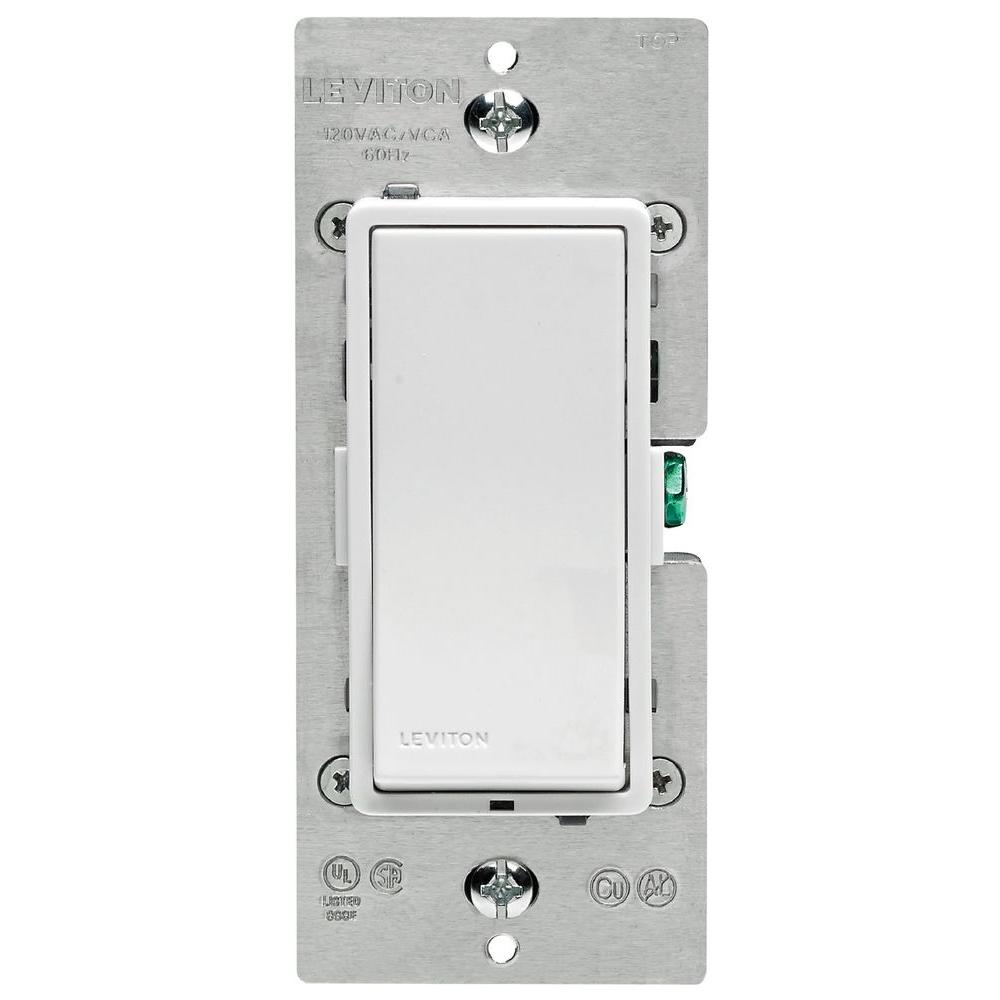
These Leviton zwave switches can replace any standard switch. They can therefore be used manually, or via SmartThings, Vera etc. I use them to manage room lights, a building fan (so I can fire it up via automation for night cooling) and the ERV ventilator at home. They are not cheap, but HD stocks them...and they work reliably. I've used them in conjunction with ST motion sensors to manage lights, as well as pure automation control (like the building fan at the office) where both manual and automated control is desired.

leviton-smart-light-switches-dimmers-r02-dzs15-1lz-64_1000.jpg


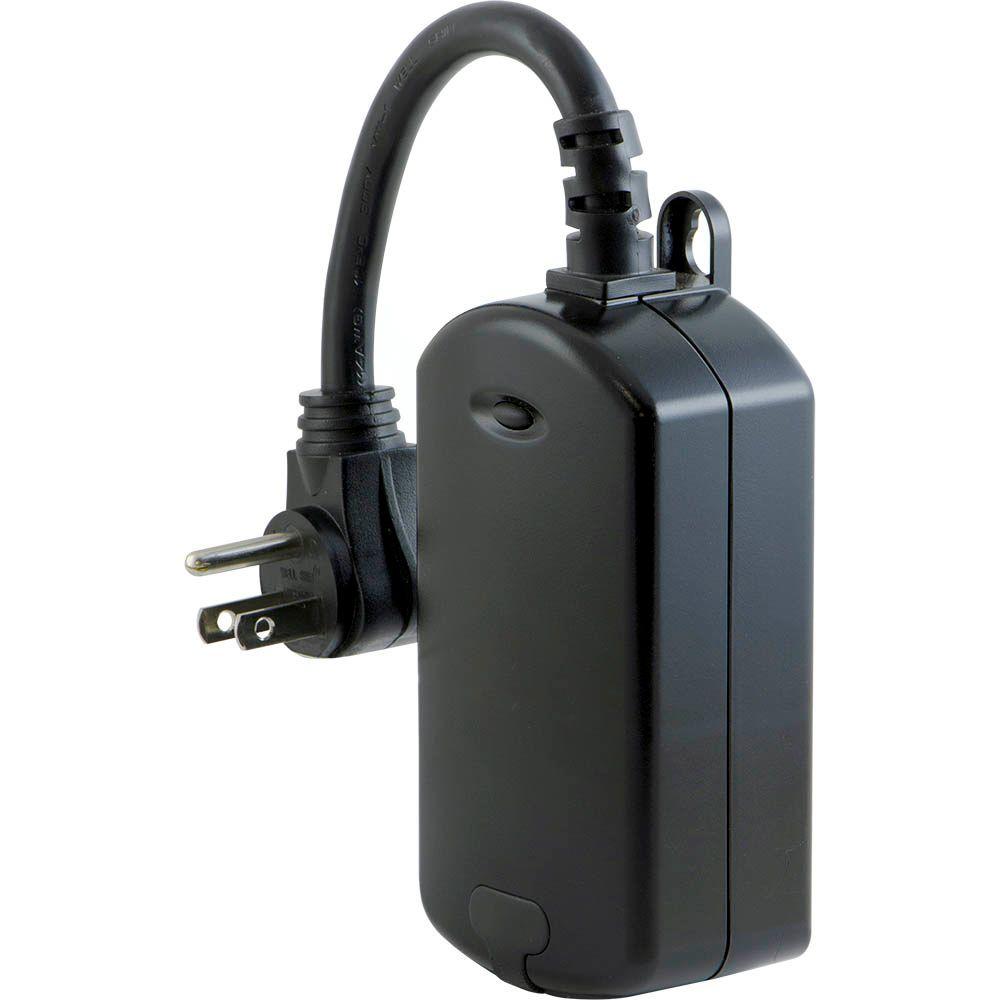
These GE outside Zwave plugs work great for lights, block heaters etc. Simple and reliable. The small black button gives you manual control. Not all Zwave smart plugs (like Leviton) have this feature which I would consider essential.

ge-plugs-connectors-12720-64_1000.jpg


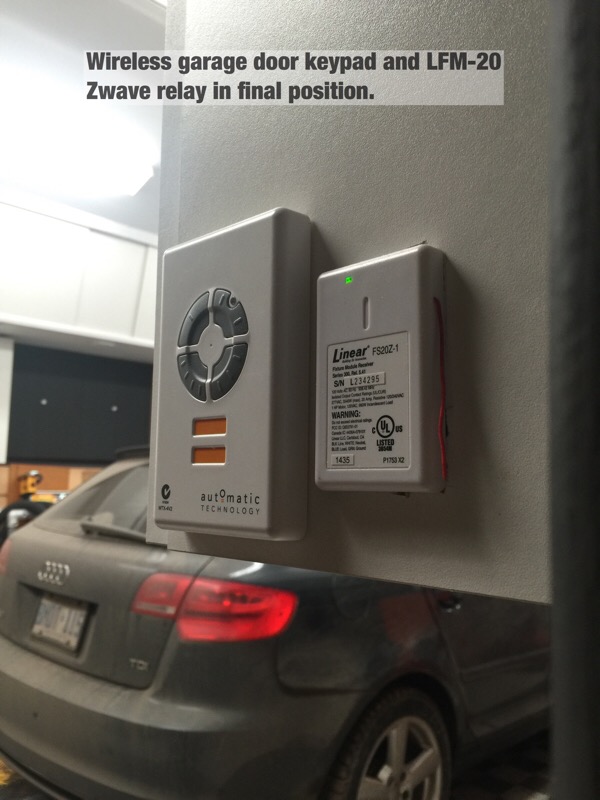
I use several of these LFM20 Zwave relays for window control, garage door control, ERV on/off, and HRV on/off. These are all applications where dry contacts, or isolated relays are required. The LFM 20 is cheap, and works well. It is however a large device and will take up a full switch width in an electrical box. Below, you can see I've used one to "hack" my garage door keypad.

garage_st9.jpg


Those two red wires below (shows the the garage roll up door keypad with cover removed) are connected to the LFM20 isolated contact wires (blue), and the LFM 20 is set up in SmartThings as a momentary relay. The door goes up or down by closing those contacts. A SmartThings door sensor tells the system if the door is open, or closed. My "hack" if you will, just replicates what happens when you press the door open/close button on the wireless key pad. It was the only way I could integrate automation with the roll up door system...works like a charm.
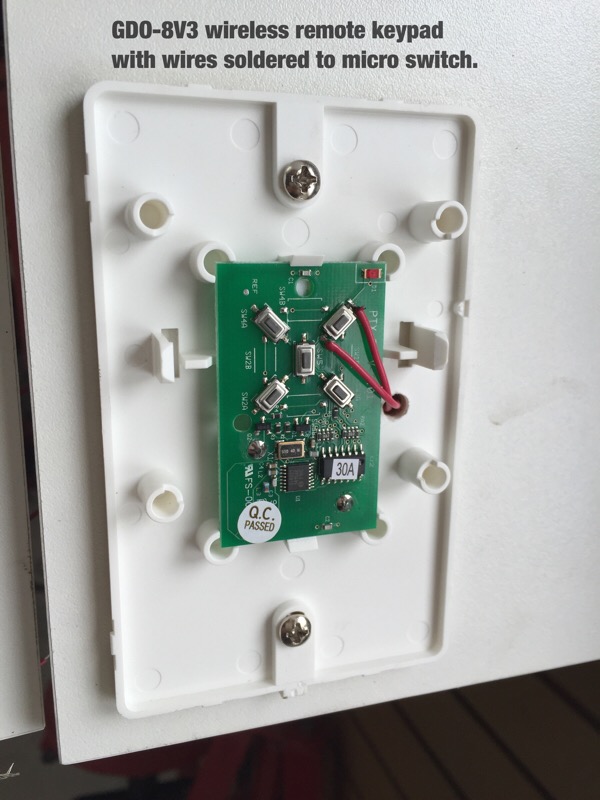
garage_st6.jpg


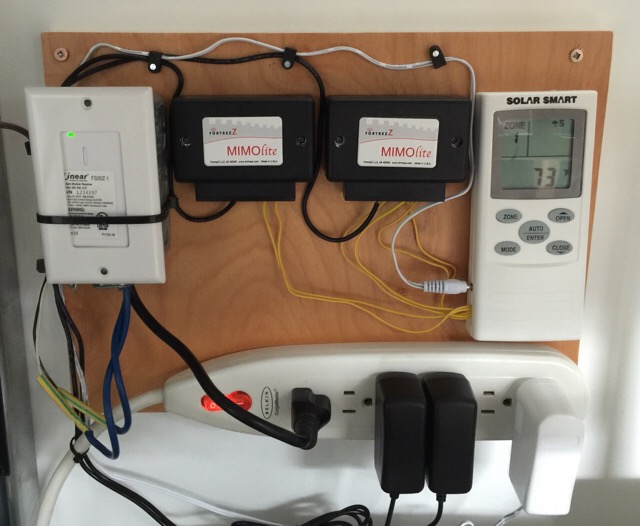
I use a few of these Fortrezz Mimolite relays to manage window open/close at the business site. They again manage simple dry contacts to open and close the windows..but have extra terminals you can use for feedback. In my case, the Mimo on the right is being used (notice the extra two wires) to indicate whether windows are open or closed. The wireless remote on the very right does the actual communicating with the Solar Smart windows. That remote has dry contacts so you can manage the windows via third party automation..a feature I had asked them for :) These relays also require external 9V power..hence the power bar and wall warts below. The white LFM20 on the left is controlling our industrial Venmar HRV ventilator.

mimo1.jpg


Finally, I just installed four of these Aeotec micro relays inline with ceiling sensors at the office. These are very small, so if you have deep boxes, can live behind a standard switch. They require a neutral, and can switch power to standard lights. They also have a low voltage set of terminals so you can connect a standard switch (make sure you use smaller gauge wires)! to signal the relay. I use them up in the ceiling to cut power to each bank of lights when the tenant arms the alarm system.

aeotec-z-wave-micro-relay-f41.jpg


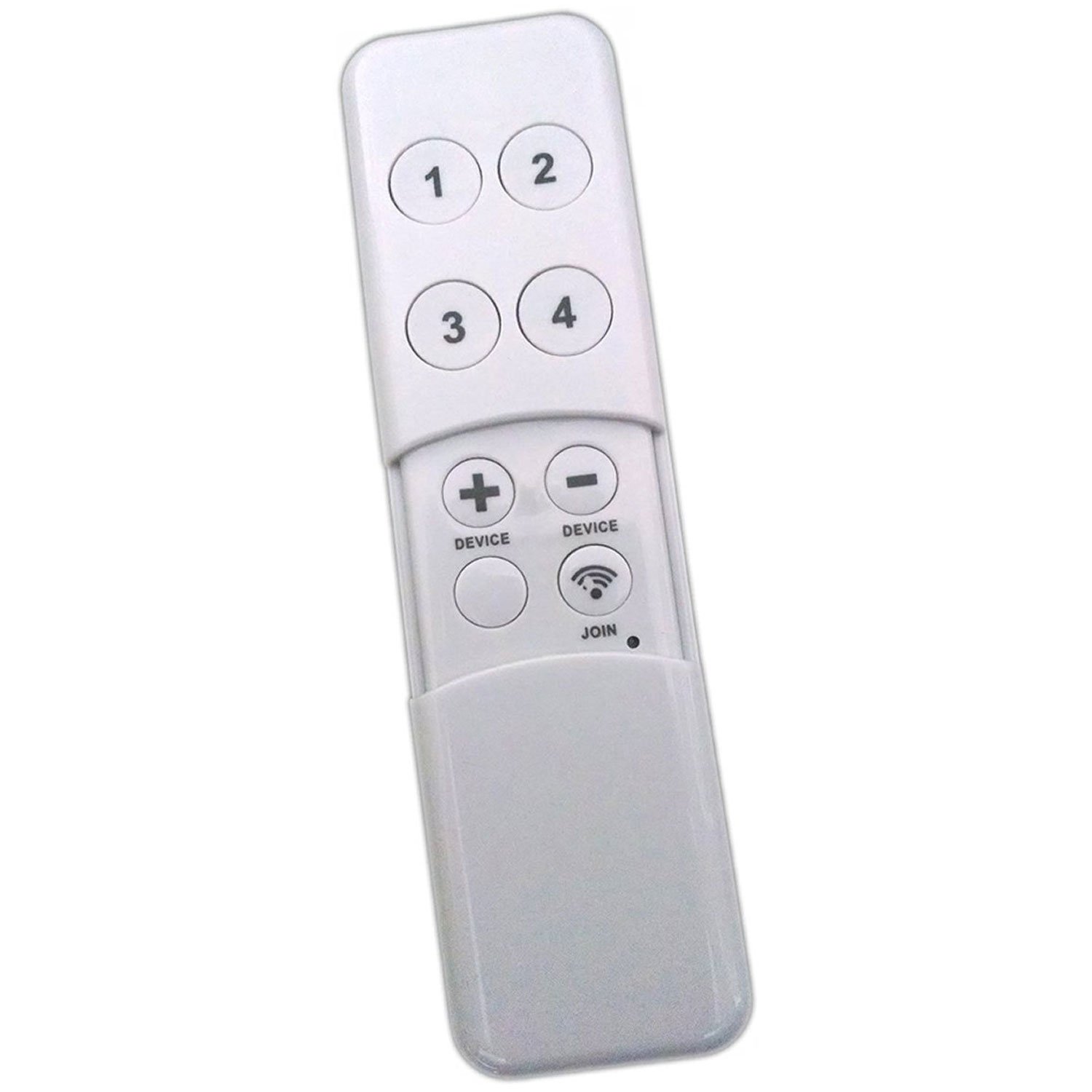
For remote switching, I've been using these minimotes which have a rechargeable (via USB) lithium battery. Four buttons actually manage eight functions as they recognize a short button press vs long press. These work well on both Vera and Smarthings.

I have a few of these at home to override light automations, run Christmas lights etc.

I also have a Minimote installed at the office so the tenants with the micro-relays can manually kill their lights, overriding the ceiling sensors. This is useful when they want the office dark for screen presentations etc. It's just mounted on the wall by their alarm console with adhesive Velcro strips.

61JhkKuN4iL._SL1500_.jpg


Finally, I am starting to use the Hue switch/dimmer, but have not installed them yet..so can't comment. I'm expecting them to be 100% like every other Hue bit I've used.

These relays/switches would let you integrate just about anything with automation...and for me at least have been 100% reliable.

Conversely, these are items I would not recommend based on a very healthy sample size:

1. SmartThings gen 1 or 2 "smart" outlets as they frequently drop off the system..all together at once and require resets. Not sure on they're latest..but one sees a pattern here...

2. Smarthings Motion sensors (require frequent resets), regardless of generation.

3. SmartThings flood sensors. They require frequent resets and drop off the system. This means that if you have the "Device Health" option off in your ST app, or fail to notice they have dropped off the system, a flood will go undetected. This is really, really stupid IMHO.

4. GE or Ecosmart (model doesn't mattter) zigbee smart bulbs. They often lose hub connection, and require a reset/rejoin. Big PITA!! Fail mode is to stay on 24/7.

5. SmartThings itself unless you have a fast and reliable web connection. Make sure you toggle "Device Health" on your SmartThings app, and check devices often!! I should mention that I've had to do zero of these reset/rejoins on devices using the Vera Edge hub at the office. So while SmartThings has a cool web interface, web IDE etc, it's hard to recommend due to the constant "Nanny" behaviour required to keep it working correctly. This is exactly what automation should not be. The Vera Hub, while not as ****, has a clunky GUI, steeper learning curve...but just works. I've called Vera tech support twice, and each time had very fast response, and 100% satisfaction.

Sorry Drives, that was a heap of laid on tech for Johnnie :) Johnnie, keep the questions coming and I'll answer as best as I can :)
 
Last edited:

drivesitfar

Well-known member
Joined
Oct 23, 2013
Messages
36,190
Location
Pacific Northwest
Woody: before i head outside i just wanted to comment about my post. while i don't totally understand or use all the tech stuff you do PLEASE KEEP ALL THAT TECHNO BABBLE COMING as you have time to post it up.

have a great day and i know you'll be done with your projects in "TWO WEEKS".

cheers

JONNNY: i'm sure re reading Woody's thread will be very imformative for me and a lot of other members and lurkers and probably why he's gotten over a million views.

take care and best of luck with your new stuff!!
 

nicholam77

Well-known member
Joined
Dec 18, 2016
Messages
2,696
Location
Minneapolis, MN
Dennis, I always enjoy reading your Smart Home advice and I think you make some very good points regarding SmartThings and Philips Hue. I have both systems, and completely agree about Hue's advantages including smoothness, reliability, and local control.

I just wanted to share a few of my own thoughts in case it helps anyone:

The main advantage of adding a home controller like SmartThings into the mix is being able to use advanced conditional logic for true automation. Hue does great at simple scheduling, motion events, and home control via an app, but there are things it simply cannot do on its own. To me, these are often the things that unlock the true convenience and "magic" of a smart home.

Advantages of Z-Wave or Zigbee switches:

  • Can control a whole bank of lights. If you have 8 lights on a circuit, a switch is much cheaper.
  • Switches do not need to be replaced, whereas smart bulbs will have a lifespan, even if it's a long one
  • Switches are more intuitive for guests and non-smart home people. They can be automated, but can also be used as a normal lightswitch with no learning curve
  • Because switches control the load, they will still work if the internet goes out
  • Switches can serve other automation purposes (i.e. tap to turn on lights, double tap to run Goodnight routine)

Advantages of smart bulbs (Hue):

  • Can individually set dimming levels or colors for lights on the same circuit. For example I have 8 ceiling lights in my entertainment area and have scenes set up where different lights go to different brightness levels. With a switch this is not possible.
  • Good for lamps or areas that have outlets (power) but no dedicated light switch
  • Don't require a neutral wire and can use existing infrastructure

In the end it's up to each end user and what they need, but I would think there is a place for both smart bulbs and smart switches in most environments. I can think of a few more things but I've probably already taken up too much space on your thread.

Great progress on the home theater and that equipment rack looks awesome!
 
OP
D

Denwood

Well-known member
Joined
Sep 22, 2014
Messages
4,305
Location
Thunder Bay, Ontario, Canada
Drives, two weeks would be nice!

Nick, thanks for the kind words. On the automation items, excellent points..and I agree 100%. One of the things that I like about SmartThings is that the presence sensing works pretty well..so when the family is away, all lights can be powered off (if left on), locks checked, garage doors checked..and if anything is amiss, you hear about it via the smartphone.

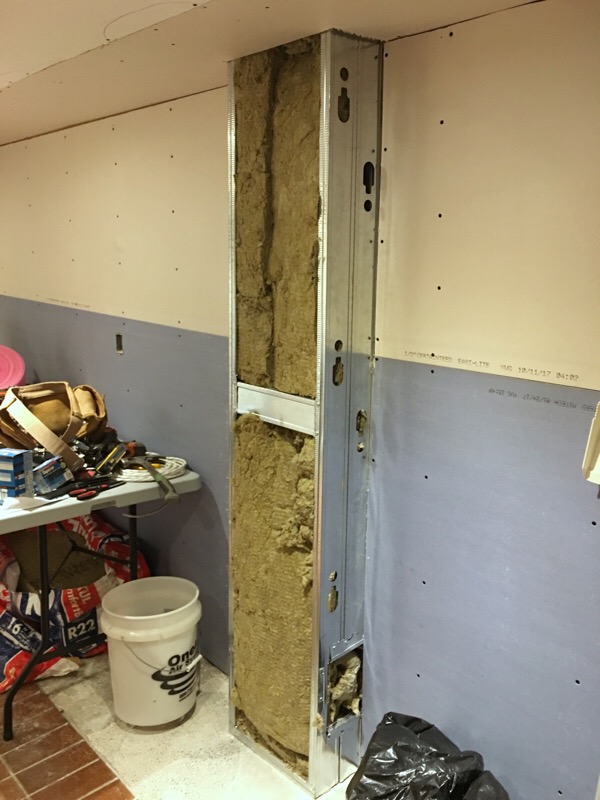
I had one final chore before finish boarding which was to frame in the main house cast iron stack with some metal studs. Two 3 1/2 studs screwed together was exactly what was needed (7") to clear the stack flanges. I wrapped it in Roxul to help quiet draining noises as a theatre distraction. I'm kind of liking metal studs for non load bearing stuff like this as not only is noise attenuation better, but the studs can save a bit of space too. Mould in the future should be a non issue with the metal studs, Roxul, and moisture/mould resistant drywall.

screenwall7.jpg


My drywall goto and his son spent a few hours boarding tonight...progress!

screenwall6.jpg
 
Last edited:

tjpavlov

Well-known member
Joined
May 18, 2012
Messages
1,280
Location
Providence, RI
If you haven't closed that wall up yet a layer of dynamat will also help with the noise. I wrapped my pvc drains in it and it makes a world of difference.
 

txusa03

Well-known member
Joined
Sep 16, 2011
Messages
479
Thanks you both Nick and Denwood for sharing your experience and input on the home automation devices. Home automation is not cheap and it is disappointing to hear that ST has issues.

Denwood, I really like the sound of your garage door automation setup but I have no clues how you were able to set it up. I was not able to follow your detail description with the devices in your pics since the letter on the device was to small for me to identify what device is LFM20. I do see a device labeled FS20Z-1. Anyhow, I am not at that level yet but it gives me hope that it is possible to control many things. :thumbup: Home automation is an interest of mine but at this time budget constraint and know how are the main issues that prevent me from getting hands on the technology.

I already have the Ecobee and Rachio devices and loved how they worked right out of the box.

One question: can the zwave switch be used independent of the ST or Vera Edge (first time I heard of Vera so I need to google for more info). I think the answer to my zwave question is "no, cannot be used independent of ST to control lights) but just wanted to make sure I am not wrong.
 
OP
D

Denwood

Well-known member
Joined
Sep 22, 2014
Messages
4,305
Location
Thunder Bay, Ontario, Canada
TJ, you may get a kick out one of my samba threads testing sound levels in my westfalia on the road, before and after Dynamat. Spoiler alert, it didn’t do much :-(

https://www.thesamba.com/vw/forum/viewtopic.php?t=532900

That said, for ABS or PVC drain pipes, I can totally agree that it would cut resonance down a lot. In my case, the stack is old cast iron, so likely weighs over 500lbs over three stories. Steel studs behave a lot like resilient channel, so that enclosure should be good for STC 45 or so. I will report back once closed in with a “flush test”, ha.

TX, the Zwave Leviton switch and Aotec micro relay both can switch loads with no hub present so will behave like a momentary toggle switch in “dumb” mode.

The LFM20 and FS20Z-1 are the same thing..for some reason the part numbers vary.

Here’s a more detailed read on my garage door opener hack from the SmartThings forum: https://community.smartthings.com/t/roll-up-garage-door-lfm-20-hack-with-smartthings/43442
There’s a free garage door app in that thread that lets you use the LFM20 relay and open/close sensor to manage the door with one button. It also tells ST if the garage door is open or closed.
 

JohnnieMo

Well-known member
Joined
Nov 25, 2014
Messages
1,175
Location
Calgary, Alberta
Okay, two more little questions.

On one hand it looks like you are using and recommending the ST motion sensors. On the other hand you state they aren't reliable. I like the ST sensors because they can become part of a larger automation system where it sounds like the Hue stuff is restricted to lights only. I don't think I'll be using motion sensors for turning lights on, only for turning them off. (at least until I get deeper down this rabbit hole). My family is notoriously bad for leaving lights on.

I did recently turn on "Device Health" although that was just random. It seemed like a good idea. I don't believe I've had notifications since.

Second question: How small are these Aeotec micro relays? MY googling has come up empty handed. With the word micro I tend to think really small... like the size of a coin. However other suggestions (and their shape) lead me to believe they are sized to slide in to an octagonal electrical box.

--

Those leviton switches sure are expensive. Looks like $60CAD or better. I'm not sure I'm quite ready to jump in to that. Unlike you, my primary area of interest is convenience / cool factor (and then cost is next). Environmental is probably third on my list.

One more question.... even though the zigbee/zwave bulbs are poor, do they act as a ST mesh node? I could still use one on my alley light. It stays on 100% of the time now anyways, so I could accept that as a default state. I mostly just want a mesh node out back to extend my mesh to the property line.
 
OP
D

Denwood

Well-known member
Joined
Sep 22, 2014
Messages
4,305
Location
Thunder Bay, Ontario, Canada
I do use the ST motion sensors...likely a dozen or so. They were great at first, but the periodic reset thing is irritating. Fibaro motion sensors work better for me.

The Aeotec micro relay is 2” x 2” x 0.7”

From what I gather, most zigbee bulbs attached to ST do propagate the mesh. That said, I have been using the SmartThings Smart plugs to extend zigbee mesh, which works well...mostly. Three times now over the last few months i’ve had to reset the ST smart plugs as they’ve gone offline together..for no apparent reason :-(

Over these last posts, you’ll see a trend where the Zwave devices tend to perform more reliably vs zigbee. This is over two sites using different hubs...hmmm.

Any of the wired in Zwave switches or relays propagate the Zwave mesh. At the work site, each computer is connected to power via Aeotec smart plugs which do a good job of keeping a Zwave mesh stable over about 9000sq/ft. In the case of your garage, perhaps a few Aeotec relays would do the job to extend Zwave out back, using a dumb bulb and relay at the switch. It makes sense to use wired-in or plug in bits to extend mesh (zigbee or Zwave) as a light manually switched off could “break” your mesh.
 
Last edited:

JohnnieMo

Well-known member
Joined
Nov 25, 2014
Messages
1,175
Location
Calgary, Alberta
I've had good luck with my motion sensors as well as my ST plugs. Granted I'm not using them in a way where immediacy is required. I may see them stumble moving forward.

I'm going to have to work out a plan on how to build all this out. It will take some time and money, but you've helped a great deal.

Have you dabbled at all with any of the voice control systems? (i.e. Amazon Echo or Google Home?) I'd want to integrate something that is ST compatible.
 
OP
D

Denwood

Well-known member
Joined
Sep 22, 2014
Messages
4,305
Location
Thunder Bay, Ontario, Canada
Johnnie, no voice stuff at all. There's something about a technology that is always on/always listening, combined with questionable corporate ethics and data breaches that has kept me away. Given all the metadata floating around, this may simply be irrational on my part..go figure.

Good automation (my opinion only) should just work, be silent, and not require constant intervention. The auto zone arming, night cooling/window management, AC off when windows open, lighting sync with alarm system, Ecobee 3 Home/Away functions, and the business "power down" when zone armed routines have all been working now pushing two yrs at the business site, and I've had to very little maintenance...just batteries in sensors. The big plus to all of this is our power consumption is 25% reduced at busines, and 40% at home when compared to levels pre-automation.
 
Last edited:
OP
D

Denwood

Well-known member
Joined
Sep 22, 2014
Messages
4,305
Location
Thunder Bay, Ontario, Canada
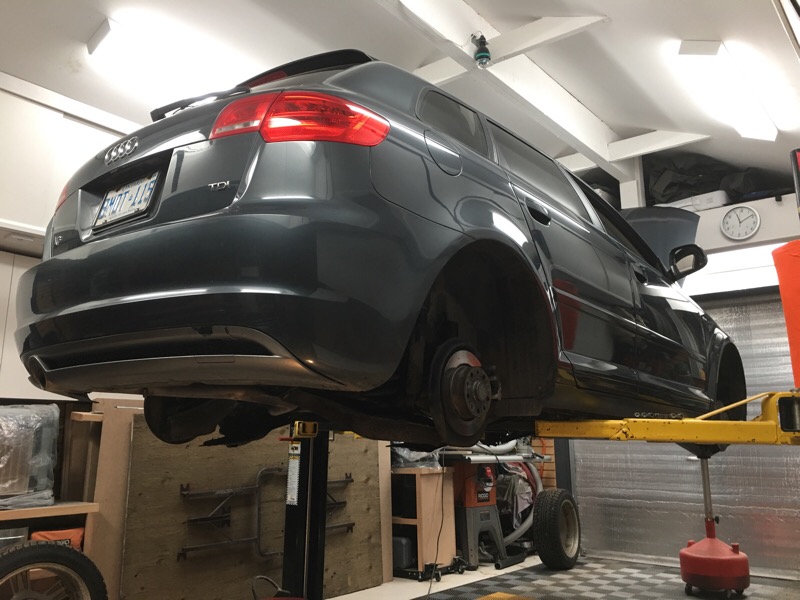
Oil Change 2010 Audi A3 TDI at 85881 kms

The fireplace arrived today, so a quick test fit and power up to check functions, heat, etc. No issues:). It throws out 5000 BTU so perfect for this room. Since spray foam, the basement has been cozy, however we have a 60000 BTU high efficiency wood burning fireplace on the main floor which if running, will hold the furnace off. At -25C outside, with main floor fireplace pumping BTUs, this basement fireplace will ensure a cozy basement if required.

screenwall8.jpg


No time to rest as snow is in our forecast for tomorrow and the A3 TDI was still on summer rims/tires :-( Some hoist time got the tires swapped over, lower body inspection done, a suspension fairing repaired, rust treatment touch up, oil change and a quick laptop section to check for stored codes, and reset the service intervals.

Oil change 2010 Audi A3 TDI at 85881 kms.
a3tdi2017_1.jpg


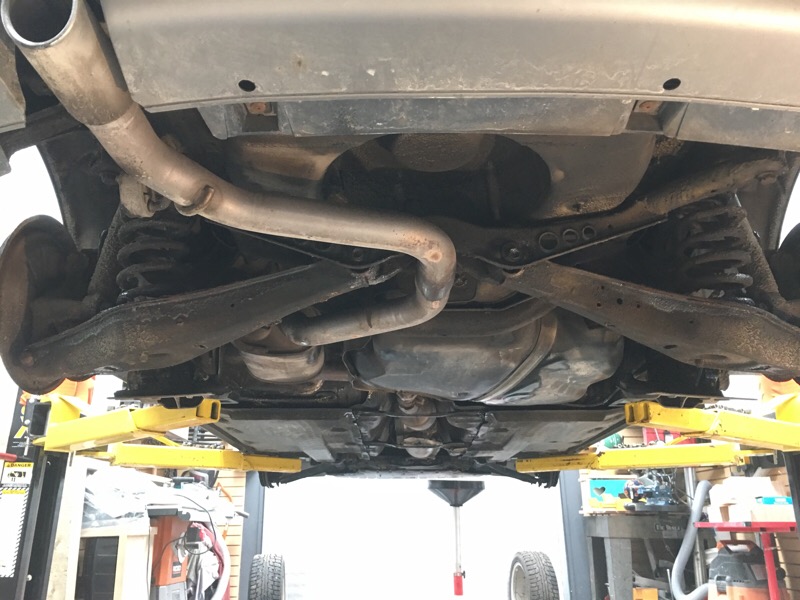
The Mike Sanders rust proofing grease is in great shape after applying nearly two yrs back. I touched up a few spots on the rear suspension with some Noxudol 700, my new favorite rust prevention treatment. Salt and gravel on winter roads rapidly makes a mess of any untreated vehicles in this area. The A3 is still looking very nice underneath.

a3tdi2017_2.jpg
 
Last edited:

drivesitfar

Well-known member
Joined
Oct 23, 2013
Messages
36,190
Location
Pacific Northwest
Woody: I'll give you a thumbs up on the design, placement and purchase of that cool fireplace. :thumbup:

nice to see that all that research and work you did to put on that waterproofing grease (gunk) a while back is really paying off cause your 7 year old car looks great.

hope you get the outside stuff buttoned up before the snow and cold hit and i'm trying to get things covered up here before our rain really starts (it rained 8 inches last week here just as a prelude to what's in store for us).

cheers and have a great day.

if you might have 10 minutes to watch this video it might make you smile and if i had to pick a few guys that remind me of the guy that aims high to do the best he can you'd be on that list.

 
OP
D

Denwood

Well-known member
Joined
Sep 22, 2014
Messages
4,305
Location
Thunder Bay, Ontario, Canada
Drive's, I'd be reticent to include myself anywhere close to the likes of Dr. Rick, but I certainly found that 10 minutes well spent. He's a great speaker :)

I left out that part of yesterday's activities (was a busy one!) was mulching the carpet of leaves that falls from our back yard Butternut tree, usually overnight. I figure returning biomass to the yard vs adding fertilizer can't be a bad thing :) Snow coming today...
 

JohnnieMo

Well-known member
Joined
Nov 25, 2014
Messages
1,175
Location
Calgary, Alberta
Over these last posts, you’ll see a trend where the Zwave devices tend to perform more reliably vs zigbee. This is over two sites using different hubs...hmmm.

This is an interesting statement indeed. I don't really understand the differences between these two wireless protocols, but they obviously exist. I do have a question though - does Smart Things create dual mesh networks - one for z-wave and one for zigbee? Do the devices then communicate on both or just one? I am interested in which network the hub decides to use when all the nodes can support either.

My concern is if I add a powered Zigbee device to extend my mesh, but all my battery powered ST sensors are choosing to run on Z-Wave, it would be a complete waste of money. Eventually I end up with a Z-Wave mesh, a Zigbee mesh, and a Hue mesh. And let's not forgot a Wifi hub as well FWIW.

Johnnie, no voice stuff at all. There's something about a technology that is always on/always listening, combined with questionable corporate ethics and data breaches that has kept me away. Given all the metadata floating around, this may simply be irrational on my part..go figure.
.

Not sure I would call this irrational.... but interesting. My concern is more on the thought of having a hack-able house.... at least in the areas of the most importance, like door locks, or heat control. The thought of having my door locks on the internet spooks me far more than having a device listening to me. I already have Siri listening to everything I say, so I'm used to it ;)
 
Last edited:
OP
D

Denwood

Well-known member
Joined
Sep 22, 2014
Messages
4,305
Location
Thunder Bay, Ontario, Canada
Any hub supporting both protocols needs both Zwave (915 MHz) and Zigbee (2.4 GHz) radios onboard. Each has its own mesh protocol with Zwave max’d at 4 hops, and Zigbee at 20. This means a Zigbee mesh can be a lot larger physically.

In my case, to get both Zwave and Zigbee working in my shop, I had to have both Zwave and Zigbee powered devices installed in closest matching walls (about 40ft) to get both systems working nicely. In my case, the LFM20 in my garage, and another in the house running ERV are likely the Zwave hop partners, and on the Zigbee side, ST smart outlets in my kitchen (coffee machine) and garage (disco lights, ha) are the Zigbee links between home and garage. The mesh(s) are self healing where range is not an issue.

If I disconnect the Zigbee ST smart plug at my coffee machine, the shop goes “dark”, but Zwave devices stay connected as the LFM20 relays are direct wired in.
 

JohnnieMo

Well-known member
Joined
Nov 25, 2014
Messages
1,175
Location
Calgary, Alberta
In my case, the LFM20 in my garage, and another in the house running ERV are likely the Zwave hop partners, and on the Zigbee side, ST smart outlets in my kitchen (coffee machine) and garage (disco lights, ha) are the Zigbee links between home and garage. The mesh(s) are self healing where range is not an issue..

So it sounds like ST uses zigbee for their sensors/plugs. That would mean I need to stick with Zigbee devices in the shop for range extension. Awesome info!

It would make sense that 2.4Ghz has wider bandwidth and shorter range. Zwave conversely is likely better range and more reliable. It makes sense why they combine the two to get the best of both.
 
To avoid these ads, REGISTER NOW!
Top Bottom