To avoid these ads, REGISTER NOW!

Between 485 & 705 SQ/FT 3rd time's a charm with a 3 car workshop

Workspaces between 485 and 705 squarefeet.
OP
L

loganb

ALLIANCE MEMBER
Joined
Dec 29, 2011
Messages
5,536
Location
Omaha, NE
Minor update in and amongst waves of sickness crashing down on us while we valiantly defend it with high proof alcohol for both our hands and our throats, lysol wipes and more tv then the kids should watch

New goodie box

20250116_142538.jpg

20250116_142659.jpg

Had hoped to have cabling run to plug right in...yeah that didn't happen

Also thanks to Nick's comment about about using an eBay bought PC for his server, realized I had several unused machines on a shelf. So pulled one out...windows 7 machine if that gives an idea of age

20250116_152558.jpg

And it won't boot.....go figure

So going to plug in a different hdd to see if that'll make it do something....otherwise it's back to the pile and may try an old laptop
 
To avoid these ads, REGISTER NOW!
OP
L

loganb

ALLIANCE MEMBER
Joined
Dec 29, 2011
Messages
5,536
Location
Omaha, NE
I'm not sure that's the right way to set up a walking desk.

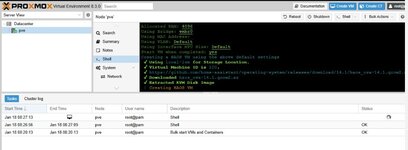
Not having any more success setting **** up on a different extra computer then I'm having using that walking desk....

prox1.jpg

In good news....if they're not going to work I can strip HDD's and toss these both in the trash next week and stop letting them collect dust
 
OP
L

loganb

ALLIANCE MEMBER
Joined
Dec 29, 2011
Messages
5,536
Location
Omaha, NE
Our home automation goes about as far as motion switches for closets and some Kasa switches that echo can turn on. I find it wild all the stuff you guys setup! Full motion turning on and off lights throughout the house would be my ideal setup.

Motion sensors and Kasa or Lutron switches is where I started.....it kinda went from there but haven't done anything like this before. I know I'll never get to full motion activated etc across the house....but getting some of the more "annoying" lights and common sequences automated would be a win

This was the main driver for our smart lights -- my wife likes the automation, but doesn't want to think about it. So we just keep it simple: several schedules for lights on/off, and then multiple lights tied to one switch for outdoor lighting.

I'd like to do some more automation, especially in my workshop, so I'm watching what you do for ideas.

I'll do my best to keep progress updated....so far all I've done is burn time on reading and money on stuff :)

I think Logan gave you a great answer but wanted to chime in two things since I've been meddling in this stuff for ~ 8 yrs:

Please keep the experience flowing, appreciate all the insight so far and the feedback you'll share as I get farther!

I have a non-techy wife and a 3 yr old and 6 yr old. The kids don't even know the 'smart home' layer exists. My wife is quick to complain when something isn't working, and refuses to use any sort of app or voice control. But she has come to appreciate, and even rely on, many of the conveniences and automations I have set up (which is around 100!). Also, guests don't need to know anything when they are present.

Same life lol

I'll also add that you don't need to go all in. Even automating one or two lights can be beneficial. I have a Lutron occupancy light switch in my laundry room (essentially a dumb motion switch) on a 5min timeout, and it's one of our best implements.
The mechanical fan timers in the bathroom and a couple "smart" motion sensor lights that only come on when motion is detected at times when it's dark have gone over with the wife far better then she expected and she's asked for a couple more....hopefully that bodes well for future "stuff"

If you do run into a tough scenario, you could look at some of the new mmWave sensors that can define multiple zones similar to a security camera. They are more $$$, but can do some magical things compared to a regular PIR motion sensor, such as instead of turning on the office lights when you walk in the room, you could have your desk lamp turn on when you sit at your desk. More specificity.

A pair of Apollo Automation's MSR-2's are supposed to show up tomorrow or Saturday so I can play with exactly that.


Currently, I have a couple of motion sensor lights switches in the current home and an automated thermostat in the other house.

My goal with the other house to add a newer thermostat, motion light, humidity regulators in the bathrooms, and possibly sensors for windows and doors more for me being hard of hearing, and cameras. Then in the garage I would want door sensors, door locks, garage door control, air compressor on/off setup, lights, thermostat, cameras, and maybe humidity regulator depending on how I can remove the moisture in the garage.

I wouldn't think the system would have to be complicated but I'm not up and up on what's out there currently.

My patience wore thin today with a sick 6 yr old at home, so a new to me refurbed HP mini pc is supposed to show up tomorrow....after the initial DOA mini PC, 2 failed "pull off the shelves"....4th time is a charm right?


So, I'll be watching your thread Loganb to see how your setup goes and what you are going through. :giggle:

Don't hold your breath on it happening quickly....but most of what you've got listed there is in my head at some level for this. There are a lot of various implementations with specific actions triggering lights to go a specific color that could be beneficial to hearing impaired, I don't have any plans for those at this point but as I get deeper into it who knows what I'll find

In a ballpark order of priority as it exists now....after the system is actually working and detecting sensors/switches etc which could take a bit

Garage lights on/off based on activity detected thru new camera to be installed there
Some additional interior lights being triggered based off garage camera activity detecting and both of us returning "home" based on phone location/geofencing
Kitchen/stairway lights turning on based on motion trigger at new sensor
Basement stairway lights turning on based on motion trigger at sensor at top or bottom of stairs
Exterior soffit lights turning on if dark and motion activated at new doorbell camera
Water leak sensors installed and integrated at major devices(under washer, dishwasher, fridge, water heater, sink bases etc)
Flip on an extra light over 3d printers when either of them are running so I can see what's going on better in the cameras as the light on the A1 ***** (1st world problems for sure)
 

Bob Heine

ALLIANCE MEMBER
Joined
Oct 24, 2009
Messages
10,706
Location
Boca Raton, Florida
Logan, I kinda fell off the tech train when the phone turned into everything but a phone. My automation journey started with low voltage yard lighting on three timer/transformers. The timers were all mechanical and all plugged into gfci outlets. Several times a year one of the gfci outlets would trip and I'd have to reset one of the timer. I put photocell controls on the units so they would only turn on in the dark. Set the timers to be on 24/7 and added three digital timers with outlets that adjust for the season and have battery backup. I also put a seasonal wall switch in the garage that does the same thing for the lights on the front of the garage.

Our son gifted us an Alexa Echo Dot and I put it in my office. When we had a question we'd make the trip to the office.
Alexa.jpg
When I added a smart TV to the master bedroom, Alexa took control of it and one of my computers. Without asking we started getting suggestions and Liane became more paranoid than before. I figured Google Nest would be a helpful thing to improve wifi in the house but it too started talking when I walked past them.

After a neighbor's car was broken into, I bought a security camera system. Actually I bought a single camera that recorded on a built-in SIM card. Rather than throw it out I mounted it over the shed door. Then I bought an 8-camera full HD DVR SWANN system from Costco for $300. It has a built-in hard drive (upgradeable to 6Tb) and the HDMI connects to the flat screen TV in the kitchen. I can access the system with the TV set to the DVD HDMI connection and a mouse. I can also access the system from any computer on my private network and it does have a phone app so I could check the house when away from the house but the phone is rarely with me. I have four of the eight cameras installed and working and one of these cool days I'll go in the attic and wire and mount the other four.

As soon as something requires a subscription or offers/requires me to access their 'cloud' I look for another solution. I am especially annoyed by all the Apps that only work on an Apple or Android phone.
 

jonshonda

Well-known member
Joined
Jul 17, 2017
Messages
4,742
Location
Wisconsin
I've drempt on and off about security cameras, but know I would want to ensure I bought cameras that perform in the dark exceptionally well. Far too often do you see blurred images of a face or car with no chance of ever making out wtf it is. I know I would want a really good cameras to capture faces and license plate readers, and assume I would likely spend north of $2k. For where I'm located and the crime rate, that's hard to justify.

I've instead invested in yellow labs. 😎 While they are lot more maintenance and require an abundance off attention, they are on guard 24/7 and the one female doesn't mess around. She is an extremely smart yet very protective 80lb dog. If she doesn't trust someone she will certainly let you know, and every visitor is met with an alarm.
 
OP
L

loganb

ALLIANCE MEMBER
Joined
Dec 29, 2011
Messages
5,536
Location
Omaha, NE
As soon as something requires a subscription or offers/requires me to access their 'cloud' I look for another solution. I am especially annoyed by all the Apps that only work on an Apple or Android phone.

Landscape lights is on the spring project list....see if I get there Bob!

The "cloud" part here rings true and helped to sell me a bit on the Ubiquiti solution for cameras moving forward as there is less risk of them trying to "call home to China" and send data out as their US owned and any motion detection I opt to try and do is done locally on hardware vs in a cloud somewhere.....but that's a ways off still

I've drempt on and off about security cameras, but know I would want to ensure I bought cameras that perform in the dark exceptionally well. Far too often do you see blurred images of a face or car with no chance of ever making out wtf it is. I know I would want a really good cameras to capture faces and license plate readers, and assume I would likely spend north of $2k. For where I'm located and the crime rate, that's hard to justify.

Yeah I learned in Chicago with the cameras there that plate detection is harder then most would expect and really requires some decent cameras, but more importantly mounted at plate height and an angle that gives the best look at the plate so you've got the maximum number of frames to pull from. As it's tough to discreetly mount cameras at plate height in front yards aimed basically parallel to the road....it often takes a much higher dollar camera. I did get the doorbell camera powered up in the basement at the network rack and it was running in a couple minutes and video quality looks really good. I need to print a bracket to account for the slope of the siding where I want to mount it but then will hopefully try and get it up tomorrow.

I've instead invested in yellow labs. 😎 While they are lot more maintenance and require an abundance off attention, they are on guard 24/7 and the one female doesn't mess around. She is an extremely smart yet very protective 80lb dog. If she doesn't trust someone she will certainly let you know, and every visitor is met with an alarm.

Every time I consider going back to this type of home security and accompanyment....I talk to my brother who reminds me how much work they are(as he also has an 80 lb yellow lab). We'll get another dog at some point....but probably waiting a couple more years to get the 3 yr old into grade school
 

Uofime

Well-known member
Joined
Jan 11, 2021
Messages
173
Location
Charleston SC
Minor update in and amongst waves of sickness crashing down on us while we valiantly defend it with high proof alcohol for both our hands and our throats, lysol wipes and more tv then the kids should watch

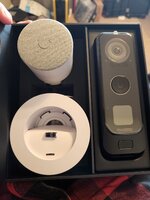
New goodie box
20250116_142538.jpg

20250116_142659.jpg
What made you choose the unifi doorbell? I’m looking to get one that doesn’t require a subscription. There’s a lot of choices.
 
OP
L

loganb

ALLIANCE MEMBER
Joined
Dec 29, 2011
Messages
5,536
Location
Omaha, NE
What made you choose the unifi doorbell? I’m looking to get one that doesn’t require a subscription. There’s a lot of choices.

Great question and thanks for joining in here!

1st-I was already in their "ecosystem" and like their stuff. It just works...but it is a premium. I'll probably have $600 bucks in this doorbell camera between the required hard drive and the camera...so there are a lot of other options that would be cheaper. I could've gotten cheaper with the hard drive, but as I intend to move the other cameras over to this platform as well(plus addition of more) I view the drive cost as "separate" since it wasn't exclusively for the front door camera, it's just first.

2nd-Local...there is no cloud storage and it'll all be local which was something I preferred. I also like that Ubiquiti is a US company, founded here. They do make products overseas(like all of them I can afford) but fewer issues of their devices trying to "phone home" back to China

3rd-Fewer headaches. I've had to replace a family members smart/video doorbell 2x in the last 18 months I think....I don't want to deal with that here. Get it mounted, setup, working on the phones as necessary and I can move on.
 

nicholam77

Well-known member
Joined
Dec 18, 2016
Messages
2,659
Location
Minneapolis, MN
@Uofime @loganb

I don't have any experience with Ubiquiti, but they seem to be well-liked and have well thought out products.

Those are all valid points, Logan.

If anyone is looking for a cheaper option (less than 1/3 the price) or is not in the Ubiquiti ecosystem already, I would be looking at Reolink. They are also fully local (recording and LAN access), have WiFi and PoE options, onboard AI smart detection, advanced settings and motion zones, can record to SD card or NVR, 24/7 continuous or motion based recording, motion event pre-roll, a free P2P remote access option (requires internet), a decent mobile app, push notifications, attractive design, and there is an excellent Home Assistant integration which exposes a lot of settings and sensors. I have the PoE version and it is very responsive.

Yes, they are a Chinese company, but if you're really paranoid you could block it from the internet and use Home Assistant to access a remote feed, or VPN in. Kind of hacky, though. Bottom line is unless you block it from the internet (which may reduce features like remote access), it's a risk. And that goes for expensive U.S. based companies like Ubiquiti, too.

My one complaint with Reolink is their native app push notifications don't include an image preview, but now I use Home Assistant for notifications that do include an image preview, and some actionable controls to mute for a period or take me into the Reolink app. I also have it set up to announce when a person has been detected over my Sonos speakers. Pretty slick.

I guess my point is aside from the benefits of no subscription and local control, I would also be looking at the actual doorbell features and specs. Reolink is pretty good, I'm sure the Unifi is good as well (that 2nd package camera looks sweet!).
 
OP
L

loganb

ALLIANCE MEMBER
Joined
Dec 29, 2011
Messages
5,536
Location
Omaha, NE
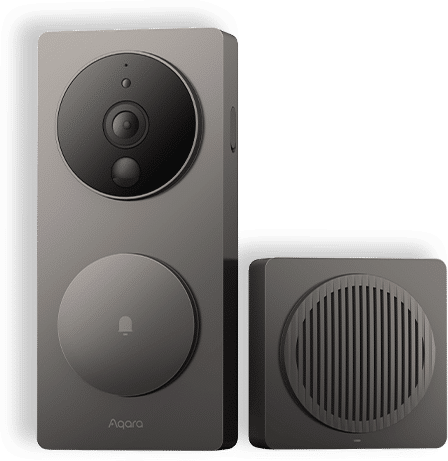
Thanks for sharing Nick...great points! I didn't look at the Reolink camera, this was the other one I was considering:


If i wasn't going to move the other cameras over to Ubiquiti, I likely would've bought a different doorbell camera. The price point for me is pretty steep for a stand alone device. Some of the spec's do appear to be better, but it's a doorbell camera. I'm not looking to grab still images and blow them up to 24 x 36....normal use case is I'd answer the doorbell on my phone so a good enough image to see who it is on my phone screen is good enough for me. I will admit...Nick is right that the package camera pointing down did make a bit excited :)

But having all the cameras on the same platform making it easy for us to monitor, integrate with other stuff etc is what got me over the initial sticker shock of it. I also don't have a hardwired doorbell system, if you do you could make it a bit cheaper by not using their optional power over ethernet speaker. As my current doorbell is wireless with a battery powered speaker, I needed that extra speaker but if you had it already it can integrate with it.
 
Last edited:

Xti04

Well-known member
Joined
Nov 11, 2016
Messages
2,319
I have been using Reolink for several years. I bought a few new cameras and they wont work with my HD. So now unsure if I need to upgrade the HD or if just biying a new kit would be sufficent. All POE cams except 2 we use inside.
 
OP
L

loganb

ALLIANCE MEMBER
Joined
Dec 29, 2011
Messages
5,536
Location
Omaha, NE
So first real "automation" with the new Home Assistant platform that I couldn't have done with just the straight Kasa or Lutron App

So attempting to turn on the kitchen lights early in the morning based on an upstairs motion detection. I've got some other sensors coming that are supposed to do more cool $h!t but they're delayed thanks to USPS so this was available fast on amazon:


And installed looks like this:

sensor1.jpg

Positioned in this hallway which is all bedrooms and bathrooms upstairs:

sensor2.jpg

This is a night light, motion sensor and has a light (lux) sensor in it, so let's start by making a basic motion activated routine

auto1.jpg

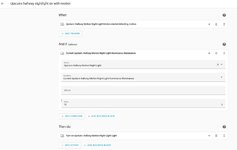
With the light sensor, I can see what the light level it's detecting for the hallway during the day when the lights are off (4 lx) and with lights on (20 lx)...so setting this to trigger based on motion when light level is below 10:

auto2.jpg

Now that I've got it to turn on, it's pretty straight forward to then turn it off, in this case I've got it set to turn off with 60 seconds of no motion detected.

With that working....time to see if I can get this sensor to trigger the kitchen lights....actually pretty easy!

auto4.jpg

I've got a time restriction in there as this is a hallway sensor vs on the stairs....in the future the sensor should be closer to the stairs so it's motion on the steps triggering this vs in a hallway that one could walk down and stop at a bedroom and not go down the stairs...but those sensors aren't here yet so this is a start!
 
Last edited:
To avoid these ads, REGISTER NOW!

nicholam77

Well-known member
Joined
Dec 18, 2016
Messages
2,659
Location
Minneapolis, MN
Nice, you're off to the races!

The built in automation editor is a lot to look at, but it is really, really powerful. There's nothing I haven't been able to do with it yet.

Motion-based automations can be kind of tricky, even simple ones.

It may not matter for your hallway automation, but I would suggest two things for motion automations in general.

First is to use Trigger IDs and put both the "starts detecting motion" and "stops detecting motion" triggers in the same automation. I don't know how to concisely explain it, so YouTube "Trigger IDs". It's become a huge part of the way I build automations.

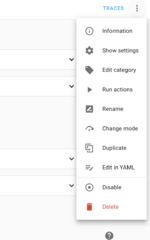
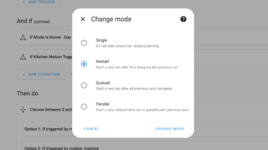
Secondly, I would probably set the automation mode to "Restart" instead of the default "Single". When you're in the automation editor, you can find this in the top three dots menu at the upper right corner:

Screenshot 2025-01-22 at 5.30.09 PM.png
Screenshot 2025-01-22 at 5.30.21 PM.png

By using Trigger ID's (keeping your motion active and inactive triggers in the same automation) and setting it to Restart, it makes sure your time delay for lights off gets restarted every time new motion is detected. Otherwise the lights will go out after 60sec no matter what, even if new motion has been detected during that period.

Not a huge deal for a 60sec delay in a hallway, but could become annoying with longer delays in a room you might be spending some time in.


Btw I don't have that motion sensor but any time you can use a mains powered device is good in my book! I believe the RGB nightlight shows up as a separate entity so it could be used for statuses or notifications. Even something like green in the morning means it's ok for the kids to come downstairs lol.

Have fun, the sky's the limit!
 
OP
L

loganb

ALLIANCE MEMBER
Joined
Dec 29, 2011
Messages
5,536
Location
Omaha, NE
Nice, you're off to the races!

The built in automation editor is a lot to look at, but it is really, really powerful. There's nothing I haven't been able to do with it yet.

Motion-based automations can be kind of tricky, even simple ones.

It may not matter for your hallway automation, but I would suggest two things for motion automations in general.

First is to use Trigger IDs and put both the "starts detecting motion" and "stops detecting motion" triggers in the same automation. I don't know how to concisely explain it, so YouTube "Trigger IDs". It's become a huge part of the way I build automations.

Secondly, I would probably set the automation mode to "Restart" instead of the default "Single". When you're in the automation editor, you can find this in the top three dots menu at the upper right corner:

Screenshot 2025-01-22 at 5.30.09 PM.png
Screenshot 2025-01-22 at 5.30.21 PM.png

By using Trigger ID's (keeping your motion active and inactive triggers in the same automation) and setting it to Restart, it makes sure your time delay for lights off gets restarted every time new motion is detected. Otherwise the lights will go out after 60sec no matter what, even if new motion has been detected during that period.

Not a huge deal for a 60sec delay in a hallway, but could become annoying with longer delays in a room you might be spending some time in.


Btw I don't have that motion sensor but any time you can use a mains powered device is good in my book! I believe the RGB nightlight shows up as a separate entity so it could be used for statuses or notifications. Even something like green in the morning means it's ok for the kids to come downstairs lol.

Have fun, the sky's the limit!

Love it..thank you for the tips! Will watch the video on the couch tonight after the kids are in bed!

And yes, it shows up as a unique entity so could do a lot with the light color as i was playing with it.
 

Blackbyrd

Well-known member
Joined
Nov 28, 2020
Messages
1,160
Location
TN
Was always fascinated by the smart home. The extent of mine is alexa and hue lights.... and a Logitech harmony.
 

tj675

Well-known member
Joined
Apr 9, 2019
Messages
905
Location
The Mitten
That’s a great sander, by far the most used tool in my shop. As far as vacuums get the 26 with the optional Bluetooth remote. I have 2 and don’t regret the purchases at all.
 
OP
L

loganb

ALLIANCE MEMBER
Joined
Dec 29, 2011
Messages
5,536
Location
Omaha, NE
I had about 6 hrs of solo windshield time today and with how timing worked out I had an hour or two to kill on the way out that almost by destiny took my right past a very large tool store which also happens to be a Festool dealer.....darn guess I'll have to stop in.

Of course the end result is already known, but ended up with the ETC EC 150/5, which in translated to english and imperial units means a rather spendy but supposedly awesome 6" random orbital with a roughly 1/4" (5mm) stroke. They also make a 3mm stroke, as well as a 125mm(5") version as well but the feedback seems to be pretty unanimous that the 150/5 is the one to go with for general purpose sanding. As this is also my first 6" sander, I picked up the Festool variety pack of sandpaper as well to give it a shot

Screenshot_20250125_203307_Photos.jpg

I was able to get a bit of time with it tonight before I was summoned back out to hang with the misses....but after 15 minutes on a piece of walnut that's been in process for probably 2 months I'm impressed. Even hooked up to a normal shop vac it generated 0 dust, was exceptionally smooth, low vibration and very well balanced.


Screenshot_20250125_203325_Photos.jpg
 

jonshonda

Well-known member
Joined
Jul 17, 2017
Messages
4,742
Location
Wisconsin
If you haven't already, try out the Mirka Abra Net sanding discs. I use them on my big bosch 6" RA and never have an issue with the pads clogging.

They have a nice variety pack to try if you don't want to commit to a big purchase w/o trying first.
 
OP
L

loganb

ALLIANCE MEMBER
Joined
Dec 29, 2011
Messages
5,536
Location
Omaha, NE
If you haven't already, try out the Mirka Abra Net sanding discs. I use them on my big bosch 6" RA and never have an issue with the pads clogging.

They have a nice variety pack to try if you don't want to commit to a big purchase w/o trying first.

I've never tried the Mirka but am a fan of the 3M Cubitron Xtract which are a similar net disc. I ordered their small sampler pack and then some of the more common grits last night.
 
OP
L

loganb

ALLIANCE MEMBER
Joined
Dec 29, 2011
Messages
5,536
Location
Omaha, NE
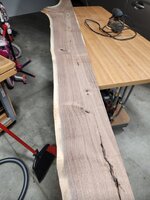
Kids cooperated this morning so parked the wife's ride outside and got the bottom side of the shelf sanded out. The board has a slight bow but with 3 shelf brackets I think I can pull it flat enough

20250126_103658.jpg

Some 80 grit on the Bosch 5" and it helps highlight how much smoother and nicer the Festool is. Under rated feature might be the sanding pad brake that stops it almost instantly

20250126_111758.jpg
 
OP
L

loganb

ALLIANCE MEMBER
Joined
Dec 29, 2011
Messages
5,536
Location
Omaha, NE
I realize we try and keep this place with proper, civilized language

But holy ****....I get why the Festool fanclub is so adamant...this thing is amazing.

To compare where I'm coming from, the now relegated to "**** work" sander is this


Typical 5" Bosch, it's 10 years old but has a new sanding pad on it and I'm using either Serious Grit, Mirka or 3M Cubitron mesh discs on it...so decent sander with good media on it. But holy **** is this Festool better

After running it thru the drum sander, I started with the 60 grit disc and worked thru 80, 120, 150 and 220 before saying it was "good enough" for a shelf....and it took very little time...maybe 30 minutes total...should've timed it.

The low center of gravity/short height on this was advertised...but it's definitely easier to control than the probably 3" taller Bosch. The "longer" design gives lots of places/ways to place your hands to alternate grips while keeping even pressure on it.

The smooth-ness of the motor can't be overstated, I thought the Bosch was pretty good but this is much better.

The pad brake and not having to wait for the pad to stop spinning....


Dust collection is great even on my free to me shop vac with the auto start switch zip tied on and a generic hose/adapter kit off amazon...

But end of the day, none of that matters if the surface finish *****....and it doesn't. I think I spent about 20% of the time sanding this one as I did the other shelf (which is larger) and this finish is better. I was blown away by how good this surface finish is....it's definitely too good for the pour and wipe Danish Oil finish job it's getting. This was smoother at 180 grit then when I've taken some other pieces to 320 or 400 on the Bosch

So for all of you who subtly(or not) help push towards Festool...thank you!

For anyone considering the step up and thinking about this sander but struggling with the $609 MSRP that rarely goes on sale....I don't think you're going to be disappointed. In my limited experience this definitely seems like a buy once, cry once type of purchase.

For me...I may have to look and see what the local Woodcraft has for on hand dust extractors


That’s a great sander, by far the most used tool in my shop. As far as vacuums get the 26 with the optional Bluetooth remote. I have 2 and don’t regret the purchases at all.

Not sure one can sing the praises strong enough!

Question on the vac recommendation-With the autostart thru the plug in port, how much use do you get with the hose end bluetooth remote? Just for quick clean up of the bench/workplace etc? Was looking at the 26 vs the Midi I I think


Solid choice. I bought my 150/5 ec ~9 years ago and it's been fantastic.

Appreciate the recommendation! Sanding has definitely just moved up from 2nd to the bottom on the list of "least favorite project steps"

Finishing is still on the bottom...but if the surface finish is this much better maybe I'll move up too!
 

slik560

Well-known member
Joined
Oct 5, 2009
Messages
787
Location
Kansas, USA
Love walnut. I still have some boards that I glued together, planed and sanded back when I worked at the old Disbrow & Co in Omaha when I went back to school after a spell with Uncle Sam. We could take scraps off of jobs and with the tools that they had, make cutting boards, plaques, whatever. It was the best of times.... :)
 

tj675

Well-known member
Joined
Apr 9, 2019
Messages
905
Location
The Mitten
Question on the vac recommendation-With the autostart thru the plug in port, how much use do you get with the hose end bluetooth remote? Just for quick clean up of the bench/workplace etc? Was looking at the 26 vs the Midi I I think

I switch the vacuum on with Bluetooth in advance of using any saw or router, it gets suction up to speed which makes a difference. Being able to switch it on and off for clean up is a great help as well.
 
To avoid these ads, REGISTER NOW!
Top Bottom