it works fine
100mb is all that is available and is seems to be working just fine.
You mean 100
Mbps???
Speeds are measured in mega
Bits
Per
Second.
ISPs sell internet speeds based on Mbps speeds.
there is 8 bits in a byte.
MB = megabyte
so 100MBs would be 800,000,000Mbps. If you got those kinds of speeds it would mean you have fiber internet such as ATT Gigapower or google fiber or Verizon FIoS. It is not physically possible for a copper wire to carry those kinds of speeds.
So your wired connection at the router that is connected directly to your WAN (ie internet) sees 100MB/sec when measuring throughput to an internet site (aka speedtest.net)?
An you see that same 100MB/sec throughput to the web but now out at the wifi that is using a repeater?
When you toss around '100mbs' it is useful to define what it is that you are citing....
see above
Also, speedtest.net gives results in Mbps NOT MBs.
From the router directly to my desktop is 100mb.
In another room 60'+ ft away through the powerline adapter to my laptop it is 100mb.
No WiFi.
Cat 5 from adapter to laptop.
It's the same as far as I can tell using speedtest.net .
I hope this clarifies it.
see above about Mbps vs. MBs...
I am using a wifi repeater in another room to extend wifi to my garage.
Repeater distance is about 60+ ft. but on the other side of the house.
It's about 25mb.
Thats because the signal is degrading.
What brand and model wireless router do you have?
My barn is about 60 feet from the cable company supplied router. I was getting 3 sometimes 2 bars (it would then cut out). I switched to a nighthawk router and now get 3 sometimes 4 bars (out of 5, no cutting out now). Pulling 12-15 mbps.
Which model nighthawk?
What speed package do you have?
You should be getting more than 12Mbps with a nighthawk unless you have slow internet.
I'm working on this now. From house to the outbuilding I need wifi in is 125 feet. Router is the TWC supplied Ubee DDW3611. Where the router is now in the middle of the house, it can barely get a signal, 1 bar and it cuts out. What I tried yesterday was putting the router in a window with a line of sight to the building and aiming both antennas at it. That got 2 bars and signal was good enough to watch videos without buffering.
Thats because most ISP supplied routers and wireless access points are garbage and have poor performance.
Buy your own wireless router or AP and piggyback it off of the TWC unit. You will get way better performance.
Is that a reasonable distance for it to keep working? Like if there is bad weather am I going to lose signal? I would have to move the cable wire from where it enters to another room for this to work permanently without wires running everywhere.
No one can answer that because there is so many variables and no two sites are the same.
I can't figure out the admin password for the router to be sure the radio power is 100%. I can get normal user access. Would 20 or 40 Mhz be better and if 40 upper or lower? I'm in the middle of nowhere, no other networks to worry about interference.
Most ISPs wont give you the password to their equipment. This is why its best to not use the ISP provided equipment.
Buy a nighthawk, set it up and turn off the wifi on the TWC unit.
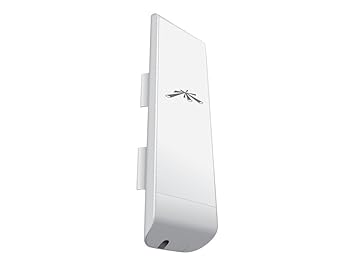
If not maybe a wireless bridge?
Powerline adapters might or might not work. Building is on a separate meter, but both meters wiring joins before the transformer on the second pole to the road. Maybe 250 feet of wire and several breakers too.
A wireless bridge is a great option.
My company installs several per week for clients.
I recommend ubiquiti products.
Th powerline adapters wont work because they need to be on the same service.


 but i also havent messed with 802.11a in 15+ years

