To avoid these ads, REGISTER NOW!

My RF30 mill to CNC conversion - the cheap way

stioc

Well-known member
Joined
May 2, 2005
Messages
1,317
Location
SoCal
So almost exactly 1yr after the purchase of the mill: https://www.garagejournal.com/forum/showthread.php?t=353948 I've decided to convert it to CNC.

Let me get some things out of the way first, this is going to be a cheap build. Yes in a perfect world I'd have a Tormach 1100 but that would be an overkill for how much I'll use it. Nope, not even going to convert it to ballscrews, at least not yet.

Goals: cheap, quick and easy :pimpflash

Hopefully, this conversion will help someone out who has wanted to do this but wasn't sure about it, didn't know how, or thought it was too expensive. If it all blows up, it'll at least provide some entertainment! :lol_hitti

How the mill sits today:

39848675704_45d6d2cc58_o.jpg
 
Last edited:
To avoid these ads, REGISTER NOW!
OP
S

stioc

Well-known member
Joined
May 2, 2005
Messages
1,317
Location
SoCal
My CNC experience: until about 2 months ago I knew almost nothing about CNC. Then I decided to build a small Arduino+GRBL based CNC router/engraver for knowledge and fun. This went better than expected, while I have a degree in computer engineering and did a lot of PLC and microcontroller projects back in college anyone can do this stuff these days with the help of Youtube and just general info available on the Internet. In fact, too much info so you have to weed through it all to find what you're looking for sometimes.

I had a budget of $300 for the router and I came just under it by a couple of bucks. It would've been cheaper if I didn't waste $30 or so on crappy endmills from Amazon based on their good reviews. However, the endmills from ebay seller drillman1 totally changed the tiny router from being nothing but an engraver to actually being able to cut mdf and HDPE.

Bench testing the electronics of my last CNC project
39848484704_b43598d1e1_o.jpg


Done - took about 6-7hrs to assemble it from scratch
38748885380_788100476d_o.jpg


An example of what I made with it:
38748885540_b1861df0e0_o.jpg


My biggest hurdle with CNC is not being good at Fusion360 or CAD/CAM in general but I manage to stumble through it once I have a design/idea in mind.

Anyway, this was/is my entire CNC knowledge but while the router is fun I want to be able to tackle bigger sized projects. Its working capacity is only about 8"x11" and the spindle is pretty weak. Sure I can upgrade, modify to suit my needs, I was even considering buying a Shapeoko XL but then I thought, I already have a 750lbs mill with a decent sized table why not convert that to CNC?
 
Last edited:
OP
S

stioc

Well-known member
Joined
May 2, 2005
Messages
1,317
Location
SoCal
So here's the breakdown of the electronics that I'll be using.

CNC software: While I enjoyed the simplicity and speed of GRBL running on Arduino (2 sec from boot up to being ready!) for the little router, for the mill though I wanted something with more features even if I don't have a use for most of them at this time. I boiled my options down to either Mach3 or LinuxCNC. I've chosen the latter for now. Cost: $0

Computer: I have an old Athlon X2 desktop sitting around in the garage, I'll start with it and see if I need to upgrade to something better. It's not the fastest of desktops made even back then lol. Cost $0

Stepper motor: Three Nema 23, 270 Oz from Amazon. Cost $98 total

Drivers: Three TB6600 clones from Amazon. Cost $45

Parallel port interface/Breakout board: 5 axis generic BoB from Amazon, comes with cables: Cost $17

Power supply: 400W 36V PSU from Amazon. Cost $36

Total cost: $196
 
Last edited:

bradpac

Well-known member
Joined
Sep 8, 2013
Messages
721
Location
Central TX
Can't wait to see this project finished. I have been looking at getting an older mill and retrofitting CNC on it for a couple of years. I'm am of the computer generation and have design experience in CAD and I just don't understand why every mill hasn't been converted to CNC.
 

kkroger

Well-known member
Joined
Apr 21, 2013
Messages
1,143
I told you so... didn't I tell you so? should have taken it to the grocery parking lot like I told you!
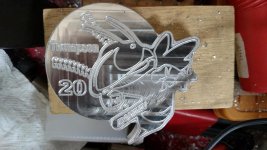
Milled from a Half inch Aluminum Plate,
Plate was Clamped to the table as a "Fixture" then the Work was glued to it with CA (Superglue) allowed to cure overnight, Then a surfacing pass to flatten the front of the plate, then engraving the image, and a tool change to hack it out of the plate... unclamp the assembly then just heat the back side of the fixture plate until you hear it "Pop" and tap it with a hammer and the piece comes free, then you just wash the glue off with Acetone. Then of course it had a piece of Square tube welded to the back side for a hitch plug, polished up with the Burnisher, clear powder coated... Sorry no weld shots...

attachment.php


attachment.php


attachment.php


attachment.php


attachment.php
 

Attachments

  • IMG_20151213_085521852.jpg
    IMG_20151213_085521852.jpg
    79.3 KB · Views: 2,515
Last edited:
OP
S

stioc

Well-known member
Joined
May 2, 2005
Messages
1,317
Location
SoCal
Thanks guys.
@lunacy, I hear you but I think for a repair use it'll be hard to use a CNC machine. For example, you want to do cylinder head work on a small engine, it'd be much simpler with a manual mill/lathe, at least to me. For scratch built stuff yes CNC all the way.

@kkroger, hahaha you remembered! yes you did tell me so and at that time CNC seemed like light years away as I knew hardly anything about milling itself let alone CNC. I still don't know much about either but I realized CNC will actually help me build stuff in hrs that will take me weeks manually (with my skill level). Plus it gives me another shop project to do.

Nice work on your mill, you have the Cadillac of RF30 conversions, FlashCut? They didn't even return my email when I asked how much for just their mechanical kit. They figured if he has to ask he probably can't afford it lol.
 

01-7700

Well-known member
Joined
Oct 19, 2017
Messages
142
Location
Maine USA
I told you so... didn't I tell you so? should have taken it to the grocery parking lot like I told you!
Milled from a Half inch Aluminum Plate,
Plate was Clamped to the table as a "Fixture" then the Work was glued to it with CA (Superglue) allowed to cure overnight, Then a surfacing pass to flatten the front of the plate, then engraving the image, and a tool change to hack it out of the plate... unclamp the assembly then just heat the back side of the fixture plate until you hear it "Pop" and tap it with a hammer and the piece comes free, then you just wash the glue off with Acetone. Then of course it had a piece of Square tube welded to the back side for a hitch plug, polished up with the Burnisher, clear powder coated... Sorry no weld shots...

attachment.php


attachment.php


attachment.php


attachment.php


attachment.php

what is it?
 

kkroger

Well-known member
Joined
Apr 21, 2013
Messages
1,143
Thanks guys.
@lunacy, I hear you but I think for a repair use it'll be hard to use a CNC machine. For example, you want to do cylinder head work on a small engine, it'd be much simpler with a manual mill/lathe, at least to me. For scratch built stuff yes CNC all the way.

@kkroger, hahaha you remembered! yes you did tell me so and at that time CNC seemed like light years away as I knew hardly anything about milling itself let alone CNC. I still don't know much about either but I realized CNC will actually help me build stuff in hrs that will take me weeks manually (with my skill level). Plus it gives me another shop project to do.

Nice work on your mill, you have the Cadillac of RF30 conversions, FlashCut? They didn't even return my email when I asked how much for just their mechanical kit. They figured if he has to ask he probably can't afford it lol.

They won't sell the mechanicals without their controller etc... I bought the Stepper kit from Grizzly with the Ball Screw kit. This Mill was a KLUGE when it was purchased oh so many years ago... it was pretty much useless at that time, the Spindle taper was a MT3 and I couldn't lay hands on Collets for that back then I had a set of End mill holders which are always ever so slightly off center due to the way they work I had to MAKE a drawbar for that... had a craptastic set of metric Benedict Arnold gages on it. One ring was seized (when it was brand new!) some of the set screws were missing and there was other stuff that was MIA as well. I replaced the entire Quill Assembly with Parts from Grizzly for their G0705, The Flashcut setup is pretty slick, It DOES cause an issue with the Y axis being short i.e. you run out of travel and can't reach both sides of the table... the X Axis you can danged near run it off the machine if you don't put the hard stops back on.
I do like their adapters for the Ball Screws I like the motor brackets and the box is pretty much plug and play, the software is pretty user friendly and there is a Flashcut Post Processor in Sheetcam and Fusion 360 so that kinda rocks. I need to fix up a repaired rifle receiver one of these days, I welded up the crack in a cast 22 receiver... it is a fun toy... Hopefully soon I will be able to replace it with a Haas 5 axis! LOL!
 

kazlx

Well-known member
Joined
Oct 30, 2012
Messages
2,851
Location
Tustin, CA
Nice job dude. You know if you ever need conversion parts made you can just give me a shout :)
 

kkroger

Well-known member
Joined
Apr 21, 2013
Messages
1,143
Your setup does nice work :rocker:

Thanks! I didn't want to HiJack the thread but here is another off that same design for the same client this is CNC Plasma off my home built table...

And the Original customer provided art... the number did change....
 

Attachments

  • IMG_20180302_090432039.jpg
    IMG_20180302_090432039.jpg
    151.1 KB · Views: 918
  • hornet.jpg
    hornet.jpg
    147.8 KB · Views: 104
  • Yellow Jacket.jpg
    Yellow Jacket.jpg
    25.1 KB · Views: 854
Last edited:

kkroger

Well-known member
Joined
Apr 21, 2013
Messages
1,143
Can't wait to see this project finished. I have been looking at getting an older mill and retrofitting CNC on it for a couple of years. I'm am of the computer generation and have design experience in CAD and I just don't understand why every mill hasn't been converted to CNC.

Look into a Bridgeport BOSS (early CNC from Bridgeport) the Motors are servo with encoders and drives built in, pretty much always Still good, they already have ball screws but their controller is dead, they seem to have this issue a LOT. so you can usually get one pretty cheap... then just build a proper controller for it. advise that they are all 3P machines so a VFD would be nice...

Speaking of which my POS has a 3P motor on it and a VFD so I have a variable speed drive and link belt from Harbor Freight to reduce vibration. that helps but I upped my HP from a 3/4 hp 1P Chinese motor that always popped the circuit breaker if you put the belts on the high speed pulleys, to a 2HP 3P motor with VFD for variable speed and more power......
 
OP
S

stioc

Well-known member
Joined
May 2, 2005
Messages
1,317
Location
SoCal
Nice job dude. You know if you ever need conversion parts made you can just give me a shout :)

For sure dude! I know where to go when I need help with anything metal, thanks!! :beer:

They won't sell the mechanicals without their controller etc... I bought the Stepper kit from Grizzly with the Ball Screw kit. This Mill was a KLUGE when it was purchased oh so many years ago... it was pretty much useless at that time, the Spindle taper was a MT3 and I couldn't lay hands on Collets for that back then I had a set of End mill holders which are always ever so slightly off center due to the way they work I had to MAKE a drawbar for that... had a craptastic set of metric Benedict Arnold gages on it. One ring was seized (when it was brand new!) some of the set screws were missing and there was other stuff that was MIA as well. I replaced the entire Quill Assembly with Parts from Grizzly for their G0705, The Flashcut setup is pretty slick, It DOES cause an issue with the Y axis being short i.e. you run out of travel and can't reach both sides of the table... the X Axis you can danged near run it off the machine if you don't put the hard stops back on.
I do like their adapters for the Ball Screws I like the motor brackets and the box is pretty much plug and play, the software is pretty user friendly and there is a Flashcut Post Processor in Sheetcam and Fusion 360 so that kinda rocks. I need to fix up a repaired rifle receiver one of these days, I welded up the crack in a cast 22 receiver... it is a fun toy... Hopefully soon I will be able to replace it with a Haas 5 axis! LOL!

Yeah I looked at their stuff and guesstimated their kit was probably in the $2k range. I paid about half that for the mill so I don't want to spend that much dough on this old mill. I might do some upgrades later, I'll have to look into Grizzly's ballscrew kit, I didn't know they had one. However, I think with my setup with some software backlash adjustment my leadscrews might be good enough for my purposes for the moment but we shall see...because cutting forces and an open loop stepper setup can still mess you up.

Haas 5 axis...:eyecrazy: :beer: a used one? what do they go for? Feel free to post pics here of your work, mill, Haas etc I don't mind at all as long as it's CNC mill related :lol:
 
OP
S

stioc

Well-known member
Joined
May 2, 2005
Messages
1,317
Location
SoCal
LinuxCNC setup:
I installed LinuxCNC 2.7 on the old HP desktop. It was pretty straight-forward, I chose the lazy way and downloaded the full version that's self contained, meaning it'll install Linux and LinuxCNC altogether on a bare disk/computer. I did have to build a bootable USB drive - which is easily done using Rufus (Google for it) on my Windows laptop.

LinuxCNC isn't as intuitive as Mach3 for the uninitiated so I'll give a couple of pointers below. A quick background story on Mach3 first- I was really considering Mach3 but for the first time in my life i got banned on a msg board...I guess for asking questions (perhaps too many?) about backlash compensation. Their Administrator quietly banned me, funny thing is he only banned one of my IP addresses so I can use an open proxy and still cruise around and even post if I wanted to since my account is still active. However, I realized if that's their mode and attitude for providing support I should look elsewhere. I know this is probably atypical as Mach3 is used by so many people but I'm a principles guy so...onward and upward for me.

So after I first installed LinuxCNC and logged into the system I couldn't figure out where to start, I ended up in the main panel in demo mode and got frustrated pretty quickly. Then some RTFM later you're supposed to start with the Stepconf Wizard where you fill out some basic information about your mill i.e. axis config, speed, parallel port pin setup etc. When you finish it creates the initial config files etc and places a shortcut to launch LinuxCNC with those settings.

Oh my HP desktop might have a little too much latency according to the latency test in LinuxCNC (not surprised) but for now I'm going to keep moving forward with it.

The pic below isn't my actual settings, I'll be playing around some with the numbers and post the config at some later point once I've finalized them. The default velocity and acceleration settings are on the high side in my opinion so I'll be dropping those down quite a bit to start with. Probably 1in/s for Velocity and 5 in/s/s (second squared).

40559229511_b4fe8e0524_o.jpg
 

kkroger

Well-known member
Joined
Apr 21, 2013
Messages
1,143
The kit from Grizzly is the Flashcut with Ball screws... it is around $5000
http://www.grizzly.com/products/Ben...and-Hardware-with-XY-Ball-Screw-Option/T24254

That nets you a solid controller, Ball screws, adapters, brackets, motors, pulleys, belts, the whole 9 yards. not a Flashcut Fan but I needed something that I could take home and install and use TODAY... not fiddling about with (needed to engrave a bunch of things and it would be too difficult on my plasma table with the router to run that many... faster but fixturing would be a pain. Soooo there ya go, the Spartan Fab plate on my mill was done on my plasma table with the router... for reference...

 
Last edited:
OP
S

stioc

Well-known member
Joined
May 2, 2005
Messages
1,317
Location
SoCal
Funny, I'd see the YT videos of Flashcut and knew that Grizzly sold a CNC kit but didn't realize it was Flashcut. It's a nice kit for sure!
 
OP
S

stioc

Well-known member
Joined
May 2, 2005
Messages
1,317
Location
SoCal
Bench test and file transfers from Windows to Linux:
OK, so I got quite a bit done today...

I configured LinuxCNC enough to do a quick bench test to make sure the parallel interface/BoB, the drivers and the motors worked. It was a successful test and no smoke so that means I got the connections setup right lol The key is to remember not to mix up the polarity or the smoke will happen.

The wiring is messy but it'll all get cleaned up soon.
25688582517_f055ca9547_b.jpg


The drivers can microstep to something like 64k steps per revolution but I only opted for 800 steps per rev. This is to ensure as much torque as possible while still getting a decent resolution.

Oh I also got setup to do file transfers from my main workstation in the house to the LinuxCNC computer in the garage over wifi. I'm using sFTP via Filezilla which makes it drag-and-drop simple from left to right.

39700471325_dff620eafa_b.jpg


Next I'll talk about the mechanical parts...
 
Last edited:
OP
S

stioc

Well-known member
Joined
May 2, 2005
Messages
1,317
Location
SoCal
The mechanical parts

OK, so far everything was really straight forward: simple, inexpensive and readily available. However, the mechanical parts was a bit of a challenge for me. I really didn't feel like building parts myself unless I had no other choice. Remember from post #1 of this thread:

Goals: cheap, quick and easy.

I briefly looked at Grizzly's kit and I mean...briefly- as soon as I saw the $5k price tag I closed the browser window :eyecrazy:. Then I found FlashCut, at the time I didn't know it's their kit Grizzly sells so I emailed them asking if they'll sell the mechanical parts to me. I got no response :headscrat

At this point it was looking like if I wanted it cheap, it wouldn't be quick because I'd have to take the project on myself. I was coming to terms with this when I came across someone's kit by the name of PaulCNC - I saw the youtube video, then found the pricing online and thought the price was right up my alley. However, I wasn't sold on the design, it just looked too simplistic to me and I wasn't convinced it would work effectively. I'm not a mechanical engineer so when I build mechanical things I often tend to over-engineer things and make them more complex than they need to be perhaps. Anyway, I reached out to Paul via email asking for availability of the mechanical kit. As of this writing Paul sells a complete kit all put together for you to just plug in for $820. He also sell the complete DIY kit for $620 and the mechanical kit for $320 (he loves $20 I see). BTW, Paul's kit is geared towards Mach3 which doesn't matter much to me since it's the same interface as LinuxCNC just different control software.

http://paulcnc.ipower.com/site/

I asked Paul for a reference of a customer whom I can talk to about their experience and longevity of the kit. Paul sent me a contact- this gentleman happens to have a really informative website about all sorts of machining stuff. From his website I gleaned quite a bit of info already and realized he bought Paul's kit several years ago and has since made lots of things on it.
Anyway, I reached out to the contact and as suspected got a very positive feedback. OK Paul, here's my $320 via paypal...and two days later the kit was in my mailbox:

40516563992_2b69b32d16_b.jpg


The kit allows you to use the handwheels too, this was important to me as I didn't want to lose that capability if I could help it. I could see times when I'd prefer to run a job manually (e.g. repair work on say a...cylinder head, I know mighty ambitious of an example, but hey...).
 
Last edited:
To avoid these ads, REGISTER NOW!

kkroger

Well-known member
Joined
Apr 21, 2013
Messages
1,143
Pay close attention to that Ball Screw video from Flashcut even if you can't stand the guy! LOL! Look at the adapter shafts and how the ball nut attaches to the existing stuff... that is important... as it would be SIMPLE to duplicate...

the Z though does NOT have a Ball Screw... the software knows there is backlash so it raises the Z to a predetermined place and then advances it to the spot you want it, so every time the Z moves it retracts then extends to Z Pos... works well but you have to futz with the spring on the Z...
 
OP
S

stioc

Well-known member
Joined
May 2, 2005
Messages
1,317
Location
SoCal
Mechanical parts fitting and a couple of oops:

So the mechanical parts in theory should be a matter of replacing the handles with these parts. That is if you're not me lol, for me it's not a project without some oddball issue cropping up or me messing things up. In this case it was both.

OOPS #1, looks like the hand me down mill was previously 'modified' in that the Y-axis shaft collar doesn't have 3 jaws like the X-axis...so Paul's collar can't mate with the jaws of the leadscrew collar.

The way the Y axis should've been (this is my x-axis):
39908061014_f369c0d747_b.jpg


My Y-axis leadscrew collar:
39722744275_b31fec5fa1_b.jpg


I decided to drill and tap Paul's collar and use set screws, similar to the hand-wheel that was on it. My table-top Craftsman drill-press has too much run-out for precise holes so I moved its small X/Y vise to the mill, since I'd removed the mill's handles and didn't feel like putting them on.

38748885610_04424c9984_b.jpg


Done, two set-screws in place, the other is opposite to the one in the pic.

39722744325_590c426dcc_z.jpg


OOPS #2, (self inflicted of course) when you order the kit from Paul you have to measure a few things to get the correct kit. This is due to the fact there have been man RF30 clones sold over the past few decades and there are slight variations of the shaft size etc. Well when I measured my Z axis shaft I thought it was a 1/2" dia. but it was more like 13mm so when I put it on it was *very* snug, while not realizing the issue I gave it a few taps with a soft hammer to get it about half way onto the shaft. Then when I went to remove it by tapping it back out it wouldn't even budge :confused: Well it doesn't know who its dealing with so I break out my slide hammer :scared: a few gentle taps and I see it moving...wait, its not the collar moving but the whole shaft is coming out of the housing :lol_hitti I quickly tapped it back in hoping I didn't mess up anything inside (I didn't even know what the inside looks like as I've never messed with any internals of a mill, ever.). After some head scratching and cursing I decided to take the housing apart. Luckily nothing was visibly damaged :bowdown:

39908060974_e942dca24e_b.jpg


I clamped it in a vise, then used a vise-grip as a stop for the shaft sliding out of its housing but this collar was not coming off! I ran through a couple of options in my head, slice the collar to get it off and reorder it from Paul and thought this might be my last resort. Then I thought, it's aluminum on steel, I should be able to heat it up with my propane torch and that should help. Boy, did that help, let me tell you just 1min of heat and the thing slid right off! Then I put everything back together the way it was before. At least I put some synthetic grease on the gears.

39908060984_a46fa9a693_b.jpg


Finally, I chucked up the collar on my 9x20 lathe and faced off the end and bored out the hole a few thous for a good fit.

39908060954_d91dda266f_z.jpg


Lesson learned: a bigger hammer is not always the best solution
 
Last edited:

kkroger

Well-known member
Joined
Apr 21, 2013
Messages
1,143
I see your Home Brew Arduino DRO Scale there... I went through that also!
 

Attachments

  • MILL DRO Tablet.jpg
    MILL DRO Tablet.jpg
    129.5 KB · Views: 119
OP
S

stioc

Well-known member
Joined
May 2, 2005
Messages
1,317
Location
SoCal
Yeah love the Touch DRO which will make it easy to dial in the backlash.

Did you make a monitor/keyboard stand? I was thinking about it as it's getting crowded in my little multi-purpose garage. I was also thinking of getting rid of a few things to make room, the power motor assembly for the RF30, the tabletop Craftsman drill press that feels redundant to the mill, same with the wood bandsaw too. Anyway, I digress.

Today was another very productive day and I'm very close with the conversion now. I'll need to catch you guys up, hopefully tomorrow.
 
OP
S

stioc

Well-known member
Joined
May 2, 2005
Messages
1,317
Location
SoCal
Back to the electronics
I only had about 5hrs of shop time but most of the control side wiring, layout and control board is done now, yay! I didn't even have to go to Home Depot, everything I needed I found in the garage, or put another way, I used what I had lol

I got the these cables with the breakout board, I cut one end of the connector to wire up the drivers. This made for very nice and clean looking wiring.

40561505602_57b0e99cbd.jpg


I then added power/ground by daisy chaining it to keep the wiring as clean as possible.

39926042554_a59450b2e1.jpg


Finally, decided on a layout that I liked and one that wouldn't stress the parallel port and USB cable, marked out some holes...

40561505622_a7aaff5c3b.jpg


...and it's all done! :rocker:

40561505562_820823ab5a_o.jpg
 

gte718p

Well-known member
Joined
Mar 12, 2009
Messages
3,974
Yeah love the Touch DRO which will make it easy to dial in the backlash.

I have Touch DRO on mine as well. Depending on your scales, it may not be be the best for dialing in backlash. Chinese scales have their own resolution issues. Great 99% of the time, bit occasionally a pain. I really struggled with backlash compensation until I started using a test indicator to see when the table actually started moving.
 
OP
S

stioc

Well-known member
Joined
May 2, 2005
Messages
1,317
Location
SoCal
Good point about the accuracy. It has igauging scales- the way I figure, one, I have the same accuracy as I did with the DRO at least (which in itself is a huge improvement over the built in dials) and two I'm not making surgical devices with it so it's close enough for me...at least for now :)
 
OP
S

stioc

Well-known member
Joined
May 2, 2005
Messages
1,317
Location
SoCal
It's ALIVE!!!

I got all the wiring completed and the control panel mounted.

39926042624_86cccb827b_z.jpg


39926042634_5e85714952_z.jpg


Then I dialed in the backlash using the Touch DRO...the 1.000 on the DRO screen represents the 1" jog command on LinuxCNC for each access - and they match up perfectly! In all honesty I would've been happy with a .002 error too since this is just backlash (and not the full screw mapping, which I don't know how to do yet).

39964301344_ac95d6ea82_z.jpg


My backlash settings/config, I'm still playing around with some of these settings so if anyone has any thoughts/advice I'm all ears:
26802706048_be39bf5da6_z.jpg


...and finally its first test under CNC power...using a pencil:
26802706138_9d76b17be6_z.jpg


OOPS #2.1:
There's a problem, of course...remember when I had to bore out the Z axis coupler? Apparently I didn't indicate the part properly so when the shaft spins the whole motor/assembly started wobbling round and round, son of a...

OK so what now? I could give Paul a call and buy another coupler which he sells separately on his website. Then I thought, dummy at least try to fix your mess and learn to do things properly...a learning opportunity you see? So I chuck up the collar in the lathe, indicate it to within .001" this time and bore it out to a bigger size 0.70". Then I take a scrap piece, bore that out to 1/2" and then turn it down to 0.685".

26802706198_606fc0918b_z.jpg


26802706268_b80b71dfb8_z.jpg


26802706368_47c4fbd971_z.jpg


Then I cut out the appropriate length and pressed it into the collar, took a bit of an effort, which is what i wanted. Finally, drilled and tapped a hole. The whole thing now turns perfectly!

26802706588_da736e5f9c_z.jpg


26802705998_ee6e5632e8_z.jpg


I now declare my conversion complete.

Total cost: $516
Total time: about 3 full days given a couple of issues I ran into
Difficulty factor: hard to quantify this but I'd say if you already use things like mills, welders, automotive stuff then probably a 2 out of 5 (5 being the hardest).

Not bad for a hobby machine, I couldn't be more pleased :)

Now Fusion 360, that's a solid 5 for me, and I'm an IT guy- I'm just not good at drawing/CAD etc. I made a design for engraving in Fusion 360 but couldn't quite get it to work right, some letters it wants to deep engrave while the others it barely touches. I think it has to do with it trying to be too smart about how wide the engraving bit is. I'm going to try the Trace function instead...again, I'm open to any tips, suggestions etc.

LinuxCNC also has a learning curve...I've just barely scratched the surface on it.
 

kkroger

Well-known member
Joined
Apr 21, 2013
Messages
1,143
I just used a cheap harbor freight tool cart with a drawer... and a Panasonic Toughbook PF30...
 
OP
S

stioc

Well-known member
Joined
May 2, 2005
Messages
1,317
Location
SoCal
Cool! I'm planning some more mods to the mill now, in no particular order:

1. Faster tool changes via ER collets - possibly using TTS
2. Powered head lift
3. Keeping column in alignment
4. Some sort of a screen or enclosure to keep the chips and possible tool flinging in check
5. 4th axis

I also desperately need some basic DRO on my lathe too. I messed up a couple of pieces I was building by over-boring holes by a few thous because of the backlash in the handles.

It's all just a game of time and money - it doesn't help I have too many other dang hobbies too making these two things less abundant :p
 

bradpac

Well-known member
Joined
Sep 8, 2013
Messages
721
Location
Central TX
Very cool. Now I need to talk my boss into letting go of the old bridgeport sitting in the corner of the shop and get to wiring.
 

gte718p

Well-known member
Joined
Mar 12, 2009
Messages
3,974
Good point about the accuracy. It has igauging scales- the way I figure, one, I have the same accuracy as I did with the DRO at least (which in itself is a huge improvement over the built in dials) and two I'm not making surgical devices with it so it's close enough for me...at least for now :)

Yes and no. the problem is scales don't feed back to LinuxCNC. Theoretically you could, but I haven't seen anyone do it now have I developed the hardware yet. The problem is backlash is cumulative. If your value is of by .0001 after 10 direction changes that adds up. By 100 changes you can be way off. You will see LinuxCNC coordinate system drift from TouchDRO.

I find there are a lot more direction changes in CNC machining then in manual machining. Big things item with long cuts I didn't notice it as much. On small engraving and circuit board it was fairly obvious until I got it dialed in. It is still not perfect, but really really good.
 
OP
S

stioc

Well-known member
Joined
May 2, 2005
Messages
1,317
Location
SoCal
Very cool. Now I need to talk my boss into letting go of the old bridgeport sitting in the corner of the shop and get to wiring.
Awesome!

Yes and no. the problem is scales don't feed back to LinuxCNC. Theoretically you could, but I haven't seen anyone do it now have I developed the hardware yet. The problem is backlash is cumulative. If your value is of by .0001 after 10 direction changes that adds up. By 100 changes you can be way off. You will see LinuxCNC coordinate system drift from TouchDRO.

I find there are a lot more direction changes in CNC machining then in manual machining. Big things item with long cuts I didn't notice it as much. On small engraving and circuit board it was fairly obvious until I got it dialed in. It is still not perfect, but really really good.

Makes sense! How did you get it dialed in? Screw mapping? I guess I'll need to dive into it and modify the hal files and such at some point in the near future :eek: Which I imagine allows you to define each axis in both directions as opposed to the backlash which is cumulative of the two movement?

Also, how do you do tool changes? or do you separate out the g-code for each tool? When it prompts for a tool change you can't touch off. So the way around it in my quick research is to seperate out the g-code or use the tool-offset table and/or go to something like the TTS so you can change out the entire tool-bit holder with a preset offset vs. changing the tool bit.
 

gte718p

Well-known member
Joined
Mar 12, 2009
Messages
3,974
Awesome!


Makes sense! How did you get it dialed in? Screw mapping? I guess I'll need to dive into it and modify the hal files and such at some point in the near future :eek: Which I imagine allows you to define each axis in both directions as opposed to the backlash which is cumulative of the two movement?

Also, how do you do tool changes? or do you separate out the g-code for each tool? When it prompts for a tool change you can't touch off. So the way around it in my quick research is to seperate out the g-code or use the tool-offset table and/or go to something like the TTS so you can change out the entire tool-bit holder with a preset offset vs. changing the tool bit.

Did screw mapping on mine, I have mixed feelings about it. For it to work, machine coordinates have to be correct every time. Which means you have to have homing switches and home often. I'm debating if that is more of a pain then it is worth. My machine is fairly new. There is very little wear difference between the center of the screws and the edge. I can see were that would be more important on older machines.

To get mine dialed in it took a test indicator (.0001") an protractor, a lot of jogging back and forth 1", also a little bit of guess and check. It took setting comp to 5 decimal places to make me happy. That is more precise then I could measure so there was definitely some guessing at the end. On the majority of my table I see no backlash effects.

Since I don't have an auto tool changer, I rezero after every tool change. I either rezero to the table or if it is not available I rezero to the vice and offset. Because of round column thing and potential to need to move the head, I rarely set z zero of the coordinate system to the part. If you want to zero to the part, which is more correct or at least common you can use machine coordinates to zero the tool, then zero the part and record the offsets. That way you can return to your your parts coordinate system.

I stole the idea from NYCNC, but I have my vice modeled in F360. I throw it into the model of anything going on to the mill so I have the work holding and coordinates relative to the vice determined. It is not a 100% solution (not everything fits into a vice) , but does help overcome one of the issues with round column mills.
 

gte718p

Well-known member
Joined
Mar 12, 2009
Messages
3,974
I guess I should also mention my procedure for determining the values as I didn't find a lot of information on line.

To get the rough number:

I bolted a 1-2-3 block to the center of the table. I mounted a test indicator to the column and zeroed it out on one side of the block. Marked the shaft and the the table where the shaft enters the table. I started jogging the table until the test indicator moved. I measured the angle that the shaft turned multiplied by the expected movement per turn. I also compare grabbed the machine coordinate. Those two numbers were very close which gave me confidence that I was close.

I reset the indicator to zero, and then jogged the table an inch. I setup a dial indicator on the opposite side of the block in that location. I then jogged the table back and forth an inch. The test indicator would come up a little short. I added that much to the correction number. I did that a few time until I over compensated and the table actually went to far. Then I wrote s a simple script to go back and forth 10 times. Correct by the amount you are off at the end divided by 10. Then I did the same thing 25 times.

The second time I ran it 25 times it came back perfect on the test indicator. Theoretically I could have done 50 and 100 time to refine it even more, but it is not noticeable in any scale I can measure.

I repeated the same procedure closer to the edges. Though I didn't change the backlash comp value. There was a little variation at the edges. That is what lead me to research the screw mapping. However, honestly I doubt it is worth messing with.
 

Aroberson77

Well-known member
Joined
Nov 14, 2016
Messages
86
Location
Clemmons, NC
Really cool project, let me know if you have solid modeling questions. I havent used a lot of autodesk, but solidworks has good extensions for CAM

Sent from my SM-G920V using Tapatalk
 
OP
S

stioc

Well-known member
Joined
May 2, 2005
Messages
1,317
Location
SoCal
@gte718p, thanks man, I appreciate the detailed info and I like your method vs. my quick and dirty I did. Interestingly enough Paul (the gentleman who I got my kit from) says he doesn't use backlash for the Z axis, I haven't quite understood it yet but I quote for the benefit of others and reference:
"I tend to use zero for Z backlash because of the upward spring force. That force gets bigger as you lower the quill and this becomes very important when you CNC. The problem occurs when the down force from the endmill exceeds the spring return and it pulls it down a backlash amount. The pulling force is from the helix of the flutes screwing it down. If you aren't aware, it can be frustrating. If the quill is extended, the problem doesn't show up. I usually leave enough material so a drop doesn't ruin the part. Taking off the return spring would do the job but it doesn't feel good in manual. You can semi- tighten the lock and use backlash comp or just take light cuts.."

@Aroberson77, thanks! I'm somewhat committed to learning F360 now because it's kinda the defacto CAD standard these days and the fact that its free and very powerful makes me think it's worth the initial pain of learning it. Kinda like learning to play the guitar, did I already mention I have too many dang hobbies and not enough time?

Anyway, here's a simple piece that I can't seem to be able to make the CAM toolpath for without errors. I tried slot, contour and adaptive clearing but I'm doing things wrong and it may have to do with what I'm selecting for the 2D milling which is the "V" portion. I picked a 3/16" flat end mill for the tool.

40019163064_60dc635a34.jpg


Here's the error the Slotting operation:
Generation completed successfully in 1.8s.
Error: Pocket selections has 10 missing selections.
Error: No pocket selected to machine.
Error: Setup2: Model has 1 missing selections.

For Contour:
Warning: A contour was not machined because the given lead parameters would cause a collision!
Generation completed with 1 warning(s) in 849.6ms.
Error: Contour selection has 10 missing selections.
Error: No contour selected to machine.
Error: Setup2: Model has 1 missing selections.

For 2D Adaptive clearing:
Error: Setup2: Model has 1 missing selections.
 

Aroberson77

Well-known member
Joined
Nov 14, 2016
Messages
86
Location
Clemmons, NC
Just glancing quickly, you may have to add a radius equal to or greater than the diameter of the endpoint otherwise its tring to program a sharp corner

Sent from my SM-G920V using Tapatalk
 
OP
S

stioc

Well-known member
Joined
May 2, 2005
Messages
1,317
Location
SoCal
@Aroberson77, Kazlx here was able to help me out, thanks! That's another cool feature of F360; I gave him access to my project and he can just remotely access it, edit it etc.

OK I decided to start a new project from scratch, one that I've been meaning to make even before the CNC conversion of the mill. It's a carriage stop for my lathe, the idea is to be able to attach it to the ways where it's fully movable along that axis. I started by taking some physical measurements of the ways profile, then sketched it out in Fusion360, extruded it to 3D, then generated the toolpath. I'm kinda getting the hang of this. For the toolpath I could've done contour and it would've been much faster but I decided to do a pocket because I really wanted to see how that comes out and the machining time of 54 mins would stress everything enough for me to have a good idea of what the machine is capable of.

I tried a shallow cut on wood first...broke the first 1/8" expensive endmill because I forgot to turn the motor on before I hit 'play', by the time I realized the damage was done, what an idiot! :lol_hitti

After swapping it out for another one I started the program again. This time the feeds and speeds that F360 picked were too aggressive and the second bit also bit the dust. Ugh, it's going to be a lot of expensive trial and error I guess :eek:

Third attempt, I set all the feeds and speeds to 5in/min and depth to .03in per pass :dunno: It worked...well until I accidentally hit the ESC key on the keyboard, which is basically ESTOP...awesome! :willy_nil

Fourth attempt, this one worked, but I had to pause it because at one point the chip brush fibers got caught in the bit as I was trying to clear the chips...I won't be doing that again. Luckily I was able to resume it where I left off. Although the dimensions came out just a bit more loose so I wonder if that was the reason.

Anyway...here it is all done, my very first metal cut on the mill since the CNC conversion. Pretty exciting for me :p.

40697729672_86c62599f3.jpg


My fancy plywood sub-plate :lol:
40030261374_f527f79a87.jpg


That mark to the left is from the second broken bit
40740424671_b6f5c18239.jpg


I'm using an old drill-bit as the stop since I didn't have a 3/8" rod handy.

38930155740_4c3c345a7e_z.jpg


40740425521_4f09f089ee.jpg
 
Last edited:
To avoid these ads, REGISTER NOW!
Top Bottom