To avoid these ads, REGISTER NOW!

Between 265 & 485 SQ/FT Nick's Two-Car Detached Vdub Garage

Workspaces sized between 265 and 485 squarefeet.

jar944

Well-known member
Joined
Jul 26, 2010
Messages
5,923
Location
Northern VA
None of that is my cup of tea, either. From your co-worker's description of wanting pure concrete and glass, plus materials like high gloss laminates and quartz, I would say they might be more interested in contemporary, or minimalism, than modernism. Not that they don't have some overlap.

Ahh you are correct. If Barry (former coworker) could be described in a picture this would be it. (Except the wood table, it should be glass, concrete ot steel..lol)
Screenshot_20220330-152146_Chrome.jpg
 
To avoid these ads, REGISTER NOW!

Mr. Roboto

Well-known member
Joined
Dec 11, 2012
Messages
2,160
Location
New Hampshire
Nick, the pantry doors look awesome all finished up. Shaker doors in that color are my absolute favorite! Just how I'd love to re-do my kitchen someday. I am waiting until my kids are past the "destroy everything in the house" phase, and I plan to remodel my kitchen and re finish all my hardwood floors.

Looks like you had a nice time on your trip as well. I feel you, I really need a getaway myself. We have a small trip booked in June, but it still feels so far away. It will be our first time traveling with the baby, so I am hoping it goes OK!
 

wreckdiver1321

Well-known member
Joined
Aug 12, 2021
Messages
1,039
Location
Billings, MT
Nick, looks like that trip was a great time. I've not been out that way much despite being not that far away. I'd love to get out there and see some of that same stuff. That chair exhibit is actually fascinating. It's very cool to see the way things have evolved over the years and how our aesthetics have changed the idea of "modern." I know there are a lot of MCM fans on here, and while that was never really my thing I really appreciate how it shifted our design to more angular and open spaces. Light, air, simplicity. I love that.

Those cabinet doors are turning out fantastic! I love simple shaker cabs. Want to come do my kitchen? :LOL:
 
OP
N

nicholam77

Well-known member
Joined
Dec 18, 2016
Messages
2,657
Location
Minneapolis, MN
Nick, the pantry doors look awesome all finished up. Shaker doors in that color are my absolute favorite! Just how I'd love to re-do my kitchen someday. I am waiting until my kids are past the "destroy everything in the house" phase, and I plan to remodel my kitchen and re finish all my hardwood floors.

Looks like you had a nice time on your trip as well. I feel you, I really need a getaway myself. We have a small trip booked in June, but it still feels so far away. It will be our first time traveling with the baby, so I am hoping it goes OK!

Thanks man! At some point in my life I might be capable of doing a kitchen, but I don't know that I'd wish it upon myself! Agree that shaker is classic... and I'm really warming up to cherry wood.

Traveling with kids / babies is tough. Fortunately there were no major incidents on our trip, but the travel days were tedious and long. So much **** to bring. The months seem to fly by with two kids though, June will be here before you know it. Hope you get a good break whatever you're up to!

Nick, looks like that trip was a great time. I've not been out that way much despite being not that far away. I'd love to get out there and see some of that same stuff. That chair exhibit is actually fascinating. It's very cool to see the way things have evolved over the years and how our aesthetics have changed the idea of "modern." I know there are a lot of MCM fans on here, and while that was never really my thing I really appreciate how it shifted our design to more angular and open spaces. Light, air, simplicity. I love that.

Those cabinet doors are turning out fantastic! I love simple shaker cabs. Want to come do my kitchen? :LOL:

Thanks Tom! Yeah, even if modernism isn't your aesthetic "style" or "look", the principles behind it can be applied to other styles and forms. When you say light, air, simplicity — those are some of the values I really believe in, and it's amazing how many houses don't fulfill those basic needs.

I could come do your kitchen if you're willing for it to take a decade to be finished :ROFLMAO:
 
OP
N

nicholam77

Well-known member
Joined
Dec 18, 2016
Messages
2,657
Location
Minneapolis, MN
Oh boy! I'm going to interested in what you have to say about that new toy.

I suppose that post was a bit clickbait-y, and now I'm feeling a little guilty... 😬 so... April Fools I guess?! (there is no Domino)

I haven't completed the project yet so I can't do the full write-up, but this should shed some light:

IMG-6443.jpg

More on this later!

You will find this book interesting. My wife received it as a birthday gift and it is pretty neat if you are in to this sort of thing.

Ah sorry I forgot to respond to this — a few of those chairs were in the exhibit!
 

bdbecker

ALLIANCE MEMBER
Joined
Nov 18, 2015
Messages
5,563
Location
Iowa
I suppose that post was a bit clickbait-y, and now I'm feeling a little guilty... 😬 so... April Fools I guess?! (there is no Domino)

I was going to give you a hard time about completing the "YouTube Woodworker Starter Pack" collection of tools, but held back because I didn't want to rain on your parade. That's what I get for trying to be nice...

:beer:
 
OP
N

nicholam77

Well-known member
Joined
Dec 18, 2016
Messages
2,657
Location
Minneapolis, MN
I was going to give you a hard time about completing the "YouTube Woodworker Starter Pack" collection of tools, but held back because I didn't want to rain on your parade. That's what I get for trying to be nice...

Lol! I would not have been upset by that in the least... I've spent my fair share of time on woodworking YouTube channels and I know how true it is...

___________________________________

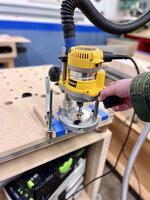
So the purpose for the Dominos is to make a router-based loose tenon jig for cabinets. Heavy inspiration from Peter Millard:


For what it's worth, an actual Domino is a tool I would like to have (as I'm sure a lot of people would), and I have considered it before but always come back to price and the work I currently do. I think if I was building hardwood furniture with angled joints and such I'd be more open to it, but right now focusing on cabinets it's simply too expensive.

My biscuits-and-pocket holes strategy has worked fine for cabinets, but what I'm hoping to improve with this loose tenon jig is:

1/ improved accuracy (biscuits help align, but have enough play where I still need to finesse everything in glue up)
2/ not use two joinery methods. The pocket holes add a lot of strength to the joint but doing that and biscuits takes twice as long
3/ have a viable joinery method for materials like melamine where pocket screws don't hold that well

I couldn't copy Peter Millard's jig exactly, because he's using a metric router bushing and metric plywood.

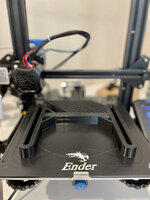
Because getting the exact size opening for the bushing requires some math and could be pretty fiddly, I decided to turn to Fusion360 and the 3D printer to make up a little spacer block to reference:
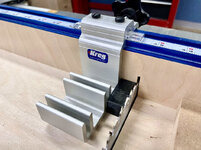
IMG-6439.jpg

IMG-6441.jpg

Which got me close. But I'm planning on a "narrow" and "loose" mortise setting just like the actual Domino, so I wanted the "narrow" setting to fit quite snug, and this first pass was a little loose side-to-side:

IMG-6453.jpg

I figured this would happen, and intentionally made my Fusion360 model parameterized, so I could easily change the needed spacer length without redoing a bunch of math:

mortise-Parameters.png

Once I was happy with the fit, I glued everything up:

IMG-6460.jpg

Not very pretty, but next I will use this as a template to remake the jig in 1/2" baltic birch plywood, same as Peter Millard did. Which involved some layout, clearing out the waste sections of the plywood with the drill press and jig saw, and then template routing with the router.

IMG-6462.jpg

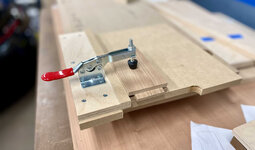
MDF clamped to plywood below for template routing:

IMG-6463.jpg

This mostly worked, but the bushing was a very tight fit in the resulting plywood pieces. A little too tight. So I had to open the holes up a bit with some careful hand sanding. I hope this won't affect the accuracy much, I tried to sand consistent faces.

Next the two plywood halves needed to be glued together:
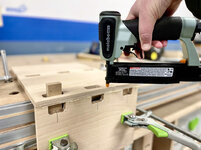
IMG-6464.jpg

This type of operation is easier said than done, and the inside face of the wide mortise needs to be flush with the lower plywood piece (hence the MDF registration stick poking up out the hole).

IMG-6465.jpg

The MFT helped a lot with this operation, but it wasn't square, so I took it out of the clamps and clamped some 90° squares to it while it dried.

Time for the big test.

I highly suggest watching the Peter Millard video for better idea on how it works, but basically one side has "loose" mortise templates, and the other has "narrow" mortise templates. I marked out some scrap 3/4" MDF and routed the loose mortises first.
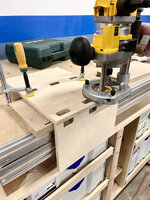
IMG-6468.jpg

Then the narrow:

IMG-6471.jpg

Here you can see what I mean about narrow vs. loose:

narrow-loose.jpg

The purpose of the narrow mortise is to align the front edge of the cabinet flush, then the rest of the joints get narrow on one piece but loose on the other so they aren't too difficult to put together.

When I first put it together I was disappointed to see a lip:

IMG-6478.jpg

But then I flipped it around and all good:
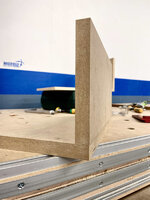
IMG-6475.jpg

This comes down to the orientation of the jig and which face of the workpiece it references. I tried to make everything to tolerance so it wouldn't matter, but with different material thicknesses etc, unfortunately I think it's something that will have to be kept track of. One of the confusing elements of biscuit-joinery I don't like (where to reference the fence).

I need to do some more tests and build a practice carcass, but hopefully it will be another tool in the cabinet-making repertoire!

🍻
 
OP
N

nicholam77

Well-known member
Joined
Dec 18, 2016
Messages
2,657
Location
Minneapolis, MN
This is a non-update update, but I haven't been very productive lately. Been hit with a wave of daycare illnesses one after the other.

But I've kept the 3D printer running on various doo-dads, not all of them very interesting, but I'll share this one because it was the longest print I've ever done at 22 hrs. And it was successful with no layer shifts or any of that nonsense!

IMG_6531.jpg

It's a clone of a Rockler featherboard for the table saw.

I also printed some miter slot hardware and the whole thing came out pretty nice.

IMG_6549.jpg

I haven't run any boards through with it yet, but it seems like it will function just fine.

Another thing I've puttered around with is making a router table jig for making the rail tenons for cabinet doors.

IMG_6548.jpg

Again, haven't tested, but pretty simple. The tenon length is set with the router table fence, and the shoulder depth is set with the router bit height.

My DeWalt job site table saw trunion was very finicky dialing in the height for doing the tenons that way, so I'm going to see if this gives me more control and better results. For 30min of effort it's worth a shot since I have 8x more doors to make for the pantry.

Speaking of which... my dad just dropped off more cherry boards so once I kick this cold I'm going to try to get back at it.

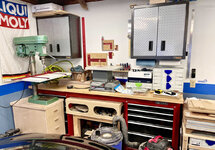
When I'm not working on projects my mind still wanders to the garage and future doings. Something that's been bugging me for awhile is getting my systainers organized. I've always wanted the "sys-port" look, and I guess that sort of exists in the base of the MFT cart, but I'm thinking about making a series of wall-mounted melamine cabinets for the rest of them + misc supplies.

I was thinking they'd go above the red Craftsman tool bench, about an 8' span.

It would give me a good chance to dry-run some 32mm cabinet making, the router-domino jig I just made, and my new LR32 setup.

sys_shelves.jpg

I made this quick modification to my garage Sketchup file. There's not enough room for every cabinet to be systainer-wide (16"), so the cabinets on the ends would be skinnier to make it sit within the footprint of the bench. Those on the ends might get doors.

And then I would move the Woodpecker tool wall stuff to be over the MFT docking area, possibly on a French cleat system.

That's where I landed but if anyone has any layout or organization suggestions I'm totally open.

All I know is the red bench has never been very efficient and always has a bunch of **** on it that could use a better home.

IMG_6551.jpg

Ok that's enough rambling for now...

🍻
 

Bakafish

Well-known member
Joined
Feb 7, 2017
Messages
477
Location
Tokyo
Okay, we all know I'm a big 3D printer advocate, but I'm an even bigger safety freak, and I'm not crazy about that featherboard. Your safety is the most important thing. The amount of force those things need to absorb if things go wrong, and the way even some commercial ones explode into shrapnel (look it up), I'd strongly suggest picking up a set of BOW brand Featherboards. I use them, they are very good quality, and because of their unique design, do not throw sharp shards if they are ever called on. The slot locks work really well too.
 

Trapps

ALLIANCE MEMBER
Joined
Feb 10, 2017
Messages
2,002
Location
The Detroit Zoo
Nick, I'm stoked to see you tackle the ports and efficient storage!

A few things to consider with your Systainer Ports:

Mounting above waist height, and a reach over the bench, means you should examine how high and how heavy you go.
I'd forego slides for above waist height as you'd most likely pull the box down to access its contents.
Your collection will most likely grow - future proof your space if possible. This is a mistake I've made and now want to redo my entire bench to make more ports. :willy_nil
Since you have other flat surfaces, what if you created a port cabinet spanning the garage, or a large portion of it, with a row of ports on your benchtop, like drawers, then another benchtop on top of that:

IMG_8880.jpg

Moving the upper, port stacks together leaves you a larger wall space to work with, like in your SketchUp model. It also leaves expansion space; just add 'port-cabinets' as needed.

Bonus points for the tenon jig!

:beer:
 
OP
N

nicholam77

Well-known member
Joined
Dec 18, 2016
Messages
2,657
Location
Minneapolis, MN
@Bakafish I looked at the Bow weatherboards, they look like a good product. I'm not sure they will fit my job site saw, though. I'll have to investigate further.

@Trapps thanks for the comments. I would never have thought of doing it like you've drawn. I'll have to think it over. I have thought about putting a floating work surface over the MFT and table saw cart docking positions. One issue with the Craftsman tool bench is it's very high. Adding a row of systainers on top of that would be awkwardly high to work on, but maybe ok to set stuff on top of to store. I do use that bench to put in progress parts on when the cars come in at night, and sometimes they are large pieces.

Agreed on no drawer slides. It's convenient for the MFT cart but these will almost surely be above the waist as you say. In my mind this would be an economical build so I'd like to skip slides for that reason, too.

As far as acquiring more systainers, I won't make any promises to myself, but I have a mental block with the new Sys3 redesign. They added a front handle which I don't like the look of and don't use, changed the latch (I like things matchy-matchy), and most annoyingly changed the heights. Sadly the gen 2 T-locs have pretty much dried up. I thought they would be around for longer. Fortunately I snagged a few on sale that are currently unused, and glad I did.
 

Bob Heine

ALLIANCE MEMBER
Joined
Oct 24, 2009
Messages
10,706
Location
Boca Raton, Florida
Nick and @Bakafish, I have the feather boards that came with the Bosch Router Table but have always thrown together feather boards for the table saw using scraps of wood and miter slides, always for specific cuts. You have shamed me into ordering a Bow FP1 feather board. TBH, I have been thinking about getting something more professional for a few decades.
Featherboard.jpg
 
OP
N

nicholam77

Well-known member
Joined
Dec 18, 2016
Messages
2,657
Location
Minneapolis, MN
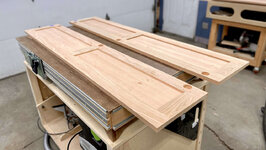
A little more pantry progress

As mentioned my dad dropped off some more cherry boards so I can continue with the pantry doors.

IMG_6563.jpg

Minnesota has been playing the usual spring weather games with us, so on the day I was working on this there was some light snow cover in the morning and only 22° F in the garage. Combine that with a head cold and it wasn't the most comfortable shop experience, but I have to take opportunities to work on it as they come.

I spent a good deal of time inspecting and marking out the parts. The lumber was S4S, but most boards had some sort of warp, mostly bow and crook.

I'll confess I've always struggled with warped boards, and it's one of the reasons I gravitate towards plywood. Despite doing woodworking things, I feel like I don't really understand wood or how to deal with it. For example I've always wondered, even with a jointer or planer, with a bowed board, if you press the board against the cutter and take away material, does it not just pop back to its bowed state after the cut?

It's no matter because I don't have milling machines anyways, but something that's always frustrated me with hardwood.

Anyways I marked for knots and other defects, examined each board and decided in what orientation I would run it through the saw.

IMG_6565.jpg

Next I cut to relative length using my pull saw. I have a skilsaw and other methods, but I like using the handsaw especially when precision isn't required.

IMG_6568.jpg

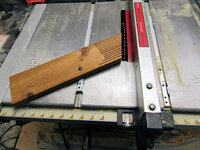
I did set up the featherboard to test (sorry @Bakafish !), but if it's any consolation I did use my JessEm stock guides to reduce the possibility of kickback and apply downward pressure.

IMG_6573.jpg

Review on the 3D-printed feather board is: It functions properly, but the miter slot "hardware" does not attach super tight. the screws end up spinning against the plastic and it is not perfect. Also, a longstanding complaint with this DeWalt model is my miter slots are not good. And the short inf3eed is posing a problem as can be seen in the picture.

IMG_6570.jpg

Ripping the boards was fairly uneventful. Cherry really burns on my saw so I need to keep the boards moving, and the JessEm guides plus the featherboard did help me do that.

Side note: even though my table saw cart is twice the width of the table saw and takes up valuable extra space, having a convenient place to set a batch of workpieces is amazing.

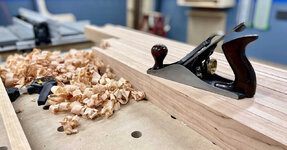
I ripped the boards a hair over 2 1/2" so I could clean up the aforementioned burning with my grandpa's #4.

IMG_6575.jpg

Still need to figure out a proper sharpening kit for it, but I LOVE using the plane. Definitely makes me want to get into hand tools but that's a whole other hobby my wallet probably can't stomach.

IMG_6576.jpg

I won't bore you with every step but after some crosscuts and grooves on the table saw, I was left with a good handful of dimensioned parts.

IMG_6582.jpg

IMG_6581.jpg

Next up was the tenons. Of course I had to try the router tenon jig I made. Got the depth from a part using my Paolini Pocket Rule.

IMG_6584.jpg

And transferred that to the router fence:

IMG_6588.jpg

But sadly it wasn't perfect on the first go. After 20-30min of dialing in the fence and bit height, I gave up.

IMG_6591.jpg

The jig DID work, but I had multiple problems.

1/ micro-adjusting the fence and bit height was NOT easier than on the table saw (which was my main reason for going this route).
2/ the tenon shoulder didn't seem perfectly square? I made the jig using my square so I don't know what's going on there
3/ The grooves in the stiles are not consistent depth or width across the pieces. Even using the rollers and featherboard. I blame this on my table saw, and on the warped boards, and on my zero-clearance insert which has some flex and not perfectly level with the table saw surface

Add to that I cut my knuckle somehow and it would not stop bleeding and I didn't want to go to the house to get a bandaid. I decided to just call it quits and return in a better headspace as I was starting to get frustrated.

On the upside, I got a lot done for a single day. On the downside, precise woodworking is hard. It's amazing how elusive a perfectly fitted tenon can be even with decent tools. For me, anyways. But I've set a high bar for myself on this project, so even though I want to get it finished up, I intend to take the time to get it right.

🍻
 

sawduststeve

Well-known member
Joined
Oct 7, 2016
Messages
2,139
Location
Havering-Atte-Bower,London/Essex boarders, England
Nick, don’t beat yourself up fella.
The work you’ve turned out from your home shop/ garage is fantastic.
Tennons , mostly, aren’t seen, glue and wedges, keep it together and a good sanding brings any variations down nicely. Wood is infinitely adjustable. Maybe you’re confusing it with 3d printing. 🤣🤣

keep up the great work.
Steve🍻
 

bj383ss

Well-known member
Joined
Sep 29, 2011
Messages
3,166
Location
TX
Nick I second what others have said. You are attempting one of the harder joints to make absolutely perfect. As you discovered if every step is not perfect the end result may not be what you want. I did the same thing except I was using rail and stile bits in my router and hardwood Pecan. The burning from the machines was the most aggravating thing to me.

When you cut the grooves did you flip them end for end and run them through both directions or did you move the fence and cut the same direction? In order to get it perfectly centered I always do the flip method. As far as you question around milling out bows on the jointer in my experience it does not come back as the wood has already moved from when it was cut and the stress released.

One recommendation I have is to always make test cuts for every procedure with an offcut from you good boards to make sure all your operations are within the tolerance you are trying to achieve that way you don't ruin you good pieces.

Hope that helps. Sometimes you just have to walk away and come back with a better head space. You having a cold definitely didn't help.

Bret
 
To avoid these ads, REGISTER NOW!

kaymccampbell

Well-known member
Joined
Feb 27, 2015
Messages
29,518
Location
Upstate New York
I'll follow along with these guys. You're doing fine. Cabinet joinery is never perfect. The folks who do it in big production run the assembled panels through a huge thickness sander to make everything appear flat n perfect. I've learned that a belt or orbital sander can be a great addition to the door making arsenal. That, and making sure you break the outer edges of the door panels, so slight differences don't show.
 

bdbecker

ALLIANCE MEMBER
Joined
Nov 18, 2015
Messages
5,563
Location
Iowa
For example I've always wondered, even with a jointer or planer, with a bowed board, if you press the board against the cutter and take away material, does it not just pop back to its bowed state after the cut?

When running a board through a jointer, the cutterhead is only removing the material that is not in plane with the outfeed table while the board is in a 'free state'. You should only putting enough force on the board to hold it tight to the fence and table, along with feeding the stock through the cutterhead. When face jointing thinner stock, you do need to be careful about how much pressure you apply and where you apply it to the board, or you will just keep taking off material without actually flattening anything.

When running stock through a planer, the flat face (that has already run through the jointer) should be facing down, and the cutterhead is only taking off the material that is not in a parallel plane with the flat face. If you feed a bowed board through a planer, you will just end up with a thinner bowed board. Its kind of why you are supposed to have both tools in the shop. That being said, some clever folks have figured out that you can cheat your planer to do jointer work with the use of a planer sled.

If you remember the ash boat seats I made in my thread, the boards I started out with were more like pringle chips than actual boards. One thing I didn’t cover in my post about that project was the planer sled I made. I used a piece of ¾” ply that is just narrower than my planer as my flat reference. I then set my stock on the sled and used shims to take out any wobble or rocking. The shims are held in place with a liberal application of hot melt glue. Many passes later, you end up with a flat reference surface and can remove the stock from the sled. The stock can then be flipped over and run through the planer like normal.

Basically, you use a jointer to make a flat surface, and then use a planer to make a surface that is parallel to the jointed surface.
 

Mr. Roboto

Well-known member
Joined
Dec 11, 2012
Messages
2,160
Location
New Hampshire
Man, I admire you for building all of these jigs, shop tools, ect and trying these complicated joints. I get intimidated sometimes when it comes to getting too fancy with woodworking. Keep it up! You’re really progressing, don’t beat yourself up!
 
OP
N

nicholam77

Well-known member
Joined
Dec 18, 2016
Messages
2,657
Location
Minneapolis, MN
Wow, lots of comments haha

I really like my Delta Tenon cutter/jig—- works great. Watch for a used as

I'll look into that. One thing I struggle with on my table saw is its size. The table and infeed are quite small and that looks like a fairly large jig but I'll check it out.

Nick, don’t beat yourself up fella.
The work you’ve turned out from your home shop/ garage is fantastic.
Tennons , mostly, aren’t seen, glue and wedges, keep it together and a good sanding brings any variations down nicely. Wood is infinitely adjustable. Maybe you’re confusing it with 3d printing. 🤣🤣

keep up the great work.
Steve🍻

Thank you Steve, I appreciate it. I have a tendency to be overly self-critical of my work. The 3d printing is a whole different beast I haven't fully figured out!

Nick I second what others have said. You are attempting one of the harder joints to make absolutely perfect. As you discovered if every step is not perfect the end result may not be what you want.

Yes, it's amazing how small of a tolerance takes a tenon from too tight to too loose.

When you cut the grooves did you flip them end for end and run them through both directions or did you move the fence and cut the same direction? In order to get it perfectly centered I always do the flip method. As far as you question around milling out bows on the jointer in my experience it does not come back as the wood has already moved from when it was cut and the stress released.

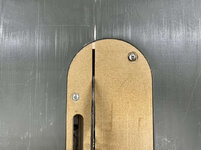
I did flip them to center the groove. I think the variances were from two things. Variance in the height is because of my homemade zero clearance insert. I had glued a little spline into the kerf behind the riving knife, but that's failed, and the "right half" can depress a bit at the end of the cut. I think in an attempt to keep the boards flat to the table I may have had varying pressure. Also my ZCI is almost impossible to perfectly level with the table surface.

IMG-6636.jpg

And then as far as variance in groove width, I think the boards, especially the long ones, still had some slight bow and cup like mentioned. So despite the featherboard, depending on where on the board I was applying pressure, it may not have been perfectly flat registered against the fence the same way throughout the cut.

And these are tiny differences. But like you said a tiny variance can throw off the fit.

Fortunately I didn't ruin any parts. I had a lot of off cut test pieces... probably went through 20+ trying to dial it in.

Copy that on the jointer.

I'll follow along with these guys. You're doing fine. Cabinet joinery is never perfect. The folks who do it in big production run the assembled panels through a huge thickness sander to make everything appear flat n perfect. I've learned that a belt or orbital sander can be a great addition to the door making arsenal. That, and making sure you break the outer edges of the door panels, so slight differences don't show.

Thanks Kay. I know I shouldn't, but I guess I was hoping for cabinet shop quality results using the tools I have. If I had milling machines, a larger table saw, or a router fence with micro-adjust and lift, I think I'd be 95% there.

Agree that sanding can ease the look of things a lot. I'm covered on an orbital sander. I do have a belt sander but I've only ever produced disastrous results with one. Probably operator error 😁

I do break the edges for comfort and less likely to splinter or chip. Thanks for the suggestions.

When running a board through a jointer, the cutterhead is only removing the material that is not in plane with the outfeed table while the board is in a 'free state'. You should only putting enough force on the board to hold it tight to the fence and table, along with feeding the stock through the cutterhead. When face jointing thinner stock, you do need to be careful about how much pressure you apply and where you apply it to the board, or you will just keep taking off material without actually flattening anything.

Yeah I follow the bit about the outfeed surface being the reference. I guess I've wondered (since I've never done it myself), and I know wood likes to spring back to whatever equilibrium it currently likes, if you have to push a bowed board down to hold it against the outfeed, does it not just pop back up even if you've removed some material? Obviously the whole point of those machines is to true out-of-square boards so it must work haha.

How was using the planer sled? Annoying or did it work pretty well?

Man, I admire you for building all of these jigs, shop tools, ect and trying these complicated joints. I get intimidated sometimes when it comes to getting too fancy with woodworking. Keep it up! You’re really progressing, don’t beat yourself up!

Thanks! I've learned jigs and repeatability are the key to accurate parts. If you let a jig or stop block do the work and take yourself out of the equation, it suddenly becomes a lot easier :ROFLMAO:

I know there's people out there that can do perfect hand cut dovetails all day, but that isn't me!


______________________________________________


In the end I went back to using the crosscut sled. I set up the tenons to be just slightly too thick, and then hand sanded each one for a custom fit. More work, but the only way I could see to get the fit I wanted.

IMG-6631.jpg

I'm purposely showing one I wish was a little better (closed more on the shoulders). Clamps will pull it in but for some reason they aren't perfectly square. The crosscut sled perhaps.

Here's a better one:

IMG-6634.jpg

This set of doors was supposed to be 11 + 5/16" wide on each door, and it came out pretty much spot on.

IMG-6635.jpg

Still a bit cold to glue up outside, but fortunately my MFT hardboard spoil surface fits our dining table perfectly. 😁

IMG-6638.jpg

🍻
 

kaymccampbell

Well-known member
Joined
Feb 27, 2015
Messages
29,518
Location
Upstate New York
You do realize that wood is not like metal. You don't machine it and expect a permanent result. After the next damp-dry cycle in a week or so, those door parts will all be a different size, length, and width. Glue em up, rub some sawdust in the joints, and wait a month. You won't recognize them.
 

bdbecker

ALLIANCE MEMBER
Joined
Nov 18, 2015
Messages
5,563
Location
Iowa
Yeah I follow the bit about the outfeed surface being the reference. I guess I've wondered (since I've never done it myself), and I know wood likes to spring back to whatever equilibrium it currently likes, if you have to push a bowed board down to hold it against the outfeed, does it not just pop back up even if you've removed some material? Obviously the whole point of those machines is to true out-of-square boards so it must work haha.

How was using the planer sled? Annoying or did it work pretty well?

You shouldn't push down to flatten the board at all. The idea is that you are only pushing down hard enough to maintain contact with the table, which serves as a fixed reference plane for each pass. For the first several passes, the cutter is only engaging the very highest spots on the board. With each subsequent pass, the high spots become lower, creating a larger contact area between the cutter and board. The final jointing pass will engage the full width of the board along its entire length, creating a flat, uniform surface.

Once the wood has dried into its twisted/bowed/cupped state, its not likely to move a significant amount unless subjected to a lot of moisture. Within that now dry, but twisted/bowed/cupped board is a smaller, perfectly straight and flat board. When jointing or planing wood, you are shaving off the material that is not a part of that perfectly straight inner board.

The planer sled worked better than expected. The shims and hot glue was a lot less fiddly than I thought it would be, and cleaning off the glue was really easy. It'd be too slow if I wanted to do a high volume of work, but since I'm just a newbie in a relatively small space, it works well for my needs. I may add some stiffeners to it, but I was able to get dead flat and consistent boards out of it.
 
Last edited:

jar944

Well-known member
Joined
Jul 26, 2010
Messages
5,923
Location
Northern VA
Tenon/stub tenon joints can be a pain, more equipment makes it less of a pain, but still can be a pain. What you have there looks good. I've never been a fan of grooving on the table saw, and even less so without a dado stack. Flipping to center the groove (it's how I was taught as well) works if you have perfect stock with no variations in thickness. Any bow or deviation in thickness translates into the groove width.

If you want to use the router table, I'd suggest a tongue and groove bit set. Even the sub $20 imports will get you a functional setup.
41sVXdXxolL._AC_SY580_.jpg

And for any mismatches you find after you glue up the doors that #4 you have will work wonders (as would a widebelt provided the person running it us paying attention) with nice sharp iron and you can have a perfect flush joint in a couple minutes.

 
OP
N

nicholam77

Well-known member
Joined
Dec 18, 2016
Messages
2,657
Location
Minneapolis, MN
You do realize that wood is not like metal. You don't machine it and expect a permanent result. After the next damp-dry cycle in a week or so, those door parts will all be a different size, length, and width. Glue em up, rub some sawdust in the joints, and wait a month. You won't recognize them.

Yes, definitely. The first round of doors I did, I let sit for a bit before glue up, and it did seem like the fit of the tenons changed slightly. I am gluing them up right away this time. I still think it makes sense to hit a measurement as precisely as possible during the build, whether it be the length, width, or the fit of the tenons. The Blum hinges we are using have some adjustability, but we going after a specific reveal and overlay. I don't think the overall door width for example should change much at all, even with seasonal humidity changes, as the width of the stiles is not that significant and there is not much movement along the length of the grain. Plywood captured panels, so no problem there.

You shouldn't push down to flatten the board at all. The idea is that you are only pushing down hard enough to maintain contact with the table, which serves as a fixed reference plane for each pass.

Makes sense, thanks.

The planer sled worked better than expected. The shims and hot glue was a lot less fiddly than I thought it would be, and cleaning off the glue was really easy. It'd be too slow if I wanted to do a high volume of work, but since I'm just a newbie in a relatively small space, it works well for my needs. I may add some stiffeners to it, but I was able to get dead flat and consistent boards out of it.

Nice. I don't have room for both at the moment so I think I'd go for a planer if I end up doing more with hardwood.

Nick,
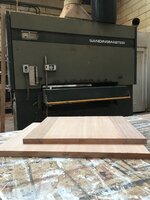
Two nicely flat small panels, not worth a lot
behind which stands an enormous bit of expensive kit.
I see a 6 head planer moulder in your future
🤣🤣🤣
You do quality work, don’t sweat it 👍
Regards
Steve

Yes, that's what I need! :ROFLMAO:

Looks awesome

Tenon/stub tenon joints can be a pain, more equipment makes it less of a pain, but still can be a pain. What you have there looks good. I've never been a fan of grooving on the table saw, and even less so without a dado stack. Flipping to center the groove (it's how I was taught as well) works if you have perfect stock with no variations in thickness. Any bow or deviation in thickness translates into the groove width.

If you want to use the router table, I'd suggest a tongue and groove bit set. Even the sub $20 imports will get you a functional setup.

And for any mismatches you find after you glue up the doors that #4 you have will work wonders (as would a widebelt provided the person running it us paying attention) with nice sharp iron and you can have a perfect flush joint in a couple minutes.

I think you hit the nail on the head with the slight bow and groove thickness. I ended up having to widen the groove in areas by hand with sandpaper on the longer stiles.

Another frustration with this set was the plywood I got was variable thickness per sheet. Enough to need to do a custom setup for different sheets which added time.

At the beginning of this project, contemplating how to do the doors, I was considering a router bit set like you showed. A non-Amazon-bargain-basement deal is more like $70-$100, plus buy or build a coping sled, and I opted for the table saw method (which YouTube made look quite easy, although they never show the time wasted on dialing in the fit!).

Aside from cost, the other reason I didn't do the bit set was I wasn't sure how the plywood panel thickness would match the cutter. Are you just at the mercy of the material and if it matches up?

But now I am left wondering if it would have been easier.

Nice video on the planing. This round my joints were in pretty good shape but I do always enjoy using and learning how to use the plane so I will keep that in mind on the rest of them.

____________________________________________​


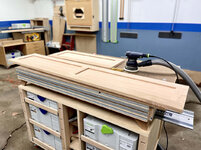
After a lot of hand sanding to fit the tenons and plywood panels, I got the two taller doors glued up for this set.

IMG_6642.jpg

These Bessey parallel clamps are pricey but I have to say for this task they were 100% worth it and probably eliminated a lot of stress.

My hand sanding efforts were worth it I think, most of the joints look great. It just took some of the "repeatability" out of the process.

IMG_6648.jpg

I'll let my dad do the final touch ups, but I sanded the faces to 120 grit.

And drilled hinge cups.

IMG_6651.jpg

IMG_6652.jpg

All-in-all I delivered 4 doors today (two upper, two lower). To give you an idea it took me about 12 hours to produce these. Only 4 more to go! But I already have the rails and stiles ripped and grooved for those so I have a head start.
 
OP
N

nicholam77

Well-known member
Joined
Dec 18, 2016
Messages
2,657
Location
Minneapolis, MN
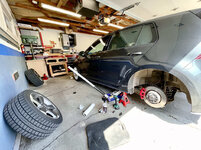
My brother is in town visiting from North Carolina so not much to report, but I did get some new tires for the GTI. I've been wanting to get summer tires for it since the beginning, and here we are 6 yrs and 35k miles later with plenty of tread on the stock all-seasons. :rolleyes:

I decided to just do it (I don't think I'm ever going to wear this tread down), but opted for a "budget" option, Firestone Firehawk Indy 500's through Costco. They are cheap compared to a Michelin PSS or something like that. But seem to be well-reviewed.

Since I hadn't quite switched to summer wheels yet, I had to take the car seats out and load 'er up. Nice thing about the hatchback is I can comfortably fit 4x wheels with tires.

IMG_6677.jpg

I had Costco install them onto the loose wheels (instead of putting the wheels on the car). I use spacers on my summer setup, and the front and back have differing bolt lengths and I just don't trust people to get that right.

I sat on them for a few weeks and finally yesterday had an opportunity to do the swap.

IMG_6689.jpg

IMG_6690.jpg

Haven't driven much other than to daycare, but so far so good. They are quiet for now and grip seems good. Not a groundbreaking difference but we'll see how they do in wet and hot conditions.
 

fourmotioneer

Well-known member
Joined
Mar 19, 2015
Messages
214
Location
Ann Arbor, MI
Hopefully the tires treat you well. I hate to chime in after you’ve purchased them but I have two sets of them at home so I do have some skin in the game. I have a set on my Fiat and on my Alfa and I’m amazed at how much they hydroplane in standing water. If they were gumball tires I’d understand, but they are 340 treadwear. Will be interested to see how they handle rain in the GTI. Hopefully better than what I’ve experienced
 
OP
N

nicholam77

Well-known member
Joined
Dec 18, 2016
Messages
2,657
Location
Minneapolis, MN
Hopefully the tires treat you well. I hate to chime in after you’ve purchased them but I have two sets of them at home so I do have some skin in the game. I have a set on my Fiat and on my Alfa and I’m amazed at how much they hydroplane in standing water. If they were gumball tires I’d understand, but they are 340 treadwear. Will be interested to see how they handle rain in the GTI. Hopefully better than what I’ve experienced

Yep, I'm committed now :ROFLMAO: . It's supposed to rain for the next 5 days here so I should find out soon haha. I actually read some reviews praising how good they were in the wet for a summer tire. Fortunately I don't drive through standing water very often. I'm sure there were better overall choices like the Michelin PS4S or something like that, but I couldn't justify spending the big bucks when my stock tires weren't even used up yet. And speaking of those... I'll be in shock if these Firehawks are worse in the rain than them. The stock tires were all around garbage.

Obviously they're brand new and it's barely cracking 50° F here, so I'll report back after some miles and warmer weather.

Just beautiful, great job👍👍

Steve 🍻

Thank you Steve, I appreciate it!
 
OP
N

nicholam77

Well-known member
Joined
Dec 18, 2016
Messages
2,657
Location
Minneapolis, MN
3D Printed Socket Organizers — Part 1

I was going to wait to post until I had this completed successfully, but I'm impatient. 😁

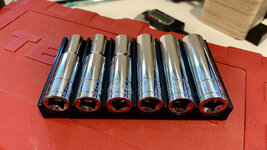
I don't own a lot of mechanics tools, but one thing I do have is this 3/8 metric/SAE set from Tekton. It came with a moulded carrying case, which is nicely organized, but I wanted something with a smaller footprint and always accessible.

IMG-6760.jpg

One of the main reasons I was intrigued by 3D printing was tool and drawer organization. After getting into it, I realized CAD is hard and there is a lot to learn, and making custom tool holders for everything is easier said than done. Not to mention constrained by my printer bed size, and would use a lot of plastic.

But... determined to not leave empty-handed I've slowly been chipping away at Fusion 360 basics as you know, and I finally felt like I was at a point to try to tackle these sockets and make something custom.

There are various socket organizer models on Thingiverse, but often for a specific set like Craftsman X-Y-Z etc, and since people only upload .STL files they are not easy to customize. So I started from scratch, measuring each socket and entering a TON of parameters into Fusion 360 for my model.

This is what I came up with (it's based some something I found on Thingiverse):

Metric-Sockets-1.jpg

Metric-Sockets-2.jpg

I had to split into two trays because my print bed wasn't large enough to do one big model. But theses two trays cover all the metric sockets in that Tekton box. The short and deep sockets of the same diameter are stacked with a center divider, and one size label for each pair.

I did a quick test print of a partial model to save filament, and everything so far fit nicely:

IMG-6762-copy.jpg

Then I ran out of filament so I have more on order from Amazon.

I heavily parameterized this model, so it should in theory be very adjustable. If I can get everything working and feel good about it I might make it available for others if there is any interest.

Next (and this required a LOT of Googling and YouTube tutorial interruptions), I tackled a little tray for the ratchet, extensions, and universal.

Because the ratchet is a complicated shape and I wanted a custom look, I took a picture of it on a high contrast background and imported into Fusion 360 to trace:

ratchet-trace-fusion.jpg

I'm familiar using splines / Bezier handles from other applications like Photoshop and Illustrator, and I have to say it was much more frustrating in Fusion 360. I couldn't for the life of me figure out how to make half of the Bezier handle independent like you can in Photoshop.

Because there were some perspective issues with the source photograph, I drew one side of the ratchet only, and then mirrored that across a center line, which resulted in the following sketch:

ratchet-sketch.jpg

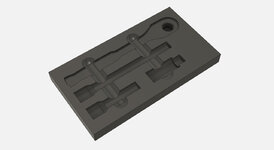
Then I extruded that up, as well as modeled some simplified 3D versions of the extensions and universal, and used those 3D models to "cut" out their shapes in a rectangle tray. Added some finger pulls and it looks like this:

Ratchet-Organizer-render-no-tooling.jpg

And for fun here are the "tools" sitting in their places with a Chrome appearance added:

Ratchet-Organizer-render.jpg

This tray is going to use a lot of plastic to print, so I might try to divide up the model somehow into some smaller test pieces. I did leave some clearance on all the parts, so it should work, but I'm not 100% confident in the curves, especially the ratchet since I traced that from a photo.

🍻
 
OP
N

nicholam77

Well-known member
Joined
Dec 18, 2016
Messages
2,657
Location
Minneapolis, MN
3D Printed Socket Organizers - Part 2

I did a lot of test prints yesterday.

First I printed small test strips of the embossed labeling area because I really wanted to to a two-tone contrasting print (white numerals on black background). So far I haven't succeeded.

IMG-6775.jpg

You can see despite the .6mm width of the font, they came out pretty clean. But in most lighting, hard to read.

I tried to follow tutorials for a mid-print filament change on the Ender 3 V2, but it seems in my firmware the Marlin M600 ADVANCED_PAUSE_FEATURE is missing. According to the Marlin website M600 "requires an LCD screen", which the Ender 3 v2 upgraded display does not qualify as. Maybe a custom firmware could solve that issue but I'm not ready to go down that path just for this, just yet.

Then I found this guide, which uses the "pause at layer height" script in Cura, and then lets Octoprint capture that pause command and run a short script to move the print head and lock the steppers so you can do the filament swap, and then reposition the print head.

That was partially successful, but my main problem was it did not unlock the extruder motor, even though it was supposed to. This made gently removing and feeding the new filament, as well as purging, a lot more difficult, and on my last try I bumped the gantry and the nozzle collided with the print and I had to emergency stop.

After that incident the next test print suffered from the extruder slipping/clicking issue I had awhile back, and it was a clogged nozzle. I haven't figured out a good way to really clean a nozzle when it comes off, so I threw my last new one on. It seems to happen more if I have to cancel a print.

A bit frustrated after running the test 5x times, I switched gears and set up the ratchet tray to run, which was an 8 hr print with only 2 walls and 5% infill.

It came out pretty well, though!

IMG-6772.jpg

The extensions and universal fit like a glove. The ratchet head and handle are correct, but somehow the head is placed about 10mm too high. All-in-all though I'm surprised it was that accurate from tracing an iPhone photo with perspective issues. I've made a correction in the model and will run it again.

More to come when I can figure out the dual-color printing.

🍻
 

SamYoung

Well-known member
Joined
Jun 4, 2020
Messages
104
Location
Massillon, Ohio
Obviously, figuring out the layered multicolor print is the ideal solution, but have you considered painting the tops of the letters if you can't? A light touch with a brush, or stamping with a sponge applicator should get you the same effect, though not as much bragging rights. You can also print as negative and fill void with needle and paint/epoxy.
 

Bakafish

Well-known member
Joined
Feb 7, 2017
Messages
477
Location
Tokyo
Obviously, figuring out the layered multicolor print is the ideal solution, but have you considered painting the tops of the letters if you can't? A light touch with a brush, or stamping with a sponge applicator should get you the same effect, though not as much bragging rights. You can also print as negative and fill void with needle and paint/epoxy.
I can't speak to painting embossed surfaces, but trying to fill in reliefs with paint was frustrating and came out pretty bad. The problem is that 3D printers do not print clean overhangs, essentially what reliefed text is, and so you get a really uneven surface at the bottom that interacts with an already complicated surface tension issue of letter outlines and the hydrophobic tendencies of the plastic. It seems like it would work until you actually try it, the results are unsatisfactory. @kaymccampbell cleverly uses an extruder pen to fill those voids with filament, which I think is the easiest way to do this successfully. There may be some semi-solid paint or colored filler that will work as well.

Multi-color printing on a single extruder setup is advanced level, I outlined my approach in an earlier post. Instead of pausing I did two separate prints and use z-hop to clear the existing material. Registration of the prints in Cura was a bit challenging, but solvable by putting unprintable registration features below the bed depth to align everything with a corner of the print bed. z-hop (on retract) lifts up the extruder whenever it is moving to another location, so it doesn't hit the colored parts you previously printed, but it slows things down on the subsequent layers where it isn't required. A tall print like the socket set tray would take a really long time to print. The workaround being, slice it with and without z-hop and replace the first 3 layers of g-code in the non-hop file (g-code is plain text) with the lines that have z-hop moves. Again, this is fairly advanced stuff, but it is doable if you are determined enough.
 

SamYoung

Well-known member
Joined
Jun 4, 2020
Messages
104
Location
Massillon, Ohio
I can't speak to painting embossed surfaces, but trying to fill in reliefs with paint was frustrating and came out pretty bad. The problem is that 3D printers do not print clean overhangs, essentially what reliefed text is, and so you get a really uneven surface at the bottom that interacts with an already complicated surface tension issue of letter outlines and the hydrophobic tendencies of the plastic. It seems like it would work until you actually try it, the results are unsatisfactory. @kaymccampbell cleverly uses an extruder pen to fill those voids with filament, which I think is the easiest way to do this successfully. There may be some semi-solid paint or colored filler that will work as well.
I've never had many issues with it, but you do have to have the right setup. I used to pot electronics, and infill extruded 3D prints and engraved letter at work on a regular basis. If paint, squeeze bottles with a blunt hypodermic needle tip are your friend. Can also put needle tips on the end of a super glue bottle or the mixer tube of an epoxy gun. Having appropriate sized letters for your needle tip is key to being able to get a good infill without bubbles or making a mess. It's been to long to remember the exact sizes we used, but it is consistently doable once you figure it out.
 

Mr. Roboto

Well-known member
Joined
Dec 11, 2012
Messages
2,160
Location
New Hampshire
I'm impressed! Pretty awesome how you are able to take a photo and translate it into dimensions to build a 3D model. On something like that ratchet/extension tray. Is that solid inside, or hollow?
 
To avoid these ads, REGISTER NOW!
Top Bottom