To avoid these ads, REGISTER NOW!

3D Printing...

scratchedup

Well-known member
Joined
Aug 13, 2012
Messages
834
Location
Fayetteville, GA
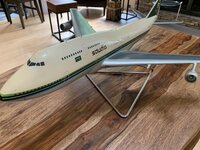
I was given this as a gift. Its pretty cool but one of the 4 engines is gone. Is there any way to replicate the engine and make a new one? I do not know anything about 3D printing but it seems it would be perfect for this. The cost would be a factor...I think this came from a garage sale so its really not would spending more then a hundred bucks or so...
 

Attachments

  • IMG_3109.jpeg
    IMG_3109.jpeg
    345.8 KB · Views: 99
  • IMG_3110.jpeg
    IMG_3110.jpeg
    256.7 KB · Views: 98
To avoid these ads, REGISTER NOW!

LXCam

ALLIANCE MEMBER
Joined
Apr 23, 2013
Messages
19,122
Location
AZ
There’s an entire thread dedicated to this. I bet someone in there could hook you up. Let me see if I can find the link.....nope not having any luck doing it off my phone.
 

no704

Well-known member
Joined
Apr 27, 2016
Messages
5,215
Ya, possible, good luck finding a .stl for it. Someone might be able to scan it for u?
 

draco_1967

Well-known member
Joined
Jan 3, 2021
Messages
205
Location
Utah
Yes, totally possible. What material is the model made from?

With a picture from the side and the front of the engine, and a measurement of the diameter, it wouldn't be hard to replicate it in CAD. The profile of the attaching strut will be a little harder, but doable.
 

WoodsTruck

Well-known member
Joined
Jan 12, 2013
Messages
1,023
Is it a Boeing 747? Could clip it from these files and print.


kd3pc

Well-known member
Joined
Aug 10, 2013
Messages
3,630
Location
Northern Neck
Where / how do I access a "standard 3d printer (200x200x200mm)?
some public libraries have them available, as do many Maker spaces.

Buying the printer is the easy part, then you need filament(s) of the desired color, ventilation, heated plates, .stl and slicer software, someone to 3D scan or do the digitizing of the needed part and so on.

Then the printing is quite slow process, and getting to completion is a feat itself. rats nest of filament and loosening from plate.
 

purplezr2

Well-known member
Joined
Jun 1, 2010
Messages
5,292
Location
Central MN
some public libraries have them available, as do many Maker spaces.

Buying the printer is the easy part, then you need filament(s) of the desired color, ventilation, heated plates, .stl and slicer software, someone to 3D scan or do the digitizing of the needed part and so on.

Then the printing is quite slow process, and getting to completion is a feat itself. rats nest of filament and loosening from plate.

Jesus, you make it sound impossible to print the part.

I think the toughest issue will be creating a model of the part you need.

Once you have that, I think printing it would not be to hard for someone else, or for you if you buy a decent printer.
 

mike93lx

ALLIANCE MEMBER
Joined
Dec 9, 2013
Messages
37,515
Location
Richmond, VA
Jesus, you make it sound impossible to print the part.

I think the toughest issue will be creating a model of the part you need.

Once you have that, I think printing it would not be to hard for someone else, or for you if you buy a decent printer.
Printing a quality part is not simple at all
 
To avoid these ads, REGISTER NOW!

mike93lx

ALLIANCE MEMBER
Joined
Dec 9, 2013
Messages
37,515
Location
Richmond, VA
Actually it is not hard at all.

I have a printer, I have had not real issues getting a quality print.
That's great. You must be the only one that hasn't spent a bunch of time aligning and maintaining their printer. I am sure there wasn't a learning curve for you either
 

IndyGarage

Well-known member
Joined
Apr 29, 2010
Messages
9,683
Location
Indy
That's great. You must be the only one that hasn't spent a bunch of time aligning and maintaining their printer. I am sure there wasn't a learning curve for you either
No he's not.

I bought an Creality Ender 3D printer awhile back on Amazon - $180 dollars. i bought a couple rolls of filament $20 each.

Literally 1 hour to put the printer together. 10 minutes to adjust it. First print failed about 30 seconds in because I didn't get something tight.

Second print finished perfectly. So did the next 20-30 prints. The thing has probably run 100 hours and through the first roll of filament without any adjustment whatsoever. Prints are better than I expected they would be - way better. Very smooth and detailed.

They've made it so simple a child could do it easily. The only tricky thing was adjusting the axis rollers - there were no instructions on that, but it was pretty obvious it needed done.
 

IndyGarage

Well-known member
Joined
Apr 29, 2010
Messages
9,683
Location
Indy
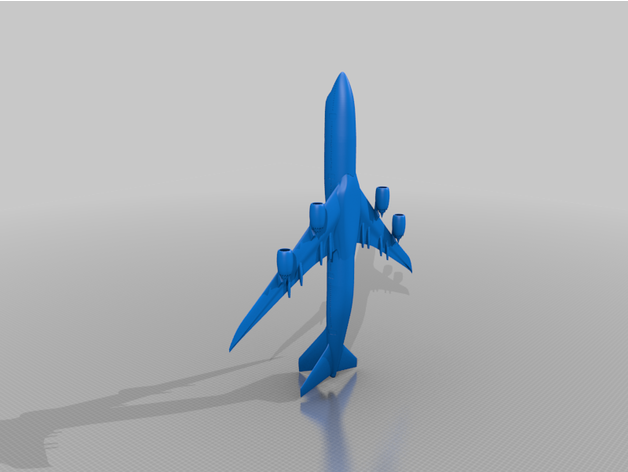
There's an engine file in this thingiverse file. Would just be a matter of getting the scaling right for your model. Just print the model then measure your item and rescale it to fit.

Then finishing it and painting it.

That's one of the great things about 3d printing - scaling something is as simple as typing in a scale. I printed out a Church for my and n-scale train layout - was too small - printed it 1.5 scale - too big, printed it again 1.25 scale - perfect.
Is it a Boeing 747? Could clip it from these files and print.


WoodsTruck

Well-known member
Joined
Jan 12, 2013
Messages
1,023
When my daughter was in middle school she had an opportunity to go to the nearby university for STEM classes. They were once a week in the evening for 6-8 weeks. One evening they drew up figurines to print and the prof printed them to be picked up at the next session. I figured I would buy a printer for her to tinker with. I ended up buying an Ender 5 ($350 at the time) since it had a decent print size capability. She helped me put it together, we leveled the bed and used her figurine .stl file and hit print. I have had few issues with mine in 3 years and keep hitting "print".

I use TinkerCad to draw up my items, which is pretty elementary compared to some of the full on CAD software packages out there, but it suits my needs at this time. Export the file out and open in the provided slicer program and save to the card to print.

I have seen images of prints done on the Prusa machines and they look impressive. Maybe someday I'll wander down that road and buy one of those too.
 

IndyGarage

Well-known member
Joined
Apr 29, 2010
Messages
9,683
Location
Indy
Indy … if i wanted to buy a printer and get started ... where would i find good information?
Well I don't know where you are starting from, but I would recommend just buying one and get going.

Essentially a 3D printer is simply an XYZ gantry that holds an extruder head over a heated flat plate. The computer controls the precise relative location of the extruder in position to lay down a continuous thin layer of melted plastic on the plate - like a caulk gun. It lays a bead down, then indexes upward and lays another bead on top of that one - thousands of layers later you have a part.

That's how it works, but in reality you don't even need to know that.

I bought this printer and filament:

Creality Ender

filament

The kit literally has everything you need to put it together and run it, except it came with a small amount of filament, so buy a large roll of filament separately.

It took me about an hour to put the printer together. You have to put the vertical axes and the gantry on and route the wires. The included cartoon instructions aren't very good but they were good enough for me. I had to tighten the table and the vertical and horizontal axis rollers, and the instructions said nothing about it. They have adjusters on them, so it was pretty easy to figure out. The only other thing to do is level the table, that was a little tricky.

From there you install the slicer software on your computer from the included mini SD card. It's a very simple piece of software that makes the G-code that runs the machine from a 3d model file. Go to thingiverse.com and pick out something you want to make - there are millions of items. Download the 3d file, pull it into the slicer, set the parameters, save it on the SD card and then put the SD card into the printer and hit Print from media. Wait a few hours and take your part off the machine.

You will learn a few things as you go. I didn't know all the features of the slicer software at first. For example the 3d file doesn't always load into the slicer in the correct orientation, and it might not print well. (Because of the layering, the printer can't just create horizontal surfaces in mid air very well, although it does way better than you might think) You have to manually flip the part around in the slicer into the best orientation for the print. Also I didn't know anything about the temperatures to run the machine at. The default is 200 C for the extruder and 60 C for the table and that has worked fine for my prints. After a couple of tries I figured things out.

After you get comfortable making Thingiverse files, then you can get CAD software and make your own models. It will be obvious what you need to do at that point.
 

Copymutt

Well-known member
Joined
Sep 3, 2016
Messages
3,390
Location
Colorado
Download, install, set parameters, software.
Guaranteed to frustrate a human to giving up. Just saying from decades if running a business using technology that does not disclose when its incompatible, no longer supported, corrupt, doesn't play well w/ operating system, etc. etc.
 

Jehannum

Well-known member
Joined
May 3, 2012
Messages
1,361
Location
Albuquerque, NM
Download, install, set parameters, software.
Guaranteed to frustrate a human to giving up. Just saying from decades if running a business using technology that does not disclose when its incompatible, no longer supported, corrupt, doesn't play well w/ operating system, etc. etc.
There are a few different slicers on the market, mostly I stick with Ultimaker's Cura. All it really does is convert 3D models into tool paths (in gcode), so it isn't heavily dependent on the OS for much of anything, and Gcode has been around almost since CNC became a thing.
 

gm54210

Well-known member
Joined
Jan 21, 2010
Messages
422
Location
Penna Dutch Country
I think I would go with buying some silicone molding material and resin from the craft store and cast a replacement from the existing one. Printing one on a FDM printer, while cool will take a lot of finishing work not to mention the learning curve for a one-off piece.

If you want to get into 3D printing and use this project as a starting point, then jump in!
 

LeonardY

Well-known member
Joined
Apr 16, 2011
Messages
5,048
Location
Southern California
I was given this as a gift. Its pretty cool but one of the 4 engines is gone. Is there any way to replicate the engine and make a new one? I do not know anything about 3D printing but it seems it would be perfect for this. The cost would be a factor...I think this came from a garage sale so its really not would spending more then a hundred bucks or so...
Yes. But your comment that it would be worth spending more than a hundred pretty much rules out a lot of processes.
For an exact replica of the engine I would mold it. The cost of materials both for the mold and casting would come close to or over a hundred.
check these guys out. We buy our materials from them.
3D printing (Which you said you nothing about.) would be a rabbit hole. You can pay to have it printed. I'm guessing you don't have access to a printer. There different types of printers but the basics are either a filament or resin printers. Filament are lower resolution compared to resin printers.
You need a model to print. Can you model in 3d? Someone mentioned scanning. It can be done but scans need to be cleaned up before they can be printed. Again the the cost will be more than a hundred dollars.
Take a look here.
If you are interested in the hobby of modeling and 3D printing. This is great project to learn from. If you are looking to just make it whole and display the model it will cost you more than the garage sale deal.

There's one other option. Build from scratch. You'll need a lathe or access to one. I'll bet you can do a nice one.
 
Last edited:

foghorn1966

Well-known member
Joined
Aug 18, 2012
Messages
228
Location
N. Alberta
+1 on checking with your local library for printing services (if you can get a file for the missing engine).
Just had a dust collection adapter for a sander, file from thingverse, done for $5 cost of filament.
 
To avoid these ads, REGISTER NOW!
Top Bottom