To avoid these ads, REGISTER NOW!

Between 265 & 485 SQ/FT Nick's Two-Car Detached Vdub Garage

Workspaces sized between 265 and 485 squarefeet.

Trapps

ALLIANCE MEMBER
Joined
Feb 10, 2017
Messages
2,003
Location
The Detroit Zoo
Nice work on the dominoes!

I've looked at that Bora rig a dozen times and never pulled the trigger. Each time I move my sawhorses I think about something lighter and easier to store...
 
To avoid these ads, REGISTER NOW!
OP
N

nicholam77

Well-known member
Joined
Dec 18, 2016
Messages
2,671
Location
Minneapolis, MN
Good looking results, and no way I would notice those gaps unless you tell to especially look at something. Those front of the drawers look great!

Excellent work!
I love the domino joinery you did here, it looks really good.

Thanks @Matias and @pat9198 !

Nice work on the dominoes!

I've looked at that Bora rig a dozen times and never pulled the trigger. Each time I move my sawhorses I think about something lighter and easier to store...

Thanks! I think you would love the centipede stand. I've noticed you use the track saw outside (in the summer). They are currently marked down on Amazon, this is the one I got because it's 36" height instead of 30". When it showed up I was initially a bit disappointed, for $80 it was so light and I thought flimsy. But... after using it a few times I love it. Super light and compact, so easy to set up. The 2'x4' seems like a good size. You can fasten a top to it as well if you want a more stable or permanent work surface.

I know you have your MFT in the works, but in case you haven't seen it here's a pretty cool solution for a track saw cutting station with a 2'x4' centipede:


Myself, I'm thinking about simplifying. I'm planning on getting rid of my original Paulk-style MFT cart and making a top for the centipede. I also think it would be good for additional support on my main MFT, like for full-size sheet goods breakdown. I might make some risers for the centipede and ditch my MFT "extension wings" as they take more time to set up.

Nick's what's the name of this square? I looked but did find anything similar on the Woodpecker site. It looks like the bees knees for a quick 90 degree track saw cut...

Hey Dennis, it's the MFT Layout & Assembly Square. I see their prices have gone up, I think it used to be $89 instead of $99, and occasionally they do a $10 sale so I got mine for $79 if I'm remembering right.

I use it every time I set up my MFT crosscut fence and guide rail. And like you said, it's perfect to just rip a square edge on something. If you're considering a rail square, I'd throw this in the ring for consideration instead. It's big enough where you can **** the rail against it accurately. It's also great for machine setup, or things like squaring a crosscut sled fence to the blade.
 

jar944

Well-known member
Joined
Jul 26, 2010
Messages
5,935
Location
Northern VA
A shaper would be a nice addition.. you can make your own domino's and notch your drawer boxes with it..🤣

1/2 plywood and the kreg jig never seemed to work out well. Even with my pc/castle machine ill get an ocassional proud screw head. It's rare they absoutley need to be flush for my process but when they do (and they aren't) I just grind them with a 4.5" angle grinder and a flap wheel.
 
OP
N

nicholam77

Well-known member
Joined
Dec 18, 2016
Messages
2,671
Location
Minneapolis, MN
A shaper would be a nice addition.. you can make your own domino's and notch your drawer boxes with it..🤣

1/2 plywood and the kreg jig never seemed to work out well. Even with my pc/castle machine ill get an ocassional proud screw head. It's rare they absoutley need to be flush for my process but when they do (and they aren't) I just grind them with a 4.5" angle grinder and a flap wheel.

:ROFLMAO: Yeah I've often had minor issues with 1/2" plywood and pocket screws, but these were sticking out way farther than usual. Angle grinder is a good idea but that's another tool I don't have.

___________________________________

Happy Halloween (last night)!!

IMG-9036.jpg

This weekend I got around to the board swap on my 3D printer. It took me about two hours.
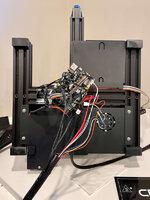
IMG-8958.jpg

Creality puts hot glue on their connections, so I had to carefully remove some of them. I also stripped fresh connections (removing the solder) and put the shoelace ferrules on the bare wire connections, which added some time, but I only want to be doing this once!

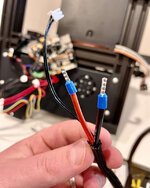
IMG-8960.jpg

IMG-8961.jpg

After swapping each connection to the new board one-by-one and putting everything back together, I booted up. And this happened:


It was going absolute bonkers.

I shut it down and figured I needed firmware. I spent another 30min or more just trying to figure out what the heck to download. Creality has two websites that have links to firmware downloads, and one is hosted in a Google Drive. It's super confusing as they don't stick to a naming convention. I made my best guess and threw it on a microSD card.

It appeared to take, and with bated breath I turned the machine on again. This time it didn't go crazy, and I could see changes in the LCD display (highlight select is a contrasting gold color, and the LCD dims after a timeout), both kind of nice.

The first thing I did was preheat the nozzle and bed and monitor on the LCD and in Octoprint. It behaved normally and no thermal runaway.

I set up a 20mm XYZ, leveled the bed, and off to the races.


No issues and it's actually one of the cleanest XYZ cubes I've had since I first got the printer:

IMG-8968.jpg

Since, I've had a few issues.

— attempted to print a larger model tool tray with some supports, and there were some gooey buildups in areas (not enough retraction?) that led to the model disconnecting from the bed and a minor spaghetti monster
— after that my next attempted print I had a nozzle clog and skipping extruder. I was able to solve this by leaving the nozzle heated for a bit and then extruding by hand until it was flowing good
— I attempted a temperature tower that I made from the Teaching Tech github calibration website, and that resulted in a spaghetti monster after a few levels (it was changing temperatures)

I've never had great luck with temperature towers. @Bakafish do you have the name of that Cura calibration plugin you use? I looked back through my thread and can't find it.

My all-metal hot end suggested printing at the high end of the filament range, which for my Overture PLA is 220°. It's been leading to stringing in the infill area and some messiness. I tried another XYZ cube with the Ender 3 default settings in Cura, and it did just fine with that. Honestly I might just use that for a bit instead of my custom profile, and make tweaks as necessary.

I'm not going to go so far as to say everything is perfect now, but at least I'm back in business!
 

mikev12345

Member
Joined
Jul 30, 2021
Messages
7
The cura plugin I use is "Calibration shapes". Btw have you looked into the new cura and moving to a .6mm nozzle ?
 
OP
N

nicholam77

Well-known member
Joined
Dec 18, 2016
Messages
2,671
Location
Minneapolis, MN
The cura plugin I use is "Calibration shapes". Btw have you looked into the new cura and moving to a .6mm nozzle ?

Thanks, I'll check that out.

I haven't updated to the latest Cura yet. Back when I was having bigger issues I was trying to address one thing at a time. Is the new version better?

I've never tried a 0.6mm nozzle but that's on my list, too.

I just tried to print a larger model and it started printing the first layer fine, but then I realized I still had the XYZ cube loaded. So I canceled, switched to what I was trying to print, and the extruder was slipping again. I think the nozzle is clogged.

Why does it always clog!? It's ALL the time. The reason I got the all-metal hot end was because I thought the bowden tube seal to the nozzle was the issue. But it's still doing it. I hate changing nozzles and it's super annoying to go to print something and always have an issue that takes an extra 30min-1hr to correct.

I typically just leave the filament loaded in the machine, am I doing something wrong? Should I be clearing it out immediately after every print?
 

mikev12345

Member
Joined
Jul 30, 2021
Messages
7
My understanding is the new Cura has some new features that help when printing finer details using a 0.6mm nozzle. Hence 0.4mm nozzles are no longer a requirement:


I don't have an all metal hotend but my understanding is you have to tweak retraction. If you over retract you end up pulling molten plastic in the cooler part of the hotend where it solidifies and clogs. I've decided to go the route of an all-metal heat break instead. I bought one last year but never installed it. It was the "ideal" solution back then ....not sure if the 3d community mentality has shifted since then.

Just wanted to add that leaving PLA loaded shouldn't be a problem. Generally my filament is in bins but I always have one loaded. I live in Ontario Canada and my printer is in my basement and haven't experienced any issues with leaving PLA out for extended periods of time. I'm sure thats a different story in humid seasons in places like Florida. What you may experience is if you leave your filament loaded for like 2+ weeks without printing your filament will snap at the entry point to the ptfe tubing. I don't remember the reasoning but its a thing.
 
Last edited:

Bakafish

Well-known member
Joined
Feb 7, 2017
Messages
477
Location
Tokyo
Notes:
Hot glue often miraculously gives up its hold with a liberal application of Isopropyl Alcohol. Makes removing most formulations trivial.

As far as Creality FW, I'm guessing that the majority of their customers fall into two buckets. Those who will use what it shipped with and never update, and those who compile their own Marlin or use Klipper. The latter is surely much smaller, but I believe you kind of fall in between those two groups. I'm guessing you are enough of a minority that the effort to release timely and high quality FW updates doesn't have a good business case. The factory FW does what it needs to do to work, but there are still a lot of dials that can be tweaked. I'm not suggesting in your case it is worth the effort, but it is always an option open to you should you choose to do so.

there were some gooey buildups in areas (not enough retraction?)
That's one possibility, although over extrusion would be another and explain the clogging as well. Most of my biggest issues centered around the extruder, wear of the gear, slipping of the gear and issues with the Boden tube junctions. All metal solves some issues, but adds friction to an already questionable extruder, so you will need to really make sure this component is working well. Retraction on a Boden is really important, and again the 'all metal' hurts you here as that additional friction will reduce the effects of this motion. This is the reason I believe that most systems these days couple all metal hot ends with direct drive which has a short enough filament path to overcome some of this inertia.

I was able to solve this by leaving the nozzle heated for a bit and then extruding by hand until it was flowing good
This can temporarily help, but very likely only displaced the blockage to some other position in the melt zone to return later. A blockage that the extruder motor can't force through isn't going to be something you are going to overpower with your hands (and an acupuncture needle) in my experience. The only way to fix a clog is to remove the blockage and the source of the contaminant, be that dust buildup or degenerated filament. The cold pull method, especially with dedicated cleaning filament, or with non-hardened nozzles a full burnout with a torch or fresh nozzle are going to give you longer term fixes. 0.6mm could help with this, there are some who claim it is less susceptible.

do you have the name of that Cura calibration plugin you use?
The Cura Calibration Shapes plugin is what I've been using. The shapes themselves are handy, but it is the scripts that modify the gcode to change the variables that make it most useful. So make sure you understand how to apply them.

I typically just leave the filament loaded in the machine, am I doing something wrong?
With PLA I don't think there is a big issue doing this as it isn't terribly moisture sensitive, it does however collect dust, and that dust is likely to make its way through the extrusion system and can conglomerate into blockages. So maybe throw something clean over it when not in use. Running the filament through some kind of foam rubber dust remover on its way to the extruder would also do the trick.
 
OP
N

nicholam77

Well-known member
Joined
Dec 18, 2016
Messages
2,671
Location
Minneapolis, MN
@mikev12345 and @Bakafish thanks for your input

I don't have an all metal hotend but my understanding is you have to tweak retraction. If you over retract you end up pulling molten plastic in the cooler part of the hotend where it solidifies and clogs.

That makes sense, although it's a balance. My previous custom profile with the stock hot end was 4mm retraction distance. Since I was trying the Cura Ender 3 default it was bumped up to 5mm, that's when the extruder skipping / clog started. Maybe it was too much. But as mentioned since installing the new hot end I've had more stringing / gooeyness, and the instructions said more aggressive retraction might be needed. Maybe by doing the all metal hot end I've just introduced more problems, but I had somewhat frequent clogs with the PTFE lined setup, too.

That's one possibility, although over extrusion would be another and explain the clogging as well. Most of my biggest issues centered around the extruder, wear of the gear, slipping of the gear and issues with the Boden tube junctions. All metal solves some issues, but adds friction to an already questionable extruder, so you will need to really make sure this component is working well. Retraction on a Boden is really important, and again the 'all metal' hurts you here as that additional friction will reduce the effects of this motion. This is the reason I believe that most systems these days couple all metal hot ends with direct drive which has a short enough filament path to overcome some of this inertia.

Good point. I can't remember if I re-did the E-steps since installing the new hot end. I'll take a look at that.

The extruder looks ok to me, visually, including the gear. It's just a single gear but I did get the metal version so it isn't cracked or anything.

So you're saying next up is a direct drive extruder :ROFLMAO:

I've looked at that Sprite one you got. Honestly though instead of doing that I think I'd unclog this one, sell it, and get the Ender S1 before putting more money into the 3v2.

This can temporarily help, but very likely only displaced the blockage to some other position in the melt zone to return later. A blockage that the extruder motor can't force through isn't going to be something you are going to overpower with your hands (and an acupuncture needle) in my experience. The only way to fix a clog is to remove the blockage and the source of the contaminant, be that dust buildup or degenerated filament. The cold pull method, especially with dedicated cleaning filament, or with non-hardened nozzles a full burnout with a torch or fresh nozzle are going to give you longer term fixes. 0.6mm could help with this, there are some who claim it is less susceptible.

I figured as much. Guess it's time to take it apart again. I've ordered some new nozzles, I'd rather just pop a new one in. I got some 0.6mm to test that out as well.

The Cura Calibration Shapes plugin is what I've been using. The shapes themselves are handy, but it is the scripts that modify the gcode to change the variables that make it most useful. So make sure you understand how to apply them.

Thanks! I realized I actually have that installed already. :rolleyes: I'll give that a shot to dial in temperature and retraction after doing E-steps and cleaning it out.

 
OP
N

nicholam77

Well-known member
Joined
Dec 18, 2016
Messages
2,671
Location
Minneapolis, MN
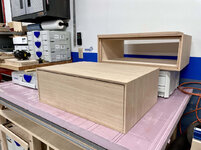
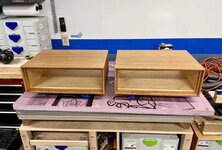
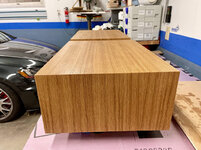
Switching gears back to the night stands build, I've been doing some more finish tests.

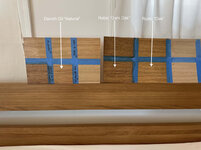
@Trapps — I found a local Rubio Monocoat dealer and got 3x samples of tinted 2C, as well as the Pure.

I'm glad I didn't order online, because they had white oak sample swatches in store and what I thought would work, was not right.

I got:

— Oak
— Dark Oak
— Bourbon

I only tried the Oak and Dark Oak which I thought were the closest.

They were easy to apply, and I think the "Oak" color is pretty close:

IMG-8999.jpg

I think in that picture the "Dark Oak" is a better match, but in person I felt the "Oak" worked the best. It's a touch more yellow/green than the Danish Oil, which I would say is a little more red.

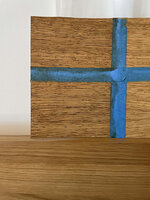
However, in person, and in closer inspection, both Rubio Monocoat oils "popped" the grain. And by that I mean accentuated the dark bits and flecks.

IMG_8991.jpg

It was especially noticeable with the "Dark Oak" color, but still not great with the "Oak" color. I felt like the Danish Oil didn't do this as much and was more smooth and natural looking.

It's a bit disappointing because I really wanted to like the Rubio Monocoat. Being a hard wax oil it has a very soft, waxy feel to it, and I think the protection would be for sure better than Danish oil, especially against water.

I don't want to compromise on looks though, and the dark grain flecks bother me.

It's also very expensive. The 3x 20ml samples plus a 100ml of Pure was $60! I think I am going to return the unopened sample + pure.

I would be open to using Rubio (especially the Pure color) on a future project, though.

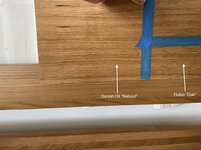
So... I might just roll with the Danish Oil. I did another larger test section, this time sanding it to 150 grit.

IMG_9003.jpg

IMG_9005.jpg

I don't think I'm ever going to get a 100% perfect match with any finish, but this feels pretty close. And of course a lot depends on lighting, too.

Being that this is "grown up" furniture, I'm ok with instituting a rule that we don't put drinks on them.

Thoughts? Do you think Danish Oil is enough protection to stand up to being a night stand? This has been the hardest part of this project for me — the boxes are sanded and ready for finish but it's so hard to commit!
 

pat9198

Well-known member
Joined
Feb 9, 2017
Messages
260
Location
Tennessee
I think the Danish Oil looks pretty darn good, but I have no experience with it's durability. You're so close, I think it's going to look great either way.
 

Trapps

ALLIANCE MEMBER
Joined
Feb 10, 2017
Messages
2,003
Location
The Detroit Zoo
Probably counter to your design mindset, but a thin sheet of tempered glass with an anti reflective coating would remove any wear and tear/water mark concerns. Then your only concern is color match and the Danish Oil could be that solution.

We have some nightstands that I wish I had done this with…

The Rubio is stupid expensive but it’s a very nice product; in appearance, application and performance.
 

Bakafish

Well-known member
Joined
Feb 7, 2017
Messages
477
Location
Tokyo
So you're saying next up is a direct drive extruder :ROFLMAO:

Short answer, yes. But you can likely get the boden working in the meantime. First look at the current extruder gear with some magnification in good lighting. It may have been the abrasive CF filaments that I use, but the wear wasn't evident by naked eye and the slippage varied with load, so extrusion when actually printing varied quite a bit. Simple extrusion length tests didn't clearly expose this issue as there was little load on the hotend extruding into space. Not a fun issue to try and diagnose, keep a close eye on it, this extruder design is crude by current standards.

I've looked at that Sprite one you got. Honestly though instead of doing that I think I'd unclog this one, sell it, and get the Ender S1 before putting more money into the 3v2.

Don't use my machine as an example of what to do, I'm a weirdo. My next machine (if I ever get around to it) will be some unreliable self built contraption similar to the poor Frankensteinian monster that used to be my Ender. But even I've become tired of the fiddling involved, and this is my kink, so...

The S1 seems like a capable machine, seems like the go-to unit for someone starting out that hasn't yet drunk the cool-aid, but pretty incremental for an existing Ender owner. In my head your entry level Ender was supposed to prove the utility of 3D printing and give you an idea of how best to approach it with minimal cost outlay. Unfortunately you've had a lot of technical challenges and identified the weaknesses of the support side of these lower end products, I'd suggest if you are going to 'upgrade' that you buy something that is less hands on, is better supported and will provide longer term value (Bambu X1, Prusa) even if the initial cost is much higher. I feel like we are about to see a next generation of machines, with enclosures, linear rails, higher speeds and better reliability at this $1000 pro-sumer price point. I'd try and squeeze the value out of your current machine with proper tuning until you can justify one of these next level machines.
 
OP
N

nicholam77

Well-known member
Joined
Dec 18, 2016
Messages
2,671
Location
Minneapolis, MN
Probably counter to your design mindset, but a thin sheet of tempered glass with an anti reflective coating would remove any wear and tear/water mark concerns. Then your only concern is color match and the Danish Oil could be that solution.

We have some nightstands that I wish I had done this with…

The Rubio is stupid expensive but it’s a very nice product; in appearance, application and performance.

Interesting idea. I'd probably rather leave the wood exposed, but I'm not 100% against that. My wife on the other hand doesn't like glass or glossy surfaces (read: fingerprint magnets) so I think it would be a tough sell.

I'll find something to use Rubio on eventually. I'm debating hanging onto the Pure for that reason, or just return it and get some more when a new project calls for it. It's a shame the Rubio can't go over the Danish Oil because that would probably be perfect.

You can put a film finish topcoat over the Danish oil for an additional layer of protection.

Thanks Jar, that's a great idea. Is lacquer what you'd recommend? I don't have a spray setup so it would be aerosol can for me. I could also probably try the General Finishes High Performance?

My .02 you definitely need a topcoat.

Bret

Thanks Bret. Same question as Jar — any recommendations on a specific product?

🍻
 
OP
N

nicholam77

Well-known member
Joined
Dec 18, 2016
Messages
2,671
Location
Minneapolis, MN
@Bakafish I agree with everything you said. I'm not about to give up on mine yet, I've come this far. Aside from the clog it was printing really nice XYZ cubes after the board swap. I'm confident I can get it going again, and looking forward to trying 0.6mm nozzles.

The S1 is temping because it's not that much more than a 3v2, and has the direct drive extruder, dual Z, bed probe, etc. I figured I could do a swap for about an extra $100 or so, and hopefully have more features and less issues. But I am still skeptical.

As far as more expensive machines, I'm not willing to spend that kind of money at this point. I do see the value in 3D printing, and even though I haven't gone down the full-blown Klipper rabbit hole I feel like I've gotten my hands probably dirtier than most who buy a Ender 3. At the end of the day it's still a novelty for me. It's fun to design little parts and bring them to life, but my skillset is still novice with CAD and I'm not blown away by what the printed parts look like. Maybe there are some that can design and make stuff to justify a $1k price tag, but to me for that money I'd rather have a Domino, a nicer table saw, bandsaw, thickness planer, a tune for my GTI, or any number of things. Maybe in 10 yrs if a decent sized resin printer is $500 or so I could get behind it. Hopefully like most things in the tech sector, printers will get better and come down in price in the future. All this to say I agree with you about waiting to see what happens.
 
OP
N

nicholam77

Well-known member
Joined
Dec 18, 2016
Messages
2,671
Location
Minneapolis, MN
Night Stands — part 8 — Blum slides + drawer fitting

I haven't made any progress on the 3D printer, but I've been busy on the night stands.

I left off with the drawer boxes assembled. Next, I wanted to install them and make sure they fit correctly.

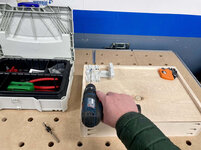
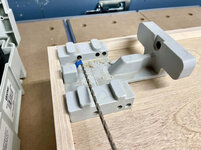
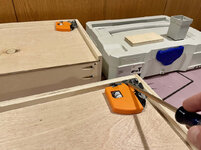
The Blum slides require some special holes drilled, two 2.5mm pilot holes on each side in the front for the under mount latching mechanisms:

IMG-9071.jpg
IMG-9072.jpg

And one 6mm hole on either side in the back to accept the "locating pin" on the rear of the slide:

IMG-9074.jpg

The gray plastic drilling jig seen above places all the holes in the right spots.

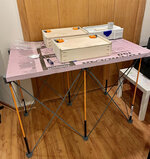
We've finally been hit with some colder weather in MN, so after this I moved my operation inside, setting up the Bora Centipede in my basement.

IMG-9079.jpg
IMG-9078.jpg

Those orange thingies are the latching mechanisms that lock the drawer onto the slides.

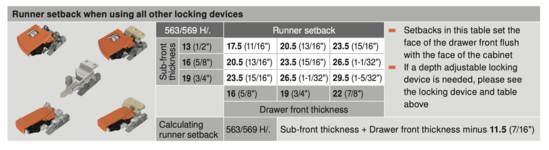
To install the slides in the night stand, I consulted Blum's documentation on "runner setbacks" for inset applications.

blum-setback.png

My drawer "sub-front" and "front" were a little different than their table, so I calculated with the formula at the bottom.

Using my Paolini rule to set back the appropriate amount of millimeters. I specifically got this little guy in dual-scale so I could use millimeters for various cabinet hardware operations.

IMG-9081.jpg
IMG-9082.jpg

The Blum Tandem slides have a few elongated holes so I used those for now to be able to adjust the depth. The depth-adjustable locking mechanisms were out of stock.

Deep breath... this was either going to be a moment of relief or a lot of swearing :ROFLMAO:

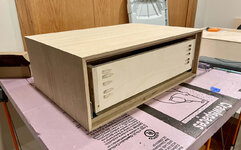
IMG-9083.jpg
IMG-9085.jpg

Nice (y)

Doing the drawer box calculations in metric definitely simplified things. I still don't have a great intuition of how long large millimeter dimensions are like I do with imperial, but I think going forward it makes sense to use a bit of both.

Here's a little YouTube video of the slides in action:


This was my second time using Blum slides. I think they can be a bit intimidating, especially their complex documentation, but once you find the correct "formulas" in the documentation, as long as you make the cuts accurately they are super fool proof.

I have some catch up to do posting... next up will be the drawer fronts.

🍻
 
To avoid these ads, REGISTER NOW!
OP
N

nicholam77

Well-known member
Joined
Dec 18, 2016
Messages
2,671
Location
Minneapolis, MN
@jar944 thanks! Yeah, I suppose you could make your own, or just measure if it's only a few drawers. I got mine a few years ago on eBay, just the plastic chunk, and pieced together some cheap-o bits and stop collars. If you buy Blum's full kit it is ridiculously priced as I'm sure you know. It definitely makes it fast and easy, though!
 
OP
N

nicholam77

Well-known member
Joined
Dec 18, 2016
Messages
2,671
Location
Minneapolis, MN
Night Stands — part 9 — drawer fronts

Moving on to the drawer fronts, my plan here was to edge band a piece of 1/2" baltic birch plywood in thin strips of white oak hardwood, and then veneer both sides.

Ideally I could have planed down a solid wood board, but at least this way the veneer and grain matches nicely.

To calculate the dimensions, I took the opening width of the cabinet and subtracted 2mm from each dimension, for an all-around reveal of 1mm.

Not pictured, but I cut the white oak hardwood edge banding strips first, to a common thickness of 5mm. Then to get the appropriate dimensions for the plywood part, I multiplied that by two (5mm x2 = 10mm), and subtracted that 10mm from my overall dimensions.

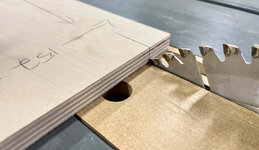
I made some tick marks on the plywood, and because my table saw doesn't have a metric readout I just lined the blade tooth to the mark.

IMG-9042.jpg
IMG-9043.jpg

Again, no pics but I picture-frame-mitered all of the oak strips to surround the plywood. I don't have a stop on my miter sled, so it was the old game of sneaking up on each cut.

I attached them primarily with blue tape, with just two pin nails on each to keep from slipping around.

IMG-9045.jpg
IMG-9047.jpg
IMG-9046.jpg

Then next day a little sanding and they turned out pretty well.

IMG-9067.jpg

Then veneered one side (on my kitchen table inside because of the temps). Again no pics. Moving fast.

A little trim action on the router table.

IMG-9087.jpg

Then veneer the other side. Then trim again. Then some more sanding... damn this is a lotta work just to make something look like a board :ROFLMAO:

Here's one of them just roughly placed in the opening:

IMG-9089.jpg

I'm getting to that stage of the project where I'm feeling a bit burnt out on it. Next up is final sanding and finishing (I've started that process but need to do a catch up post). I can feel the finish line, but cold weather is here and I have some other things to attend to like car prep, and my wife is working this weekend so I probably won't get much done then.

🍻
 

wreckdiver1321

Well-known member
Joined
Aug 12, 2021
Messages
1,039
Location
Billings, MT
Nick, those are turning out great!

I envy your carpentry abilities. I think these are going to look killer honestly when finished and next to your bed. I know you said you're getting burnt out but it's going to be so worth it when you can stand back and look at the finished product.
 

jar944

Well-known member
Joined
Jul 26, 2010
Messages
5,935
Location
Northern VA
@jar944 thanks! Yeah, I suppose you could make your own, or just measure if it's only a few drawers. I got mine a few years ago on eBay, just the plastic chunk, and pieced together some cheap-o bits and stop collars. If you buy Blum's full kit it is ridiculously priced as I'm sure you know. It definitely makes it fast and easy, though!

The blum jig itself isn't horribly priced (well it is but it was low enough to not care) but the fact it doesn't come with any of the drill bits or stops was just irritating.. I've done the measure, mark and drill for the 6mm holes but it's slow and painful for more than one or two drawers. I just made a jig that fits in the notches and can be flipped to either side out of a block of hard maple. It works well enough.

As for the locking device holes, I've never bothered to pre-drill. Just set the lock in the corner and drive both screws in.

I'm curious how you cut the notches. That's a area where cabinet makers have a surprisingly large variety of methods all which are "the best" with all others being stupid and slow..lol

Edit: never mind. I see you made the back short of the groove.
 
OP
N

nicholam77

Well-known member
Joined
Dec 18, 2016
Messages
2,671
Location
Minneapolis, MN
@wreckdiver1321 Thank you, Tom. When I started this thread six years ago (six!) I had barely any woodworking experience, and no real woodworking tools to my name. I am definitely proud of the results these days, but I still feel like I've only scraped the tip of the woodworking iceberg. I agree they will be worth it, although sometimes it's hard to continue that optimism when you're in the middle of it. I appreciate the kind words!

@jar944 I've also wondered if drilling for the locking devices is really necessary...

I've only ever made drawers this way with the back cut short, whether it's for Blum slides or not. I just slide the bottom in and screw / staple / pin nail into the back piece from the underside. I think I learned that method from Jay Bates' YouTube and it's worked for me so I've never seen a reason to switch it up.

@Trapps Thanks, Mark! When I was working on my parents' pantry I was missing having a metric rule for the shelf pins, the hinges, etc. I had the FastCap dual-scale tape measure, which is great, but I prefer to use a rule when possible. I've made a lot of cabinets to date so I thought it would be a handy thing to have.
 
OP
N

nicholam77

Well-known member
Joined
Dec 18, 2016
Messages
2,671
Location
Minneapolis, MN
Night Stands — part 9 — finishing

Here's a little preview on the finishing:

IMG-9095.jpg
IMG-9096.jpg
IMG-9100.jpg
IMG-9102.jpg

This is with 2x coats of Danish Oil only.

I tested both of my favorite General Finishes top coats (High Performance + Arm-R-Seal), and neither one changed the color from the Danish oil. I only had satin on hand for both, but as expected the High Performance looks slightly duller and milkier with a slight sheen, and the Arm-R-Seal is more matte and natural like the Danish Oil.

The High Performance gives excellent protection, even against standing water. But I'm opting to go with the Arm-R-Seal because I like the look better and it's far easier to apply. After the Danish Oil fully dries I plan to wipe on 2x coats of Arm-R-Seal.

One debate I'm having is what to finish the drawers with. The inside of the night stands got wiped with Danish Oil and of course that gives it an amber hue. I can't decide if I want to carry that through to the drawer boxes, or use the High Performance and keep the birch nice and natural color. That's my usual instinct, but again, it's a pain to brush on.

🍻
 
OP
N

nicholam77

Well-known member
Joined
Dec 18, 2016
Messages
2,671
Location
Minneapolis, MN
IMG-9176.jpg


Well :poop: !

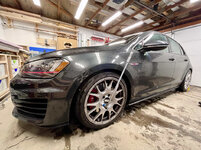
The drive to daycare was an "interesting" one on my summer tires.

IMG-9175.jpg


I knew this was coming, I just haven't had the time to take care of the car. Or a lot of winter prep things really, as I've been so focused on finishing the night stands.

Truth be told I almost got in an accident this morning. Came to a 4-way stop and there was already an SUV and an alpha romeo Guilia on the side from from a rear-ending. I was already going so slow and tried to stop for the stop sign but just kept going, straight at the car making a left turn in front of me. It all happened in slow motion but ending up missing them by about 5 feet. 😲

It was 26° F this morning, the wet snow getting compacted on the busier roads into what essentially was a sheet of ice, and my tires had almost no traction in areas. On the radio it said "and it's going to turn cold by the weekend". Wait a minute, I thought it already was cold!! Looking at the forecast, overnight lows in the teens, possibly single digits are on the way.

Looks like I'm going to be doing the bi-annual wheel swap in the garage tonight, in sub-freezing temps with a wet floor.

I wanted to wash / clay / seal it, too, but reality is setting in and I don't know that it's going to happen.

Anyways, how's your day going!? :ROFLMAO:
 

patlun

Well-known member
Joined
Apr 12, 2015
Messages
242
Location
Värmland, Sweden
Ouch! That white mold everywhere. I changed the wheels a couple of weeks ago. Since then we have had the warmest November this century, with 16 °C (61 °F) this weekend, the normal temperature for November is 0 °C (32 °F)

My day have been fantastic, nice coffee, my changes will go to production next weekend and only two meetings. And only about five weeks until the days starts to become longer again.
 

Trapps

ALLIANCE MEMBER
Joined
Feb 10, 2017
Messages
2,003
Location
The Detroit Zoo
Nick, if you wouldn't mind, please don't forward that stuff any farther east.

No matter the conditions, those CH's look so good on your car.
 

bj383ss

Well-known member
Joined
Sep 29, 2011
Messages
3,166
Location
TX
We have lower temps here than is normal but no white stuff. I hope you keep all that up there. We have several nights in the next 10 days in the 30's which is very rare temps we see until January.

Bret
 

loganb

ALLIANCE MEMBER
Joined
Dec 29, 2011
Messages
5,572
Location
Omaha, NE
The night stands are looking great! Also appreciate your continued greedyness in regards to that nasty white stuff....I know your winter economy is built on outdoor activities in it...so please keep it...every last flake!
 

Mr. Roboto

Well-known member
Joined
Dec 11, 2012
Messages
2,160
Location
New Hampshire
Damn, snow already! I hope we make it a few more weeks before it finds its way over to us. Glad your close call on the drive to daycare was just that and nothing more!
 
OP
N

nicholam77

Well-known member
Joined
Dec 18, 2016
Messages
2,671
Location
Minneapolis, MN
Ouch! That white mold everywhere. I changed the wheels a couple of weeks ago. Since then we have had the warmest November this century, with 16 °C (61 °F) this weekend, the normal temperature for November is 0 °C (32 °F)

My day have been fantastic, nice coffee, my changes will go to production next weekend and only two meetings. And only about five weeks until the days starts to become longer again.

:ROFLMAO:

That's pretty warm for November. The wheel swap has been on my to-do list but up until now we've had an unseasonably warm Fall, too, with days almost 70° F (21° C). So it felt wrong to put winter rubber on yet. But now it's flipped a switch and we're in for it!

Nick, if you wouldn't mind, please don't forward that stuff any farther east.

No matter the conditions, those CH's look so good on your car.

Ha, I'll try not to! Thanks, Mark! They are actually CO's... aka the CH's cast, less expensive cousin. I actually wish I had waited and tried to find a used set of CH's, maybe in 19", for an acceptable price. But what's done is done!

We have lower temps here than is normal but no white stuff. I hope you keep all that up there. We have several nights in the next 10 days in the 30's which is very rare temps we see until January.

Bret

We'll try to keep it up here, don't want your poor plants to freeze again!

The night stands are looking great! Also appreciate your continued greedyness in regards to that nasty white stuff....I know your winter economy is built on outdoor activities in it...so please keep it...every last flake!

Thanks Logan!

Damn, snow already! I hope we make it a few more weeks before it finds its way over to us. Glad your close call on the drive to daycare was just that and nothing more!

It's actually pretty normal for us to get snow this time of year, even in October, but it did sneak up on me. Fortunately I had already dropped the kids off (no one would have gotten hurt, I was going sliding 10 mph maybe), but I'd probably have some light damage and an insurance hassle. I almost had a heart attack.

Get your Snows on! More snow today and cold weather for the next 5 days!

Got it done last night!

IMG-9179.jpg
IMG-9183.jpg
IMG-9181.jpg

Not really how I wanted to spend my evening, but driving on the summer tires was so sketch, I knew I had to get it done ASAP.

This morning was a night and day difference with traction.

IMG-9186.jpg

Hope you didn't have to commute. My wife works at Mercy hospital in **** Rapids (we're in SLP), and she said it was a $h!tshow on the highways yesterday morning.

🍻
 
OP
N

nicholam77

Well-known member
Joined
Dec 18, 2016
Messages
2,671
Location
Minneapolis, MN
Ok — poll for you guys:

I've cut the French cleats for the night stands, and was planning out how to attach them. The goal was to hit at least two studs with lag screws.

I knew it was going to be tough because the night stands are 20" wide, 18.5" on the interior, and the wall cleat is more like 18". Not much wiggle room with 16" on-center framing.

On the right side of the bed I can just barely make it happen. One stud on each end of the cleat.

On the left side of the bed, I found this with my stud finder (drill!):

IMG-9190.jpg

A double stud on the left, and then nothing up until the bed. I think there might be a stud literally touching where the bed is judging by the nail pop in the drywall, but that's way too close for the cleat.

I can't really move the bed over because that would screw up the cleat on the other side, not to mention it's centered under two windows.

So my question is, would it be crazy to use dry wall anchors to supplement on the left cleat? Get a lag screw in on the left studs, and then a few heavy duty drywall anchors in the middle and right side? Or is that asking for failure and should I go to the trouble to frame it out instead (cut out the drywall, add in a 2x4 or plywood). I'd rather avoid this because it's a lot more work, but I don't want it to come crashing down, either.

Each night stand is ~ 21 lbs empty. So with some things in the drawer + table lamp etc it could easily be 35 lbs I would imagine.
 

zanyad

ALLIANCE MEMBER
Joined
Apr 26, 2018
Messages
2,801
Location
NE Ohio
So my question is, would it be crazy to use dry wall anchors to supplement on the left cleat? Get a lag screw in on the left studs, and then a few heavy duty drywall anchors in the middle and right side? Or is that asking for failure and should I go to the trouble to frame it out instead (cut out the drywall, add in a 2x4 or plywood). I'd rather avoid this because it's a lot more work, but I don't want it to come crashing down, either.

Each night stand is ~ 21 lbs empty. So with some things in the drawer + table lamp etc it could easily be 35 lbs I would imagine.
Toggle bolts can hold a lot, even in drywall. Used them to install an IKEA headboard.
1668535682297.png
 
To avoid these ads, REGISTER NOW!
Top Bottom