
You are using an out of date browser. It may not display this or other websites correctly.
You should upgrade or use an alternative browser.
You should upgrade or use an alternative browser.
Above 1200 Sq/FT Eastern Washington Workshop
- Thread starter slodat
- Start date
Wokspaces above 1200 squarefeet.

cycle61
Well-known member
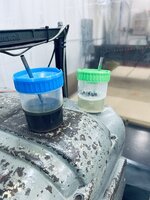
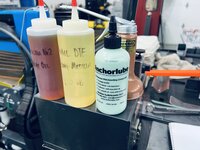
I got to thinking about the different cutting fluids I have in the shop. Put the band together and this is what I came up with:
I also keep a squirt bottle of Vactra Way Lube and DTE Heavy Medium, and an oil can of non-detergent 30W over by the machine tools.
These two have large rare earth magnets in the bottom and live between the lathes. Works really well.

What, no Boelube? I'm a tiny bit disappointed

cycle61
Well-known member
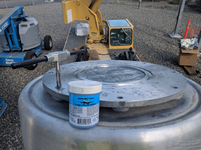
Bought this years ago for a project involving thread repairs in a big aluminum casting. Nothing else seemed to work.

cycle61
Well-known member
Specifically, one of these. They're a little bit expensive and hard to replace.

cycle61
Well-known member
Bushing repair. Government client built a substation near the ocean, breakers were installed but never energized. We spent quite some time chasing SF6 leaks. Turns out this is not what you want your machined surfaces to look like.

The 3D surfacing is really satisfying and the end result is very nice.


Next, and last, parts to machine for this tooling kit- brass pins. Turned to diameter with 1/4-20 thread that mates with an aluminum part. This pin starts out as 0.56” brass. I’m using an import floating tap holder. While it does do the job, it’s really junky. I look forward to making a better tap holder when I have the time to dedicate to the task.
It took some experimenting to get brass turning dialed in. I settled on a diamond shaped insert tool.


Next, and last, parts to machine for this tooling kit- brass pins. Turned to diameter with 1/4-20 thread that mates with an aluminum part. This pin starts out as 0.56” brass. I’m using an import floating tap holder. While it does do the job, it’s really junky. I look forward to making a better tap holder when I have the time to dedicate to the task.
It took some experimenting to get brass turning dialed in. I settled on a diamond shaped insert tool.
racer-john
Well-known member
Best of the season to All.


Replaced the nozzle on the Prusa. It was the original that came with the printer. Turns out when I installed the new nozzle I somehow didn't get it tightened enough, despite thinking I had followed the instructions. I pulled it apart this morning and found the nozzle loose. Once I tightened the nozzle, it returned to printing gorgeous parts!
@cycle61 suggested using a Voile strap to hold the two hardware case halves together.

I added a slot through the lid. The strap will pass through, and the slot will act as a keeper. Some shots of the bridging over the slot. It's completely clear all the way through!


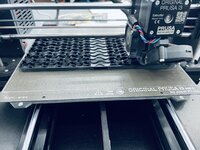
The Storm case foam for the tooling kit is easily the most complicated design I've done in Fusion. I needed it to be parametric. I followed some good best practices and pulled it off. I forgot the wrench. When I went to add it, it wasn't much work at all.

I REALLY wanted to cut the foam on the laser. The finish is great, once dialed in. It took quite a bit of testing to get the foam cutting right on the laser. Especially the 57mm thick sheets. I'm happy with how it is turning out.

I've settle on this layout and settings. Now to make the production run!

I may have ordered a Bambu Carbon X1 printer. All the photos of the multi color stuff did me in!
@cycle61 suggested using a Voile strap to hold the two hardware case halves together.
I added a slot through the lid. The strap will pass through, and the slot will act as a keeper. Some shots of the bridging over the slot. It's completely clear all the way through!
The Storm case foam for the tooling kit is easily the most complicated design I've done in Fusion. I needed it to be parametric. I followed some good best practices and pulled it off. I forgot the wrench. When I went to add it, it wasn't much work at all.
I REALLY wanted to cut the foam on the laser. The finish is great, once dialed in. It took quite a bit of testing to get the foam cutting right on the laser. Especially the 57mm thick sheets. I'm happy with how it is turning out.
I've settle on this layout and settings. Now to make the production run!
I may have ordered a Bambu Carbon X1 printer. All the photos of the multi color stuff did me in!
Last edited:
MadeByMiller
Well-known member
Very nice! Great utilization of your tooling to create a high end final product.
Thank you, Logan! This whole product development process has been amazing. It takes SO much more time that I was hoping. I'm close to the final stretch on the first order. Each part, process, tool, work holding, etc. is a project in its own right.That looks awesome! And excited to see what you think of the X1...I'm trying to hold off till my bonus hits the bank account....5 more weeks or so....
I am now printing part of my product line. When my Prusa was acting up I realized I really wanted a second 3d printer. I looked at another Prusa and for the money, it doesn't make sense. I bought it assembled and I wouldn't want to use it without Octopi. That put it at the same price as the X1. I'm excited to try some multi color stuff with the X1.
Thank you, Austin! That's what I'm going for! To make tools that are useful, nice to use, and present in a professional manner.Very nice! Great utilization of your tooling to create a high end final product.
Like I said above, the whole process has been amazing. I have more tooling kits I want to develop.
Thanks for following along and contributing to the conversation!
Edited to add: I ordered the Revo 6 setup for my Prusa from Printed Solid the other day. I'll install it the next time the hotend needs any attention. It's printing too good to mess with before then.
Last edited:
GeddyT
Well-known member
Thank you, Logan! This whole product development process has been amazing. It takes SO much more time that I was hoping. I'm close to the final stretch on the first order. Each part, process, tool, work holding, etc. is a project in its own right.
I am now printing part of my product line. When my Prusa was acting up I realized I really wanted a second 3d printer. I looked at another Prusa and for the money, it doesn't make sense. I bought it assembled and I wouldn't want to use it without Octopi. That put it at the same price as the X1. I'm excited to try some multi color stuff with the X1.
Amen! This has been the most significant observation I've made as well. CNC machines, lasers, 3D printers, press brakes, etc. are absolutely amazing, and I still giggle at what one can do with them, but they're not Star Trek replicators. They're not microwaved popcorn. Everything takes SO much longer than I imagined, from the design phase to tooling to workholding to setup and then the actual process for some large or complex parts.
It looks like you're getting a decent percentage of wins on your first try, but you're also "doing it right" and spending the time/money to be properly trained on your machines before you put them to work. Those two (or was it three?) days spent dialing in your press brake process, for instance, will save you a ton of time later in fiddling with every little job you need to dial in. I dream of the day that I have the process down and can go from napkin drawing to product in seamless fashion, but I haven't come close to that yet, creating at least one scrap part for every good one so far, which costs dearly in both time and money. I'm starting to understand the outrageous cost for one-off metal work.
What you're putting together up there is seriously impressive. You've managed to manufacture a whole set of tooling in an attractive case and professionally packaged, and you're doing it all in-house, even cutting the foam. I mean... wow! It looks to me like you have to be matching or exceeding the quality and professionalism of your lone competitor, so it's to the point that I see no reason why you even need to discount the price. You can beat them on delivery time instead and increase your margins. Good times to be you!
Oh yeah, I had never heard of the X1, so I looked into it, and that's a pretty cool machine! I watched an independent review video, and one of the big knocks is that multi-color parts generate a ton filament waste, as it purges quite a bit of material between color changes at every single layer of the print. The reviewer printed a 4-color poker chip that was 24 layers thick, and the X1 purged more filament into the waste bin than it actually used in the print. For one-off stuff, cost of filament is probably the least of your concerns, but for production runs, that would add up. Regardless, the reviewer called it the best printer under $5K, so that's pretty high praise!
Tom- thank you for the thoughtful contribution to the conversation! Very well said on the CNC machines, lasers, 3D printers, etc. I'm currently at the stage where I really care about process reliability. A little longer cycle time for example is fine if the process runs reliably. This is true on any of the machines. Right now, I have the CO2 laser, fiber laser, 3D printer, and milling machine running. All I'm doing is feeding them and hitting cycle start. It's like a big, choreographed dance.
Thank you for the kind words. I appreciate it. Here's hoping more orders come in!
There's a lot of buzz around the X1 from what I've seen. A few guys I follow have them and seem like they are working out well. For the multi color stuff, I'll mostly be doing lettering and such. I'm not much of a trinket guy, unless it's somehow useful. I think it will be great for labeling bins, parts trays, etc.
Thank you for the kind words. I appreciate it. Here's hoping more orders come in!
There's a lot of buzz around the X1 from what I've seen. A few guys I follow have them and seem like they are working out well. For the multi color stuff, I'll mostly be doing lettering and such. I'm not much of a trinket guy, unless it's somehow useful. I think it will be great for labeling bins, parts trays, etc.
SilverJimmy
Well-known member
Maybe I missed it, but have you posted any pictures of your product in use? What you’re making looks very top notch, just would be interesting to see it in application.
thanks!
thanks!
Another full, long day in the shop. Making good progress. I need to sort out the best way to glue the layers of foam together. Spraying didn't work well aesthetically. You can see the adhesive in the openings in this photo:
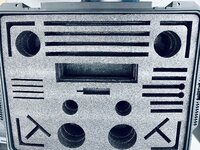
Brushing on upholstery adhesive is clean and looks nice. It's taking a little bit of time. Not too bad.. Definitely looks presentable.
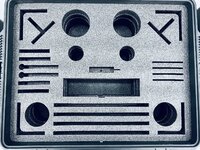
I thought about making a chipboard spraying template for each layer. I don't think the juice is worth the squeeze and I think it would still be sloppy.
Production line!

They go back in the Pelican cardboard box for shipping.
End of the night this is how the shop looks:

I'm currently using FastCap Kaizen foam. It comes in 2' x 4' sheets. They ship bundle quantities for free. It works for now. If I make bigger batches, I'll probably buy full 4x8 sheets. The CO2 laser ran all day cutting foam. I'm happy with how it's turning out. Definitely the most the laser has run in one day. Worked flawlessly!
I think I've settled on bead blasting the parts and then engraving the client's logo with the fiber laser. The bead blasted finish is really nice and consistent.
Brushing on upholstery adhesive is clean and looks nice. It's taking a little bit of time. Not too bad.. Definitely looks presentable.
I thought about making a chipboard spraying template for each layer. I don't think the juice is worth the squeeze and I think it would still be sloppy.
Production line!
They go back in the Pelican cardboard box for shipping.
End of the night this is how the shop looks:
I'm currently using FastCap Kaizen foam. It comes in 2' x 4' sheets. They ship bundle quantities for free. It works for now. If I make bigger batches, I'll probably buy full 4x8 sheets. The CO2 laser ran all day cutting foam. I'm happy with how it's turning out. Definitely the most the laser has run in one day. Worked flawlessly!
I think I've settled on bead blasting the parts and then engraving the client's logo with the fiber laser. The bead blasted finish is really nice and consistent.
GeddyT
Well-known member
Could you laser-cut dual sided contact paper sheets with openings just larger than those of the foam layers and apply all the adhesive at once in one large film? Would probably be fast.
cycle61
Well-known member
That's a really good idea. I have no idea if it would work but I love the thinking!Could you laser-cut dual sided contact paper sheets with openings just larger than those of the foam layers and apply all the adhesive at once in one large film? Would probably be fast.
I ended up using spray glue. It worked out well once I sorted out the right method.
The Revo 6 hotend arrived for the Prusa today. Just in time. I need to re-print the hardware case lids. The Voile straps won't go through the slot as currently designed. I'm going to make it wider.

On the right is the E3 V6 hotend that comes stock on the Prusa i3mk3. The left is the Revo 6 nozzle. The heatbreak is built into the nozzle. So, no leaks there. And, tool free nozzle changes. I don't care much about the nozzle changes. This printer only prints PETG with the 0.4mm nozzle. The no leaks and a much more reliable design is what I'm after.
This is the hotend as it came out of the printer today:
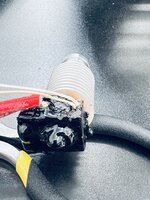
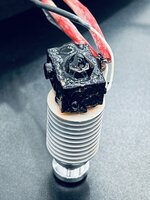
It has leaked a little for a long while and I didn't really understand that is what was going on.
This is the test print that's running now:

Pretty sure I'm good to go! No more leaks, stringyness, etc. A HUGE thank you to Austin (@MadeByMiller) for the post detailing this upgrade!
Next up is a lot of laser engraving!

The Revo 6 hotend arrived for the Prusa today. Just in time. I need to re-print the hardware case lids. The Voile straps won't go through the slot as currently designed. I'm going to make it wider.
On the right is the E3 V6 hotend that comes stock on the Prusa i3mk3. The left is the Revo 6 nozzle. The heatbreak is built into the nozzle. So, no leaks there. And, tool free nozzle changes. I don't care much about the nozzle changes. This printer only prints PETG with the 0.4mm nozzle. The no leaks and a much more reliable design is what I'm after.
This is the hotend as it came out of the printer today:
It has leaked a little for a long while and I didn't really understand that is what was going on.
This is the test print that's running now:
Pretty sure I'm good to go! No more leaks, stringyness, etc. A HUGE thank you to Austin (@MadeByMiller) for the post detailing this upgrade!
Next up is a lot of laser engraving!
MadeByMiller
Well-known member
I'm glad you found my post helpful! Unfortunately for you it sounds like you needed to replace your hotend sooner than you were hoping to, but it's always a good time for an upgrade, right? That oozing/leak problem on your old setup is wild, I never had any issues with that and mine looked practically new still when I removed it.
Glad it's up and running now and back in the production lineup. Mine has been flawless since the upgrade and is printing right now, I'm running these trays that my good and talented friend Dave (@davemoneysign on IG) designed.
Glad it's up and running now and back in the production lineup. Mine has been flawless since the upgrade and is printing right now, I'm running these trays that my good and talented friend Dave (@davemoneysign on IG) designed.
To be fair to Prusa, aside from changing the nozzle recently, I’ve done absolutely nothing to the printer other than some lubrication. It printed about 35 spools of filament essentially trouble free. The Revo 6 was installed in under and hour. It’s printing the part I need now. I canceled my test print because it was spot on.
I bought the printer assembled because I didn’t want a 3d printer hobby that I’m always fiddling with. It has been a great machine out of the box.
Seriously considering another i3mk3, but the X1CC is about the same price by the time I install a Revo 6, and a raspberry pi (at current prices). I’ll hold for now. I’m hoping to use the X1 as the shop printer and the Prusa (or two) as the production printers for parts for my products. I like the PETG recipe I have dialed in on the Prusa. It’s essentially trouble free and I’m sure it will be with the new hotend. (edit: maybe not quite as trouble free as I thought! Working on it now.)
X1 is supposed to be here Friday or Monday.
I bought the printer assembled because I didn’t want a 3d printer hobby that I’m always fiddling with. It has been a great machine out of the box.
Seriously considering another i3mk3, but the X1CC is about the same price by the time I install a Revo 6, and a raspberry pi (at current prices). I’ll hold for now. I’m hoping to use the X1 as the shop printer and the Prusa (or two) as the production printers for parts for my products. I like the PETG recipe I have dialed in on the Prusa. It’s essentially trouble free and I’m sure it will be with the new hotend. (edit: maybe not quite as trouble free as I thought! Working on it now.)
X1 is supposed to be here Friday or Monday.
Last edited:
MadeByMiller
Well-known member
I'm looking at my second Prusa still boxed up and sitting in the corner of my office right now. I think I'll assemble it and the enclosure some time later this week. My XL is on preorder for a who knows when delivery, but I'm fine with that. The Bambu machine looks neat for sure, I'm happy to stick with Prusa machines though for what I need them for.To be fair to Prusa, aside from changing the nozzle recently, I’ve done absolutely nothing to the printer other than some lubrication. It printed about 35 spools of filament essentially trouble free. The Revo 6 was installed in under and hour. It’s printing the part I need now. I canceled my test print because it was spot on.
I bought the printer assembled because I didn’t want a 3d printer hobby that I’m always fiddling with. It has been a great machine out of the box.
Seriously considering another i3mk3, but the X1CC is about the same price by the time I install a Revo 6, and a raspberry pi (at current prices). I’ll hold for now. I’m hoping to use the X1 as the shop printer and the Prusa (or two) as the production printers for parts for my products. I like the PETG recipe I have dialed in on the Prusa. It’s essentially trouble free and I’m sure it will be with the new hotend.
X1 is supposed to be here Friday or Monday.
I'm with you on sticking with Prusa in general. I went with the X1 specifically for a client request. I'm sure the multi color stuff will have some good application. If the XL was shipping anytime soon, I wouldn't have bought the X1. I pre-ordered the XL the morning it was announced.
I'm getting a little bit of a blob on the nozzle. I believe it is because of too hot of temperature. Doing some reading and experimenting. Might need a little fiddling. I'm wondering if that's what was going on with the other hotend? I'm sure I'll get it sorted.


I had raised nozzle temp to 260C based on a thread on the Prusa forums. I've now incrementally lowered it. I'm at 230C now.. Time will tell. This is a large print.. about 9.5" x 5". The first layer takes a long time. At least I don't have bed adhesion issues
Open to suggestions! Filament is Overture PETG.
I'm getting a little bit of a blob on the nozzle. I believe it is because of too hot of temperature. Doing some reading and experimenting. Might need a little fiddling. I'm wondering if that's what was going on with the other hotend? I'm sure I'll get it sorted.
I had raised nozzle temp to 260C based on a thread on the Prusa forums. I've now incrementally lowered it. I'm at 230C now.. Time will tell. This is a large print.. about 9.5" x 5". The first layer takes a long time. At least I don't have bed adhesion issues
Open to suggestions! Filament is Overture PETG.
MadeByMiller
Well-known member
Hmm, interesting. I've definitely not run into that problem with mine, but I've not run PETG yet with it either. I've read of folks having to tune retraction settings to clear up blob problems, but I've never had to deal with it fortunately. Here is E3D's starter settings on their site where they claim 240* for PETG.
I haven’t played with retraction settings. That well could be it! I paused the print and pulled the blob off.
The right side is 260/90, middle 240/85, and left is 230/80. I’ve read threads where each of those is recommended. I’m thinking the 230/80 is looking good.

I’ve always had a few little blobs, but not much. I bet it’s retraction. I’ll see how this turns out and adjust in the morning.
Thank you for the suggestion!
The right side is 260/90, middle 240/85, and left is 230/80. I’ve read threads where each of those is recommended. I’m thinking the 230/80 is looking good.
I’ve always had a few little blobs, but not much. I bet it’s retraction. I’ll see how this turns out and adjust in the morning.
Thank you for the suggestion!

ptt49er
Well-known member
Is that monitoring part of the Prusa standard package? Looks like I need to do some research!Thank you for the link! I’m in E3D’s and Overture’s temperature ranges.
I love that I can make sure things haven’t gone south from my sofa!
The phone app is called Polymer. I connect to it via vpn to a Raspberry pi running OctoPrint. This is connected to the Prusa via USB. The camera connects to the pi. This setup allows remote monitoring, start/pause/stop control, wireless drag and drop file control, Prusa slicer sends directly to the pi over wifi. There’s a ton of OctoPrint plugins as well. It makes the Prusa so much more user friendly.Is that monitoring part of the Prusa standard package? Looks like I need to do some research!
Walked in to a completed part this morning.. It has this unplanned "feature".
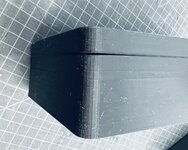
It is very strong, and I can't pull it apart. Obviously lowering the nozzle temp to 230C was too much. I'm back to my original recipe (260/90), I did increase the retraction from 1.4mm to 2mm. There's already some filament accumulating on the nozzle. I'll continue to experiment while I hopefully also get some usable parts out of the machine.
Good news is the Voile straps slide right through the bigger slot.

They are way too long. I used their measurements (in both cases) and they aren't accurate for what I'm doing. So, I ordered the shorter straps. These will have to work for now. This shows the excess length. It's workable, just not ideal.
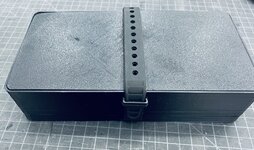
And last but definitely not least, the money shot!

Now that I look at it.. this print isn't going out the door. I can get better out of the machine. Iterative design, this is an iteration that's a little closer to where I want to be.
It is very strong, and I can't pull it apart. Obviously lowering the nozzle temp to 230C was too much. I'm back to my original recipe (260/90), I did increase the retraction from 1.4mm to 2mm. There's already some filament accumulating on the nozzle. I'll continue to experiment while I hopefully also get some usable parts out of the machine.
Good news is the Voile straps slide right through the bigger slot.
They are way too long. I used their measurements (in both cases) and they aren't accurate for what I'm doing. So, I ordered the shorter straps. These will have to work for now. This shows the excess length. It's workable, just not ideal.
And last but definitely not least, the money shot!
Now that I look at it.. this print isn't going out the door. I can get better out of the machine. Iterative design, this is an iteration that's a little closer to where I want to be.
MadeByMiller
Well-known member
It's hard to tell with the textured build plate, but it looks like maybe your initial Z may be a little high? I can see some areas towards the middle of that second to last picture where it appears there is some space between the extrusions. Maybe if you bring that initial Z down a bit it will help squish down into that textured build plate better and help with the warping off the bed issue.
Austin, I appreciate the help! I did an elaborate first layer calibration and have ran hundreds of parts since. I feel strongly this is happening because I'm close to the X axis build volume, I question if the outer edges of the build plate have as even of heating as the rest of the plate, and the print is 2" tall with solid walls on the corners. It only does this on the front, and the front is also where I get that horizontal line. I think it is all related. When I print smaller parts, I don't have this lift. The first layer goes down really nicely. I'm about to run another part and I'll snap a photo of the first layer. It looks great! I'm down to give your suggestion a try, I just think the first layer is really good.
I tried a brim and it didn't do anything other than leave a brim I had to remove. Today's part should be done in an hour or so.
I think I need to do the bed leveling stuff you did..
I tried a brim and it didn't do anything other than leave a brim I had to remove. Today's part should be done in an hour or so.
I think I need to do the bed leveling stuff you did..
MadeByMiller
Well-known member
Should be fairly easy to check your bed temp hypothesis with an IR thermometer if you have one, but that's not a bad theory.
Bed leveling will help for sure, I definitely recommend it! Also, I think someone mentioned earlier to try sticking a cardboard box over the printer to help keep some heat in. I know that PETG is more sensitive to ambient temps and drafts than PLA.
Bed leveling will help for sure, I definitely recommend it! Also, I think someone mentioned earlier to try sticking a cardboard box over the printer to help keep some heat in. I know that PETG is more sensitive to ambient temps and drafts than PLA.
MadeByMiller
Well-known member
Also, try bumping up to a 7x7 levelling mesh instead of a 3x3 if you haven't already. It won't make your parts any flatter than your build plate obviously, but it will help with your first layer.
Yes, I always make sure the area I'm printing in is at least 65*, and no drafts, not even a ceiling fan.
Yes, I always make sure the area I'm printing in is at least 65*, and no drafts, not even a ceiling fan.
It's 70° in here pretty much all the time. I'll switch to the 7x7 leveling. Hadn't noticed that was a thing. One thing that’s interesting is it only lifts on the front, which is also where the line in the front wall is. It’s at the height of the first solid layer above the infill.
Print is about 30 minutes from being complete.

Print is about 30 minutes from being complete.