To avoid these ads, REGISTER NOW!

Above 1200 Sq/FT Eastern Washington Workshop

Wokspaces above 1200 squarefeet.
OP
S

slodat

ALLIANCE MEMBER
Joined
Feb 6, 2010
Messages
3,679
Location
Central-ish, WA
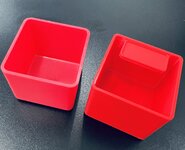
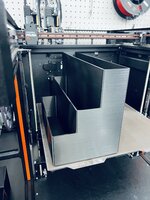
The XL continues to impress with print quality. Parts coming off it are really nice. These hardware bins where waiting for me this morning. All but the upper right square bin are off the XL.

IMG_2749.jpeg

Detail of that label pocket overhang:

IMG_2750.jpeg

The X1C continues to win the speed race and the print quality is awesome. I'm hopeful the much-anticipated input shaping firmware will yield the expected speed improvements on the XL.

I'm done with the BOM hardware stuff for right now. This stuff was spread out over my 4x8 work table. It always blows my mind how a little bit of organization condenses things so well.

IMG_2757.jpeg

IMG_2758.jpeg

These kind of photos are always fun to share. It's pretty cool to look at. Of course, there's a functional piece as well. All of these fasteners are in the database the label software uses. Going forward it's quick work to get the BOM packed.

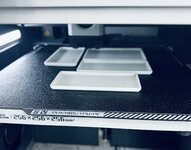
In an effort to not accidentally grab fine thread I'm making their bins a different color:
IMG_2761.jpeg

I have a lot of the small Schaller bins that don't have labels, and more hardware that would benefit from being in the little bins. The Fusion model is all parameters. This makes different size bins a few mouse clicks. These turn out so nice. This is off the X1C:

IMG_2759.jpeg

Compared to similar Schaller bin:
IMG_2760.jpeg

I have a feeling I will have a LOT of Schaller bins to sell..
 
Last edited:

To avoid these ads, REGISTER NOW!
OP
S

slodat

ALLIANCE MEMBER
Joined
Feb 6, 2010
Messages
3,679
Location
Central-ish, WA
For years I've felt like I don't have much in the way of personal stuff in the shop. As I need more space for the day to day business operations, I find myself moving more and more stuff into storage. It's stuff that belongs in storage - car stuff, wood working stuff I'd like to use later in life, things that don't get used often, and upholstery supplies. Needless to say I'm moving quite a bit of that sort of thing to storage and it's going well.

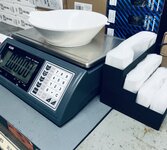
Came into some nice prints this morning. On the way out the door last night I came up with an idea for an organizer to hold the zip closure bags for the hardware.

IMG_2764.jpeg

The X1C printed what I see as a perfect part.

IMG_2766.jpeg

Moved into the storeroom by the hardware:
IMG_2769.jpeg

The XL is still completing its overnight job:
IMG_2768.jpeg

The other X1C made these:
IMG_2767.jpeg

And the gray bins for fine pitch threads worked out great:
IMG_2770.jpeg

Having that different color will do the trick to help ensure the right stuff gets packed out.

Before anyone asks.. I'm not replacing all the Schaller bins. (We all know replacing them all with the new labeled version is totally something I would do!) I am definitely happy to get rid of the ones I never loved - the 2x4x 3" tall bins. The draft on the sides means they always want to fall over in the drawers.

As I type this I'm looking for even somewhat reasonable pricing on more Vidmar cabinets..

Up next for the XL:
1692550102785.png
 
Last edited:
OP
S

slodat

ALLIANCE MEMBER
Joined
Feb 6, 2010
Messages
3,679
Location
Central-ish, WA
It's awesome that you can print things that you actually use. And at such high quality, too. What material are you using for these bins?
It’s really awesome! It makes the shop so much more enjoyable to work in.

These are all made with IIID Max PLA+. I bought a lot when it was $10.99/roll. I won’t buy PLA again. The new printers make the other materials just as easy to get great results.
 

GeddyT

ALLIANCE MEMBER
Joined
Jun 17, 2015
Messages
1,239
Location
Bellingham, WA
I’ve ran about 10kg of ABS with this level of quality. Photos are in the last few weeks.

Oh, I've seen all the pictures, I'm just mostly impressed with those unsupported overhangs for the labels in those bins. If you can print that kind of quality in ABS with those overhangs, man!

(This is definitely a "point on the doll to where the bad 3D printer hurt you" situation...)
 
OP
S

slodat

ALLIANCE MEMBER
Joined
Feb 6, 2010
Messages
3,679
Location
Central-ish, WA
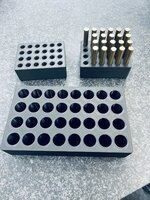
One of the many ways 3D printing really is a game changer in the shop. I needed a way to hold some of my parts for engraving on the short edge. And, I wanted it repeatable. A few minutes in Fusion 360 and a couple hours on the X1C and I have a workable solution.

It’s not that these couldn’t be made other ways. It’s that this takes very little of my time, there’s no setup, and they lack nothing.

IMG_2784.jpeg
 
OP
S

slodat

ALLIANCE MEMBER
Joined
Feb 6, 2010
Messages
3,679
Location
Central-ish, WA
Ran a few each of these work in progress blocks on the X1C’s. They turn out really nice and will help with the production of these parts.

IMG_2806.jpeg

IMG_2807.jpeg

I wanted to print another bag organizer on the XL for the larger bags. The first attempt failed:

IMG_2780.jpeg

The control panel stated the fan had failed. A reboot appeared to fix it. The second attempt failed as well. It stopped extruding. I believe that hotend is clogged bad. I switched to the other tool head and got a successful print.

IMG_2804.jpeg

IMG_2803.jpeg

IMG_2802.jpeg

IMG_2805.jpeg

As I use the XL more I feel it’s going to get better over time. This is historically how Prusa does things. A few things aren’t there that are quite surprising. I had to reslice the project to switch to the other tool head. I’ve had issues where the wifi doesn’t work at all requiring multiple reboots. It doesn’t switch toolheads when it runs out of filament and other toolheads have that filament loaded.

I love the print quality. The big bag organizer is 12” wide, 6.5” deep, 8” tall. That’s a great looking print at that size.
 

lilscorpion

Well-known member
Joined
Mar 15, 2010
Messages
3,599
Location
Colorado
Care to elaborate? ;)

Just scrolling through your recent updates and, more or less, I'd see a picture and say "that's slick" or "that's neat" or "I wish I had that capability"...like half a dozen times.

The bins: I like bins. I also like having drawers full of bins...not because I'm a bin freak or anything, but mostly because I don't like having to go to the store every time I need something common or ordering it and having to wait 3 days for it to arrive. I've figured out a way that works for me but the bins I (or most of us) have access to, are constrained in one way or another. Either the sizes are too standard to fit a normal drawer or they're too shallow/deep to optimize the depth of the particular drawer or they're hard to buy in limited quantities. "Damn" because I could buy a 3D printer, I just don't have the cycle times to practice at the moment...but I do want the outcome. :)

The fixturing: When I build a fixture, I sometimes spend more money and time on the fixture than the thing it is I'm attempting to build (repeatably, square, whatever). So "damn", I like the idea of being able to just whip up a fixture without lots of time investment.

Ziploc Bag Organization: "Damn" you even organized your ziplocs...
 
OP
S

slodat

ALLIANCE MEMBER
Joined
Feb 6, 2010
Messages
3,679
Location
Central-ish, WA
Matt- thank you for elaborating! I’m growing to regret all the money spent on Schaller bins because of exactly what you’re saying. Custom organization bits to fit the space and contents are really nice. As the shop evolves I’m finding myself wanting more layers to organization. Like the gray bins for fine thread fasteners.

I continue to be surprised by how useful 3d printing is in the shop. When I look back over what I’ve made on it, I still feel like I haven’t really tapped into the potential of it.

The ziploc organizers solved a real annoying issue- they are unwieldy as hell and a general mess. In these two organizers they are effortless and no time wasted trying to keep them from being a big pile in a tote.
 
OP
S

slodat

ALLIANCE MEMBER
Joined
Feb 6, 2010
Messages
3,679
Location
Central-ish, WA
Came across this Reolink POE Doorbell camera on Amazon for $76 with the 15% off coupon they currently offer. A quick search revealed folks are using it with Blue Iris without much fuss. I've avoided the other more popular options because I wanted the video on my Blue Iris system. Installed today and I'm impressed. It's really good. Consider the price and it's a no brainer.

Edited to add: the two way audio works with all of the Blue Iris interfaces: main application, web, and iOS app.

I'll end up with one on the other door to the shop as well. It includes a wireless door chime. The chime sound can be changed, so it should help me know when people are at the other door. Their iOS app works well and does two-way audio. Pretty slick.

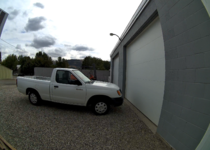
This is a still from the doorbell camera.

1693513834981.png
 
Last edited:
OP
S

slodat

ALLIANCE MEMBER
Joined
Feb 6, 2010
Messages
3,679
Location
Central-ish, WA
Conversation with @madison069 over in @loganb 's thread about wifi extenders got me thinking. I recently went through this and thought I'd do a little writeup on it. My Netgear wifi router had done a good job for several years, but it wasn't able to accept firmware updates for quite a while. I ultimately decided it was time to replace it. You may remember I installed a wireless link between my shop and my new building a block away. It has not had a single issue since I installed it five years ago. The Ubiquiti point to point wireless used for this was the first of their products I've used. I was really impressed with their interface and how well it worked.

This got me looking into Ubiquiti's current offerings. I ended up going with their Dream Machine Special Edition router. This doesn't have wireless built in. They offer several options for the wifi access points. I have three of their U6 Mesh access points. Two in the shop and one in the building down the street. The way their mesh setup works is incredibly easy to configure and REALLY powerful. I have multiple SSID's. The main network for computers, phones, etc. A network just for legacy 2.4Ghz wifi devices. A sandboxed network just for machine tools. Another for cameras. And one for automation related stuff. I added their Ultimate Dream Machine at home as well. They recently released "Site Magic Groups". This creates an always on VPN link between the two locations if you want. This means my HomeSeer home automation server is accessible at my house in a different town, via this VPN link.

1693611040841.png

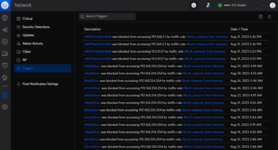
I can't emphasize enough how nice their user interface is. It's super simple to create firewall rules, see what's on the network, and SO much more. The cameras are on their own isolated VLAN that isn't allowed to connect to the internet. This prevents the Chinese cameras from phoning home as well as all manner of IOT attacks from within the network. I have one of their Pro POE+ Layer 3 switches for the cameras.

1693611306818.png

This shows the cameras attempting to connect to the internet and being blocked by the firewall rules. Their "Teleport VPN" is a zero configuration VPN for your phone. This allows me access to the network from my phone without any port forwarding.

I installed a 10Gb ethernet adapter in the Blue Iris/HomeSeer server. It's connected to a 10Gb port on the switch. The switch and router are also connected via 10Gb ethernet. It's fast, reliable, and it all just works.

I'm not a network engineer, but I'm happy to answer any questions on this stuff. I feel it was worth the cost and I'm very happy with the end result.
 
OP
S

slodat

ALLIANCE MEMBER
Joined
Feb 6, 2010
Messages
3,679
Location
Central-ish, WA
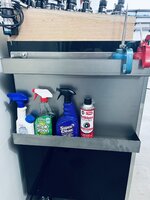
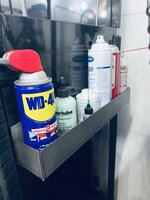
Stayed late this evening after working on customer projects all day and made a thing. I haven't made anything on the press brake for me/the shop since it arrived. Like any tool or machine, it takes a while to learn how to use it, incorporate it into a workflow, and how to apply to things that come up. I was about to design a small shelf for the front of the Ellis bandsaw. I opened the sheet metal projects folder in Fusion and a spray can shelf project was sitting there. When I tried to draw it last November, I got stuck and the project was shelved.

The design took a few minutes.

1693628827796.png

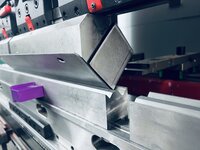
This part wouldn't be possible without the gooseneck punch:

IMG_3087.jpeg

And closed:
IMG_3086.jpeg

Completed part:
IMG_3088.jpeg

I could weld the ends closed, but it's completely unnecessary. This is 14ga (0.075") cold rolled. It is very strong for the application.IMG_3089.jpeg

As I'm sure you've noticed, I like to use existing fastener locations and mounting points when I can. This bolted right up to the HF cart:
IMG_3090.jpeg

Loaded up:
IMG_3093.jpeg

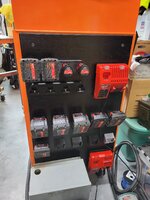
This was a really quick project that went to plan on the first attempt, which is really satisfying and confidence inspiring. SO.. I made one for the end of the Icon box that holds the mill tooling.
IMG_3094.jpeg

I really need to use as much of this kind of space as I can. It keeps horizontal surfaces clear while keeping these items nearby.

Overall, a VERY satisfying evening project. I have a feeling I'll make about a half dozen more. There are several spots in the shop where this would be really handy.

Lastly.. I let my Costco membership lapse 4-5 years ago. I have used their terrycloth shop towels for 20 years or so. They slowly get nasty enough they get tossed and consumed. I broke down and renewed my membership online. These showed up free shipping, next day:

IMG_3078.jpeg

I am continually pleased to have the laundry in the shop. It's a huge quality of life improvement.
 
Last edited:
OP
S

slodat

ALLIANCE MEMBER
Joined
Feb 6, 2010
Messages
3,679
Location
Central-ish, WA
Id get an Etsy account and sell ‘em as HF spray can trays.
That sounds like a nightmare. Granted, I've never used etsy. hmm..

Decided the Icon cabinet needed a second shelf.

IMG_3118.jpeg

The HF 44" box that holds the lathe tooling is next to the Pacemaker. I've kept some essentials on top for a long time.
IMG_3116.jpeg

I screwed up the CAD model and made it 2" too wide. Didn't seem worth scrapping the part over it, so it's there. At least until I make more. As I type this, I realize I'd like at least two more of these..

IMG_3117.jpeg
 
OP
S

slodat

ALLIANCE MEMBER
Joined
Feb 6, 2010
Messages
3,679
Location
Central-ish, WA
@Andrew S - you know I love this stuff! Thanks for sharing with us! Looks great!

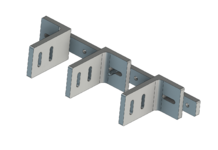
On the subject of 3d printing.. @cycle61 called with a need/idea for a new tool for the testing he's doing today. The conversational sketch on the dry erase board:
IMG_3125.jpeg

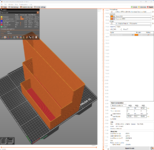
Concept in Fusion:
image.png

image.png

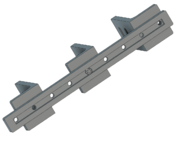
Variation on the L:
image.png

All three parts are printing on the 3d printer. 1.5 hours from phone call to printers starting. All will be in hand in 3 hours to evaluate.

Cool stuff!
 
Last edited:
To avoid these ads, REGISTER NOW!
OP
S

slodat

ALLIANCE MEMBER
Joined
Feb 6, 2010
Messages
3,679
Location
Central-ish, WA
Really productive day in the shop. Several iterations on the previously mentioned project. This is where 3d printing shines!!

IMG_3153.jpeg

IMG_3154.jpeg

Made a mistake on the center part. Corrected part is printing now. This is enough to send to @cycle61 so he can put it in hand and see what needs to change.

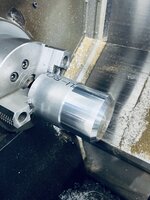
The old Okuma continues to challenge (my patience) and impress. The patience piece is.. it's old. It doesn't receive code electronically. I have to key the programs in from the control panel. I was entering the program for a part that starts out 4" bar stock. About 170 lines. I save every 10-20 lines. I went to save when it was complete and the control said it was out of memory, and I lost what I entered. One of the things that is cool/interesting about hand keying in the code is that I am considering each move as I type it in. I made a few changes that shortened it about 50 lines and typed it in again after I cleaned up the memory. At the end of the day yesterday I was single blocking the code when it rapid fed into the part, the part came out of the chuck, and broke the insert.

IMG_3140.jpeg

IMG_3141.jpeg

I got the tool setup with a new insert. And set out to try to figure out what I did wrong. It took a bit but I ultimately had forgotten to enter G1 at the beginning of a line. This means it's still in G0 (G0/G1 are modal). Once I took care of that, the code was good. I tuned the program for the first 4-5 parts and got it going pretty nicely.

IMG_3149.jpeg

The Ellis bandsaw adjustments I did the last time I ran the Okuma proved to be good. I had two thin offcuts that are pretty square and parallel.
IMG_3151.jpeg

This took about 3-4 hours this evening:

IMG_3150.jpeg

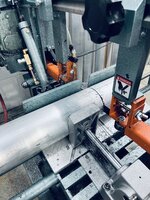
The bandsaw takes a little bit longer than the lathe cycle. I'll run the other 6' of the 4" bar tomorrow while these are running on the Haas.
 

RickP

Well-known member
Joined
Jan 15, 2013
Messages
1,547
Location
Annapolis, MD
That missing G1 modal line prefix will get you every time! ;-)

Parts look good -- amazing how repeatable your setup is.
All your infrastructure work getting to this point is really paying off!
 
OP
S

slodat

ALLIANCE MEMBER
Joined
Feb 6, 2010
Messages
3,679
Location
Central-ish, WA
@slodat is there no path to upgrading the controls on the lathe?

Ron
One way or another, I’m sure there is. It’s just not worth it. Like @GeddyT has mentioned previously, two axis lathe in great condition go for great prices at auction. My goal is to get a small dual spindle Y axis lathe when the finances can support it and the timing is right.

For now, this old 1986 Okuma is still a huge improvement over making these on a manual lathe.
 
OP
S

slodat

ALLIANCE MEMBER
Joined
Feb 6, 2010
Messages
3,679
Location
Central-ish, WA
That missing G1 modal line prefix will get you every time! ;-)

Parts look good -- amazing how repeatable your setup is.
All your infrastructure work getting to this point is really paying off!
I had not made that mistake yet. Took a bit of time to know what to look for. The feedrate override doesn’t affect rapids in single block mode on this control. Now I know to verify all the G0/G1 at the beginning of the lines. Should help prevent it in the future.

Things are starting to add up. I’m seeing the efficiency improvements on this run of parts already.
 

GeddyT

ALLIANCE MEMBER
Joined
Jun 17, 2015
Messages
1,239
Location
Bellingham, WA
One way or another, I’m sure there is. It’s just not worth it. Like @GeddyT has mentioned previously, two axis lathe in great condition go for great prices at auction. My goal is to get a small dual spindle Y axis lathe when the finances can support it and the timing is right.

For now, this old 1986 Okuma is still a huge improvement over making these on a manual lathe.

There is a long term plan in place to add a turning center to my shop. I think I could call things "complete" at that point. A couple of months ago, there was a 2006 Daewoo 2-axis lathe in perfect working condition and under power for inspection just a half hour away from me. It sold for something well under $5K, and the only reason I missed out on it was that I did bad math and logged in to bid an hour after the auction was over.

That same week, an identical lathe (same year, same brand) only with a dual spindle and Y axis went for auction in the Seattle area. Exact same footprint, a hundred times the capability. That one sold for quite a bit more money (I can't remember, but about $15K rings a bell), but still a pittance compared to what you could accomplish with it in a production environment. As a hobbyist, I'd probably prefer the cheaper 2-axis route and regret it later...

I've also considered a retrofit to my Chinese mini lathe, but when you can buy a real turning center for similar cost, why would I do that? In Steven's case, it becomes slightly more appealing when considering the cost of rigging, which can be shockingly expensive. Moving his current Okuma out and sliding another turning center in its place is about a $6K proposition, which would pay for several different control upgrade options to that Okuma. Control upgrades are a huge time sink, though, and I doubt Steven wants another, particularly when there are huge benefits in his production environment to that second spindle and Y axis. Advantage: new machine.

Steven and I were chatting about all of this off-board after we discovered that we were both eyeballing the same machine at a local auction! I'm way too busy (and house project broke...) right now for new machines, and this one would have been a logistical nightmare, with an impossible to meet removal deadline, no under-power inspection, and the auction house having no deal with offsite riggers. Steven bid, though, but the machine sold for about three times what I would have expected based on other recent auctions, so it wasn't meant to be.

Anyway, for the time being I'm going to have to live vicariously through Steven's shop, so I'm here with popcorn bucket firmly in hand!
 

86turbodsl

Well-known member
Joined
Jul 1, 2005
Messages
6,554
Location
Michigan
One way or another, I’m sure there is. It’s just not worth it. Like @GeddyT has mentioned previously, two axis lathe in great condition go for great prices at auction. My goal is to get a small dual spindle Y axis lathe when the finances can support it and the timing is right.

For now, this old 1986 Okuma is still a huge improvement over making these on a manual lathe.
I'd love to come up with a used 2 axis cnc lathe with old controls that could be updated to linuxcnc, do you have any suggestions for what to look for? I live in machine tool mecca but have no idea what to look for on a cnc lathe.
 
OP
S

slodat

ALLIANCE MEMBER
Joined
Feb 6, 2010
Messages
3,679
Location
Central-ish, WA
Tom - you really hit the nail(s) on the head. While I have completed a few control retrofits and use those machines in my shop, it's very time consuming. I'm overall happy with them. And, I'd rather buy a machine that's ready to run. As far as dual spindle Y axis lathes go.. They print money.. meaning bar stock goes in and completed parts come out. I have several products I won't develop until I have such a machine. They would be way too labor intensive, and all I'd do is lose money on them. I do think this is the next machine I'll buy.. I have found a rigger that's willing to both bring a machine from the west side, and set it in place. His pricing is very good and he answers his phone.

I don't think you'll regret a two axis turning center. The 37 year old Okuma is making very nice parts. I would definitely be tweaking the programs a lot more if I was able to send code to the machine. With that said, it's doing its job. It's an order of magnitude better than doing all the turning on a manual lathe.
 
OP
S

slodat

ALLIANCE MEMBER
Joined
Feb 6, 2010
Messages
3,679
Location
Central-ish, WA
I'd love to come up with a used 2 axis cnc lathe with old controls that could be updated to linuxcnc, do you have any suggestions for what to look for? I live in machine tool mecca but have no idea what to look for on a cnc lathe.
Just my .02.. linuxcnc is not worth the hassle. I have three machines I've retrofitted with Centroid controls and it runs circles around Linux CNC.

As far as what to look for, first decide what control you want to run. This dictates what kind of motor/drives you can run. At this point, on a budget Centroid Acorn is very inexpensive and it runs step and direction. The way I have approached it is to replace the axis drives, keep the spindle motor, new spindle vfd, and then get all the I/O and auxiliaries working. Two axis (XZ) CNC lathes are somewhat simple machines. I would absolutely want a hydraulic chuck. Kitagawa is the industry standard. If I were to do what you are thinking, I would want a lathe that runs on the existing control. It will answer a ton of questions. On my old Okuma the servos are absolutely massive. Physically they are bigger than a typical 5hp 3 phase motor. I don't know what drives could be used to run those servos. You would definitely want a turret. I'd recommend 1" tools. They are a great size and aren't crazy money.

Honestly, I bet the Okuma LB (12 in my case) would be a great retrofit candidate.

Just found a page on Centroid's website about retrofitting Mori Seiki turning centers.
 
OP
S

slodat

ALLIANCE MEMBER
Joined
Feb 6, 2010
Messages
3,679
Location
Central-ish, WA
Ebay says Okuma LB's are around $5K in my area.
I paid $5k for my Okuma. It will probably still be running great when I replace it. The only issue I have with it is I can't send code to the lathe. It takes me about 30 minutes to key in a program. These are HEAVY machines. An LB12 is a relatively small turning center. It weighs about 10k lbs. It's doing a great job turning 4" stock. These machines were designed to last forever. And, they seem to.
 

86turbodsl

Well-known member
Joined
Jul 1, 2005
Messages
6,554
Location
Michigan
I'm a mechanical engineer, but that discipline is far enough outside my experience to question it. I read somewhere that floors under machine tools need more beef than typical. I don't worry about the 2k bridgeport, or the 5k pacemaker, but a 10k small footprint machine makes me think about it.
 
OP
S

slodat

ALLIANCE MEMBER
Joined
Feb 6, 2010
Messages
3,679
Location
Central-ish, WA
Typical 8-10k vehicle lifts put that weight in 2-3 sq ft, and all I've seen specify 4" slab. Yes, I know some of them want big pads and such. In doing a little googling around I'm quite confident a 4" slab is not going to be an issue for a 10k lb machine. The machines I've seen have foundation specs are much, much heavier.
 

zanyad

ALLIANCE MEMBER
Joined
Apr 26, 2018
Messages
2,756
Location
NE Ohio
@slodat is there no path to upgrading the controls on the lathe?

Ron
One way or another, I’m sure there is. It’s just not worth it. Like @GeddyT has mentioned previously, two axis lathe in great condition go for great prices at auction. My goal is to get a small dual spindle Y axis lathe when the finances can support it and the timing is right.

For now, this old 1986 Okuma is still a huge improvement over making these on a manual lathe.
@slodat have you considered a DNC (direct/distributed network control) or BTR (behind tape reader) solution? Many exist. I've used boxes that interface between a PC with serial port and the CNC control, as well as a Predator card in a mid-1980's Cincinnati HMC to replace the tape reader. If you need more details, I can ask my old boss. It's been a while since I've touched that kind of technology.
 
To avoid these ads, REGISTER NOW!
Top Bottom