You are using an out of date browser. It may not display this or other websites correctly.
You should upgrade or use an alternative browser.
You should upgrade or use an alternative browser.
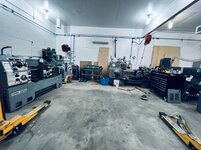
Above 1200 Sq/FT Eastern Washington Workshop
- Thread starter slodat
- Start date
Wokspaces above 1200 squarefeet.
Sorting out a plan for the lathe. Got what looks like a great deal from govets.com (which I believe is another Grainger outlet) on a Dorian tool post setup. Also ordered a DRO from Precision Matthews. Next up is replacing all of the controls. Should be a very nice setup when it's done.
I'm off for a week. In the shop sorting through the tooling. There's... a LOT!
I'm off for a week. In the shop sorting through the tooling. There's... a LOT!
They both have CXA (now). The tool center height will be different between the lathes most likely. That would require changing if moving a tool from one lathe to another. Having CXA on both lathes will be really nice.Going to be able to have the same toolpost setup on the new lathe and the Pacemaker to make moving tooling easy or will the Pacemaker have the next size up post?
Last edited:


bugnut
ALLIANCE MEMBER
Slodat, loving the new equipment. I am jealous of the cnc, I'm still manual and doubt I'll ever upgrade. As for switching toolholders between lathes a shim under the toolholder height adjustment screw, will make them work without changing.
Slodat, loving the new equipment. I am jealous of the cnc, I'm still manual and doubt I'll ever upgrade. As for switching toolholders between lathes a shim under the toolholder height adjustment screw, will make them work without changing.
I had thought I'd give it a go when the Dorian tool post gets here and see if I could get the tools to work on either lathe. It's okay with me if they don't. The CNC mill is a game changer and worth the effort in my experience.
I got the parts ordered for the lathe control system. I will be replacing everything except the motor. Going with the same setup Paco has on his new lathe.
I believe all of the needed parts for the lathe controls are ordered and on their way. Thankfully I had some of the stuff on hand. Prices on the MTW wire I use have skyrocketed!
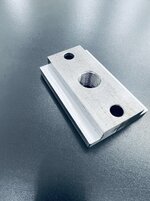
The KDK tool post and holders sold quickly and nearly covered the cost of a new Dorian toolpost. It arrived today. The included nut wasn’t as thick as I would like. I will be making another that has more contact. It sounds like a fun, simple project.

I powered up the lathe with the static phase converter that came with. Machine runs great.
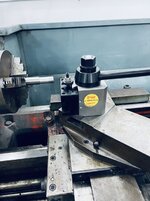
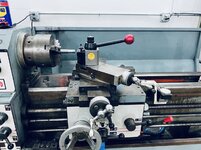
I’m thinking this will be my last lathe. I can’t see anything it won’t do. It’s funny though.. comparing it to my “smaller” 14x30 Pacemaker and.. there’s just no comparison. With that said, this is a nice machine with features the Pacemaker doesn’t have - reverse, D1 spindle, and metric threading. I’m going to try to raise the tool post on the Pacemaker so I can use tools on both lathes without changing tool height.
I’ve made my way through the tooling that came with the machines. There is a lot! This is the open stock stuff that is beyond what I want to store/keep.

It’s going to a dear friend. I also gave a box of tooling to the other friend that helped move the machines last week.
The Haas introduces a new to me tool management challenge. The Tree with Centroid has a 200 tool library because I change tools manually. The Haas has a 10 tool carousel. I saw a video on NYCCNC where he used some CAT40 tool tags sold by MSC to keep track of the details for a given tool. I found an .stl on Thingiverse and did this:
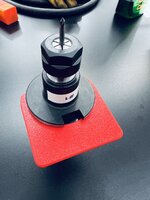


They turned out REALLY nice. Each tool will get a label from the label maker with pertinent details in an effort to keep it all straight and hopefully avoid a Z axis tool height crash.
Back to going through tooling and putting **** away!
Cheers!
The KDK tool post and holders sold quickly and nearly covered the cost of a new Dorian toolpost. It arrived today. The included nut wasn’t as thick as I would like. I will be making another that has more contact. It sounds like a fun, simple project.
I powered up the lathe with the static phase converter that came with. Machine runs great.
I’m thinking this will be my last lathe. I can’t see anything it won’t do. It’s funny though.. comparing it to my “smaller” 14x30 Pacemaker and.. there’s just no comparison. With that said, this is a nice machine with features the Pacemaker doesn’t have - reverse, D1 spindle, and metric threading. I’m going to try to raise the tool post on the Pacemaker so I can use tools on both lathes without changing tool height.
I’ve made my way through the tooling that came with the machines. There is a lot! This is the open stock stuff that is beyond what I want to store/keep.
It’s going to a dear friend. I also gave a box of tooling to the other friend that helped move the machines last week.
The Haas introduces a new to me tool management challenge. The Tree with Centroid has a 200 tool library because I change tools manually. The Haas has a 10 tool carousel. I saw a video on NYCCNC where he used some CAT40 tool tags sold by MSC to keep track of the details for a given tool. I found an .stl on Thingiverse and did this:
They turned out REALLY nice. Each tool will get a label from the label maker with pertinent details in an effort to keep it all straight and hopefully avoid a Z axis tool height crash.
Back to going through tooling and putting **** away!
Cheers!
Last edited:

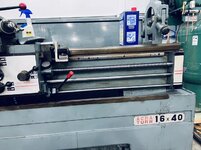

It took most of the day, and the lathe is clean.. enough. It was nasty. I used purple degreaser and WD-40. It worked well and I didn't remove the paint in the process. Everything is now coated in way oil. I don't plan on using the coolant pump. Will most likely install a Fog Buster. I have one on the Tree CNC mill and I really like it. I did flush hot water through the coolant system until it came out clean ish. It has some Kool Mist in the sump in the off chance I decide to use it later. Should prevent it all rusting.
The lathe is in really good condition. On to the next project... which will probably be cleaning the grease and grime off the floor in front of the lathe.


The lathe is in really good condition. On to the next project... which will probably be cleaning the grease and grime off the floor in front of the lathe.
Finallygotit
ALLIANCE MEMBER
What Logan said!!

Thanks guys. And, Happy New Year! Here's to a good year!
I'm really happy about the lathe. I have a lot of good stuff coming for it: complete changeout of the controls. Going with Mark Jacobs design with the proximity stop for threading, VFD with ~1 second braking, two stage coolant control, etc., and what looks like a nice DRO, and a spindle speed display.
I'm really happy about the lathe. I have a lot of good stuff coming for it: complete changeout of the controls. Going with Mark Jacobs design with the proximity stop for threading, VFD with ~1 second braking, two stage coolant control, etc., and what looks like a nice DRO, and a spindle speed display.
racer-john
Well-known member
Happy New Year, slodat
Quick fun project this afternoon.. the lathe chuck key handle was loose in the bore and always sliding out. The probe on the milling machine makes short work of locating the center of the bore. The Yuasa 5c indexer is really slick for rotating 90 degrees. Switch collets to drill a small dimple in the handle, still centered because of the indexer. The dimple gives the set screw a pocket to register in. Worked out well, it's on center and goes together quite nicely.


Cleaned up the tailstock and got it on the lathe. I'm really happy with the new lathe.

Finished going through all of the tooling that I bought. It's all sorted and put away. That was a lot of work. So much high quality tooling. And, I gave my two buddies big care packages to feed their Bridgeports.


Cleaned up the tailstock and got it on the lathe. I'm really happy with the new lathe.
Finished going through all of the tooling that I bought. It's all sorted and put away. That was a lot of work. So much high quality tooling. And, I gave my two buddies big care packages to feed their Bridgeports.
Finallygotit
ALLIANCE MEMBER
Man, that new lathe sure cleaned up well!
lilscorpion
Well-known member
Holy **** that’s a lot of tooling!!!
Klokwerk
Well-known member
Holy hell your shop is looking great! The new lathe looks beefy!
Holy **** that’s a lot of tooling!!!
Did a double check there...great to see you back!
And agreed...that lathe is looking sharp and ready for work!
It did. I knew when I went to check everything out that it was lightly used and covered in cutting oil and dried up lubricant. It’s a gem with no perceivable wear.Man, that new lathe sure cleaned up well!
That’s only end mills and reamers. There had to be a ton, as in 2000 pounds, of tooling. Everything I’m keeping is put away. I’ve sold a couple things and have some more I’d like to sell.Holy **** that’s a lot of tooling!!!
Thank you! It’s an enormous amount of work getting it back to clean and put away. The new lathe is awesome. It’s a baby compared to the “14x30” Pacemaker sitting across from it. The Pacemaker’s headstock is nearly 3 feet wide, has a 15hp motor, and weighs about a ton more. The Acra has everything the Pacemaker doesn’t and I’m lucky to have it!Holy hell your shop is looking great! The new lathe looks beefy!
I have a lot in store for the lathe. All new motor controls, DRO, and maybe a new chuck.And agreed...that lathe is looking sharp and ready for work!
Thanks for following along and taking the time to comment everyone. It adds fuel to the fire.
86turbodsl
Well-known member
You could always build a spacer into the toolpost mount for the shorter lathe so centerlines match. Would eliminate the tool holder shuffling.They both have CXA (now). The tool center height will be different between the lathes most likely. That would require changing if moving a tool from one lathe to another. Having CXA on both lathes will be really nice.
Edit: I didn't jump far enough back and see you are doing it. And also.... can i be one of your buddies??? lol

Continuing to print Schaller style bins in various odd sizes that work well for my needs. It’s so satisfying to walk in to the shop in the morning and find this waiting for me.

I started cleaning up the Haas. It's cleaning up nicely. The paint on the main casting has failed a long time ago. It's mostly wiping off. The sheet metal and other parts are looking good. Shouldn't be an issue. The tool changer carousel was just nasty with dried up coolant and chips.


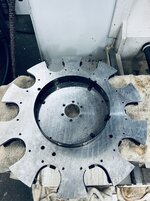

Much better.

I started cleaning up the Haas. It's cleaning up nicely. The paint on the main casting has failed a long time ago. It's mostly wiping off. The sheet metal and other parts are looking good. Shouldn't be an issue. The tool changer carousel was just nasty with dried up coolant and chips.
Much better.
One of the limitations with the 20 year old control on the Haas is its limited memory and associated program limits. Another is it uses a floppy disk for programs or RS-232 serial communication with a PC. The slick setup is a small controller that “drip feeds” the program to the Haas control via RS-232 using tape commands. This evening I installed that setup.
Calmotion’s setup is really well done. It has a panel mount USB port for sneaker-net file transfer, and it has an ethernet port to send files over the shops network. Then you select that file on the controller and it sends the program to the CNC control one line at a time aka “drip feed”.
I decided to sacrifice the spindle load meter to give panel space for the Calmotion.
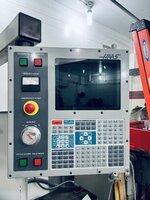
Drew up a drill template and cut it out of 1/8 mdf on the laser. Makes quick work of this and makes it easy to get good results.

Mounted up.

Replaced two mounting screws with standoffs. Attached din rail to standoffs and board clips onto the din rail.

Looks like it was born there.

Powered up.
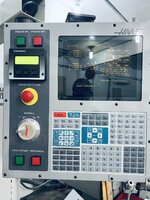
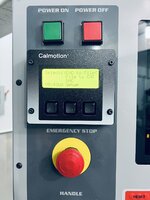
Calmotion’s setup is really well done. It has a panel mount USB port for sneaker-net file transfer, and it has an ethernet port to send files over the shops network. Then you select that file on the controller and it sends the program to the CNC control one line at a time aka “drip feed”.
I decided to sacrifice the spindle load meter to give panel space for the Calmotion.
Drew up a drill template and cut it out of 1/8 mdf on the laser. Makes quick work of this and makes it easy to get good results.
Mounted up.
Replaced two mounting screws with standoffs. Attached din rail to standoffs and board clips onto the din rail.
Looks like it was born there.
Powered up.
Finallygotit
ALLIANCE MEMBER
Ya know, for a 20 year old CNC, that control looks barely used. We have panels on some of our 10 year old machines that look like someone ran over them with a belt sander. Nice work on the Calmotion.
GirchyGirchy
Well-known member
C'mon, you need to work out a solution to flush-mount that Calmotion controller panel. Sheesh.
lilscorpion
Well-known member
Those are sick. How’s the finish up close? How long does the printer run for say those 4?Continuing to print Schaller style bins in various odd sizes that work well for my needs. It’s so satisfying to walk in to the shop in the morning and find this waiting for me.
The quality is ridiculous. They are flawless/near flawless. 3-4 hours each depending on size.Those are sick. How’s the finish up close? How long does the printer run for say those 4?


This is three 2x6x2 and one 4x6x2. Slicer says 15 hours. These are essentially solid. Very durable. At least as good as the actual Schaller bins. I doubt I'll ever buy another.

86turbodsl
Well-known member
How's the cost of the printed bins vs the schaller bins?
The Frisco Kid
Well-known member
How's the cost of the printed bins vs the schaller bins?
This is what I need to know! I have been playing around with the concept/utility of a 3D printer, and the bin cost/cost savings could tip this thing over the edge.
How's the cost of the printed bins vs the schaller bins?
This is what I need to know! I have been playing around with the concept/utility of a 3D printer, and the bin cost/cost savings could tip this thing over the edge.
Using the four bins currently printing as a data set.. Schaller's cost before shipping and taxes is $4.29. According to the slicer I'm using $4.71 in filament. Add in sales tax, which I have to pay for online transactions, and shipping and it's either a wash, or slightly less cost to print. The major advantage of printing is you print what you need vs. "stocking orders" with Schaller. It's important to note I have over $2k in Schaller bins. I have them EVERYWHERE. They are that useful. I doubt I will ever buy more from Schaller. I will print the sizes I need going forward. I also make custom sizes that Schaller doesn't make.
Also, the 3" tall Schaller bins have a significant draft angle and they tip up in Vidmar drawers. I can print 3" or taller bins with no draft angle, so they stay put.
I use Overture PETG filament. It is relatively inexpensive, looks and prints great and is readily available.
The Frisco Kid
Well-known member
I figured that it would be about the same. Gaining the ability to custom print as needed and custom size bins (fitting exactly what I want to store and where I want to store it) would be the big advantages.
Thanks for the reply.
Thanks for the reply.
86turbodsl
Well-known member
Very nice. I will look into this option in future.
lilscorpion
Well-known member
It’s the custom sizes that really makes it almost brilliant. What custom enables is to fit bins in drawers that are non-standard sizes. None of the cabinets I’ve made were built so I could have a perfectly even sizes drawer so I’ll always have a little space to fill. It’s always kinda irritated me.
the only downside I can think of in the print vs buy is time. If you needed 100 bins you’d have to plan further ahead to print than just placing a large order.
the only downside I can think of in the print vs buy is time. If you needed 100 bins you’d have to plan further ahead to print than just placing a large order.
lilscorpion
Well-known member
Being able to prototype a panel like that so quickly is awesome. What will the final one be made out of?New control panel for the lathe mocked up in MDF to check fitment and see how it looks. This is going to be nice.

I’ve used the laser for this sort of rapid prototyping since I got it. It really speeds up the process. Allows checking dimensions, fit, layout, fastener location, and all that in a couple minutes. There’s a stack of mdf remnants next to the laser that get reused until they are so small they can’t be used again.Being able to prototype a panel like that so quickly is awesome. What will the final one be made out of?
Final part(s) are being designed now. The cavity in the head that the switch panel sits over is not deep enough for the new switches. The new panel will be two parts - an extension ring that attaches to the lathe headstock with the original threaded holes and a top plate that attaches to the ring. There’s a step in the interface between the two parts that would require liquids to go up and over in order to get inside. It also serves as a registration flange. And, it’s a challenge to make. These parts will be made out of aluminum. More to follow.
The rest of the lathe control parts and the DRO have arrived. Now to get it all together and installed on the lathe. I will have to make a DRO head mount and come up with something to mount the tachometer display.
Machines are in the shop. There’s a lot of tooling to sort through and put away. I am exhausted!

Congrats. I run a TM-1P, which is very similar to yours but with a full enclosure and newer control (previous generation). NB: If the control takes a ****, it's thousands of dollars to upgrade to the current (NextGen) control.
Something to consider: an indicating tool offset block, such as this one from Edge Technologies. Makes setting tool length offsets easy-peasy. They're 4" tall, so if you know how tall your vise base is, you can calculate your coordinate Z offset instead of having to touch off everything. I use a 1" gage block to calculate my Z length offset where I don't know the fixture offset.
Haas's videos on YouTube are great, especially their Tip of the Day series.
The Haas introduces a new to me tool management challenge. The Tree with Centroid has a 200 tool library because I change tools manually. The Haas has a 10 tool carousel. I saw a video on NYCCNC where he used some CAT40 tool tags sold by MSC to keep track of the details for a given tool. I found an .stl on Thingiverse and did this:
<SNIP>
They turned out REALLY nice. Each tool will get a label from the label maker with pertinent details in an effort to keep it all straight and hopefully avoid a Z axis tool height crash.
Back to going through tooling and putting **** away!
Cheers!
I got something similar from I think MSC. Haven't really used them because they don't fit the spacing in the storage racks I have. Printed labels on these sound great. However I'd recommend leaving a space for the tool length offset and writing it in with a Sharpie or grease pencil. Makes re-using tooling very easy. Just pop in the tool and enter the previously saved offset length.
Feel free to message me if you have any questions!