To avoid these ads, REGISTER NOW!

Above 1200 Sq/FT Eastern Washington Workshop

Wokspaces above 1200 squarefeet.

GeddyT

ALLIANCE MEMBER
Joined
Jun 17, 2015
Messages
1,239
Location
Bellingham, WA
I've mentioned it in this thread before, I think, but Aquanet hairspray is also a great bed adhesion promoter. It's a solvent when went and glue when dry, so you don't have to clean it off. Just spray more on, and it's self cleaning. I probably clean my print bed maybe once every dozen prints with that stuff.

My Aquanet walked away (things grow legs around here sometimes) recently, so I found a different brand hairspray in one of the bathroom cupboards and tried it the other day. Noooope. Corners lifted badly, and it left a crusty layer that had to be scraped off.
 
To avoid these ads, REGISTER NOW!
OP
S

slodat

ALLIANCE MEMBER
Joined
Feb 6, 2010
Messages
3,679
Location
Central-ish, WA
This is an excellent suggestion if the part allows it! Here's my interpretation of what @Andrew S was suggesting:
Add a brake in the center on the opposite side to open up the part for die clearance:
Press Brake Back Bend.png

Then flatten that bend out when you're finished:
Press Brake Back Bend 2.png

Hope you don't mind me answering for you Andrew, but that's a brilliant solution until you get a set of gooseneck dies!
Austin - thank you for this! Illustrating the idea is what I needed. I don't have a flattening die, but I think I can make one easy enough.

This method is used pretty frequently in the fab shops I've worked with. It works a treat when you don't have the dies for the profile as long as you can live with the flattened bend line running down the center of the part.
Thank you for sharing your experience. This would have been just fine for the part I was making the other day.

I've mentioned it in this thread before, I think, but Aquanet hairspray is also a great bed adhesion promoter. It's a solvent when went and glue when dry, so you don't have to clean it off. Just spray more on, and it's self cleaning. I probably clean my print bed maybe once every dozen prints with that stuff.

My Aquanet walked away (things grow legs around here sometimes) recently, so I found a different brand hairspray in one of the bathroom cupboards and tried it the other day. Noooope. Corners lifted badly, and it left a crusty layer that had to be scraped off.
Tom - you have mentioned it. What I was getting at is that as modern, advanced, and awesome as the X1C is, I would have thought they'd have a better method then glue, hairspray, etc. I'll see if I can find a can of AquaNet.
 

rvieceli

Well-known member
Joined
Nov 3, 2013
Messages
774
Location
Illinois
All you Aquanet guys, just remember to make sure to keep a lighter close by your hairspray can. Then come the zombie apocalypse, you can fight the zombies off with your mini flame thrower. :p

Ron
 
Last edited:

gilr

Well-known member
Joined
Jul 26, 2008
Messages
296
Location
Richmond, VA
For the Wrist Rocket bands, I just dip the ends in rubbing alcohol and they slip right over the prongs of the slingshot. Once the alcohol dries, they are stuck tight!
 
OP
S

slodat

ALLIANCE MEMBER
Joined
Feb 6, 2010
Messages
3,679
Location
Central-ish, WA
The replacement Revo Six HeaterCore arrived and the Prusa is back at it.

@MadeByMiller this is the first layer (on the left).

BA2A12A2-25CE-45D7-B245-46C82F8F5F5A.jpeg

This is a satisfying photo:
7F562BEF-6D3F-4ACF-A92D-13DF2EE5A48D.jpeg

I’m done with the magnetic drawer labels. I may or may not have made 99 of them!

Thoughts on the X1C after a week of it in the shop.. it's an absolute win. I had two minor issues, and they were both my fault and easy to resolve. The multi-color piece cannot be underestimated. It's reliable, fast, no fuss, and it makes beautiful parts. I'm very happy with it.

This is very satisfying:

F9071C3C-0929-4AD7-BCB6-4F9AAEC005F1.jpeg

It’s hard to tell in a still shot. X1 is printing hardware case bottom, Prusa printing a top.
 
Last edited:

bugnut

ALLIANCE MEMBER
Joined
Jul 14, 2012
Messages
3,840
Location
Central Ohio
I’m done with the magnetic drawer labels. I may or may not have made 99 of them!

Thoughts on the X1C after a week of it in the shop.. it's an absolute win. I had two minor issues, and they were both my fault and easy to resolve. The multi-color piece cannot be underestimated. It's reliable, fast, no fuss, and it makes beautiful parts. I'm very happy with it.

This is very satisfying:
Dadgummit, my wallet won't stop twitching..........Grrrrr
 

MadeByMiller

Well-known member
Joined
Dec 29, 2018
Messages
1,230
Location
Rapid City, SD
Planning on getting the assembly at least started but hopefully completed on the enclosure today. I read through the instructions and I'm annoyed that I'll be required to partially disassemble (LCD and PSU/cable management) my new machine to get through the enclosure assembly. Also annoyed that in order to install the filtration and light add-ons I purchased with the enclosure I will also have to undo some of the enclosure assembly once it's together. They should have specific instructions for people installing those add-ons in the initial assembly.
 
OP
S

slodat

ALLIANCE MEMBER
Joined
Feb 6, 2010
Messages
3,679
Location
Central-ish, WA
That's disappointing. It pains me to say it, but Prusa is losing some luster for me. Especially when I was comparing a new i3MK3s with enclosure, Octopi, and Revo Six with the X1CC. They are quite close in price, the Prusa is a kit - even when buying assembled because of the enclosure. And, the X1 is an all around better printer in every way.

This was the goal.. print both parts at the same time. Worked well.

0AADD394-250D-4D31-BE52-61BECF3050D0.jpeg

Just sent this to the X1

1674327368832.png
 

MadeByMiller

Well-known member
Joined
Dec 29, 2018
Messages
1,230
Location
Rapid City, SD
I got the enclosure assembled minus the add-ons, I need to print some parts before I install those. I'm really impressed with the enclosure. Great design and construction. I can tell where they've improved some points in design on their printed parts. It looks great too. I'm still team Prusa due to the open source nature of the brand and the community.

Those parts look excellent! What to you attribute the difference in part sheen to (the Prusa parts are much more shiny in appearance in the photo)? Are they printing at different temps? The ambient temp inside the enclosure of the Bambu?
 
OP
S

slodat

ALLIANCE MEMBER
Joined
Feb 6, 2010
Messages
3,679
Location
Central-ish, WA
Those parts look excellent! What to you attribute the difference in part sheen to (the Prusa parts are much more shiny in appearance in the photo)? Are they printing at different temps? The ambient temp inside the enclosure of the Bambu?
Thank you. I’m really happy with the parts. As far as the sheen goes, I really don’t know. I’ve used the same ish PETG settings on both printers and the X1 always produces a matte finish, on any filament. I haven’t printed PLA on the Prusa in well over a year. I can’t comment on how it looked off the Prusa.

The X1’s cool plate preset is 35C for PLA. I was somewhat assuming that is part of the finish.
If I sent that to my printer, I'd come back 40 hours later to a perfect print of a fist flipping me the bird.

Who am I kidding, no way could my printer handle a fist flipping the bird...
Ha! Well… you know of at least two options that are reliable out of the box ;)

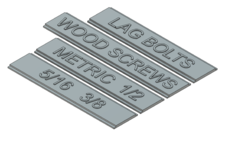
Just pulled this off the X1 while the Prusa is working away on a hardware tray. These are Tekton screwdriver, and hex sockets that I didn’t have a rail for in the socket drawer.

53140AA6-82A4-45C6-B156-CDDBF60D8AED.jpeg

The letters are 1/4” tall. I knew the white letters on black would look great. I’m really happy with this one.
 
Last edited:
OP
S

slodat

ALLIANCE MEMBER
Joined
Feb 6, 2010
Messages
3,679
Location
Central-ish, WA
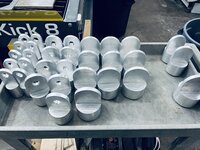
The last machining operation on the tooling order was the hole in the round stabs.

79BF2221-7A7F-428C-B7A6-A93FB13491D3.jpeg

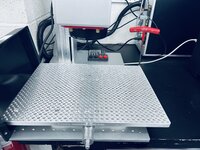
Got that dialed in and they went quick. Then, engraving. Blackwell Engineering recently started offering this 200mm x 400mm fixture table for their XY table. It was exactly what I needed to support my longer parts. Especially doing four at once. Matt makes some really nice stuff.
6F97E7CB-489A-4B17-B422-9BCE11B18A90.jpeg

One last final check prior to boxing up and shipping. This is the final product. I'm very happy with the first run.

3C5F4E76-43E1-4AE7-A669-7981D10B114E.jpeg

I want a tumbler for the next tooling run. That will happen when the order comes in. The last and final step complete:
BF3B20B6-5CFD-4819-96D3-520533962C8C.jpeg

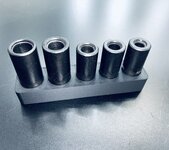
I've been enjoying not doing much of anything today. I did do a design to hold these large tap sockets in a tray.

1B0175F5-757A-4AE7-9803-41FD53BD7ACB.jpeg

The X1 continues to impress. The order of 30 rolls of inexpensive PLA+ arrived. I have plenty of filament for quite a while.
 
To avoid these ads, REGISTER NOW!

RPageOne

Member
Joined
Apr 20, 2013
Messages
19
Location
DFW
Just reached the end of a 5 day journey with you.
You sir, are very inspiring. You know what you want, you go for what you need. Organized to achieve efficiency.
If more people had your work ethic, the world would be a better place but less populated.
Hope you see that as a joke.
You make me want to see such a small town with such talent to pull from.
 
OP
S

slodat

ALLIANCE MEMBER
Joined
Feb 6, 2010
Messages
3,679
Location
Central-ish, WA
Just reached the end of a 5 day journey with you.
You sir, are very inspiring. You know what you want, you go for what you need. Organized to achieve efficiency.
If more people had your work ethic, the world would be a better place but less populated.
Hope you see that as a joke.
You make me want to see such a small town with such talent to pull from.
Thank you so much for the kind words of encouragement, and taking the time to read the whole thread. It means a lot to me that folks find what I'm doing in my shop interesting. I do get your joke. Well done!

Again, thank you.
 
OP
S

slodat

ALLIANCE MEMBER
Joined
Feb 6, 2010
Messages
3,679
Location
Central-ish, WA
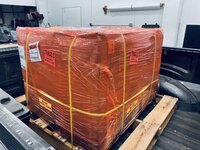
Congratulations! There is a lot of effort sitting on that pallet, you should be proud.

By the way, I thought I asked you to stop talking about the X1??
Thank you! I didn't do much of anything yesterday, save for that socket tray. It was really nice to not have the tooling order weighing on me. I'm glad to have it completed and on the way to the client.

I'm not good with instructions, some would tell you ;)

I'll say this.. I am very happy to have the X1.
 
OP
S

slodat

ALLIANCE MEMBER
Joined
Feb 6, 2010
Messages
3,679
Location
Central-ish, WA
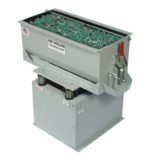
I have spent a lot of time trying to settle on how to finish my tools. The initial order went out as machined. I did all the deburring I could on the machines, and there was plenty left to be done by hand. I tried various blasting media/pressure combinations, and never found something I really liked. Deep down I knew the answer.. After a LOT of hemming and hawing, I ordered this guy:

1674950016231.png

I'm ready for it to get here already! I'm working on a spot for it to live in the finishing room. I can close doors and separate myself from the loud racket these machines make while running.
 
OP
S

slodat

ALLIANCE MEMBER
Joined
Feb 6, 2010
Messages
3,679
Location
Central-ish, WA
I was chatting with @MadeByMiller earlier about drawer labels. We both agree that they clutter up the otherwise cleaner visual space and lines. Then why am I making drawer labels? Because there are a lot of drawers in the shop, and lesser used stuff has proven to be less easy to find at times. And, I often open/close a few looking for what I know is in "one of these drawers". The HF toolbox labels are working out for the most part in their current form. I didn't label every drawer becuase many are reflexive.

All that to say, I started on labels for the Vidmars. My Vidmar cabinets are kina rough cosmetically, and fully functional. The drawer handles are no different.

This was the first (test) piece.

4F67F592-71C1-4D5F-A990-B963E8A255C2.jpeg

23E39195-0F9F-42AB-8EE3-9DE1755DB3EC.jpeg

It slid right in. A little too easy. I snuck up on the right dimension so the label wouldn't slide around in the handle. It's a nice tight fit now. A 3D printing savvy friend has been asking me to see how the X1 does with ironing. This is the result:

BAFF0373-7658-433B-BBC5-C09F624578F5.jpeg

Obviously, ironing on the left label. It is crazy how smooth it makes the surface. It dosn't seem to add too much time to the print. Honestly, I don't get concerned with how long a print takes generally speaking. It's automation and it runs unattended. This is more what I'm thinking I'll make these like:

62BEBAF2-8DF3-4A18-A244-D09093E75A18.jpeg

73B9FD23-2625-49B5-8EEF-0980AF44968C.jpeg

Installed. These letters are 15mm tall. The finish on the print is really nice. I left the X1 working on these:

1674968851192.png

Here it is churing away while I decompress at home:
E9A5CE8B-90DD-4F07-9CD4-C39451BD3CFE.png

D75B9575-864F-4357-A756-5290085674F7.png

The ironing eliminates (or minimizes) the "3d printed" look enough to really change things. The multi-color prints on top of that and.. this is really cool stuff!

@MadeByMiller @loganb @nicholam77 sorry about the X1 stuff.
 

Arne73

Well-known member
Joined
Mar 20, 2010
Messages
1,477
I had an opportunity to visit a high end, German owned production machine manufacturer. All the hardware used in their products is run through a polisher. I think it really adds to the finished look of the assembly.
 

loganb

ALLIANCE MEMBER
Joined
Dec 29, 2011
Messages
5,497
Location
Omaha, NE
I am really impressed with the ironing function on the X1. The plaques almost look injection molded.

:beer:

Agreed....that ironing surface is awesome!

This does make me think about labels for mine....my labels recently have been 1" tall label maker tape stuck to a 1" tall magnet I cut off the roll

But I could do a "lazy mans" 2 color appearance by printing the letters/numbers as the negative/blank space and then sticking contrasting paper to the backside that would show. Might have to try this....my Vidmar has the slightly curved label holder so will need to keep it pretty thin
 
OP
S

slodat

ALLIANCE MEMBER
Joined
Feb 6, 2010
Messages
3,679
Location
Central-ish, WA
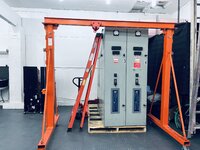
I need to be able to lift this switchgear I'm making parts for off the pallet. HF won't have their gantry back in stock until late May. I lucked out. A buddy of mine has one that I can borrow until I can get one of my own. I've planned on getting one since I let the fixed height gantry go a few years ago. Just hasn't happened yet. I needed the telescoping height feature. This will work well. Got it in the shop this afternoon.

C6C5C13D-F58B-4D55-80D6-A8018C4B5491.jpeg

These were waiting for me in the X1. @loganb the ironing is making some really nice looking parts.

D2ABFF54-10C8-4183-9926-4C112D29F380.jpeg

Installed:
67C413EF-6B0E-493C-BBC6-8D5465209DC3.jpeg

These are made using the $10.99/roll PLA+ I bought. It's working well. I suspect I'll make filler panels once the labels are made for a uniform appearance on the handles. Maybe.

I do need to make some end caps for the handles.
 
OP
S

slodat

ALLIANCE MEMBER
Joined
Feb 6, 2010
Messages
3,679
Location
Central-ish, WA
I’m finally sorting out running my parts on the Haas I bought last December. The control is quite different and I don’t find it to be intuitive at all. And, I’m making some headway.

Step one, I thought, was getting my milling stop setup to work on the Orange vise with the 8” serrajaws. I made two 1” spacers so the arms would make it past the wider jaws.

The spacers worked great. It was really cool to just grab some material from the rack and turn these right quick on the Pacemaker. Once I had it all bolted together another issue presented itself- the Orange vise jaws are deeper than the typical Kurt jaws the stop is made to work with. So.. I’ll have to sort that out at some point. I think I’ll buy or make another table mount. I use Edge Technologies table mount on the other mill.

8DC43A5F-519F-4F12-9F12-A3C49E5F0ACC.jpeg

13FE72FB-7D09-46C1-9F26-4D1BF9B1F9C2.jpeg

I spent a big part of the day getting the code to the machine and fumbling my way around the control. I did get to this:

0C5FE8DF-255E-458D-B4C1-6BEBF0942413.jpeg

I got the graph function figured out and that really helps. Lastly, I’ve loaded up the tools for the first job:

93C6B7BE-089F-4171-8D2F-7A5DFE3B6661.jpeg

How it sits now while I try to wrap my head around measuring tools and setting WCS for OP1.

756C6183-84A2-428A-834C-4F631BE48301.jpeg
 

GeddyT

ALLIANCE MEMBER
Joined
Jun 17, 2015
Messages
1,239
Location
Bellingham, WA
Am I reading the cheat sheet right in that you have to calibrate the Haimer on every single machine startup!? I don't know why this would be necessary. I'm only familiar with one control (at least in the last two decades), but don't they all work pretty much the same when it comes to G54 and tool offsets?

The tool library on your control should be able to save far more tools than the carousel can hold, so you should only have to set the offset of each tool once until it wears out or breaks.

The process, from start to finish, goes like this:

1.) Load the Haimer probe into the spindle, assign it a tool number, and let the control know that it's a probe (not sure how to do this on Haas control, and might not even be necessary to assign it as a probe).
2.) Place your height setter on the table (table never goes away, but vises and fixture plates might), then touch off the Haimer to the height setter until both read zero. My height setter has fixed raised nubs next to the plunger to touch a probe off to, but it doesn't look like yours does. Somehow, though, you need to get the probe to read zero at the same point that the height setter reads zero (maybe stacking gauge blocks on the top of the setter's case until you have the correct height to touch off to).
3.) Place your workpiece in the the vise or fixture and touch off with the probe, storing X/Y/Z to G54 on the control.
4.) Insert tools and start touching them off to the height setter and storing the offset of each.

Done.

The reason steps 3 and 4 are in that order (at least how I like to do it) is that it offers a quick sanity check. After setting each tool offset, I can jog to the top of the workpiece (assuming G54 Z0 is the top of the stock) and see if the DRO reads 0 in Z.

From then on, you should only have to do step 3. Since both the probe's and the tools' offsets were measured from the same fixed point, you never have to change the tools' height offsets unless you put a new one in the machine or replace one that's worn. You never have to reset your probe's Z-offset because probes don't grow or shrink when not in the machine. As long as the control knows that, for instance, Tool 1 is your probe and Tool 1 is in the spindle when you touch off to your part to set G54, everything stays relative.

If I'm loading new tools into the machine, it's probably for a specific job, so I always load the stock in the vise and set my G54 first, then load the new tools in and touch them off. Doing it in this order allows me to more quickly perform the "test against the top of the stock" sanity check and make sure I didn't fumble when entering the offset.

My guess is that you're probably shaking your head and saying, "Yeah, yeah, of course that's what you do, but how do you do it on this control," and my apologies if that's the case. In my defense, I'm just reacting to the words "each time you power up the machine" on that cheat sheet. Surely there's a way to store the probe's Z-offset so you don't have to do that every time!
 
OP
S

slodat

ALLIANCE MEMBER
Joined
Feb 6, 2010
Messages
3,679
Location
Central-ish, WA
If the machine doesn’t have accurate home position, then the probe would be needed on each power up. That cheat sheet isn’t the process I’m using. I think. Haven’t gotten there yet. I will say, I don’t like the Haas control at all. It is illogical and not intuitive to say the least. I’m sure I’ll be able to make friends with it. I REALLY want the tool changer. And, the Haas has much faster rapids than I’m able to use on the Tree.

I’m glad I can drop gcode from my PC onto the control though. Well.. to the CalMotion box. And then it’s easy to load the control from there.

Tom- this is the process I’m going to use:

9A9D45CC-11B5-4ADA-982D-3699CCB3227B.jpeg

I will double check the probe offset is the same between power up cycles. I’m confident it will be, but it will be good to verify.

Using the 2-4-6 block on the 4” side is how these instructions and others I’ve seen suggest how to measure the 4” that is the top of the tool setter.

Typically speaking I don’t set my WCS to my stock. Then you’re probing the stock each operation. I use fixed locations. For most OP1 it’s the Serra Jaws for Y and Z, and a milling stop for X. My maternal is wider than the jaws. For OP2, I design a WCS zero into the soft jaws. This has worked well for me on the Tree, and I intend to continue. Where this is particularly useful is I have a part that I make in five different thicknesses. While the gcode is different for these thicknesses the machine setup (G54 and G55) doesn’t change.
 

macgyver37

Well-known member
Joined
Mar 7, 2013
Messages
608
Location
Pittsburg, Kansas
I have 2 Fanuc controlled machines and one old Yasnac. It pleases me more than it should that you do not like the Haas control. I have spent the last 15+ years hearing many people (online especially) preach that Haas is the best control and it is so intuitive etc. Way back when I was starting I was a parts changer on a few Haas', years later I tried to actually program one myself and it was frustrating to me. I did not have any training on it, didn't have anyone in person to help and it was a one time thing so after that project I never pursued it again.

I think cnc controls being liked or not is mostly due to whether the person operating it has been trained on it and has used it enough to be efficient with it and not the controls actual technical ability or power. I understand that an old school Fanuc is not the most user friendly interface, but I know what the buttons do and what info is on all the pages. It may take a few more button pushes to get to the offset page etc, but I don't care. It works and keeps working.

I bet it won't be long and you will figure out the control and then you will not really think about it much. Run a dozen jobs through it and you'll forget about it.
 
OP
S

slodat

ALLIANCE MEMBER
Joined
Feb 6, 2010
Messages
3,679
Location
Central-ish, WA
I've been wanting to find a home for the small Huot cabinets in the machine bay for quite a while. This morning the idea hit me. I'm happy with it!

DF5EDEF2-1966-484A-9DED-563334CC0FD9.jpeg

HUGE shoutout to @zanyad for the assist with a Haas control issue! And... we're off!
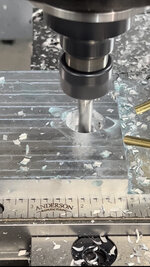
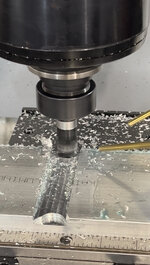
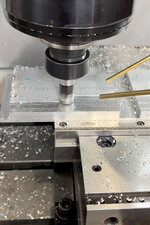
9AE5C94C-D66B-4E70-AB3F-F101B7403C99.jpeg

This is a two flute 3/4" insert end mill that uses APTK inserts. I don't have a proven recipe for it yet, so it took really little cuts.. and a very long time. I'm trying to decide if I get another Shear Hog just for the Haas.. or if I hold off and let it borrow tools. I feel like I want to have both mills tooled up with my core tools I use for making my products. Having both mills running at once sounds really nice!

That tool did a nice job on the facing pass:
8E7A83D2-773C-4B4A-B470-A4C132249427.jpeg

Now that I'm working with a tool changer, I can order operations to do things like the facing pass last, even though it means another tool change. This will eliminate the scratches seen around the pre-drill hole in this photo:
E3DFDBA3-6F85-46A0-9C0D-08925148DFFA.jpeg

Before I get into a nice/fancy/time consuming chip enclosure, I'm going to do a quick and dirty with MDF tomorrow and see how it works.

FD326AF6-ED80-454C-A9EB-08C2FF86AAB4.jpeg

In all its messy, 2001 glory:
89D8968E-C04E-4360-AEE8-C64727C9C52D.jpeg

If I had set my Y axis WCS correctly, this would have been a perfectly acceptable OP1:
8883B7F9-B1D1-40E0-BAFD-8A5A0A6ED22A.jpeg

While I was making friends with the Haas, the X1 was putting in work..
AE08F82C-4D98-44A4-931D-406CD4F1506D.jpeg

Organization tray for 37 degree dies for the MasterCool hydraulic flaring tool. (They were part of the mess I cleaned up when I moved the Huot cabinets.)

Okay.. I not only no longer hate the Haas control, I think this 21-year-old machine is going to quell my window shopping for a new VMC for a while. I am so excited to get a little bit of chip containment sorted out and see how it runs my parts this week.
 
OP
S

slodat

ALLIANCE MEMBER
Joined
Feb 6, 2010
Messages
3,679
Location
Central-ish, WA
I have 2 Fanuc controlled machines and one old Yasnac. It pleases me more than it should that you do not like the Haas control. I have spent the last 15+ years hearing many people (online especially) preach that Haas is the best control and it is so intuitive etc. Way back when I was starting I was a parts changer on a few Haas', years later I tried to actually program one myself and it was frustrating to me. I did not have any training on it, didn't have anyone in person to help and it was a one time thing so after that project I never pursued it again.

I think cnc controls being liked or not is mostly due to whether the person operating it has been trained on it and has used it enough to be efficient with it and not the controls actual technical ability or power. I understand that an old school Fanuc is not the most user friendly interface, but I know what the buttons do and what info is on all the pages. It may take a few more button pushes to get to the offset page etc, but I don't care. It works and keeps working.

I bet it won't be long and you will figure out the control and then you will not really think about it much. Run a dozen jobs through it and you'll forget about it.

I've thought about your post since I read it earlier today. The Haas has been an unknown for me, and I knew I needed to learn a lot about running *any* control before I started running the Haas. I'm glad I took that path. I agree with you about controls. A lot comes down to what is well known by accessible communities and support for new users.

Thank you for sharing your perspective. I have a great feeling about the Haas in my workflow.
 

GeddyT

ALLIANCE MEMBER
Joined
Jun 17, 2015
Messages
1,239
Location
Bellingham, WA
Okay, that offset process makes more sense. You should never have to remeasure the probe (unless you break the tip like I did yesterday...).

Like you, I'm also starting to use hard reference points on the machine for my work zeros so I don't have to re-measure every time. And every time I use a soft jaw for an operation, I mill a flat in it for a known reference point.

Shear hog with no enclosure? No thanks! On the bright side, since you're making your enclosure, it won't leak like mine.
 
OP
S

slodat

ALLIANCE MEMBER
Joined
Feb 6, 2010
Messages
3,679
Location
Central-ish, WA
Okay, that offset process makes more sense. You should never have to remeasure the probe (unless you break the tip like I did yesterday...).

Like you, I'm also starting to use hard reference points on the machine for my work zeros so I don't have to re-measure every time. And every time I use a soft jaw for an operation, I mill a flat in it for a known reference point.

Shear hog with no enclosure? No thanks! On the bright side, since you're making your enclosure, it won't leak like mine.
Agree on the probe piece for sure. I'm not sure where I got that bit of info on that sheet.

This is all a progression. I'm enjoying learning!

I won't run flood coolant on a machine without a proper enclosure. Both have Fogbusters. I have zero coolant mess thanks to the Fogbusters. The 3/4" Shear Hog is manageable. The 1.25" two flute.. it's a real machine gun with the super hot chips.
 
To avoid these ads, REGISTER NOW!
Top Bottom