To avoid these ads, REGISTER NOW!

I need internet wireless router tech help.

To avoid these ads, REGISTER NOW!

dogdog

Well-known member
Joined
Nov 15, 2011
Messages
12,711
this isnt quite accurate. you have an Arris Surfboard SBG7600AC2. yes it is a cable modem but its also a wireless router. so your shop router will be getting a LAN IP from the arris.
His tplink c54 sets up a bit differently than other brands it still requires him to use the wan port in access point mode for backhaul.
It’s in his quick setup guide.


IMG_4188.png
 

Denwood

Well-known member
Joined
Sep 22, 2014
Messages
4,191
Location
Thunder Bay, Ontario, Canada
Good catch there on the TP link device. Yes, WAN port if using a C54 in access port mode. That said, confirm that the device is still in access point mode!

If you have surge protection on both sides already, bypass it ... for testing only.
 
OP
P

PWC Repair

Well-known member
Joined
Dec 27, 2012
Messages
3,182
Location
Arkansas
Thanks guys. Yes have checked at least twice all these things. All great advice but I'm actually loaded to my brow with common sense and always go through basic troubleshooting steps before asking for help or jumping to conclusions...........I know, rare these days. LOL!!
 

dogdog

Well-known member
Joined
Nov 15, 2011
Messages
12,711
Do you have any way to bypass those surge protectors. Like using a cat5 or 6 coupling instead? There is really no other components if you tested the device back in home and works fine. Unless you have a bad crimp or that rj45 jack.
 
OP
P

PWC Repair

Well-known member
Joined
Dec 27, 2012
Messages
3,182
Location
Arkansas
Yes, I bypassed the protectors. They are CyberPower/APC/MonsterCable style with power, phone, ethernet, cable, and USB ports. Simple IN and OUT so easy to bypass. I checked all this simple stuff out before ever posting. I just can't understand how I can have great 90mbps internet off this cable in the shop and it somehow be bad........BUT, I have a tester AND a new 200ft waterproof, double shielded CAT6 cable coming. We'll know soon enough!
 

BrandonV

Well-known member
Joined
Jun 9, 2023
Messages
4,030
Location
Arizona
Just yesterday, I discovered a problem with a 150+ ft run of cable that had been static (neither end had any force applied or moved). I found the tiniest nick in the outer jacket, which extended to one of the conductors in the middle of the run.

Stuff happens. It took 4 years for this tiny nick to develop into a problem that interfered with gigabit speeds.

What was the original cable run in the conduit? Do you have the specifications off the jacket? Surprisingly, direct burial and gel-filled cables are mostly engineered by the manufacturer, and there are no standards for the waterproofing of twisted pair cables, except for UL-rated jackets.
 

djbmw

Well-known member
Joined
Jun 20, 2013
Messages
1,143
Location
Ottawa, Ontario, Canada
I just can't understand how I can have great 90mbps internet off this cable in the shop and it somehow be bad........
Packet loss and how its handled is an interesting thing. Some equipment does well with missed packets while other equipment can barely handle a few dropped packets.

If you were really curious and have time to burn you could connect a laptop in your shop to the line (without the shop access point... just plug it directly into the 200 ft ethernet line), and run a ping test from DOS/Command Prompt to see what type of packet loss youre seeing. That could help tell you if there's degredation in the line accounting for the issues.
 

BrandonV

Well-known member
Joined
Jun 9, 2023
Messages
4,030
Location
Arizona
Packet loss and how its handled is an interesting thing. Some equipment does well with missed packets while other equipment can barely handle a few dropped packets.

Yup. It's pretty nuts how different various Ethernet PHYs can be. A product that implements a quality industrial/high end Analog Devices or Texas Instruments Ethernet PHY IC might be able to handle a slightly jacked up cable while your bargain bin knockoff IC out of China will freak out.
 

bugnut

ALLIANCE MEMBER
Joined
Jul 14, 2012
Messages
3,919
Location
Central Ohio
Would like to reopen this conversation. @PWC Repair would like to know if new wire solved your issue. I replaced an end on the house side of my outbuilding connection as noted in my previous post. So a couple weeks later, again no internet connection in the shop. Took the trusty 8 cable tester hooked it up and it said a different line on the connector was not working. So once again replaced the house side connector, put the tester on and we are up and running. Yesterday the internet failed in the shop, again, this time different line failed #3. So I stopped at HD picked up 250 ft of cat6. Today just for giggles I retested and everything is working fine. So I am still trying to figure it out. Anytime this happens I can take the tp-link router from the shop into the house, test with a jumper instead of the shop run and all work perfectly. Any thoughts appreciated. I clearly do not understand how the cable can be intermittently bad, so anybody experience this before? PS I am writing this in the shop and using a different, router, internet dropped twice but reconnected. Checked line and #3 without any changes showed failure than reconnected.
 

wyliesdiesels

Well-known member
Joined
Aug 14, 2012
Messages
20,023
Location
Modesto, CA
Would like to reopen this conversation. @PWC Repair would like to know if new wire solved your issue. I replaced an end on the house side of my outbuilding connection as noted in my previous post. So a couple weeks later, again no internet connection in the shop. Took the trusty 8 cable tester hooked it up and it said a different line on the connector was not working. So once again replaced the house side connector, put the tester on and we are up and running. Yesterday the internet failed in the shop, again, this time different line failed #3. So I stopped at HD picked up 250 ft of cat6. Today just for giggles I retested and everything is working fine. So I am still trying to figure it out. Anytime this happens I can take the tp-link router from the shop into the house, test with a jumper instead of the shop run and all work perfectly. Any thoughts appreciated. I clearly do not understand how the cable can be intermittently bad, so anybody experience this before? PS I am writing this in the shop and using a different, router, internet dropped twice but reconnected. Checked line and #3 without any changes showed failure than reconnected.
do you have another router in the house? if so you most likely are having a conflict between the 2 routers.
 

djbmw

Well-known member
Joined
Jun 20, 2013
Messages
1,143
Location
Ottawa, Ontario, Canada
do you have another router in the house? if so you most likely are having a conflict between the 2 routers.
I disagree because he said he used a cable tester and one of the twisted pairs failed to make a connection. Using a cable tester checks conductivity in the pairs. If it fails this, the line has a problem.

Is the line getting wet? Burried below the water table? Tree roots interfering? Are you gentle with it when running new wire to avoid kinking/twisting/breaking the strands?
 

wyliesdiesels

Well-known member
Joined
Aug 14, 2012
Messages
20,023
Location
Modesto, CA
ive never seen network cables intermittently work. they either work or they dont. Ive reported hundreds of cabling nightmare installs.... also depending on what pair failed, OP could still have 2 pair for 100mbps connection.... loosing 1 pair would only cause gigabit to not work, not kill the entire connection. Ive seen this happen many times.
 

BrandonV

Well-known member
Joined
Jun 9, 2023
Messages
4,030
Location
Arizona
ive never seen network cables intermittently work. they either work or they dont. Ive reported hundreds of cabling nightmare installs.... also depending on what pair failed, OP could still have 2 pair for 100mbps connection.... loosing 1 pair would only cause gigabit to not work, not kill the entire connection. Ive seen this happen many times.

All you have to do is loose a single pin (1, 2, 3, or 6) and the cable will not work at all (gigabit or fast Ethernet).
 

BrandonV

Well-known member
Joined
Jun 9, 2023
Messages
4,030
Location
Arizona
Totally depends on how its terminated. Youre assuming its standard

Not really. The actual conductor pairs being terminated in the pins are irrelevant considering the pins used by 10BASE-T & 100BASE-TX always perform TX/RX over 1, 2, 3, or 6 on the RJ45 connector. That's hard specified in the IEEE 802.3 standard and any Ethernet PHY will be wired to an RJ45 port with that in mind. See example document from Microchip datasheet showing how to connect a PHY to a RJ45 port on a device like an Ethernet network card.

1723173238756.png

You could take a cable terminated with a random colors matching on both ends or something like USOC for POTS and cutting one of these single pins (1, 2, 3, or 6) would disrupt the cable.

You have a 50% chance of a single wire break causing an complete lost of the physical layer link.
 

bugnut

ALLIANCE MEMBER
Joined
Jul 14, 2012
Messages
3,919
Location
Central Ohio
Okay, so the last couple posts are WAY above my pay grade! I'll answer as best as my mind can. In 2017 there was a router installed in the house and a cable buried just a few inches underground from the house to the shop. Terminated into another router in the shop office which provided wifi in the shop since 2017. I know this as I buried the cable and marked the date on the original router in the house box. System, in the house, was upgraded in 2020 to TP-Link Deco Mesh AC1900 WiFi System (Deco S4). This replaced the original router in the home. The shop router was unchanged. All systems worked and coverage was good until about July and then it became intermittent as described above. Yesterday to insure it was not the router in the shop I took the old 2017 router, that had been in the house and was replaced by the Deco, out to the shop. After a full reset and hooking it up it worked and then became sporadic. So that is where it is at today. Appreciate all the help and advice.
 

BrandonV

Well-known member
Joined
Jun 9, 2023
Messages
4,030
Location
Arizona
Can you take pictures of the twisted pair jacket markings and a picture of both ends?
 
To avoid these ads, REGISTER NOW!

KSJeff

Well-known member
Joined
Dec 19, 2011
Messages
764
Location
Andover, Kansas
This one's probably solved, but in cases like this I generally lock down the ports off of auto to a set speed (100Mbps, 1Gb). If that doesn't work, I upgrade the firmware. If that doesn't work, you've got incompatible parts or a bad physical connection. If the physical tests good, then I open up a case with the vendor. Vendors are hit and miss at the professional level, so I'm guessing it's the same for consumers.

Good luck.
 

djbmw

Well-known member
Joined
Jun 20, 2013
Messages
1,143
Location
Ottawa, Ontario, Canada
The wire needs to be "direct burrial" rated. It will be MUCH stiffer than normal indopr CAT5 or CAT6 cable as its sheething contains woven steel mesh to prevent rodents from chewing on it. Its also is UV treated and waterproof. Most importantly, the outter jacket is made from LLDPE.

In contrast, indoor cables PVC jackets will leach water over time and the line will have major interferance.
 

cgrutt

Well-known member
Joined
Mar 4, 2016
Messages
8,302
I didn't read through this entire thread so sorry if its already covered but could it be a bad POE supply? Just replaced a switch that had 18 devices on it about 5 of them worked the others were DOA. We think camera on flagpole took a lightening strike and knocked out POE supply on switch. I still have to open up switch to see if it's power supply or something on main board but internet still worked no POE to power up the remote devices.
 

djbmw

Well-known member
Joined
Jun 20, 2013
Messages
1,143
Location
Ottawa, Ontario, Canada
I didn't read through this entire thread so sorry if its already covered but could it be a bad POE supply? Just replaced a switch that had 18 devices on it about 5 of them worked the others were DOA. We think camera on flagpole took a lightening strike and knocked out POE supply on switch. I still have to open up switch to see if it's power supply or something on main board but internet still worked no POE to power up the remote devices.
He tested the wire with an ethernet connection tester and the wire itself failed
 

bugnut

ALLIANCE MEMBER
Joined
Jul 14, 2012
Messages
3,919
Location
Central Ohio
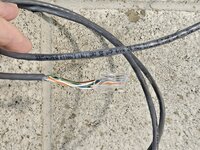
@BrandonV images of the house side. Will be a day for shop pictures.
 

Attachments

  • 20240810_055402.jpg
    20240810_055402.jpg
    915.5 KB · Views: 25
  • 20240810_055429.jpg
    20240810_055429.jpg
    930.6 KB · Views: 25

djbmw

Well-known member
Joined
Jun 20, 2013
Messages
1,143
Location
Ottawa, Ontario, Canada
@BrandonV images of the house side. Will be a day for shop pictures.
Thats indoor cable and should only be used inside only. If used ourdoors it will fail at some point due to water or sun exposure... or animals.

Also, the termination is too far. You need to keep the pairs twisted as close to the connector as possible. Untwisting the pairs and having the connector several inches away leads to degredation in signal - especially if the connection is like this at the other end as well.
 

BrandonV

Well-known member
Joined
Jun 9, 2023
Messages
4,030
Location
Arizona
@djbmw Not surprised. That's what I get for using paid professionals, I could have screwed it up better myself! Thanks

It looks like this is a standard Home Depot installation with Klein & Southwire cable. Klein products aren't typically used for professional data work. I'd also bet there's a 50% chance they used an RJ45 connector rated for Cat6 on a Cat5e cable. Depending on the design, this could prevent the IDC terminals from properly engaging with the conductors. As someone else pointed out, totally wrong cable for this application. The cable you want is gel filled and will make you curse.

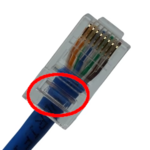
When crimping an RJ45 connector, the back of the connector should engage with the outer jacket of the twisted pair as a strain relief. I've seen similar crimps in industrial environments, usually done by non-data professionals. Over time, as the cable is subjected to vibration or handling, broken conductors can occur because there's nothing to prevent them from being strained or moved from the RJ45 connector. In one case, I encountered a bad crimp from 20 years ago that caused a building's HVAC system to fail. I had to repair it because the HVAC company didn't have the tools. They had been updating the building, which required unplugging and plugging that cable multiple times, something that had rarely happened since the initial installation, so bad crimps can last.

This situation also highlights actual data professionals almost never crimp twisted pair cables. IDC punch-downs are generally preferred for this reason. Achieving a proper, factory-quality crimp requires specific tools and expertise, which I rarely see executed correctly. The only tool I'd use is a specialized one from Panduit.

The jacket of the twisted pair cabling should be fully engaged in the box area where the strain relief crimp is performed.

Best advice I can give someone is to give is to try to crimp the cable yourself. Check out some tutorials and use a factory patch cable as a reference on how things should look. You'll find that for a non-critical home environment it's 100% do-able skill to do as a DIYer with good results and you'll probably be a lot better than whoever thought that was acceptable.
1723299387036.png
 

wyliesdiesels

Well-known member
Joined
Aug 14, 2012
Messages
20,023
Location
Modesto, CA
The cable you want is gel filled and will make you curse.
or skip the cursing and mess and use shireen dry gel tape cable


BrandonV

Well-known member
Joined
Jun 9, 2023
Messages
4,030
Location
Arizona
or skip the cursing and mess and use shireen dry gel tape cable


Cool stuff. Haven't seen it listed for approval at the places I've done work but I'm excited to try it.
 
OP
P

PWC Repair

Well-known member
Joined
Dec 27, 2012
Messages
3,182
Location
Arkansas
OP here. I've been super busy with work.........still using the original ethernet cable in the shop........somehow, it's bad. I ran the new cable outside on the ground and down to the shop. Wireless routers instantly recognize the internet and start working, both the old one and the new one. SO....I guess you CAN have internet and still have a bad cable!!! Now I just need to find the time to pull the CAT6 and phone back out and rerun with the new "outdoor" rated cable.
 

bugnut

ALLIANCE MEMBER
Joined
Jul 14, 2012
Messages
3,919
Location
Central Ohio
@PWC Repair Well,sounds like you got it under control.

I ordered what ended up being a 1000ft spool of Shireen delivered it was $325 and it was their 2042 that got delivered. Like above yesterday I pulled it into the house, then laid on grass and ran to the shop ~150ft. Put ends on as suggested by @BrandonV and with the cabling that @wyliesdiesels suggested, when connected we had internet and wifi in the shop. So gonna leave it lay on the grass a couple days then bury.

Next question is how to transition from exterior of painted steel building to interior drywall?

Methods and how to appreciated.

Thanks to all!
 

bugnut

ALLIANCE MEMBER
Joined
Jul 14, 2012
Messages
3,919
Location
Central Ohio
Okay, so a shout out to @BrandonV, @PWC Repair and @wyliesdiesels since Monday the green light on the router has not wavered! The new cabling did the trick, so I started prep to bury cable. I will use the same to run a new cable for telephone line and include a spare. So 3 wires going into the trench.

Thanks to all!
 

theoldwizard1

Well-known member
Joined
Feb 22, 2011
Messages
43,196
Location
SE MI
OK.....I have a cable modem with wireless in the house. I have an ethernet cable directly plugged in and it runs with a phone line in conduit underground about 175-200ft into the shop. In the shop I have that plugged into a wireless router "access point" so the wireless stuff works in the shop.
Late to the game, and you have gotten good advice so far, but I have a "nit to pick". The industry makes it difficult for those (especially us old timers) with mixed terminology.

The box that most of us have in our house connected to the cable wire (using a F connector to RG6 or RG59 coax cable) typically does 3 jobs
  1. The modem portion converts the analog signal on the coax to digital and vice versa.
  2. The digital signal is sent to a router that send it to ZERO or more Ethernet ports (RJ45 connector).
  3. One of the outputs from the router goes to a wireless access point (WAP)
In the "old days" these were 3 separate boxes. You can still buy "just a router" or "just a WAP".

Keeping this in the back of your brain might help with trouble shooting
 

djbmw

Well-known member
Joined
Jun 20, 2013
Messages
1,143
Location
Ottawa, Ontario, Canada
Late to the game, and you have gotten good advice so far, but I have a "nit to pick". The industry makes it difficult for those (especially us old timers) with mixed terminology.

The box that most of us have in our house connected to the cable wire (using a F connector to RG6 or RG59 coax cable) typically does 3 jobs
  1. The modem portion converts the analog signal on the coax to digital and vice versa.
  2. The digital signal is sent to a router that send it to ZERO or more Ethernet ports (RJ45 connector).
  3. One of the outputs from the router goes to a wireless access point (WAP)
In the "old days" these were 3 separate boxes. You can still buy "just a router" or "just a WAP".

Keeping this in the back of your brain might help with trouble shooting
Most modem/router combo boxes have the router/dhcp portion inside so a customer would typically use a switch, instead of a router, if they are using the modem/router for dhcp handling.

If they attempt to use an external router to handle dhcp, in addition to the modem/router combo to do dhcp then they will be double Nat'd... which will cause issues when trying to connect to lan devices from outside the network (like security cameras, file sharing services for upload, etc).

This is why its important to either disable the modem/routers dhcp and use your external routers dhcp... or change your routers configuration to a switch and use the modem/router combo to handle dhcp,.. or use a stand alone switch and have the modem/router handle dhcp.
 

theoldwizard1

Well-known member
Joined
Feb 22, 2011
Messages
43,196
Location
SE MI
Most modem/router combo boxes have the router/dhcp portion inside so a customer would typically use a switch, instead of a router, if they are using the modem/router for dhcp handling.
Forgot about DHCP (Dynamic Host Control Protocol) ! (For those not familiar with the low level "innards" of networking, it is the "software" that gives a new computer on your subnet an "address" when it first asks to join the network.)

To be complete, there is also Domain Name System (DNS). This what converts an Internet name (like garagejournal.com) into a number.

In the "old days" you need to manually set these. It is automatic now.
 

wyliesdiesels

Well-known member
Joined
Aug 14, 2012
Messages
20,023
Location
Modesto, CA
Late to the game, and you have gotten good advice so far, but I have a "nit to pick". The industry makes it difficult for those (especially us old timers) with mixed terminology.

The box that most of us have in our house connected to the cable wire (using a F connector to RG6 or RG59 coax cable) typically does 3 jobs
  1. The modem portion converts the analog signal on the coax to digital and vice versa.
  2. The digital signal is sent to a router that send it to ZERO or more Ethernet ports (RJ45 connector).
  3. One of the outputs from the router goes to a wireless access point (WAP)
In the "old days" these were 3 separate boxes. You can still buy "just a router" or "just a WAP".

Keeping this in the back of your brain might help with trouble shooting
not true if its one of the national carriers. Carriers like Comcast and Charter switched to digital signaling long ago. so the modem isnt converting an analog signal to digital. it is converting a digital cable plant signal (DOCSIS) to ethernet signaling.
 

djbmw

Well-known member
Joined
Jun 20, 2013
Messages
1,143
Location
Ottawa, Ontario, Canada
not true if its one of the national carriers. Carriers like Comcast and Charter switched to digital signaling long ago. so the modem isnt converting an analog signal to digital. it is converting a digital cable plant signal (DOCSIS) to ethernet signaling.
Thats not correct at all! DOCSIS is analog, based on QAM modulation. Anyway, the OP replaced his wire and all is good now.
 
To avoid these ads, REGISTER NOW!
Top Bottom