I extended the WIFI service out to the garage using two RE6300 Linksys Range Extenders. My router is in the basement. One 6300 upstairs in the house and the other in the garage. Works perfect. Amazon Prime and Netflix and internet all available on 55" TV and laptop with a chromecast. Cheap and no wires.


You are using an out of date browser. It may not display this or other websites correctly.
You should upgrade or use an alternative browser.
You should upgrade or use an alternative browser.
Internet router or access point for shop?
- Thread starter rockcrawler
- Start date
I extended the WIFI service out to the garage using two RE6300 Linksys Range Extenders. My router is in the basement. One 6300 upstairs in the house and the other in the garage. Works perfect. Amazon Prime and Netflix and internet all available on 55" TV and laptop with a chromecast. Cheap and no wires.
Those wireless range extenders are fairly cheap, very easy to install and work pretty decently if the distances aren't too great. BUT, since the OP is running ethernet to his shop, if it was me, I would definitely want to use something that is hard wired.
Also, after looking at the OP's rack, I would also very strongly consider having either a separate physical subnet (or vlans) for his IP Cams and IoT devices. Look into pfSense
Hardwired is always better if you can do it. I would do like so, since the NVR already has PoE ports:
If using a router with DHCP disabled (essentially a wireless switch or Access Point), make sure you plug into LAN ports 1-4 and not the internet or WAN port.
This is what I would do. However, you said your exiting router is out of ports. So not to add confusion, think of what I about say as a separate project not related to the shop. Buy an 8 port network switch (under $20) and plug that into any LAN port on you existing router.....you now have 12 ports you can plug any LAN device into....nothing technical to do as everything will figuring itself out. Now you can move on to the shop.
There are a lot of good suggestions on here like running the cameras on a isolated subnet etc but considering how you describe your tech skillset that would be challenging for now.
For now, buy an inexpensive router and connect it to the new switch via cat6 - LAN port to LAN port. With connectivity complete the tech part is next.
The tech part:
-new routers come with DHCP turned on, you must disable this FIRST
-configure new router as a wireless access point
Use Google if the router's instruction are lacking, or repost so we can assist.
This is what I would do. However, you said your exiting router is out of ports. So not to add confusion, think of what I about say as a separate project not related to the shop. Buy an 8 port network switch (under $20) and plug that into any LAN port on you existing router.....you now have 12 ports you can plug any LAN device into....nothing technical to do as everything will figuring itself out. Now you can move on to the shop.
There are a lot of good suggestions on here like running the cameras on a isolated subnet etc but considering how you describe your tech skillset that would be challenging for now.
For now, buy an inexpensive router and connect it to the new switch via cat6 - LAN port to LAN port. With connectivity complete the tech part is next.
The tech part:
-new routers come with DHCP turned on, you must disable this FIRST
-configure new router as a wireless access point
Use Google if the router's instruction are lacking, or repost so we can assist.
I missed the bold tidbit, sorry about that. Yes, adding a cheap unmanaged switch at your router would give you those extra connections you need.
I think VLANs, pfsense, mesh, Unifi controller, all that stuff is over-complicating a simple network. I like my unifi stuff but it's not straightforward to jump into once you go beyond running an AP in standalone setup. You can go more complex if you start having connectivity problems but I don't think you're anywhere near that.
Attachments

OP
rockcrawler
Well-known member
You don’t want 2 routers on the same network. All you need is a WiFi access point. If you want mesh networking I’d go with a couple ubiquiti uap-ac-pro. The downside is I believe you need to have a cloud key controller (more $)or install controller software on a computer to setup the ap.
Zyxel also makes several good access points, look at the nwa1123 series. They can be cloud managed on their nebula portal, which is free for basic setup. They do have a paid option that adds more features but the free version is fine. They can also be setup locally without cloud management.
Your lowest cost option is something like an engenius eap1250. It doesn’t have cloud management. Yes these might be more expensive but they are all solid and just work and are very reliable. Look on eBay for used if your on a budget. I can help you configure any of these for a few $ if you need help.
Sent from my iPad using Tapatalk
Thank you for the suggestions. I think I have decided to just go with a basic access point since I’m just wanting wireless. Now I just have to decide which one.
HenryAZ
MEMBER EMERITUS
Mentioned above, EnGenius access points are my goto. They are well made with all the necessary features, and do not require a controller. All configuration and monitoring is done using a browser interface. They also make nice outdoor rated APs. I have one of those (ENS1200) for our RV pad area, cabled, and one inside the house (EWS360AP) that is centrally located on a wall near the ceiling. It provides coverage for the entire house.
OP
rockcrawler
Well-known member
This is what I would do. However, you said your exiting router is out of ports. So not to add confusion, think of what I about say as a separate project not related to the shop. Buy an 8 port network switch (under $20) and plug that into any LAN port on you existing router.....you now have 12 ports you can plug any LAN device into....nothing technical to do as everything will figuring itself out. Now you can move on to the shop.
There are a lot of good suggestions on here like running the cameras on a isolated subnet etc but considering how you describe your tech skillset that would be challenging for now.
For now, buy an inexpensive router and connect it to the new switch via cat6 - LAN port to LAN port. With connectivity complete the tech part is next.
The tech part:
-new routers come with DHCP turned on, you must disable this FIRST
-configure new router as a wireless access point
Use Google if the router's instruction are lacking, or repost so we can assist.
I’m definitely looking to get a switch and I want to hardwire everything I can. I was thinking that I just wanted to go simple and get an AP. But, now I’m thinking there might be a small chance that I’ll put a smart TV in the shop someday. So, I might want a router instead that would give me the opportunity to hardwire the TV. Thank you so much for the information.
OP
rockcrawler
Well-known member
I missed the bold tidbit, sorry about that. Yes, adding a cheap unmanaged switch at your router would give you those extra connections you need.
I think VLANs, pfsense, mesh, Unifi controller, all that stuff is over-complicating a simple network. I like my unifi stuff but it's not straightforward to jump into once you go beyond running an AP in standalone setup. You can go more complex if you start having connectivity problems but I don't think you're anywhere near that.
Thank you. Simple, basic and easy is what I need.
HenryAZ
MEMBER EMERITUS
I’m definitely looking to get a switch and I want to hardwire everything I can. I was thinking that I just wanted to go simple and get an AP. But, now I’m thinking there might be a small chance that I’ll put a smart TV in the shop someday. So, I might want a router instead that would give me the opportunity to hardwire the TV. Thank you so much for the information.
No need for a router and the extra configuration woes that come with that. Just get an 8 port switch, and plug it into the cable you ran from your house. That uplinks the switch to your house network. Make the switch the first device in your garage. Then your can plug your AP, smart TV and whatever else into the switch.
You could also use the switch for your POE cameras by getting a switch with POE ports. Personally, I don't like POE switches, because of the extra power they run hot and need an internal fan, which will eventually fail. Instead, I use POE injectors, which you can purchase for your cameras and your POE AP. The POE injector has its own power (wall wart), and two ethernet ports. One port goes to the switch, and the other to the camera/AP or other POE device. You need a POE injector for each POE device.
OP
rockcrawler
Well-known member
1. I have three Cat6 cables that go from my media closet to the garage and come out of a single outlet size hole in the wall. Then I have conduit in the wall (same hole) that runs from the garage out to the shop. What is the best way to splice those together in the garage?
2. If I use some sort of lightning protection, is that best done at each device (ie each camera and the switch in the shop) to eliminate damage to equipment in my media closet? Or, would it be best to do it in the garage where I have to splice the wires anyway? I’m trying to eliminate as many connections as possible as I know each one adds to signal loss.
2. If I use some sort of lightning protection, is that best done at each device (ie each camera and the switch in the shop) to eliminate damage to equipment in my media closet? Or, would it be best to do it in the garage where I have to splice the wires anyway? I’m trying to eliminate as many connections as possible as I know each one adds to signal loss.
HenryAZ
MEMBER EMERITUS
1. I have three Cat6 cables that go from my media closet to the garage and come out of a single outlet size hole in the wall. Then I have conduit in the wall (same hole) that runs from the garage out to the shop. What is the best way to splice those together in the garage?
Use a switch. Plug in the line from the house, and the line to the shop to the switch. That also gives you more length, because the 100m ethernet length limit is to the end device or to a repeater, which the switch is. So you then have 100m from house to garage, and 100m from garage to shop. Just splicing the two together with a connector makes the 100m length limit apply to the entire run. Breaking the run with a switch keeps your cable lengths less for better performance.
You will find the switch useful for other devices you want to plug in at the garage. I would also terminate the shop line with a switch, giving you extra ports to plug in additional devices.
1. I have three Cat6 cables that go from my media closet to the garage and come out of a single outlet size hole in the wall. Then I have conduit in the wall (same hole) that runs from the garage out to the shop. What is the best way to splice those together in the garage?
You can get underground rated Cat6 patch cables that you can fish through the conduit. Just do a search and you can find them in the size you need (Monoprice, cables.com). Make sure it is a patch cable so you do not have to go through the aggravation of terminating them yourself.
I would also consider a shielded cable to protect from interference. If you already have electrical running through the conduit, there may be interference problems. It may not be a good idea to run the Cat6 next to the power cable. It may also go against your local building code to run them together in the same conduit. Don't really know much about that, so maybe someone else can comment on that.
Last edited:
OP
rockcrawler
Well-known member
Use a switch. Plug in the line from the house, and the line to the shop to the switch. That also gives you more length, because the 100m ethernet length limit is to the end device or to a repeater, which the switch is. So you then have 100m from house to garage, and 100m from garage to shop. Just splicing the two together with a connector makes the 100m length limit apply to the entire run. Breaking the run with a switch keeps your cable lengths less for better performance.
You will find the switch useful for other devices you want to plug in at the garage. I would also terminate the shop line with a switch, giving you extra ports to plug in additional devices.
Ok, sounds good. I wasn’t sure I could run multiple switches in-line together. I’ll end up having one in the garage and one in the shop, on the same line. Thank you.
OP
rockcrawler
Well-known member
You can get underground rated Cat6 patch cables that you can fish through the conduit. Just do a search and you can find them in the size you need (Monoprice, cables.com). Make sure it is a patch cable so you do not have to go through the aggravation of terminating them yourself.
I would also consider a shielded cable to protect from interference. If you already have electrical running through the conduit, there may be interference problems. It may not be a good idea to run the Cat6 next to the power cable. It may also go against your local building code to run them together in the same conduit. Don't really know much about that, so maybe someone else can comment on that.
Due to length, I’m making my own cables. I’ve gotten fairly good at it after running CAT6 throughout the house during the build. I also test each one after termination. We have separate conduits already. Thank you for your input.
jack stand
Well-known member
If I can poke in a a little different direction.....
My cable and wifi enter IN the shop so I'm all set there, but about 300' away I have my little 10x10 generator building that I'd like to control one of those wifi switched receptacles to control the 1000w block heater and maybe install a wifi camera. This 300' is from our wifi in the shop and the shop has steel "barn type" siding. The generator bldg has wood siding if any of this makes any difference.
I do have a spare conduit running between the 2 building's available. I'm fine with electrical work, but when it comes to computers and even the "lingo", you might as well talk to my dog.
I can add one of those wifi boosters with "line of sight" about 64' away (closer to the generator) and then another 30'+ but that's through 2 more walls with said metal siding.
If I were to pull a cat6 (or whatever) between the buildings, how would they get connected?
Any suggestions?
My cable and wifi enter IN the shop so I'm all set there, but about 300' away I have my little 10x10 generator building that I'd like to control one of those wifi switched receptacles to control the 1000w block heater and maybe install a wifi camera. This 300' is from our wifi in the shop and the shop has steel "barn type" siding. The generator bldg has wood siding if any of this makes any difference.
I do have a spare conduit running between the 2 building's available. I'm fine with electrical work, but when it comes to computers and even the "lingo", you might as well talk to my dog.
I can add one of those wifi boosters with "line of sight" about 64' away (closer to the generator) and then another 30'+ but that's through 2 more walls with said metal siding.
If I were to pull a cat6 (or whatever) between the buildings, how would they get connected?
Any suggestions?
Last edited:
1. I have three Cat6 cables that go from my media closet to the garage and come out of a single outlet size hole in the wall. Then I have conduit in the wall (same hole) that runs from the garage out to the shop. What is the best way to splice those together in the garage?
2. If I use some sort of lightning protection, is that best done at each device (ie each camera and the switch in the shop) to eliminate damage to equipment in my media closet? Or, would it be best to do it in the garage where I have to splice the wires anyway? I’m trying to eliminate as many connections as possible as I know each one adds to signal loss.
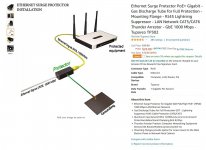
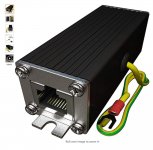
You don't need a switch. You simply need to connect the two cables together for each run. If your worried about 'lightning protection' I would consider buying one of these grounding devices. They are available for around $10 to $30 each. If all your cables are already terminated (they have jacks on them) you just plug them into this and run the grounding wire to a ground.
If your not interested an 'arrestor' a simple coupler like this will work fine
Attachments

Denwood
Well-known member
Yep, you don’t splice CaT5/6. Terminate and use a balun coupler. Keep it as simple as possible 
rayra
Well-known member
op already has (potential) wired run to the shop. USE IT.
OP
rockcrawler
Well-known member
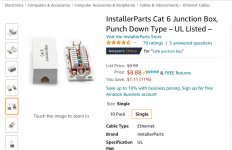
Thanks guys. Can I just use something like this to connect the Cat6 cables together from the garage to the shop? Seems simpler than installing connectors on each cable and then plugging both ends into something else.
Attachments
Last edited:
Thanks guys. Can I just use something like this to connect the Cat6 cables together from the garage to the shop? Seems simpler than installing connectors on each cable and then plugging both ends into something else.
If you were linking to something, it didn't work.
If your cables aren't terminated, (don't have ends on them) you can use something like this. Basically uses punch down blocks, but if you worried about Lightning, etc, I would terminate the cables and use one of those suppressors
Attachments

OP
rockcrawler
Well-known member
I fixed my post. Yes, that is exactly what I was talking about. Wouldn’t it be better to use the suppressors in the shop to eliminate the cable running back to the house from getting damaged? I’d hate for all that cable to get fried.
I might have missed it but you ran ethernet from your media cabinet to the garage and then another 100' or so to the shed that is going to be in an underground conduit?
Is the garage attached or are the cables also run underground in a conduit? Where I live (S Cal) I have no worries about lightning. In fact I have 3 cameras in my back yard (one is a good 100' run) and I am not worried about it. Texas, apparently is a different story. There are a number of posts on this forum where people have suggested to run 'fiber' in a conduit because anything buried in the ground is susceptible to electric surges (fiber does not conduct electricity). Others have suggested the surge suppressors.
If I was in your shoes and I had an attached garage, I would install the surge suppressors there - if there is another conduit run to your house, then at the house. Bottom line is you want to protect your equipment in the house
Is the garage attached or are the cables also run underground in a conduit? Where I live (S Cal) I have no worries about lightning. In fact I have 3 cameras in my back yard (one is a good 100' run) and I am not worried about it. Texas, apparently is a different story. There are a number of posts on this forum where people have suggested to run 'fiber' in a conduit because anything buried in the ground is susceptible to electric surges (fiber does not conduct electricity). Others have suggested the surge suppressors.
If I was in your shoes and I had an attached garage, I would install the surge suppressors there - if there is another conduit run to your house, then at the house. Bottom line is you want to protect your equipment in the house
OP
rockcrawler
Well-known member
I might have missed it but you ran ethernet from your media cabinet to the garage and then another 100' or so to the shed that is going to be in an underground conduit?
Is the garage attached or are the cables also run underground in a conduit? Where I live (S Cal) I have no worries about lightning. In fact I have 3 cameras in my back yard (one is a good 100' run) and I am not worried about it. Texas, apparently is a different story. There are a number of posts on this forum where people have suggested to run 'fiber' in a conduit because anything buried in the ground is susceptible to electric surges (fiber does not conduct electricity). Others have suggested the surge suppressors.
If I was in your shoes and I had an attached garage, I would install the surge suppressors there - if there is another conduit run to your house, then at the house. Bottom line is you want to protect your equipment in the house
Garage is attached and I have lines running from the media closet to the garage (all inside the house). I have a conduit specifically for Ethernet run underground from the garage to the shop. I’m currently collecting all the equipment necessary to complete the shop (AP, switch, suppressors, etc). I have the Cat6 to run through the conduit, but I haven’t done that yet. I haven’t really considered fiber. I don’t know anything about it or how to make it work with my stuff. I’m having a hard enough time trying to figure out what I have. I definitely want to protect the equipment in the house. Lots of money there. I accept the fact that lightning will most likely take out everything in the shop eventually (cameras, AP, switch, Cat6). Not a lot you can do about that.
jdrais
Member
I see this was posted earlier.
You'd want to put an ethernet surge protector inline. It's not going to protect you from a direct hit but it will help with a surge.
Something like this: https://www.amazon.com/dp/B00805VUD8/?tag=atomicindus08-20
You'd want to put an ethernet surge protector inline. It's not going to protect you from a direct hit but it will help with a surge.
Something like this: https://www.amazon.com/dp/B00805VUD8/?tag=atomicindus08-20
Last edited:
OP
rockcrawler
Well-known member
rockcrawler
You'd want to put an ethernet surge protector inline. It's not going to protect you from a direct hit but it will help with a surge.
Something like this: https://www.amazon.com/dp/B00805VUD8/?tag=atomicindus08-20
Or search Amazon for ethernet surge protector.
Yup, already ordered three of those. One for each line. Thank you.
PhantomEB
Well-known member
I wish I ran that from the cable box to my garage.
OP
rockcrawler
Well-known member

OP
rockcrawler
Well-known member
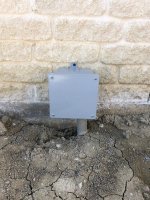
Any ideas on how to ground these suppressors? Can I run a ground wire inside the conduit to the box just outside my garage and attach it to a rod in the ground? Will it hurt for the ground wire to be in a small portion (about 3 feet) of the conduit with the CAT6 cables?
jdrais
Member
If that is the closest grounding location that will work. There shouldn't be a problem running a ground wire in the conduit. Maybe an electrician will tell me if I'm wrong.Any ideas on how to ground these suppressors? Can I run a ground wire inside the conduit to the box just outside my garage and attach it to a rod in the ground? Will it hurt for the ground wire to be in a small portion (about 3 feet) of the conduit with the CAT6 cables?
Sent from my SM-G970U using The Garage Journal mobile app
OP
rockcrawler
Well-known member
Do you have an electrical outlet nearby. Again, I am no electrician, but I would think you could just wire nut the ground wires together from the suppressors and run a wire to the nearest junction box that has a ground?
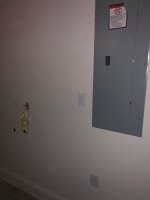
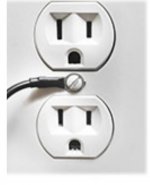
Plug is not real close, but a light switch, the panel and the house ground (or panel ground) is fairly close. The wall plate below the panel covers a copper wire that I’m assuming is a ground for the panel. But, I really don’t want to run wire on the outside of the wall.
Attachments
I assume you are plugging in your switch to that outlet also? Just get a wire and a screw spade terminal and attach to the center screw on the outlet wall plate. Then run that single wire to the isolators and connect all together.
Attachments
OP
rockcrawler
Well-known member
I assume you are plugging in your switch to that outlet also? Just get a wire and a screw spade terminal and attach to the center screw on the outlet wall plate. Then run that single wire to the isolators and connect all together.
No, the switch is in the shop. I’m putting the suppressors in the garage attached to the house to protect the inside equipment from anything that may happen outside the house.
OP
rockcrawler
Well-known member
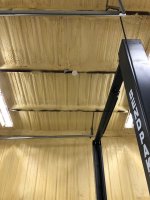
Finally got the AP installed and functional. Took me a few hours to figure it out though. Through a lot of reading, I found that I had to connect the AP directly to the computer to access the menu. Apparently it cannot be accessed otherwise. So, I guess if I ever have to make a change, I’ll have to take it down and bring it in the house. Now I’ve got to knock out the cameras and figure out how I’m going to ground those suppressors.
Attachments
OP
rockcrawler
Well-known member
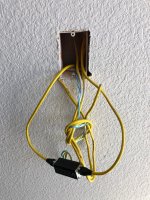
Without the proper shielded cable and grounding connectors, those arrestors you have pictured do nothing but join two male connectors.
The cable in the picture does not appear to be shielded.
Shielded cable is not required for that arrestor to work. Just a good ground.
OP
rockcrawler
Well-known member
Without the proper shielded cable and grounding connectors, those arrestors you have pictured do nothing but join two male connectors.
The cable in the picture does not appear to be shielded.
Yup, I’m working on grounding the arrestors. Just finished driving a 5/8” copper ground rod about 5 feet into the ground next to the box outside the garage. I’ll be running a 6 gauge copper ground wire from the arrestors to the ground rod. Might be overkill, but I want to protect my house stuff the best I can.
Last edited: