OP
lilscorpion
Well-known member
You still shoulda…there was about 20 sheets left.Glad I didn't go to the plystore today, as that was my intention. There wouldn't be any left!

You still shoulda…there was about 20 sheets left.Glad I didn't go to the plystore today, as that was my intention. There wouldn't be any left!




Great idea!
Where can I find a job like that?Drinking to work today I had an epiphany

Hahaha…DRIVING. Auto-correct is truly amazing.Great idea!
Where can I find a job like that?
I’ve had my visual correction changed the last 4 years consecutively. I feel like font size 20 or larger is too small…I may roll with it regardless of being too big now (or don’t feels).They're perfect as they are, I can read them.
It won't be too big in a couple years. Believe me.I’ve had my visual correction changed the last 4 years consecutively. I feel like font size 20 or larger is too small…I may roll with it regardless of being too big now (or don’t feels).
Hmmm, good iideas. Pondering…I love the color matching and the idea. I would think your ocd would interfere with having them off on one side and not centered. I would look at printing them so they hook over the hand grip spot and no fasteners to marr the outside of the drawers, or affix with double stick. Just my OCD about centering and marring running rampant this morning! Love the labels!!!
Thank you. Yeah, probably need to disassemble them. Would t take long tho. None are glued they come apart like legosLove the plates. Would you have to take each drawer apart to machine the face for the plate? Amazing details in your work as always.
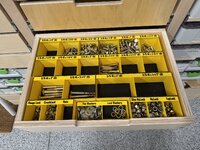
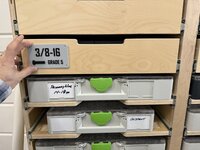
Very cool.getting closer. Nearly done with 1/4 thru 7/16 grade 5 and grade 8 UNC bolt drawers. Here’s one completed. Notice the washers bin reduced in height to allow a hand to grab the cutout without jamming a finger.
With having more than 120 drawers in the shop, I’ve been thinking for a few months about maybe adding some kind of tags/plates to the front of the drawers for quicker visual identification. I’ve been on the fence because I seem to be adapting well to the new organizational layout well in that I candy find stuff almost always the first time. Admittedly tho, I do get drawers swapped in my head from time to time. Meaning I’ll go to grab a hammer and pull drawer 3 in a bank instead if 4 EVERY TIME.
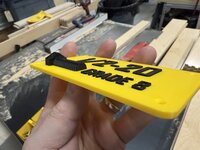
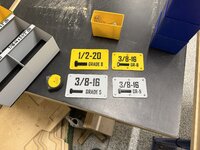
Drinking to work today I had an epiphany that I think I’ll use on the hardware drawers for sure. I played with the idea in fusion - made a bolt accurate to the specs for the drawer that it’s identifying, split It in half length-wise, and put it on a plate. So damn cool (and a good way to advance skills in cad). I’ll stick with the color combos used within the drawers to make differentiating between grade 8 and 5 a snap.
Cool eh?
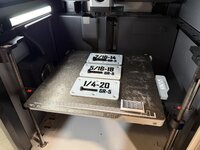
Maybe the shadows in the above pic give it away but in case they don’t - they’re 3d dimensionally correct. I sat there and watched the first one print beginning to end.
I like the 1-1/4” length on the plate. Proof it’s bang on.
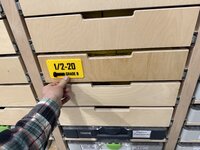
Thinking of adding them to each drawer here. The plate part is 1/8” thick so I think I’d machine the plates profile in the drawer face maybe .100 deep so it just barely sits proud.
Yellow pops.
Only thing I’ve not yet decided yet is if it’s too big. Right now they’re 3x5. Kinda thinking they may need to be a bit smaller, like 2.5 x 4…or even smaller…well and should I put them only on hardware drawers or every drawer.

There ya go, wind the poor kid up and send him down the endless rabbit hole.Very cool.
I had one thought and it's fleeting. What if you 3D printed the thread as a Stud and a nut. Perpendicular to the face. So you could use it to check the size?
What about surface mount using threaded inserts in the face and machine screws?Thank you. Yeah, probably need to disassemble them. Would t take long tho. None are glued they come apart like legos
Pat, appreciate the tips. You may have just saved me a mess of time. I’ve been so focused on trying to figure out cad I wasn’t paying attention to layout and post fabrication considerations. CAD is interesting in that it enables you to think in perfect dimensions that can’t be achieved on machines. Lessons I’ve learned the hard when when machining a one off part not thinking about the end mill diameter compensation (or lack there of) resulting in an impossible press fit when the piece should actually slide in the hole no problem.@lilscorpion and @slodat I enjoy seeing you play in the world of sheet metal design, layout and fabrication.
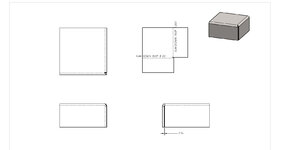
While I don't know anything about Fusion, may I offer a few tricks of the trade on the layout side of things and corner construction. Designing tight corners can be a fabricator best friend and worst enemy at the same time.
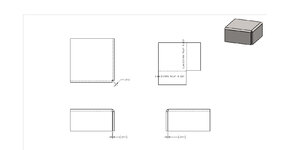
Touching corners in the world of Solid Modeling Sheet Metal can create issues when going from 1 software to another or when using 2nd and 3rd party softwares for quoting, analysis or unfolding. My experience is to leave slight gaps on surfaces that would normally be touching in a perfect world. These gaps provide better opportunities not only on the processing of models in non-native softwares but also aid in the fabrication of the part.
Cutter comps, material thickness tolerances and available bend tooling all need a little forgiveness at times to prevent crashing or aid in spring back when forming.
I use "standard" (my standards) gaps based on material thickness:
0 - .060 = 1/128
.075 - .120 = 1/64
.120+ = .031 or sometime larger depending on if the corner is welded or not.
These gaps may need to be increased depending on your method of cutting the parts and the accuracy of your machines and what kind of tolerance they can hold. Press Brake Tooling can also demand a bigger gap if you do not have a wide variety of Bottom Dies to match perfectly with all of the material thicknesses you work with.
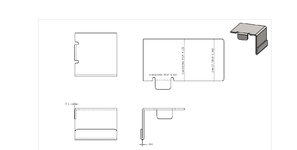
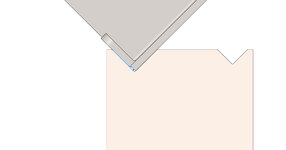
For an Inside-Inside corner:
Outside-Inside Corner:
Hem:
The Hemmed part also shows a bend in the middle of an edge. I typically set these bends off the edge the same gap distance as the corners based on the thickness of the material. This keeps the edge from bottoming in the Bottom Die:
You can see the small gap (highlighted light blue lines) between the face of the tool and the edge.
This allows for you to move the bend line up to the gap distance making that flange longer if you need to rob material to make the tolerancing work out. This gap also allows for issues with dross and cutter comp issues. Material Thickness can come into play at times too.
Keep in mind we play in a world of +/-.005 at times but we apply these techniques to all the products we build...The Press Brake and Welding Department lives get a lot easier when not having to fight issues that come with zero gaps.
Keep up the great work guys!!!
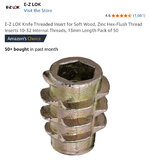
Was thinking about that as well. May do both because I want to use black stainless fasteners to attach them. I have these E-Z Lok inserts that work really well.What about surface mount using threaded inserts in the face and machine screws?
That way you can easily swap the plate should you change drawers, or design new label plates?
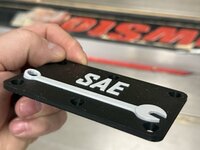
The biggest challenge for labeling drawers for me has always been deciding on a name that correctly clarifies what’s in the drawer. It’s easy for a drawer where all of the contents are on thing - e.g. drill bits or SAE wrenches. But in some of my deeper drawers I have a mixture of stuff which only had in common the need for a deeper drawer. Guess the label could be “big stuff”.Either way, I really like those label plates and need to evaluate what I can do on some of my storage drawers.

I thought about doing that. Really like the idea and may try one to see how I like it. I don’t think the printed threads would work for checking tho, any bur on a bolt and the plastic printed checker would be instantly destroyed. What I could do is use metal inserts that get set with a heat gun. It would work just not sure I’d like having a threaded piece hanging out of the drawer front. Need to think about it a little more.Very cool.
I had one thought and it's fleeting. What if you 3D printed the thread as a Stud and a nut. Perpendicular to the face. So you could use it to check the size?
here’s why I was planning to offset, and it’s actually my OCD that’s encouraging me to offset. All of the systainer bins that are in the same cabinet have offset labels…I would think your ocd would interfere with having them off on one side and not centered.
Make a router template? That way you wouldn't have to disassemble the drawer...I’ll probably machine a pocket about .100” deep so they just barely sit proud. The less complicated I make the matching tho the more likely I’ll use plates on other drawers around the shop. Need to keep that in mind. Maybe surface mount is better.
Could but the slides are greased so I’d get to wipe them down before re-installing them. May be the same amount of work. Disassembly is really fast and Inca leave the slides on. Slides only attach to the sidesThose label plates are sick!
Make a router template? That way you wouldn't have to disassemble the drawer...
Those label plates are sick!
Make a router template? That way you wouldn't have to disassemble the drawer...
Edit: yeah I’m gonna have to make a template. Some of the drawers are glued. Ha



Pat - you are slowly writing the guidebook in these threads! I know you have one for your customers@lilscorpion and @slodat I enjoy seeing you play in the world of sheet metal design, layout and fabrication.
While I don't know anything about Fusion, may I offer a few tricks of the trade on the layout side of things and corner construction. Designing tight corners can be a fabricator best friend and worst enemy at the same time.
...
Keep in mind we play in a world of +/-.005 at times but we apply these techniques to all the products we build...The Press Brake and Welding Department lives get a lot easier when not having to fight issues that come with zero gaps.
Keep up the great work guys!!!
 I really appreciate all your help, encouragement, info, tips, tricks, advice, all of it! I was, and am, really surprised at how satisfying sheet metal is. It continues to kick our *** and bring smiles daily!
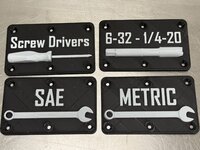
On the larger cards I was getting slight bowing of the labels so I figured adding a few more screws to make sure they lay flat was an easy fix. That said, the smaller cards are ending perfectly flat and likely don’t need the added screws. Go figure.Those look fantastic!
Out of curiosity, why add the extra two screw holes when you shrunk down the plaque?
New to me. Just watched a video about ironing and I’ll start using it maybe for all of my stuff. I don’t care about increased print times and would like the surfaces to be cleaner. As you can easily see in these cards, the lines are fairly obvious. At 3’ tho, which is about as close as I’d ever get, they’re really not that noticeable. But I’ll using ironing anyway.Matt - have you tried ironing on your drawer labels? I really like the finish ironing leaves.
Haven’t tried them yet but I see what you’re saying. I could make them angled by printing them face into the hot bed. May try a few. Good idea.Do you find the labels clear even on your lowest drawers? I ended up labelling the drawers of my tool box with labels "up" instead of out. If it's an issue at all, I suppose you could always print a bracket behind them to angle them upwards a bit (or maybe I'm over complicating things lol)
Yeah, the video I watched had a 2hr print turn into an almost 3hr print by adding it.Keep in mind that ironing is a very slow process
I plan on doing a few this weekend just to see hit it goes (and how long). Armed with that info I’ll decide if having cards on every drawer makes sense or not or if they’ll be limited to the hardware drawers.Keep in mind that ironing is a very slow process