To avoid these ads, REGISTER NOW!

Machine Name Plate Tag Reproduction

Cruzan80

Well-known member
Joined
Jul 22, 2015
Messages
4,209
Location
Denver, CO
It is pretty easy to drill a divot in a spare piece of angle iron, and peen from inside as well. Just need to match divot size to rivet head. Hit with a cross peen and you can make sure the tag isn't going anywhere. Or just put the divot piece outside, and hit with large hammer repeatedly.

But nice job overall. Keeping this in mind for when I do restorations to some of the other tools I have.
 
To avoid these ads, REGISTER NOW!
OP
P

Pupuhd

Well-known member
Joined
Aug 18, 2011
Messages
346
Location
New Jersey
It is pretty easy to drill a divot in a spare piece of angle iron, and peen from inside as well. Just need to match divot size to rivet head. Hit with a cross peen and you can make sure the tag isn't going anywhere. Or just put the divot piece outside, and hit with large hammer repeatedly.

But nice job overall. Keeping this in mind for when I do restorations to some of the other tools I have.
Thanks. That was also my original idea for setting the rivets without getting into more expenses. However because of the odd shape of the grinder center band and limited space behind it, it was difficult to swing a hammer square to the rivet. Using a buck and air hammer was the only other avenue for me.

Great idea on using an angle iron. A thick enough one can be mounted in the vise and used as a buck.

I "see" said the blind man to the deaf man as he picked up his hammer and saw.
 

vertguy

Well-known member
Joined
Apr 6, 2010
Messages
1,261
Location
SE WI
How difficult is Adobe Illustrator to use for creating these badges? I signed up a free trial, but I definitely need to spend some time watching tutorials before taking a crack at designing a label for 1/2hp that I just restored. I started with one of the Word files from Torqueman's thread and have it customized for my model and s/n. Just not sure how clear it will print from that format.

Great work on all facets of these badges!
 
OP
P

Pupuhd

Well-known member
Joined
Aug 18, 2011
Messages
346
Location
New Jersey
How difficult is Adobe Illustrator to use for creating these badges? I signed up a free trial, but I definitely need to spend some time watching tutorials before taking a crack at designing a label for 1/2hp that I just restored. I started with one of the Word files from Torqueman's thread and have it customized for my model and s/n. Just not sure how clear it will print from that format.

Great work on all facets of these badges!

Thank you.

Once you learn the basics, it's pretty straight forward for what we are doing here. The software is primarily designed for illustrators so creating badges is an overkill. The CM badge you see made was all done watching tutorial on Youtube. Every time I came across a situation I wanted to do a particular detail in Illustrator, I searched Youtube and several videos would pop up. Watch minutes of it then apply the lesson in Illustrator.

The beauty of Illustrator is the "Layer" system. You can layer each set of details as you please: background shape, boxes, symbols, texts, data, even the original image you scan in. Freeze(view), hide, name each layer.

I'm a Sketchup type of guy, currently a carpenter with drafting background and some architecture years in college. Lines, exact numbers, points, you know what I mean. So Illustrator is right up my alley.

David
 

vertguy

Well-known member
Joined
Apr 6, 2010
Messages
1,261
Location
SE WI
Thanks Pup!! I watched a couple basic videos and got to work designing my label. It was more tedious than anything. Now I need to find the right color red before getting it printed as the default red is too bright.
 
Last edited:
OP
P

Pupuhd

Well-known member
Joined
Aug 18, 2011
Messages
346
Location
New Jersey
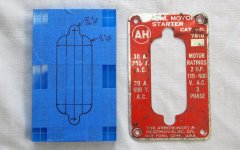
Tonight I had an opportunity to continue with the AH Manual Switch badge. What a pain in the rear it was to profile the center of the acrylic template guide. First an hour drilling holes in 1/32" progression to get the internal profile holes and radius. Then another hour to rough cut with a jigsaw and then hand file the final shape with files. With all that work the profile is a heavy 1/32" off center, but as they say "you can't see it from my house".

Also this time I was a little more careful in drilling the mounting holes. I drilled up to it with a 7/64" bit then sneaked up on it using number drill bits. This gave me a snug fit for the 1/8" diameter alignment pins. Only one hole in the upper template half I had to play with to fit.
Tags 021.jpg

Tags 027.jpg

Tags 028.jpg


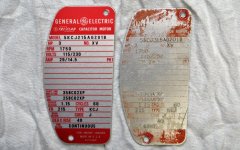
Then I took a stab at the GE Triclad 3hp motor badge, this was all done by hand, no power tools and took about half hour to finish. First, all the straight edges I scored right up to the reference outline and snapped off. The large radius I cut with tin snips almost right up to the line. Then minutes with a file and draw filed everything just past the outline. The holes were punched using the original badge as a guide. I'm happy the way this one turned out.
Tags 026.jpg
 
Last edited:

PCMusicGuy

Well-known member
Joined
Feb 15, 2009
Messages
851
Location
Houston, TX
They look great! If people find illustrator intimidating, they can do nearly all of the same things in Paint.NET. It is open source, free and easy to use and also has layers.
 

S4cruiser

Well-known member
Joined
Sep 11, 2013
Messages
587
Location
NC
Just got one of the grinder labels in the mail from Pup - they are very very nice! :thumbup:

I'll post pics once I get it installed. Waiting on a rivet set for my small air hammer.

:beer:
 
OP
P

Pupuhd

Well-known member
Joined
Aug 18, 2011
Messages
346
Location
New Jersey
Just got one of the grinder labels in the mail from Pup - they are very very nice! :thumbup:

I'll post pics once I get it installed. Waiting on a rivet set for my small air hammer.

:beer:

Thanks, hope it looks great on your grinder. When installed please post on "Let's see your Craftsman grinder" thread.
 
OP
P

Pupuhd

Well-known member
Joined
Aug 18, 2011
Messages
346
Location
New Jersey
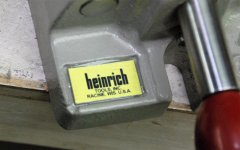
Last week I had an opportunity to install both the Heinrich vise and GE Triclad electric motor badges. The Heinrich 4GM vise one was epoxied into the recess. The GE one was installed with two u-drive screws. All I need to reproduce is the GE logo that mounts to cover the shaft opening.

Tags 029.jpg
GE%20Motor%203HP%2055.jpg
 
Last edited:

Dick in Wisconsin

Well-known member
Joined
Mar 3, 2012
Messages
3,048
Location
Shawano, Wisconsin
Stunning! Absolutely stunning!

Any idea how the original name plate tags were produced? What kind of process was used? Were those sensitive to direct sunlight for a long time?

I went to Bayphoto's web site. At first look, I would not have expected Bayphoto to do short runs. I might even have passed over them had you not directed me there. They have their pricing right on-line. 20 business cards for $36! Looks like their minimum charge is $20 ... they will apparently go down to $20 for something.

I hope their business is as successful as their website looks and as successful I think it should be!
 
Last edited:
OP
P

Pupuhd

Well-known member
Joined
Aug 18, 2011
Messages
346
Location
New Jersey
Stunning! Absolutely stunning!

Any idea how the original name plate tags were produced? What kind of process was used? Were those sensitive to direct sunlight for a long time?

I went to Bayphoto's web site. At first look, I would not have expected Bayphoto to do short runs. I might even have passed over them had you not directed me there. They have their pricing right on-line. 20 business cards for $36! Looks like their minimum charge is $20 ... they will apparently go down to $20 for something.

I hope their business is as successful as their website looks and as successful I think it should be!

As far as how the original badges were made, I haven't done much research on it. However from reading online I believe they were silk screened. I think most stuff like this is done that way in mass production machines.

As far as UV or direct sunlight is concerned I don't think any product out there has any protection unless specifically noted at production. Over at "Lets see your Craftsman grinder" thread there are plenty of examples of original badges faded away due to age and sunlight. These new ones here are probably no better when it comes to direct sunlight. As a matter of fact, Bayphoto states:

MetalPrints™ represent a new art medium for preserving photos by infusing dyes directly into specially coated aluminum sheets. Because the image is infused into the surface and not on it, your images will take on an almost magical luminescence. The ultra-hard scratch-resistant surface is waterproof/weatherproof and can be cleaned easily – just avoid direct sunlight.

There may be a minimum for the business cards, however for the MetalPrints there's no minimum. Smallest 4x4 is only $11. They also do custom sizes at $0.25 per square inch with a minimum price of $20. Also shipping is reasonable.

Last night I place a second order for two 8x10 MetalPrints, $5 for shipping from CA to NJ. These are another lot of Craftsman "Block" grinder badges, two other model types being sold to GJ members at "Lets see your Craftsman grinder" thread.
 

E.rodz

Well-known member
Joined
Nov 11, 2009
Messages
2,434
Location
st.paul MN.
really cool! nice work indeed. as with any project the devil is in the details! i just learned some new tricks that could apply to name plates and badging we just got a small low power cnc laser at work and made up some vintage signs for a friend and took a piece of aluminum scuffed it with a 3m scotchbrite pad then dusted some bronze,gold and dusted black over that then the laser just burns in deep enough to burn the paint off leaving the bronze ish looking background behind. a lot of trophy shops have that laser cutting ability as well. you could also use brass shim stock and do the same thing too.keep up the great work they look awesome!


OP
P

Pupuhd

Well-known member
Joined
Aug 18, 2011
Messages
346
Location
New Jersey
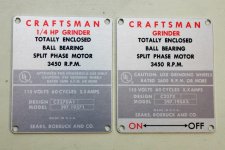
The other day a second shipment of badges came in. This time for newly reproduced two other models of Craftsman 1/3hp block grinders. One is same as first order but non-INDUSTRIAL RATED and second with the gold background.
CM GRINDER TAG 397.19580 NON_INDUSTRIAL.jpg
DSC_0916.jpg

DSC_0914.jpg

DSC_0915.jpg


First, I picked up where I left off with the AH Manual Motor Starter switch. This time a lesson learn from trimming out the Craftsman grinder badges. With snips I cut closer to the border lines, about 1/16" away. This way there wouldn't be so much cutting out with the router and chips everywhere.
AH%20SWITCH%20TAG%2004.jpg


The center cut out was drilled first so the router bit can fit in and then route out the majority of the center. The rest was hand filed away. My template guide was off center in the middle by a heavy 1/32" to the left, however once completed it looked ok on the cover.
AH%20SWITCH%20TAG%2005.jpg

AH%20SWITCH%20TAG%2006.jpg

DSC_0979.jpg


Another lesson learned is drilling out the mounting holes for the Craftsman grinder badges. Before I used blue tape to hold down the acrylic template guide for drilling . That process was long and created minor play in the template while drilling, this cause a slight mis-alignment with the mounting holes onto the lower template guide.

This time I had cut the badges to withing a 1/16" of the border as explained above, then separated all the badges. After careful alignment, used a clamp to secure everything. This provided a rock solid hold and no movement. It worked so well that once drilled and deburred, the badges just slipped right onto the alignment pins on the lower template guide.
DSC_0968.jpg

DSC_0973.jpg

DSC_0974.jpg
 
Last edited:
To avoid these ads, REGISTER NOW!

kochankr

Member
Joined
Aug 22, 2014
Messages
22
Thanks for the great comments so far.


I did forget to mention a few details about the MetalPrints from Bayphoto. First they currently only accept JPG, PNG and unlayered TIFF. I did email them to see if they would accept vector files such as AI. The image according to their website: MetalPrints™ represent a new art medium for preserving photos by infusing dyes directly into specially coated aluminum sheets. Your images will take on a magical luminescence.

I did notice this right away, while working with them no image "was harmed in the making of", very durable. Fingerprints just wiped right off. According to them you can use standard glass cleaning products on it, however keep away from direct sunlight. I'm not sure this type of media would survive harsh chemicals, but most likely cleansers, oils would be fine. The MetalPrints media is mostly for photographs.

Second I chose the Sheer Matte finish. With either the Sheer matte or glossy the "Metal shows through the image, giving our Sheer Surfaces a unique translucent luminescence." Also for this finish the whites are transparent and the brushed aluminum is shown through. This is ideal for some tags that have that look such as the CM grinder, GE Triclad motor and AH switch plates I reproduced.

David

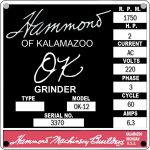
David, nice work! I'm inspired to try to make a tag for my Hammond grinder, one thing I wanted to clarify, the jpg you sent to bay photo did have the white background? And it just shows up as metal gray thing there? Just wanted to be 100% sure so I don't have to do this twice :)
 
OP
P

Pupuhd

Well-known member
Joined
Aug 18, 2011
Messages
346
Location
New Jersey
David, nice work! I'm inspired to try to make a tag for my Hammond grinder, one thing I wanted to clarify, the jpg you sent to bay photo did have the white background? And it just shows up as metal gray thing there? Just wanted to be 100% sure so I don't have to do this twice :)

Thank you. There are two types of print surfaces they offer, each with several finishes, either Satin/Matte or Gloss/Glossy/Mid-Gloss.
Bayphoto finish.jpg

First, yes all the jpg sent had white as the background. I know there's a way to have all "clear" backgrounds in Illustrator as a hatch pattern, however I haven't figured that out nor have I had a need for it to date. Besides the clear hatch pattern affect will only work if the file is sent in vector format, not jpg. At this present time Bayphoto does not accept vector format file.

The first Print Surface in either Gloss, Mid-Gloss or Satin. All white colors including white background will show up as white. The rest of the colors will show up vibrant.

The second choice of Print Surface is the Sheer in either Glossy or Matte. This style will take all white colors, regardless of background, objects or text, and make them clear. Additionally all other colors won't be as vibrant as the first style and will as they describe "an luminescent look" as some of the aluminum brush texture will show through the colors.

The second style is the one you want to choose if your original badge has aluminum showing through in the border, background, any objects, data fields, etc.. If your badge has no aluminum showing through, then choose the first style.

Just remember these are reproductions of damaged or missing badges to complete your rebuild, not restoration badges for a museum piece. However, with that said, I thrive to accurately reproduce the badges as original as I can. That includes any artwork, outline, shape, background, and even font style. This is where most of the work goes into these reproductions, looo.......ooong hours behind the computer.

One more thing, there's a trick to uploading your jpg so it'll fit properly onto the frame size you choose. When you get to that point, please post. Anything else, ask. Hope this helps-David
 

kochankr

Member
Joined
Aug 22, 2014
Messages
22
Thank you. There are two types of print surfaces they offer, each with several finishes, either Satin/Matte or Gloss/Glossy/Mid-Gloss.
Bayphoto finish.jpg

First, yes all the jpg sent had white as the background. I know there's a way to have all "clear" backgrounds in Illustrator as a hatch pattern, however I haven't figured that out nor have I had a need for it to date. Besides the clear hatch pattern affect will only work if the file is sent in vector format, not jpg. At this present time Bayphoto does not accept vector format file.

The first Print Surface in either Gloss, Mid-Gloss or Satin. All white colors including white background will show up as white. The rest of the colors will show up vibrant.

The second choice of Print Surface is the Sheer in either Glossy or Matte. This style will take all white colors, regardless of background, objects or text, and make them clear. Additionally all other colors won't be as vibrant as the first style and will as they describe "an luminescent look" as some of the aluminum brush texture will show through the colors.

The second style is the one you want to choose if your original badge has aluminum showing through in the border, background, any objects, data fields, etc.. If your badge has no aluminum showing through, then choose the first style.

Just remember these are reproductions of damaged or missing badges to complete your rebuild, not restoration badges for a museum piece. However, with that said, I thrive to accurately reproduce the badges as original as I can. That includes any artwork, outline, shape, background, and even font style. This is where most of the work goes into these reproductions, looo.......ooong hours behind the computer.

One more thing, there's a trick to uploading your jpg so it'll fit properly onto the frame size you choose. When you get to that point, please post. Anything else, ask. Hope this helps-David

David, Thank you very much for the detailed explanation and clarifying the different print options, I have used bay photo once before for regular landscape print, but that was three years ago and i no longer have the print.

I have been working on my tag for a few hours, i think i'm getting close to where i'll be happy with it, the original tag is destroyed, i was able to find a similar tag from different machines, and a bad photo on eBay item that looked accurate.

thanks again,
Kris
 

Attachments

  • ok12 TAG.jpg
    ok12 TAG.jpg
    82.6 KB · Views: 55
OP
P

Pupuhd

Well-known member
Joined
Aug 18, 2011
Messages
346
Location
New Jersey
Been over two months since my last post here. There's been a lot of badges reproduce, some mistakes made and new techniques. To catch up, here's some work done back a month or so. By the way, from now on all photos will be as attachments so they stay here "forever" and no more Photobucket links.

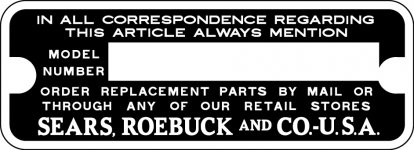
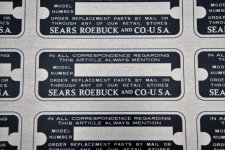
I removed the SEARS, ROEBUCK AND CO. machinery tag off of my belt/disk sander and reproduced it without the serial number.
Tags 049.jpg
SEARS_CRAFTSMAN TAG.jpg

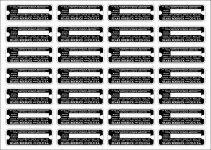
These will be available for sale individually as blanks without any stamps. They will be trimmed to size.
SEARS_CRAFTSMAN TAG MULTI.jpg
Tags 051.jpg
 
OP
P

Pupuhd

Well-known member
Joined
Aug 18, 2011
Messages
346
Location
New Jersey
David, Thank you very much for the detailed explanation and clarifying the different print options, I have used bay photo once before for regular landscape print, but that was three years ago and i no longer have the print.

I have been working on my tag for a few hours, i think i'm getting close to where i'll be happy with it, the original tag is destroyed, i was able to find a similar tag from different machines, and a bad photo on eBay item that looked accurate.

thanks again,
Kris

Kris, sorry for the delay in response. Just want to say that reproduction looks excellent. Recently I had a reproduction to do with an original badge with all the text, data and electric diagram missing, gone. Only had the shape and background art barely visible. Like you finding online images I was able to piece it together.
 
OP
P

Pupuhd

Well-known member
Joined
Aug 18, 2011
Messages
346
Location
New Jersey
The following reproductions are from over a month ago. This print ordered was received then.
Tags 052.jpg
Tags 053.jpg

Much faster way of rough getting these is on the band saw.
Tags 054.jpg

GJ member requested this one for his newly acquired Craftsman block grinder. No mounting holes for this style, it will have to be adhered to the grinder. No shear finish with this one, solid colors with a light gray background. I really like the way this one came out as far as printing.
Tags 056.jpg
CM GRINDER 1_2HP 397.19591.jpg
 
OP
P

Pupuhd

Well-known member
Joined
Aug 18, 2011
Messages
346
Location
New Jersey
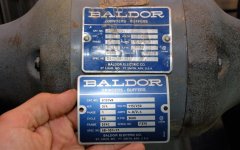
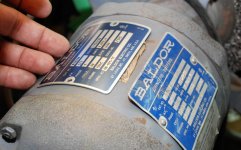
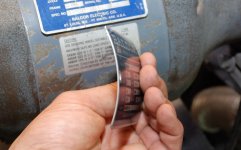
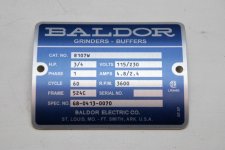
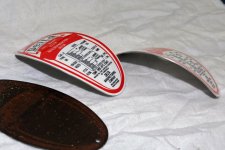
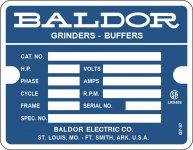
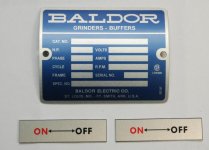
I reproduced three Baldor badges for an 8" grinder. One for me is model 8107WB, the other two for another member with same exact grinder is model 8107W and a second blank version. Also an ON/OFF plate that can be mounted on top of the switch shield. On mine, the original ON/OFF text was not visible anymore, just a little extra touch on a rebuild of the grinder. Using the diameter of the grinder I was able to pre-bend these to shape using my 12" slip roll. They were slightly over bent to have a tight fit when fastened down to the grinder body.
BALDOR GRINDER .75HP TAG_BLANK.jpg
Tags 058.jpg
Tags 059.jpg
Tags 060.jpg
Tags 061.jpg
 
OP
P

Pupuhd

Well-known member
Joined
Aug 18, 2011
Messages
346
Location
New Jersey
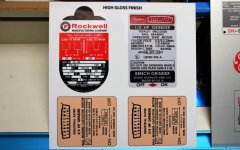
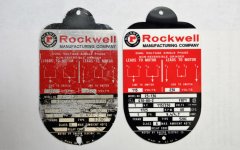
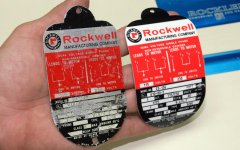
Part of that last print order is this Rockwell badge for a 10" grinder model no. 23-136. While reproducing this badge in Illustrator I discovered not all Rockwell badges with similar outlines are all the same. I was sent another one it was an 1/8" taller at the shoulders on top, left and right radius.

Reproduction and before/after:
ROCKWELL 10in GRINDER 23136 TAG.jpg
Tags 057.jpg
Tags 064.jpg
Tags 062.jpg
Tags 063.jpg
 
OP
P

Pupuhd

Well-known member
Joined
Aug 18, 2011
Messages
346
Location
New Jersey
As I mentioned before for those interested in doing there own badges, I'm always trying to reinvent a better mouse trap or at least a more efficient way of doing these, more on that later.

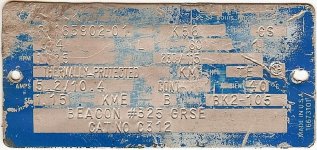
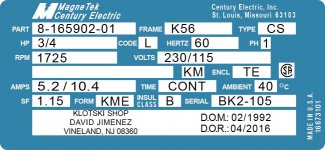
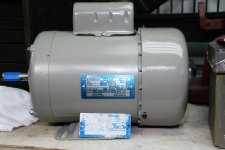
In the mean time, I managed to finally finish a motor rebuild, a 1990s Century Electric 3/4hp motor, by installing a reproduced badge on it. For this one I removed the old one and scanned it. The upper left area was pretty beat up and couldn't make out anything, especially the Century Electric logo. The rest of it was straight forward to trace in Illustrator, however the upper left I had to research online similar badges of the period to get an idea on how it looked. Apparently Century Electric went through a number of acquisitions in the later half of the twentieth century. All said and done, I managed to reproduce in Illustrator a close facsimile of the original badge. The print surface on this badge is shear which makes all white colors clear for the aluminum to show through, finish is matte.
CENTURY .75HP MOTOR TAG Image.jpg
CENTURY .75HP MOTOR TAG.jpg

In the blank field at the bottom of the badge, I decided to include my rebuild information for this motor.
Tags 066.jpg

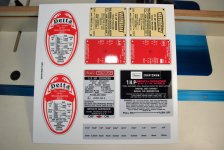
Jump to a couple weeks ago, a print order arrived containing two sheets with twelve different badges/tags on it: Baldor, Crafstman, Delta, Rockwell, AH, etc.. First the good news and bad news. In a previous post I had created several Baldor 8107 grinder badges. One for me, a 8107WB, and two others a 8107W and blank one. Well in my haste to get the print order out, I didn't realize I had one of the layers in Illustrator Locked for the border of the Baldor badge. When I copied the vector images to my proof sheet containing all the badges on it, the border did not copy over. When the print was delivered I never noticed the missing border to cut and file down to. The first badge, 8107, I wound up trimming to the blue background, not the bare aluminum border around it. If you look carefully at that original print order you will see the three Baldor badges on the right without the black line border around it, however I did catch myself with the second and third ones and trimmed them correctly.
Tags 053.jpg

Here are the latest two prints that arrived. In the second one you can see the corrected Baldor I had to redo with the border around it. Then trimmed and shaped to the proper diameter.
Tags 067.jpg
Tags 068.jpg
Tags 070.jpg
 
OP
P

Pupuhd

Well-known member
Joined
Aug 18, 2011
Messages
346
Location
New Jersey
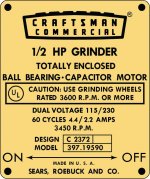
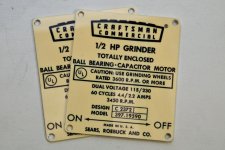
To continue with the bad news, the top two in the first print are redos of Craftsman block grinder badges I unknowingly sent in the wrong gold badge. I now have two extra 3/4hp versions from that mistake and now up for sale. However here is the correct version of that gold background for a 1/2hp grinder.
CM GRINDER 1_2HP 397.19590 GOLD.jpg
Tags 071.jpg

They say it comes it three at least that's what my wife tells me, I hope so because here is screw-up number three. See if you can spot it. This is a for a Craftsman 1hp block grinder which originally has a sticker style badge, however an aluminum one was requested.

Funny thing my wife spotted the mistake as soon as I showed her the prints.
Tags 069.jpg

Wait for it...................

The freaking second period in "H.P." is elevated just below the letter B. That kills me. That's another reprint I'll have to do and a nice free beer coaster for someone, or a nice fridge magnet. For the rest of the Craftsman grinder badges, they came out good. See good news finally.

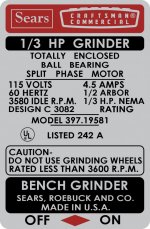
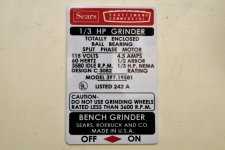
This is for a later 1/3hp grinder, no mounting holes. Surface print is non-shear with glossy finish. I believe this original style might have been a sticker, but could be wrong about that.
CM GRINDER 1_3HP 397.19581.jpg
Tags 072.jpg
 
OP
P

Pupuhd

Well-known member
Joined
Aug 18, 2011
Messages
346
Location
New Jersey
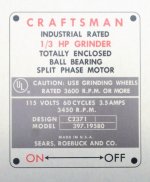
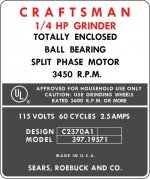
The next three Craftsman grinder badges are from older models. The first is a repeat from an earlier post, model 397.19580. The second one is a new one I reproduced from online images of many ones pieced together to get the proper proportions and layout. No original scan or badge for this one, a 1/4hp grinder model 397.19571. Last one the original badge was completely void of any information or style. So we decided to reproduce a generic style however the horse power is omitted, AMPS, DESIGN and MODEL specs have been partially "X" out.
Tags 074.jpg
Tags 073.jpg
CM GRINDER 1_4HP 397_19571.jpg
CM Grinder  397_195XX UNKNOWN.jpg

More to come on the rest of the badges in this print order and again thanks all for the great comments. Please post any suggestions or ideas.

David
 
OP
P

Pupuhd

Well-known member
Joined
Aug 18, 2011
Messages
346
Location
New Jersey
This bring this thread up to date and it's been a few weeks since I have done any work on the reproduction badges. Just finished a electric motor rebuild for another OWWM member. A circa 1950s Leland Larady 3hp capacitor motor, the link for that rebuild is listed at the end of this post along with a few of my other completed topics.

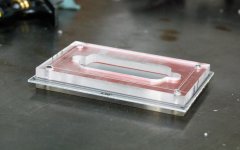
In my last print order I mention about building a better mouse trap, or in this case reproducing these badges more efficiently. My issue was with the odd shape ones, not square or rectangular. However these later ones will also benefit from it. I needed a better and faster way to trim them to size with little finish filing the edges for final shipping. Then the original acrylic template guides came to mind. I can make an acrylic template guide using the original badge as a master template.

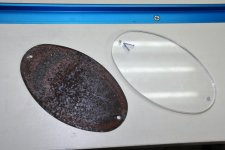
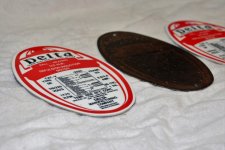
Here is an original badge mailed to me for reproduction of two Delta RepuIsion-Induction motor badges. This one the artwork was barely visible and all the data and text gone. I was able to from online images reproduce the missing data, text and electric wiring diagram. The exact shape of the badge and background red artwork I was able to copy from the badge. First from a piece of acrylic I outlined the shape, then on the bandsaw cut this slightly larger.
Tags 075.jpg

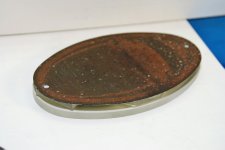
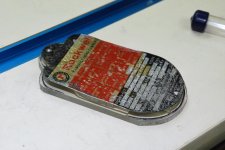
Then using scrap pieces of acrylic along with double sided tape build up layers. The bottom rough shape acrylic, then pieces as a spacer followed by the original badge.
Tags 076.jpg
Tags 077.jpg

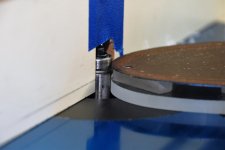
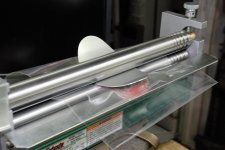
This allows me to use the original badge as a master to trim the acrylic below. I used the same 3/8" diameter trim router bit and carefully trimmed to shape. This gave me an exact copy of the original.
Tags 078.jpg
Tags 079.jpg
Tags 080.jpg
 
OP
P

Pupuhd

Well-known member
Joined
Aug 18, 2011
Messages
346
Location
New Jersey
Using double-sided tape I was able to stick the acrylic template guide to the roughly cut reproduced badge. Lower the trim bit and route out the shape exactly.
Tags 081.jpg
Tags 082.jpg
Tags 083.jpg
Tags 084.jpg

Here's a scan of the original badge and the reproduction.
Delta 1_2HP RI Motor_Scan.jpg
DELTA 1_2HP RI MOTOR.jpg
 
OP
P

Pupuhd

Well-known member
Joined
Aug 18, 2011
Messages
346
Location
New Jersey
Any thoughts on how to reproduce the punched model number on these tags?

Jay

The original punched numbers, I believe done with reverse number punches punched through the back to produce the raised look on the front. I'm pretty sure given the time and resources that can possibly be reproduced. However the major hurdle is the thickness of the new aluminum at .045". You would need a commercial press in order to achieve this, if possible with the thickness.

The only solution is standard number punches on the face. First I don't currently own a 1/4" number punch set. I believe that's the dimension on the original. Second a jig of some sort would have to be devised to hold one punch in order to punch one character at a time, then either move the punch over or move the badge over to the next character and still keep it in alignment. Punching would have to be achieved with a hammer or arbor press.

I've been toying in my head of such a device using my 1 ton HF arbor press I have. At work the Lock Shop next to our Carpenter Shop has two punch press machines similar in function. The table advance to the left with each downward press of the lever. The character is set by rotating the wheel. One of these goes for over $1000 with only one wheel, however the largest font size available from this company is 5/32" or 3/16" I believe.
IMG_20160405_142002914.jpg

Using a 1/8" wheel set I have used the above machine to punch the blank fields in my etched brass rebuild badges. I just need to create something that will be repeatable and efficient. Again, thank you-David
Tags 003.jpg

EDIT: One other idea is to have these engraved.
 
Last edited:
OP
P

Pupuhd

Well-known member
Joined
Aug 18, 2011
Messages
346
Location
New Jersey
Using my 12" slip roller, I rolled the badges to the proper diameter. I use one of the plastic bags that the printed sheets come in to protect the finish side of the badge from the metal rollers. With these badges it was requested not to punch the mounting holes.
Tags 085.jpg
Tags 086.jpg
 

toplessHO

Well-known member
Joined
Oct 20, 2014
Messages
14,034
Location
central florida
might I suggest using a whitney punch to pop the holes
quick and clean.
If you want to mark the holes using your template and a dimple for centering it will be spot on.
As for the process of making them,yes they were screen printed.
I do a process called pad printing which will do about the same as screen printing
and uses the durable inks as well(2 part paints)
 
OP
P

Pupuhd

Well-known member
Joined
Aug 18, 2011
Messages
346
Location
New Jersey
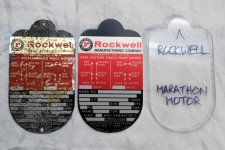
To continue with idea of making template guides using the original badge as a master, I decided to do the same with a Rockwell grinder (Marathon motor) badge reproduction. Same procedure as before a new acrylic template guide is produce. This is only for one badge however I've labeled these guides for any possible future request. By the way, I did file and clean up all the edges of the original to produce a smooth profile.
Tags 087.jpg
Tags 088.jpg

Below on the left is the original badge, center reproduced badge after trimming with the acrylic guide on the right. For this setup on the router table I switched over to a new 1/4" trim bit with top bearing. This allows me to get closer into the two top shoulder inside corners. I left the template guide still taped and with a small jewelers file cleaned up the inside corner square. The print finish for this is Sheer-Matte, allows all white areas to be clear and brushed aluminum surface to show through.
Tags 091.jpg

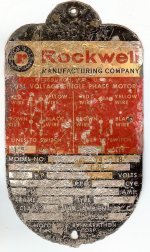
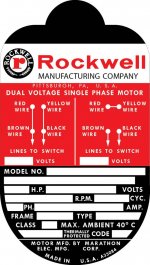
Here is the scan of the original Rockwell grinder badge and the reproduced badge in Illustrator. The fields were left blank as the owner wished to punch the data himself. Also the mounting holes were not punched and not slip rolled per purchaser.
Rockwell Marathon Motor.jpg
ROCKWELL MARATHON MOTOR  TAG.jpg
 
To avoid these ads, REGISTER NOW!
Top Bottom