3D Printer Mayhem
This thing is driving me nuts. But let's start out with a few positive things.
The layer shifting seems to have pretty much gone away since adjusting the stepper motor voltages.

And after completing that, I finally managed to print the rest of my paper towel holders for the garage:
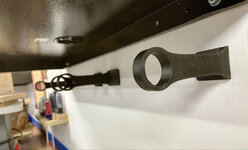

They work pretty well and get them off my bench top.
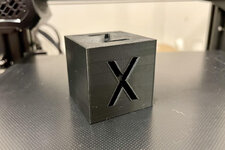
So it was a bit after this I wanted to dial it in even more and got stuck on the XYZ cube. Why that? Because it's one of the first things I printed when I got the printer, and that one turned out really clean. So I know it can, or could, do it. And it's small and doesn't take too long to print (~30min).
Obviously I've been posting my less-than-great cubes here the past few posts. Lots of good advice and some of it I've tried and some of it I haven't gotten too. (Trying to balance this "hobby" with work and family life).
Things I haven't tried:
— bowden tube fix
— printing the cube at half speed
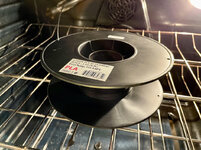
— attempting to dry the filament in the oven
— update firmware
I'll get to those. But let's cover a few things I have done.
Per
@Bakafish's advice I disassembled the hot end to check for leaks around the bottom of the bowden tube.
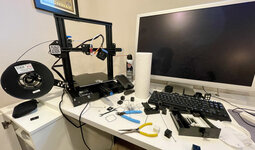
Yeah, my office is turning into a ripe old mess.
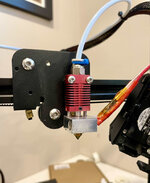
I cleaned up the bottom of the hot end and had previously changed the nozzle (to another spare Creality one that came with the printer).
Now I removed the bowden tube, gave it a fresh perpendicular cut, and that reamed it through the hot end to clear any gunk.
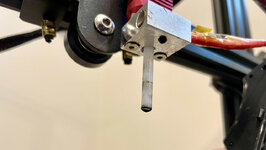
There was some. Not a ton but definitely some to wipe away. About 3 passes and it came clean. Then I put everything back together, hopefully seated it well.
As mentioned above I haven't done the "fix", I assume
this part on Thingiverse, but mean to get to it when I can.
Printed another cube and still some issues.
Then I started working through the
Teaching Tech calibration steps. YES, I know I should have done this in the beginning and before complaining on here about how things aren't working right. Shame on me. But in the beginning things seemed to be working ok and I was more excited to print stuff than do a bunch of tests.
First up PID autotune. I attempted to use Pronto Pup Face (Pronterface, but for some reason that's how my brain likes to read it), and it was controlling the printer (could turn fans on and off, etc), but when I ran the autotune it never gave results. I abandoned and sent the G-code through Octoprint instead (yes, I got that set up, more later in this post). So, PID tune done.
Next was E-steps, this came out not so good. It was extruding 8mm under 100.

I corrected the value and next extrusion came in within 1mm, so I called it good. Everyone suggests using calipers for this, but I happened to get a Paolini Pocket Rule for Xmas and it seemed like a great opportunity to use it.

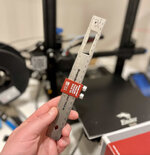
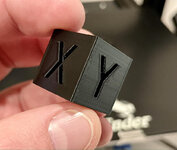
After these two steps I re-leveled the bed and printed another XYZ cube, and while not perfect, it was my best so far since everything went downhill and I started getting obsessed with little plastic cubes. So that was encouraging.

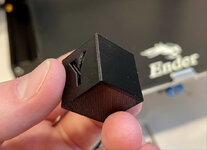
There's still some deformation on the X and Y relief, but the edges / corners looked much better, wasn't warped, pretty smooth, etc.
Of course I didn't stop there and had to go ahead a take 1 step forward and 10 steps back.
But first let's take a short break and talk about Octoprint. I got lucky and sourced a Raspberry Pi Zero 2 for ~$15 (Octoprint certified), power supply, micro SD, USB cable etc. All in under $45. I wanted to not break the bank on this, especially with a malfunctioning printer, so that's why I chose the Zero 2.
Install was super easy using the Raspberry Pi Imager. Was even able to set up the WiFi credentials and bonjour host name before even powering on the Pi.

Got it powered on and first thing I noticed was BAM! firmware error message.

So I guess this is another strike against Creality, it doesn't format the temperature reporting correctly so Octoprint can't draw the graphs. Fortunately there is a plugin fix called
Creality 2x temperature reporting fix that seems to solve it.
One interesting side effect is the Pi powers the Ender touch screen through the USB port 5v pin. This is annoying because I like to turn the printer off when not using it, but I'd be fine leaving the Pi and Octoprint server running. But that keeps the screen on. So I have to power down both.
With all the test prints I've been doing, I set up an unused Wyze Cam so I could check in on things while upstairs.
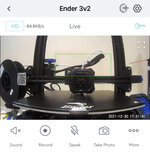
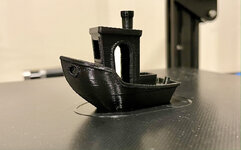
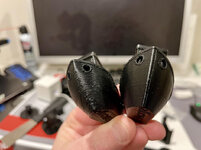
Then I went on a Cura profile binge, watching many videos, tweaking temperature, acceleration, jerk, retraction, all that good stuff. And printed a bunch more cubes. And a benchy. And some calicats. And things were not improving, and in some cases getting worse.
Getting quite a collection now.
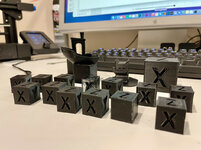
Not getting results I wanted, I jumped back into the Teaching Tech series and tried to calibrate the Flow. This involved printing some thin-walled open cubes and measuring the wall thickness. Mine came out saying my Flow should be 80 instead of 100. I have no idea what a normal correction would be but that seems like a big change?
More cubes with less flow. Tried 80, 90, 95. None looked as good as the original and still had the deformations in places.
So then I thought I'd update to the latest Cura. Just to see. Did that, no improvements.
Then... I was watching some CHEP videos on YouTube and saw one where he boasts his Ender Cura profile is so good you don't even need to run the part cooling fan on a Benchy. So I went to his website, dowloaded it for the latest version of Cura, hoping this would give me a good starting place for settings I'm really just taking some wild guesses at outside of what I've read online.
Printed a cube with his profile, and let's just say it wasn't the best:


I've spent hours and hours on this now and I'm going in the wrong direction!!
Ok, fired it up again because spaghetti monsters can happen.

Dear god, still horrendous.

So why does this profile work so good for CHEP but do this on mine?!?
Maybe the bowden tube made a clog again? Maybe my filament is bad? I did loosen the eccentric nuts on the X and Z axis a bit, I thought maybe they were overtightened. It's really hard to adjust just one thing at a time. And I feel like the more I test and learn the less I really know.
They say insanity is doing the same thing over and over while expecting different results. Well my version is no matter what I do, the results are always garbage, lol. And it is definitely driving me insane.
Anyways, this morning I went back to my own profile and am currently printing a 200% scaled XYZ cube to see if a larger model might go a little cleaner. Then going to follow up with some of the things I haven't done, and get some new filament.


 Haha! Yeah, when I went back and re-read your comment I sort of figured that. Well... I'll check it out sometime, although after adjusting the trim pots I've had no layer shifts and I think the Y-motor is running cooler.