I have a few of these Hue switches..they are excellent! I just picked up a few of the IKEA 2 button/4 button remotes to add into the ventilation system. The IkEa buttons have been solid too.
Nice. I have a few of the IKEA ones, too, on your recommendation, and have been happy with them. I couldn't pass up this price and I had an idea in mind that the Hue form factor works well for.
1st off they actually showed up, so it turns out I didn't get scammed


Ok so here was my idea.
Our basement TV has a receiver and 5.1 speaker setup, and I use my trusty Logitech Harmony hub to set inputs / start "activities".
It works great.
But, the Sony remote that came with the TV is faster than the Harmony remote for some reason. I don't like input lag, so I always use the Sony remote. And so does my wife. Normally I trigger the Harmony activity through Home Assistant via a physical button at the top of the basement stairs.
Usually my wife remembers to to the same. But in the case she forgets, or goes downstairs first and
then decides to watch TV, she'll just use the Sony remote. The TV has HDMI-CEC, but sometimes it doesn't recognize the receiver properly and defaults to the built-in speakers (yuck!). And she'll hit the power button on the Sony remote to turn the TV off, which does
not turn off the receiver or end the Harmony activity.
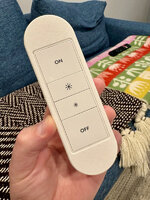
In addition to the switch at the top of the stairs, I have other methods of doing what is needed. Pressing off on the Hue Dimmer in the TV room will turn off all the lights and
and turn off the TV + receiver via Harmony properly. Convenient as you're walking out of the room.
And I often use my custom Home Assistant dashboard on my phone, which I'm finally very happy with:

The thing is, my wife will not do any of that stuff. She knows it exists. Doesn't matter, she will grab the Sony TV remote and shut it off the wrong way. Every. Single. Time. She knows is "wrong" and just doesn't care. "Why can't I just turn it off with the TV remote?"
I even have a "cleanup" automation that turns the Harmony Activity back to "off" at midnight, in case it was improperly shut off earlier in the day.
So what she asked for is a button near the TV. A simple ON / OFF. And that's what I was going to do... until I saw this Hue deal.
My idea is to 3d print a case for a Hue Dimmer to use as a "Scene Remote" for the basement. It will encompass TV on/off via Harmony (which also triggers lighting scenes), the ability to cycle through room lighting scenes, the ability to turn the TV Bias LED strip on and cycle through preset colors, as well as set the Harmony scene for the Blu-ray player.
Off to Fusion I go!



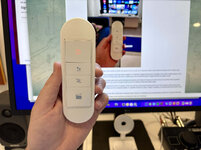
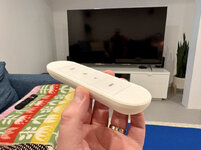
Considering I just hack my way through Fusion, I'm pretty proud of this model. I roughly took inspiration from a Roku remote or Google Chromecast remote, but I made from scratch with a press-fit recess for the Hue Dimmer. It's also held in with magnets, and has a small hole for a paperclip to push the Dimmer out to change batteries.


A few hours later I had a prototype.
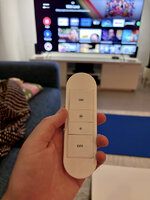
Very happy for a first pass. The remote currently sits about 0.5mm proud, so I'm going to make a few tolerance tweaks, but it's really close.
I've programmed it in Home Assistant so the top button toggles TV on/off (by triggering Harmony Activities), the smaller middle buttons cycle room lighting scenes and the LED Bias light strip colors respectively, and the bottom button triggers the Blu ray player scene.
I plan to print simple label stickers and cover up the existing Hue buttons with Material Design icons (the same icon set that Home Assistant uses). And I will make the Power icon red so it's easy to pick out. So it's obvious what each button does.
Because it's white and is simplified from the TV remote, I think she will feel comfortable knowing this is the "home theater smart home scene remote thingy". And it will finally give her a physical option, in a familiar format, in a way I *hope* is intuitive, to control some of the stuff I have set up.
I'm thinking about doing a version with a small Home Assistant logo in blue for a multicolor print, and possibly an option for a lanyard (like Roku remotes have). Just for fun and it might help identify the orientation. At least right now it's a bit hard to tell top from bottom.
I haven't showed it to her yet, wanted to test first, but I'll report back if it's a "hit" or if it's just another remote to ignore!


 outbuyer.com