To avoid these ads, REGISTER NOW!

Between 265 & 485 SQ/FT Nick's Two-Car Detached Vdub Garage

Workspaces sized between 265 and 485 squarefeet.
OP
N

nicholam77

Well-known member
Joined
Dec 18, 2016
Messages
2,674
Location
Minneapolis, MN
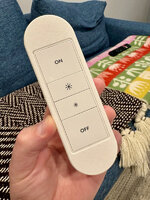
PSA for my smart home people… found this deal on Gen 1 Hue Dimmer Remotes someone posted in the Home Assistant subreddit ($10 a piece (~50% off):


I believe it’s only good through tomorrow, code is HUEJULY if it doesn’t auto-apply.

I picked up 4… they work great with Hue, but also with Home Assistant, Hubitat, or HomeKit can be programmed to control anything.

@Denwood @cccoltsicehockey @loganb

I thought it was a good deal so just in case anyone else here is interested!
 
To avoid these ads, REGISTER NOW!

Denwood

Well-known member
Joined
Sep 22, 2014
Messages
4,194
Location
Thunder Bay, Ontario, Canada
PSA for my smart home people… found this deal on Gen 1 Hue Dimmer Remotes someone posted in the Home Assistant subreddit ($10 a piece (~50% off):


I believe it’s only good through tomorrow, code is HUEJULY if it doesn’t auto-apply.

I picked up 4… they work great with Hue, but also with Home Assistant, Hubitat, or HomeKit can be programmed to control anything.

@Denwood @cccoltsicehockey @loganb

I thought it was a good deal so just in case anyone else here is interested!
I have a few of these Hue switches..they are excellent! I just picked up a few of the IKEA 2 button/4 button remotes to add into the ventilation system. The IkEa buttons have been solid too.
 
OP
N

nicholam77

Well-known member
Joined
Dec 18, 2016
Messages
2,674
Location
Minneapolis, MN
I have a few of these Hue switches..they are excellent! I just picked up a few of the IKEA 2 button/4 button remotes to add into the ventilation system. The IkEa buttons have been solid too.

Nice. I have a few of the IKEA ones, too, on your recommendation, and have been happy with them. I couldn't pass up this price and I had an idea in mind that the Hue form factor works well for.

1st off they actually showed up, so it turns out I didn't get scammed 🤣

IMG-1652.jpg

Ok so here was my idea.

Our basement TV has a receiver and 5.1 speaker setup, and I use my trusty Logitech Harmony hub to set inputs / start "activities".

It works great. But, the Sony remote that came with the TV is faster than the Harmony remote for some reason. I don't like input lag, so I always use the Sony remote. And so does my wife. Normally I trigger the Harmony activity through Home Assistant via a physical button at the top of the basement stairs. Usually my wife remembers to to the same. But in the case she forgets, or goes downstairs first and then decides to watch TV, she'll just use the Sony remote. The TV has HDMI-CEC, but sometimes it doesn't recognize the receiver properly and defaults to the built-in speakers (yuck!). And she'll hit the power button on the Sony remote to turn the TV off, which does not turn off the receiver or end the Harmony activity.

In addition to the switch at the top of the stairs, I have other methods of doing what is needed. Pressing off on the Hue Dimmer in the TV room will turn off all the lights and and turn off the TV + receiver via Harmony properly. Convenient as you're walking out of the room.

And I often use my custom Home Assistant dashboard on my phone, which I'm finally very happy with:

IMG-1633.png

The thing is, my wife will not do any of that stuff. She knows it exists. Doesn't matter, she will grab the Sony TV remote and shut it off the wrong way. Every. Single. Time. She knows is "wrong" and just doesn't care. "Why can't I just turn it off with the TV remote?"

I even have a "cleanup" automation that turns the Harmony Activity back to "off" at midnight, in case it was improperly shut off earlier in the day.

So what she asked for is a button near the TV. A simple ON / OFF. And that's what I was going to do... until I saw this Hue deal.

My idea is to 3d print a case for a Hue Dimmer to use as a "Scene Remote" for the basement. It will encompass TV on/off via Harmony (which also triggers lighting scenes), the ability to cycle through room lighting scenes, the ability to turn the TV Bias LED strip on and cycle through preset colors, as well as set the Harmony scene for the Blu-ray player.

Off to Fusion I go!

Hue-Dimmer-Switch-Remote-v1.png
Hue-Dimmer-Switch-Remote-v2.png
Hue-Dimmer-Switch-Remote-v3.png

Considering I just hack my way through Fusion, I'm pretty proud of this model. I roughly took inspiration from a Roku remote or Google Chromecast remote, but I made from scratch with a press-fit recess for the Hue Dimmer. It's also held in with magnets, and has a small hole for a paperclip to push the Dimmer out to change batteries.

IMG-1639.jpg
IMG-1641.jpg

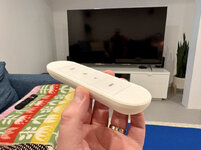
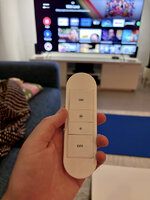
A few hours later I had a prototype.
IMG-1646.jpg

Very happy for a first pass. The remote currently sits about 0.5mm proud, so I'm going to make a few tolerance tweaks, but it's really close.

I've programmed it in Home Assistant so the top button toggles TV on/off (by triggering Harmony Activities), the smaller middle buttons cycle room lighting scenes and the LED Bias light strip colors respectively, and the bottom button triggers the Blu ray player scene.

I plan to print simple label stickers and cover up the existing Hue buttons with Material Design icons (the same icon set that Home Assistant uses). And I will make the Power icon red so it's easy to pick out. So it's obvious what each button does.

Because it's white and is simplified from the TV remote, I think she will feel comfortable knowing this is the "home theater smart home scene remote thingy". And it will finally give her a physical option, in a familiar format, in a way I *hope* is intuitive, to control some of the stuff I have set up.

I'm thinking about doing a version with a small Home Assistant logo in blue for a multicolor print, and possibly an option for a lanyard (like Roku remotes have). Just for fun and it might help identify the orientation. At least right now it's a bit hard to tell top from bottom.

I haven't showed it to her yet, wanted to test first, but I'll report back if it's a "hit" or if it's just another remote to ignore! 🤣

🍻
 

Denwood

Well-known member
Joined
Sep 22, 2014
Messages
4,194
Location
Thunder Bay, Ontario, Canada
That's a lot of work..and a nice result :)

Like you, my theatre is all programmed on a Harmony (Elite) remote, as are the lights (if "manual" control is needed). I do however have the HUE remote on the wall connected to all the HUE GU10s and light strips in the theatre. It does a nice job of manual override, allows dimming, and additionally toggles color temp from about six choices. There are way too many devices in the theatre to not use the Harmony (projector, motorized screen, two amps, subs, blah, blah), but Hubitat seems to handle all the lighting automation stuff just fine. The Harmony remote integration just toggles a virtual switch in Hubitat which then manages all the lighting in the basement, disables motion detection etc. The HUE wall control gets used a lot for toggling lights on/off if needed while a movie is playing etc. Wife/daughter acceptance is high for that device :)

All that said, if/when my Harmony Elite remote setup dies, I'll literally weep as Logitech has abandoned the entire universal remote product line.
 
OP
N

nicholam77

Well-known member
Joined
Dec 18, 2016
Messages
2,674
Location
Minneapolis, MN
That's a lot of work..and a nice result :)

Like you, my theatre is all programmed on a Harmony (Elite) remote, as are the lights (if "manual" control is needed). I do however have the HUE remote on the wall connected to all the HUE GU10s and light strips in the theatre. It does a nice job of manual override, allows dimming, and additionally toggles color temp from about six choices. There are way too many devices in the theatre to not use the Harmony (projector, motorized screen, two amps, subs, blah, blah), but Hubitat seems to handle all the lighting automation stuff just fine. The Harmony remote integration just toggles a virtual switch in Hubitat which then manages all the lighting in the basement, disables motion detection etc. The HUE wall control gets used a lot for toggling lights on/off if needed while a movie is playing etc. Wife/daughter acceptance is high for that device :)

All that said, if/when my Harmony Elite remote setup dies, I'll literally weep as Logitech has abandoned the entire universal remote product line.

Thanks!

Back in the day we used to just use the Harmony remote, too. It's nice, but sometimes I would forget what the "activity" buttons do since the printed icon doesn't always match what you use it for (like there is no Gaming icon, which I used to play Playstation sometimes).

I have the standard remote, not the Elite, so no dedicated lighting control buttons or screen.

harmony-remote.jpg

My current Sony TV is an Android TV and the OS layer sits on a "Home" button, not a true "input", so the native Sony remote makes more sense to control it.

I've done the same as you with virtual switches at one point, but Home Assistant quickly detects what Activity is active, so now I just do all the automation there with the lights based on what the Activity is... hence why I want my wife to actual activate the Activities haha. I also have a Hue Dimmer on the wall that cycles through lighting presets... but if you would believe it... when my wife is on the couch she isn't going to get up to the wall to change the lights. She just gets annoyed. And then there's things like the LED Bias Light Color (I like blue sometimes, but she doesn't like colors and just wants a standard white). No easy way for her to control that (without phone).

So this 2nd Hue Dimmer (in the form of the 3d-printed-psuedo-remote) will hopefully make those manual overrides easier. And honestly for myself, too. My dashboard can do anything I need, but a simple physical remote is nicer. Even I hate taking out the phone to adjust something.

Plus, cycling through scenes with the same button is really neat.

Just a Photoshop mockup, but I will put some icons on, something like this:

IMG-1654.jpg

Or maybe even bolder... I found an image from someone else that had a more graphical look to control some Sonos presets.

hue-sticker-example.jpg

I think that could be nice for ease-of-understanding what it does.

V2 with some small fitment tweaks is on the printer now!
 
OP
N

nicholam77

Well-known member
Joined
Dec 18, 2016
Messages
2,674
Location
Minneapolis, MN
Another Logitec Harmony user/fanboi here. Terrified of the day it fails.

Same. I'm not too worried about it burning out, but reconfiguring new devices in the future might be an issue.


Got V2 off the printer. I'm pretty happy with the print quality and tolerances.

IMG-1665.jpg
IMG-1666.jpg

I showed it to my wife and she was... much less excited about it than me 🤣

But it wasn't met with total rejection, so I'll call that a win. I think once I get the label stickers sorted it will become more intuitive / useful for her. And if not, I'll use it myself to avoid pulling the phone out.

🍻
 

cccoltsicehockey

Well-known member
Joined
Apr 3, 2014
Messages
1,418
Location
Charlotte, NC
My Harmony remote has been working well but I agree there is a bit of a delay still. I actually turn things on these days with my Google Home controlling the Harmony Scene and that seems to be faster that pushing the remote button.

Not surprised the wife wasn't all that excited. Mine would be the same.
 
OP
N

nicholam77

Well-known member
Joined
Dec 18, 2016
Messages
2,674
Location
Minneapolis, MN
My Harmony remote has been working well but I agree there is a bit of a delay still. I actually turn things on these days with my Google Home controlling the Harmony Scene and that seems to be faster that pushing the remote button.

I don't mind it taking awhile to start the activity and turn things on, that seems to be the same for me no matter what triggers it. For some reason navigating the TV menus (especially d-pad directional movement) has an input lag with the Harmony remote that doesn't exist with the native Sony remote. Might just be my TV.

We used to have an Alexa echo dot in the basement to trigger Harmony scenes. And my wife did use that. But I've always found voice control a little awkward, and not the the Jarvis experience it's sold as. I also made a decision when dropping SmartThings that I was going to go local with as many devices as possible, including getting rid of my voice assistants and trying not to support Amazon and Google. It's a tradeoff though, and I see the usefulness of a voice assistant in scenarios like that.

Actually, I just realized I do have a HomePod Mini in the TV room I use for TTS announcements. The mic is currently muted, but I suppose I could set up a Siri shortcut to trigger a Harmony activity. Hmmmmmm 🤔

Not surprised the wife wasn't all that excited. Mine would be the same.

Yeah, and I'm fine with that. I don't expect anyone else in the house to care about smart home stuff. Most of it she actually does appreciate, but most of it is automated or has intuitive physical controls.
 
OP
N

nicholam77

Well-known member
Joined
Dec 18, 2016
Messages
2,674
Location
Minneapolis, MN
Those are all more exciting than the truth!

Insulation or floors?

Good guesses. I don’t think floors are possible. I’d rather wrap that into a full teardown and new build.

I do need to fix the insulation, though!

I'm gonna vote for a ceiling and insulation....then lighting....then more electric....then mini split!!!! if it was floors I think we'd see the floor completely empty....or maybe that step hasn't happened yet...

Holy **** Logan you have way too much confidence in me :ROFLMAO:

Getting ready to move?

Ha! I’m always looking, but for now we’re staying put.

I’ll elaborate more when I have a chance, but here’s a sneak peak that should give it away:

IMG_2350.jpeg
 

kaymccampbell

Well-known member
Joined
Feb 27, 2015
Messages
29,595
Location
Upstate New York
I’ll elaborate more when I have a chance, but here’s a sneak peak that should give it away:

IMG_2350.jpeg
You're going to paint white circles around all the **** on your walls.
 
OP
N

nicholam77

Well-known member
Joined
Dec 18, 2016
Messages
2,674
Location
Minneapolis, MN
I think long time ago you mentioned maybe removing the stripe and repainting...

Bingo, and good memory. And yes it was a long time ago. Time slips away easily these days.

I guess I just want a tangible visual change of pace. I feel like the garage itself has been in stasis for a quite a few years.

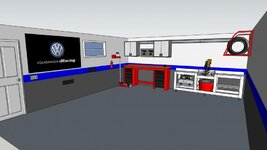
As soon as I started painting, I had a mini panic attack, since the blue stripe has been part of its "identity" almost from the beginning. See below Sketchup from 2017:

67959.jpg

When I started this Garage Journal adventure, I hadn't even began woodworking yet, and I thought it was just going to be a cool car zone / shrine to my GTI.

77382.jpg

Almost 10 yrs later, woodworking took over the space, and I think I'm craving something more subtle and mature.

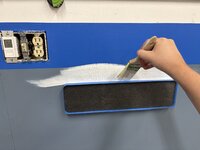
I honestly don't know if it's the right call or if I'll regret it, but the plan is to paint the walls completely white, and then try to tidy up some of the woodworking carts / jigs / storage, and take the opportunity to rearrange some of the wall hung items.

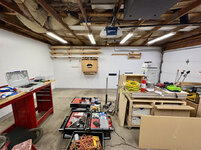
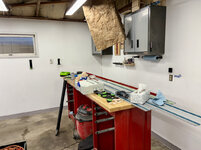
I still need another coat at least, but here's where I'm at so far.

IMG_2360.jpg
IMG_2362.jpg
 
To avoid these ads, REGISTER NOW!
OP
N

nicholam77

Well-known member
Joined
Dec 18, 2016
Messages
2,674
Location
Minneapolis, MN
Plenty of time to trench in more power from the house and get the mini split on order. Once you commit to that you can cover the ceiling with metal ceiling panel (it's pre painted) and be ready to work or play out there all winter!

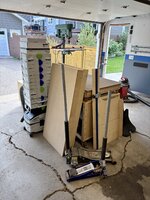
So you're saying I should do something about the insulation that's falling down? 🤣

IMG_2493.jpg

Simply doing the painting has been rough. Moving everything, the primer + two coats. After every paint session my back and leg were killing me.

I'm going to digress here...

My latest effort to help myself a few weeks ago was seeing a new doctor, a "Physiatrist" aka Doctor of Physical Medicine and Rehabilitation. I didn't know that was a specialty — previously I had gone to an orthopedic surgeon a few times for spine evaluation — and that was mostly a waste of time and money other than getting imaging and physical therapy referrals.

At least this new guy listened to me and acknowledged that I've been dealing with this for 4+ years and didn't just dismiss me. Better than the last one. And he reinterpreted a previous MRI I had, and I learned some new info that the ortho doc failed to communicate! The main thing being that I do have mild L5-S1 and L4-5 annular bulging (slightly bulging lumbar discs), and due to that chronic mild bilateral foraminal narrowing (narrowing of the nerve openings on either side of the spine). Both of these things, or together, can cause lower back pain, numbness or tingling in the leg, and muscle weakness... all of which I've experienced at one point or another.

This past year I've had some level of pain or discomfort every single day. Some days it's mild, some days I can hardly sit in a chair. But literally zero days where it's "normal".

Unfortunately it's sitting (at my job), and prolonged physical activity especially with heavy objects or exertion that are the main triggers. Including crouching around the garage floor with a paint roller, sanding my son's bed, or pretty much any other yard work, home improvement, or woodworking type project. Doing a big task I usually end up paying the price for several weeks.

So now it's back to physical therapy for some more targeted guidance, because clearly the exercises and stretching I do regularly aren't enough.

That's all to say I'm not going to be trenching in extra power or installing a mini split anytime soon. Love the ideas though and they are on the list for future. I am going to try to get that insulation back up before it snows.

IMG_2494.jpg

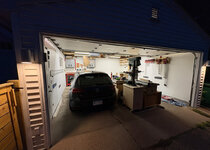
I finished all the coats and was at least able to get my car back in after street parking for 5 nights. Hoping to get the rest of it back in place this evening so I can get my wife's car back in.


Since I wrote too much in this one I'm going to make the next post a catch up of the last month of odds and ends.

🍻
 
OP
N

nicholam77

Well-known member
Joined
Dec 18, 2016
Messages
2,674
Location
Minneapolis, MN
Looks nice! It certainly brightens up the space! I kind of regret my color/stripe choice as well, but I don't have it in me to change it haha.

Thanks! Tbh as soon as I painted I missed the color scheme a bit, but after I've put some stuff back on the walls I've gotten used to it. It was probably more effort than it was worth though, haha.

Especially going back in time on my older phone cameras, the dark gray portion of the wall never exposed well. I think the white backdrop will make for nicer, cleaner forum pics.

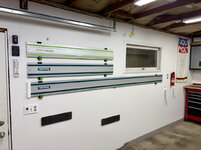
One thing I've done is move my track saw guide rails all to the same location:

IMG-2505.jpg

Previously I had the Big Boy Rail on this wall, and the other two mounted vertically on the other side of the garage. Small thing... but as I'm putting a few things back, trying to go clean slate and rethink a few things.

Plus I think they look cool together :cool:

IMG-2504.jpg

I have been crazy busy still (it never ends!) — and haven't had time to address the insulation or vinyl baseboard that's falling off. Hopefully before winter still.

IMG-2507.jpg

But at least things are mostly cleaned up.

Long term I need to figure out more convenient storage for the Systainers. Either cabinets above the tool bench, a unit under the tool bench, or a shelf on the side wall by the lumber rack / router. I just want them off the work surface of the tool bench because they were in the way and easily accessible. I really need to buckle down and build a solution for that.

Some other small updates to come.

🍻
 
OP
N

nicholam77

Well-known member
Joined
Dec 18, 2016
Messages
2,674
Location
Minneapolis, MN
Random Stuff

So yeah... crazy busy end to the summer. Somewhere in the mix (end of August I think?) we went to Hawaii with the kids. It was amazing, and I wish I was still there 🤣

IMG-1931.jpg
IMG-1770.jpg

Work has been a grind before and after that trip.

I also fit in a few favorite annual events. One being a car show / motorsports open house. (Imola, for my Twin Cities people). There were a few heavy hitters, but the main exotic on display was this 1 of 40 Bugatti Bolide:

IMG-2318.jpg

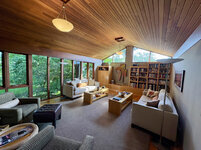
And then the annual Docomomo Modernism Tour. Ten houses this year. I had a wedding to go to the same day so I only went to 6 of them. I won't go nuts with pictures, but it definitely sparked my creative juices.

@Aladinsane07 was chatting clerestory windows in his thread, and most of these houses (built in the 1950s and 1960s) had clerestories and walls of glass abound, creating both views + privacy, drenched in natural light.

IMG-2374.jpg
IMG-2401.jpg

Even the bathrooms get clerestories or skylights — I am always surprised how much light can fill from even small windows:

IMG-2383.jpg

And there were plenty of built-ins, cabinets, closets, doorways, details etc that align with my style and gave me some ideas for possible future projects.

IMG-2405.jpg

I'm not a big gamer, in fact I haven't played for quite some time, but lastly I picked up a used PS5 to play with my younger brother who recently moved from NC to Boston.

My little 3D printed Hue remote is working nicely to set the basement TV and lights without the phone... and my wife is even using it. BUT, I still need to get some buttons printed.

IMG-2559.jpg

The next post will be finishing up my son's bed refinish!

🍻
 

zanyad

ALLIANCE MEMBER
Joined
Apr 26, 2018
Messages
2,817
Location
NE Ohio
this 1 of 40 Bugatti Bolide:

IMG-2318.jpg
:drool:
And then the annual Docomomo Modernism Tour. Ten houses this year. I had a wedding to go to the same day so I only went to 6 of them. I won't go nuts with pictures, but it definitely sparked my creative juices.
Lovely!
Even the bathrooms get clerestories or skylights — I am always surprised how much light can fill from even small windows:

IMG-2383.jpg
I'd love that along the wall instead of the skylight in our master bath!
 

cccoltsicehockey

Well-known member
Joined
Apr 3, 2014
Messages
1,418
Location
Charlotte, NC
The garage is looking good. Did you make those track holders or buy them? I haven't seen those. For systainer storage, could you give up more wall space to the right of the right wall cabinet and build a rack for them to sit in you can pull them out from similar to what @lilscorpion has done with his?

You really make me want to do lighting behind the TVs in the loft of the garage when I do them. You are using hue for that? I have no hue lights so wonder if I can just find maybe some regular zwave controllers.
 
OP
N

nicholam77

Well-known member
Joined
Dec 18, 2016
Messages
2,674
Location
Minneapolis, MN
Nick, have you ever given any thought to filling in the cracks in the concrete?

For some reason, seeing that triggers me.

You and me both, Dan 🤣

There, I've fixed it for you:

IMG_2507_edit.jpg

**yes, it's been considered many times over the years — I always come to the consensus it's too uneven / sinking slab to really be "filled", needs mud jacking or something like that, and I have a long list of things I'd rather spend disposable income on than garage floor cracks. Ideally, someday I would like to either a) move houses, or b) rebuild the garage with new slab and slightly larger footprint. My neighbors did that last year and it's quite nice. Costs a lot in my area, though.

The garage is looking good. Did you make those track holders or buy them? I haven't seen those.

The track holders are from FastCap. They are nice but a little pricey if you need multiple sets and they only have Festool Green. There are lots of 3D printed ones out there, if you find a model you fancy, I'd be happy to print you some.

You really make me want to do lighting behind the TVs in the loft of the garage when I do them. You are using hue for that? I have no hue lights so wonder if I can just find maybe some regular zwave controllers.

The colors are fun. I like to watch movies in a dark room, and a bias light is really great for perceived contrast and helping your eyes relax. Especially white, but again, the colors can be fun.

Mine is a Tp-Link Tapo RGBWW addressable strip. It has one fluke in Home Assistant where it doesn't seem to respond to the first command sometimes... so automations are a little flakey. Not sure why. Color selection and color reproduction are good, white range is good (can do warm or cool whites), and there are a handful of animated effects but I don't use those. I got this to try since it was about 1/2 the price of a Hue strip.

To my knowledge there are not many Zwave LED strip controllers out there. Zigbee is more common. The Tp-Link strip is WiFi. If you want to roll your own, maybe look at WLED. That would let you get a high quality light strip, locally controlled, good Home Assistant compatibility, etc. I just didn't want to learn or maintain another open source project and liked that the TP-link came with the controller and power adapter so no figuring out power specs and all that.

I would always recommend Hue if you want to spend the money. I have the Hue basic RGBWW (non-addressable) strips in my kitchen, and they are excellent and flawless. I know you said you don't have Hue lights at the moment... but they do make good stuff, maybe worth considering.
 
Last edited:
OP
N

nicholam77

Well-known member
Joined
Dec 18, 2016
Messages
2,674
Location
Minneapolis, MN
For systainer storage, could you give up more wall space to the right of the right wall cabinet and build a rack for them to sit in you can pull them out from similar to what @lilscorpion has done with his?

Forgot to respond to this. Yeah, I probably could do that! I hadn't considered having them all in one vertical stack like they are on top of the vac right now. And yeah, something along the lines of what @lilscorpion has done (his thread(s) have always been a huge inspiration!) would be a goal. Some sort of open cabinet for easy access.

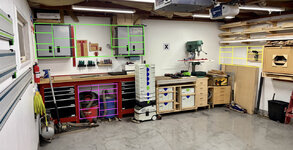
I've mulled around a few possible locations and sizes:

IMG-2507-edit2.jpg

The green one would either be two cabinets (like the existing Gladiator cabinets), each two Systainers wide, with open shelving or tool wall in between. The Woodpecker stuff could move above the MFT by the "X" — I've sort of been planning a French cleat wall or some sort of tool wall above the MFT for a while.

The pink one would just be a cabinet built into the Craftsman bench recess. It's a bit wider than two Systainers, but plenty tall and I could even incorporate some shallow full length drawers at the top for more general tool storage. I would need to find a new spot for the shop vac and dust cyclone, but I want to do that anyways, or get a smaller one.

The yellow option would either be open shelving or an open cabinet to the left of the router table (same depth). It's off axis but kind of an underutilized nook. If I don't do this one, I want to turn that area into more short board lumber storage.

With the pink and yellow options, accessibility would be reduced if the cars are in... but often when doing woodworking stuff I've moved them out, anyways.

I kind of want to reserve the area above the MFT and near the drill press for hand tools, jigs, quick access woodworking related stuff.

But now you have me thinking about keeping them in a single vertical stack, too. I have a lot of trouble committing to a design with things like this. 🤣


Hey Nick— I need a smart switch for my detached garage. Is there a brand you recommend?

Thanks!

Hey!

I can probably give a recommendation, but the smart device space is so fragmented it kind of depends on what you're trying to do with it and what your setup is.

Is this a standalone device (like your first smart device)? Or do you have a hub or ecosystem / platform already? Are you fine using the hardware manufacturer's cloud app (Like TP-Link Kasa for example), or do you need local control? And do you want to control it from a larger platform like HomeKit, Google Home, Alexa, or some sort of 3rd party smart home hub?

Also, what are you trying to automate with it (what is the reason for needing a smart switch in the garage)?

fellow VW fan here - bookmarking for later

(y)

Welcome aboard! I've followed your thread for quite awhile, you've had some amazing cars, I especially like the new 911 and your old RS4.

I'd love that along the wall instead of the skylight in our master bath!

Same!
 
Last edited:

legenddc

Well-known member
Joined
Aug 19, 2012
Messages
1,075
Too many updates to keep straight. First of all, where did you go in Hawaii? We went to Kauai 14 years ago for our honeymoon and I would love to go back!

As always, the house tour looks amazing. I need to convince my wife we should go to the one in our town later this month. I never knew those windows were call clerestory windows. I love the look of them but as a not-good sleeper, having them in a bedroom without a way to shut out the light would be terrible.

I have some white TV bias lights that are dumb. They're powered by a USB port on the back of the TV and come on automatically when the TV comes on. We thought about colors or fancier options but this works and we both enjoy it.

I was going to ask why you still have the shop vac and the Festool dust extractor. I sold off my shop vac right away after I got the Festool. You could mount your tracks on your garage door and free up that wall for your Woodpeckers stuff or other shallow storage.

If you don't move the air compressor frequently, stick it up on top of where the Gladiator cabinets are with a remote to turn it on and a cord reel. I've been using a cheap 3-1 Christmas light remote to trigger my shop and dust collector for a couple of years without any issue. My dad uses one for his pancake compressor.

Finally, how is your back doing? I hope you're feeling better.
 

RickP

Well-known member
Joined
Jan 15, 2013
Messages
1,555
Location
Annapolis, MD
Thanks Nick! It’s for the exterior lights on my detached shop. Would be nice for them to be able to be shut off from the house.
How far is it from your house to the shop?

Nick will know the range of WiFi switches better than me, but if it's hundreds of feet, you might try an Insteon switch (they use both power line and radio). Mine work reliably at 900 feet, and switch on/off instantly.
 

cccoltsicehockey

Well-known member
Joined
Apr 3, 2014
Messages
1,418
Location
Charlotte, NC
You and me both, Dan 🤣

There, I've fixed it for you:

IMG_2507_edit.jpg

**yes, it's been considered many times over the years — I always come to the consensus it's too uneven / sinking slab to really be "filled", needs mud jacking or something like that, and I have a long list of things I'd rather spend disposable income on than garage floor cracks. Ideally, someday I would like to either a) move houses, or b) rebuild the garage with new slab and slightly larger footprint. My neighbors did that last year and it's quite nice. Costs a lot in my area, though.


The track holders are from FastCap. They are nice but a little pricey if you need multiple sets and they only have Festool Green. There are lots of 3D printed ones out there, if you find a model you fancy, I'd be happy to print you some.


The colors are fun. I like to watch movies in a dark room, and a bias light is really great for perceived contrast and helping your eyes relax. Especially white, but again, the colors can be fun.

Mine is a Tp-Link Tapo RGBWW addressable strip. It has one fluke in Home Assistant where it doesn't seem to respond to the first command sometimes... so automations are a little flakey. Not sure why. Color selection and color reproduction are good, white range is good (can do warm or cool whites), and there are a handful of animated effects but I don't use those. I got this to try since it was about 1/2 the price of a Hue strip.

To my knowledge there are not many Zwave LED strip controllers out there. Zigbee is more common. The Tp-Link strip is WiFi. If you want to roll your own, maybe look at WLED. That would let you get a high quality light strip, locally controlled, good Home Assistant compatibility, etc. I just didn't want to learn or maintain another open source project and liked that the TP-link came with the controller and power adapter so no figuring out power specs and all that.

I would always recommend Hue if you want to spend the money. I have the Hue basic RGBWW (non-addressable) strips in my kitchen, and they are excellent and flawless. I know you said you don't have Hue lights at the moment... but they do make good stuff, maybe worth considering.
I might take you up on that once I get to implementing the shop layout.

RGB I can see as being fun but leaning towards warm white for most things. Looking for things to generate little bits of light in the room without actually having all that many lights. Considering warm white LED on the cabinet toe kicks and behind the TVs. Already going to do the stairs.

It looks like Zooz used to make a Zwave controller but it has been out of stock for a good while. Wi-Fi and Zigabee seem to be my only options. I might looks into the Hue finally as well but I hate having another hub.
 
OP
N

nicholam77

Well-known member
Joined
Dec 18, 2016
Messages
2,674
Location
Minneapolis, MN
Too many updates to keep straight. First of all, where did you go in Hawaii? We went to Kauai 14 years ago for our honeymoon and I would love to go back!

We were on the Big Island and stayed just outside of Kona. I have never been to Kauai, although my wife has, but I would love to go. I am a big Hawaii fan, mostly because my parents are. They even considered moving to Maui when I was in middle school. I’ve been to Maui 5-6 times, Oahu a few times, day trip to Lanai, and technically this was my 2nd time to the Big Island but the first was as a pretty young kid so don’t really remember it.

I would highly recommend the Big Island. Not overcrowded or touristy. Very volcanic but there are a few white sand beaches. Not as many as some of the other islands, but the rougher lava rock terrain is very cool. Kilauea (the active volcano) has been erupting like every two weeks for a year. We went to Volcanos National Park, but just missed it. It erupted the night we flew in and then again 2 days after we got home. :mad: And it’s erupted 2 more times since then, the most recent being Wednesday this last week:


My son is a volcano fanatic so I’m bummed we missed a life-changing experience for him, but the national park was beautiful all the same.

Some decent snorkeling. Was lucky enough to see an eel and some sea turtles.

As always, the house tour looks amazing. I need to convince my wife we should go to the one in our town later this month. I never knew those windows were call clerestory windows. I love the look of them but as a not-good sleeper, having them in a bedroom without a way to shut out the light would be terrible.

Yeah if you can find a tour, it’s worth it! I always tell people it’s so different being physically in a space than looking at photos online.

I have some white TV bias lights that are dumb. They're powered by a USB port on the back of the TV and come on automatically when the TV comes on. We thought about colors or fancier options but this works and we both enjoy it.

That’s a good way to do it!

I was going to ask why you still have the shop vac and the Festool dust extractor. I sold off my shop vac right away after I got the Festool. You could mount your tracks on your garage door and free up that wall for your Woodpeckers stuff or other shallow storage.

Good question. I use the shop vac for cleaning the garage floor a general cleanup or dirty tasks, and with the dust separator on the table saw. I use the Festool vac for small power tools like track saw and sanders and biscuit joiner and router. I could trash the shop vac but I think I’d want to get a cyclone separator for the Festool. That blue rocker one is cracked and not working well.

If you don't move the air compressor frequently, stick it up on top of where the Gladiator cabinets are with a remote to turn it on and a cord reel. I've been using a cheap 3-1 Christmas light remote to trigger my shop and dust collector for a couple of years without any issue. My dad uses one for his pancake compressor.

That is a good idea and has been on my punch list for forever.

Finally, how is your back doing? I hope you're feeling better.

Thank you, but same old thing unfortunately. I just started PT again. Have sciatic pain in my leg as I write this. It’s up and down though.

Thanks Nick! It’s for the exterior lights on my detached shop. Would be nice for them to be able to be shut off from the house. Happy using just an app. Think I will try the Kasa!

Ah, gotcha. Kasa would be good if your WiFi reaches like @RickP pointed out. I had no idea Insteon still existed or communicated through power lines, but that’s an interesting option although a bit on the expensive side, but looks like it can be linked to a remote, too.

Personally I have a dumb solar timetable switch from Honeywell for my exterior garage lights. I can’t control it from inside the house, but it turns them off on a schedule based on sunset and sunrise times (with an offset). If you just need a simple schedule, something like that might be a good option and not require internet.

I might take you up on that once I get to implementing the shop layout.

RGB I can see as being fun but leaning towards warm white for most things. Looking for things to generate little bits of light in the room without actually having all that many lights. Considering warm white LED on the cabinet toe kicks and behind the TVs. Already going to do the stairs.

It looks like Zooz used to make a Zwave controller but it has been out of stock for a good while. Wi-Fi and Zigabee seem to be my only options. I might looks into the Hue finally as well but I hate having another hub.

You should be able to connect Hue devices directly to Home Assistant via ZHA or Z2M. I can’t remember if you have a Zigbee coordinator set up with Home Assistant yet, but that would be like $30 and then you could pair directly since Hue uses Zigbee. I use the Bridge integration since I already had a Bridge and quite a few lights before setting up Home Assitant.

Otherwise maybe look at WLED! You can get pre flashed controllers and pick your own LED strip and power supply.

Or if you really don’t need scenes or colors or anything… maybe a USB powered dumb strip is the way to go.
 
OP
N

nicholam77

Well-known member
Joined
Dec 18, 2016
Messages
2,674
Location
Minneapolis, MN
Finishing The Bed

I know my posts are scattered all over the place, because I tend to get sidetracked with stuff, but going back a page I had started refinishing a bed for my son.

Quick refresher — several years ago I'd been given two twin beds from my parents, that used to belong to my brother and I growing up, that they'd saved all these years. They are handmade and hardwood (Douglas Fir I believe), but were worse for wear and needing some attention. A few years ago I refinished one for my daughter. And the other has been in storage in my attic.

Now my son is 4, and ready for a big boy bed. Up until now he's been using this little plywood one I made a long time ago:

IMG_2547.jpg


In a nutshell it's been a slow process refinishing the 2nd twin bed. Lot's of sanding.

IMG_2333.jpg

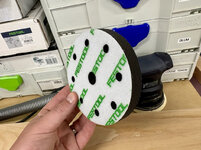
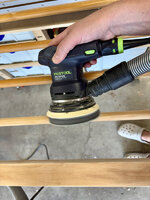
I mostly used my orbital finishing sander for this, starting with 80 grit and working through 220. The ETS 125 is meant to be a finishing sander, so it doesn't remove material that quickly, but it leaves a nice finish in the end and does the job.

I even got a soft foam interface pad for the spindles, but quickly realized it didn't conform or wrap around as well as I would have liked. I think the soft foam would work better for concave surfaces.

IMG_1632.jpg
IMG_1685.jpg

Not only was the old finish orange-y and ambered, but it was cracking and flaking and dirty. Below is a good example of before and after.

IMG_2334.jpg

And another before vs. after:

IMG_2330.jpg
IMG_2329.jpg

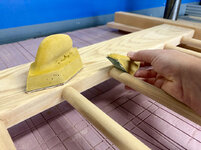
Some fiddly hand sanding to get the spots the orbital sander couldn't reach.

IMG_2336.jpg

Then I brought everything inside for a new coat of finish.

Thanks for the suggestions on the hard wax oil, but in the end I stuck with my go-to General Finishes, because I already had some on hand and even though they will be in separate rooms I was worried my OCD wouldn't allow me to have two separate finishes on what is ultimately a set of furniture.

IMG_2339.jpg
IMG_2353.jpg

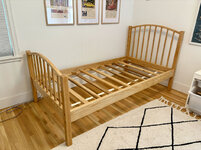
All assembled in his room:

IMG_2551.jpg

And I reapplied the sticker with the furniture company name (Tubbs) and the signature of the person who made it, because I think that's pretty neat.

IMG_2549.jpg
IMG_2556.jpg

It was a good amount of work, but I'm pleased with the way it turned out and hopefully these will last another 50+ years. And most importantly my son was excited about his 'new' bed.

🍻
 

Aladinsane07

Well-known member
Joined
Aug 13, 2020
Messages
70
Location
MN
I also fit in a few favorite annual events. One being a car show / motorsports open house. (Imola, for my Twin Cities people).

And then the annual Docomomo Modernism Tour. Ten houses this year. I had a wedding to go to the same day so I only went to 6 of them. I won't go nuts with pictures, but it definitely sparked my creative juices.
Man this thread moves fast! And apparently I'm missing lots of cool events around the cities. Great pictures.
 

jake28

Well-known member
Joined
Aug 28, 2018
Messages
490
Location
SF, CA
Nice work @nicholam77
One unsolicited wood finishing detail tip: avoid doing edges and corners with a power sander of any sort. It’s virtually impossible to get a consistent bevel or edge. You wind up with edges that roll and buck. Once you see it you can’t unsee it.

A nice alternative is a basic sanding block held at a 45. Much easier to control and hold at a consistent angle that you can carry across all edges (ex. The top of your bed posts)

Or a block plane.
 
To avoid these ads, REGISTER NOW!
Top Bottom