To avoid these ads, REGISTER NOW!

Show us your VFD conversions/installations

fiftyv8

Well-known member
Joined
Dec 29, 2018
Messages
237
Location
Perth
I am using a remote 10k Potentiometer.
The speed has been programmed into the VFD manually but as previously mentioned for some reason the commands are not being respected or interpreted properly by the VFD.
I fear there is amongst all the F code programs installed an incorrect value or a class of commands that don't like it other, but I just can not be sure being a layman when it comes to this VFD stuff.

Attached is a copy of the manual I hope it will attach due to its size.
My VFD is a Folinn BD600.

Can not attached as anticipated so the link I found is;

http://cononmotor.com.au/wp-content/uploads/2017/09/BD600-Manual.pdf

Any thoughts or comments would be appreciated...

Woops, it seems that because I am new to your Forum for now at least I am unable to attach a link.

So add to the above link the https:// and here is hoping we beat the system
 
Last edited by a moderator:
To avoid these ads, REGISTER NOW!

r_olson_06

Well-known member
Joined
Feb 12, 2012
Messages
4,070
Location
SD
I am using a remote 10k Potentiometer.
The speed has been programmed into the VFD manually but as previously mentioned for some reason the commands are not being respected or interpreted properly by the VFD.
I fear there is amongst all the F code programs installed an incorrect value or a class of commands that don't like it other, but I just can not be sure being a layman when it comes to this VFD stuff.

Attached is a copy of the manual I hope it will attach due to its size.
My VFD is a Folinn BD600.

Can not attached as anticipated so the link I found is;

cononmotor.com.au/wp-content/uploads/2017/09/BD600-Manual.pdf

Any thoughts or comments would be appreciated...

Woops, it seems that because I am new to your Forum for now at least I am unable to attach a link.

So add to the above link the https:// and here is hoping we beat the system
I would double check that F00.22 is set 2 that would reference the AI1 to the frequency reference.

Looking for the following Plomb Pebbles Wrenches 3061, 3070,
 

laser3kw

Well-known member
Joined
Nov 17, 2012
Messages
7,276
Location
northen IL
I am using a remote 10k Potentiometer.
The speed has been programmed into the VFD manually but as previously mentioned for some reason the commands are not being respected or interpreted properly by the VFD.
I fear there is amongst all the F code programs installed an incorrect value or a class of commands that don't like it other, but I just can not be sure being a layman when it comes to this VFD stuff.

Attached is a copy of the manual I hope it will attach due to its size.
My VFD is a Folinn BD600.

Can not attached as anticipated so the link I found is;

cononmotor.com.au/wp-content/uploads/2017/09/BD600-Manual.pdf

Any thoughts or comments would be appreciated...

Woops, it seems that because I am new to your Forum for now at least I am unable to attach a link.

So add to the above link the https:// and here is hoping we beat the system
I found the manual from your link
check parameters:
with F00.01 = 1 ( set vfd to terminal control instead of keypad)

F00.03 (suggest 130hz)
F00.04 (suggest 120hz)
F00.05 (suggest 20hz)

Edit**
I re-read your post #597
If I understand it, your vfd worked ok then you hooked up and debugged the switches and now it isn't working as you would like?
can you post up a wiring diagram of how you have the switches wired?

I see your pot should be wired:
with F00.06 = 2 ( sets main freq via AI1 pot)
10v (VFD) >>term 3 of pot
AI1 >> term 2 of pot
ACM >> term 1 of pot

A simple f/r switch setup would be:
F05.13 = "0"
S1= forward run = F05.00= "1"
S2= reverse run = F05.01= "2"
do you need "jogging"?

(PS - fixed typo on S1 & S2)
 
Last edited:

fiftyv8

Well-known member
Joined
Dec 29, 2018
Messages
237
Location
Perth
Thanks for your constructive check suggestions, I will get right onto confirming the correct codes are installed.
Different time zones will always put us slightly out of sync.

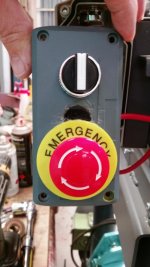
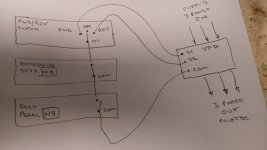
Here is a pic of my very basic circuit.
The S connect points I have used are S1 & S6
I accept that it fails the E stop circuitry of higher standards but is offered more as high viz switch easily seen in the case of something going wrong.

No, I do not require JOG at all and have never sought to install it.

Thanks,

Russ.
 

Attachments

  • IMAG1049.jpg
    IMAG1049.jpg
    112.2 KB · Views: 639

laser3kw

Well-known member
Joined
Nov 17, 2012
Messages
7,276
Location
northen IL
The S connect points I have used are S1 & S6
your wiring diagram shows "S1" & "S2"
I saw where in the manual they default S6 to reverse, that doesn't necessarily apply to you.
If your are wired S1 & S2, see above parameters. I think that will work. The manual kind of jumps around.

PS - double check - I had a typo - I missed the "5" (high lighted below)
F05.13 = "0"
S1= forward run = F05.00= "1"
S2= reverse run = F05.01= "2
 
Last edited:

fiftyv8

Well-known member
Joined
Dec 29, 2018
Messages
237
Location
Perth
Yes wire diagram was devised prior to making final connections and S1 & S2 were just nominal or token descriptives at the time.

I got a family commitment for the next couple of hours and once I get back I will run thru and check all the offered suggested codes.
 

laser3kw

Well-known member
Joined
Nov 17, 2012
Messages
7,276
Location
northen IL
Yes wire diagram was devised prior to making final connections and S1 & S2 were just nominal or token descriptives at the time.

I got a family commitment for the next couple of hours and once I get back I will run thru and check all the offered suggested codes.
Duly noted.
It will still work to use the actual S1 & S2 terminal and program as stated.
If you do use S6 for reverse, then make sure S6= reverse run= F05.05= "2"
and leave F05.01= (default) "4" (jog forward) ( not used if not wired)
PS - I may be signed off in a hour or so. I may not be back until late tomorrow.
 
Last edited:

MattT

Well-known member
Joined
Feb 20, 2010
Messages
3,201
I am using a remote 10k Potentiometer.
The speed has been programmed into the VFD manually but as previously mentioned for some reason the commands are not being respected or interpreted properly by the VFD.

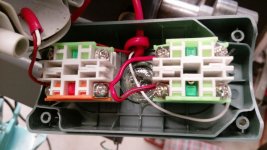
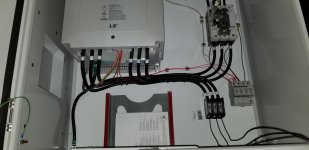
Some pics of the finished wiring might shed some light on what's going on. The ones you posted earlier only show temporary power wiring.
 

fiftyv8

Well-known member
Joined
Dec 29, 2018
Messages
237
Location
Perth
I don't have it in front of me as I left the manual I have in my shop outside.
The Pot has been wired according to the manual suggested diagram.
The speed will increase and decrease with remote pot being adjusted.
The only problem seems that the limit commands installed are not being totally respected.
I think it best that I go do the homework you guys have set for me before I comment any further because for me the last thing I want to be doing is causing any additional confusing as right now we are all in sync with suggestions and responses.

Please note that I really appreciate what you guys are doing for me to help out.
I have just found myself in a corner with this VFD and I can vaguely see the light at the end of the tunnel but just not quite there yet.

I'll be back soon, Russ.

PS: regarding wiring of my unit what you see in the pic's is about all I expect to be doing. I know it is not pretty and I am no artisan but it does work and is safe and earthed and well insulted.
If I had my time again knowing more about where I was headed with this project, I would have built in a couple of better and hidden pathways for the cabling.
 

MattT

Well-known member
Joined
Feb 20, 2010
Messages
3,201
PS: regarding wiring of my unit what you see in the pic's is about all I expect to be doing. I know it is not pretty and I am no artisan but it does work and is safe and earthed and well insulted.
If I had my time again knowing more about where I was headed with this project, I would have built in a couple of better and hidden pathways for the cabling.

The control wiring doesn't look to be connected to the VFD on the pics you posted. And depending on how it's ran it could be the cause of the erratic operation.
 

fiftyv8

Well-known member
Joined
Dec 29, 2018
Messages
237
Location
Perth
MattT & laser3kw, I have checked and confirmed all your suggested F code checks and they are all AOK.

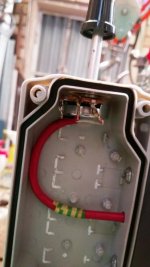
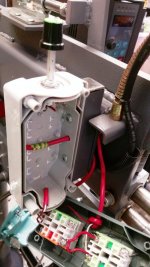
Rather than spieling more words I have attached some additional pic's to help you confirm and visualise my wiring.
 

Attachments

  • IMAG1142.jpg
    IMAG1142.jpg
    94.9 KB · Views: 64
  • IMAG1143.jpg
    IMAG1143.jpg
    62.7 KB · Views: 59
  • IMAG1144.jpg
    IMAG1144.jpg
    87.3 KB · Views: 60
  • IMAG1145.jpg
    IMAG1145.jpg
    55.9 KB · Views: 58
  • IMAG1146.jpg
    IMAG1146.jpg
    78.5 KB · Views: 56
  • IMAG1147.jpg
    IMAG1147.jpg
    52.2 KB · Views: 58

laser3kw

Well-known member
Joined
Nov 17, 2012
Messages
7,276
Location
northen IL
The speed will increase and decrease with remote pot being adjusted.
The only problem seems that the limit commands installed are not being totally respected.
I got a minute to look at this.
If I am reading this right:
start / stop works
forward / reverse works
pot function works - motor speed increases and decreases as pot is varied
If that is true, the wiring is probably ok. Picture of terminal strip looks like connections are good with the manual.
I am not sure what you mean (exactly) when you say "the limit commands installed are not being totally respected"
I am guessing you want to see that at "0" pot the motor is at 20 hz and at "full" pot the speed is at 120hz?
If that is true then we have to explore the parameters a bit more.
If you get the chance try the parameter suggestions mentioned above. And, as always, document your changes as you go. If you get lost, go back to where you are now and start over. Trust me, I have done that many times. On slip up and you chase your tail for hours.
PS - I may be signed off in a hour or so. I may not be back until late tomorrow.
happy new year to all!
 
Last edited:

fiftyv8

Well-known member
Joined
Dec 29, 2018
Messages
237
Location
Perth
Thanks laser3kw, yes, only issue now is that with the same original speed limits that were originally set and worked, now for some reason my Pot will not shut down at lower limit of 20hz as it used to and when increased the speed will increase upto 90hz without issue, but once over 90hz I can not achieve any further increase as it goes into a bind inching kind of procedure, which I am not familiar with at all and once 120hz is dialled it basically just stops as if it has locked.
I don't hold it there to see what might happen for fear of doing damage.

I have been thru so many F checks and every one has come up good.
I am just wondering if some where there are two F codes installed that are not compatible with each other!!!

Happy new year, Russ.
 

laser3kw

Well-known member
Joined
Nov 17, 2012
Messages
7,276
Location
northen IL
now for some reason my Pot will not shut down at lower limit of 20hz as it used to and when increased the speed will increase upto 90hz without issue, but once over 90hz I can not achieve any further increase as it goes into a bind inching kind of procedure, s.
sounds like you are stalling the motor - not enough power. I had a 30hp 460v 3ph motor exhibit this when the mechanics was bound up. Just "shuddered" and groaned.
Try disconcerting the motor from the driven mechanics and see if the motor will go to 120hz with no load.
most the time, once you past 60 hz, you lose torque. the motor will only make "X" horsepower and 60 hz is usually max torque. After that, as rpm goes up, torque drops .
There are some parameter changes to help, I can look further tomorrow. Look for something like "torque boost" "stall prevention" or such.
But, be warned, you may never get good results past 90 hz unless your motor is way over sized .
 
Last edited:

jeff g

Well-known member
Joined
Jul 16, 2011
Messages
191
Location
Manchester UK
Hi
To me it looks like the wiring is to S1 & DCM not S1 & S2 ???
jeff

Had a look at the pdf manual, so DCM is com, so you are using S1 & S6, just so you know.
Are you getting S2 & S6 right in your head, just thinking out loud ???

jeff
 
Last edited:

fiftyv8

Well-known member
Joined
Dec 29, 2018
Messages
237
Location
Perth
Hi Jeff, yes it seems that wiring wise it is fine and F codes programmed correspondingly.

S1 & S2 on my circuit diagram, were just nominal numbers and it worked out better at the time of connecting to use S1 & S6 as they were default setting for what was required.

It would appear that something has changed between getting the unit running with just speed controls (which worked perfectly well in all regards) and then adding on remote switches the speed control limits are not working as they used to.
 

MattT

Well-known member
Joined
Feb 20, 2010
Messages
3,201
MattT & laser3kw, I have checked and confirmed all your suggested F code checks and they are all AOK.

Rather than spieling more words I have attached some additional pic's to help you confirm and visualise my wiring.

The control cables aren't shielded so interference is a possible cause of the erratic operation north of 90 Hz. Have you ran the control cables next to the power cables leaving the VFD?
 

fiftyv8

Well-known member
Joined
Dec 29, 2018
Messages
237
Location
Perth
No MattT, the low voltage cables leave the VFD and almost immediately pass thru a drilled hole in the large plate and run thru a tunnel between the large plate and the rib welded to it.

However, there is a single phase cable running thru this tunnel for the light, which presently is live upto the switch right near to the globe, I should check that by turning the power OFF at the rear of the machine and check that scenario in the morning to see if it has any impact.

If you look at the attached pic, you will see at to the right of the Stop button a rectangular tunnel where the lamp cable comes out from, well this is the same tunnel the low voltage cables are running in.

The other thing that I wanted to raise, is the fact that upon rechecking installed F codes, I note that where the motor parameters are installed I have 2 questions;
1. since my motor is 0.37kw, what value should I enter since the parameter only accepts one decimal point?
2. when it comes to asking for the amps value I have installed 1.05 amps from memory but each time I recheck this code it shows 2.50 amps, which seems kind of weird to me.
 

Attachments

  • BeadRollerProject (77).jpg
    BeadRollerProject (77).jpg
    67.2 KB · Views: 56
Last edited:

laser3kw

Well-known member
Joined
Nov 17, 2012
Messages
7,276
Location
northen IL
couple of questions for fiftyv8
could you post the full model number of the vfd? BD600-xxxx-x - there may be some parameters specific to different models
the specs of the motor as listed on the data plate?
VFD power input - Single phase in or three phase - the diagram posted shows three wires into the vfd? - you mention single phase cable in other post
Also - you say the controls worked as you wished when just operation off keypad, but after implementing control functions via "S" terminals, you lost some control?

attachment.php
 
Last edited:

fiftyv8

Well-known member
Joined
Dec 29, 2018
Messages
237
Location
Perth
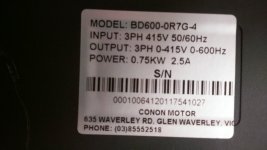
laser3kw, I can offer you the following details mostly in pic's.
Yes, speed upper and lower limits worked fine prior to switching from panel pad controls to terminal controls.

My VFD has 3 phase power coming in and 3 phase going out to the motor.
It appears after isolating the single line to the light, it has made no difference to speed issues above.

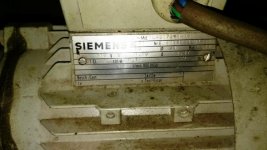
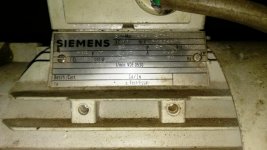
Please see VFD data plate and 2 views of my motor plate.
It reads 1365rpm, 0.37kw 1.05 amps 3 phase 415 volt and 50hz.

If you need any more info just hola.
 

Attachments

  • BeadRollerProject (98).jpg
    BeadRollerProject (98).jpg
    121.9 KB · Views: 39
  • BeadRollerMotor (9).jpg
    BeadRollerMotor (9).jpg
    61.1 KB · Views: 40
  • BeadRollerMotor (10).jpg
    BeadRollerMotor (10).jpg
    62.5 KB · Views: 40
Last edited:
To avoid these ads, REGISTER NOW!

laser3kw

Well-known member
Joined
Nov 17, 2012
Messages
7,276
Location
northen IL
haven't forgotten you. new year - back to work!
have you considered reset to factory then program motor parameters and then a auto tune?
have you uncoupled the motor from the drive and tried the max rpm?
just thinking out loud(?).
 

whateg01

Well-known member
Joined
Mar 13, 2006
Messages
11,183
Location
doo dah, kansas, usa
I'm not familiar with the VFD in question, but I know the cheap one I had used on my lathe for awhile did not behave as expected. I do think it worked as the makers intended, but there were certain things that did not work the same from the front panel as they did remotely, and there was nothing that could be done to change it. As an example, the acceleration limits only applied to front panel operation, not remote via 10k pot. It might be that the same is true here.

Dave
 

laser3kw

Well-known member
Joined
Nov 17, 2012
Messages
7,276
Location
northen IL
I'm not familiar with the VFD in question, but I know the cheap one I had used on my lathe for awhile did not behave as expected. I do think it worked as the makers intended, but there were certain things that did not work the same from the front panel as they did remotely, and there was nothing that could be done to change it. As an example, the acceleration limits only applied to front panel operation, not remote via 10k pot. It might be that the same is true here.

Dave
Thanks for the feed back. That's good info. At least you can make a judgement of when to say "done"
 

fiftyv8

Well-known member
Joined
Dec 29, 2018
Messages
237
Location
Perth
Folks, I decided out of frustration to re-email the manufacturer with more pertinent questions regarding my unit.

They were quite unhelpful several months back and that is why I posted on this forum.
I was referred here by one of your members who was reading my build thread on another metal forum that I also belong to.

Interestingly enough, the manufacturer to this point has shown a little more interest and has even asked me to confirm certain setting in my F codes.

I am taking this as a positive for now and suggested that something was wrong if I needed to resort to seeking help on forums when they were best placed to provide assistance in the first instance.

After my initial contact yesterday, they had replied within several hours and had asked for pic's of my machine and of the remote switches etc.
I sent pic's which seemed to please them and then over night they asked for the following;

Thanks very much for the photos. Please give me the below parameters: F8.14, F00.05, set frequency, operation frequency, current. If is it possible to send me a video that show the speed can't reach upper limit. Thanks.

I am not sure exactly how I will do the video stuff yet, I'll need to speak with my 13yo grandson about that as he is the expert in the family.
He is the one who helped me produce and load my Cadflat Movies onto YouTube.

I'll keep you guys posted as to any out comes from their advice.
 

930dreamer

Super Moderator
Staff member
Joined
Oct 7, 2009
Messages
22,927
Location
Amarillo,TX and Stinnett,TX
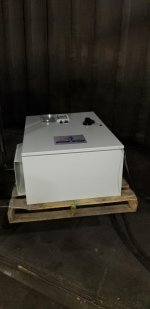
I'm building a bunch of these at work this week, I think this one is 75 hp for an irrigation well. Testing after build.
 

Attachments

  • 20190103_143050.jpg
    20190103_143050.jpg
    80.6 KB · Views: 78
  • 20190103_143056.jpg
    20190103_143056.jpg
    105.4 KB · Views: 78
  • 20190103_135000.jpg
    20190103_135000.jpg
    37.2 KB · Views: 68
  • 20190103_135010.jpg
    20190103_135010.jpg
    112.3 KB · Views: 78

laser3kw

Well-known member
Joined
Nov 17, 2012
Messages
7,276
Location
northen IL
Folks, I decided out of frustration to re-email the manufacturer with more pertinent questions regarding my unit.

They were quite unhelpful several months back and that is why I posted on this forum.
I was referred here by one of your members who was reading my build thread on another metal forum that I also belong to.

.................

After my initial contact yesterday, they had replied within several hours and had asked for pic's of my machine and of the remote switches etc.
I sent pic's which seemed to please them and then over night they asked for the following;

Thanks very much for the photos. Please give me the below parameters: F8.14, F00.05, set frequency, operation frequency, current. If is it possible to send me a video that show the speed can't reach upper limit. Thanks.

............

I'll keep you guys posted as to any out comes from their advice.
glad they are responding. Interesting parameters they are asking about. From what I have seen, it should work. But, I do see a lot of cross connected parameters. I wish I had it in front of me so I could try some changes.
Keep us posted!:thumbup:
 

fiftyv8

Well-known member
Joined
Dec 29, 2018
Messages
237
Location
Perth
If things don't improve, I my gift it to you!!! hahaha...
Previously when I contacted them, I was treated a bit like a leper and they took ages to even reply with text book quotes and that was about it.

I was disappointed with the local agent who if not able to answer questions, could have possibly hooked me up with somebody in the factory to deal with.
 

fiftyv8

Well-known member
Joined
Dec 29, 2018
Messages
237
Location
Perth
First feedback.
I was instructed to ensure both F00.21 and F00.22 codes are in factory default setting.
Then run motor and report result.
No change occurred.
 

laser3kw

Well-known member
Joined
Nov 17, 2012
Messages
7,276
Location
northen IL
have you entered the motor data (as shown on motor data tag) F02.00~ F02.05
and tried a self tune F02.37? If you are unsure how to enter a number with decimal places, round up is best = example .37 round up to .4.
F02.37 will calculate the needed info for F02.06 ~ F02.10
if you can uncouple the motor from the drive-train, set F02.37 to "1" and hit run on key pad. the drive will run the motor through some test and will actually rotate the motor.
If you can not uncouple the motor (easily) the set F02.37 to "2" and hit run on the key pad. That will run some test on the motor without rotating the motor.
either will tune the vf drive for your motor for best performance.
 
Last edited:

fiftyv8

Well-known member
Joined
Dec 29, 2018
Messages
237
Location
Perth
Yes laser3kw, I have all info entered, but have not tried F02.37.
I will give that a try and report back.

We have struck a big problem with the manufacturer.
They asked for a video, but are unable to use many media sources to view it and/or are unable to open what I have sent them.

They are a very restricted society when it comes to media and this is appearing as a problem to us right now.

So no Whats App, YouTube or Facebook and a simple email for now is not getting thru once it has such an attachment.

Scary, we just don't appreciate what freedom and liberty we have...
 

fiftyv8

Well-known member
Joined
Dec 29, 2018
Messages
237
Location
Perth
laser3kw, I tried changing the code F02.37 from the default to learn my motor functions, but the VFD wont let me change the default value.

I am led to believe that my speed limit issues are unrelated and the lower speed issue that should be cutting the motor out at 20hz is being overridden by the fact that I have a foot pedal which will determine when the motor stops and not the lower limit setting.

Not what I expected but I guess I could live with that, but I must be some what mindful not to adjust any dialled speed to low and I should respect my personal 20hz recommended minimum limit to ensure motor longevity.

I also don't see that I should ever have a need to be doing work at such a slow speed any way...

More later.
 
Last edited:

whateg01

Well-known member
Joined
Mar 13, 2006
Messages
11,183
Location
doo dah, kansas, usa
...but I must be some what mindful not to adjust any dialled speed to low and I should respect my personal 20hz recommended minimum limit to ensure motor longevity.
...

There are analog ways around that limitation in the VFD. That is what I ended up at just prior to buying a Fuji Electric VFD for the lathe and moving the cheapo to a use where it is controlled via the front panel.

Dave
 

MattT

Well-known member
Joined
Feb 20, 2010
Messages
3,201
I am led to believe that my speed limit issues are unrelated and the lower speed issue that should be cutting the motor out at 20hz is being overridden by the fact that I have foot pedal which will determine when the motor stops and not the lower limit setting.

Not what I expected but I guess I could live with that, but I must be some what mindful not to adjust any dialled speed to low and I should respect my personal 20hz recommended minimum limit to ensure motor longevity.

Is it running below 20 Hz or just ramping down below 20 Hz when you let off the foot switch?

Either way it's not really anything to worry about. Constant running under load at low speed can cause overheating but intermittent isn't going to hurt anything.

The erratic operation at high speed is the big concern. Something is definitely wrong there. One thing you could try is changing the speed and run references back to keypad and see how it runs then. If that's OK it'll rule out motor parameters. Then switch back to the wired speed and run one at a time to see when the problem starts back up.

Another thing if you've got the videos on youtube post links in this thread.
 

fiftyv8

Well-known member
Joined
Dec 29, 2018
Messages
237
Location
Perth
Well folks, I am pleased to advise you all, that from my perspective the machine is now running according to my expectations.

I know that I condemned the manufacturer very early in this thread and this is a perfect example of how one employee can discredit a whole organisation or product just thru lack of customer response/service.

There are still issues trying to deal with China based companies, however in this case after my last attempt to seek technical support, I have been rewarded/lucky by striking an employee (young lady) who has been more than willing (even with a low degree of tech knowledge) to ensure my issues were addressed and that she could obtain a response from experts to pass back down the line to me for program checking, similar to what we have been doing here on the forum.

Between all the checking and re-checking and adjusting of parameter settings, the machine has decided it will work at the upper speed limit and not bind any more.
To me this is great news and a great result.
Maybe starting to sound like Donald Trump with my over use of the word GREAT.

How it was achieved is another story and the simple answer is we are not quite sure, but it does seem to revolve around one issue that I had raised during checking which related to the motor parameter settings which I had re-visited several times.

Initially, I was having trouble with the machine holding in the amps value (1.05 amps) I would enter it and then discover later that it had changed to a value of 2.50 amps.

This was frustrating to say the least.
Between re-checking and following what both laser3kw and the manufacturer was saying, when it was noted that code F02.37 would not respond and then code F 02.01 was adjusted from setting 0.3hp to 0.4hp as the true value was 0.37hp and then a revisit to code F02.05 which continued to show 2.50 amps, but was again reset to 1.05 amps and the machine was ran correctly.

The result this time was NO binding.
After returning to code F02.05 to see if the amp value of 1.05 amps had held, which it did, then it was determined that this amp setting had been the problem all along, yet it was obvious that F02.05 may have been the prompt for this problem to occur.

I'm just a layman and it is all rocket science to me, but I am very thankful to everybody who has taken an interest in my problem and I hope that by documenting each step and feedback that it may assist somebody else in the future who is suffering the VFD blues...

Great work folks and thankyou once more.
I am very happy!!!!!!!!!!!!!!!!!!!!!
 

whateg01

Well-known member
Joined
Mar 13, 2006
Messages
11,183
Location
doo dah, kansas, usa
Well folks, I am pleased to advise you all, that from my perspective the machine is now running according to my expectations.
...
Great work folks and thankyou once more.
I am very happy!!!!!!!!!!!!!!!!!!!!!

Were they able to figure out the low Hz limit when controlled remotely?

Dave
 

fiftyv8

Well-known member
Joined
Dec 29, 2018
Messages
237
Location
Perth
I did not pursue this issue and told them that I was happy with what I had.
I just accepted the logic that the foot pedal was some how over riding the lower speed setting.

It is no fun dealing with such companies in my experience the culture and political situation is always a factor.

I assume things are just all the more sensitive right now with what we read in the news with China both internationally and internally.
There seems to be a lot of cleansing going on...

I've just called it good and I am out of here...
 

fiftyv8

Well-known member
Joined
Dec 29, 2018
Messages
237
Location
Perth
Will do buddy and thanks for your early lead into solving my woes on this site.
 
Last edited:

fiftyv8

Well-known member
Joined
Dec 29, 2018
Messages
237
Location
Perth
Folks, you are not going to believe this post.
I turned on my bead roller to show a friend how ell it was working etc as per the last few posts here.
Blow me down it is back to doing exactly the same thing that caused me to seek help here.
I give up, it just ain't worth the effort...
 

Johnny_V

Well-known member
Joined
Jun 14, 2015
Messages
54
Location
Mentor, Ohio USA
Well from everything I've read on this post, I would shitcan that VFD and buy one from a company with good tech support. I had problems with my first VFD and when I called tech support they graciously walked me through my dilemma. The company I'm referring to is FactoryMation, and I have stuck with them and their excellent customer service.

https://www.factorymation.com/ac_drives_qs
 
To avoid these ads, REGISTER NOW!
Top Bottom