To avoid these ads, REGISTER NOW!

The Everything 3D Printer Thread

coldh2o

Well-known member
Joined
May 21, 2013
Messages
1,413
Location
Ontario, Canada
and just because there is a new printer on the way don't think the X1C is getting retired. Not going to reveal the cool thing I've been working on until it's done but can share something else.

MIL's sewing machine broke and she wanted to order a new piece. Wife looked at it for a bit and I came along, looked at the broken part and asked if she had the rest of the missing parts. Wife knew where this was going, rolled her eyes. MIL asked why I would want the broken parts, I asked if she threw them away and she said yes. She went to get them out of the trash. We agreed to wait until Thanksgiving before ordering a replacement.

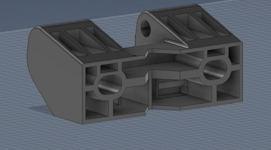
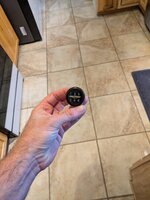
Took me two tries... First just because I missed that the pin went through both inner circles. Second try fit like factory but I'm printing a third with six ribs instead of the original four.


Broken part


New design, ribbed for...
1763968180390.png


and another satisfied customer! Well, once MIL gets the machine back.

Very nice. How did you draw the ribs on the outside of the knob?
 
To avoid these ads, REGISTER NOW!

Firstram

Well-known member
Joined
May 16, 2017
Messages
1,390
its gona be nuts when you can just take a couple photos with your cell phone/lidar and send a replacement part to the printer. the tech is on its way to doing that.
Right? I’ve been printing small statues of my coworkers from a single picture, thanks to AI. I can only imagine how good it will get.

The guy I work for just had orthotics made, the podiatrist scanned his feet with an IPad instead of taking an impression! Of course the insurance company was still billed $600..
 

jayz66ragtop

Well-known member
Joined
Sep 11, 2009
Messages
1,521
Location
SoCal
Very nice. How did you draw the ribs on the outside of the knob?
I use Fusion 360 for most of my modeling. I drew a line on the outside of the outer circle in a sketch, extruded it inward 0.3mm using it to cut the body. Once that was done I used a circular pattern selecting all of the cut faces and the axis was the middle of the circles, telling it I wanted 120 of them and viola! Used the same circle pattern for the support ribs, drew one and once I was happy with it, said I wanted six of them around the middle circle.

I knew what I wanted to do for the ribs on the outside but had to watch a youtube on how to do the circle pattern how I wanted it.
 

burger

Well-known member
Joined
Jun 6, 2005
Messages
980
Location
Erf
Gentlemen, I have made my first sale of an item I designed and printed and netted appropriately a $2 profit.

The caviar is on me tonight.
That there is the funniest thing I read on the internet today
 

cody1325

Well-known member
Joined
Apr 17, 2024
Messages
1,075
Location
Southwest Virginia
As I put the order in for my Bambu A1 (and I'm seriously considering the model with AMS as it's only $100 more--far cheaper than the AMS itself is even on Black Friday) I'm wondering if anyone here has used Hobby Lobby's filament. Figured I could save money and space with the A1 Mini, but I've got a few print-in-place projects I've got planned that are too large for the Mini's print bed.

They are the only brick and mortar selling it here, and I'm by there quite regularly due to Rural King being in the same mall. They show out of stock online on all of it--so it makes me wonder if they're dropping it.

I hear the stuff's somewhat low-end, but then again--I mostly use Sunlu filament.

That being said, I'm fixing my old AD5M with the Bambu (messed up the Z-axis tensioner). The Bambu's design is easier for me to keep up, but the AD5M can print stuff like ABS and ASA due to the enclosure kit.
 

jayz66ragtop

Well-known member
Joined
Sep 11, 2009
Messages
1,521
Location
SoCal
As I put the order in for my Bambu A1 (and I'm seriously considering the model with AMS as it's only $100 more--far cheaper than the AMS itself is even on Black Friday) I'm wondering if anyone here has used Hobby Lobby's filament. Figured I could save money and space with the A1 Mini, but I've got a few print-in-place projects I've got planned that are too large for the Mini's print bed.

They are the only brick and mortar selling it here, and I'm by there quite regularly due to Rural King being in the same mall. They show out of stock online on all of it--so it makes me wonder if they're dropping it.

I hear the stuff's somewhat low-end, but then again--I mostly use Sunlu filament.

That being said, I'm fixing my old AD5M with the Bambu (messed up the Z-axis tensioner). The Bambu's design is easier for me to keep up, but the AD5M can print stuff like ABS and ASA due to the enclosure kit.

I almost went there for some when I was desperate BUT they don't carry ABS, only PLA from what I saw and I needed a spool of Black ABS.

I wrote this up for a friend that is getting a 3D printer soon.

I've used these filaments:


FLASHFORGE - Had the best luck with this one, have used both PLA and ABS Probably 20 spools used total
BAMBU LABS - Have bought several of their PLA and ABS spools and they print really good. It's a toss up between these and the FLASHFORGE as to the best quality. Used close to 15 spools, they sent me four spools of CF infused of various types for participating in the Kickstarter that I have yet to try.
SUNLU - Had great luck with their ABS, had three bad spools that I returned of PLA but have used probably ten spools total of their PLA
eSUN - Used two spools their ABS and been pretty good. I think I used one spool of PETG but don't recall any issues
DURIMAC - Two spools of their TPU and it printed very well. One spool of their glow in the dark PLA and it's been great but only printed a few things with it. Printed address numbers on a black background for our outside mailbox. Don't seem to glow all that much though
Chitu Systems - Bough a couple spools of their multi-color filament and it's been great, bought three different colors in PLA
ELEGOO - Bought about ten spools of PLA in different colors. Other than one spool of Gray I've had good luck with them, the gray spool was all tangled up for the first 1/3 of the spool been fine I got past that.
Reprapper - Bought a spool of their PP filament in black. Forget what I used it for but it printed good from what I remember
MIKA3D - Bought a ten pack of their PLA when I first got my X1C. I used three or four different colors and they seemed to print fine.
dikale - Bought a ten spool pack of their PETG. It printed ok but seemed like the spools were pretty moist, I dried the ones I used in the X1C for a couple of hours and then in the AMS. These are not currently available on Amazon so probably not a good sign.
 

soloz2

Well-known member
Joined
Jun 30, 2012
Messages
856
Location
Western NY
I’ve had good luck with bambu labs filament and as a bonus the RFID tags make sure the correct profiles are up which helps out noobs like me.
I’ve also had good luck with Sunlu Silk PLA. I did have to do some calibration.
I have a spool of Creality en route from Best Buy as it was on sale for $15 and I had a $10 reward so for $5 I decided to give it a shot.
 
To avoid these ads, REGISTER NOW!

Grant Gunderson

Well-known member
Joined
May 17, 2013
Messages
2,312
Location
Bellingham, WA
Ok still in decision phase in regards to the printer. I am also wanting to look into 3D scanning. I do t have the patience or desire to sit and draw / trace out every item. So what’s the best scanner option? Lidar on phone or other photo app vs one of those budget dedicated 3D scanners? What’s the most efficient work flow for this? I’ve had a fusion 360 license in the past, so can renew that if needed. Efficiency is key as I envision this gridfinity project to be something I can mostly run in the background between paying customer jobs. Ideally once I hire a few employees it’s something I can hand off to them if we are slow to keep them productive.
 

rmack898

Well-known member
Joined
Jan 23, 2007
Messages
3,140
Location
Honu Grove NE Florida
So I finally got to set up my A1 and I have issues.
The z axis will not home and I can't get past the calibration step.
I researched all possible fixes but nothing has worked.
Build plate is properly seated.
Z locking screws and black plastic blocks are removed.
Cable block and USB plug on bottom of printer base are correctly connected.

Error messages say the toolhead is malfunctioning and to restart, Restarted many times with no joy.
The data from the extrusion sensor is abnormal and probably broken.

I don't think I'm the only one that has had this problem.

Anyone have any advice?
 

pcrov

Well-known member
Joined
Feb 27, 2023
Messages
375
Location
Ontario, CA
So I finally got to set up my A1 and I have issues.
The z axis will not home and I can't get past the calibration step.
I researched all possible fixes but nothing has worked.
Build plate is properly seated.
Z locking screws and black plastic blocks are removed.
Cable block and USB plug on bottom of printer base are correctly connected.

Error messages say the toolhead is malfunctioning and to restart, Restarted many times with no joy.
The data from the extrusion sensor is abnormal and probably broken.

I don't think I'm the only one that has had this problem.

Anyone have any advice?
Check this: https://www.reddit.com/r/BambuLab/comments/18o5qf3
 

jayz66ragtop

Well-known member
Joined
Sep 11, 2009
Messages
1,521
Location
SoCal
1000001% sure. I'm done with it for today and I'll be gone to Turkey run all day tomorrow.
I guess I'll pick it back up on Saturday.
My X1C gives the cannot home Z axis about every tenth print, started maybe a year ago. I know it's a different printer but I've traced it to the cable that goes between the chassis and the print bed. It gets in a weird spot and doesn't let the print bed go ALL the way up, like half a mm or something and throws the error. I just wait for it to happen and then adjust the cable until it clears the error.

Could yours be having a similar issue? The cable from the base to the gantry, does it have enough slack? Basically, the cable I circled in red.


1764274880651.png
 

KwikFab

Well-known member
Joined
Jul 27, 2024
Messages
1,165
Location
Central Valley, CA
Pictures finally work!

20251126_205045.jpg

Ordered the AMS hub yesterday so we'll see when that arrives.

Printed some PETG earlier today for the first time and was really impressed with the quality for Bambu's generic settings.

Ordered more PETG along with some ABS and TPU to try out.

Seems I'll have an AMS buffer I won't need anymore.
 

Citation

Well-known member
Joined
Jan 20, 2016
Messages
3,209
Location
Indy
Pictures finally work!

20251126_205045.jpg

Ordered the AMS hub yesterday so we'll see when that arrives.

Printed some PETG earlier today for the first time and was really impressed with the quality for Bambu's generic settings.

Ordered more PETG along with some ABS and TPU to try out.

Seems I'll have an AMS buffer I won't need anymore.
Be careful with air quality while printing. ABS outgasses formaldehyde.
 

KwikFab

Well-known member
Joined
Jul 27, 2024
Messages
1,165
Location
Central Valley, CA
Be careful with air quality while printing. ABS outgasses formaldehyde.

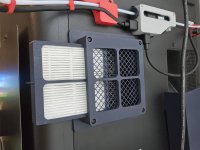
Great point. I have the two filter printout done, with the single filter adapter currently in place.

Granted I should probably look for actual rated filters that are worth a damn.

20251125_104600.jpg

I'm afraid with two exterior filters, exhaust will be heavily restricted.

What do you do for printing ABS?
 

pcrov

Well-known member
Joined
Feb 27, 2023
Messages
375
Location
Ontario, CA
People typically worry about the styrene (S) part of ABS but that is overblown. It wouldn't surprise me if that FUD morphed into formaldehyde now. Not that styrene is good for you, but your exposure level is so low it just doesn't matter. The MSDS basically says it smells bad, molten plastic is hot, and don't literally set it on fire and smoke it.

Even at industrial levels guidance boils down to "try not to burn it" and "turn a fan on in case you do."

If your hotend can reach 400°C maybe don't turn it up so high. And crack a window, it stinks.
 

jayz66ragtop

Well-known member
Joined
Sep 11, 2009
Messages
1,521
Location
SoCal
Pictures finally work!

20251126_205045.jpg

Ordered the AMS hub yesterday so we'll see when that arrives.

Printed some PETG earlier today for the first time and was really impressed with the quality for Bambu's generic settings.

Ordered more PETG along with some ABS and TPU to try out.

Seems I'll have an AMS buffer I won't need anymore.
Awesome!

Re: TPU - Heed the warning and do not run it through the AMS. That is unless you want to learn how to take it apart to flush out all the TPU that broke in it.
 
To avoid these ads, REGISTER NOW!
Top Bottom