To avoid these ads, REGISTER NOW!

The Everything 3D Printer Thread

To avoid these ads, REGISTER NOW!

jayz66ragtop

Well-known member
Joined
Sep 11, 2009
Messages
1,521
Location
SoCal
Was out of town all this week, wife called me on Tuesday or Wednesday but I couldn't pick up. Texted me right after with "Call me" so I know something serious but not emergency serious. Called when I could, my H2C was dropped in the middle of the driveway in the afternoon. No delivery notice, no indication it was even on the truck, on it's way or delivery notice even to this day. No clue who delivered it, looked at the camera and it was an all white van, no company stickers or anything. Guy got out of the van in plain clothes and a reflective vest with no company name on it. Struggled to get it out the back of the van, dragged it into the middle of the driveway and took off. Didn't even ring the door bell!.

Whole reason I didn't order when it said delivery estimate to be Dec 2 was because I knew I would be out of town and didn't want my wife to have to deal with it. :mad: Glad it's here and all BUT sitting in the garage for now, angry wife, and not even sure if it's damaged or not from being dragged out of the van and across the driveway. I'll crack the box tomorrow and try to make sure it's not damaged at least. Still need to rearrange things in the office for the new printer.

Mean while, I wanted to print a few things before setting up the new printer. Mainly some grifinity boxes to store all the X1C spare parts I have. X1C decided it needed a bunch of maintenance now. I tried fixing the Z axis homing issue by adjusting the screws for the heated bed, adjusted everything else suggested in the FAQ link. Tried again and still got the Z axis homing issue. Also now the new cutter is making the cutting lever stick apparently. Dicked around with that for an hour or so and finally just swapped hot ends. The Z axis homing thing still there and now the "hold the cable out of the way" trick doesn't help. Cannot print anything, every print fails for Z axis homing error.


Looked, read, looked some more and I figured out my Z homing issue. It was not the cable like I thought. I ended up taking the rear cover off because the FAQ said it could be the plug got pulled out on the MB side and the only way to get to it is to open it up. Upon doing so, one of the plugs did look a tiny bit out so I pushed it back in. Was looking around at everything else and thought nothing much else to see and about to button it back up when I noticed the bearing on the rear rod was pushed waaaaaaaaay out and almost fell out when I touched it. Pushed it back in and cleaned everything up back there.

Put EVERYTHING back together, ran the full diagnostic expecting to see Z axis homing error. Nope, only issue the printer is reporting is my credentials expired but it still connects and works so IDGAF. Said screw it and sent a test print of the latch and handle to the box I printed before leaving. Damn thing printed like a brand new X1C!

I guess she just wants to give me **** for buying a replacement.
 

PelicanPines

ALLIANCE MEMBER
Joined
Apr 30, 2014
Messages
38,104
Location
New Jersey, USA, Earth, My own reality
i feel like everytime i believe a shipping estimate for something i know the wife can't lift what is getting delivered it gets delivered the second I leave.
We have a brand new... 97lb female USPS person... She delivered my Flash forge 5M Pro... Right to my front porch. Strong like bull.

Unpacked that filament... 110% satisfied. Was this a one time thing or are future orders welcome?
 

Firebrick43

Well-known member
Joined
May 12, 2015
Messages
13,972
Location
West central Indiana
Anyone putting rare earth magnets in their prints?

I designed a Funnel dock to keep the dirt out and catch any drips, lots of time messing with threads to print correctly for the catch bottle and the funnels adapter. Want it attached to the side of my lista with magnets.

Anyway put (6) 8mmx3mm rare earth magnets epoxied in just a few thousands below the outside surface in it and it barely could stay and support its own weight let alone the funnels as well.

Should I use larger 12mm x 3 magnets or jump up to the bar or ones with countersunk holes in them an thru bolt it?

Funnel Trap v6.jpg
 

kaymccampbell

Well-known member
Joined
Feb 27, 2015
Messages
29,409
Location
Upstate New York
We have a brand new... 97lb female USPS person... She delivered my Flash forge 5M Pro... Right to my front porch. Strong like bull.

Unpacked that filament... 110% satisfied. Was this a one time thing or are future orders welcome?
My UPS guy is a team. Big Arnie S lookalike, and a wiry little guy that can sprint from the truck to my door and back in seconds.
The big guy lifted the pallet forks for the Dingo down out of his truck, and if I didn't stop him was going to carry them up to my front door. So like a couple hundred feet. The little guy runs back and forth across the street, from house to house, stopping at the truck in between to get more.

My FedEx girl is a 5' and 110 lbs of solid muscle. I can't believe the stuff she drops at my door. If the door is open she'll run it all the way to the bench. She's so sweet, and always time to say hi to the kids.
 
To avoid these ads, REGISTER NOW!

loganb

ALLIANCE MEMBER
Joined
Dec 29, 2011
Messages
5,495
Location
Omaha, NE
Anyone putting rare earth magnets in their prints?

I designed a Funnel dock to keep the dirt out and catch any drips, lots of time messing with threads to print correctly for the catch bottle and the funnels adapter. Want it attached to the side of my lista with magnets.

Anyway put (6) 8mmx3mm rare earth magnets epoxied in just a few thousands below the outside surface in it and it barely could stay and support its own weight let alone the funnels as well.

Should I use larger 12mm x 3 magnets or jump up to the bar or ones with countersunk holes in them an thru bolt it?

Funnel Trap v6.jpg

The shear holding force for magnets is between 10 to 25% their pull apart force depending on the friction between the two surfaces.

I usually figure 10% if I'm going on smooth metal like the side of a toolbox and use that as a starting point

Using this calculator:


It figures that those magnets are approx 2 lbs pull force if we put a .005" gap for distance...x 6 gets 12 lbs total...assume 10% shear strength you get 1.2 lbs which if it was right should've been suffecient....so an assumption is wrong. Friction value is lower, gap is bigger then .005, magnets aren't as strong....either way you need more magnet power but this at least gives a starting place.

I've struggled with this too and have just gotten lazy and on prints I don't care about the aesthetics get larger disc or bar magnets and put in threaded inserts or more commonly just super glue them to the back
 

Firebrick43

Well-known member
Joined
May 12, 2015
Messages
13,972
Location
West central Indiana
The shear holding force for magnets is between 10 to 25% their pull apart force depending on the friction between the two surfaces.

I usually figure 10% if I'm going on smooth metal like the side of a toolbox and use that as a starting point

Using this calculator:


It figures that those magnets are approx 2 lbs pull force if we put a .005" gap for distance...x 6 gets 12 lbs total...assume 10% shear strength you get 1.2 lbs which if it was right should've been suffecient....so an assumption is wrong. Friction value is lower, gap is bigger then .005, magnets aren't as strong....either way you need more magnet power but this at least gives a starting place.

I've struggled with this too and have just gotten lazy and on prints I don't care about the aesthetics get larger disc or bar magnets and put in threaded inserts or more commonly just super glue them to the back
Thanks for that link and the info. I didnt have a clue where to start on shear strength of magnets in relation to their pull forces

They are amazon magnets and who knows the actual quality? Maybe to it needs to be at the 25 percent range as its not pure shear but quite a bit of the weight is cantilevered?

And the one magnet in the upper middle isn’t setting nearly as close to the surface as it should be. I didn’t realize the lost so much strength with just .010” gap according to the calc

IMG_1578.jpeg
 

jayz66ragtop

Well-known member
Joined
Sep 11, 2009
Messages
1,521
Location
SoCal
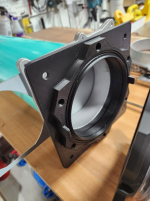
I'm going to print some dust collection connectors for my brother and researched a lot about magnets and such. I forget which Youtube channel it was I think it was they guy who created MagQuick but showed his first iteration failing miserably because the magnets were just not strong enough so he had to double the number and I think he ended up stacking them as well. Original design was I think four 6X3 and he ended with 16 magnets per connect in the end (It's been a bit so I may be off on the numbers but I found a design I like better anyway).


On edit: not the one I was thinking of but this guy stacked five magnets about the size I think the MagQuick guy used:

Not sure if you can reprint and double up on your magnets is what I'm getting at.
 

Jbullfrog

ALLIANCE MEMBER
Joined
Jan 9, 2007
Messages
2,347
Location
Avoca, Iowa
I bought a Anycubic Kobra s1 with the 4 spool hub. So far I have been running from their Makeronline.

I have a 3D Maker Pro - Seal camera setup that I got from Retail Rebel (Amazon return auctions). What do I need for software to be able to scan items and convert to a slicer file to print them?
 

Attachments

  • 20251207_174045.jpg
    20251207_174045.jpg
    719.4 KB · Views: 26
  • 20251207_173722.jpg
    20251207_173722.jpg
    883.6 KB · Views: 25

loganb

ALLIANCE MEMBER
Joined
Dec 29, 2011
Messages
5,495
Location
Omaha, NE
I'm going to print some dust collection connectors for my brother and researched a lot about magnets and such. I forget which Youtube channel it was I think it was they guy who created MagQuick but showed his first iteration failing miserably because the magnets were just not strong enough so he had to double the number and I think he ended up stacking them as well. Original design was I think four 6X3 and he ended with 16 magnets per connect in the end (It's been a bit so I may be off on the numbers but I found a design I like better anyway).


On edit: not the one I was thinking of but this guy stacked five magnets about the size I think the MagQuick guy used:

Not sure if you can reprint and double up on your magnets is what I'm getting at.
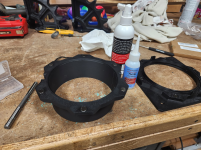
I've done something similar for 6" pipe/hose. Key thing for me is using the magnets to just keep the connection together but having a mechanical feature that engages together to position and take most of the force to hold things in place

Blast gate half...designed with a big square face so it can be used as a thru manifold type fitting and easily screw to the wall

1765207937781.png

Other half getting magnets installed:

1765207991932.png

The magnets are strong enough to keep it together even with some jostling/bumping but still easy to pull apart, even with the collector running.

Based on my amazon history, those are likely 10mm x 5mm magnets, I'd share the link but it says currently unavailable.
 
Last edited:

ptt49er

Well-known member
Joined
Jun 28, 2018
Messages
301
Location
Rock Hill, SC
Thanks for that link and the info. I didnt have a clue where to start on shear strength of magnets in relation to their pull forces

They are amazon magnets and who knows the actual quality? Maybe to it needs to be at the 25 percent range as its not pure shear but quite a bit of the weight is cantilevered?

And the one magnet in the upper middle isn’t setting nearly as close to the surface as it should be. I didn’t realize the lost so much strength with just .010” gap according to the calc

Adding something to increase the friction between the two surfaces will help a lot too.

Figure the magnets will compress the rubber or whatever and that is what prevents it from sliding down the face.
 

jeepxj

Well-known member
Joined
Mar 2, 2008
Messages
17,831

garandman

Well-known member
Joined
Oct 5, 2011
Messages
667
Location
Boston MA / Mt Sunapee NH
Friend of mine called me in a dither. They wanted to give two retiring board members a going-away plaque. The plaque duplicated their old-fashioned (ie pre internet) sign. Someone else was supposed to take care of it: let him know 4 days before the event!

IMG_2540.jpeg

Designed it up in SolidWorks and printed each one in about 6 hours. Slightly smaller: 8”. Couldn’t duplicate the “V” cross section of font, flat on bottom.


IMG_2034.jpeg

After painting.


IMG_2554.jpeg
 

jayz66ragtop

Well-known member
Joined
Sep 11, 2009
Messages
1,521
Location
SoCal
I've done something similar for 6" pipe/hose. Key thing for me is using the magnets to just keep the connection together but having a mechanical feature that engages together to position and take most of the force to hold things in place

Blast gate half...designed with a big square face so it can be used as a thru manifold type fitting and easily screw to the wall

1765207937781.png

Other half getting magnets installed:

1765207991932.png

The magnets are strong enough to keep it together even with some jostling/bumping but still easy to pull apart, even with the collector running.

Based on my amazon history, those are likely 10mm x 5mm magnets, I'd share the link but it says currently unavailable.
Those look interesting, both the connectors and the magnets.

This is the system I'm printing for my brother: https://makerworld.com/en/collections/4232971-modular-dust-collection-mdc
 

PelicanPines

ALLIANCE MEMBER
Joined
Apr 30, 2014
Messages
38,104
Location
New Jersey, USA, Earth, My own reality
I think all the rotating and magnet hose catches are neat, but honestly, for the things that need a movable giant hose, I just slip the hose over the ****** and once the DC is running, you can't pull them off without a lot of effort.
Agree... but the snapping of the magnets is sooooo thrilling.

Also the location of "the ******" may not be in as wonderful of a location as they could be giving all the colorful hooking contraptions.

Random words bolded just for the fun of things.
 

ptt49er

Well-known member
Joined
Jun 28, 2018
Messages
301
Location
Rock Hill, SC
Not that we're going to open a print farm, I'm still curious.

What software are you using to manage all of those printers? How do you keep up w/ the PM on each machine? Or is your PM to just fix the parts that break when it happens?
 
To avoid these ads, REGISTER NOW!
Top Bottom