To avoid these ads, REGISTER NOW!

The Everything 3D Printer Thread

christopher

Well-known member
Joined
Sep 13, 2022
Messages
64
I found the STL, and it was 96MB! I must have had the resolution jacked way up to make it as smooth as possible. Instead of posting that, here is the original solidworks file, plus a couple exports of different formats that are fairly common for other cad packages too. All of these combined are WAY smaller, and give you the freedom to hack on it yourselves, and make it work for you.
 

Attachments

  • vacuum-schnozzle.zip
    366 KB · Views: 7
To avoid these ads, REGISTER NOW!

jayz66ragtop

Well-known member
Joined
Sep 11, 2009
Messages
1,521
Location
SoCal
How did you do the multiple colors?
On a "normal" printer you would have to manually change the filament. Some have dual print heads so they can handle two colors. What makes the BamBu X1 different is they have something called an AMS which can have up to four spools in it and auto changes the filament for you. To get that feature you have to use their slicer which has a "paint" feature that you select the slot on the AMS to paint the part. You can chain up to four AMS' together as well for a total of sixteen different filaments.

Printing it the way I did wasted a lot of filament because each color change wastes about two inches of filament. If I were to print it again I would cut the holder into three pieces, the two end pieces and then the center. That way I could lay down the ends and print them on their backs. I just ran out of time to learn how to do that with Fusion 360. I'll admit, I had to print the holder twice. It was about 80% done, I wanted to try out the coasters and thought I hit pause but apprentely not. Just as I dropped in the coasters and had them set, the print head came over, collided with the coasters and broke off one side! I was hoping I could just gently bend it back, finish the print and glue it but the calibration of the print head was so far off it couldn't park the head for filament change. Only way to calibrate was to start over.

I initially wanted to print the black part of the coasters in PLU and the red/white in PLA but PLU will not feed through the AMS.
I tried, got it to partially feed and then broke the filament off in the AMS. Thought I has an oh **** moment because Iread others had tried it and had to disassemble the AMS to get it out but I was able to gently wiggle it out intact. So my choice would have been to manually swap the spools which was too much work so I did it all in ABS.
 
Last edited:

jayz66ragtop

Well-known member
Joined
Sep 11, 2009
Messages
1,521
Location
SoCal
Jay you have a keeper there with your woman, as most women I know aren't fans of one of the, if not the greatest band ever! I don't see the flaws you are referring :sleep: to I'd be proud as #e!! to show that off! Especially as a custom gift someone made for me, your spouse will be too I am sure! Looks Great! Harry (y)
Thank you! She is a keeper. Before we met I had a co-worker that was a fan so he played some songs for me but didn't really "get it". My wife, then girlfriend took me to one of their concerts (time machine tour) and then I "got it". Wife's license plate is one of the members name, all I'm going to say about that.
 

jayz66ragtop

Well-known member
Joined
Sep 11, 2009
Messages
1,521
Location
SoCal
For those who want more info on multiple colors:

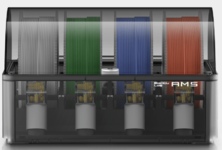
Here is an AMS, on the back a single PTFE tube comes out and connects to the back of the printer. The printer software works with their slicer for color changes.

1671518282775.png


This is an AMS hub which can connect up to four total AMS'. You can see the four connections on the fron of this picture and on the back is a single PTFE tube connection that goes to the printer. The AMS winds and unwinds the filament at each filament change. I am contemplating getting the hub and another AMS but they are a bit pricey. Other than the color change the best thing is the lidar auto leveling and extrusion testing. That is all done by the machine, I just click the auto level checkbox and the extrusion calibration checkbox and the machine adjusts itself.
1671518529513.png


I'm not trying to sell anyone on the Bambu but will tell you this, I have done ZERO adjustments to the printer since pulling it out of the box. Even after the head crashed into the coasters, just hit the calibration button on the printer and it was good as new. I've used the default settings for all of my prints and I've printer with PLA, PLU, ABS, and PETG. All prints have come out as good or better than what I posted above. I had one incident where massive spaghetti happened with PLA but I think that was my fault because I forgot to put glue down on the print bed. The printer detected it but I was being lazy and just told it to go ahead and print from the app without checking the camera to make sure it was not an issue.
 
Last edited:

christopher

Well-known member
Joined
Sep 13, 2022
Messages
64
My drill press (with the schnozzle) is a restored '49 Delta. I also got a lead counter weight and some pulleys, and that made it so the table is essentially weightless when moving it up or down. The lead weight (actually a Ye Olde style window weight) I got here: https://nathantrotter.com
Contact sales at the link for info about getting one. I used a round 11 pounder IIRC.
That weight resides in the stand-tube, attached with a steel cable up and out of the tube and over a printed pulley and tube-mounted pulley bracket, down around another pulley that mounts to the table (at the clamp split in the casting), and then ties off at the motor mount. The lower pulley came from McMaster-Carr. If anyone is interested in those details and files, let me know.
 

christopher

Well-known member
Joined
Sep 13, 2022
Messages
64
For those who want more info on multiple colors:

Here is an AMS, on the back a single PTFE tube comes out and connects to the back of the printer. The printer software works with their slicer for color changes.

1671518282775.png


This is an AMS hub which can connect up to four total AMS'. You can see the four connections on the fron of this picture and on the back is a single PTFE tube connection that goes to the printer. The AMS winds and unwinds the filament at each filament change. I am contemplating getting the hub and another AMS but they are a bit pricey. Other than the color change the best thing is the lidar auto leveling and extrusion testing. That is all done by the machine, I just click the auto level checkbox and the extrusion calibration checkbox and the machine adjusts itself.
1671518529513.png


I'm not trying to sell anyone on the Bambu but will tell you this, I have done ZERO adjustments to the printer since pulling it out of the box. Even after the head crashed into the coasters, just hit the calibration button on the printer and it was good as new. I've used the default settings for all of my prints and I've printer with PLA, PLU, ABS, and PETG. All prints have come out as good or better than what I posted above. I had one incident where massive spaghetti happened with PLA but I think that was my fault because I forgot to put glue down on the print bed. The printer detected it but I was being lazy and just told it to go ahead and print from the app without checking the camera to make sure it was not an issue.
I went to their site and checked it out. Very sophisticated and interesting. But they are definitely into vendor lock-in, and I can dig that, they need to make money for their efforts. Reminds me of Apple in that regard, and no doubt they have studied Apple's playbook.

So the AMS houses four spools, and my understanding is, when a filament change occurs it happens in this order:
1. the print stops and the head moves away from the part
2. The entire length of active filament in the tube must be rewound back into the AMS box by a dedicated feeder extruder per spool.
3. the AMS box moves the delivery tube to the next required spool
4. that spool's feeder extruder in the AMS box pushes the new filament down the tube to the direct-drive extruder on the head
5. I Assume that the feeder extruder(s) disengage(s) and gets out of the way once the direct drive extruder grabs the filament
6. the direct drive does some kind of purge on a purge tower off the print until clean new filament is flowing
7. goes back to printing with new filament

Is that an accurate summary?
Q1: the tower must be printed on every layer to keep it's height regardless of filament change, correct?
Q2: how many seconds do you recon a filament change takes?

Cheers,
-C
 

christopher

Well-known member
Joined
Sep 13, 2022
Messages
64
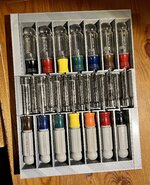
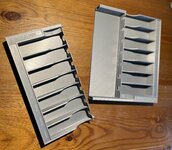
The AMS is not totally unlike these designs:
 

jayz66ragtop

Well-known member
Joined
Sep 11, 2009
Messages
1,521
Location
SoCal
I went to their site and checked it out. Very sophisticated and interesting. But they are definitely into vendor lock-in, and I can dig that, they need to make money for their efforts. Reminds me of Apple in that regard, and no doubt they have studied Apple's playbook.

So the AMS houses four spools, and my understanding is, when a filament change occurs it happens in this order:
1. the print stops and the head moves away from the part
2. The entire length of active filament in the tube must be rewound back into the AMS box by a dedicated feeder extruder per spool.
3. the AMS box moves the delivery tube to the next required spool
4. that spool's feeder extruder in the AMS box pushes the new filament down the tube to the direct-drive extruder on the head
5. I Assume that the feeder extruder(s) disengage(s) and gets out of the way once the direct drive extruder grabs the filament
6. the direct drive does some kind of purge on a purge tower off the print until clean new filament is flowing
7. goes back to printing with new filament

Is that an accurate summary?
Q1: the tower must be printed on every layer to keep it's height regardless of filament change, correct?
Q2: how many seconds do you recon a filament change takes?

Cheers,
-C

Pretty close. In the back of the printer there is a wiper/cutter. Before #2 occurs the loaded filament is cut just above the hot end and then retracted back into the AMS. I'm not sure the "magic" inside the AMS but I suspect there is a four way junction just like the hub above where each spool is fed to. Below is what the far right spool looks like. To load, put the spool on the rollers and then feed the filament into the white hole slightly pulling the nub just above the yellow part towards you. At a certain point the AMS senses the filament and will start pulling it inside. It goes in about four to five inches and then pulls it back a bit. I assume there is a sensor or something that detects it's about to hit the four into one junction so it stops and pulls back away. On the back of the AMS there is a section of PTFE tube that slips into a connector on the back of the printer and the AMS has a cord that plugs into the back of the printer. One thing that does kind of **** with the AMS, it's designed for large spools. I have found a multitude of adapters people have made and put on Thingiverse. The spool of white below is a pretty small size, I think it's 500kg and not very wide so I had to improvise an adapter for another type of spool for it.

When a filament change occurs, as I said above the filament is cut from the extruder and pulled back into the AMS. The next color is then pushed to the extruder and the prior filament is then purged from the hot end. In the back left corner of the printer there is a hole for the purged filament to fall out the back and just to the right of that hole there is a wiper that cleans the hot end. From the time the print stops and the print head goes "home" (above the purge hole), cutes the current filament, retracts the filament, loads the next filament, purges the prior filament, wipes the hot end and continues to print.
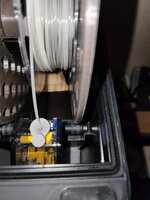

AMS.jpg


To illustrate, the below picture is of the back left of the printer. when "resting" the print head sits in th emiddle and about two to three inches from the back. When purging, the print head goes to where the green arrow is and then it drops out the back. The yellow is just showing where the hole is covered and it's ramped towards the back to make a slide if you will for the filament to go out. One of the first things I printed was a bin to put behind the printer to catch the discards. The red circle is around the wiper arm. Once the purging has occured the print head will go and rub against the white part a few times and then go on to print..

purge hole.jpg


Q1: I have not figured out why sometimes it prints a tower and other times it does not. Since it has the wiper arm I don't think it needs it but sometimes it does get generated. It has to be in the slicer but I have not explored it fully yet. It has options to turn on and off supports. It recommended printing with supports for the coaster holder but I did it without with no issue.
Q2: I never timed it, less than a minute for sure. Maybe 15-20 seconds.

As to your equating it to locking into Apple's ecosystem, I didn't think of it that way but yes it is like that for the AMS stuff but I always have the option to hang a spool off the back of it and run it that way if I want. I printed a temporary ring for my wife a little bit ago and did it in TPU. There is one guy who made TPU work in the AMS but everywhere it says not to. I tried it, almost had to take the AMS apart to get it out. Ended up just hanging the spool off the back (there is an included hanger) and printing it that way. The only drag about that is you have to disconnect the tube from the AMS and then put it back on when done. There is a "Y" someone made on Thingiverse that I'll probably print at some point so I can leave the tube connected.
 
Last edited:

jayz66ragtop

Well-known member
Joined
Sep 11, 2009
Messages
1,521
Location
SoCal
The AMS is not totally unlike these designs:
It's a little like that. Before I found the kickstater for the X1 I almost bought that but I knew I wanted to be able to do more than two colors.

Oh and yes, I got the X1 Carbon. It was I think $150 more on the Kickstarter but it came with the AMS, the regular X1 on the Kickstater did not come with the AMS and only two spools of filament where the Carbon came with four. It also came with the hardened hot end and one of the filaments is carbon infused.


I feel like I'm an advertisement for the X1, I hope everyone is ok with me sharing all of this. I geeked out on it for a long time before commiting and even cancelled my initial Kickstater because it freaked me out to commit so much money to something I may never get.
 

sh944

ALLIANCE MEMBER
Joined
Jan 1, 2014
Messages
291
Location
Linwood, KS
This is one of those “don’t look unless you are ready to buy” things…. After looking at their website and hearing your experience, I’m pretty well set on my next printer. Lol
 

sh944

ALLIANCE MEMBER
Joined
Jan 1, 2014
Messages
291
Location
Linwood, KS
And since y’all are showing off your stuff, I figured I should offer up something as well. This is a tray I am building up for a set of Craftsman nut drivers I had rolling around the tray. I’m just piecing it together right now to make sure I have all the dimensions correct but will reprint it in fewer pieces and emboss the sizes on it for a final print. I wish I had a bigger printer but I am getting pretty good at splitting print jobs and rejoining them at this point. I will probably reduce the height slightly on the final version but it’s easy enough to grab the tools as-is.
 

Attachments

  • AC129812-78CF-489F-A6E7-A3EFE6AA5624.jpeg
    AC129812-78CF-489F-A6E7-A3EFE6AA5624.jpeg
    1.3 MB · Views: 130
Last edited:

jayz66ragtop

Well-known member
Joined
Sep 11, 2009
Messages
1,521
Location
SoCal
This is one of those “don’t look unless you are ready to buy” things…. After looking at their website and hearing your experience, I’m pretty well set on my next printer. Lol
Correct and be ready for a bit of sticker shock if you are use to the other 3D printers that are not as sophisticated. The X1 has a lot of whiz bang that is reflected in the price. I was concerned that it was too much for a newb but in reality it solved the things I was concerned about which is mainly the learning curve to level the bed and having to fiddle with the temp and feed rates.
 

zanyad

ALLIANCE MEMBER
Joined
Apr 26, 2018
Messages
2,755
Location
NE Ohio
And since y’all are showing off your stuff, I figured I should offer up something as well. This is a tray I am building up for a set of Craftsman nut drivers I had rolling around the tray. I’m just piecing it together right now to make sure I have all the dimensions correct but will reprint it in fewer pieces and emboss the sizes on it for a final print. I wish I had a bigger printer but I am getting pretty good at splitting print jobs and rejoining them at this point. I will probably reduce the height slightly on the final version but it’s easy enough to grab the tools as-is.
Very nice! I'd be interested in the final file, if you're willing to share. Thanks!
 

christopher

Well-known member
Joined
Sep 13, 2022
Messages
64
And since y’all are showing off your stuff, I figured I should offer up something as well. This is a tray I am building up for a set of Craftsman nut drivers I had rolling around the tray. I’m just piecing it together right now to make sure I have all the dimensions correct but will reprint it in fewer pieces and emboss the sizes on it for a final print. I wish I had a bigger printer but I am getting pretty good at splitting print jobs and rejoining them at this point. I will probably reduce the height slightly on the final version but it’s easy enough to grab the tools as-is.
(looks like my fridge beer drawer ;) )
 

christopher

Well-known member
Joined
Sep 13, 2022
Messages
64
Pretty close. In the back of the printer there is a wiper/cutter. Before #2 occurs the loaded filament is cut just above the hot end and then retracted back into the AMS. I'm not sure the "magic" inside the AMS but I suspect there is a four way junction just like the hub above where each spool is fed to. Below is what the far right spool looks like. To load, put the spool on the rollers and then feed the filament into the white hole slightly pulling the nub just above the yellow part towards you. At a certain point the AMS senses the filament and will start pulling it inside. It goes in about four to five inches and then pulls it back a bit. I assume there is a sensor or something that detects it's about to hit the four into one junction so it stops and pulls back away. On the back of the AMS there is a section of PTFE tube that slips into a connector on the back of the printer and the AMS has a cord that plugs into the back of the printer. One thing that does kind of **** with the AMS, it's designed for large spools. I have found a multitude of adapters people have made and put on Thingiverse. The spool of white below is a pretty small size, I think it's 500kg and not very wide so I had to improvise an adapter for another type of spool for it.

When a filament change occurs, as I said above the filament is cut from the extruder and pulled back into the AMS. The next color is then pushed to the extruder and the prior filament is then purged from the hot end. In the back left corner of the printer there is a hole for the purged filament to fall out the back and just to the right of that hole there is a wiper that cleans the hot end. From the time the print stops and the print head goes "home" (above the purge hole), cutes the current filament, retracts the filament, loads the next filament, purges the prior filament, wipes the hot end and continues to print.


AMS.jpg


To illustrate, the below picture is of the back left of the printer. when "resting" the print head sits in th emiddle and about two to three inches from the back. When purging, the print head goes to where the green arrow is and then it drops out the back. The yellow is just showing where the hole is covered and it's ramped towards the back to make a slide if you will for the filament to go out. One of the first things I printed was a bin to put behind the printer to catch the discards. The red circle is around the wiper arm. Once the purging has occured the print head will go and rub against the white part a few times and then go on to print..

purge hole.jpg


Q1: I have not figured out why sometimes it prints a tower and other times it does not. Since it has the wiper arm I don't think it needs it but sometimes it does get generated. It has to be in the slicer but I have not explored it fully yet. It has options to turn on and off supports. It recommended printing with supports for the coaster holder but I did it without with no issue.
Q2: I never timed it, less than a minute for sure. Maybe 15-20 seconds.

As to your equating it to locking into Apple's ecosystem, I didn't think of it that way but yes it is like that for the AMS stuff but I always have the option to hang a spool off the back of it and run it that way if I want. I printed a temporary ring for my wife a little bit ago and did it in TPU. There is one guy who made TPU work in the AMS but everywhere it says not to. I tried it, almost had to take the AMS apart to get it out. Ended up just hanging the spool off the back (there is an included hanger) and printing it that way. The only drag about that is you have to disconnect the tube from the AMS and then put it back on when done. There is a "Y" someone made on Thingiverse that I'll probably print at some point so I can leave the tube connected.
unlike a lot of RepRap-style printers, this one has a _lot_ of molded plastic parts, and all the tooling for that was a big investment for them. That adds a lot to the cost to produce it. Looks very slick, and they seemed to solve a lot of the issues elegantly.
 

jayz66ragtop

Well-known member
Joined
Sep 11, 2009
Messages
1,521
Location
SoCal
unlike a lot of RepRap-style printers, this one has a _lot_ of molded plastic parts, and all the tooling for that was a big investment for them. That adds a lot to the cost to produce it. Looks very slick, and they seemed to solve a lot of the issues elegantly.
For sure, another bonus is it has four print speeds. On the slowest the printer is nearly silent. On the highest speed it's blazing fast. The printer itself is very polished as well. Doesn't have the built in someone's garage look/feel, on the contrary it looks as good if not better than the Makerbot we have at work.
 

loganb

ALLIANCE MEMBER
Joined
Dec 29, 2011
Messages
5,493
Location
Omaha, NE
I feel like I'm an advertisement for the X1, I hope everyone is ok with me sharing all of this.

Yes!

Ok selfishly I want you to keep sharing as I'm waffling on my next machine. I have a Prusa mk3, but have a deposit down on a PrusaXL, however likely going to cancel that and go a different direction and currently looking like the X1 Carbon. The newness and long term support are concerns, but continuing to see more and more good stories on it.... so please keep sharing your experiences!
 

christopher

Well-known member
Joined
Sep 13, 2022
Messages
64
My take of this printer from as close as I could get, (aka interwebs), is that it's very well engineered and made. For what it is, $1500 seems like a bargain. Nice score!
 

jayz66ragtop

Well-known member
Joined
Sep 11, 2009
Messages
1,521
Location
SoCal
Seems as though at least two people are interested so I'll keep adding information as it comes. I don't plan on printing a ton stuff with it but what has been printed I'm really happy with.

There has been some bad but nothing that bad:

  • One print had a ton of spaghetti, still not sure what caused it other than lack of putting glue down for PLA (On edit) I take it back, I printed a model space shuttle that is multiple parts and multiple colors. I had one of the wing pieces that printed a little warped and not sure why since the other one next to it was perfect. Didn't even notice the warp at first but when I tried to put the wing onto the fuselage it wouldn't sit right. I just reprinted it and it fit perfect. I haven't put the model together fully yet. I'll post it up once it's together.
  • Probably the biggest irritant was having to print and try a bunch of different adapters for the smaller spools. It seems there isn't a standard size/way of creating them so I had to find multiple adapters and then just try it until I found one that worked with that spool
  • Wish there was an official Bambu bin to catch the purged filament. I found a neat looking one on Thigiverse but either on the Wiki, FAQs, or somewhere else Bambu highly discouraged hanging or connecting anything to the back of the printer so I chose a simple bin.
  • It would be nice if there was an option for longer connections to the AMS. The cord that comes with it is only about eight to ten inches long so your only real option is to put it on top of the printer. This makes it a bit of a pain if you have something hanging off the spool holder on the back. I read Bambu is considering creating longer PTFE and AMS cords so it can be put on a shelf or something. The drawback to that is longer filament change times because it has to pull back even more filament which is why they kept it short to begin with.
  • Since the product is so new Bambu is releasing updates, this is good and bad but mostly good so far. For the printer and AMS they are done over the air, the printer just tells you there is an update and you can load it up. For the slicer, it will tell you there is a new version and asks if you want to download it. It doesn't do an in place install, a new version is downloaded in a browser and installed over the top of the existing. All updates so far except the latest printer one has been perfect. The latest printer update spun for a bit, I went to bed and in the morning my wife said the printer says the update failed. I cleared the message and it said a partial update was done and to retry. I did and it was fine after that but I have not printed since then. I'm bringing this up because about three printer updates ago it made the fastest print speed kind of loud. Initially I thought something was wrong with the printer but nope, that's just the way it is but I think it is actually faster now. (On edit) I printed another set of coasters for wife's brother and happy to report, fast print stealth mode has been restored with the latest update!

So all in all I have been happy with it. The speed just blows me away, on the fastest print speed it's easily twice as fast as the Makerbot at work and those are suppose have decent speed. There is warnings that the higher print speed can affect print quality but looks good to me. All of my prints have been with the .04 nozel that came installed on the printer. I forgot to mention earlier and this one other thing that locks you into the ecosystem. The hot end and print nozel are all one piece so when the nozel wears out you have to replace the hot end as well. The replacement parts aren't that expensive so not a big deal to me but if you are concerned about consumables that could be an issue. Since I got in on the Kickstarter they offered supporters a "gift" when it fully funded that cost a dollar plus shipping. I think it cost me a total of $8 and received at least $100 worth of parts. I think three full hot ends (.06, .08, and another hardened .04) along with a couple of other goodies I forget what though.

So, yes to me it was worth the $1200 on Kickstarter. I think the combo now is around $1500 for the X1 Carbon or $1200 for the regular X1.


Ok, enough for this post. If there is anything specific on the printer you want to know ask away.
 
Last edited:

jayz66ragtop

Well-known member
Joined
Sep 11, 2009
Messages
1,521
Location
SoCal
Q2: I never timed it, less than a minute for sure. Maybe 15-20 seconds.

@christopher

I tried to qoute you original post with the question as well but it did weird things so here we are. I printed another set of coasters tonight and color change from black to red was ~40 seconds so a little longer than I thought but was from the moment it stopped printing until start of the other color. Way faster than I could do by hand and the spool hanger :rocker:
 
To avoid these ads, REGISTER NOW!

jayz66ragtop

Well-known member
Joined
Sep 11, 2009
Messages
1,521
Location
SoCal
I have not gone through all 46 pages of this thread, so apologies if this has already been covered. I've been making metal stamps lately for various things, and it's opened up a whole new realm of possibilities. :)

Hey Tom,

that is really cool. I was going to do that when I needed to but wasn't sure what filament to use. Was hard to hear on the video what you used. Could you put it in a post?

thx
 

jayz66ragtop

Well-known member
Joined
Sep 11, 2009
Messages
1,521
Location
SoCal
As promised, here is the shuttle model that was all printed on my X1 Carbon. It is suppose to be snap together but seemed too fragile so I glued it. Got a little carried away with the glue, you can see some of it on the external fuel tank just above and to the right of the orbiter.

It fit together with minimal adjustments considering all of the orange is ABS and the rest is PLA. Only because that was what was loaded at the time in the AMS.

Shuttle.jpg
 

4 FN 27

ALLIANCE MEMBER
Joined
Oct 19, 2015
Messages
4,635
Location
Minnesnowta
I have not gone through all 46 pages of this thread, so apologies if this has already been covered. I've been making metal stamps lately for various things, and it's opened up a whole new realm of possibilities. :)


That is awesome. We have used a few "Additive Tools" made by Wilson Tool. A local company we have done business with since 1968. They have a whole division dedicated to Printing.

Some great info, ideas and articles here:

https://www.wilsontool.com/en-us/search?searchtext=Additive&searchmode=allwords
 

tom86951

Well-known member
Joined
May 14, 2005
Messages
155
Location
CA
Hey Tom,

that is really cool. I was going to do that when I needed to but wasn't sure what filament to use. Was hard to hear on the video what you used. Could you put it in a post?

thx

It was nGen by ColobFabb, which I'm told is similar to PET G, but I only used that because it was in my printer and very easy to use. That said, PLA works great for steel stamps. PLA is very stiff, I just tend not to use it because it doesn't hold up in the sun/heat, but for metal dies and stamps, it's great.

After doing that video, I modeled a stamp for the entire rusted area. I would never have the sheet metal skills to make a patch like this the traditional way -- but printing stamps makes a seriously professional-looking patch :)

006D1298-4FAC-4FB4-B2A6-BCBCF3AB79C8.jpeg288762A4-02EE-42E9-9463-C1964B69017E.jpeg1FD5194A-2054-4E8A-B6D5-035E5C9956D9.jpeg6926D29D-71BC-44E6-A03A-416AE6BA13F6.jpeg
 

banjopete

Well-known member
Joined
Oct 5, 2014
Messages
300
Location
Edmonton, Alberta, Canada
It was nGen by ColobFabb, which I'm told is similar to PET G, but I only used that because it was in my printer and very easy to use. That said, PLA works great for steel stamps. PLA is very stiff, I just tend not to use it because it doesn't hold up in the sun/heat, but for metal dies and stamps, it's great.

After doing that video, I modeled a stamp for the entire rusted area. I would never have the sheet metal skills to make a patch like this the traditional way -- but printing stamps makes a seriously professional-looking patch :)

006D1298-4FAC-4FB4-B2A6-BCBCF3AB79C8.jpeg288762A4-02EE-42E9-9463-C1964B69017E.jpeg1FD5194A-2054-4E8A-B6D5-035E5C9956D9.jpeg6926D29D-71BC-44E6-A03A-416AE6BA13F6.jpeg
That's a pretty awesome outcome there. I wasn't sure what you were getting at with the first crusty rusty picture but now with the patch I get it, it looks perfect. Now just to weld'er up.
 

Jswain

Well-known member
Joined
Apr 26, 2013
Messages
2,449
Location
Calgary, AB
It was nGen by ColobFabb, which I'm told is similar to PET G, but I only used that because it was in my printer and very easy to use. That said, PLA works great for steel stamps. PLA is very stiff, I just tend not to use it because it doesn't hold up in the sun/heat, but for metal dies and stamps, it's great.

After doing that video, I modeled a stamp for the entire rusted area. I would never have the sheet metal skills to make a patch like this the traditional way -- but printing stamps makes a seriously professional-looking patch :)

006D1298-4FAC-4FB4-B2A6-BCBCF3AB79C8.jpeg288762A4-02EE-42E9-9463-C1964B69017E.jpeg1FD5194A-2054-4E8A-B6D5-035E5C9956D9.jpeg6926D29D-71BC-44E6-A03A-416AE6BA13F6.jpeg
That is damn brilliant!
 

sh944

ALLIANCE MEMBER
Joined
Jan 1, 2014
Messages
291
Location
Linwood, KS
Just to follow up on my previous post about my nut driver tray... below is the current print. I did it in two pieces, tabbed it so that its both aligned and gives an additional stregth member when gluing, did some embossing plus put a mariana trench in it to make it easier to grab the tools. My only gripe at this point is that the embossing details were a bit less detailed than I wanted because I didn't bother to slow the print speed down for that part, but that got me thinking. Going forward, I think I will start just leaving a spot in the basic build and print the embossed pieces separately so that if it doesn't come out as clearly as I'd like, I can just reprint the embossed plate and insert it.

I'll post the STL file if there is any interest. Its not quite as clean as I'd like, especially compared to some of the works of art that others have posted here, but I don't do this sort of thing for a living. lol
 

Attachments

  • Split tray.jpg
    Split tray.jpg
    950.7 KB · Views: 64
  • Assembled tray.jpg
    Assembled tray.jpg
    954.2 KB · Views: 71

jstroede

Well-known member
Joined
Oct 28, 2010
Messages
1,080
Location
Kansas City
Just to follow up on my previous post about my nut driver tray... below is the current print. I did it in two pieces, tabbed it so that its both aligned and gives an additional stregth member when gluing, did some embossing plus put a mariana trench in it to make it easier to grab the tools. My only gripe at this point is that the embossing details were a bit less detailed than I wanted because I didn't bother to slow the print speed down for that part, but that got me thinking. Going forward, I think I will start just leaving a spot in the basic build and print the embossed pieces separately so that if it doesn't come out as clearly as I'd like, I can just reprint the embossed plate and insert it.

I'll post the STL file if there is any interest. Its not quite as clean as I'd like, especially compared to some of the works of art that others have posted here, but I don't do this sort of thing for a living. lol

Glad to see another local guy.

I like your design, but I went a little more minimalist with mine.
 

Attachments

  • IMG_20221105_114830267.jpg
    IMG_20221105_114830267.jpg
    650.8 KB · Views: 79

sh944

ALLIANCE MEMBER
Joined
Jan 1, 2014
Messages
291
Location
Linwood, KS
What speed do you print the embossed tags at? I have never gotten anywhere near that quality of lettering when I have done embossing on my printer.

And yeah, nice to have a neighbor here!
 

jstroede

Well-known member
Joined
Oct 28, 2010
Messages
1,080
Location
Kansas City
What speed do you print the embossed tags at? I have never gotten anywhere near that quality of lettering when I have done embossing on my printer.

And yeah, nice to have a neighbor here!
I actually drive through your neck of the woods every day. I live in KC and work in Lawrence and drive the back roads.

That was my first attempt at multiple colors. It took me a bit to get it down, but I am overall pretty happy with the results. It kept me from going out and buying a bunch of new bins after I bought my dad a bunch of Akro Mills for Christmas.

I believe I am printing at 50 mm/s, 220 degrees and 60 degrees on the bed. My machine is a stock Ender 3 with a glass bed. It isn't fancy but it works for me!
 

sh944

ALLIANCE MEMBER
Joined
Jan 1, 2014
Messages
291
Location
Linwood, KS
Off topic question... Garage Door Guru? If dealing with garage doors is your gig, I have a potential project for you. I have a couple of garage condo units in DeSoto and want to get the rails on one door adjusted so they follow the roof line and install a different door opener. Let me know if you'd be interested and we can talk offline.

I'll try another print using your settings and see if that makes the difference, thanks for the advice.
 

jstroede

Well-known member
Joined
Oct 28, 2010
Messages
1,080
Location
Kansas City
Off topic question... Garage Door Guru? If dealing with garage doors is your gig, I have a potential project for you. I have a couple of garage condo units in DeSoto and want to get the rails on one door adjusted so they follow the roof line and install a different door opener. Let me know if you'd be interested and we can talk offline.

I'll try another print using your settings and see if that makes the difference, thanks for the advice.
I sent you a message about the garage door.
 

Poolshark314

Well-known member
Joined
Jul 5, 2021
Messages
658
Location
MD
Off topic question... Garage Door Guru? If dealing with garage doors is your gig, I have a potential project for you. I have a couple of garage condo units in DeSoto and want to get the rails on one door adjusted so they follow the roof line and install a different door opener. Let me know if you'd be interested and we can talk offline.

I'll try another print using your settings and see if that makes the difference, thanks for the advice.
The temperatures are more filament specific than speed related, as an FYI. The Die Hard one I printed at 100mm/second
 

sh944

ALLIANCE MEMBER
Joined
Jan 1, 2014
Messages
291
Location
Linwood, KS
Yep, agreed on the filament temp, it depends on the type and I usually get better print quality if I err on the lower side of the temp range recommeded by the manufacturer. I was more interested in just the speed setting as I think the jerk of the print head changing direction might be too much for the small details at 60mm/s, at least thats what I have been speculating my problem has been. I'll be testing it soon enough.

Thanks for the message Jstroede, replied back!
 

RivennHewn

Well-known member
Joined
Jun 4, 2011
Messages
10,356
Location
PNW
Had my son print me a mitersaw dust collection upgrade. Not his file, but one I found online by Benchtop Woodworks.


Attachments

  • 12406D4B-7476-429C-9A87-84405564AE71.jpeg
    12406D4B-7476-429C-9A87-84405564AE71.jpeg
    1.2 MB · Views: 50
  • BD365778-7325-4DD6-9DD2-E7256777E9A2.jpeg
    BD365778-7325-4DD6-9DD2-E7256777E9A2.jpeg
    640.7 KB · Views: 52
  • 96B87BB6-365E-4A63-B240-1BC8CBA035FD.jpeg
    96B87BB6-365E-4A63-B240-1BC8CBA035FD.jpeg
    824.8 KB · Views: 54
  • DD00DA87-E9D4-45B9-9723-A8926A1E3F34.jpeg
    DD00DA87-E9D4-45B9-9723-A8926A1E3F34.jpeg
    1.1 MB · Views: 50
To avoid these ads, REGISTER NOW!
Top Bottom