To avoid these ads, REGISTER NOW!

The Everything 3D Printer Thread

Keyblazer

Well-known member
Joined
Jul 30, 2009
Messages
1,471
Location
Irvine, CA
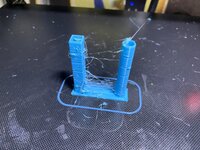
These are the two Cura generated rated “Flow Towers” I printed.
Left is before I changed the e-steps, and right is after.
D0730010-6FD2-4660-96B5-E3F0E6CCA88F.jpeg

Nom clue if there are clues there..🙄
 
To avoid these ads, REGISTER NOW!

Jswain

Well-known member
Joined
Apr 26, 2013
Messages
2,449
Location
Calgary, AB
These are the two Cura generated rated “Flow Towers” I printed.
Left is before I changed the e-steps, and right is after.
D0730010-6FD2-4660-96B5-E3F0E6CCA88F.jpeg

Nom clue if there are clues there..🙄
I'm not sure if you mentioned what speed you are trying to print at, or what speed you previously printed at but you will likely need more heat to print at 160mm/min versus 50mm/min if that's the case. You are pushing over 3x as much filament through the hotend as you did before...
And if you're already maxxed out with a normal hotend that means all metal w/ a new thermistor.

(I've never run clipper and usually print PETG ~50 but I now to go from 25-50 required quite a bit more heat)
 

ArcReactorKC

Well-known member
Joined
Jun 1, 2019
Messages
2,237
Location
Out in the county NE of KCMO
These are the two Cura generated rated “Flow Towers” I printed.
Left is before I changed the e-steps, and right is after.
D0730010-6FD2-4660-96B5-E3F0E6CCA88F.jpeg

Nom clue if there are clues there..🙄
The stringing is really rough there and is negating really any ability to read those completely accurately. Was your machine stringy before the extruder change? For what its worth I've put a ton of the cheapo amazon red metal extruders on a bunch of printers. They are cheap, and a little rough around the edges but for the speed capability of a bed slinger they seem to be fine.

Did you say you changed the e-motor? What is the possibility it is a different degree motor? What control board and stepper drivers does your ender have? You may need to adjust the current on the driver or, it could be failing.

Have you removed the nozzle and told it to extrude through just the empty heatbreak?
 

Keyblazer

Well-known member
Joined
Jul 30, 2009
Messages
1,471
Location
Irvine, CA
Will do.
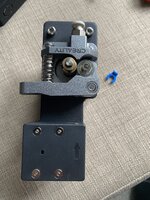
I pulled off the extruder.
Stepper looks and is designated the same.
292B8219-3C32-4BA7-9F5B-C298311C2C84.jpeg

Close up exam of the extruder, didn’t tell me anything. Just some filament dust.
13B7E3CE-D2F4-4721-8694-BE728F14D402.jpeg

2F402EB9-53C2-41DE-88B1-2662881D26E4.jpeg

Everything moves as it should.
 

harley jim

Well-known member
Joined
Dec 6, 2013
Messages
11,385
Location
Cleveland Tn..........out in the sticks
Hello everyone, I just set up my first printer and I'm starting the setup of a laptop to use with it. I dont have a clue of what I'm doing but I want to learn, and several people have said this is the thread to watch and learn from, so I'm here and have been reading everything, I have an Ender3 and I'm going to install fusion 360 on the laptop, Jim.
 

bugnut

ALLIANCE MEMBER
Joined
Jul 14, 2012
Messages
3,831
Location
Central Ohio
HJ do not know if you have fiddled with fusion and don't want to engage in a debate but found that for folks without any experience, sketchup and the youtube tutorials made it easier for them to quickly get models drawn.
Also go to thingiverse and other similar places as a host of already created pieces are ready to download and print!
 

86turbodsl

Well-known member
Joined
Jul 1, 2005
Messages
6,553
Location
Michigan
Been watching this thread for a while, i have an Ender3 i haven't setup yet. I'm a very experienced CAD guy, using Creo daily. Does anyone have any experience using Octoprint or equivalent? I'm not going to do the sd card shuffle. I picked up a few old HP thin clients i want to deploy one of them for remote control. I have no experience on the slicing and printer side of things, but general knowledge of cnc i do have.
 

Mark_17

Well-known member
Joined
Jun 27, 2018
Messages
742
Location
NJ
Octoprint and the other slicing programs are very similar (if not identical). With your CAD experience, you won't have any issue navigating them, they are very simple and straight forward.

A few minutes on youtube and you can learn how to do all the basic setups in Octoprint and add multiples to the same print etc...
 

nicholam77

Well-known member
Joined
Dec 18, 2016
Messages
2,655
Location
Minneapolis, MN
Hello everyone, I just set up my first printer and I'm starting the setup of a laptop to use with it. I dont have a clue of what I'm doing but I want to learn, and several people have said this is the thread to watch and learn from, so I'm here and have been reading everything, I have an Ender3 and I'm going to install fusion 360 on the laptop, Jim.

I would highly recommend watching some 3D printing overview / basics tutorials on YouTube. I'm sure there are tons geared toward the Ender 3 specifically. I'm sure people on this thread will be happy to answer questions but that's probably the fastest way to get up to speed.

In a nutshell to print something you need:

1. A 3D model, usually in the form of a .STL (mesh object) file
2. A "slicing" software program to translate that .STL model file into g-code the printer can understand
3. Save resulting g-code to your printer's SD card

For the first item, I would highly recommend starting with pre-made models from the internet vs. designing your own, unless you already happen to know Fusion 360. Some common websites to browse and download models (in STL format) are Thingiverse and Printables.

For the second item, there are multiple free Slicers out there, probably the most popular being Ultimaker Cura and Prusa Slicer. I use Cura so I can only speak to that, but Cura has a preset printer profile with appropriate settings for the Ender 3. Again... YouTube how to set up an Ender 3 printer with Cura and you'll get lots of hits. Also watch a video on how to slice a file in Cura, and you'll be off to the races.

Fusion 360 is awesome if you need to design your own stuff, but not essential to 3D printing if you are able to find models you like online. If you're trying to learn Fusion 360 and have no CAD experience (like me), be prepared for a fairly steep learning curve.

Hope that helps and good luck!

Been watching this thread for a while, i have an Ender3 i haven't setup yet. I'm a very experienced CAD guy, using Creo daily. Does anyone have any experience using Octoprint or equivalent? I'm not going to do the sd card shuffle. I picked up a few old HP thin clients i want to deploy one of them for remote control. I have no experience on the slicing and printer side of things, but general knowledge of cnc i do have.

Octoprint is great. I'm running on a Pi Zero 2. Not only do you eliminate the "SD card shuffle" as you put it, but it has a ton of useful plug-ins, from webcam monitoring, mobile app notifications when your print finishes, bed leveling, etc. Octoprint allows for remote control off your network with Octo Everywhere. There might be other solutions, too. Highly recommend.
 

Keyblazer

Well-known member
Joined
Jul 30, 2009
Messages
1,471
Location
Irvine, CA
Hello everyone, I just set up my first printer and I'm starting the setup of a laptop to use with it. I dont have a clue of what I'm doing but I want to learn, and several people have said this is the thread to watch and learn from, so I'm here and have been reading everything, I have an Ender3 and I'm going to install fusion 360 on the laptop, Jim.
Welcome to the Madness Jim.
I’m kinda new, too but totally addicted. I started with an Ender 3 V2, added an Ender 5 Plus, and now working on building printer #3, which will be a hybrid Ender 3 V2, with a lot of mods per my last post.
For me, the most important thing to learn/understand/ master is bed leveling. Get that down and you are 75% there.

Thingyverse is an awesome place to start.
I’ve found, and printed so many projects from there.
For me, the fun part is making the printer, print itself updated parts!
Last couple of days it’s been printing upgrade parts for my Ender 5 Plus.
Front “Drop Bar” relocation brackets and frame stiffeners.
I have about 8x more stiffener brackets to print now.
6038514C-2A35-4804-8851-113F727F983C.jpeg
Welcome, and go for it!
 

Keyblazer

Well-known member
Joined
Jul 30, 2009
Messages
1,471
Location
Irvine, CA
I like these for calibration on my Creality CR-6 SE. https://www.thingiverse.com/thing:1278865

Try printing one really slowly, they only take 10 minutes or so.
Actually, I’d done a test cube when I’d first set up the printer.
This was the result, that looked good to me…
AF9F59C0-1D64-40F8-997E-29F4F8C70338.jpeg

So, after messing with the this extrusion issue for hours, I decided to swap the Red unit, for the Silver “Official Creality All Metal” extruder, that just arrived.
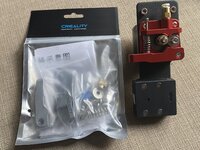
5B05B4AC-2133-4DE9-8805-304B2459FF6F.jpeg

5821AD10-9F0F-44FF-BD8F-FB0E65F2B4AE.jpeg

I wasted a no time fitting it…
7794F326-C085-4C07-AC98-7287D727E8FC.jpeg

And the results were obvious…. Visually and audibly. No clicking, just prints.
Here is the Cube I just printed.
302C638F-B3B8-49EE-A85A-E9D56C3A318A.jpegNext to the one I printed before I added the new extruder…
I don’t think it’s perfect, and I would welcome input.
Edit:
Ah, Looks like the part cooling fan was not switched on...

66E69ED4-4534-4F70-BD60-111C9A80B7C2.jpeg
So clearly there is/was something wrong with the Red Version… I don’t know what it is, but the results speak for themselves.
I will be returning it.
Buyer beware.

I will run that same flow tower, and post results.
 
Last edited:

Jswain

Well-known member
Joined
Apr 26, 2013
Messages
2,449
Location
Calgary, AB
Actually, I’d done a test cube when I’d first set up the printer.
This was the result, that looked good to me…
AF9F59C0-1D64-40F8-997E-29F4F8C70338.jpeg

So, after messing with the this extrusion issue for hours, I decided to swap the Red unit, for the Silver “Official Creality All Metal” extruder, that just arrived.

5B05B4AC-2133-4DE9-8805-304B2459FF6F.jpeg

5821AD10-9F0F-44FF-BD8F-FB0E65F2B4AE.jpeg

I wasted a no time fitting it…
7794F326-C085-4C07-AC98-7287D727E8FC.jpeg

And the results were obvious…. Visually and audibly. No clicking, just prints.
Here is the Cube I just printed.
302C638F-B3B8-49EE-A85A-E9D56C3A318A.jpegNext to the one I printed before I added the new extruder…
I don’t think it’s perfect, and I would welcome input.
Edit:
Ah, Looks like the part cooling fan was not switched on...

66E69ED4-4534-4F70-BD60-111C9A80B7C2.jpeg
So clearly there is/was something wrong with the Red Version… I don’t know what it is, but the results speak for themselves.
I will be returning it.
Buyer beware.

I will run that same flow tower, and post results.
I use that same red one, no issues. Perhaps your cooling fan is cooling your nozzle too much and that's why you had no clicking....are you running a silicone cover?
 

slodat

ALLIANCE MEMBER
Joined
Feb 6, 2010
Messages
3,679
Location
Central-ish, WA
The X1 arrived today. Fair warning… lots of photos are coming, I’m sure. My five minute assessment is it is awesome! Literally did nothing but power it up and load filament.

B7BB8582-8951-48A6-A34A-131724D3502B.jpeg

This is a test print that comes loaded on the printer. The orange is Bambu PLA that came in the box. The black has been open and on the shelf for at least 18 months.

68E9687C-4A9F-4E75-A6D7-DDFA1C76698A.jpeg

It is truly difficult to believe the quality of this print. Top and bottom. And, effortless two colors! I’ll put the machine through its paces seeing how it does running my parts.

Initial impression is it’s a very nice machine and appears to print well out of the box. Printing a bin now. I’ll load up ABS after it’s done and see how that goes.

Screenshot from the ap while I’m out getting a bite to eat:

C4A253CC-4FED-49C4-9E37-FE5B15CDE355.png
 

harley jim

Well-known member
Joined
Dec 6, 2013
Messages
11,385
Location
Cleveland Tn..........out in the sticks
Thanks everyone, that's some good advice. I did cad design at the fab shop, unfortunately it was Draftsight which was canceled by Dassault systems. I have been on youtube watching lots of video and taking notes, I have some downtime coming up starting next friday so I'm going to be studying hard.
 

Keyblazer

Well-known member
Joined
Jul 30, 2009
Messages
1,471
Location
Irvine, CA
That Bambu printer looks gorgeous.
What do they cost?

I use that same red one, no issues. Perhaps your cooling fan is cooling your nozzle too much and that's why you had no clicking....are you running a silicone cover?
Yes, running a sock.
That cube looked ok, So I decided to try a print I’ve been waiting to print for a while.
Makita battery charger wall mount.
Set it off about 5pm last night.
I checked it, and it seemed to be going ok, there was no clicking from the extruder, but I did notice some brown patches and little stringy bits of the blue Meta PLA that looked burnt as it laid down the base.
But when I got up this morning, it was finished printing, and this is what greeted me…😬

081CA21D-3471-46CF-B1DE-69B73457E683.jpeg

I guess I’m at a loss at this point.
I will check my extruder calibration again this morning, and report back.
Maybe I messed something up in Cura….
Edit:
I didn’t spot til just now that it looks like there was a X shift too. Weird.
 
Last edited:
To avoid these ads, REGISTER NOW!

jayz66ragtop

Well-known member
Joined
Sep 11, 2009
Messages
1,521
Location
SoCal
X1 just did this after printing the first layer:

702D49ED-31F6-4ABD-B413-C3B3505BCE1D.jpeg

If these features work well, it could bode quite well for process reliability.
Yup, that's one of the features I really like. It self inspects and makes adjustments on the fly.

If you haven't already have the printer check for updates. There was one that came out mid Decmeber so your's may not be running it.
 

slodat

ALLIANCE MEMBER
Joined
Feb 6, 2010
Messages
3,679
Location
Central-ish, WA
Yup, that's one of the features I really like. It self inspects and makes adjustments on the fly.

If you haven't already have the printer check for updates. There was one that came out mid Decmeber so your's may not be running it.
It prompted to install updates on the first power up. It's running the latest stuff. I'm very impressed with it so far. I need to get it dialed in running Overture PETG and I'll be quite happy with it.

The AMS screwed up when a roll of filament ran out. I had to disconnect a few PTFE tube connections to remove the filament. Not a big deal and it didn't scrap the in progress print. Hopefully the run out piece is reliable.
 

Jswain

Well-known member
Joined
Apr 26, 2013
Messages
2,449
Location
Calgary, AB
That Bambu printer looks gorgeous.
What do they cost?


Yes, running a sock.
That cube looked ok, So I decided to try a print I’ve been waiting to print for a while.
Makita battery charger wall mount.
Set it off about 5pm last night.
I checked it, and it seemed to be going ok, there was no clicking from the extruder, but I did notice some brown patches and little stringy bits of the blue Meta PLA that looked burnt as it laid down the base.
But when I got up this morning, it was finished printing, and this is what greeted me…😬

081CA21D-3471-46CF-B1DE-69B73457E683.jpeg

I guess I’m at a loss at this point.
I will check my extruder calibration again this morning, and report back.
Maybe I messed something up in Cura….
Edit:
I didn’t spot til just now that it looks like there was a X shift too. Weird.
Maybe post some screen shots of your slicer settings
 

jayz66ragtop

Well-known member
Joined
Sep 11, 2009
Messages
1,521
Location
SoCal
It prompted to install updates on the first power up. It's running the latest stuff. I'm very impressed with it so far. I need to get it dialed in running Overture PETG and I'll be quite happy with it.

The AMS screwed up when a roll of filament ran out. I had to disconnect a few PTFE tube connections to remove the filament. Not a big deal and it didn't scrap the in progress print. Hopefully the run out piece is reliable.
Oh, ok. I think mine did an update as well after connecting to the WiFi but couldn't remember. Funny you say that about the PETG because since the last update it seems ABS and TPU print fine with the default setting but the PETG I have doesn't seem as happy with the default settings. Since I had ABS in the same color I just switched to it after the first small part acted up.

Interesting about the PTFE tube. I ran out once in a print as well, I think it did have to tell the AMS to unload the filament and pulled it out after disconnecting the PTFE tube that goes from the AMS to the printer.


I think I mentioned it before but head the warnings on the FAQ and don't trying to print TPU through the AMS. Trust me, don't do it... I got lucky and was able to get it out without issue but others had to take the AMS apart to get all the filament out.
 

jayz66ragtop

Well-known member
Joined
Sep 11, 2009
Messages
1,521
Location
SoCal
My Bambu arrived on Thursday, very impressed so far although I have had limited time to play due to business commitments. I hope to start catching up here next week…
Awesome! Hopefully you have as much good luck as slodat and I have with it.

I should have gotten a referral fee or something LOL
 

slodat

ALLIANCE MEMBER
Joined
Feb 6, 2010
Messages
3,679
Location
Central-ish, WA
Oh, ok. I think mine did an update as well after connecting to the WiFi but couldn't remember. Funny you say that about the PETG because since the last update it seems ABS and TPU print fine with the default setting but the PETG I have doesn't seem as happy with the default settings. Since I had ABS in the same color I just switched to it after the first small part acted up.

Interesting about the PTFE tube. I ran out once in a print as well, I think it did have to tell the AMS to unload the filament and pulled it out after disconnecting the PTFE tube that goes from the AMS to the printer.


I think I mentioned it before but head the warnings on the FAQ and don't trying to print TPU through the AMS. Trust me, don't do it... I got lucky and was able to get it out without issue but others had to take the AMS apart to get all the filament out.
It took me considerable trial and error to get results i could live with running PETG in the Prusa. The only real trouble I’m having with it in the X1 is the 5% gyroid infill. It’s.. soft. I don’t know how else to describe it.
Awesome! Hopefully you have as much good luck as slodat and I have with it.

I should have gotten a referral fee or something LOL
Agree! Your posts are why I bought the X1.
 

Keyblazer

Well-known member
Joined
Jul 30, 2009
Messages
1,471
Location
Irvine, CA
Anyones you have adjusted

That’s kinda my issue.
I don’t remember changing any slicer settings.
If I remember correctly, all I did was change the nozzle setting in the top bar Cura menu to a 0.6mm.

Ran two “Retraction Tower Tests” first yesterday.
Both were from the Cura Extensions menu.
This one is the simple one.
Pics are front and back of the tower.
9B136285-7A9D-4A74-93B6-9A4AEE3691CA.jpeg0A744CFB-01DF-4E36-94B0-CA9A2BD34EE0.jpeg
Then I ran a more complex one, called “Retraction 1-6”.
I don’t even know what that means… LOL
Result.
1413BEBB-B053-4BDF-ABFC-B599EEE38B4E.jpeg

So, I swapped to white filament, and checked the extruder calibration yesterday.
This is what I did.
Marked the filament, where it stopped.
Pulled it out, marked 100mm and 120mm
2B0C2BBC-522F-4C12-9E52-96D45C9161AC.jpeg
Reinserted.
49CBD53A-2CC0-4EED-94DC-D9869CB3E971.jpeg

Set the Creality pad to preset heat the nozzle to 200c.
Found the Extruder menu, and advanced it 100mm… because 100 is not an option, I did 4x 25mm.
9C62F0BF-9129-4FC1-B166-FCCC6E1D60E3.jpeg

This is how it looked.., under extruded by maybe 5 mm.
7303C160-6CE5-447C-9D4E-F367ACC32299.jpeg

So. Basically, it’s still under extruding?
Will try to adjust the E-steps today.
 

Keyblazer

Well-known member
Joined
Jul 30, 2009
Messages
1,471
Location
Irvine, CA
Well, I thought I would run a calibration print while I had the white filament in.
As soon as it started printing, I was confused. Big blobs of the previous blue filament in the white, on the second layer,long after it should have purged. Some of them were burnt looking.
Extruder started popping again.
Layers looked weak, so I stopped the print.
5C1677BB-057E-4961-90A3-8DABE0E14DA8.jpeg

Thought I would clear the nozzle and purge the hot end.
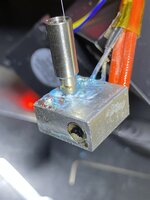
As I looked closer at it, I spotted blue, thru the fan… where there should not be any!
48DCDB48-FBF2-4068-A29D-E07CCAC7A151.jpeg

Pulled of the fan shroud to be met with this.
12972060-8624-45B6-BBC9-652ACC8ADC64.jpeg2D72C3E4-6756-4580-98FF-1821FCDCF805.jpeg

I’m confused where this filament t came from.
Maybe I didn’t get the Bowden tube seated properly, or is there another issue?

Pulled it all apart.
Screws holding the hot end to the upper heat sink/cooler were not very tight.
09F7060D-56E3-4145-82C3-E558D32450F2.jpeg

Would this cause my print issues? I hope this is it.
At this point, I’m thinking I’ll just replace the whole hot end with a better one.
Wondering if I should go Direct Drive too.
Want to try TPU at some point.
My Ender 3 Creality direct drive unit has been flawless.
Looked at Microswiss, and the new NG looks super neat, but I don’t see how you can mount the BL Touch…
Opinions?
 

Black300zx

Well-known member
Joined
Apr 8, 2019
Messages
781
Location
Elkton, Md
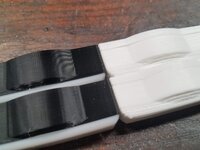
So I spent a couple days scratching my head with some really bad lamination quality on a set of parts. These are replacement slider bushings for the seats on my boat which are no longer available from Grady White. I made myself a set about 3 weeks ago which printed flawlessly with the PLA filament that was included with my Ender3 Max Neo. They fit "good enough" but I wanted to make a few minor refinements before offering sets up to others who need these parts.

I finally realized that my issues started when I switched over to a fresh spool of filament because the original spool didn't have enough left. I switched back to the remainder of the original filament, printed about the first 20% of it, then loaded up a spool of black PLA that I had been using for everything else. Boom - perfect prints again.

The white spool of Overture PLA was brand new in a vacuum sealed container. Did I just somehow get a bad spool of filament? The all white parts have some terrible delamination with laminations literally separating if I gripped them about as firmly as I'd hold a pencil. The white/black hybrid parts started off with a different spool of white PLA and then changed to black. These parts are the quality I'm used to. Both printed with the exact same gcode file.
 

Attachments

  • 20230115_120857.jpg
    20230115_120857.jpg
    1,020.4 KB · Views: 24
  • 20230115_120907.jpg
    20230115_120907.jpg
    460.4 KB · Views: 25

Jswain

Well-known member
Joined
Apr 26, 2013
Messages
2,449
Location
Calgary, AB
So I spent a couple days scratching my head with some really bad lamination quality on a set of parts. These are replacement slider bushings for the seats on my boat which are no longer available from Grady White. I made myself a set about 3 weeks ago which printed flawlessly with the PLA filament that was included with my Ender3 Max Neo. They fit "good enough" but I wanted to make a few minor refinements before offering sets up to others who need these parts.

I finally realized that my issues started when I switched over to a fresh spool of filament because the original spool didn't have enough left. I switched back to the remainder of the original filament, printed about the first 20% of it, then loaded up a spool of black PLA that I had been using for everything else. Boom - perfect prints again.

The white spool of Overture PLA was brand new in a vacuum sealed container. Did I just somehow get a bad spool of filament? The all white parts have some terrible delamination with laminations literally separating if I gripped them about as firmly as I'd hold a pencil. The white/black hybrid parts started off with a different spool of white PLA and then changed to black. These parts are the quality I'm used to. Both printed with the exact same gcode file.
You may need to adjust settings for the new brand of filament, or you may need to dry the filament
 

Black300zx

Well-known member
Joined
Apr 8, 2019
Messages
781
Location
Elkton, Md
You may need to adjust settings for the new brand of filament, or you may need to dry the filament
Same brand, purchased and opened at the same time and stored right next to each other. I'll play around with temps a bit to see if I can't get that spool working right
 

slodat

ALLIANCE MEMBER
Joined
Feb 6, 2010
Messages
3,679
Location
Central-ish, WA
Printed a poop shoot for the X1. This is a tall part and it turned out nice.

010F2020-7B44-4D14-9F35-F96F1EF0FED3.jpeg

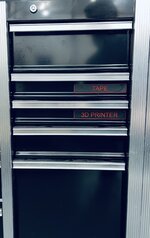
And, drawer labels for all the drawers in the shop.

1673835861242.png

I am so happy with these. I used red for the contrast color because it's the only color I have in PLA. These are nice. On the build plate fresh out of the printer:

773E8A2B-7D62-4801-83CF-F28E165E0241.jpeg

This shows the magnets on the back.

F1202979-71A2-4664-A2E6-1C10F3713D8F.jpeg

And, installed. I will be making a lot of these over time.

1669188E-BF45-48DC-9C50-863FBC093EC4.jpeg

1CFD50E2-6937-464D-A9C1-D45079E6FBE8.jpeg
 
To avoid these ads, REGISTER NOW!
Top Bottom