Happy to - PMed my email addy.Does anyone have the full version of Fusion 360 that wouldn't mind converting an F3D to DXF for me? I need one file and don't feel like the ~$70/mo would be a good bang for the buck investment at this time.


What printer are you using, a bambu? My first instinct looking at the print is that it was done a little too quickly, acceleration and jerk could be calibrated to get crisper edges. That will help with color bleed on it's own. What does your purge block look like?Anybody have any recommendations for improving this print? I am comfortable printing with multiple colors, but this is the first time I have tried printing multiple colors at the same layer height. Seems like there is just a little bleed, likely from the hot nozzle touching the black after it's already been printed and is doing the green run.
Ender 3 v2What printer are you using, a bambu? My first instinct looking at the print is that it was done a little too quickly, acceleration and jerk could be calibrated to get crisper edges. That will help with color bleed on it's own. What does your purge block look like?
Have you got explicit instructions for that infill? I just leave holes, and fill them in with a 3-D pen. I'd love to do that with my Ender, but haven't had any luck.Ender 3 v2
Have you calibrated your acceleration and jerk settings? Depending on what board you have it may be junction deviation not jerk.Ender 3 v2
Generally what I would do is separate the print into 2 STLs, where the 2nd file has a void for the 1st file, and then all of the work is done in the slicerHave you got explicit instructions for that infill? I just leave holes, and fill them in with a 3-D pen. I'd love to do that with my Ender, but haven't had any luck.
On your first file, after slicing it, open the Gcode in notepad. You should see an M140 as one of the last few lines of Gcode. Delete that line and the bed won't try to drop temperature so you don't have to monitor it as it will maintain temperature until you interfere.Generally what I would do is separate the print into 2 STLs, where the 2nd file has a void for the 1st file, and then all of the work is done in the slicer
Now that I type this out, it looks like a lot, but it really isn't lol
- Open both STLs onto the same project and align them exactly how you want to print them
- Get your print profile settings correct
- Note the X, Y, and possibly even Z coordinates for the 2nd object
- Delete the 2nd object from the project
- Slice and print the 1st object
- Monitor the 1st print and preheat the printer after it finishes ASAP
- Change out the filament color for the 2nd print
- Hit Undo in your slicer to bring back your 2nd object, or re-add it and use the coordinates you wrote down to put it back in the correct place
- Delete the 1st object from the project
- Print the 2nd object
thanks now i know what ill be making for christmas presentsAnybody have any recommendations for improving this print? I am comfortable printing with multiple colors, but this is the first time I have tried printing multiple colors at the same layer height. Seems like there is just a little bleed, likely from the hot nozzle touching the black after it's already been printed and is doing the green run.
![]()


The only changes i make between PETG and ABS is a little bit lower Z-offset (and running a little slower for ABS).That's how I feel. My Prusa is really well dialed in for PETG. It will stick to that. The X1C is truly effortless. It just makes nice parts.
Coming from someone who owns printers up and down the scale from contraptions I built myself up to Raise 3d industrial machines the Bambu X1 is worth the money. I have mine running profit prints non-stop. The lidar has caught full build plates of first layer garbage of expensive filaments that wouldn't have been caught until they were a half-kg of waste on the P1P. I've been using Octoprint for years and started using the Spaghetti-detective when it was still just in it's infancy and it wouldn't have caught the imperfections the lidar does.I'm considering a bambu printer. Having trouble deciding between the P1P and the X1. I like the Lidar and the touch screen of the X1, just not sure if the extra $500 is worth it. Anyone have experience with the P1P yet?
That's a good point, thank you for the feedback, it's much appreciated.Coming from someone who owns printers up and down the scale from contraptions I built myself up to Raise 3d industrial machines the Bambu X1 is worth the money. I have mine running profit prints non-stop. The lidar has caught full build plates of first layer garbage of expensive filaments that wouldn't have been caught until they were a half-kg of waste on the P1P. I've been using Octoprint for years and started using the Spaghetti-detective when it was still just in it's infancy and it wouldn't have caught the imperfections the lidar does.
The lidar and included camera are worth it. This is my current favorite printer, it's not the most capable by size but it does have the widest range.
It's like tools, trucks, houses, shops. Buy once cry once, you may not always need it but man it's nice to have.
That's a great idea!


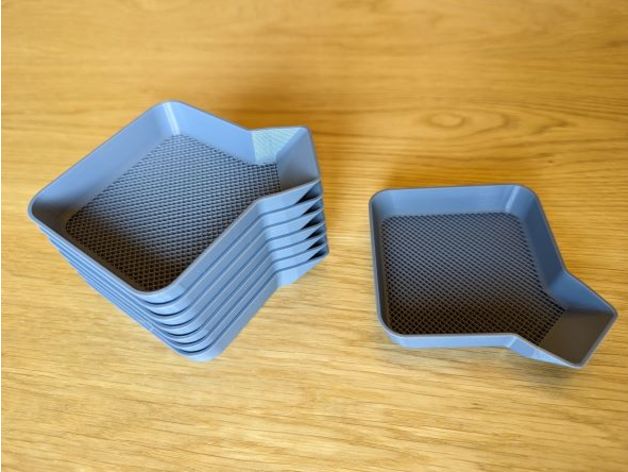
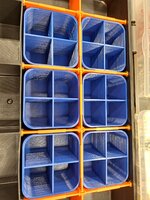
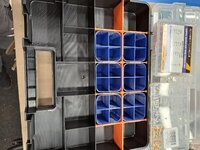
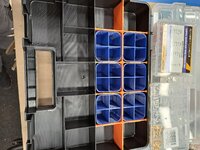
Made another. This time for a tension/compression tapping chuck. I have a few collets and they have been rolling around in a Shaller bin. wanted a better way to organize and store what will be a full set #6 through 1/2. Spent some time in Fusion..
Some time for the X1C to do its thing..
As I learn to model things, I try to add more detail when it makes sense. The pockets for these collets are a great example. Tray turned out great.
![]()
Thank you! I'm really happy with how these turn out. I am using ironing on these. I use it on most anything with a horizontal flat surface.@slodat That tray looks great. Is the top surface ironed or is that how smooth the top layers usually come out with that printer?
It is white filament. Printed with the Bambu X1C.Looks great! I've been meaning to do some tool holders for a while now.
Are those numbers painted/sharpied or is that a white filament?
Well, I went ahead and cried once, now I'm excited to get the printer (ETA is end of March). I bought it with the AMS however, I'm not sure how much I will use it. I read that the AMS is sealed? Is it enough to keep hydroscopic filament dry?Coming from someone who owns printers up and down the scale from contraptions I built myself up to Raise 3d industrial machines the Bambu X1 is worth the money. I have mine running profit prints non-stop. The lidar has caught full build plates of first layer garbage of expensive filaments that wouldn't have been caught until they were a half-kg of waste on the P1P. I've been using Octoprint for years and started using the Spaghetti-detective when it was still just in it's infancy and it wouldn't have caught the imperfections the lidar does.
The lidar and included camera are worth it. This is my current favorite printer, it's not the most capable by size but it does have the widest range.
It's like tools, trucks, houses, shops. Buy once cry once, you may not always need it but man it's nice to have.
Not completely, there is two spots inside for desiccant and it should ship with some. If the desiccant is good and your spools are already dry you should be fine. The app and the screen will also tell you when the humidity is high in the AMS.Well, I went ahead and cried once, now I'm excited to get the printer (ETA is end of March). I bought it with the AMS however, I'm not sure how much I will use it. I read that the AMS is sealed? Is it enough to keep hydroscopic filament dry?