To avoid these ads, REGISTER NOW!

The Everything 3D Printer Thread

Jswain

Well-known member
Joined
Apr 26, 2013
Messages
2,449
Location
Calgary, AB
Having a problem that I'm hoping someone can help me on.

I have an Ender 3 pro. I've used it for a couple years with no issues.

Now I am having feeder issues. The issues seem to be intermittent, but lately they have happened on all of my long prints. Prints that are 1-1.5 hours seem to be fine with maybe 1 layer not right.

I replaced the plastic pieces on top of the extruder motor with aluminum, then replaced the extruder motor, then the hot end and the tube between them.

I'm stumped. I've been using the same brand of filament, the same slicer settings, nothing has changed.

Any one have any ideas to try?
Is your extruder clicking? Did you recalibrate the e steps when you changed to the aluminum extruder as it may have a different size gear?

Perhaps it's failing on a layer that requires more flow then the other layers and starting to click/not extrude enough material. Easy fix if so, recalibrate extruder e steps and if it's still clicking in those areas that require more flow you can bump the temp up some or slow the print speed
 
To avoid these ads, REGISTER NOW!

ArcReactorKC

Well-known member
Joined
Jun 1, 2019
Messages
2,237
Location
Out in the county NE of KCMO
I've been looking for a light solution for a while now to keep an eye on things better in Octoprint without leaving the lights on in our Bike Room that also houses the 3D printer.

I settled on this rechargeable LED bar with magnetic swivel mount for $17 on amazon rather than a USB/Smart light option. For the times I need it I can turn it on or let it run out. The mount itself has 3m on the back attached to the bottom of my lower TV. The light and female side of the mount have interlocking magnets which is a nice touch.


It came with a second mounting base so I can technically take it and mount it elsewhere if/when that happens.
There is an octoprint plug in for controlling an LED strip by GPIO pins. On my coreception I have it set to turn on when it starts printing and shut off when it's done.
 

Mark_17

Well-known member
Joined
Jun 27, 2018
Messages
742
Location
NJ
Is your extruder clicking? Did you recalibrate the e steps when you changed to the aluminum extruder as it may have a different size gear?

Perhaps it's failing on a layer that requires more flow then the other layers and starting to click/not extrude enough material. Easy fix if so, recalibrate extruder e steps and if it's still clicking in those areas that require more flow you can bump the temp up some or slow the print speed

This is the upgrade I did. It uses the same gear as stock. With the old stepper motor it would do that clicking which started out of no where.

It doesn't click any more and will actually not feed, so when the print fails the bed is just empty. It doesn't do the typical spaghetti that you'd expect.
 

Jswain

Well-known member
Joined
Apr 26, 2013
Messages
2,449
Location
Calgary, AB

This is the upgrade I did. It uses the same gear as stock. With the old stepper motor it would do that clicking which started out of no where.

It doesn't click any more and will actually not feed, so when the print fails the bed is just empty. It doesn't do the typical spaghetti that you'd expect.
So the stepper motor isn't spinning at all? Or it's spinning but not feeding? Sounds like either a bad stepper motor/drivers or a loose gear/cracked arm on the extruder
 

Jehannum

Well-known member
Joined
May 3, 2012
Messages
1,347
Location
Albuquerque, NM

This is the upgrade I did. It uses the same gear as stock. With the old stepper motor it would do that clicking which started out of no where.

It doesn't click any more and will actually not feed, so when the print fails the bed is just empty. It doesn't do the typical spaghetti that you'd expect.
That sounds like a clog in the hot end.

If filament doesn't feed and the extruder doesn't click, then either you've got so much tension on the extruder that the drag is jamming the motor, or the hot end is clogged and the extruder gear is digging into the filament.
 

Mark_17

Well-known member
Joined
Jun 27, 2018
Messages
742
Location
NJ
So the stepper motor isn't spinning at all? Or it's spinning but not feeding? Sounds like either a bad stepper motor/drivers or a loose gear/cracked arm on the extruder
It spins and feeds, then after an ~hour or so it stops.
That sounds like a clog in the hot end.

If filament doesn't feed and the extruder doesn't click, then either you've got so much tension on the extruder that the drag is jamming the motor, or the hot end is clogged and the extruder gear is digging into the filament.
I did have too much tension on the extruder, fixed that and it stopped digging into the filament. Hot end is new and I put a brand new nozzle before my last print attempt.

I guess at this point I need to go back to the basics and go through everything again. I'll do that this weekend when I have the time to take pictures and videos.
 

Jswain

Well-known member
Joined
Apr 26, 2013
Messages
2,449
Location
Calgary, AB
Agreed sounds like you have a nozzle clogging. Adjust your temperature or possibly you are retracting too much. Do you have a silicone sock on the bottom of the hotend?
 

Mark_17

Well-known member
Joined
Jun 27, 2018
Messages
742
Location
NJ
Agreed sounds like you have a nozzle clogging. Adjust your temperature or possibly you are retracting too much. Do you have a silicone sock on the bottom of the hotend?
Running the hot end at 205. And yes to the silicone sock. I use the Ultimaker slicer, I'm not sure if or how to change the retracting setting.
 

Jswain

Well-known member
Joined
Apr 26, 2013
Messages
2,449
Location
Calgary, AB
Running the hot end at 205. And yes to the silicone sock. I use the Ultimaker slicer, I'm not sure if or how to change the retracting setting.
Not sure what filament you are using and I usually use petg but you could try increasing the temp 10 degrees and see if that helps. Or slowing the print speed. Retraction settings would be changed in the slicer settings as well.

Also that Allen bolt in the top corner on the Amazon link make sure it is not too tight or it won't allow the arm to pivot and provide tension on the roller against the gear

If it's an all new hotend you may need to play with parameters some again to find good settings. Is the thermistor & heating element the same? Same style hotend? Same size/type of metal nozzle?
 

Poolshark314

Well-known member
Joined
Jul 5, 2021
Messages
658
Location
MD
It spins and feeds, then after an ~hour or so it stops.

I did have too much tension on the extruder, fixed that and it stopped digging into the filament. Hot end is new and I put a brand new nozzle before my last print attempt.

I guess at this point I need to go back to the basics and go through everything again. I'll do that this weekend when I have the time to take pictures and videos.
I agree it sounds like a clogged hotend. Have you tried to heat up your hotend, and then tell the printer to feed filament and see if it's coming out correctly. Did you replace the PTFE tubing as well? You might have a broken piece of filament stuck in there causing a jam in the tubing. I would try Luke's Hotend fix also if it ends up being a clog.
 

Mark_17

Well-known member
Joined
Jun 27, 2018
Messages
742
Location
NJ
I agree it sounds like a clogged hotend. Have you tried to heat up your hotend, and then tell the printer to feed filament and see if it's coming out correctly. Did you replace the PTFE tubing as well? You might have a broken piece of filament stuck in there causing a jam in the tubing. I would try Luke's Hotend fix also if it ends up being a clog.
I run PLA, the same brand of stuff I've been using for the past year or so.

If the hotend is up to temp, I can very easily manually feed more filament through it.

I appreciate everyone chiming in. I'll go through everything again and take some pics/vids then report back.
 

Poolshark314

Well-known member
Joined
Jul 5, 2021
Messages
658
Location
MD
I run PLA, the same brand of stuff I've been using for the past year or so.

If the hotend is up to temp, I can very easily manually feed more filament through it.

I appreciate everyone chiming in. I'll go through everything again and take some pics/vids then report back.
Understood, but asking if you checked the either opaque (or blue PTFE) bowden tubing that runs from the extruder to the hotend. Blue tubing is smaller diameter, so sometimes it could cause a jam. Also, when you say manually feed filament, do you mean you are pushing filament through the extruder with your hand, or sending commands through the printer interface? If your extruder was slipping, that would make a difference
 

Mark_17

Well-known member
Joined
Jun 27, 2018
Messages
742
Location
NJ
Understood, but asking if you checked the either opaque (or blue PTFE) bowden tubing that runs from the extruder to the hotend. Blue tubing is smaller diameter, so sometimes it could cause a jam. Also, when you say manually feed filament, do you mean you are pushing filament through the extruder with your hand, or sending commands through the printer interface? If your extruder was slipping, that would make a difference
Blue PTFE tube was replaced when I did the stepper motor and hotend.

I feed it thru by hand. After I stop the print i release the arm and it takes virtually no effort to feed the filament.
 

Jswain

Well-known member
Joined
Apr 26, 2013
Messages
2,449
Location
Calgary, AB
Blue PTFE tube was replaced when I did the stepper motor and hotend.

I feed it thru by hand. After I stop the print i release the arm and it takes virtually no effort to feed the filament.
But if you do the same and use the machine to control the stepper motor does it work?

Don't rule out a corrupt SD card either, if you haven't formatted it lately do so. Or try another, I had an issue with mine where it would just stop at 70% and it took some figuring out to find I just needed to format the card,now I try to do a quick format everytime
 

Poolshark314

Well-known member
Joined
Jul 5, 2021
Messages
658
Location
MD
Blue PTFE tube was replaced when I did the stepper motor and hotend.

I feed it thru by hand. After I stop the print i release the arm and it takes virtually no effort to feed the filament.
Yeah I would be trying it through the screen to make sure the gears are feeding correctly and consistently, since that is how the printing is done
 

ArcReactorKC

Well-known member
Joined
Jun 1, 2019
Messages
2,237
Location
Out in the county NE of KCMO
Prusa just released the MK4 and MK3>MK4 upgrades.
https://www.prusa3d.com/product/original-prusa-mk4-2
I'll just say I am unimpressed but this is exactly what I expected from Prusa at this point. It has taken them a very very long time to iterate away from the i3 platform to the XL that has yet to see a large audience.

The MK4 does bring their existing i3 platform to modern standards with the 32bit board and using a load sensor for bed leveling instead of the Pinda. The price does not make the means though in my opinion. They could have done so much more and this displays their comfort in the industry. They are not innovating or pushing the envelope as Prusa once were.

A bambu P1P has all of the same features of the Mk4 except the localized abl and quick change nozzle. I would wager the P1P will still outrun the MK4 on speed by a large margin and quality between the two will be very similar.

I was hoping for a "non-XL" corexy from them in the 200-250mm footprint to replace the at this point ancient bedslinger design.
 

ER70S-2

Well-known member
Joined
Jan 2, 2015
Messages
796
@ArcReactorKC I agree. I still like the idea of being able to upgrade my MK3S+ for faster printing and better quality, but to get both of those, you have to get the whole upgrade package which seems to be priced way too high.

At this point, I can sell my printer and enclosure and get a Bambu X1 instead of upgrading and not be out much money. That just seems like a lot of work, though. I think I'll see how the Bambus hold up and what parts availability is like down the road once more X1s get some serious print time on them.
 

ArcReactorKC

Well-known member
Joined
Jun 1, 2019
Messages
2,237
Location
Out in the county NE of KCMO
@ArcReactorKC I agree. I still like the idea of being able to upgrade my MK3S+ for faster printing and better quality, but to get both of those, you have to get the whole upgrade package which seems to be priced way too high.

At this point, I can sell my printer and enclosure and get a Bambu X1 instead of upgrading and not be out much money. That just seems like a lot of work, though. I think I'll see how the Bambus hold up and what parts availability is like down the road once more X1s get some serious print time on them.
The long term parts availability is a valid worry. Bambu is still a new company and pretty much everything is proprietary. Prusa does open source a ton and they have been around for many years so the worry they might just suddenly disappear doesn't exist with them.

I am curious to see how the new MMU3 system does though. I have a handful of printers running nightly marlin builds that I would love to add an MMU to but I've just had too much trouble with the MMU2 to want to go forward.
 

penright

ALLIANCE MEMBER
Joined
Dec 27, 2016
Messages
618
Location
SW of Mustang, OK
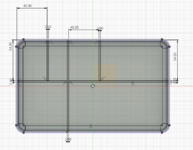
Just created a new storage trick. It is based on Dollar Generals' school, pencil cases. They are cheap, like $1 apiece. They have a design on the top to lock in for stacking proposes. The basic design is a shell that fits the case, it can be really thin since the case does all the work. Designed in dividers for whatever. Once you have the shell, you can use it over and over just changing the layout of the dividers. My first try was for my 1/4-20 rivet nuts. I wanted to store the right drill bit, then I left room for a few bolts, then a spot for some nuts and washers.
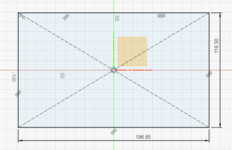
I did it in fusion 360. This is the first try, I need to tweak the roundness of the top at the edge and put a notch to clear some tabs on the front that hold the lid between the latch and back edge. I did the tweaks with some clippers. :) The print was 11 1/2 hours on my Ender 3, so I am not going to reprint it. :) I will share with anyone who uses Fusion 360.
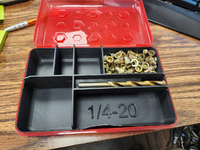
Not sure why the 1/4 emboss messed up.

1680276965755.png

1680277114773.png

Working out the size with partial prints.
1680277187456.png

Drawings
1680277327008.png

Just the base
1680277355023.png
Adding the diveders.
1680277402235.png
 
To avoid these ads, REGISTER NOW!

Jehannum

Well-known member
Joined
May 3, 2012
Messages
1,347
Location
Albuquerque, NM
Just created a new storage trick. It is based on Dollar Generals' school, pencil cases. They are cheap, like $1 apiece. They have a design on the top to lock in for stacking proposes. The basic design is a shell that fits the case, it can be really thin since the case does all the work. Designed in dividers for whatever. Once you have the shell, you can use it over and over just changing the layout of the dividers. My first try was for my 1/4-20 rivet nuts. I wanted to store the right drill bit, then I left room for a few bolts, then a spot for some nuts and washers.
I did it in fusion 360. This is the first try, I need to tweak the roundness of the top at the edge and put a notch to clear some tabs on the front that hold the lid between the latch and back edge. I did the tweaks with some clippers. :) The print was 11 1/2 hours on my Ender 3, so I am not going to reprint it. :) I will share with anyone who uses Fusion 360.
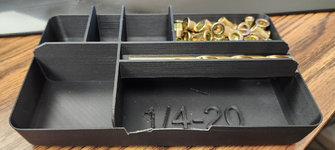
Not sure why the 1/4 emboss messed up.

1680276965755.png

1680277114773.png

Working out the size with partial prints.
1680277187456.png

Drawings
1680277327008.png

Just the base
1680277355023.png
Adding the diveders.
1680277402235.png
cool idea. I'd probably make some space for helicoils and the accompanying stuff too, so you've got all the tools in one spot per size.
 

penright

ALLIANCE MEMBER
Joined
Dec 27, 2016
Messages
618
Location
SW of Mustang, OK
cool idea. I'd probably make some space for helicoils and the accompanying stuff too, so you've got all the tools in one spot per size.
That is the cool thing, you can model it to whatever you have room for. You just have to remember the size is only about 4"ish x 6"ish.

Wonderful idea! Any plans to upload models to Thingiverse or another 3D part sharing site? I'd be interested if you do!
Yes. I need to fix some things. Maybe sometime next week I will go ahead and reprint it just to check my fixes. If those are ok then I will upload it to Thingiverse. And unless you want my layout for the 1/4 - 20 the model may not do much for you. I will post the dimension if you want to try and model it in another tool.

1680287449035.png
The solid is 31mm with a 5 deg taper. This gets the block and the bottom.
1680287493253.png
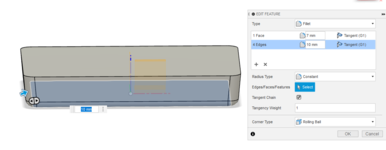
These are the roll edges to get it the final fit for the bottom.
1680287610074.png

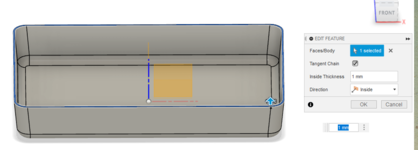
Then shell it out to 1mm. That is almost the basic shell. It does not have the reliefs for the middle tabs.
1680287646383.png
This is the notch I was talking about. This is an untested feature.
1680287756076.png

Then cut it and rolled the edges. Still untested.
1680287818054.png

So the top lid slopes out to the edges of the bottom. I could not figure out a way to model it. So I just extended the dividers up to the lid and rounded the corners so it would not interfere with the lid. I did not round them enough, so I just clipped them. That and the center notch that was not modeled in the original try. This version is what I think will work, but it is untested also. Since it stops at the side your volume is only as high as the bottom is. If I could figure out how to model the side with that curve and height it might work. The lid is not that tall and this model does not have any interior spaces, they would have full volume.
1680288031437.png


Well, I guess I can not attach them. I will update the post when I get them to Thingiverse.
 

penright

ALLIANCE MEMBER
Joined
Dec 27, 2016
Messages
618
Location
SW of Mustang, OK
You can post a zip. Make a zip file of them.
I did not know that, thanks. Here are the files in a zip. Again these are untested. Since I am reprinting it, I am adding a second drill holder for a clearance bit. I added to the edge of the existing one. I split up the body to test print, not sure if my printer with a stock cooler can bridge that distance. Here is the test print. (The zip files do not have this feature yet). The test print is showing 4 hours at start. I will report back what I find.

1680526934179.png

1680527072783.png
 

Attachments

  • PencilBoxTrayPrototype.zip
    1.2 MB · Views: 2

WoodsTruck

Well-known member
Joined
Jan 12, 2013
Messages
1,019
My slicer would put supports under that whole tray. With the weight of a drill bit I'm not sure that many knee supports are needed.
 

penright

ALLIANCE MEMBER
Joined
Dec 27, 2016
Messages
618
Location
SW of Mustang, OK
My slicer would put supports under that whole tray. With the weight of a drill bit I'm not sure that many knee supports are needed.
I can turn on supports. I try to do it without support most of the time, I added the knee more for bridging than support. Just seeing how far I can push it. :)
 

penright

ALLIANCE MEMBER
Joined
Dec 27, 2016
Messages
618
Location
SW of Mustang, OK
Here was the results of my bridge test. I was going to look at the top in the lid but it came off the plate. I am trying the whole print now.
Bridging looking ok.
1680537509135.png

Little bit lose, but I think it will work. Went for the print. We will see.
Both .stl and .f3d are in the zip. It has the spot for the clearance drill bit.
1680549410621.png
 

Attachments

  • PencilBoxTray_test_with_clearance_bit_test.zip
    1.4 MB · Views: 2

ER70S-2

Well-known member
Joined
Jan 2, 2015
Messages
796

Gator-J

Well-known member
Joined
Jun 11, 2012
Messages
47
Location
St Johns, FL
Quick question for the group.

Are most of these set ups in climate controlled environments? Anyone successfully working in a muggy southern shop?
 

penright

ALLIANCE MEMBER
Joined
Dec 27, 2016
Messages
618
Location
SW of Mustang, OK
This project is on Thingiverse Link to the project
This was to fill a need to change the oil in my compressor. I did this extension to reach under the compress between it and the frame. Then I model a funnel to fill it, so it is all in one package. Bought the oil, but have not used it yet. Also, modeled a holder. I used a rivet nut melted into a hole to bolt it to the compressor.
1680614531162.png
1680614559410.png
1680614594599.png

1680614633390.png
1680614658999.png

_____________________________________________________________________________________
EDIT 9/22/2023
I finally used it and thought I would update the post.
Worked fine. Had to make sure to tilt down so the step would clear. If it was level the amount coming out could almost overrun the small section. When using the funnel to refill performed well also. The issue was cleaning the oil out since it gets tight. I used compressed air and that dried the oil out pretty well. When the compressor was new, I ran two oil changes to clear out any break in metal. This is the first one since then and it look pretty clean.
1695404146786.png
 

Attachments

  • OilCatchAirCompressor-holder-stl-f3d.zip
    11.9 MB · Views: 0
Last edited:

ArcReactorKC

Well-known member
Joined
Jun 1, 2019
Messages
2,237
Location
Out in the county NE of KCMO
Quick question for the group.

Are most of these set ups in climate controlled environments? Anyone successfully working in a muggy southern shop?
I have printers in my server room with climate control that only run PLA prints, but the bulk of my farm is in a non-climate controlled outbuilding. In the winter I have to make sure the enclosure doors are closed or I get adhesion problems, but in the summer it's perfect. The building gets full sun all day in the summer and internal temperature is around 110F so bed heating is nice and quick. I haven't had any issues with any of my machines that run darn near 24/7 in this environment other than humidity. I have many more wet filament issues out there than inside. I keep filament dryers running on those machines.
 

LeonardY

Well-known member
Joined
Apr 16, 2011
Messages
5,020
Location
Southern California
Quick question for the group.

Are most of these set ups in climate controlled environments? Anyone successfully working in a muggy southern shop?
I have my printers in the garage. I have a insulated garage door. My printer is enclosed which in a must in my situation. It also has a spool holder inside the enclosure but I haven't needed that yet. Just got a filament dryer box but haven't needed it yet.
My resin printers are just sitting on the bench. I generally warm the resin prior to printing.
 

Mark_17

Well-known member
Joined
Jun 27, 2018
Messages
742
Location
NJ
Just an update from my feeder issues... They seem to be resolved.

I believe the original issue was due to the stepper dying. That lead me to replace the stepper and the extruder parts on top of the stepper with the upgraded aluminum pieces.

The spring I used when first installing it was wayyy to heavy. I didn't realize there were different stiffness springs in the kit. The gear was leaving marks in the filament. I changed that to the lightest spring and still had issues. Last night I swapped in the "medium" stiffness spring and ran a print that has been going for ~10 hours and it looks good.

It was a real pain to diagnose. I'd watch the first ~10 minutes of the print and everything worked as expected. It would lay down a nice first layer, the retraction worked perfect. Then something would cause the filament to not feed, maybe a small clog in the nozzle (even tho the nozzle and hot end were brand new), and the stepper would look like it was working the same but the filament was not feeding.
 

bugnut

ALLIANCE MEMBER
Joined
Jul 14, 2012
Messages
3,834
Location
Central Ohio
No enclosure, in the shop, sitting exposed to ambient air. Most days have to warm the printer before using. Summer different story, mostly pla printing.

Quick question for the group.

Are most of these set ups in climate controlled environments? Anyone successfully working in a muggy southern shop?
 

tlevan03

Well-known member
Joined
Oct 24, 2011
Messages
264
Location
Chesapeake, VA
I have an Ender 3 V2 and am having some issues with it feeding the filament. I am fairly new to this and have been making prints just for fun. I changed my filament out to another color, same diameter as the previous that was printing fine. I started a print, and it started off fine and then it stopped feeding. The wheels were just slipping on the filament. I checked for any obstructions and changed the extruder tip and tried again without success. Next, I pulled the feed wheels and cleaned them off and it's still not working. I have adjusted the tension and it started popping until I loosened it a little. I tried putting the previous filament in and that's not feeding either. My extruder temp was 200, which is what it has been at for successful prints. Any other ideas to try? Thank you!
 
To avoid these ads, REGISTER NOW!
Top Bottom