To avoid these ads, REGISTER NOW!

The Everything 3D Printer Thread

niget2002

Well-known member
Joined
Oct 2, 2012
Messages
11,115
Location
Josephine, TX
Nice!

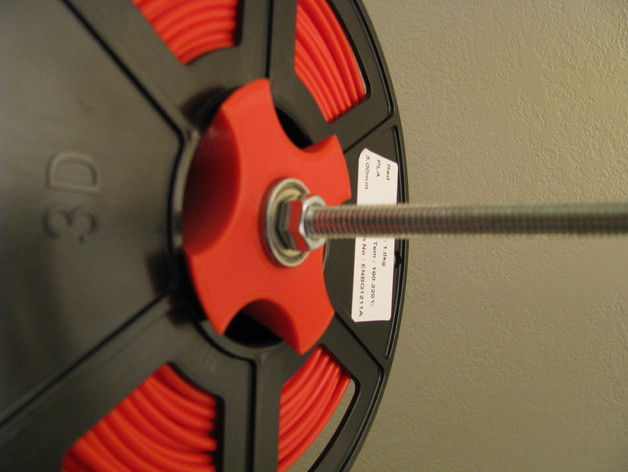
I'm using one of these to hold my spool I'm printing with. It allows the spool to rotate on the threaded rod a little easier. I use a threaded lock nut on the end.

 
To avoid these ads, REGISTER NOW!

Drunkonunleaded

Well-known member
Joined
Apr 14, 2019
Messages
339
Location
Detroit Rock City
Long time 3DP thread lurker, first time 3DP thread poster.

I've had my Ender 3 Pro for a few years now. Occasionally I print small items for projects (battery adapters, brackets, etc.). In that time, I've probably put half of a spool through it. A few brackets I designed on my own, but otherwise I'm just printing files that I've already found. My printer is pretty much stock and has worked well enough out of the ox.

My ONLY complaint is how loud the drivers are. The sound is absolutely annoying. For $40, I can get the quiet board. For $100, it looks like I can buy an entire Ender 3 Pro from Micro Center that includes the board, an updated screen, and a few other tweaks.

Is there any case for one route vs. another? My mind says buy the new printer and sell off the old one for $50-60 and call it a day. Then again, I read about so many problems that people have with their printers and am almost grateful that mine required zero troubleshooting out of the box.
 

moab11

Well-known member
Joined
Nov 22, 2015
Messages
553
Location
Thunder Bay, Ontario
What does everyone recommend for a 3D modelling software for a beginner?
The last time I did any kind of CAD work was in high school 20ish years ago, and looking online there is all kinds, top probably being Fusion 360, but it doesn't seem to be free anymore. I don't mind paying a bit for ease of use or convenience.
 

draco_1967

Well-known member
Joined
Jan 3, 2021
Messages
205
Location
Utah
What does everyone recommend for a 3D modelling software for a beginner?
The last time I did any kind of CAD work was in high school 20ish years ago, and looking online there is all kinds, top probably being Fusion 360, but it doesn't seem to be free anymore. I don't mind paying a bit for ease of use or convenience.
It is still free for hobbyists, but they made it much harder to find: https://www.autodesk.com/products/fusion-360/personal
 

kaymccampbell

Well-known member
Joined
Feb 27, 2015
Messages
29,427
Location
Upstate New York
What does everyone recommend for a 3D modelling software for a beginner?
The last time I did any kind of CAD work was in high school 20ish years ago, and looking online there is all kinds, top probably being Fusion 360, but it doesn't seem to be free anymore. I don't mind paying a bit for ease of use or convenience.
I use FreeCAD. It's free. It works.
 

MadeByMiller

Well-known member
Joined
Dec 29, 2018
Messages
1,230
Location
Rapid City, SD
a bin for a tractor.


but struggling with:

2024-03-15 12.42.46.jpg
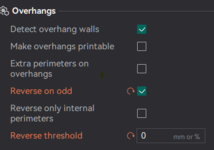
There's a relatively new feature that is in Orcaslicer but I don't know if it's on Bambu Studio yet. It's called Reverse on Odd and it reverses the extrusion direction for every odd numbered perimeter. It's supposed to help reduce stresses in the walls and prevent warping. Worth a shot!

Note: you have to set the Reverse Threshold to 0 or it will only work on overhangs.

1710529346588.png
 

jeepxj

Well-known member
Joined
Mar 2, 2008
Messages
17,831
There's a relatively new feature that is in Orcaslicer but I don't know if it's on Bambu Studio yet. It's called Reverse on Odd and it reverses the extrusion direction for every odd numbered perimeter. It's supposed to help reduce stresses in the walls and prevent warping. Worth a shot!

Note: you have to set the Reverse Threshold to 0 or it will only work on overhangs.

1710529346588.png

well that is something ill check out for sure.
 

moab11

Well-known member
Joined
Nov 22, 2015
Messages
553
Location
Thunder Bay, Ontario
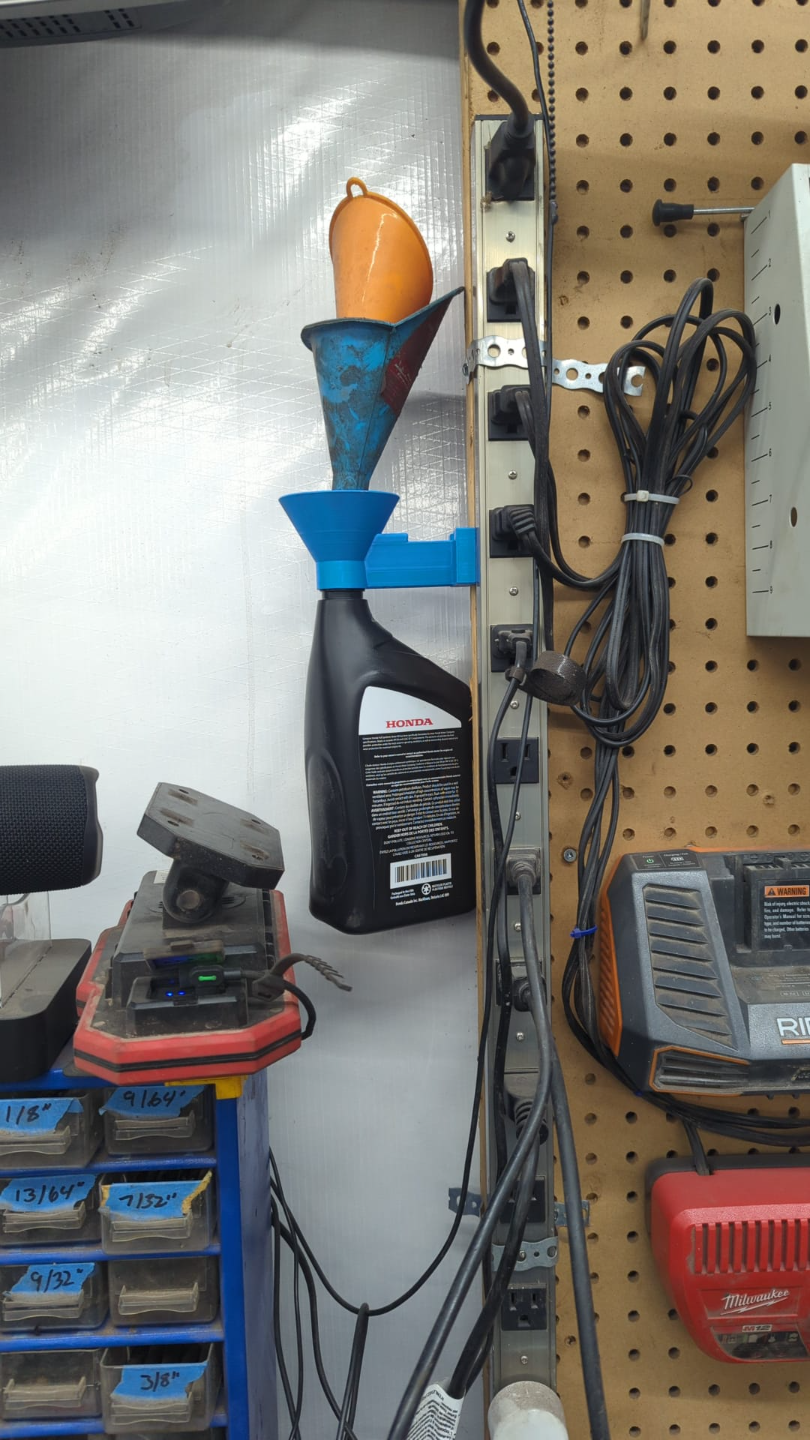
Interesting with the threads on the bottom for a water bottle.
Was this designed for something in particular? Or just a handy way to let funnels drip dry?
 
To avoid these ads, REGISTER NOW!

jeepxj

Well-known member
Joined
Mar 2, 2008
Messages
17,831
Interesting with the threads on the bottom for a water bottle.
Was this designed for something in particular? Or just a handy way to let funnels drip dry?

i modifed to allow for magnets to get screwed on
 

LeonardY

Well-known member
Joined
Apr 16, 2011
Messages
5,024
Location
Southern California
i modifed to allow for magnets to get screwed on
Oh...
I thought you 3d printed a Tractor urinal. :ROFLMAO:
 

LeonardY

Well-known member
Joined
Apr 16, 2011
Messages
5,024
Location
Southern California
What does everyone recommend for a 3D modelling software for a beginner?
The last time I did any kind of CAD work was in high school 20ish years ago, and looking online there is all kinds, top probably being Fusion 360, but it doesn't seem to be free anymore. I don't mind paying a bit for ease of use or convenience.
I use FormZ Pro.

There are several versions of it. Including a free one.


Most people don't have the need for all the abilities of Fusion 360. It's a steep learning curve.
 

Cruzan80

Well-known member
Joined
Jul 22, 2015
Messages
4,167
Location
Denver, CO
Just got in two Bambu X1C printers for School/work. Managed to mostly get one unpacked, then had two snow days.

Any recommendations for Bambu slicer vs Orca? First setup tips/tricks? Broke open the manual to figure out how to actually remove everything. We will be running these via SD, instead of over network (for now at least).
 

Citation

Well-known member
Joined
Jan 20, 2016
Messages
3,210
Location
Indy
Long time 3DP thread lurker, first time 3DP thread poster.

I've had my Ender 3 Pro for a few years now. Occasionally I print small items for projects (battery adapters, brackets, etc.). In that time, I've probably put half of a spool through it. A few brackets I designed on my own, but otherwise I'm just printing files that I've already found. My printer is pretty much stock and has worked well enough out of the ox.

My ONLY complaint is how loud the drivers are. The sound is absolutely annoying. For $40, I can get the quiet board. For $100, it looks like I can buy an entire Ender 3 Pro from Micro Center that includes the board, an updated screen, and a few other tweaks.

Is there any case for one route vs. another? My mind says buy the new printer and sell off the old one for $50-60 and call it a day. Then again, I read about so many problems that people have with their printers and am almost grateful that mine required zero troubleshooting out of the box.
The $100 Ender at Microcenter is the Ender 3 V2. We got one for my father for Christmas. It's a small upgrade over the 3 Pro. I do understand what you mean about the noise. The V2 is very quite in comparison but otherwise the print quality/speed are basically the same as the 3 Pro. Microcenter has a similar deal on the Ender 3 S1 for $150 (again with a coupon you have to find). The S1 is a big step up as it has auto bed leveling, faster print speeds, and a direct drive extruder that is better for both flexible materials and for print jobs that have a lot of start/stops of the extruder. For most people I would say the extra $50 is worth it. However, in your case maybe not. If you are already happy with the old printer in every way other than sound and you don't see trying to expand your usage/capabilities etc, then the V2 is probably better. It's fans are no louder than those on the 3 Pro and are quieter than those on the S1. Both have the very quite motors. So basically the V2 is quieter at the expense of lesser overall capabilities.

If you do think you can get $50-60 for your old printer I would get one of the new ones. I personally would get the S1 but I'm not sure if I would recommend the S1 over the V2 for your needs.
 

GarageHobbyist

Well-known member
Joined
Feb 18, 2024
Messages
361
Location
Illinois
What does everyone recommend for a 3D modelling software for a beginner?
The last time I did any kind of CAD work was in high school 20ish years ago, and looking online there is all kinds, top probably being Fusion 360, but it doesn't seem to be free anymore. I don't mind paying a bit for ease of use or convenience.
I was using Fusion360, but I have really grown to like OnShape.

Since Fusion360 basically requires an internet connection at this point, I figured I might as well get the benefits of something that is fully cloud based and not have to install software at all.
With Onshape I can work on my garage computer, go inside and pull out my laptop and pick up right where I left off. I can also log in at work when I have some down time and work on something.
 

Drunkonunleaded

Well-known member
Joined
Apr 14, 2019
Messages
339
Location
Detroit Rock City
The $100 Ender at Microcenter is the Ender 3 V2. We got one for my father for Christmas. It's a small upgrade over the 3 Pro. I do understand what you mean about the noise. The V2 is very quite in comparison but otherwise the print quality/speed are basically the same as the 3 Pro. Microcenter has a similar deal on the Ender 3 S1 for $150 (again with a coupon you have to find). The S1 is a big step up as it has auto bed leveling, faster print speeds, and a direct drive extruder that is better for both flexible materials and for print jobs that have a lot of start/stops of the extruder. For most people I would say the extra $50 is worth it. However, in your case maybe not. If you are already happy with the old printer in every way other than sound and you don't see trying to expand your usage/capabilities etc, then the V2 is probably better. It's fans are no louder than those on the 3 Pro and are quieter than those on the S1. Both have the very quite motors. So basically the V2 is quieter at the expense of lesser overall capabilities.

If you do think you can get $50-60 for your old printer I would get one of the new ones. I personally would get the S1 but I'm not sure if I would recommend the S1 over the V2 for your needs.

Didn't know that the S1 was on a coupon deal as well. The auto leveling was another thing that I wanted to ad to my Ender 3. This is pretty much a no-brainer now. I appreciate the input.
 

shakenfake

Well-known member
Joined
Apr 16, 2023
Messages
609
Location
Shlumpt, TX
Just purchased something that I would like to scan and then 3D print based off the scan. My question is, how accurate are these scans?

Second question: If I decide to just model it how do I go about modeling screw holes?
 

purplezr2

Well-known member
Joined
Jun 1, 2010
Messages
5,290
Location
Central MN
Just purchased something that I would like to scan and then 3D print based off the scan. My question is, how accurate are these scans?

Second question: If I decide to just model it how do I go about modeling screw holes?
Are you planning to put inserts in the screw holes or are you trying to print threads.
 

Cruzan80

Well-known member
Joined
Jul 22, 2015
Messages
4,167
Location
Denver, CO
To the second question, I would model at minor root diameter. Either you could tap the holes to cut threads into the plastic, or use the threads on the screw itself to cut threads. Or you can model a hex hole, to embed a nut (captive or otherwise). It depends on how big the screw is and how many.

The second issue would be how tight the printer you are using can hold exact tolerances.
 

jmdirk

Well-known member
Joined
May 4, 2015
Messages
695
i modifed to allow for magnets to get screwed on

Cool. The original there was done by a buddy of mine :D

And the main photo on MW is actually from my garage
 
Last edited:

jeepxj

Well-known member
Joined
Mar 2, 2008
Messages
17,831
Cool. The original there was done by a buddy of mine :D

And the main photo on MW is actually from my garage

sweet! really good design minus it not liking the costco water bottles. gona remix it to be happier with those.
 

purplezr2

Well-known member
Joined
Jun 1, 2010
Messages
5,290
Location
Central MN
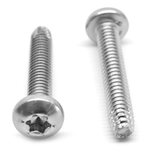
for my screw holes I use a type F screw.

1711121126998.png


for 8-32 screws I use a 3.6mm hole size. threads in really good. i did a test print with holes from 3.0 to 5.0 in .1 steps to arrive at 3.6


Do you increase your wall thickness in that area.

Is there such a thing as variable wall thickness with bambu?
 
To avoid these ads, REGISTER NOW!
Top Bottom