moab11
Well-known member
What dryer did you get @XJSuperman ?
I've been quite happy with my Sunlu S2 and S4
I've been quite happy with my Sunlu S2 and S4

The new S2 is what I went with. We'll see how it goes.What dryer did you get @XJSuperman ?
I've been quite happy with my Sunlu S2 and S4
No, my initial layer is good. No issues with plate adhesionPost some photos if you have any please. Is the part warping off the build plate during the print?
It works quite well, there is a spacer that you can print to keep the lid open a little to let the moisture out also.The new S2 is what I went with. We'll see how it goes.


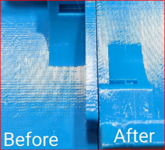

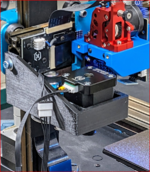


no not big parts. lol. i'd be brokeTypical .2 layer height profile and stock .4 nozzle
What about big parts? Solid infill? That's crazy.
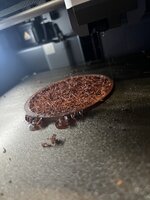
Just slower on sparse infil.Dryer showed 30%RH this morning after running several hours. I reset and its running all day today. Once home I'll try another default print and then move to slower speeds if needed.
I would let the filament dry no less than 24 hours straight at 65C. It will be fine to run unmonitored. The default setting should work just fine, but always change to gyroid infill pattern instead of grid (although I agree this is a 100% infill part). Speeds shouldn't be an issue for the default Bambu PETG filament profile, but you can try setting it to Generic PETG which will slow down all the speeds. I know there's some naysayers when it comes to drying, but I'd be shocked if it's not the root of all of your problems here.Well here's a fresh example:
Mini clip: a sunglasses holder that goes on your car visor. I stopped it after a few minutes and could see what was happening.
Bambu petg basic black. Bambu default process and filament settings.
It has been in the dryer for a few hours at a time, RH read 38% when I pulled it out to try it. I think I will try and start it tomorrow morning before work and see how it looks when I get home. I just didn't want to leave it run while I was gone all day. The filament had not really gotten below 38 in any of the drying runs so I figured that was about as good as it gets.
Stringy, breaking and balling up.
Well that's half the issue with the dryer so far then. Its set to 51C right now. What no one has mentioned is what the RH% should read when its "dry".I would let the filament dry no less than 24 hours straight at 65C. It will be fine to run unmonitored. The default setting should work just fine, but always change to gyroid infill pattern instead of grid (although I agree this is a 100% infill part). Speeds shouldn't be an issue for the default Bambu PETG filament profile, but you can try setting it to Generic PETG which will slow down all the speeds. I know there's some naysayers when it comes to drying, but I'd be shocked if it's not the root of all of your problems here.
I don't base my drying off humidity percentages, just time, but I currently have two spools of PETG drying in my Sunlu S4 and the screen is reading 15% RH. The dryer has been running for about 18 hours so far. The filament was brand new, I pulled them out of the vacuum sealed bags just before I stuck them in the dryer.Well that's half the issue with the dryer so far then. Its set to 51C right now. What no one has mentioned is what the RH% should read when its "dry".
I've read about the gyroid pattern and was attempting to use it early on, but quit worrying about it with all the other changes in the previous tests. Just have to get through the workday to try the next steps.
Speaking of infill patterns....has anyone tried the new CrossHatch method yet? Studio just got a huge update the other day and that was included.
I would let the filament dry no less than 24 hours straight at 65C. It will be fine to run unmonitored. The default setting should work just fine, but always change to gyroid infill pattern instead of grid (although I agree this is a 100% infill part). Speeds shouldn't be an issue for the default Bambu PETG filament profile, but you can try setting it to Generic PETG which will slow down all the speeds. I know there's some naysayers when it comes to drying, but I'd be shocked if it's not the root of all of your problems here.
I disagree that it's only infill, it looks like the walls are pretty trash too.explain why its just infil and not the whole print if its not dry enough?
I disagree that it's only infill, it looks like the walls are pretty trash too.
Looks like pretty bad oozing/stringing too which are trademark signs of wet filament.
The remarks above are in regards to @XJSuperman 's print. As far as your photos, I would attribute most of that to grid infill. Grid infill especially ***** with PETG because it's so prone to sticking to itself and the nozzle while printing.
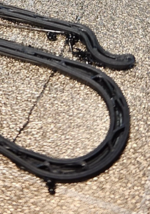
That appears to be the nicest segment of either part. There's bad wall adhesion everywhere, including in the upper part of that photo crop.wouldn't wet have string on the inside of the arc here?
That appears to be the nicest segment of either part. There's bad wall adhesion everywhere, including in the upper part of that photo crop.

Glad to see you had success! Reach out any time if you have another printing issue. I wouldn't put any blame on Bambu for having wet filament. PETG can and will absorb moisture during the manufacturing process. Filament is actually cooled with a water bath post extrusion, so it's extremely common to have wet filament straight out of the vacuum sealed bag. I exclusively use Atomic PETG filament, as it's high quality, US made and they have a broad range of colors. As I mentioned before, I always dry before printing.The update you are all ready to be done with! I was able to print the aforementioned Mini clips successfully! They look really good to me actually. So I am trying the bigger more important print that started this mess now. Already had one failure right away so I slowed some things down a bit more and we are about to find out how that goes.
Drying 8hrs while I was at work at 51C, then 2 more hours at 65C. That got me down to ~20%RH from what was at one point (not this morning) 45%RH. I think I may move to another brand of PETG after I use the last of this stuff. Unfortunately it was Bambu from Bambu. Ordered with the printer originally.
Yes of course.Are you letting the build plate cool fully after printing?
I find my parts basically fall right off if I let the plate cool to room temp.
Tbf, PLA doesn't do this. Just PETG. And it has since the first test prints a couple weeks ago. That first layer or two is really stuck good. I probably just need to drop the bed temp a hair, but wanted to hear other's thoughts.Figured as much, but always have to check. It's odd that you are having so much adhesion now. Maybe @jeepxj has some pointers then.
Lets see a photo of the overhangs. Anything over 50* is going to struggle. You can try adjusting cooling settings, but it's tricky.The large print made it as well.
Two problems:
-The overhang layers are a little rough. Need to look into that.
-petg sticks a little too well to the pei textured bed plate. Ready had to dig to scrape it clean. Popping the part off the plate may be damaging on other parts.
i run 70c first layer. 82 to 86 for bed temps.
you cleaning the plate good? dove soap. warm to hot water. paper towel scrub.
I'll have to check the settings at home later and get pics, but my temps should be very close to defaults. Maybe bumped up a few degrees. No, I am not cleaning the plate much. I keep it wiped and scraped free of debris but I haven't been wiping it down or washing it because I wasn't having problems getting things to stick. And I'd think that a dirty plate would make things stick less, so this PETG sticking so well is interesting.Lets see a photo of the overhangs. Anything over 50* is going to struggle. You can try adjusting cooling settings, but it's tricky.
Weird that it's sticking so hard. I've had that problem with PETG-CF before, but never standard PETG. It always pops right off. You can always wipe down the build plate with window cleaner prior to printing, but this shouldn't be necessary.


Drop the bed temp down to 70C for all layers, that should solve the over adhesion issue. The overhangs actually look good for what they are. It's a bad idea to add fillets to your parts in the Z axis like that, instead you should be using a chamfer there. A chamfer is a constant, linear stepover, while a fillet radius in that orientation is starting off at a very long stepover (sometimes more than one extrusion width) and narrowing up as it goes up the radius.Home and the values are:
Nozzle temp: 260C for all
Bed temp: 80C for all
Pics of what I am calling overhangs (maybe theres a better term?)
The first pic is the overall part in its normal orientation. I laid it on its back you can see the difference in layers for the fileted edge between bottom and outer walls. Also note the bad spot on the bottom. It seemed to recover so I kept the print going. (I'm calling it moisture as well since I could have dried it a little hotter longer)
Also, I need to step back and quit having little issues, I feel like I'm hijacking this thread for the rest of the good folks here with info and models to share.
FYI, the crosshatch pattern was quieter and seemed to work well.

Sounds good, thanks for the help, EVERYONE, honestly. Yeah, I agree the chamfer would have been better, and honestly not necessary at all, but this wasn't my part file, and it is not for me. A friend wants it to put his spices in on his smoker. That's the file he sent, albeit with some serious re-scaling to get within sizing constraints. I should have just whipped my own up and been done with it, but that's what he wanted. We know what to change next time to simplify the process.Drop the bed temp down to 70C for all layers, that should solve the over adhesion issue. The overhangs actually look good for what they are. It's a bad idea to add fillets to your parts in the Z axis like that, instead you should be using a chamfer there.