To avoid these ads, REGISTER NOW!

The Everything 3D Printer Thread

To avoid these ads, REGISTER NOW!

XJSuperman

Well-known member
Joined
Jan 26, 2018
Messages
3,086
Location
Central Iowa
Well I found my issue @loganb. AMS managed to get a strand of filament lodged the infill length of the infeed tube on one slot. Perfect length to not reach a feeder and jam the rest. Pushed it out with more filament after releasing tension. This is the first mechanical issue I've had with this p1s setup since February.
20240903_183638.jpg
 

loganb

ALLIANCE MEMBER
Joined
Dec 29, 2011
Messages
5,500
Location
Omaha, NE
When you get 2 printers running at the same time... off course you don't make anything immediately useful

20240903_210345.jpg

20240903_210341.jpg

You work on printing articulated animals in white to put in a box that says "open in case of kids emergency" OK not that bad, but they're to distract the kids by giving them something fun to paint

Models are Giraffe and whale shark from Makerworld
 

sh944

ALLIANCE MEMBER
Joined
Jan 1, 2014
Messages
291
Location
Linwood, KS
Which amp are you using? That looks like it would solve a problem for me that I deal with daily.

Nevermind, I’m an idiot today. I *could* try reading those things on the front of it called “letters” and see if I get a clue from them.

its been a long week…
 
Last edited:

loganb

ALLIANCE MEMBER
Joined
Dec 29, 2011
Messages
5,500
Location
Omaha, NE
it also didn't work for me, gives me some tradetracker.com error. But I was able to find it.... tempted to give it a try... it's cheap enough it's hard to go too wrong and if it prints like **** ya throw it out
 

jeepxj

Well-known member
Joined
Mar 2, 2008
Messages
17,831
it also didn't work for me, gives me some tradetracker.com error. But I was able to find it.... tempted to give it a try... it's cheap enough it's hard to go too wrong and if it prints like **** ya throw it out

i got $300 worth on the way so...


but im like 80% sure i know the factory its coming from.
 

loganb

ALLIANCE MEMBER
Joined
Dec 29, 2011
Messages
5,500
Location
Omaha, NE
insanely cheap pla/abs/petg 10kg packs. -$45 currently. takes about 2 weeks to arrive.


i got $300 worth on the way so...


but im like 80% sure i know the factory its coming from.

The colors and spool images are very similar to iiidmax, I've had good success with their PLA but don't like their PETG even when dried....for half the price a kilo I'm in for 20 spools of the PLA to see what I think.
 

loganb

ALLIANCE MEMBER
Joined
Dec 29, 2011
Messages
5,500
Location
Omaha, NE
The colors and spool images are very similar to iiidmax, I've had good success with their PLA but don't like their PETG even when dried....for half the price a kilo I'm in for 20 spools of the PLA to see what I think.

This should be interesting...got a tracking number for FedEx on my order....FedEx is saying they have it, it's in Georgia, package weight is 7kg (order is 20 spools at 1kg each) and it's going to Michigan...not Nebraska. Suspecting they may be "reusing" FedEx tracking numbers to get items into shipped status earlier assumingly so it releases money....but will give it a week or two and see what happens.
 

jeepxj

Well-known member
Joined
Mar 2, 2008
Messages
17,831
This should be interesting...got a tracking number for FedEx on my order....FedEx is saying they have it, it's in Georgia, package weight is 7kg (order is 20 spools at 1kg each) and it's going to Michigan...not Nebraska. Suspecting they may be "reusing" FedEx tracking numbers to get items into shipped status earlier assumingly so it releases money....but will give it a week or two and see what happens.

you got full refund from ali if its not what they said. aliexpress been good to me so far.
 

jeepxj

Well-known member
Joined
Mar 2, 2008
Messages
17,831
trying to work out a modular oil filter/funnel catchment system for the inside of a service truck door.
1725910035765.png

sloped to the backside. drain holes 1/4" NPT to 3/8" hose. ribs to keep filter off the bottom when priming in there.
1725910128960.png
 
To avoid these ads, REGISTER NOW!

jeepxj

Well-known member
Joined
Mar 2, 2008
Messages
17,831
not looking good on that aliexpress cheapo link. mine says delivered in cali. but thats usually where the stuff gets broken apart to another carrier for US shipping.

i've had to claim before on aliexpress. heres how if it goes that route:


bottom of the page - click on 24 * 7 help. tell them you didnt get your order and you want a refund. they submit everything for ya and get a refund coming in a couple days.
 

JackOfDiamonds

Well-known member
Joined
Jul 31, 2020
Messages
706
Location
Idaho (USA)
First time printing TPU.

--will destroy PEI. Use glue stick on a surface you don't mind destroying
--needs filament drying. Mine was bubbly right out of the shrink wrap
--can't push it. I switched to a 0.6 nozzle to keep pressure low and kept flow to 3mm^3/sec.
--counterintuitively can't use high retraction. I reduced my retraction and retraction speed.
--zero fan

I'm pretty happy to be able to print squishy things.
 

Attachments

  • PXL_20240916_035105819.PORTRAIT~2.jpg
    PXL_20240916_035105819.PORTRAIT~2.jpg
    503.6 KB · Views: 65
Last edited:

Jehannum

Well-known member
Joined
May 3, 2012
Messages
1,348
Location
Albuquerque, NM
First time printing TPU.

--will destroy PEI. Use glue stick on a surface you don't mind destroying
--needs filament drying. Mine was bubbly right out of the shrink wrap
--can't push it. I switched to a 0.6 nozzle to keep pressure low and kept flow to 3mm^3/sec.
--counterintuitively can't use high retraction. I reduced my retraction and retraction speed.

I'm pretty happy to be able to print squishy things.
I've found it works better with a direct-drive extruder. I swapped a bondtech extruder onto the e3d v6 hot end on my CR-10 some time ago for that reason. It does fine with TPU at 50mm/s speeds (dunno what 3mm^3/sec means, I use Cura as a slicer, and it takes linear speeds when slicing).
 

JackOfDiamonds

Well-known member
Joined
Jul 31, 2020
Messages
706
Location
Idaho (USA)
I've found it works better with a direct-drive extruder. I swapped a bondtech extruder onto the e3d v6 hot end on my CR-10 some time ago for that reason. It does fine with TPU at 50mm/s speeds (dunno what 3mm^3/sec means, I use Cura as a slicer, and it takes linear speeds when slicing).

50mm/s means nothing in terms of plastic flow rate. It could be very high in the case of a big line, or very low in the case of small line. What matters for nozzle pressure and melt-rate is the volumetric flow. That's how hard the extruder has to push on the plastic and how fast the plastic has to melt. Since TPU is squishy, you can't push it hard.

I found multiple sources online that said 3mm^3/sec is a typical flow rate for TPU and that worked for me. It definitely didn't work at all at my normal flow rates.

A standard hotend will melt at most 10mm^3/sec well. A "high flow" hotend will melt 20 or so. I push my Volcano up to 25mm^2 when printing with a 0.8 nozzle but I also increase the temperature to partly compensate.

Cura doesn't let you set your speeds by volumetric flow, because Cura ***** and things like that are one of the reasons I'm thinking about switching slicers. The only flow control Cura gives you is to go into preview mode and switch the coloring to "flow", and then match up the colors. You have to manually re-slice and re-check the flow rate. Flow and the ability to cap max flow is critical when printing fast or printing big parts.
 

Jehannum

Well-known member
Joined
May 3, 2012
Messages
1,348
Location
Albuquerque, NM
50mm/s means nothing in terms of plastic flow rate. It could be very high in the case of a big line, or very low in the case of small line. What matters for nozzle pressure and melt-rate is the volumetric flow. That's how hard the extruder has to push on the plastic and how fast the plastic has to melt. Since TPU is squishy, you can't push it hard.

I found multiple sources online that said 3mm^3/sec is a typical flow rate for TPU and that worked for me. It definitely didn't work at all at my normal flow rates.

A standard hotend will melt at most 10mm^3/sec well. A "high flow" hotend will melt 20 or so. I push my Volcano up to 25mm^2 when printing with a 0.8 nozzle but I also increase the temperature to partly compensate.

Cura doesn't let you set your speeds by volumetric flow, because Cura ***** and things like that are one of the reasons I'm thinking about switching slicers. The only flow control Cura gives you is to go into preview mode and switch the coloring to "flow", and then match up the colors. You have to manually re-slice and re-check the flow rate. Flow and the ability to cap max flow is critical when printing fast or printing big parts.
Since like 95% of the consumer space printers use 1.75mm filament, 50mm/s does mean something. In your numbers, 50mm/s on 1.75mm filament, works out to 120 cubic millimeters/second.

Lots of newer printers are running upwards of 400mm/s on PLA filaments, which works out to 960 cubic millimeters/s.

So yes, Cura does let you set volumetric flow, based on the diameter of the filament you select. It's all just conversions dude, nothing about it "*****" inherently, it just means we weren't using the same language. Sorry I haven't gone out to buy a Bambu-mobile to hop on the bandwagon, yeesh.
 

JackOfDiamonds

Well-known member
Joined
Jul 31, 2020
Messages
706
Location
Idaho (USA)
You are confusing parameters. Neither Cura nor any other slicer allows you to set the filament feed rate as an independent parameter. Filament feed rate is calculated by the slicer based on a myriad of other parameters and is an outcome of the process. Slicers and printers don't even display the filament feed rate usually. And furthermore, a filament feed rate of 50mm/s wouldn't be physically possible on any printer. That would be a volumetric flow rate of over 120mm^3s which no hotend can achieve because fundamental limits of the plastic thermal conductivity and even if you could, you couldn't cool it back down fast enough to make a real print.

 

draco_1967

Well-known member
Joined
Jan 3, 2021
Messages
205
Location
Utah
50mm/s is the speed the nozzle can travel; it has nothing to do with the filament flowing through the nozzle, other than you can't move the nozzle faster than the plastic can flow effectively through it.
 

Jehannum

Well-known member
Joined
May 3, 2012
Messages
1,348
Location
Albuquerque, NM
You are confusing parameters. Neither Cura nor any other slicer allows you to set the filament feed rate as an independent parameter. Filament feed rate is calculated by the slicer based on a myriad of other parameters and is an outcome of the process. Slicers and printers don't even display the filament feed rate usually. And furthermore, a filament feed rate of 50mm/s wouldn't be physically possible on any printer. That would be a volumetric flow rate of over 120mm^3s which no hotend can achieve because fundamental limits of the plastic thermal conductivity and even if you could, you couldn't cool it back down fast enough to make a real print.
So what you're saying is that you've given a measure that nobody uses in designing or slicing, but we all **** for using the thing that we can adjust. Not super helpful.
 

loganb

ALLIANCE MEMBER
Joined
Dec 29, 2011
Messages
5,500
Location
Omaha, NE
Can you look at your top layer in the preview window, does it start on the right side?
I'm curious if it's from an incomplete purge

This would be my first step. Do you have the purge tower on or are you purging into the infill? You can adjust the purge volume and when going from black to white may need to bump that up in order to prevent this (if that's what it is)
 

TracerRound

Active member
Joined
Jun 24, 2019
Messages
43
Location
North Carolina
Can you look at your top layer in the preview window, does it start on the right side?
I'm curious if it's from an incomplete purge
Currently travel is showing it leaving the print tower and going to the left side but the item isn't in the same location as it was when I printed it yesterday so your though could be correct.
 

TracerRound

Active member
Joined
Jun 24, 2019
Messages
43
Location
North Carolina
This would be my first step. Do you have the purge tower on or are you purging into the infill? You can adjust the purge volume and when going from black to white may need to bump that up in order to prevent this (if that's what it is)
Tower is on, not flushing into objects infill.

I am going to print it again and adjust the purge volume if needed.

Thank you both!
 

Jehannum

Well-known member
Joined
May 3, 2012
Messages
1,348
Location
Albuquerque, NM
Yummy!

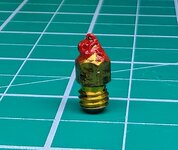
?: Is it worth upgrading to a better nozzle? These brass cheapies seem to **** out too soon.

NOZZLE - YUMMY.jpg
You can buy a lot of brass nozzles for the cost of a nice one.

I don't like tool steel, because it seems to knock out about 15% of your speed to get the same quality as brass, and you can buy hundreds of brass nozzles for the cost of a tungsten carbide nozzle that allows the same speeds.

If your goal is a printer that "just works" when you want it to, by all means, upgrade. If your goal is lower price per print, stick with brass.
 

JackOfDiamonds

Well-known member
Joined
Jul 31, 2020
Messages
706
Location
Idaho (USA)
Yummy!

?: Is it worth upgrading to a better nozzle? These brass cheapies seem to **** out too soon.

NOZZLE - YUMMY.jpg
What "craps out" about them?

I'm in the cheap brass nozzles camp. I change them any time I change filament types instead of trying to flush all the old filament out. I used to put them in a little baggy labeled "PETG" or whatever so I could switch back to them, but for $0.50 each, I just toss them as a consumable now. People say they wear out, but I've never had it happen....besides if my 0.4mm nozzle became 0.5mm, I probably would never notice because I always print lines 120-200% of the nominal nozzle width anyway, so accuracy of the hole is practically irrelevant.
 

Jeff

Well-known member
Joined
Dec 10, 2009
Messages
2,706
Location
Sonova Beach
What "craps out" about them?

I'm in the cheap brass nozzles camp. I change them any time I change filament types instead of trying to flush all the old filament out. I used to put them in a little baggy labeled "PETG" or whatever so I could switch back to them, but for $0.50 each, I just toss them as a consumable now. People say they wear out, but I've never had it happen....besides if my 0.4mm nozzle became 0.5mm, I probably would never notice because I always print lines 120-200% of the nominal nozzle width anyway, so accuracy of the hole is practically irrelevant.
Just frustrated I guess. I've only been at this a couple of months as a hobby and I print a boatload due to retirement. I print PLA and PLA metallics & silk. After a nozzle swap, cleaning, and re-level all is well. I'm working on Xmas stuff for the grands.

TIC TAC B&P.jpg
 

JackOfDiamonds

Well-known member
Joined
Jul 31, 2020
Messages
706
Location
Idaho (USA)
Just frustrated I guess. I've only been at this a couple of months as a hobby and I print a boatload due to retirement. I print PLA and PLA metallics & silk. After a nozzle swap, cleaning, and re-level all is well. I'm working on Xmas stuff for the grands.

TIC TAC B&P.jpg
I've also had mysterious print problems that went away by changing the nozzle. Like stringing or blobbing that shouldn't happen, change nozzle and it's inexplicably better. All the more reason not to spend $30 on some fancy nozzle IMO.
 
To avoid these ads, REGISTER NOW!
Top Bottom