To avoid these ads, REGISTER NOW!

The Everything 3D Printer Thread

To avoid these ads, REGISTER NOW!

Firebrick43

Well-known member
Joined
May 12, 2015
Messages
13,971
Location
West central Indiana
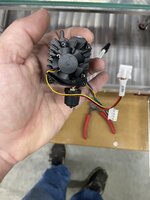
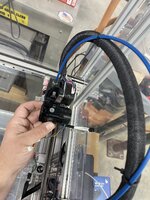
Just received my smart orbiter v3 this morning.

This integrated nema 14 motor/planetary driven dual gear extruder/and integrated hot end is insanely small and light in comparison to other that have previously been on the market

I am eventually going to convert it to water cooled as it will be quite easy to mill the fins off and put water cooled plates on the face plate and back of the nema 14, but for now I will get it running as is

IMG_1075.jpeg
IMG_1076.jpeg
IMG_1077.jpeg

The “smart” part is it has sensors for the filament and a button to actuate a macro for loading filament plus LEDs that light up and show status. To be honest with my enclosure I doubt I will waste the wire as usually I shove filament up the tube and operate the extruder to feed new filament in via the duet touch panel
 

Firebrick43

Well-known member
Joined
May 12, 2015
Messages
13,971
Location
West central Indiana
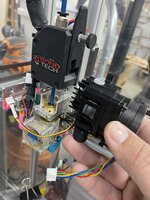
Here it is next to my Bondtech BMG/Nema 17 and ED3 V6 hot end on my Railcore II

IMG_1078.jpeg
IMG_1079.jpeg
So the lighter weight should allow me to print even faster before resonance starts causing issues with print quality. But I really want a heated chamber to keep warping to a minimum on large ABS and ASA prints.

Ironically the thing that most excites me, the ceramic heater sock is so much better designed that the ED3 V6 heater block and sock. I hate the v6 sock.

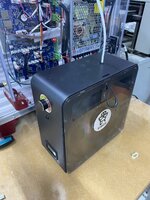
IMG_1080.jpeg

I have also been running this Eibos filament dryer for the last 2 weeks. Of all the single roll dryers I have had or friends have, this so far has been the best. It’s simple with just a temp knob and an on/off rocker. It feeds well, and the air flow around the spool is excellent compared to most including my esun dryer it replaced. The door latch is interesting and works but the door bottom is a little fiddly to get in place.

The biggest negative is you have to pop the door slightly to see how much filament you have left. I wish the would have put a little window the top?
 

Firebrick43

Well-known member
Joined
May 12, 2015
Messages
13,971
Location
West central Indiana
Thanks for the response. I don't think the filament is wet, it's been inside my loft in a wood burning house, it's dry enough to cause nosebleeds. The last print was almost the same model with same filament and came out good. I've let it run for now, we'll see tonight.
If it’s PETG it needs dried
 

Firebrick43

Well-known member
Joined
May 12, 2015
Messages
13,971
Location
West central Indiana
Yeah you're right, some of my old PLA filaments either don't extrude correctly and I found are brittle so need to be dried out. Prints perfect with new filament.
Might be a good use for the heating element out of the "heated bird watering bowl" I found at the dump.
My basement is dehumidified and runs in the 40 percent range. For the first few years I printed I would dry in the oven if it had been out for a long time but I usually printed right out of the bag. Until I bought my first filament dryer I didn't realize how active drying while printing made a huge difference. So many problems disappeared especially with PETG. Even a few hours in the oven isn't really great for large prints as lower layers on the spool don't get as dry as the upper layers due to lack of surface area/air flow during drying.

Even though I have made dry boxes with desiccant that can be spooled out of during printing, I still put all filament in the dryer as its printing.
 

lovetap

Well-known member
Joined
Sep 23, 2021
Messages
248
Location
the last frontier
I have started to reach the limit of the small build plate on my Prusa Mini. I've been very happy with the Mini and would prefer to stay in the Prusa environment but could be swayed. Keeping everything local (non-cloud based) is important, and compatible with OctoPrint is a plus.

Anyone have experience with the new Prusa CORE?
 

ER70S-2

Well-known member
Joined
Jan 2, 2015
Messages
796
I have started to reach the limit of the small build plate on my Prusa Mini. I've been very happy with the Mini and would prefer to stay in the Prusa environment but could be swayed. Keeping everything local (non-cloud based) is important, and compatible with OctoPrint is a plus.

Anyone have experience with the new Prusa CORE?
No direct experience, but I think it's going to be my next printer. My MK3S+ is a beast and has been 100% reliable, but I would like faster prints at times. Slightly better quality is the icing on the cake. I can upgrade my MK3S+ to a 3.5 which will give me the faster prints, but then I'm going to lose out on all of the other pluses of the Core One and its future upgrades. I think a Core One makes a lot more sense than a Bambu imo. The support, parts availability, open source, and COO all mean so much more to me than saving a couple hundred bucks.
::ducks for cover::
 

Firebrick43

Well-known member
Joined
May 12, 2015
Messages
13,971
Location
West central Indiana
No direct experience, but I think it's going to be my next printer. My MK3S+ is a beast and has been 100% reliable, but I would like faster prints at times. Slightly better quality is the icing on the cake. I can upgrade my MK3S+ to a 3.5 which will give me the faster prints, but then I'm going to lose out on all of the other pluses of the Core One and its future upgrades. I think a Core One makes a lot more sense than a Bambu imo. The support, parts availability, open source, and COO all mean so much more to me than saving a couple hundred bucks.
::ducks for cover::
and not having to upload your prints to china
 

Citation

Well-known member
Joined
Jan 20, 2016
Messages
3,209
Location
Indy
My brother got bit by the bug after playing with an Ender 3 V3SE (my old printer). He wants to do some parts with the engineering grade plastics. He looked at the Core One but passed in part because the build volume was small for his needs but also because the hot end was limited to 290C and some of the materials he was looking at needed 300. I think like others he felt Prusa was the company he would most prefer to give his money to but they didn't do what he needed. The Bambu printers were again small for some of what he had in mind. He ordered a Creality K2 (not sure if he got the material changer or not). Note that with basically all of these printers you can run them off line. However, I'm not sure which let you run in LAN mode without calling home. Creality does (we have two K1 Maxes at work and they are on an isolated network). I think Prusa does as well. I'm unsure about BL but they might though my understanding is you lose some features when you do so.
 

jeepxj

Well-known member
Joined
Mar 2, 2008
Messages
17,829
Are they much cheaper than the 1 and 5kg spools? It seems like they should be, but also have to be a pain to move around in bulk.

its a time thing for us. we're pushing about a kg a day per p1s on avg. 5kgs last 4/5 days and change. these will last over a week between changes.

cost wise my per KG cost is the same if i go 1kg to 10kg so long as i do a thousand kg per order.

this was the last order we did to give a sense of wholesale cost.
1740667483652.png
 
To avoid these ads, REGISTER NOW!

Jehannum

Well-known member
Joined
May 3, 2012
Messages
1,347
Location
Albuquerque, NM
Took my son to see Micro Center when we went up to Denver last week for a concert (because I wanted to show him what computer stores were like in the '90s), and I got a serious Jones for a heated build-volume printer, so I ordered a Creality K2 plus with the CFS.

We'll see how that all shakes out, as I'm not one of those "leave it alone and stay within the ecosystem" sort of fellas.

If it works well, I may have to retire the **** of Theseus CR-10.
 
Last edited:

ed_

Well-known member
Joined
Nov 5, 2019
Messages
183
Location
Maine
Made a little lock delete for my HF tool carts. It works on the 4 drawer or 5 drawer cart and pops right into place.

I initially designed it for my 4 drawer cart since I deleted the lid on it but decided to see if it'd fit my 5 drawer carts too since I had already deleted the locks on those awhile ago
IMG_20250303_213126_159.LARGE.jpeg

4 drawer:
IMG_20250303_205427_712.LARGE.jpeg

5 drawer:
IMG_20250303_213326_848.LARGE.jpeg
 

gtae07

Well-known member
Joined
Mar 6, 2015
Messages
2,962
Location
Fayetteville, GA
Finally opened and set up the K1C I bought during the snowpocalypse in January. Still getting used to the slicer software (haven't figured out how to get Cura working with it, but the Creality package seems pretty powerful too) but once I loaded the filament correctly I made a couple accessories for the wife's new-to-her car.

Damn this thing's fast! Easily 3-4x the speed of my old Ender 3.

I think I'm going to pick up some ASA filament for outdoor use prints, and then maybe try to make a cupholder for the airplane.

Then I'll probably start down the pat of mods and tweaks for the printer itself, assuming I get time for such shenanigans...
 

KFBR392

Well-known member
Joined
Feb 4, 2025
Messages
142
Photograph it, import the image into your modeling program of choice, trace it in a sketch, scale it to proper size.
How do you account for parallax and focal length warping? This method seems like it would not be accurate enough for a lot of applications and would need a lot of prototyping and tweaking on the back end to get it right, but I could be wrong.
 

LeonardY

Well-known member
Joined
Apr 16, 2011
Messages
5,020
Location
Southern California
How do you account for parallax and focal length warping? This method seems like it would not be accurate enough for a lot of applications and would need a lot of prototyping and tweaking on the back end to get it right, but I could be wrong.
Programs such as Photoshop can take the warp out if you input the lens that was used.
If you are using digital SLR use a longer focal length.
I use the portrait setting on my phone which is essentially a longer focal length.

You might need to still do some tweaking of you model after your first print. I usually print partial models to check fit before I print the entire thing.
 

Yankeefarmer

Well-known member
Joined
Jul 25, 2011
Messages
1,169
Location
Connecticut
How do you account for parallax and focal length warping? This method seems like it would not be accurate enough for a lot of applications and would need a lot of prototyping and tweaking on the back end to get it right, but I could be wrong.
You may have an application where it is not sufficiently accurate. During my working career, one of the groups I started up and managed did reverse engineering of machine parts. Even though we used a Coordinate Measuring Machine, we still had to do prototyping, tweaking, and logical thinking to establish workable tolerances.
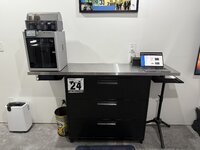
Nowadays, I’m pretty much just looking to produce things like Gridfinity holders for tools I’ve got, so shapes that are generously oversized are my main goal. I also save on filament costs by printing a 2d drawing of my model at full scale on a laser printer, then comparing the print to the part and tweaking dimensions if necessary before 3d printing.
 

KFBR392

Well-known member
Joined
Feb 4, 2025
Messages
142
Programs such as Photoshop can take the warp out if you input the lens that was used.
If you are using digital SLR use a longer focal length.
I use the portrait setting on my phone which is essentially a longer focal length.

You might need to still do some tweaking of you model after your first print. I usually print partial models to check fit before I print the entire thing.
You may have an application where it is not sufficiently accurate. During my working career, one of the groups I started up and managed did reverse engineering of machine parts. Even though we used a Coordinate Measuring Machine, we still had to do prototyping, tweaking, and logical thinking to establish workable tolerances.
Nowadays, I’m pretty much just looking to produce things like Gridfinity holders for tools I’ve got, so shapes that are generously oversized are my main goal. I also save on filament costs by printing a 2d drawing of my model at full scale on a laser printer, then comparing the print to the part and tweaking dimensions if necessary before 3d printing.
Thank you for the thorough responses--also, the laser printer 2D prototype method is a crazy good idea. Never thought to do something like that.
 

niget2002

Well-known member
Joined
Oct 2, 2012
Messages
11,112
Location
Josephine, TX
I've been looking at the Qidi Plus4 printers lately. I may start saving up for one.

Over the weekend I finally got the filament sensor working on the older printer running Klipper. The larger CoreXY printer had one of the belts come loose and I haven't bothered to get in there and fix it yet.

I like the build size and speed of the larger home-built core XY printer, but it seems to always have little small issues. Most of them are related to something I've done. I'm sure I'd work it out eventually, but the idea of just buying a decent capable printer is starting to eek into my brain.

I do have all new electronics for the coreXY machine to convert it over to Klipper and possibly use CANBUS to the print head. I need to decide if I'm wanting to spend that much time on this machine still.
 

KFBR392

Well-known member
Joined
Feb 4, 2025
Messages
142
You can also trace something on a piece of paper and draw a line of a set length. Scan that in to your PC and use that to start your design from. We use that method frequently to program funky shaped parts to be cut out on the laser. Generally the scans are 1:1.
Another awesome idea. I never thought to simplify it like that.
 
To avoid these ads, REGISTER NOW!
Top Bottom